ARTICLE · 983113
Abaqus插件:part网格信息汇总
Abaqus插件:part网格信息汇总Abaqus版本为2026,插件功能为显示Model中的part名称、是否划分网格、显示单元数量以及单元类型。 插件显示界面如下图所示。 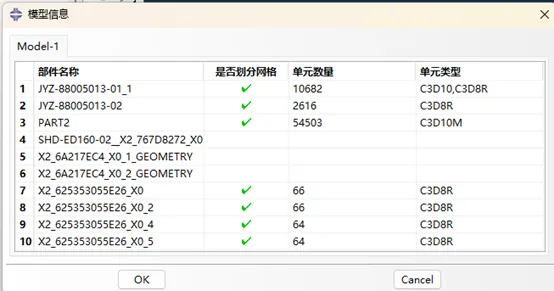
插件的具体功能包括: 插件代码如下所示。 plugin文件: DB文件: 这个插件比较简单,最花时间的是查找abaqus中得到part网格信息的方法,可以在帮助文件中进行查找。 需要注意的点包括:
“分享一个Abaqus插件,简单介绍Abaqus插件开发流程,记录插件开发关键代码。”
01Part网格信息汇总插件
在第一列显示当前视口模型的所有part名称; 在第二列显示对应part是否已经划分网格,若已划分网格,显示为绿色对勾; 若已划分网格,则在第三列显示对应part中包含的单元数量; 若已划分网格,在第四列显示对应part中包含的单元类型。
from abaqusGui import *from abaqusConstants import ALLimport osutils, osimport importlib############################################################################ Class definition###########################################################################class PartInfo_Std_plugin(AFXForm):#~~~~~~~~~~~~~~~~~~~~~~~~~~~~~~~~~~~~~~~~~~~~~~~~~~~~~~~~~~~~~~~~~~~~~~def __init__(self, owner):# Construct the base class.#AFXForm.__init__(self, owner)self.radioButtonGroups = {}self.cmd = AFXGuiCommand(mode=self, method='',objectName='', registerQuery=False)pickedDefault = ''self.keyword02Kw = AFXTableKeyword(self.cmd, 'keyword02', True)self.keyword02Kw.setColumnType(0, AFXTABLE_TYPE_STRING)self.keyword02Kw.setColumnType(1, AFXTABLE_TYPE_BOOL)self.keyword02Kw.setColumnType(2, AFXTABLE_TYPE_INT)self.keyword02Kw.setColumnType(3, AFXTABLE_TYPE_STRING)#~~~~~~~~~~~~~~~~~~~~~~~~~~~~~~~~~~~~~~~~~~~~~~~~~~~~~~~~~~~~~~~~~~~~~~def getFirstDialog(self):import partInfo_StdDBimportlib.reload(partInfo_StdDB)return partInfo_StdDB.PartInfo_StdDB(self)#~~~~~~~~~~~~~~~~~~~~~~~~~~~~~~~~~~~~~~~~~~~~~~~~~~~~~~~~~~~~~~~~~~~~~~def doCustomChecks(self):# Try to set the appropriate radio button on. If the user did# not specify any buttons to be on, do nothing.#for kw1,kw2,d in self.radioButtonGroups.values():try:value = d[ kw1.getValue() ]kw2.setValue(value)except:passreturn True#~~~~~~~~~~~~~~~~~~~~~~~~~~~~~~~~~~~~~~~~~~~~~~~~~~~~~~~~~~~~~~~~~~~~~~def okToCancel(self):# No need to close the dialog when a file operation (such# as New or Open) or model change is executed.#return False#~~~~~~~~~~~~~~~~~~~~~~~~~~~~~~~~~~~~~~~~~~~~~~~~~~~~~~~~~~~~~~~~~~~~~~# Register the plug-in#thisPath = os.path.abspath(__file__)thisDir = os.path.dirname(thisPath)toolset = getAFXApp().getAFXMainWindow().getPluginToolset()toolset.registerGuiMenuButton(buttonText='PartInfo_Std',object=PartInfo_Std_plugin(toolset),messageId=AFXMode.ID_ACTIVATE,icon=None,kernelInitString='',applicableModules=ALL,version='N/A',author='N/A',description='N/A',helpUrl='N/A')
from abaqusConstants import *from abaqusGui import *from kernelAccess import mdb, sessionimport osthisPath = os.path.abspath(__file__)thisDir = os.path.dirname(thisPath)############################################################################ Class definition###########################################################################class PartInfo_StdDB(AFXDataDialog):#~~~~~~~~~~~~~~~~~~~~~~~~~~~~~~~~~~~~~~~~~~~~~~~~~~~~~~~~~~~~~~~~~~~~~~def __init__(self, form):# Construct the base class.#viewport_Name = session.currentViewportName # 获取当前视口名称model_Name=session.viewports[viewport_Name].displayedObject.modelName # 获取视口模型名称m = mdb.models[model_Name]parts_Name = m.parts.keys()AFXDataDialog.__init__(self, form, '模型信息',self.OK|self.CANCEL, DIALOG_ACTIONS_SEPARATOR)okBtn = self.getActionButton(self.ID_CLICKED_OK)okBtn.setText('OK')TabBook_1 = FXTabBook(p=self, tgt=None, sel=0,opts=TABBOOK_NORMAL,x=0, y=0, w=0, h=0, pl=DEFAULT_SPACING, pr=DEFAULT_SPACING,pt=DEFAULT_SPACING, pb=DEFAULT_SPACING)tabItem = FXTabItem(p=TabBook_1, text=model_Name, ic=None, opts=TAB_TOP_NORMAL,x=0, y=0, w=0, h=0, pl=6, pr=6, pt=DEFAULT_PAD, pb=DEFAULT_PAD)TabItem_2 = FXVerticalFrame(p=TabBook_1,opts=FRAME_RAISED|FRAME_THICK|LAYOUT_FILL_X,x=0, y=0, w=0, h=0, pl=DEFAULT_SPACING, pr=DEFAULT_SPACING,pt=DEFAULT_SPACING, pb=DEFAULT_SPACING, hs=DEFAULT_SPACING, vs=DEFAULT_SPACING)vf = FXVerticalFrame(TabItem_2, FRAME_SUNKEN|FRAME_THICK|LAYOUT_FILL_X,0,0,0,0, 0,0,0,0)# Note: Set the selector to indicate that this widget should not be# colored differently from its parent when the 'Color layout managers'# button is checked in the RSG Dialog Builder dialog.vf.setSelector(99)Parts_Amount =len(parts_Name)table = AFXTable(vf, Parts_Amount+1, 5, Parts_Amount+1, 5, form.keyword02Kw, 0, AFXTABLE_NORMAL)table.setLeadingRows(1)table.setLeadingColumns(1)table.setColumnWidth(1, 200)table.setColumnType(1, AFXTable.TEXT)table.setColumnWidth(2, 100)table.setColumnType(2, AFXTable.BOOL)table.setColumnJustify(2, AFXTable.CENTER)table.setColumnWidth(3, 150)table.setColumnType(3, AFXTable.INT)table.setColumnWidth(4, 150)table.setColumnType(4, AFXTable.TEXT)table.setLeadingRowLabels('部件名称\t是否划分网格\t单元数量\t单元类型')table.setStretchableColumn( table.getNumColumns()-1 )table.showHorizontalGrid(True)table.showVerticalGrid(True)for i in range(Parts_Amount):table.setItemValue(i+1,1,parts_Name[i])p1 = m.parts[parts_Name[i]]e1 = p1.elementsif len(e1) > 0:table.setItemBoolValue(i+1,2,TRUE)table.setItemIntValue(i+1,3,len(e1))E_Type=[]for c in p1.cells:E_Shape=p1.getMeshControl(c,ELEM_SHAPE)E_Type.append(p1.getElementType(c,E_Shape).elemCode)E_Type_Set = set(E_Type)table.setItemValue(i+1,4,','.join(E_Type_Set))
02 注意事项
abaqus2026对应的python版本为3.0,Reload语句在Python3.0中不再是默认模块,所以需要在开头导入importlib模块,同时Reload DB文件语句变为importlib.reload(partInfo_StdDB),这个的目的是实现实时查看插件窗口的布局变化; 插件开发一般先通过RSG对话框编辑器生成基本的布局,再保存为对应的代码进行修改,比完全自己写快很多; 在布局中若要支持中文,需要abaqus修改为支持中文,具体方法之前的文章中也有介绍; 这个插件本身较为简单,但是可以作为后续拓展的基础,比如可以增加查询材料、属性等,还可以增加编辑功能,如对某特定的part进行某种操作,比如批量修改part名称、批量修改单元类型、批量赋予材料属性等等都是可以实现的。