 夜雨聆风
夜雨聆风


用AI快速实现一个浏览器插件的提示词和技术规范
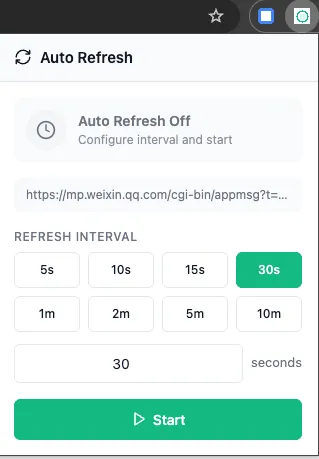
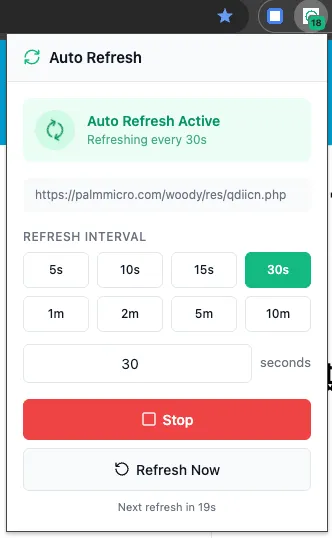
本文档记录了开发 Auto Refresh 浏览器扩展时使用的提示词和技术规范。先看下实现效果。这是一个定时刷新页面的小插件。
项目概述
初始需求提示词
在 auto-refresh 目录下创建一个插件,自动刷新当前 tab 页面,方便配置核心功能
-
自动刷新当前标签页 -
可自定义刷新间隔 -
预设快捷间隔选项 -
快捷键支持 -
每个标签页独立配置
技术栈
- 框架: React 18 + TypeScript
- 构建工具: Vite + @crxjs/vite-plugin
- 样式: Tailwind CSS
- 扩展规范: Manifest V3
- 图标库: Lucide React
功能增强提示词
动态倒计时 Badge提示词
icon角标运行的时候实现动态倒计时,1S刷新一次,可以吗实现方案:
-
创建全局 countdown_ticker定时器(每秒触发) -
使用 chrome.alarmsAPI 实现可靠的定时 countdownState
对象存储每个标签页的倒计时状态 -
Badge 显示格式: < 60s
显示秒数如 5960s - 1h
显示 分:秒如1:30> 1h
显示 时:分如1:30或2h
文档与上架
创建README 文档提示词
创建 README.md 增加上架插件所需要的文本包含内容:
-
双语说明(English / 中文) -
功能特点列表 -
使用方法步骤 -
权限说明表格 -
隐私声明 -
Chrome Web Store 上架文本 -
简短描述(132字符以内) -
详细描述 -
分类建议 -
搜索关键词
宣传图创建提示词
创建宣传图,生成 svg 文件再增加一个 1280x800 的生成的图片尺寸:
|
|
|
|
|---|---|---|
|
|
|
promo-small-440x280.svg |
|
|
|
promo-large-1400x560.svg |
|
|
|
promo-banner-1280x800.svg |
设计要素:
文件结构
auto-refresh/├── manifest.json # 扩展配置├── package.json # 依赖配置├── vite.config.ts # Vite 构建配置├── tsconfig.json # TypeScript 配置├── tailwind.config.js # Tailwind 配置├── postcss.config.js # PostCSS 配置├── README.md # 项目文档├── public/│ ├── icons/│ │ ├── icon.svg # 源 SVG 图标│ │ ├── icon-16.png│ │ ├── icon-32.png│ │ ├── icon-48.png│ │ └── icon-128.png│ ├── promo/│ │ ├── promo-small-440x280.svg│ │ ├── promo-large-1400x560.svg│ │ └── promo-banner-1280x800.svg│ └── _locales/│ ├── en/messages.json│ └── zh_CN/messages.json├── scripts/│ └── build-zip.sh # 打包脚本└── src/ ├── types/index.ts # 类型定义 ├── lib/storage.ts # 存储管理 ├── background/index.ts # 后台脚本 ├── popup/ │ ├── index.html │ ├── main.tsx │ └── PopupApp.tsx └── styles/globals.css # 全局样式关键代码片段
倒计时 Badge 实现
// 格式化倒计时显示functionformatBadgeCountdown(seconds: number): string {if (seconds >= 3600) {const h = Math.floor(seconds / 3600)const m = Math.floor((seconds % 3600) / 60)return m > 0 ? `${h}:${m.toString().padStart(2, '0')}` : `${h}h` }if (seconds >= 60) {const m = Math.floor(seconds / 60)const s = seconds % 60return`${m}:${s.toString().padStart(2, '0')}` }return`${seconds}`}// 启动全局倒计时定时器asyncfunctionstartCountdownTicker() {await chrome.alarms.clear(COUNTDOWN_ALARM)await chrome.alarms.create(COUNTDOWN_ALARM, {periodInMinutes: 1 / 60, // 每秒触发 })}存储结构
interfaceTabRefreshConfig {tabId: numberinterval: number// 刷新间隔(秒)enabled: booleanurl: stringlastRefresh?: number}interfaceRefreshSettings {defaultInterval: numbershowNotification: booleanpresets: number[] // 预设间隔选项}权限说明
|
|
|
|---|---|
storage |
|
tabs |
|
alarms |
|
activeTab |
|
<all_urls> |
|
构建命令
# 安装依赖pnpm install# 开发模式pnpm run dev# 生产构建pnpm run build# 打包发布pnpm run build:zip# 类型检查pnpm run type-check设计规范
颜色
|
|
|
|
|---|---|---|
|
|
|
|
|
|
|
|
|
|
|
|
|
|
|
|
|
|
|
|
|
|
|
|
|
|
|
|
|
|
|
|
图标设计
-
刷新环形箭头 -
内圆显示倒计时数字 -
绿色主题 -
白色背景 + 浅灰边框
Chrome Web Store 信息
分类
Productivity
语言
English, Chinese (Simplified)
搜索关键词
auto refresh, page refresh, automatic reload, tab refresh, auto reload,refresh timer, page monitor, 自动刷新, 页面刷新, 定时刷新简短描述 (132字符)
EN: Auto refresh any webpage at custom intervals. Live countdown badge, keyboard shortcuts, per-tab settings. Simple and lightweight.
ZH: 自动刷新任意网页,支持自定义间隔。实时倒计时角标、快捷键、独立标签页设置。简单轻量。

