 夜雨聆风
夜雨聆风


OpenManus 源码分析(三)
这是 OpenManus 源码分析的最后一篇文章,讲解了 OpenManus 中除了 Agent 和 Tool 之外的其他支撑模块。上一篇文章见OpenManus 源码分析(二)
上一篇文章见
一、其他模块
1. LLM
1. TokenCounter
1. 各类内容计算逻辑
|
|
|
|
|---|---|---|
|
|
|
|
|
|
|
|
|
|
|
|
|
|
|
|
|
|
|
|
2. 完整消息计算逻辑
|
|
|
|---|---|
|
|
|
|
|
|
|
|
|
|
|
|
|
|
|
|
|
|
|
|
|
2. LLM方法
1. ask
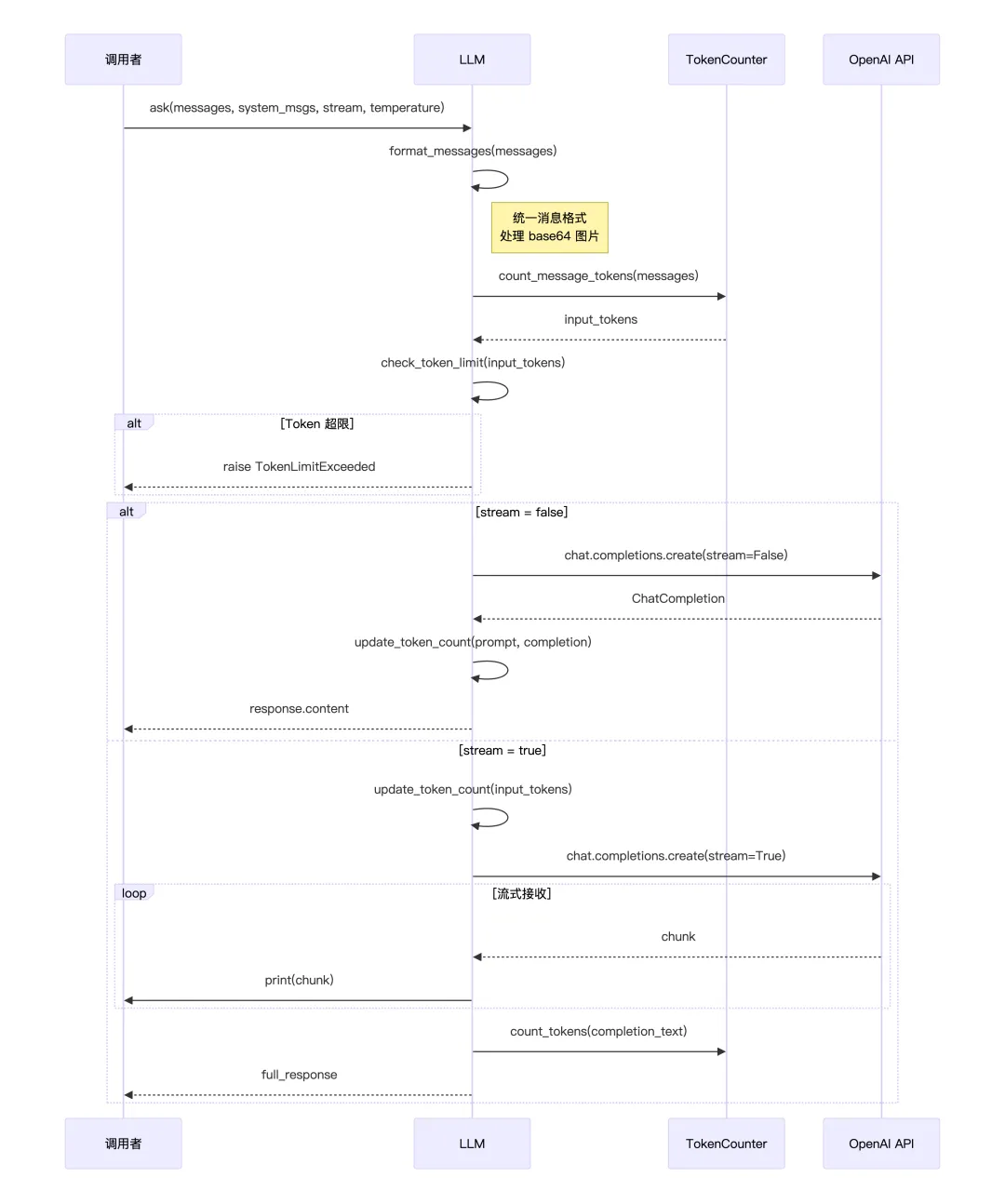
ask() 是最基础的对话方法。调用时首先将传入的消息列表格式化为 OpenAI API 标准格式,同时处理可能存在的 base64 图片。接着通过 TokenCounter 计算输入的 token 数量,并检查是否超过配置的限制,如果超限则直接抛出异常,不会重试。
方法支持两种响应模式:非流式模式下,等待 API 返回完整响应后一次性返回,同时记录实际的 token 消耗;流式模式下(默认),先预估输入 token,然后边接收边打印响应内容,最后拼接完整文本返回,并估算输出 token 数。
2、ask_with_images
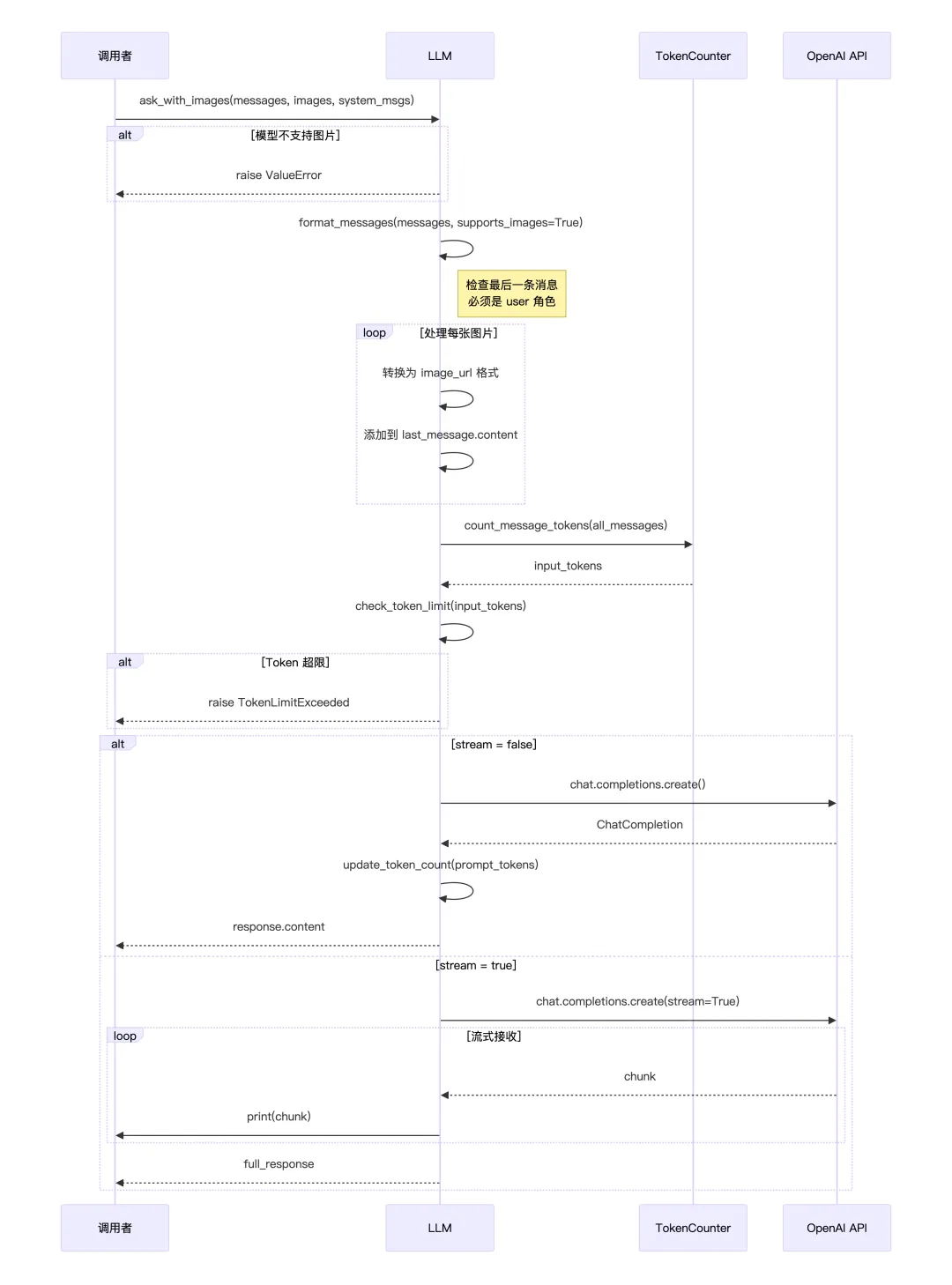
ask_with_images() 专门用于发送带图片的消息。方法首先会校验当前模型是否支持多模态(必须在 MULTIMODAL_MODELS 列表中),不支持则直接报错。
接下来格式化消息,并强制要求最后一条消息必须是 user 角色——因为图片只能附加到用户消息上。然后遍历传入的图片列表,将每张图片(无论是 URL 还是 base64)统一转换为 Open AI 的 image_url 格式,追加到最后一条用户消息的 content 数组中。
Token 计算时会根据图片的清晰度和尺寸计算额外的 token 开销。后续的 API 调用流程与 ask() 类似,支持流式和非流式两种模式。
3、ask_tool
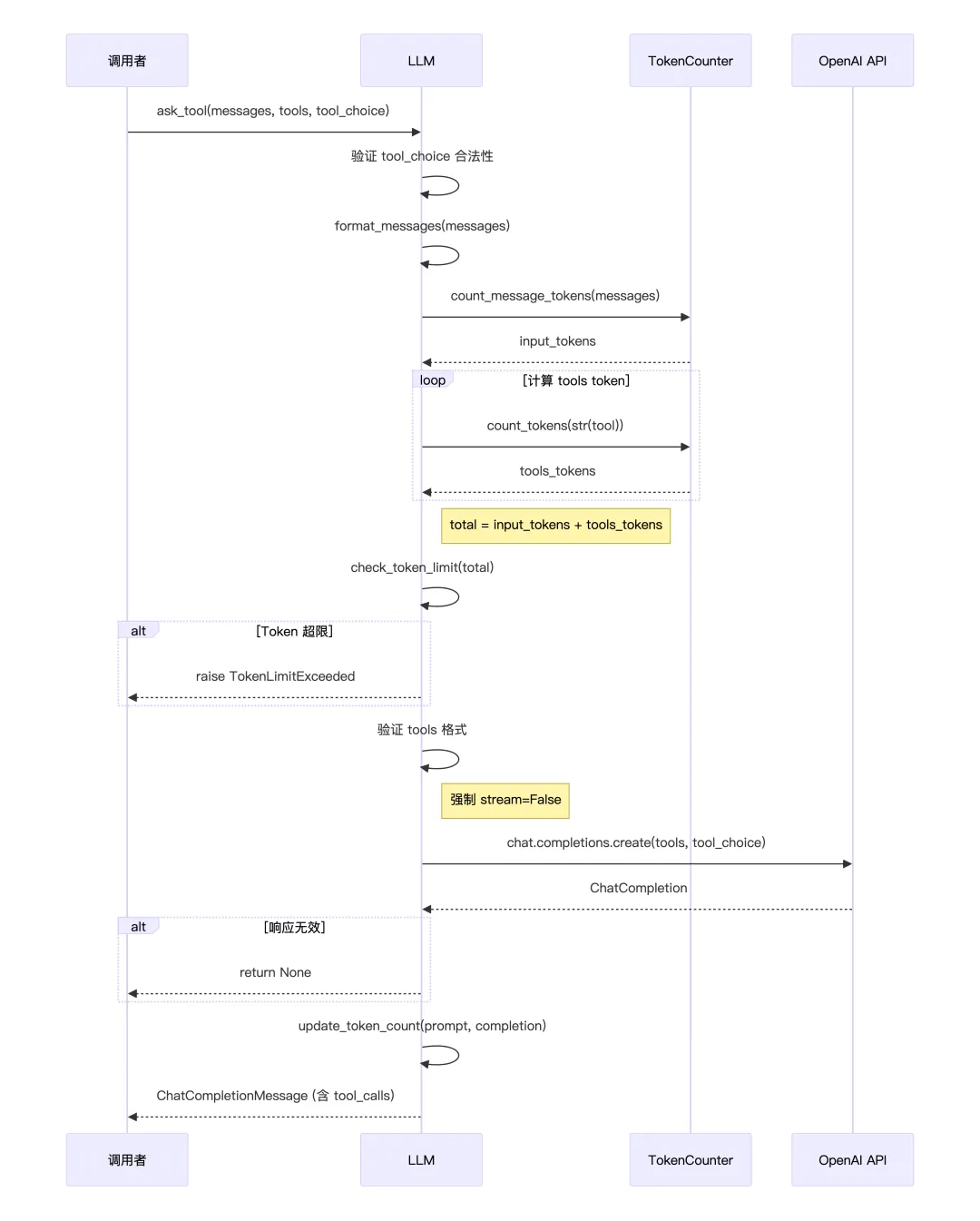
ask_tool() 是 Agent 调用工具的核心方法,用于 Function Calling。方法首先验证 tool_choice 参数是否合法(可选值:auto、none、required 或指定具体工具)。
与前两个方法不同,token 计算需要额外考虑工具定义本身的 token 开销每个 tool 的 JSON schema 都会被转成字符串计算 token,然后与消息 token 相加进行限制检查。
工具调用始终使用非流式模式,因为需要完整解析返回的 tool_calls 结构。如果 API 返回无效响应(空或无 message),方法会返回 None 而不是抛异常,让上层自行处理。正常情况下返回完整的 ChatCompletionMessage 对象,其中包含 tool_calls 数组,记录模型决定调用哪些工具及其参数。
这里有个有意思的地方,就是OpenManus的所有请求都是走的ask_tool,没有走ask,每次请求都会带上当前可用的工具列表让LLM决定要不要用工具,ask方法只适合纯聊天机器人、不需要工具能力的应用。
2. 多Agent
flow模块是一个经典的PAE(Plan-and-Execute )框架,将复杂任务分解为可执行的步骤,并协调多个 Agent 来完成。
1. 流程基类
定义了多智能体系统的基本数据结构
classBaseFlow(BaseModel, ABC):"""Base class for execution flows supporting multiple agents""" agents: Dict[str, BaseAgent] # {Agent名称:Agent实例} tools: Optional[List] = None# 可选的工具列表 primary_agent_key: Optional[str] = None# 主代理的 keydef__init__( self, agents: Union[BaseAgent, List[BaseAgent], Dict[str, BaseAgent]], **data ):# 提供3种方式构造Agent实例if isinstance(agents, BaseAgent):# 只给一个 Agent时,内部会变成{"default": xxxAgent(...)} agents_dict = {"default": agents}elif isinstance(agents, list):# 给一个 Agent 列表时,内部会变成{"agent_0:xxxAgent,agent_1:xxxAgent} agents_dict = {f"agent_{i}": agent for i, agent in enumerate(agents)}# 直接给字典else: agents_dict = agents# 如果没有指定主Agent,就默认使用第一个Agent作为主Agent primary_key = data.get("primary_agent_key")ifnot primary_key and agents_dict: primary_key = next(iter(agents_dict)) data["primary_agent_key"] = primary_key# Set the agents dictionary data["agents"] = agents_dict# Initialize using BaseModel's init super().__init__(**data)# 从 agents 字典里,用 primary_agent_key 拿主 Agent。 @propertydefprimary_agent(self) -> Optional[BaseAgent]:"""Get the primary agent for the flow"""return self.agents.get(self.primary_agent_key)# 按名字拿 Agent,方便子类在 execute() 里对不同角色做不同事情。defget_agent(self, key: str) -> Optional[BaseAgent]:"""Get a specific agent by key"""return self.agents.get(key)# 运行时动态加 Agentdefadd_agent(self, key: str, agent: BaseAgent) -> None:"""Add a new agent to the flow""" self.agents[key] = agent# execute 必须由子类实现,输入是字符串,也就是要完成任务的指令,输出也是str,是最终文本返回的结果。# 里面可以是多轮、多 Agent 的复杂交互,但对调用方来说只感知到一个“端到端任务”。 @abstractmethodasyncdefexecute(self, input_text: str) -> str:"""Execute the flow with given input"""2. planning流程
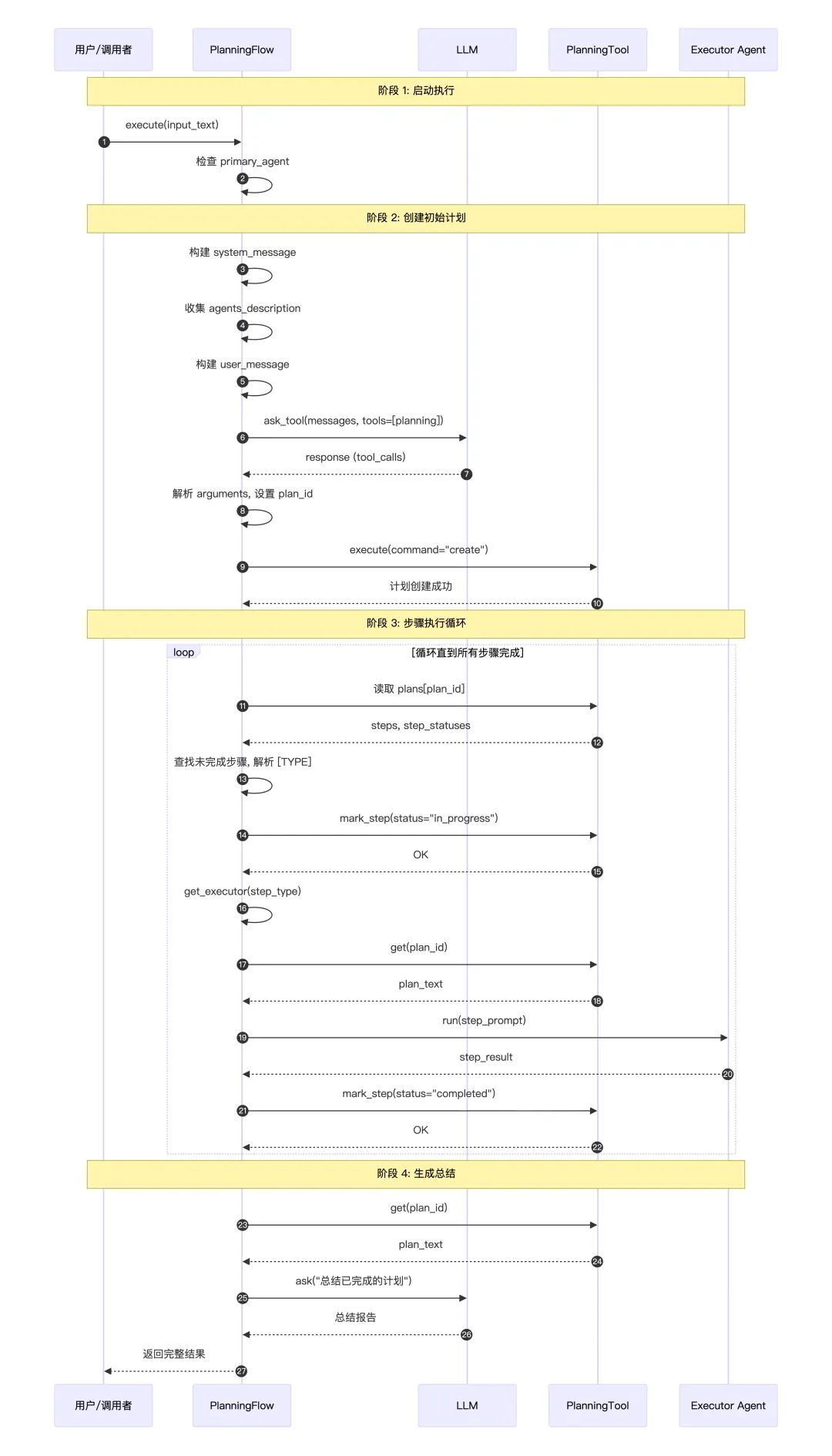
定义了一个面向代理协作的计划执行流 PlanningFlow,继承自 BaseFlow,负责:生成初始计划 → 逐步调度执行 → 标记步骤状态 → 汇总结果。
planning流程关键属性:
classPlanningFlow(BaseFlow):"""A flow that manages planning and execution of tasks using agents."""# LLM专门用于生成计划调用 PlanningTool 和最后总结# llm: LLM = Field(default_factory=lambda: LLM()) # 计划管理工具(存储和操作计划) planning_tool: PlanningTool = Field(default_factory=PlanningTool) # 用来从 agents 中选出可用的执行 Agent 列表 executor_keys: List[str] = Field(default_factory=list) # 当前正在执行的 plan 的 ID active_plan_id: str = Field(default_factory=lambda: f"plan_{int(time.time())}") # 当前执行到计划里的第几个 step current_step_index: Optional[int] = None核心执行流程:
asyncdefexecute(self, input_text: str) -> str:"""Execute the planning flow with agents."""try:# 没有主 Agent 就直接报错ifnot self.primary_agent:raise ValueError("No primary agent available")# 让 LLM使用PlanningTool工具拟一个 planif input_text:await self._create_initial_plan(input_text)# 确认计划真的创建成功了if self.active_plan_id notin self.planning_tool.plans: logger.error(f"Plan creation failed. Plan ID {self.active_plan_id} not found in planning tool." )returnf"Failed to create plan for: {input_text}" result = ""whileTrue:# 找当前要执行的步骤 self.current_step_index, step_info = await self._get_current_step_info()# 没有更多步骤了 -> finalizeif self.current_step_index isNone: result += await self._finalize_plan()break# 为当前步骤选一个合适的Agent step_type = step_info.get("type") if step_info elseNone executor = self.get_executor(step_type)# 执行这个步骤 step_result = await self._execute_step(executor, step_info) result += step_result + "\n"# 如果 Agent 内部把自己状态标记为 FINISHED,就提前终止if hasattr(executor, "state") and executor.state == AgentState.FINISHED:breakreturn resultexcept Exception as e: logger.error(f"Error in PlanningFlow: {str(e)}")returnf"Execution failed: {str(e)}"创建计划:
计划一共有4种状态:not_started、in_progress、completed、blocked
asyncdef_create_initial_plan(self, request: str) -> None:"""Create an initial plan based on the request using the flow's LLM and PlanningTool.""" logger.info(f"Creating initial plan with ID: {self.active_plan_id}") system_message_content = ("You are a planning assistant. Create a concise, actionable plan with clear steps. ""Focus on key milestones rather than detailed sub-steps. ""Optimize for clarity and efficiency." ) agents_description = []# 如果有多个 Agent,会在提示词中描述每个 Agent 的能力for key in self.executor_keys:if key in self.agents: agents_description.append( {"name": key.upper(),"description": self.agents[key].description, } )if len(agents_description) > 1:# Add description of agents to select system_message_content += (f"\nNow we have {agents_description} agents. "f"The infomation of them are below: {json.dumps(agents_description)}\n""When creating steps in the planning tool, please specify the agent names using the format '[agent_name]'." )# 创建系统消息 system_message = Message.system_message(system_message_content)# 创建用户消息 user_message = Message.user_message(f"Create a reasonable plan with clear steps to accomplish the task: {request}" )# 调用 LLM,带上 PlanningTool,LLM 会返回一个 tool_call,告诉我们要调用 planning 工具,参数是什么 response = await self.llm.ask_tool( messages=[user_message], system_msgs=[system_message], tools=[self.planning_tool.to_param()], tool_choice=ToolChoice.AUTO, )# Process tool calls if presentif response.tool_calls:for tool_call in response.tool_calls:if tool_call.function.name == "planning":# 解析参数(可能是字符串形式的 JSON) args = tool_call.function.argumentsif isinstance(args, str):try: args = json.loads(args)except json.JSONDecodeError: logger.error(f"Failed to parse tool arguments: {args}")continue# 强制设置正确的 plan_id args["plan_id"] = self.active_plan_id# 执行 PlanningTool result = await self.planning_tool.execute(**args) logger.info(f"Plan creation result: {str(result)}")return整体流程时序图:
计划中的每个步骤是如何选择合适的Agent?
在创建计划的时候,如果有多个Agent,在System Prompt中会引导LLM在使用panningTool创建多个步骤时,在每个步骤前面用[agent_name]标识出当前步骤要选择哪个Agent处理,比如[webSearchAgent] 搜索xxx
if len(agents_description) > 1:# Add description of agents to select system_message_content += (f"\nNow we have {agents_description} agents. "f"The infomation of them are below: {json.dumps(agents_description)}\n""When creating steps in the planning tool, please specify the agent names using the format '[agent_name]'." )在循环执行所有步骤,选择当前步骤用哪个Agent时,首先使用精确匹配,截取每个步骤开头的[agent_name]和目前可用的Agent字典中的某个key匹配,匹配上了就用那个Agent,如果没找到,就默认用PrimaryAgent
3. 还能实现什么Flow?
BaseFlow已经处理好了Agents字典管理、Primary_agent的自动选择、get_agent()/add_agent()方法,继承BaseFlow的类主要需要实现execute方法,execute方法的作用是Flow的总指挥,决定哪些Agent、按什么顺序、如何协作来完成任务。在planningFlow中,execute干的事,主要就是先引导LLM使用计划工具列出计划,再按计划一个个步骤完成任务,那其实我们也可以自己编排更多的多Agent协作逻辑。
1. SequentialFlow
场景:代码审查流水线 – 依次进行代码分析、安全检查、性能评估。
适合需要逐步处理的任务,严格按顺序执行,确保依赖关系。
execute方法的核心逻辑就是让整个任务流按照提前编排好的Agent顺序执行。

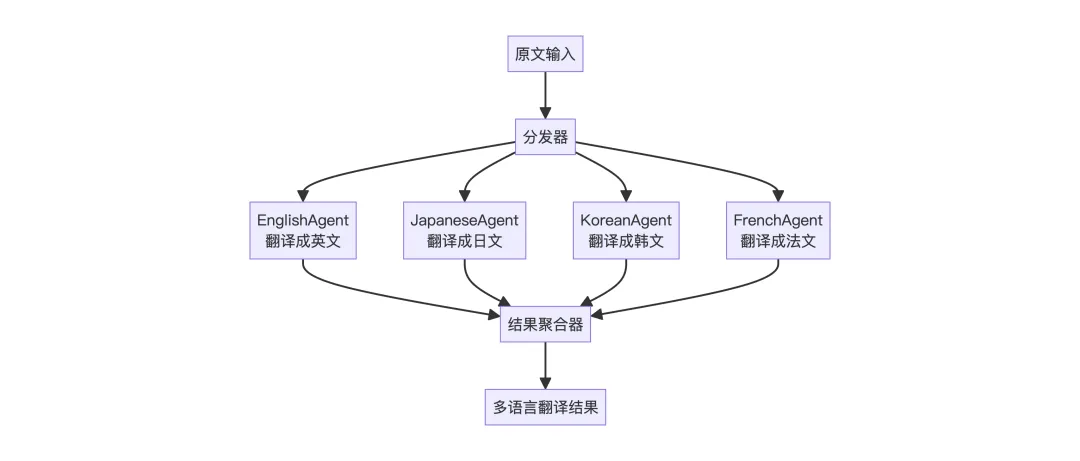
2. ParallelFlow
场景:多语言翻译系统 – 同时翻译成多种语言,最后汇总。
多个 Agent 同时并行执行,提高效率,最终需要聚合所有结果,适合相互独立、可并行的子任务。
execute方法的核心逻辑就是让所有Agent并行执行,最后汇总结果。
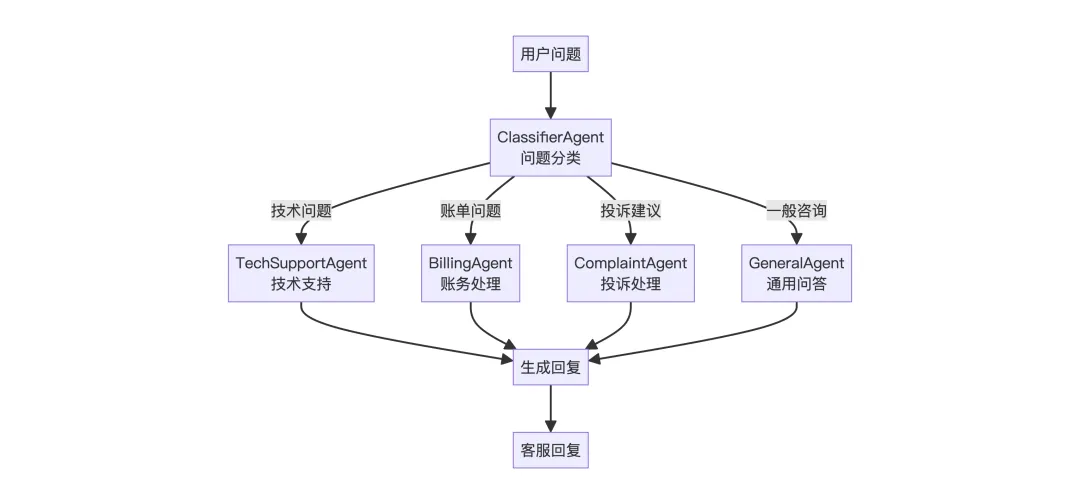
3. ConditionalFlow
场景:智能客服路由 – 根据用户问题类型分配到不同专业 Agent
先分类,再根据分类结果选择执行路径,只有一个分支会被执行,合需要动态路由的场景。
execute方法的核心逻辑就是根据用户问题选择一个合适的Agent执行。
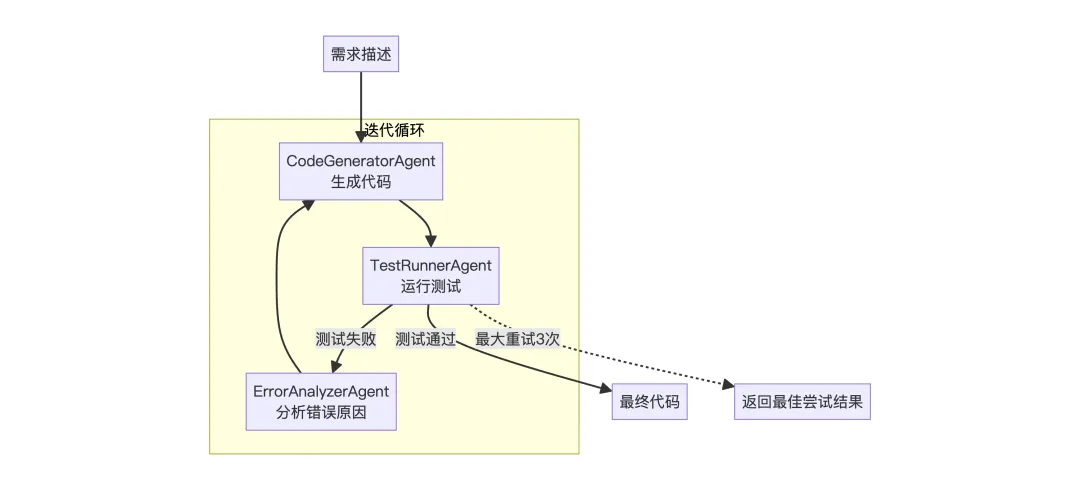
4. LoopFlow
场景:代码生成与自我修正 – 生成代码后测试,不通过则修正重试
循环执行直到满足条件或达到最大次数,每次循环可以利用上次的反馈改进,适合需要迭代优化的任务。
execute方法的核心逻辑就是让一个Agent持续运行直到任务成功。
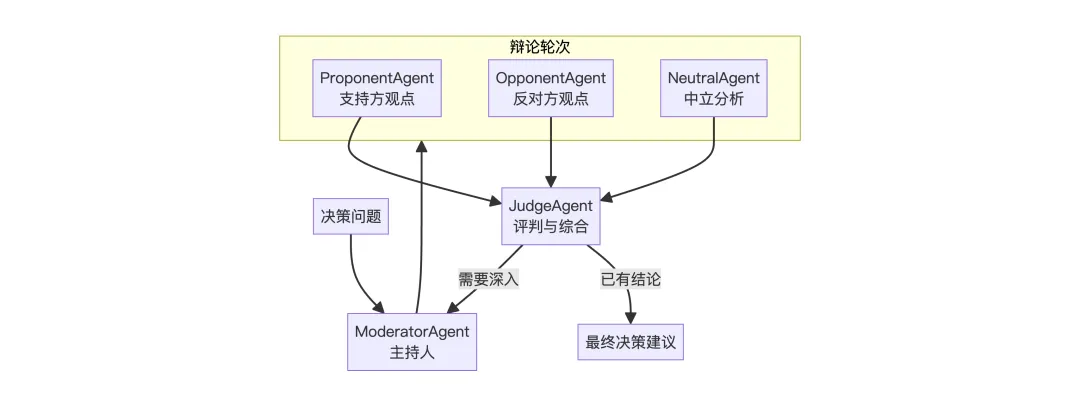
5. DebateFlow
场景:决策辅助,多个 Agent 从不同角度辩论,最终综合决策
多个 Agent 代表不同立场进行辩论,通过对抗获得更全面的分析,适合需要多角度权衡的决策场景。
execute方法的核心逻辑就是让多个 Agent 轮流发表不同立场的观点,最后由裁判 Agent 综合各方论点生成最终决策。
3. A2A协议
A2A (Agent-to-Agent) 是 Google 推出的一个开放协议,用于实现不同 AI Agent 之间的互操作性和通信。它定义了一套标准化的接口,让不同的 Agent 可以:
-
发现彼此:通过 Agent Card 暴露自身能力 -
发送任务:使用 JSON-RPC 格式传递请求 -
接收结果:获取任务执行结果和状态
详细介绍见:https://a2a-protocol.org/latest/
这块内容较少,OpenManus只是简单的接入了A2A协议,使其能够与其他遵循 A2A 协议的 Agent 进行通信和协作。
1. 协议适配器
把 ManusAgent封装成一个标准接口 A2AManus,对外暴露统一的 invoke(...) 方法和一个固定的响应结构,方便在 A2A 协议里互相调用。
1. A2A协议标准响应格式
classResponseFormat(BaseModel):"""Respond to the user in this format."""# Agent发起响应时的状态,默认为input_required需要用户进一步输入 status: Literal["input_required", "completed", "error"] = "input_required"# 响应的具体内容 message: str2. ManusAgent适配A2A
classA2AManus(Manus):# 标准单次调用ManusAgent的入口asyncdefinvoke(self, query, sessionId) -> str: config = {"configurable": {"thread_id": sessionId}} response = await self.run(query)return self.get_agent_response(config, response)# Manus不支持流式输出asyncdefstream(self, query: str) -> AsyncIterable[Dict[str, Any]]:"""Streaming is not supported by Manus."""raise NotImplementedError("Streaming is not supported by Manus yet.")# 把 Manus 的响应包装成 A2A 格式defget_agent_response(self, config, agent_response):return {"is_task_complete": True,"require_user_input": False,"content": agent_response, }# 声明自己能处理什么类型的内容 SUPPORTED_CONTENT_TYPES: ClassVar[List[str]] = ["text", "text/plain"]3. 执行A2AManus
这是 A2A 服务端的执行器,负责接收外部请求、调用 Agent、返回标准格式的结果。
asyncdefexecute( self, context: RequestContext, event_queue: EventQueue, ) -> None:# 验证请求参数 error = self._validate_request(context)if error:raise ServerError(error=InvalidParamsError())# 从请求上下文中提取用户的查询内容 query = context.get_user_input()try:# 调用工厂函数创建 A2AManus 实例 self.agent = await self.agent_factory()# 核心调用,执行 Agent result = await self.agent.invoke(query, context.context_id) print(f"Final Result ===> {result}")except Exception as e: print("Error invoking agent: %s", e)raise ServerError(error=ValueError(f"Error invoking agent: {e}")) from e# 把结果包装成 A2A 协议的 Part 格式 parts = [ Part( root=TextPart( text=( result["content"]if result["content"]else"failed to generate response" ) ), ) ]# 把完成的任务放入事件队列返回 event_queue.enqueue_event( completed_task( context.task_id, context.context_id, [new_artifact(parts, f"task_{context.task_id}")], [context.message], ) )A2A协议中的Part是什么?
在一个 A2A 协议里,Part的作用就是作为统一内容单元的外壳,承载一系列内容(比如Textpart文本、ImagePart图片、JsonPartJSON等),A2A协议只需要处理一组Part,而不用关心里面具体是文字、图片还是JSON,从而用一个统一的机制来描述这次任务产出的所有内容片段。
比如 Agent 既返回人类可读的文本信息,又返回结构化 JSON 结果:
summary_part = Part(root=TextPart(text="本次查询的结果是:汇率约为 7.12"))json_part = Part(root=JsonPart(data={"from": "USD", "to": "CNY", "rate": 7.1234}))parts = [summary_part, json_part]A2A 就知道这个任务的输出由两个 Part 组成,一个是文本类型的摘要,一个是JSON类型的详细结果。
4. A2A时序图
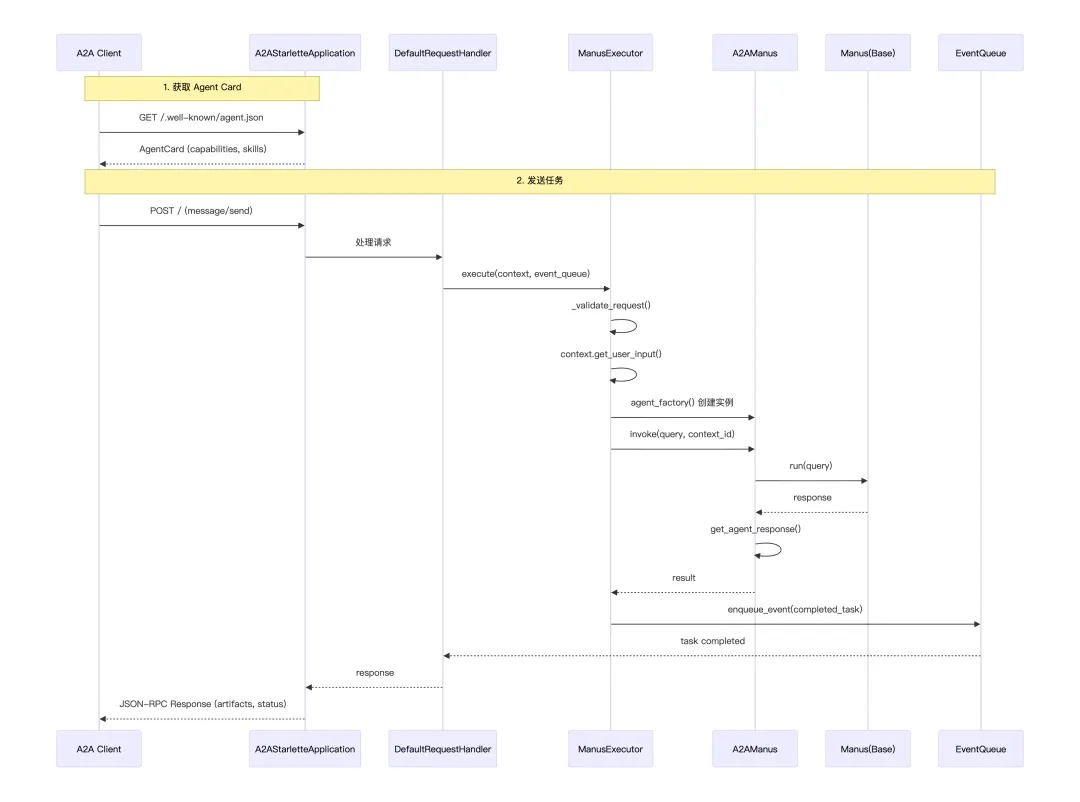
其中,如果你是Agent的服务提供方,想暴露一个Agent给被人调用,那你就要实现:
-
/.well-known/agent.json:作用是返回AgentCard,介绍Agent的元数据信息 -
JSON-RPC 端点:接收 message/send 等请求 -
符合协议的响应格式:Task, Artifact, TextPart 等
A2A SDK 的 A2AStarletteApplication 帮你把这些都实现了,这也是一个Web服务器,外部的Agent可以向该Web服务器发起API调用请求。

