 夜雨聆风
夜雨聆风


【源码开源】基于MATLAB的四杆机构运动学仿真系统(带GUI交互界面)
在机械设计领域,平面连杆机构是最基础也是应用最广泛的机构之一。无论是发动机的曲轴连杆,还是雨刮器的往复运动,都离不开它的身影。
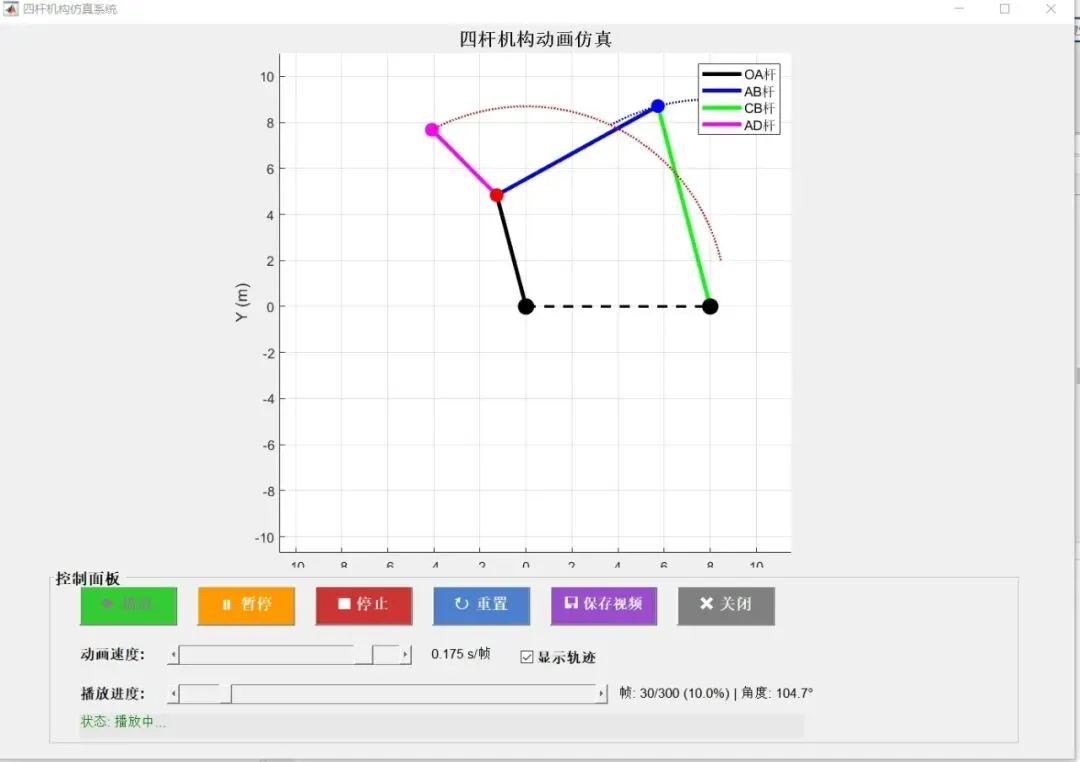
今天,我们要分享一套完整的 MATLAB 四杆机构仿真方案。它不仅涵盖了运动学求解的核心算法,还配备了功能完备的 GUI(图形用户界面),支持实时交互、轨迹追踪以及视频保存功能!
🌟 系统亮点一览
这套系统专门为机械原理学习和机构设计开发,具有以下核心功能:
|
|
|
|---|---|
| 交互式 GUI |
|
| 高精度求解 |
fsolve 数值计算方法求解闭环矢量方程,计算结果稳定可靠。 |
| 动态可视化 |
|
| 轨迹追踪 |
|
| 视频导出 |
|
🧠 核心技术原理解析
1. 运动学建模
本程序基于闭环矢量方程法。将机构简化为向量环,通过位置约束方程:ra+rc=rb+rd转化为非线性方程组。
2. 数值求解
代码中使用了 MATLAB 强大的优化工具箱函数 fsolve。相比于解析法,数值求解法具有更强的通用性,即使修改机构构型(如演化为五杆或六杆机构),算法逻辑依然适用。
3. GUI 状态机控制
通过定义 isPlaying 和 isPaused 等逻辑变量,实现了对 while 循环动画的精准控制,确保界面在高频刷新时依然响应流畅。
🖥️ 界面功能演示
程序运行后,您将看到一个布局优雅的仿真窗口:
-
绘图区:动态显示四杆机构的实时姿态,背景网格辅助观察位移。
-
速度控制:支持从 0.01s 到 0.2s 的帧延迟调节。
-
进度展示:实时显示当前帧数、百分比以及输入构件的旋转角度。
-
快捷按钮:一键保存当前动画为视频文件,告别繁琐的录屏软件。
⌨️ 核心代码结构
代码采用全函数封装模式,结构清晰,方便二次开发:
|
|
|
|---|---|
FourBarLinkageGUI |
|
solvePositions |
|
loop_equations |
|
updateFrame |
|
saveVideo |
|
如何获取与使用
-
环境要求:确保您的电脑安装了 MATLAB(建议 R2016b 及以上版本)并安装了 Optimization Toolbox。
-
运行方式:
-
将上述代码复制并保存为
FourBarLinkageGUI.m。 -
在 MATLAB 命令行窗口输入
FourBarLinkageGUI即可启动。 -
自定义修改:您可以直接在代码开头的“参数设置”区修改杆长
r_a、r_b等参数,探索不同长度配比下的运动特性
.rtcContent { padding: 30px; } .lineNode {font-size: 10pt; font-family: "Times New Roman", Menlo, Monaco, Consolas, "Courier New", monospace; font-style: normal; font-weight: normal; }% 四杆机构仿真 - 带GUI界面完整版本function FourBarMechanismSimulator()clear; clc; close all;%% 参数设置% 杆件长度定义r_a = 6; % 曲柄OA长度 (主动件)r_b = 10; % 机架OC长度 (固定杆)theta_b = 0; % 机架OC与X轴夹角 (弧度)r_c = 9; % 连杆AB长度r_d = 8; % 摇杆CB长度r_e = 5; % 延伸杆AD长度angle_extension = 30; % 延伸杆AD相对OA的夹角 (度)% 固定点O的位置O = [0, 0];% 输入角度范围t2 = linspace(0, 6*pi, 300);n = length(t2);% 动画控制变量isPlaying = false;isPaused = false;currentFrame = 1;animationSpeed = 0.05;showTrace = true;%% 求解机构位置fprintf('正在求解机构位置...\n');[A_pos, B_pos, D_pos, C] = solvePositions(t2, O, r_a, r_b, theta_b, r_c, r_d, r_e, angle_extension);fprintf('求解完成!\n');%% 创建GUI界面fig = figure('Position', [100, 50, 1100, 750], ...'Name', '四杆机构仿真系统', ...'NumberTitle', 'off', ...'MenuBar', 'none', ...'Resize', 'on', ...'CloseRequestFcn', @closeGUI);% 创建绘图区域ax = axes('Parent', fig, ...'Position', [0.05, 0.28, 0.9, 0.68]);hold(ax, 'on');grid(ax, 'on');axis(ax, 'equal');% 设置坐标轴范围all_x = [O(1), C(1), A_pos(:,1)', B_pos(:,1)', D_pos(:,1)'];all_y = [O(2), C(2), A_pos(:,2)', B_pos(:,2)', D_pos(:,2)'];margin = 2;xlim(ax, [min(all_x)-margin, max(all_x)+margin]);ylim(ax, [min(all_y)-margin, max(all_y)+margin]);title(ax, '四杆机构动画仿真', 'FontSize', 14, 'FontWeight', 'bold');xlabel(ax, 'X (m)', 'FontSize', 12);ylabel(ax, 'Y (m)', 'FontSize', 12);% 初始化图形对象h_OA = plot(ax, [O(1), A_pos(1,1)], [O(2), A_pos(1,2)], 'k-', 'LineWidth', 3);h_AB = plot(ax, [A_pos(1,1), B_pos(1,1)], [A_pos(1,2), B_pos(1,2)], 'b-', 'LineWidth', 3);h_CB = plot(ax, [C(1), B_pos(1,1)], [C(2), B_pos(1,2)], 'g-', 'LineWidth', 3);h_AD = plot(ax, [A_pos(1,1), D_pos(1,1)], [A_pos(1,2), D_pos(1,2)], 'm-', 'LineWidth', 3);h_OC = plot(ax, [O(1), C(1)], [O(2), C(2)], 'k--', 'LineWidth', 2);% 关节点h_O = plot(ax, O(1), O(2), 'ko', 'MarkerSize', 12, 'MarkerFaceColor', 'k');h_A = plot(ax, A_pos(1,1), A_pos(1,2), 'ro', 'MarkerSize', 10, 'MarkerFaceColor', 'r');h_B = plot(ax, B_pos(1,1), B_pos(1,2), 'bo', 'MarkerSize', 10, 'MarkerFaceColor', 'b');h_C = plot(ax, C(1), C(2), 'ko', 'MarkerSize', 12, 'MarkerFaceColor', 'k');h_D = plot(ax, D_pos(1,1), D_pos(1,2), 'mo', 'MarkerSize', 10, 'MarkerFaceColor', 'm');% 轨迹线h_trace_B = plot(ax, B_pos(1,1), B_pos(1,2), 'b-', 'LineWidth', 1.5, 'LineStyle', ':');h_trace_D = plot(ax, D_pos(1,1), D_pos(1,2), 'r-', 'LineWidth', 1.5, 'LineStyle', ':');% 添加图例legend(ax, [h_OA, h_AB, h_CB, h_AD], {'OA杆(曲柄)', 'AB杆(连杆)', 'CB杆(摇杆)', 'AD杆(延伸)'}, ...'Location', 'northeast', 'FontSize', 10);%% 创建控制面板panel = uipanel('Parent', fig, ...'Position', [0.05, 0.02, 0.9, 0.24], ...'Title', '控制面板', ...'FontSize', 12, ...'FontWeight', 'bold', ...'BackgroundColor', [0.94 0.94 0.94]);% 第一行按钮btn_play = uicontrol('Parent', panel, ...'Style', 'pushbutton', ...'String', '播放', ...'FontSize', 12, ...'FontWeight', 'bold', ...'Position', [30, 120, 100, 45], ...'BackgroundColor', [0.2 0.8 0.2], ...'ForegroundColor', 'white', ...'Callback', @playAnimation);btn_pause = uicontrol('Parent', panel, ...'Style', 'pushbutton', ...'String', '暂停', ...'FontSize', 12, ...'FontWeight', 'bold', ...'Position', [150, 120, 100, 45], ...'BackgroundColor', [1 0.6 0], ...'ForegroundColor', 'white', ...'Enable', 'off', ...'Callback', @pauseAnimation);btn_stop = uicontrol('Parent', panel, ...'Style', 'pushbutton', ...'String', '停止', ...'FontSize', 12, ...'FontWeight', 'bold', ...'Position', [270, 120, 100, 45], ...'BackgroundColor', [0.8 0.2 0.2], ...'ForegroundColor', 'white', ...'Callback', @stopAnimation);btn_reset = uicontrol('Parent', panel, ...'Style', 'pushbutton', ...'String', '重置', ...'FontSize', 12, ...'FontWeight', 'bold', ...'Position', [390, 120, 100, 45], ...'BackgroundColor', [0.3 0.5 0.8], ...'ForegroundColor', 'white', ...'Callback', @resetAnimation);btn_save = uicontrol('Parent', panel, ...'Style', 'pushbutton', ...'String', '保存视频', ...'FontSize', 11, ...'FontWeight', 'bold', ...'Position', [510, 120, 110, 45], ...'BackgroundColor', [0.6 0.3 0.8], ...'ForegroundColor', 'white', ...'Callback', @saveVideo);btn_close = uicontrol('Parent', panel, ...'Style', 'pushbutton', ...'String', '关闭', ...'FontSize', 12, ...'FontWeight', 'bold', ...'Position', [640, 120, 100, 45], ...'BackgroundColor', [0.5 0.5 0.5], ...'ForegroundColor', 'white', ...'Callback', @closeGUI);% 速度控制txt_speed = uicontrol('Parent', panel, ...'Style', 'text', ...'String', '动画速度:', ...'FontSize', 11, ...'FontWeight', 'bold', ...'Position', [30, 75, 80, 25], ...'HorizontalAlignment', 'left', ...'BackgroundColor', [0.94 0.94 0.94]);slider_speed = uicontrol('Parent', panel, ...'Style', 'slider', ...'Min', 0.01, 'Max', 0.2, 'Value', 0.05, ...'Position', [120, 80, 250, 20], ...'Callback', @updateSpeed);txt_speed_val = uicontrol('Parent', panel, ...'Style', 'text', ...'String', '0.05 s/帧', ...'FontSize', 10, ...'Position', [380, 75, 80, 25], ...'BackgroundColor', [0.94 0.94 0.94]);% 显示轨迹复选框chk_trace = uicontrol('Parent', panel, ...'Style', 'checkbox', ...'String', '显示轨迹', ...'FontSize', 11, ...'FontWeight', 'bold', ...'Value', 1, ...'Position', [480, 75, 100, 25], ...'BackgroundColor', [0.94 0.94 0.94], ...'Callback', @toggleTrace);% 进度条txt_progress = uicontrol('Parent', panel, ...'Style', 'text', ...'String', '播放进度:', ...'FontSize', 11, ...'FontWeight', 'bold', ...'Position', [30, 35, 80, 25], ...'HorizontalAlignment', 'left', ...'BackgroundColor', [0.94 0.94 0.94]);progress_bar = uicontrol('Parent', panel, ...'Style', 'slider', ...'Min', 1, 'Max', n, 'Value', 1, ...'SliderStep', [1/(n-1), 10/(n-1)], ...'Position', [120, 40, 450, 20], ...'Callback', @updateProgress);txt_frame = uicontrol('Parent', panel, ...'Style', 'text', ...'String', sprintf('帧: 1/%d (0.0%%) | 角度: 0.0°', n), ...'FontSize', 10, ...'Position', [580, 35, 200, 25], ...'BackgroundColor', [0.94 0.94 0.94]);% 状态栏txt_status = uicontrol('Parent', panel, ...'Style', 'text', ...'String', '状态: 就绪', ...'FontSize', 10, ...'Position', [30, 5, 740, 25], ...'HorizontalAlignment', 'left', ...'BackgroundColor', [0.9 0.9 0.9], ...'ForegroundColor', [0 0.5 0]);%% 回调函数% 播放动画function playAnimation(~, ~)if ~isPlayingisPlaying = true;isPaused = false;set(btn_play, 'Enable', 'off');set(btn_pause, 'Enable', 'on');set(txt_status, 'String', '状态: 播放中...', 'ForegroundColor', [0 0.5 0]);while isPlaying && currentFrame <= nif ~isPausedupdateFrame(currentFrame);currentFrame = currentFrame + 1;pause(animationSpeed);elsepause(0.1);endif ~ishandle(fig)return;endendif currentFrame > ncurrentFrame = 1;isPlaying = false;set(btn_play, 'Enable', 'on');set(btn_pause, 'Enable', 'off');set(txt_status, 'String', '状态: 播放完成', 'ForegroundColor', [0 0 0.8]);endendend% 暂停动画function pauseAnimation(~, ~)if isPlayingisPaused = ~isPaused;if isPausedset(btn_pause, 'String', '继续');set(txt_status, 'String', '状态: 已暂停', 'ForegroundColor', [0.8 0.5 0]);elseset(btn_pause, 'String', '暂停');set(txt_status, 'String', '状态: 播放中...', 'ForegroundColor', [0 0.5 0]);endendend% 停止动画function stopAnimation(~, ~)isPlaying = false;isPaused = false;set(btn_play, 'Enable', 'on');set(btn_pause, 'Enable', 'off', 'String', '暂停');set(txt_status, 'String', '状态: 已停止', 'ForegroundColor', [0.8 0 0]);end% 重置动画function resetAnimation(~, ~)isPlaying = false;isPaused = false;currentFrame = 1;updateFrame(1);set(btn_play, 'Enable', 'on');set(btn_pause, 'Enable', 'off', 'String', '暂停');set(progress_bar, 'Value', 1);set(txt_status, 'String', '状态: 已重置', 'ForegroundColor', [0 0 0]);end% 更新速度function updateSpeed(src, ~)animationSpeed = get(src, 'Value');set(txt_speed_val, 'String', sprintf('%.3f s/帧', animationSpeed));end% 更新进度function updateProgress(src, ~)if ~isPlayingcurrentFrame = round(get(src, 'Value'));updateFrame(currentFrame);endend% 切换轨迹显示function toggleTrace(src, ~)showTrace = get(src, 'Value');if showTraceset(h_trace_B, 'Visible', 'on');set(h_trace_D, 'Visible', 'on');elseset(h_trace_B, 'Visible', 'off');set(h_trace_D, 'Visible', 'off');endend% 更新帧function updateFrame(i)% 更新连杆set(h_OA, 'XData', [O(1), A_pos(i,1)], 'YData', [O(2), A_pos(i,2)]);set(h_AB, 'XData', [A_pos(i,1), B_pos(i,1)], 'YData', [A_pos(i,2), B_pos(i,2)]);set(h_CB, 'XData', [C(1), B_pos(i,1)], 'YData', [C(2), B_pos(i,2)]);set(h_AD, 'XData', [A_pos(i,1), D_pos(i,1)], 'YData', [A_pos(i,2), D_pos(i,2)]);% 更新关节点set(h_A, 'XData', A_pos(i,1), 'YData', A_pos(i,2));set(h_B, 'XData', B_pos(i,1), 'YData', B_pos(i,2));set(h_D, 'XData', D_pos(i,1), 'YData', D_pos(i,2));% 更新轨迹if showTraceset(h_trace_B, 'XData', B_pos(1:i,1), 'YData', B_pos(1:i,2));set(h_trace_D, 'XData', D_pos(1:i,1), 'YData', D_pos(1:i,2));end% 更新进度条和文本set(progress_bar, 'Value', i);set(txt_frame, 'String', sprintf('帧: %d/%d (%.1f%%) | 角度: %.1f°', ...i, n, 100*i/n, rad2deg(t2(i))));drawnow;end% 保存视频function saveVideo(~, ~)set(txt_status, 'String', '状态: 正在保存视频...', 'ForegroundColor', [0.6 0 0.6]);drawnow;[file, path] = uiputfile('*.mp4', '保存视频', 'fourbarlinkage.mp4');if file == 0set(txt_status, 'String', '状态: 取消保存', 'ForegroundColor', [0 0 0]);return;endfullpath = fullfile(path, file);v = VideoWriter(fullpath, 'MPEG-4');v.FrameRate = 30;v.Quality = 95;open(v);% 临时禁用控制面板set(panel, 'Visible', 'off');for i = 1:nupdateFrame(i);frame = getframe(fig);writeVideo(v, frame);if mod(i, 30) == 0set(txt_status, 'String', sprintf('状态: 保存视频中... %.1f%%', 100*i/n), ...'ForegroundColor', [0.6 0 0.6]);drawnow;endendclose(v);set(panel, 'Visible', 'on');set(txt_status, 'String', ['状态: 视频已保存至 ' fullpath], 'ForegroundColor', [0 0.5 0]);msgbox(['视频已成功保存至: ' newline fullpath], '保存成功', 'help');end% 关闭GUIfunction closeGUI(~, ~)isPlaying = false;choice = questdlg('确定要关闭程序吗?', '确认关闭', '是', '否', '否');if strcmp(choice, '是')delete(fig);endend%% 求解位置函数function [A_pos, B_pos, D_pos, C] = solvePositions(t2, O, r_a, r_b, theta_b, r_c, r_d, r_e, angle_ext)n = length(t2);A_pos = zeros(n, 2);B_pos = zeros(n, 2);D_pos = zeros(n, 2);% 计算固定点C的位置C = O + r_b * [cos(theta_b), sin(theta_b)];% 初始猜测值guess = [deg2rad(50), deg2rad(120), 5, deg2rad(50)];% 优化选项options = optimoptions('fsolve', 'Display', 'off', ...'TolFun', 1e-6, 'TolX', 1e-6, ...'MaxIterations', 100, ...'Algorithm', 'levenberg-marquardt');for i = 1:n% 求解当前角度下的机构位置x = fsolve(@(x) loop_equations(x, t2(i), r_a, r_b, theta_b, r_c, r_d, r_e, angle_ext), guess, options);guess = x; % 使用上一次的解作为下一次的初始猜测% 计算各点位置A_pos(i, :) = O + r_a * [cos(t2(i)), sin(t2(i))];B_pos(i, :) = A_pos(i, :) + r_c * [cos(x(1)), sin(x(1))];% 延伸杆D点位置theta_e = t2(i) + deg2rad(angle_ext);D_pos(i, :) = A_pos(i, :) + r_e * [cos(theta_e), sin(theta_e)];endend%% 闭环方程function F = loop_equations(x, theta_a, r_a, r_b, theta_b, r_c, r_d, r_e, angle_ext)% x(1): theta_c (连杆AB的角度)% x(2): theta_d (摇杆CB的角度)% x(3): 辅助变量% x(4): 辅助角度cos_a = cos(theta_a);sin_a = sin(theta_a);cos_c = cos(x(1));sin_c = sin(x(1));cos_d = cos(x(2));sin_d = sin(x(2));cos_b = cos(theta_b);sin_b = sin(theta_b);% 延伸杆角度theta_e = theta_a + deg2rad(angle_ext);cos_e = cos(theta_e);sin_e = sin(theta_e);cos_f = cos(x(4));sin_f = sin(x(4));% 闭环方程组F1_x = r_a * cos_a + r_c * cos_c - r_d * cos_d - r_b * cos_b;F1_y = r_a * sin_a + r_c * sin_c - r_d * sin_d - r_b * sin_b;F2_x = r_a * cos_a + r_e * cos_e - x(3) * cos_f;F2_y = r_a * sin_a + r_e * sin_e - x(3) * sin_f;F = [F1_x, F1_y, F2_x, F2_y];endend
结语
这个仿真系统不仅是一个工具,更是学习 MATLAB 交互式编程和机械原理的绝佳案例。

