 夜雨聆风
夜雨聆风


C++ QT 实现Dialog插件
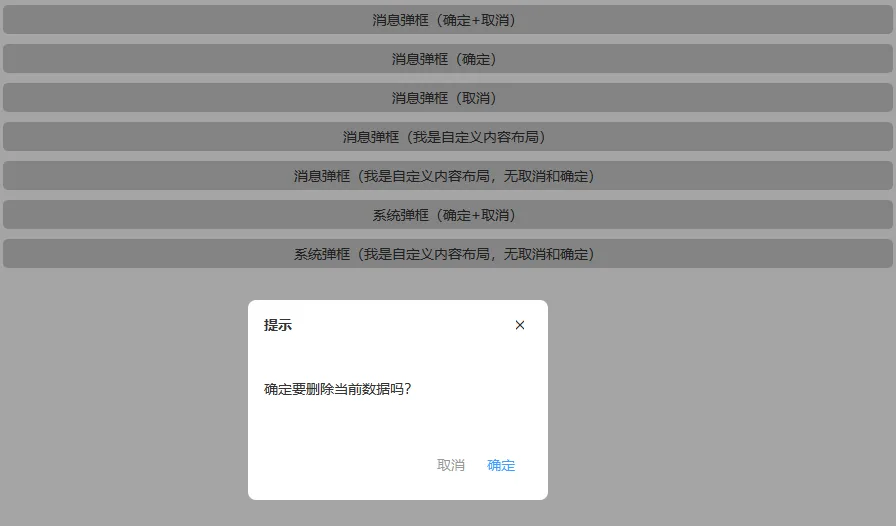
开头:
在 Qt 的开发世界里,弹窗永远是避不开的坎。但有时候,产品经理的需求总能让我们在深夜陷入沉思:
-
自定义 Widget 插件: “能不能做一个弹窗,它看起来很高级,但必须‘乖巧’地待在父窗口里,绝对不能越界(拖出窗口外)?”——这就是所谓的画地为牢型。
-
QDialog 插件: “能不能调起系统级的对话框,让它像幽灵一样在屏幕上乱跑,甚至覆盖掉其他应用?”——这就是我们的放飞自我型。
今天,我们要挑战的就是同时搞定这两套逻辑。一个是基于 QWidget 手写位移限制算法,实现“家教森严”的子窗口;另一个是利用 QDialog 的原生力量,搞定那些“不服管教”的顶级窗口。
作为一名资深的(或者是头发尚存的)Qt 开发者,我知道你们最关心的是逻辑。所以,UI 布局咱们点到为止,核心代码我已在键盘上就绪。让我们看看如何通过插件化的思维,把这两头性格迥异的“猛兽”关进代码的笼子里。
先看看GIF效果
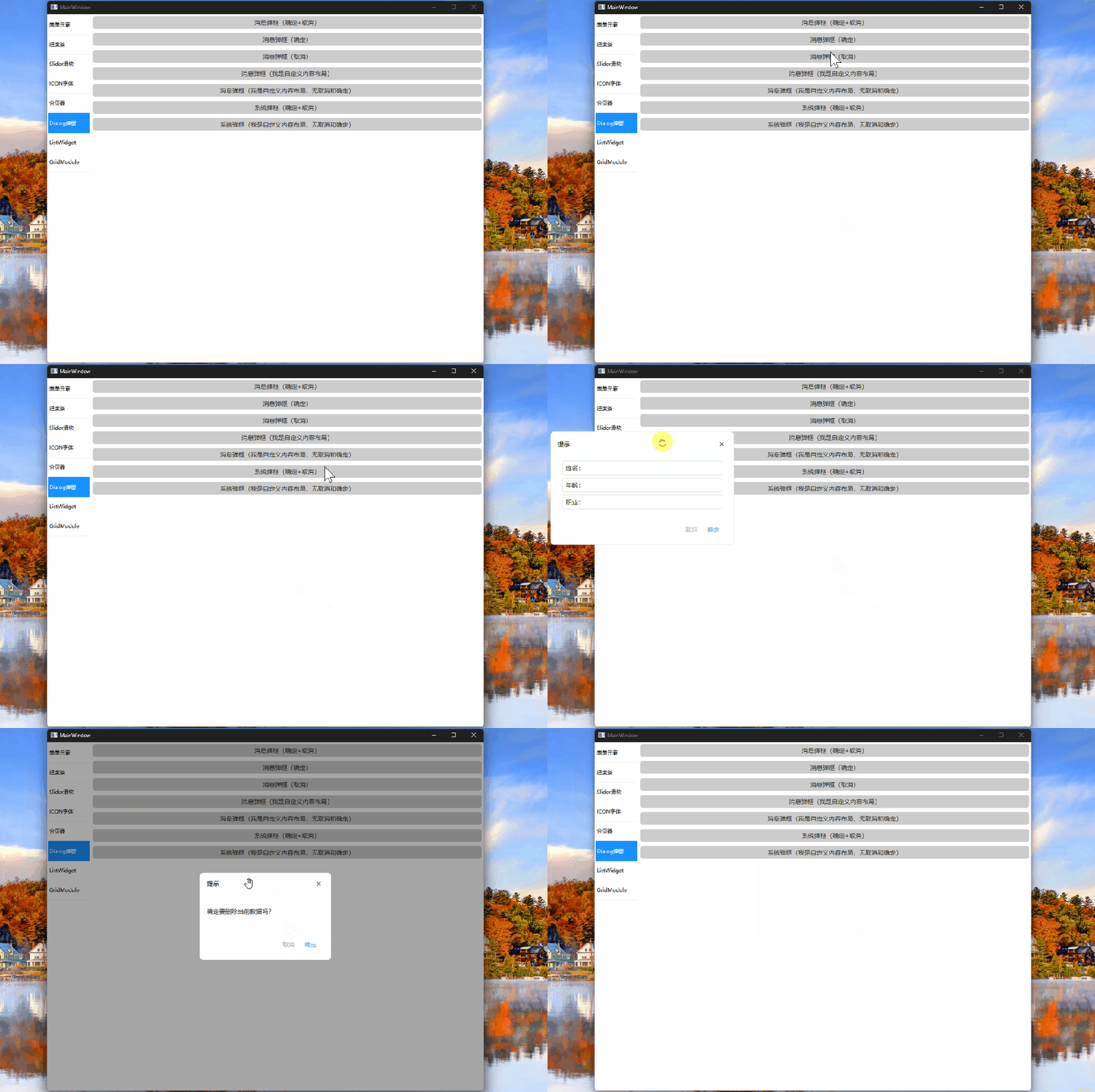
上图为2种逻辑:
1. 自定义widget 获取属主window窗口 插入dialog到上层,只能在当前窗口中拖动。
2.使用系统的QDialog,是独立的窗口可以任意拖动。
3. 都可以设置title, 关闭回调,自定义按钮,中间内容自定义,拖动功能等
首先分析第一种“家教森严”型,源代码如下:
overlayDialog.h
#pragma once#include<QWidget>#include<QLabel>#include<QPushButton>class OverlayDialog : public QWidget{Q_OBJECTpublic:enum ButtonFlag {None = 0x0,Ok = 0x1,Cancel = 0x2};//定义一个新类型 如同 typedef QFlags<ButtonFlag> ButtonFlags;Q_DECLARE_FLAGS(ButtonFlags, ButtonFlag)// 快捷接口static OverlayDialog* showMessage(QWidget* anyWidget,const QString& title,const QString& message,ButtonFlags buttons = Ok,int panelWidth = 300,int panelHeight = 200);// 自定义static OverlayDialog* showCustom(QWidget* anyWidget,const QString& title,QWidget* customContent,ButtonFlags buttons = Ok,int panelWidth = 420,int panelHeight = 260);signals:voidaccepted();voidrejected();voidclosed();protected:booleventFilter(QObject* obj, QEvent* event)override;voidmousePressEvent(QMouseEvent* event)override;voidkeyPressEvent(QKeyEvent* event)override;private:explicitOverlayDialog(QWidget* root, int panelWidth, int panelHeight);voidinitUi();voidsetTitle(const QString& title);voidsetMessage(const QString& message);voidsetCustomContent(QWidget* widget);voidsetButtons(ButtonFlags flags);voidcenterPanel();voidcloseDialog();private:QWidget* m_root = nullptr;QWidget* m_header = nullptr;QWidget* m_panel = nullptr;QWidget* m_contentArea = nullptr;QLabel* m_titleLabel = nullptr;QLabel* m_messageLabel = nullptr;QPushButton* m_okBtn = nullptr;QPushButton* m_cancelBtn = nullptr;int m_panelWidth = 420;int m_panelHeight = 260;bool m_dragging = false;QPoint m_dragStartPos; // 鼠标按下的全局位置QPoint m_panelStartPos; // 面板初始位置};//给 ButtonFlags 生成这些运算符://operator|//operator&//operator|=//operator&=//operator~Q_DECLARE_OPERATORS_FOR_FLAGS(OverlayDialog::ButtonFlags)
overlayDialog.cpp
#include"overlaydialog.h"#include<QPropertyAnimation>#include<QVBoxLayout>#include<QHBoxLayout>#include<QEvent>#include<QMouseEvent>#include<QKeyEvent>#include<QParallelAnimationGroup>#include<qgraphicseffect.h>OverlayDialog::OverlayDialog(QWidget* root, int panelWidth, int panelHeight): QWidget(root), m_root(root), m_panelWidth(panelWidth), m_panelHeight(panelHeight){setAttribute(Qt::WA_StyledBackground);setFocusPolicy(Qt::StrongFocus);setStyleSheet("background-color: rgba(0,0,0,90);");setGeometry(root->rect());raise();root->installEventFilter(this);initUi();}voidOverlayDialog::initUi(){// ===== 面板 =====m_panel = new QWidget(this);m_panel->setFixedSize(this->m_panelWidth, this->m_panelHeight);m_panel->setStyleSheet("background: white;""border-radius: 8px;");auto mainLayout = new QVBoxLayout(m_panel);mainLayout->setContentsMargins(16, 12, 16, 12);mainLayout->setSpacing(12);// ===== 头部 =====m_header = new QWidget(m_panel);m_header->setCursor(Qt::OpenHandCursor); // ⭐ 悬停提示m_header->installEventFilter(this);auto headerLayout = new QHBoxLayout(m_header);headerLayout->setContentsMargins(0, 0, 0, 0);m_titleLabel = new QLabel("Title");m_titleLabel->setStyleSheet("font-weight: bold; font-size: 14px;");auto closeBtn = new QPushButton("✕");closeBtn->setCursor(Qt::PointingHandCursor);closeBtn->setFixedSize(24, 24);closeBtn->setStyleSheet("QPushButton { border: none; background: transparent; }""QPushButton:hover { color: red; }");connect(closeBtn, &QPushButton::clicked, this, &OverlayDialog::closeDialog);headerLayout->addWidget(m_titleLabel);headerLayout->addStretch();headerLayout->addWidget(closeBtn);// ===== 内容区 =====m_contentArea = new QWidget(m_panel);auto contentLayout = new QVBoxLayout(m_contentArea);contentLayout->setContentsMargins(0, 0, 0, 0);m_messageLabel = new QLabel;m_messageLabel->setWordWrap(true);contentLayout->addWidget(m_messageLabel);// ===== 底部按钮 =====auto footer = new QWidget(m_panel);auto footerLayout = new QHBoxLayout(footer);footerLayout->addStretch();m_okBtn = new QPushButton("确定");m_cancelBtn = new QPushButton("取消");m_okBtn->setStyleSheet("QPushButton { color: #409eff; border: none; background: transparent; }""QPushButton:hover { color: #90409eff; }");m_cancelBtn->setStyleSheet("QPushButton { color: #999999; border: none; background: transparent; }""QPushButton:hover { color: #90999999; }");connect(m_okBtn, &QPushButton::clicked, this, [=]() {emit accepted();closeDialog();});connect(m_cancelBtn, &QPushButton::clicked, this, [=]() {emit rejected();closeDialog();});footerLayout->addWidget(m_cancelBtn);footerLayout->addWidget(m_okBtn);mainLayout->addWidget(m_header);mainLayout->addWidget(m_contentArea, 1);mainLayout->addWidget(footer);centerPanel();}OverlayDialog* OverlayDialog::showMessage(QWidget* anyWidget,const QString& title,const QString& message,ButtonFlags buttons,int panelWidth,int panelHeight){QWidget* root = anyWidget->isWindow() ? anyWidget : anyWidget->window();auto dlg = new OverlayDialog(root, panelWidth, panelHeight);dlg->setTitle(title);dlg->setMessage(message);dlg->setButtons(buttons);dlg->show();dlg->raise();dlg->activateWindow();return dlg;}OverlayDialog* OverlayDialog::showCustom(QWidget* anyWidget,const QString& title,QWidget* customContent,ButtonFlags buttons,int panelWidth,int panelHeight){QWidget* root = anyWidget->isWindow() ? anyWidget : anyWidget->window();auto dlg = new OverlayDialog(root, panelWidth, panelHeight);dlg->setTitle(title);dlg->setCustomContent(customContent);dlg->setButtons(buttons);dlg->show();dlg->raise();dlg->activateWindow();return dlg;}voidOverlayDialog::setTitle(const QString& title){m_titleLabel->setText(title);}voidOverlayDialog::setMessage(const QString& message){m_messageLabel->setText(message);}voidOverlayDialog::setCustomContent(QWidget* widget){delete m_messageLabel;m_messageLabel = nullptr;widget->setParent(m_contentArea);m_contentArea->layout()->addWidget(widget);}voidOverlayDialog::setButtons(ButtonFlags flags){m_okBtn->setVisible(flags & Ok);m_cancelBtn->setVisible(flags & Cancel);}voidOverlayDialog::centerPanel(){m_panel->move((width() - m_panel->width()) / 2,(height() - m_panel->height()) / 2);}boolOverlayDialog::eventFilter(QObject* obj, QEvent* event){if (obj == m_root && event->type() == QEvent::Resize) {setGeometry(m_root->rect());centerPanel();return false;}// ===== 标题栏拖动 =====if (obj == m_header) {switch (event->type()) {case QEvent::MouseButtonPress: {auto* e = static_cast<QMouseEvent*>(event);if (e->button() == Qt::LeftButton) {m_dragging = true;m_dragStartPos = e->globalPosition().toPoint();m_panelStartPos = m_panel->pos();m_header->setCursor(Qt::ClosedHandCursor);return true;}break;}case QEvent::MouseMove: {if (m_dragging) {auto* e = static_cast<QMouseEvent*>(event);QPoint delta = e->globalPosition().toPoint() - m_dragStartPos;m_panel->move(m_panelStartPos + delta);return true;}break;}case QEvent::MouseButtonRelease: {m_dragging = false;m_header->setCursor(Qt::OpenHandCursor);return true;}case QEvent::Leave:m_header->setCursor(Qt::ArrowCursor);break;case QEvent::Enter:m_header->setCursor(Qt::OpenHandCursor);break;}}return QWidget::eventFilter(obj, event);}voidOverlayDialog::mousePressEvent(QMouseEvent* event){if (!m_panel->geometry().contains(event->pos())) {closeDialog();}}voidOverlayDialog::keyPressEvent(QKeyEvent* event){if (event->key() == Qt::Key_Escape)closeDialog();}voidOverlayDialog::closeDialog(){if (m_root)m_root->removeEventFilter(this);emit closed();deleteLater();}
ok 上面是第一种,下面是放飞自由型,使用系统的QDialog插件
SystemDialog.h
#pragma once#include<QDialog>class QLabel;class QPushButton;class QWidget;class SystemDialog : public QDialog{Q_OBJECTpublic:enum ButtonFlag {None = 0x0,Ok = 0x1,Cancel = 0x2};//定义一个新类型 如同 typedef QFlags<ButtonFlag> ButtonFlags;Q_DECLARE_FLAGS(ButtonFlags, ButtonFlag)explicitSystemDialog(QWidget* parent = nullptr, int panelWidth = 420, int panelHeight = 260);// ===== API =====voidsetTitle(const QString& title);voidsetMessage(const QString& message);voidsetCustomContent(QWidget* widget);voidsetButtons(ButtonFlags flags);// 静态工厂(像 QMessageBox)static SystemDialog* showMessage(QWidget* parent,const QString& title,const QString& message,ButtonFlags buttons = ButtonFlags(),int panelWidth = 300,int panelHeight = 200);// 自定义static SystemDialog* showCustom(QWidget* anyWidget,const QString& title,QWidget* customContent,ButtonFlags buttons = ButtonFlags(),int panelWidth = 420,int panelHeight = 260);signals:voidaccepted();voidrejected();voidclosed();protected:booleventFilter(QObject* obj, QEvent* event)override;private:voidinitUi();private:QWidget* m_header = nullptr;QLabel* m_titleLabel = nullptr;QLabel* m_messageLabel = nullptr;QWidget* m_contentArea = nullptr;QPushButton* m_okBtn = nullptr;QPushButton* m_cancelBtn = nullptr;// 拖动相关bool m_dragging = false;QPoint m_dragStartPos;QPoint m_windowStartPos;int m_panelWidth = 420;int m_panelHeight = 260;};Q_DECLARE_OPERATORS_FOR_FLAGS(SystemDialog::ButtonFlags)
SystemDialog.cpp
#include"systemdialog.h"#include<QVBoxLayout>#include<QHBoxLayout>#include<QLabel>#include<QPushButton>#include<QMouseEvent>SystemDialog::SystemDialog(QWidget* parent, int panelWidth, int panelHeight): QDialog(parent),m_panelWidth(panelWidth), m_panelHeight(panelHeight){setWindowFlags(Qt::Dialog | Qt::FramelessWindowHint);setModal(true);//setAttribute(Qt::WA_StyledBackground);//设置背景透明setAttribute(Qt::WA_TranslucentBackground);//设置高宽setFixedSize(panelWidth, panelHeight);initUi();}void SystemDialog::initUi(){// ===== 外层透明布局 =====auto outerLayout = new QVBoxLayout(this);outerLayout->setContentsMargins(0, 0, 0, 0);outerLayout->setSpacing(0);// ===== 圆角主体容器(真正画背景的地方)=====auto *m_frame = new QWidget(this);m_frame->setObjectName("dialogFrame");m_frame->setStyleSheet("#dialogFrame{"" background: white;"" border-radius: 8px;"" border: 1px solid#eeeeee;""}");outerLayout->addWidget(m_frame);auto mainLayout = new QVBoxLayout(m_frame);mainLayout->setContentsMargins(16, 12, 16, 12);mainLayout->setSpacing(12);// ===== Header =====m_header = new QWidget(this);m_header->setFixedHeight(32);m_header->setCursor(Qt::OpenHandCursor);m_header->installEventFilter(this);auto headerLayout = new QHBoxLayout(m_header);headerLayout->setContentsMargins(0, 0, 0, 0);m_titleLabel = new QLabel("Title");m_titleLabel->setStyleSheet("font-weight: bold; font-size: 14px;");auto closeBtn = new QPushButton("✕");closeBtn->setFixedSize(24, 24);closeBtn->setCursor(Qt::PointingHandCursor);closeBtn->setFixedSize(24, 24);closeBtn->setStyleSheet("QPushButton { border: none; background: transparent; }""QPushButton:hover { color: red; }");connect(closeBtn, &QPushButton::clicked, this, [=]() {emit closed();close();});headerLayout->addWidget(m_titleLabel);headerLayout->addStretch();headerLayout->addWidget(closeBtn);// ===== Content =====m_contentArea = new QWidget(this);auto contentLayout = new QVBoxLayout(m_contentArea);contentLayout->setContentsMargins(0, 0, 0, 0);m_messageLabel = new QLabel;m_messageLabel->setWordWrap(true);contentLayout->addWidget(m_messageLabel);// ===== Footer =====auto footer = new QWidget(this);auto footerLayout = new QHBoxLayout(footer);footerLayout->addStretch();//占满剩余空间m_okBtn = new QPushButton("确定");m_cancelBtn = new QPushButton("取消");m_okBtn->setStyleSheet("QPushButton { color:#409eff; border: none; background: transparent; }""QPushButton:hover { color:#90409eff; }");m_cancelBtn->setStyleSheet("QPushButton { color:#999999; border: none; background: transparent; }""QPushButton:hover { color:#90999999; }");connect(m_okBtn, &QPushButton::clicked, this, [this]() {emit accepted();//关闭弹窗close();});connect(m_cancelBtn, &QPushButton::clicked, this, [this]() {emit rejected();//关闭弹窗close();});footerLayout->addWidget(m_cancelBtn);footerLayout->addWidget(m_okBtn);mainLayout->addWidget(m_header);mainLayout->addWidget(m_contentArea);mainLayout->addWidget(footer);}bool SystemDialog::eventFilter(QObject* obj, QEvent* event){if (obj == m_header) {switch (event->type()) {case QEvent::MouseButtonPress: {auto* e = static_cast<QMouseEvent*>(event);if (e->button() == Qt::LeftButton) {m_dragging = true;m_dragStartPos = e->globalPosition().toPoint();m_windowStartPos = pos();m_header->setCursor(Qt::ClosedHandCursor);return true;}break;}case QEvent::MouseMove: {if (m_dragging) {auto* e = static_cast<QMouseEvent*>(event);QPoint delta = e->globalPosition().toPoint() - m_dragStartPos;move(m_windowStartPos + delta);return true;}break;}case QEvent::MouseButtonRelease:m_dragging = false;m_header->setCursor(Qt::OpenHandCursor);return true;}}return QDialog::eventFilter(obj, event);}void SystemDialog::setTitle(const QString& title){m_titleLabel->setText(title);}void SystemDialog::setMessage(const QString& message){m_messageLabel->setText(message);}void SystemDialog::setCustomContent(QWidget* widget){delete m_messageLabel;m_messageLabel = nullptr;widget->setParent(m_contentArea);m_contentArea->layout()->addWidget(widget);}void SystemDialog::setButtons(ButtonFlags flags){m_okBtn->setVisible(flags & Ok);m_cancelBtn->setVisible(flags & Cancel);}SystemDialog* SystemDialog::showMessage(QWidget* parent,const QString& title,const QString& message,ButtonFlags buttons, int panelWidth,int panelHeight){auto dlg = new SystemDialog(parent, panelWidth,panelHeight);dlg->setTitle(title);dlg->setMessage(message);dlg->setButtons(buttons);dlg->show();return dlg;}SystemDialog* SystemDialog::showCustom(QWidget* anyWidget,const QString& title,QWidget* customContent,ButtonFlags buttons,int panelWidth,int panelHeight){QWidget* root = anyWidget->isWindow() ? anyWidget : anyWidget->window();auto dlg = new SystemDialog(root, panelWidth, panelHeight);dlg->setTitle(title);dlg->setCustomContent(customContent);dlg->setButtons(buttons);dlg->show();dlg->raise();dlg->activateWindow();return dlg;}
上面就是2种类型的dialog的全部源码,下面举例怎么使用。
dialogwidget.h
#ifndefDIALOGWIDGET_H#defineDIALOGWIDGET_H#include<QWidget>namespace Ui {class dialogwidget;}class dialogwidget : public QWidget{Q_OBJECTpublic:explicitdialogwidget(QWidget *parent = nullptr);~dialogwidget();private:Ui::dialogwidget *ui;};#endif// DIALOGWIDGET_H
dialogwidget.cpp
#include"dialogwidget.h"#include"ui_dialogwidget.h"#include<overlaydialog.h>#include<overlaydialogmycustomwidget.h>#include<systemdialog.h>dialogwidget::dialogwidget(QWidget *parent): QWidget(parent), ui(new Ui::dialogwidget){ui->setupUi(this);//消失提示,确认和取消connect(ui->pushButton, &QPushButton::clicked, [this]() {auto dlg = OverlayDialog::showMessage(this,"提示","确定要删除当前数据吗?",OverlayDialog::Ok | OverlayDialog::Cancel);connect(dlg, &OverlayDialog::accepted, this, []() {qDebug() << "用户点击了确定";});connect(dlg, &OverlayDialog::rejected, this, []() {qDebug() << "用户点击了取消";});connect(dlg, &OverlayDialog::closed, this, []() {qDebug() << "关闭了";});});//设置样式marginui->pushButton->setStyleSheet("QPushButton{margin: 5px;}");connect(ui->pushButton2, &QPushButton::clicked, [this]() {OverlayDialog::showMessage(this,"提示","我只有OK键吗?",OverlayDialog::Ok);});ui->pushButton2->setStyleSheet("QPushButton{margin: 5px;}");connect(ui->pushButton3, &QPushButton::clicked, [this]() {OverlayDialog::showMessage(this,"提示","我只有cannel键吗?",OverlayDialog::Cancel);});ui->pushButton3->setStyleSheet("QPushButton{margin: 5px;}");//我是自定义的组件widget ,替换掉OverlayDialog的widgetconnect(ui->pushButton4, &QPushButton::clicked, [this]() {auto custom = new OverlayDialogMyCustomWidget();OverlayDialog::showCustom(this,"我是自定义的内容widget",custom,OverlayDialog::Ok | OverlayDialog::Cancel);});ui->pushButton4->setStyleSheet("QPushButton{margin: 5px;}");//我是自定义的组件widget ,替换掉OverlayDialog的widget,无取消和确定按钮connect(ui->pushButton5, &QPushButton::clicked, [this]() {auto custom = new OverlayDialogMyCustomWidget();OverlayDialog::showCustom(this,"我是自定义的内容widget,无取消和确定按钮",custom,OverlayDialog::None);});ui->pushButton5->setStyleSheet("QPushButton{margin: 5px;}");//系统自带的dialog插件connect(ui->pushButton6, &QPushButton::clicked, [this]() {auto dlg = SystemDialog::showMessage(this,"提示","我是系统弹框?",SystemDialog::Ok | SystemDialog::Cancel);connect(dlg, &SystemDialog::accepted, this, []() {qDebug() << "用户点击了确定";});connect(dlg, &SystemDialog::rejected, this, []() {qDebug() << "用户点击了取消";});connect(dlg, &SystemDialog::closed, this, []() {qDebug() << "用户点击了关闭";});});ui->pushButton6->setStyleSheet("QPushButton{margin: 5px;}");//系统dialog的自定义内容connect(ui->pushButton7, &QPushButton::clicked, [this]() {auto custom = new OverlayDialogMyCustomWidget();auto dlg = SystemDialog::showCustom(this,"提示",custom,SystemDialog::Ok | SystemDialog::Cancel);connect(dlg, &SystemDialog::accepted, this, []() {qDebug() << "用户点击了确定";});connect(dlg, &SystemDialog::rejected, this, []() {qDebug() << "用户点击了取消";});connect(dlg, &SystemDialog::closed, this, []() {qDebug() << "用户点击了关闭";});});ui->pushButton7->setStyleSheet("QPushButton{margin: 5px;}");}dialogwidget::~dialogwidget(){delete ui;}
dialogwidget.ui
<?xml version="1.0" encoding="UTF-8"?><uiversion="4.0"><class>dialogwidget</class><widgetclass="QWidget"name="dialogwidget"><propertyname="geometry"><rect><x>0</x><y>0</y><width>320</width><height>240</height></rect></property><propertyname="windowTitle"><string>Form</string></property><layoutclass="QVBoxLayout"name="verticalLayout_2"><propertyname="spacing"><number>0</number></property><propertyname="leftMargin"><number>0</number></property><propertyname="topMargin"><number>0</number></property><propertyname="rightMargin"><number>0</number></property><propertyname="bottomMargin"><number>0</number></property><item><layoutclass="QVBoxLayout"name="verticalLayout"><propertyname="spacing"><number>0</number></property><item><widgetclass="QPushButton"name="pushButton"><propertyname="text"><string>消息弹框(确定+取消)</string></property></widget></item><item><widgetclass="QPushButton"name="pushButton2"><propertyname="text"><string>消息弹框(确定)</string></property></widget></item><item><widgetclass="QPushButton"name="pushButton3"><propertyname="text"><string>消息弹框(取消)</string></property></widget></item><item><widgetclass="QPushButton"name="pushButton4"><propertyname="text"><string>消息弹框(我是自定义内容布局)</string></property></widget></item><item><widgetclass="QPushButton"name="pushButton5"><propertyname="text"><string>消息弹框(我是自定义内容布局,无取消和确定)</string></property></widget></item><item><widgetclass="QPushButton"name="pushButton6"><propertyname="text"><string>系统弹框(确定+取消)</string></property></widget></item><item><widgetclass="QPushButton"name="pushButton7"><propertyname="text"><string>系统弹框(我是自定义内容布局,无取消和确定)</string></property></widget></item><item><spacername="verticalSpacer"><propertyname="orientation"><enum>Qt::Orientation::Vertical</enum></property><propertyname="sizeHint"stdset="0"><size><width>20</width><height>40</height></size></property></spacer></item></layout></item></layout></widget><resources/><connections/></ui>
上面代码中 OverlayDialogMyCustomWidget是举例的自定义connent 的内容widget 就不贴代码了,如图:
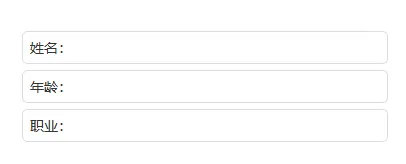
demo已经举例,隐藏按钮,设置title, 自定义内容消息等功能。
结尾
这两种插件的实现,本质上是我们在窗口坐标系与全局屏幕坐标系之间反复横跳的过程:
-
自定义 Widget 插件让我们学会了如何当一名严厉的“保安”,死死守住
pos()的边界,不让窗口踏出雷池一步。 -
QDialog 插件则让我们重新审视了 Qt 的窗口标志位(WindowFlags),看它是如何优雅地调戏操作系统的窗口管理器。
最后给各位同行的几句忠告:
-
关于拖动: 在计算
event->pos()的时候,千万分清什么是“相对位置”,什么是“绝对位置”。搞混了的话,你的窗口可能会在你点击的一瞬间,以量子穿梭的速度飞向屏幕左上角。 -
关于父子关系: 记住,一旦你给
QWidget设置了父窗口,它这辈子就很难逃出“五指山”了。如果你想让它既在里面待着,偶尔又能出去转转,那建议你考虑一下QDockWidget,或者……重新审视一下需求。
分页器也好,弹窗插件也罢,代码的终点永远是用户的顺心和我们的不加班。如果你在实现过程中发现窗口还是会“越狱”,或者 QDialog 消失在了次元空间,欢迎在评论区留言,我们一起抓虫!

▼点个「 」赞,是我持续更新的动力 ▼

