 夜雨聆风
夜雨聆风


RapidDoc:高速文档解析系统
RapidDoc – 高速文档解析系统
😺 项目介绍
RapidDoc 是一个轻量级、专注于文档解析的开源框架,支持 OCR、版面分析、公式识别、表格识别和阅读顺序恢复等多种功能,支持将复杂 PDF 文档转换为 Markdown、JSON、WORD、HTML 格式。
框架基于 Mineru[1] 二次开发,移除 VLM,专注于 Pipeline 产线下的高效文档解析,在 CPU 上也能保持不错的解析速度。
本项目所使用的核心模型主要来源于 PaddleOCR[2] 的 PP-StructureV3[3] 系列(OCR、版面分析、公式识别、阅读顺序恢复,以及部分表格识别模型),并已全部转换为 ONNX 格式,支持在 CPU/GPU 上高效推理。
KittyDoc 已经成为 RapidAI 开源家族成员
✨ 如果该项目对您有帮助,您的 star 是我不断优化的动力!!!
github 点击前往[4] gitee 点击前往[5]
👏 项目特点
-
OCR 识别
-
使用 RapidOCR[6] 支持多种推理引擎 -
CPU 下默认使用 OpenVINO,GPU 下默认使用 torch -
版面识别
-
PP-DocLayoutV2:自带阅读顺序,效果最好,默认使用 -
PP-DocLayout_plus-L:效果好运行稳定 -
PP-DocLayout-L:速度快,效果也不错 -
PP-DocLayout-S:速度极快,存在部分漏检 -
模型使用 PP-DocLayout系列 ONNX 模型(v2、plus-L、L、M、S) -
公式识别
-
PP-FormulaNet_plus-L:速度慢,支持 onnx -
PP-FormulaNet_plus-M:默认使用,支持 onnx 和 torch -
PP-FormulaNet_plus-S:速度最快,支持 onnx,复杂公式精度不够 -
使用 PP-FormulaNet_plus系列 ONNX 模型(L、M、S) -
支持配置只识别行间公式 -
cuda 环境,默认使用 torch 推理,公式模型 onnx gpu 推理会报错,暂时无人解决 PaddleOCR/issues/15125[7], PaddleX/issues/4238[8], Paddle2ONNX/issues/1593[9] -
表格识别
-
表格分类(区分有线/无线表格) -
有线表格识别 UNET[11] + SLANET_plus/UNITABLE(作为无线表格识别) -
基于 rapid_table_self[10] 增强,在原有基础上增强为多模型串联方案: -
阅读顺序恢复
-
使用 PP-StructureV3 阅读顺序恢复算法,基于 xycut 算法和版面的结果 -
速度快效果好,支持多栏、竖排等复杂版面,和 V3 不开启版面子模块检测效果一致 -
推理方式
-
所有模型通过 ONNXRuntime 推理,OCR 可配置其他推理引擎 -
除了 OCR 和 PP-DocLayout-M/S 模型,OpenVINO 推理会报错,暂时难以解决。PaddleOCR/issues/16277[12]
基准测试结果
1. OmniDocBench
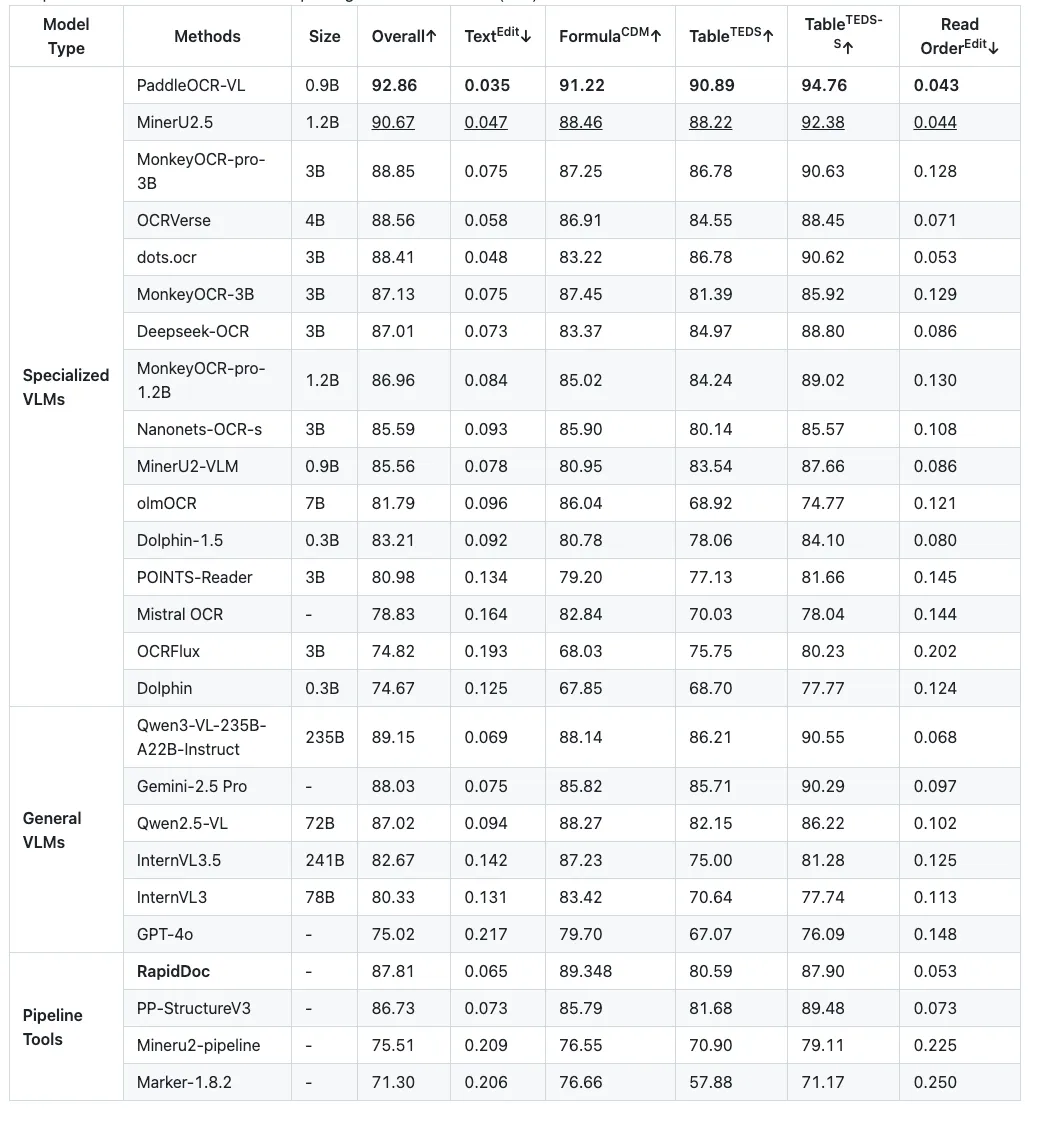
以下是 RapidDoc 在 OmniDocBench 上的评估结果。Pipeline 模型使用 PP-DocLayoutV2、PP-OCRv5-mobile、PP-FormulaNet_plus-M、UNET_SLANET_PLUS。
🛠️ 安装 RapidDoc
使用 pip 安装
pip install rapid-doc[cpu] -i https://mirrors.aliyun.com/pypi/simple或pip install rapid-doc[gpu] -i https://mirrors.aliyun.com/pypi/simple通过源码安装
# 克隆仓库git clone https://github.com/RapidAI/RapidDoc.gitcd RapidDoc# 安装依赖pip install -e .[cpu] -i https://mirrors.aliyun.com/pypi/simple或pip install -e .[gpu] -i https://mirrors.aliyun.com/pypi/simple使用 gpu 推理
# rapid-doc[gpu] 默认安装 onnxruntime-gpu 最新版# 需要确定onnxruntime-gpu与GPU对应,参考 https://onnxruntime.ai/docs/execution-providers/CUDA-ExecutionProvider.html#requirements# 在 Python 中指定 GPU(必须在导入 rapid_doc 之前设置)import os# 使用默认 GPU(cuda:0)os.environ['MINERU_DEVICE_MODE'] = "cuda"# 或指定 GPU 编号,例如使用第二块 GPU(cuda:1)os.environ['MINERU_DEVICE_MODE'] = "cuda:1"使用 docker 部署 RapidDoc
RapidDoc 提供了便捷的 docker 部署方式,这有助于快速搭建环境并解决一些棘手的环境兼容问题。
您可以在文档中获取 Docker 部署说明[13],镜像已推送至 Docker Hub[14]。
在线体验
基于 Gradio 的在线 demo
基于 gradio 开发的 webui,界面简洁,仅包含核心解析功能,免登录
URL:https://www.modelscope.cn/studios/RapidAI/RapidDoc
📋 使用示例
-
代码示例[15]
-
参数介绍[16]
-
FastAPI 示例[17]
模型下载
不指定模型路径,初次运行时,会自动下载
-
RapidDoc 模型集(版面/公式/表格)[18] -
RapidOCR 模型[19] -
部分表格模型 RapidTable[20]
📌 TODO
-
[x] 跨页表格合并 -
[x] 复选框识别,使用 opencv(默认关闭、opencv 识别存在误检) -
[x] 提供 fastapi,支持 cpu 和 gpu 版本的 docker 镜像构建 -
[x] 文本型 pdf,表格非 OCR 文本提取 -
[x] 文本型 pdf,使用 pypdfium2 提取文本框 bbox -
[x] 文本型 pdf,支持 0/90/270 度三个方向的表格解析 -
[x] 文本型 pdf,使用 pypdfium2 提取原始图片(默认截图会导致清晰度降低和图片边界可能丢失部分) -
[x] 表格内公式提取,表格内图片提取 -
[x] 优化阅读顺序,支持多栏、竖排等复杂版面恢复 -
[x] 公式支持 torch 推理,可用 GPU 加速 -
[x] 版面、表格模型支持 openvino -
[x] markdown 转 docx、html -
[x] 支持 PP-DocLayoutV2 版面识别+阅读顺序 -
[x] OmniDocBench 评测 -
[ ] 支持自定义的ocr、table、公式。支持PaddleOCR-VL系列 -
[ ] 公式支持openvino
🙏 致谢
-
MinerU[21] -
PaddleOCR & PP-StructureV3[22] -
RapidOCR[23]
⚖️ 开源许可
基于 MinerU[24] 改造而来,已移除原项目中的 YOLO 模型,并替换为 PP-StructureV3 系列 ONNX 模型。由于已移除 AGPL 授权的 YOLO 模型部分,本项目整体不再受 AGPL 约束。
该项目采用 Apache 2.0 license[25] 开源许可证。
参考资料
Mineru: https://github.com/opendatalab/MinerU
[2]PaddleOCR: https://github.com/PaddlePaddle/PaddleOCR
[3]PP-StructureV3: https://www.paddleocr.ai/main/version3.x/pipeline_usage/PP-StructureV3.html
[4]github 点击前往: https://github.com/RapidAI/RapidDoc
[5]gitee 点击前往: https://gitee.com/hzkitty/KittyDoc
[6]RapidOCR: https://github.com/RapidAI/RapidOCR
[7]PaddleOCR/issues/15125: https://github.com/PaddlePaddle/PaddleOCR/issues/15125
[8]PaddleX/issues/4238: https://github.com/PaddlePaddle/PaddleX/issues/4238
[9]Paddle2ONNX/issues/1593: https://github.com/PaddlePaddle/Paddle2ONNX/issues/1593
[10]rapid_table_self: rapid_doc/model/table/rapid_table_self
[11]有线表格识别 UNET: https://github.com/RapidAI/TableStructureRec
[12]PaddleOCR/issues/16277: https://github.com/PaddlePaddle/PaddleOCR/issues/16277
[13]Docker 部署说明: docker/README.md
[14]Docker Hub: https://hub.docker.com/r/hzkitty/rapid-doc
[15]代码示例: ./demo/demo.py
[16]参数介绍: ./docs/analyze_param.md
[17]FastAPI 示例: ./docker/README_API.md
[18]RapidDoc 模型集(版面/公式/表格): https://www.modelscope.cn/models/RapidAI/RapidDoc
[19]RapidOCR 模型: https://www.modelscope.cn/models/RapidAI/RapidOCR
[20]部分表格模型 RapidTable: https://www.modelscope.cn/models/RapidAI/RapidTable
[21]MinerU: https://github.com/opendatalab/MinerU
[22]PaddleOCR & PP-StructureV3: https://github.com/PaddlePaddle/PaddleOCR
[23]RapidOCR: https://github.com/RapidAI/RapidOCR
[24]MinerU: https://github.com/opendatalab/MinerU
[25]Apache 2.0 license: LICENSE

