 夜雨聆风
夜雨聆风


LAMP离线源码安装
1、LAMP环境搭建
1.1、安装apache
1.1.1、安装pcre
wget https://netix.dl.sourceforge.net/project/pcre/pcre/8.40/pcre-8.40.tar.gz
tar -xzf pcre-8.40.tar.gz
cd pcre-8.40/
./configure –prefix=/usr/local/pcre
make && make install
1.1.2、安装apr
wget https://mirrors.tuna.tsinghua.edu.cn/apache//apr/apr-1.6.5.tar.gz
tar -zxvf apr-1.6.5.tar.gz
cd apr-1.6.5
./configure –prefix=/usr/local/apr
make && make install
1.1.3、安装expat
wget https://github.com/libexpat/libexpat/releases/download/R_2_6_4/expat-2.6.4.tar.gz
tar -zxvf expat-2.6.4.tar.gz
cd expat-2.6.4
./configure –prefix=/usr/local/expat
make && make install
1.1.4、安装apr-util
wget http://mirror.bit.edu.cn/apache//apr/apr-util-1.6.1.tar.gz
tar -zxvf apr-util-1.6.1.tar.gz
cd apr-util-1.6.1
./configure –prefix=/usr/local/apr-util –with-apr=/usr/local/apr/ –with-expat=/usr/local/expat/
make && make install
1.1.5、安装httpd
wget http://mirror.bit.edu.cn/apache/httpd/httpd-2.4.34.tar.gz
tar -zxvf httpd-2.4.34.tar.gz
cd httpd-2.4.34
./configure –prefix=/usr/local/httpd –with-pcre=/usr/local/pcre/ –with-apr=/usr/local/apr –with-apr-util=/usr/local/apr-util/ –enable-so
make && make install
配置apache:
vi /usr/local/httpd/conf/httpd.conf
修改Server Name,去掉注释
ServerName localhost:80
cp /usr/local/httpd/bin/apachectl /etc/init.d/httpd
vi /etc/systemd/system/httpd.service
[Unit]
Description=The Apache HTTP Server
After=network.target remote-fs.target nss-lookup.target
[Service]
Type=forking
ExecStart=/etc/init.d/httpd start
ExecStop=/etc/init.d/httpd stop
ExecReload=/etc/init.d/httpd graceful
[Install]
WantedBy=multi-user.target
启动apache服务:
systemctl daemon-reload
systemctl start httpd
systemctl enable httpd
1.2、安装mysql
rpm -ivh libaio-0.3.109-13.el7.x86_64.rpm
解压mysql安装包:
wget https://cdn.mysql.com/archives/mysql-8.0/mysql-8.0.32-linux-glibc2.12-x86_64.tar
tar xvf mysql-8.0.32-linux-glibc2.12-x86_64.tar
tar -xf mysql-8.0.32-linux-glibc2.12-x86_64.tar.xz
mv mysql-8.0.32-linux-glibc2.12-x86_64 mysql
mv mysql /usr/local/
创建mysql用户和用户组:
groupadd mysql
useradd -r -g mysql -s /bin/false mysql
将安装目录所有者及所属组改为mysql ,并创建相关文件夹
cd /usr/local/
chown -R mysql:mysql /usr/local/mysql/
mkdir -p /data/mysql/
chown -R mysql:mysql /data/mysql/
添加环境变量:
echo “export PATH=$PATH:/usr/local/mysql/bin” >> /etc/profile
source /etc/profile
修改my.cnf配置文件:
tee > /etc/my.cnf << “EOF”
[mysqld]
user=mysql
port=3306
datadir = /data/mysql/data/
default_authentication_plugin=mysql_native_password
log_error=/data/mysql/mysql_error.err
max_connections=10000
max_connect_errors=10
character-set-server=utf8mb4
default-storage-engine=INNODB
[mysql]
default-character-set=utf8mb4
EOF
初始化mysql数据库:
cd /usr/local/mysql
sudo bin/mysqld –initialize –user=mysql
配置MySQL:
cp support-files/mysql.server /etc/init.d/mysqld.server
启动mysql:
systemctl daemon-reload
systemctl status mysql
systemctl start mysql
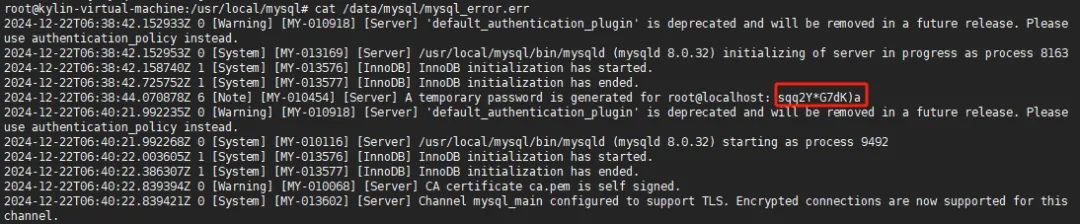
获取mysql初始密码:
cat /data/mysql/mysql_error.err
修改初始密码:
mysql -uroot -p’sqq2Y*G7dK)a’
mysql> alter user root@localhost identified by ‘zabbix@2025!’;
mysql> flush privileges;
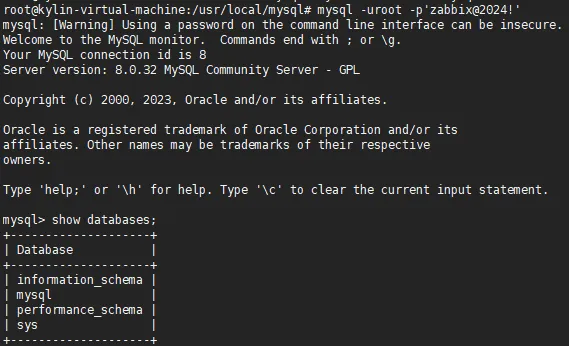
mysql -uroot -p’zabbix@2025!’
1.3、安装php
1.3.1、安装perl
wget https://www.cpan.org/src/5.0/perl-5.28.0.tar.gz
tar -zxvf perl-5.28.0.tar.gz
cd perl-5.28.0
./configure.gnu -des -Dprefix=/usr/local/perl -Dusethreads -Uversiononly
make
make install
export PKG_CONFIG_PATH=/usr/local/perl/lib/pkgconfig:$PKG_CONFIG_PATH
1.3.2、安装python-devel
rpm -ivh python-devel-2.7.5-94.el7_9.x86_64.rpm
rpm -ivh perl-Data-Dumper-2.145-3.el7.x86_64.rpm
1.3.3、安装libxml2
wget http://xmlsoft.org/sources/libxml2-2.9.6.tar.gz
tar -zxvf libxml2-2.9.6.tar.gz
cd libxml2-2.9.6
./configure –prefix=/usr/local/libxml2
make
make install
export PKG_CONFIG_PATH=/usr/local/libxml2/lib/pkgconfig:$PKG_CONFIG_PATH
1.3.4、安装zlib
wget http://zlib.net/zlib-1.2.11.tar.gz
tar -zxvf zlib-1.2.11.tar.gz
cd zlib-1.2.11
./configure
make
make install
1.3.5、安装bzip2
wget http://www.bzip.org/1.0.6/bzip2-1.0.6.tar.gz
tar -zxvf bzip2-1.0.6.tar.gz
cd bzip2-1.0.6
make -f Makefile-libbz2_so
make
make install
1.3.6、安装curl
wget https://curl.se/download/curl-7.80.0.tar.gz –no-check-certificate
tar -xvzf curl-7.80.0.tar.gz
cd curl-7.80.0
./configure –prefix=/usr/local/curl –without-ssl
make
make install
export PKG_CONFIG_PATH=/usr/local/curl/lib/pkgconfig:$PKG_CONFIG_PATH
1.3.7、安装Berkeley DB
wget http://download.oracle.com/berkeley-db/db-4.7.25.tar.gz
tar -zxvf db-4.7.25.tar.gz
cd db-4.7.25/build_unix
../dist/configure –prefix=/usr/local/berkeleyDB
make
make install
1.3.8、安装jpeg
wget http://www.ijg.org/files/jpegsrc.v9c.tar.gz
tar -zxvf jpegsrc.v9c.tar.gz
cd jpeg-9c/
./configure –prefix=/usr/local/jpeg –enable-shared –enable-static
make
make install
1.3.9、安装png
wget https://mirrors.omnios.org/libpng/libpng-1.6.35.tar.xz
tar -xf libpng-1.6.35.tar.xz
cd libpng-1.6.35
cp scripts/makefile.linux makefile
vi makefile
修改:
prefix=/usr/local/png
ZLIBLIB=/usr/local/zlib/lib
ZLIBINC=/usr/local/zlib/include
保存
make
make install
1.3.10、安装freetype
wget http://download.savannah.gnu.org/releases/freetype/freetype-2.5.3.tar.gz
tar -xvf freetype-2.5.3.tar.gz
cd freetype-2.5.3
./configure –prefix=/usr/local/freetype
make
make install
1.3.11、安装openldap
wget http://www.openldap.org/software/download/OpenLDAP/openldap-release/openldap-2.4.46.tgz
exportCPPFLAGS=”-I/usr/local/berkeleyDB/include -D_GNU_SOURCE”
exportLDFLAGS=”-L/usr/local/berkeleyDB/lib”
exportLD_LIBRARY_PATH=”/usr/local/berkeleyDB/lib”
tar -zxvf openldap-2.4.46.tgz
cd openldap-2.4.46
./configure –prefix=/usr/local/openldap
make depend
make
make install
1.3.12、安装sqlite
wget https://mirrors.aliyun.com/blfs/conglomeration/sqlite/sqlite-autoconf-3420000.tar.gz –no-check-certificate
tar -xzf sqlite-autoconf-3420000.tar.gz
cd sqlite-autoconf-3420000/
./configure –prefix=/usr/local/sqlite3
make -j2 && make install
export PKG_CONFIG_PATH=/usr/local/sqlite3/lib/pkgconfig:$PKG_CONFIG_PATH
1.3.13、安装m4
wget http://mirrors.kernel.org/gnu/m4/m4-1.4.13.tar.gz
cd m4-1.4.13
./configure
make && make install
1.3.14、安装autoconf
wget http://mirrors.kernel.org/gnu/autoconf/autoconf-2.65.tar.gz
tar -xzf autoconf-2.65.tar.gz
cd autoconf-2.65/
./configure –prefix=/usr/local
make
make install
1.3.15、安装automake
wget http://mirrors.kernel.org/gnu/automake/automake-1.11.tar.gz
tar -xzf automake-1.11.tar.gz
cd automake-1.11/
./configure
make
make install
1.3.16、安装libtool
wget http://mirrors.kernel.org/gnu/libtool/libtool-2.2.6b.tar.gz
tar -xzf libtool-2.2.6b.tar.gz
cd libtool-2.2.6b/
./configure
make
make install
1.3.17、安装oniguruma
wget https://github.com/kkos/oniguruma/archive/v6.9.4.tar.gz -O oniguruma-6.9.4.tar.gz –no-check-certificate
tar -xzf oniguruma-6.9.4.tar.gz
cd oniguruma-6.9.4/
./autogen.sh
./configure
make
make install
export PKG_CONFIG_PATH=/usr/local/lib/pkgconfig:$PKG_CONFIG_PATH
1.3.18、安装php
wget https://www.php.net/distributions/php-8.3.3.tar.gz
tar -zxvf php-8.3.3.tar.gz
cd php-8.3.3
./configure –prefix=/usr/local/php \
–enable-fpm\
–with-config-file-path=/usr/local/php/etc/ \
–with-pdo_mysql \
–with-bz2 \
–with-iconv-dir \
–with-zlib-dir \
–enable-soap \
–enable-mbstring \
–enable-exif \
–enable-sockets \
–enable-pcntl \
–disable-debug \
–with-db4=/usr/local/berkeleyDB/ \
–with-gd \
–with-curl=/usr/local/curl/ \
–enable-gd-native-ttf \
–enable-zip \
–enable-bcmath \
–with-gettext \
–with-apxs2=/usr/local/httpd/bin/apxs \
–with-png-dir=/usr/local/png/ \
–with-jpeg-dir=/usr/local/jpeg/ \
–with-freetype-dir=/usr/local/freetype/ \
–enable-shared \
–with-ldap=/usr/local/openldap/ \
–with-mysqli \
–enable-static \
–with-libxml-dir=/usr/local/libxml2/
make -j 2
make install
配置PHP相关配置文件:
cp sapi/fpm/php-fpm.conf /usr/local/php/etc/
cp php.ini-production /usr/local/php/etc/php.ini
cp /usr/local/php/etc/php-fpm.d/www.conf.default /usr/local/php/etc/php-fpm.d/www.conf
cp sapi/fpm/php-fpm.service /usr/lib/systemd/system/
sed -i ‘s@max_execution_time = 30@max_execution_time = 300@g’ /usr/local/php/etc/php.ini
sed -i ‘s@max_input_time = 60@max_input_time = 300@g’ /usr/local/php/etc/php.ini
sed -i ‘s@post_max_size = 8M@post_max_size = 500M@g’ /usr/local/php/etc/php.ini
sed -i ‘s@memory_limit = 128M@memory_limit = 1024M@g’ /usr/local/php/etc/php.ini
sed -i ‘s@upload_max_filesize = 2M@upload_max_filesize = 500M@g’ /usr/local/php/etc/php.ini
sed -i ‘s@;date.timezone =@date.timezone = Asia/Shanghai@g’ /usr/local/php/etc/php.ini
sed -i ‘s@mysqli.default_socket =@mysqli.default_socket = /tmp/mysql.sock@g’ /usr/local/php/etc/php.ini
sed -i ‘s@;pid = run/php-fpm.pid@pid = /usr/local/php/var/run/php-fpm.pid@g’ /usr/local/php/etc/php-fpm.conf
sed -i ‘s/user = php/user = php/g’ /usr/local/php/etc/php-fpm.d/www.conf
sed -i ‘s/group = php/group = php/g’ /usr/local/php/etc/php-fpm.d/www.conf
sed -i ‘s/listen = 127.0.0.1:9000/listen = 127.0.0.1:9000/g’ /usr/local/php/etc/php-fpm.d/www.conf
sed -i ‘s/;listen.owner = php/listen.owner = php/g’ /usr/local/php/etc/php-fpm.d/www.conf
sed -i ‘s/;listen.group = php/listen.group = php/g’ /usr/local/php/etc/php-fpm.d/www.conf
sed -i ‘s/;listen.mode = 0660/listen.mode = 0660/g’ /usr/local/php/etc/php-fpm.d/www.conf
useradd -s /sbin/nologin -M php
vi /usr/lib/systemd/system/php-fpm.service
[Unit]
Description=The PHP FastCGI Process Manager
After=syslog.target network.target
[Service]
Type=simple
PIDFile=/usr/local/php/var/run/php-fpm.pid
ExecStart=/usr/local/php/sbin/php-fpm –nodaemonize –fpm-config /usr/local/php/etc/php-fpm.conf
ExecReload=/bin/kill -USR2 $MAINPID
[Install]
WantedBy=multi-user.target
检测配置文件:
/usr/local/php/sbin/php-fpm -t
启动php-fpm:
systemctl daemon-reload
systemctl start php-fpm
systemctl enable php-fpm
配置apache支持解析PHP:
vi /usr/local/httpd/conf/httpd.conf
在
AddType application/x-compress .Z
AddType application/x-gzip .gz .tgz
后面添加
AddType application/x-httpd-php .php
AddType application/x-httpd-php-source .phps
在行添加Indexphp
DirectoryIndex index.html Indexphp
重启apache:
systemctl restart httpd
systemctl status httpd

