夜雨聆风
夜雨聆风


偷梁换柱解决iOS App打包问题
上一个版本打包还好好的,发新版时使用Transporter打包ipa包时被打回来了。
提示如下:ITMS-90426: Invalid Swift Support - The SwiftSupport folder is missing. Rebuild your app using the current public (GM) version of Xcode and resubmit it.
也就是说缺少SwiftSupport文件夹。
由于我是HBuilder云打包,不是XCode本地打包,所以只能对.ipa作手脚了,先是从前一版本的正常能提交的ipa里解压出来SwiftSupport,再加进新的.ipa包里。具体操作就简单的,先将.ipa后缀名我以为成.zip,解压后连同旧版的SwiftSupport压缩最后将.zip改回.ipa就好了。
如图将Payload与SwiftSupport选中右键压缩最后重命名为unit.ipa就好。
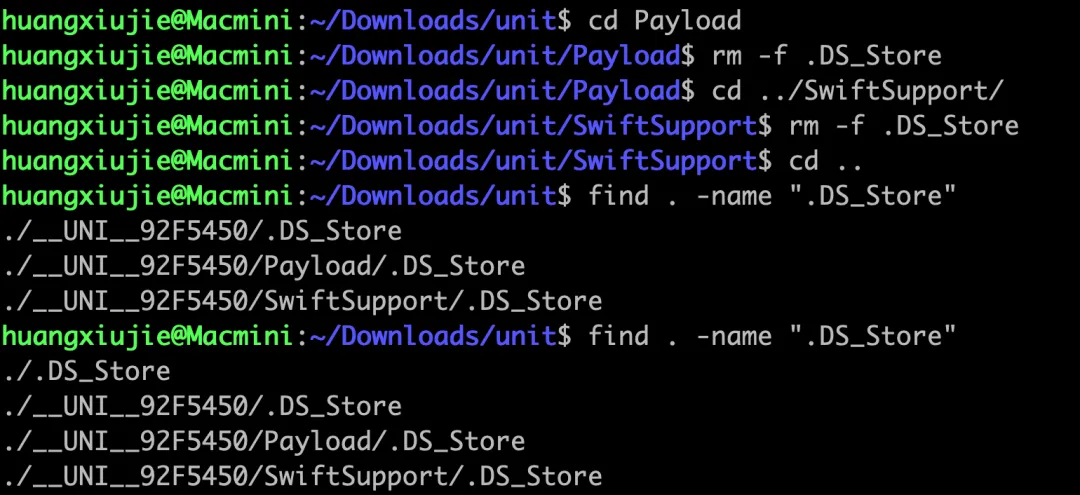
期间还有一个小插曲,经过上述操作提交ipa还是被Transporter打回来了,理由是ITMS-90430: Invalid Swift Support - The file .DS_Store doesn’t have a signing ID. Sign the file, rebuild your app using the current public (GM) version of Xcode, and resubmit it.原因是在Finder里操作,会有万恶的.DS_Store这个文件,而它在Finder又不是可见了,于是就使用终端,使用命令行查看文件在哪儿然后删除它就行了。
find . -name ".DS_Store"
./Payload/.DS_Store
./SwiftSupport/.DS_Store
rm -f .DS_Store