 夜雨聆风
夜雨聆风


uni-app开发极简入门(10):HTTP网络请求
-
GET、POST请求的各平台兼容性最高,本文就仅考虑这两种。
-
uni-app有很多第三方封装的拦截器可用,按需选择。本文仅做基于uni-app官方的HTTP请求API。
-
展示和上传图片功能对应的服务端是我自己写的,但通常情况下,大家应该都是用各种云提供的OSS,按照官方文档处理即可,我只是演示一下uni-app相关API(chooseImage、uploadFile)。
-
服务端代码就不写了,大家手头有现成的就用现成的,没有的可以参考写给前端的Mock Server一文。
创建common/params.ts:
export interface BaseResponse<T> {code: numbermsg: stringdata: T}export interface Page<T>{currentPage:numberpageSize:numbertotal:numberlist:T}
创建pages/user/userVo.ts:
export interface UserDetail {id : stringname : stringidCard : stringphone : stringgender : stringbirthDate : stringaddress : string}
结合以前讲TypeScript的文章,不解释了。
创建utils/request.ts:
import { BaseResponse } from "../common/params"import { useTokenStore } from '@/stores/token'const baseURL = 'https://www.example.com/api' //仅为示例,非真实的接口地址export const request = <T>(options : UniApp.RequestOptions) => {uni.showLoading({ title: '加载中...', mask: true });const tokenStore = useTokenStore();if (tokenStore.hasToken) {options.header = {...options.header,"jwt-token": tokenStore.token}}return new Promise<BaseResponse<T>>((resolve, reject) => {uni.request({...options,url: baseURL + options.url,success: (res) => {if (res.statusCode >= 200 && res.statusCode < 300) {resolve(res.data as BaseResponse<T>)} else {reject(res)}},fail: (err) => {reject(err)},complete: () => {uni.hideLoading()}})})}
创建pages/reqDemo/reqDemo.vue:
<template><divclass='reqDemo'><h1>用户列表</h1><buttontype="default" @click="getUserList">POST请求</button>{{userList}}<h1>用户详情</h1><buttontype="default" @click="getUserById">GET请求</button>{{userDetail}}<h1>上传图片</h1><buttontype="default" @click="uploadImg">上传图片</button><image:src="imgSrc"mode="scaleToFill"></image></div></template><scriptlang='ts'setupname='ReqDemo'>import {Ref,ref} from 'vue'import {BaseResponse,Page} from '../../common/params'import {UserDetail} from '../user/userVo'import {request} from '../../utils/request'// POST请求const userList: Ref < UserDetail[] > = ref < UserDetail[] > ([])const getUserList = async () => {try {const res = await request < BaseResponse < Page < UserDetail[] >>> ({url: '/user/page',method: 'POST',data: {page: 1,pageSize: 5}})if (res.code === 0) {const response = res.data as unknown as Page < UserDetail[] > ;userList.value = response.listuni.showToast({title: '列表获取成功',icon: 'success'})} else {throw new Error(res.msg)}} catch (error) {uni.showToast({title: '异常:' + error.message,icon: 'none'})console.error('POST请求错误:', error)} finally {console.log("POST网络请求结束");}}// GET请求// 用户详情数据const userDetail: Ref < UserDetail > = ref < UserDetail > ({id: '-',name: '-',idCard: '-',phone: '-',gender: 'male',birthDate: '2021-01-01',address: '-'})const getUserById = async () => {try {const res = await request < BaseResponse < UserDetail >> ({url: '/user/getUserById',data: {userId: "1"}})if (res.code === 0) {const response = res.data as unknown as UserDetailuserDetail.value = responseuni.showToast({title: '用户详情获取成功',icon: 'success'})} else {throw new Error(res.msg)}} catch (error) {uni.showToast({title: '异常:' + error.message,icon: "error"})console.error('GET请求错误:', error)} finally {console.log("GET网络请求结束");}}//上传图片const imgSrc:Ref<string>=ref<string>("随便一个图片URL地址")const uploadImg = () => {uni.chooseImage({success: (chooseImageRes) => {const tempFilePaths = chooseImageRes.tempFilePaths;const uploadTask = uni.uploadFile({url: 'https://www.example.com/api/upload', //仅为示例,非真实的接口地址filePath: tempFilePaths[0],name: 'file',success: (uploadFileRes) => {console.log("上传成功:", uploadFileRes);console.log("图片地址:",JSON.parse(uploadFileRes.data).data.newFileName);imgSrc.value="https://www.example.com/uploads/"+JSON.parse(uploadFileRes.data).data.newFileName},fail: uploadFileRes => {console.error('上传失败', uploadFileRes);}});uploadTask.onProgressUpdate((res) => {console.log('上传进度' + res.progress);console.log('已经上传的数据长度' + res.totalBytesSent);console.log('预期需要上传的数据总长度' + res.totalBytesExpectedToSend);// 测试条件,取消上传任务。// if (res.progress > 50) {// uploadTask.abort();// }});}});}</script><stylescoped>.reqDemo {background-color: wheat;}</style>
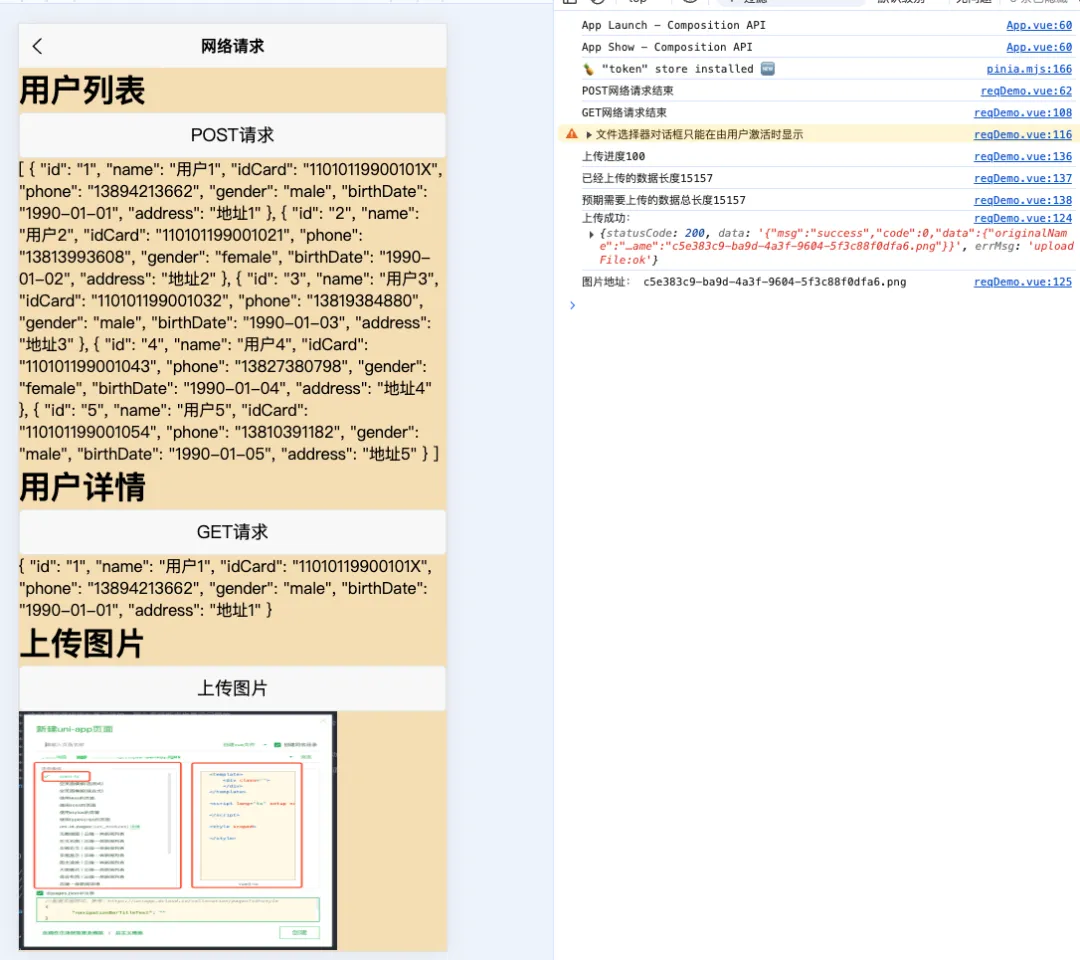
这里额外多说一个大家可能会遇到的问题。
看我们上面的代码,我们发HTTP请求的时候,为了用户友好,并防重复请求,都会显示加载的提示框,并在HTTP请求结束后将其隐藏。为了统一操作,节省代码,其对应的就是request.ts里的
uni.showLoading({ title: '加载中...', mask: true })uni.hideLoading()
在进行业务开发时,为了通用性,我们通常会将某个请求封装成一个方法(例如getUserById()),真正使用的时候,还是有很多上下文逻辑,一般是通过其他方法来调用,例如页面有个重置按钮,前后做一些逻辑处理,中间getUserById,弹出个显示信息什么的,例如:
const handleReset = () => {// 一些其他逻辑...// 重新加载原始数据getUserById()uni.showToast({title: '重置成功!',icon: 'success'})// 一些其他逻辑...}
很直接的代码,但是这么写,控制台一般会报“请注意 showLoading 与 hideLoading 必须配对使用”,如下图:

很多人就摸不着头脑了,因为代码里showLoading、hideLoading就是配对使用的,为什么报这个错。
直接揭晓答案:因为用了其他弹出框,例如showToast。showLoading和showToast使用的同一个实例,handleReset的代码是异步的,getUserById整个代码没执行完,它的showLoading,被下面的showToast给冲掉了,最后hideLoading自然找不到对应的实例,就报异常了。
解决方案也简单:
第一种:无视告警。反正也不影响程序的正常运行,用户也看不到控制台,眼不见心不烦就行。
你说我有强迫症,必须搞掉这个告警,那就第二种,上同步:
const handleReset = async () => {// 一些其他逻辑...// 重新加载原始数据await getUserById()uni.showToast({title: '重置成功!',icon: 'success'})// 一些其他逻辑...}
等HTTP请求hideLoading之后,再showToast。
但是也有人说了,一切HTTP请求都同步,性能不给力,还是想搞异步,那就第三种:request.ts不再统一处理loading提示框,交由上层的function独立处理,且hideLoading必须放在showToast的前面。
大家有兴趣可以去uni-app官网看看,这个问题,2019年就存在了,2025年5月份还有人讨论这个问题。
再补充几句,即便是按照上面的写法,哪怕是不加uni.showToast了,在微信小程序真机调试模式下(注意是真机调试,不是在微信开发工具上调试),控制台依然会报“hideLoading:fail toast can’t be found”,如图:
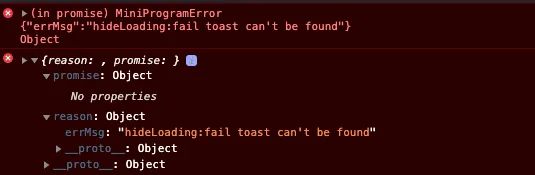
原因我也懒得查了,要么无视,要么直接去微信开发工具修改代码。
通过uni-app编译过去的微信小程序代码如:
// 对应的uni-app代码// uni.showLoading({ title: '加载中...', mask: true })// 编译后的微信小程序代码common_vendor.index.showLoading({ title: "加载中...", mask: true });// 手动修改为// wx.showLoading({ title: "加载中...", mask: true });// 对应的uni-app代码// uni.hideLoading()// 编译后的微信小程序代码common_vendor.index.hideLoading();// 手动修改为// wx.hideLoading();
报错就消失了。
我说什么来着,兼容性是个大问题吧!!

