 夜雨聆风
夜雨聆风


为了优雅的敲代码,搓了个 vite 插件搞定了 vue3 中的 svg 图标名称自动提示问题
本文约 1400 字,阅读完大约 6 分钟。
HELLO ,这里是大熊的项目开发笔记。
分享开发中遇到的各种奇奇怪怪的需求与问题~
本文是基于 vite-plugin-svg-icons 插件功能,完善了一下自动提示效果。
阅读此文章之前,建议先看看 vite-plugin-svg-icons 这个插件用法:vite-plugin-svg-icons:vite/vue3 项目中自定义 svg 图标的高效管理方式
就像前面文章最后提到的,没有自动提示,敲代码总是有点点卡手,每次都要手动输入图标名称,这太麻烦了,必须要想个办法搞定自动提示问题!
自动提示
用着用着就会发现问题,为什么写 SvgIcon 组件的时候,不能像 RouterLink 组件那样,自动提示属性??
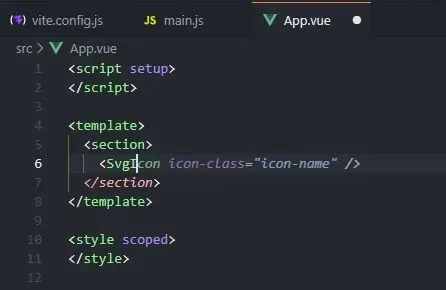
上图的自动补全,仅仅是通义灵码的一个效果,如果没装这个插件,那就是啥都没有。
别慌,一步步来~
1、像 RouterLink 那样,给 SvgIcon 写一个 SvgIcon.d.ts 声明文件,放在任意位置都行,建议跟 SvgIcon.vue 放在一起
123456789101112131415import { AllowedComponentProps, ComponentCustomProps, VNodeProps, VNode } from 'vue'exportdeclareinterface SvgIconProps { icon: string}declaremodule 'vue' {exportinterface GlobalComponents { SvgIcon: new () => { $props: AllowedComponentProps & ComponentCustomProps & VNodeProps & SvgIconProps $slots: {default?: (({ Component }: { Component: VNode }) => VNode[]) | undefined} } }}
添加完之后,需要重启下 vscode 才能生效,用法就成这样了:
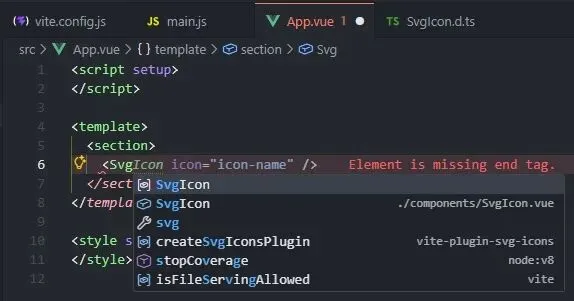
2、继续使用又会发现问题,虽然组件有提示了,但是在写 icon 属性指定图标名称时候,还是没提示,就像这样:
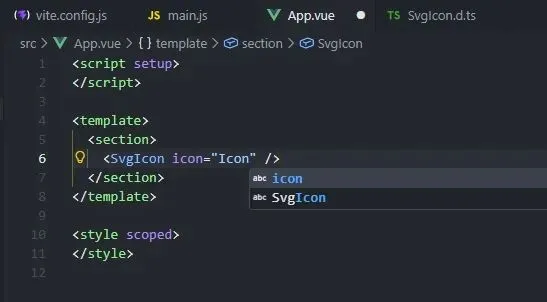
如果不怕麻烦,也可以直接修改 SvgIcon.d.ts 文件,指定 icon 属性声明为具体的文件名字:
123exportdeclareinterface SvgIconProps { icon: 'IconAuth' | 'IconTime' | 'IconEye'}
修改之后的提示效果:
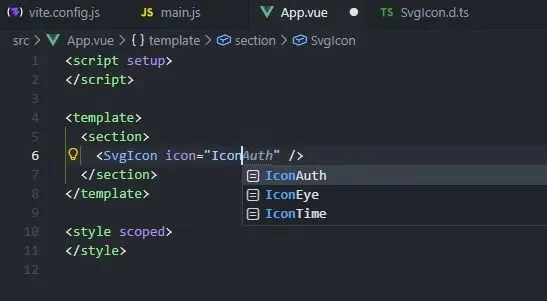
到这一步,自动提示功能其实已经 OK 了,但问题在于,每次新增图标都要去改一改声明文件,又太麻烦了!
vite 插件自动处理
既然 icon 属性的声明就是文件名称,那就借用 Node.js 能力,让 vite 插件自动处理,实现自动提示功能。
1、创建一个 plugin-generate-icon-types.js 文件,用于处理声明文件,完整代码如下:
123456789101112131415161718192021222324252627282930313233343536373839404142434445464748495051525354555657585960616263646566676869707172737475767778798081// 使用 vite 插件生成图标类型import fs from 'fs'import path from 'path'export functiongenerateIconTypes(options = {}){const { iconsDir = 'src/assets/icons', outputDir = 'types', fileName = 'icons.d.ts' } = optionslet resolvedConfiglet isDevMode = falsefunctiongenerateTypes(){try {const fullIconsDir = path.resolve(resolvedConfig.root, iconsDir)const files = fs.readdirSync(fullIconsDir)const iconNames = files .filter((file) => file.endsWith('.svg')) .map((file) => path.basename(file, '.svg'))const typeDefinition = `type AvailableIcons = ${iconNames.map((name) => `'${name}'`).join(' | ')}// 将 SvgIconProps 声明全局接口declare global { interface SvgIconProps { icon: AvailableIcons }}// 必须包含这行,使模块被识别为全局扩展export {}`const fullOutputDir = path.resolve(resolvedConfig.root, outputDir)if (!fs.existsSync(fullOutputDir)) { fs.mkdirSync(fullOutputDir, { recursive: true }) }const outputPath = path.resolve(fullOutputDir, fileName) fs.writeFileSync(outputPath, typeDefinition)console.log(`图标定义文件生成位置:${outputPath}`) } catch (error) {console.error('生成失败:', error) } }functionwatchEventHandler(filePath){// 获取绝对路径进行比较,避免 windows 相对路径无法匹配问题const iconsFullPath = path.resolve(resolvedConfig.root, iconsDir);const absoluteFilePath = path.resolve(filePath);if (absoluteFilePath.startsWith(iconsFullPath) && filePath.endsWith('.svg')) { generateTypes() } }return { name: 'icon-types', configResolved(config) { resolvedConfig = config// 检查是否为开发模式isDevMode = config.command === 'serve'// 'serve' 是开发模式,'build' 是构建模式}, buildStart() {// 只在开发模式下生成类型if (isDevMode) { generateTypes() } }, configureServer(server) {// 只在开发模式下监听图标目录if (isDevMode) {// 监听图标目录server.watcher.add(path.resolve(resolvedConfig.root, iconsDir))// 监听文件新增server.watcher.on('add', watchEventHandler)// 监听文件删除server.watcher.on('unlink', watchEventHandler) } }, }}
2、修改 vite.config.ts 文件,添加插件
1234567891011121314151617181920212223242526272829303132import { fileURLToPath, URL } from 'node:url'import { defineConfig } from 'vite'import vue from '@vitejs/plugin-vue'import vueDevTools from 'vite-plugin-vue-devtools'import { createSvgIconsPlugin } from 'vite-plugin-svg-icons'import { generateIconTypes } from './plugin-generate-icon-types.js'// https://vite.dev/config/export default defineConfig({ plugins: [ generateIconTypes({ iconsDir: 'src/assets/icons', // 默认值,可省略outputDir: 'types', // 默认值,可省略fileName: 'icons.d.ts', // 默认值,可省略}), vue(), vueDevTools(),// 生成 svg 雪碧图createSvgIconsPlugin({ iconDirs: [fileURLToPath(new URL('./src/assets/icons', import.meta.url))], // icon 存放目录symbolId: '[name]', // symbol 的 idinject: 'body-last', // 插入的位置customDomId: 'svg-icons', // svg 的 id}), ], resolve: { alias: {'@': fileURLToPath(new URL('./src', import.meta.url)) }, },})
3、修改 SvgIcon.d.ts 声明文件,删除 SvgIconProps 声明
123456789101112131415import { AllowedComponentProps, ComponentCustomProps, VNodeProps, VNode } from 'vue'/* export declare interface SvgIconProps { icon: 'IconAuth' | 'IconTime' | 'IconEye'} */declaremodule 'vue' {exportinterface GlobalComponents { SvgIcon: new () => { $props: AllowedComponentProps & ComponentCustomProps & VNodeProps & SvgIconProps $slots: {default?: (({ Component }: { Component: VNode }) => VNode[]) | undefined} } }}
4、修改 .gitignore 文件,将 icons.d.ts 加入忽略列表
这一步是防止多人协作时都去修改声明文件,导致代码冲突,可以选择不做。
12# 忽略项目启动时 JS 生成的图标类型types/icons.d.ts
每次变动都会 console.log 输出图标定义文件生成位置,如果看着烦,可以删除打印代码。
最终运行效果:
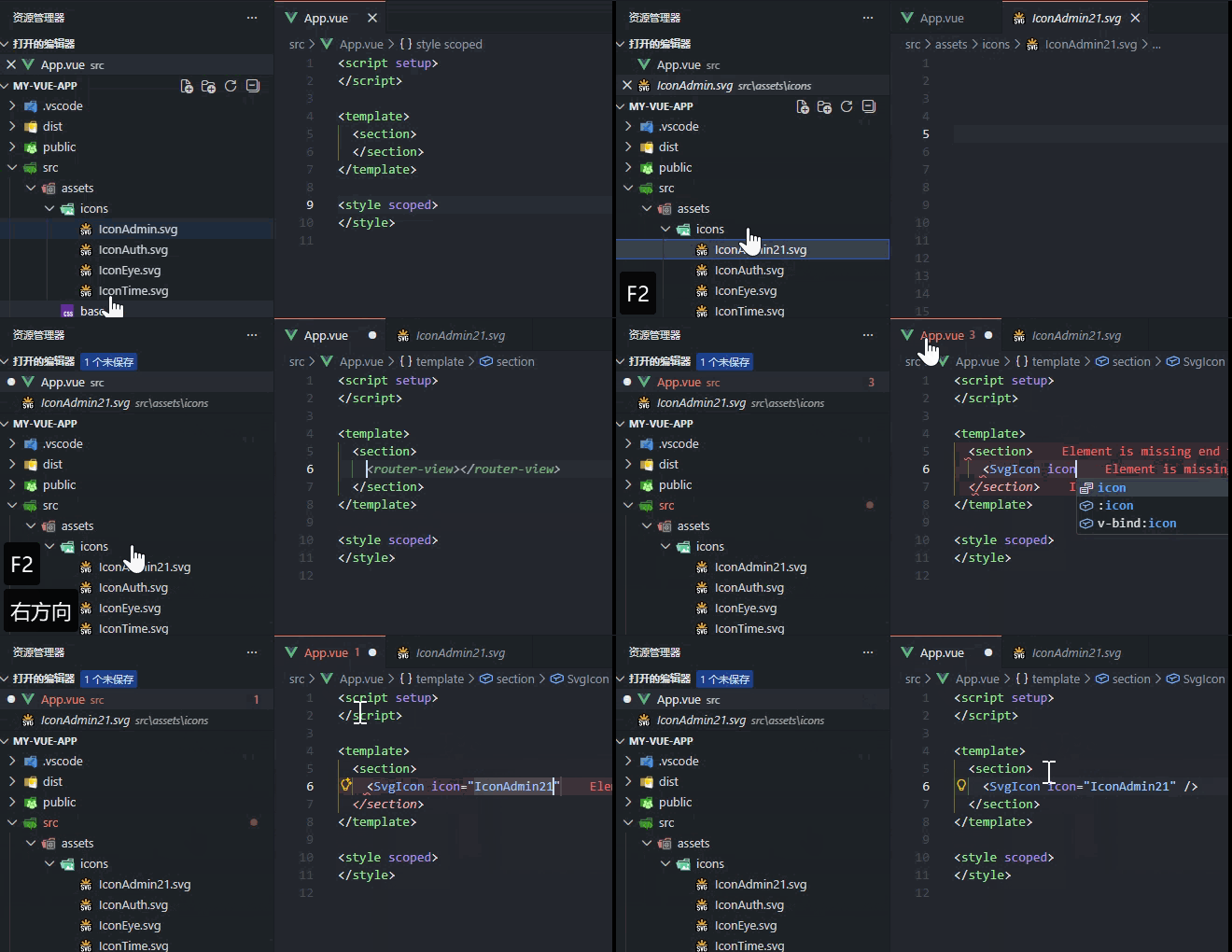
效果还不错,不止能提示组件名称,组件 icon 属性也有提示,还能提示具体的图标名称,而且图标文件改动后,也能自动处理,简直完美!
最后
本文自能提示用的 .d.ts 这种声明文件的方法,也可以用到其他的全局组件中,可以尝试下。
作为程序员,遇到重复工作,第一步就应该想到要用程序搞定。
写这篇文章的想法就缘起于突然想到为什么每次新增图标都要去复制文件名,为何不能程序提示?
如果对文章有任何疑问,欢迎评论留言讨论~~
如果觉得文章对您有帮助,欢迎关注、一键三连~~
↓ 点击文章底部 项目问题实录 · 目录可阅读本系列其他文章

