 夜雨聆风
夜雨聆风


C++ QT之消失弹窗Message插件
过完年了,牛马不能停蹄!
在 Qt 开发的世界里,QMessageBox 就像是那位穿着格子衫、背着双肩包的资深程序员——功能强大、逻辑严密,但审美嘛……确实有点让人一言难尽。当你的应用界面已经进化到流光溢彩的现代风格时,突然跳出一个 Windows 98 风格的警告框,那种“次元壁破裂”的感觉,足以让用户的产品体验瞬间降温。
为了拯救广大用户的视力,也为了让你的软件显得更有“高级感”,我们需要亲手打造一套支持 Primary(首选)、Success(成功)、Warning(警告)、Info(信息)和 Error(错误) 的五彩消息盒子。
这不仅仅是一个简单的弹窗,它还要具备以下“求生欲”极强的功能:
-
肤色多样化:根据情绪逻辑匹配不同的配色方案和矢量图标。
-
时间管理大师:支持倒计时自动关闭,主打一个“悄悄地来,悄悄地走”。
-
进退有据:保留手动关闭按钮,给那些有强迫症、一定要亲手点掉它的用户一个交代。
下面,让我们挽起袖子,从 UI 布局与样式设计开始,一步步把这个消息界的“颜值担当”给实现出来。
先上效果:
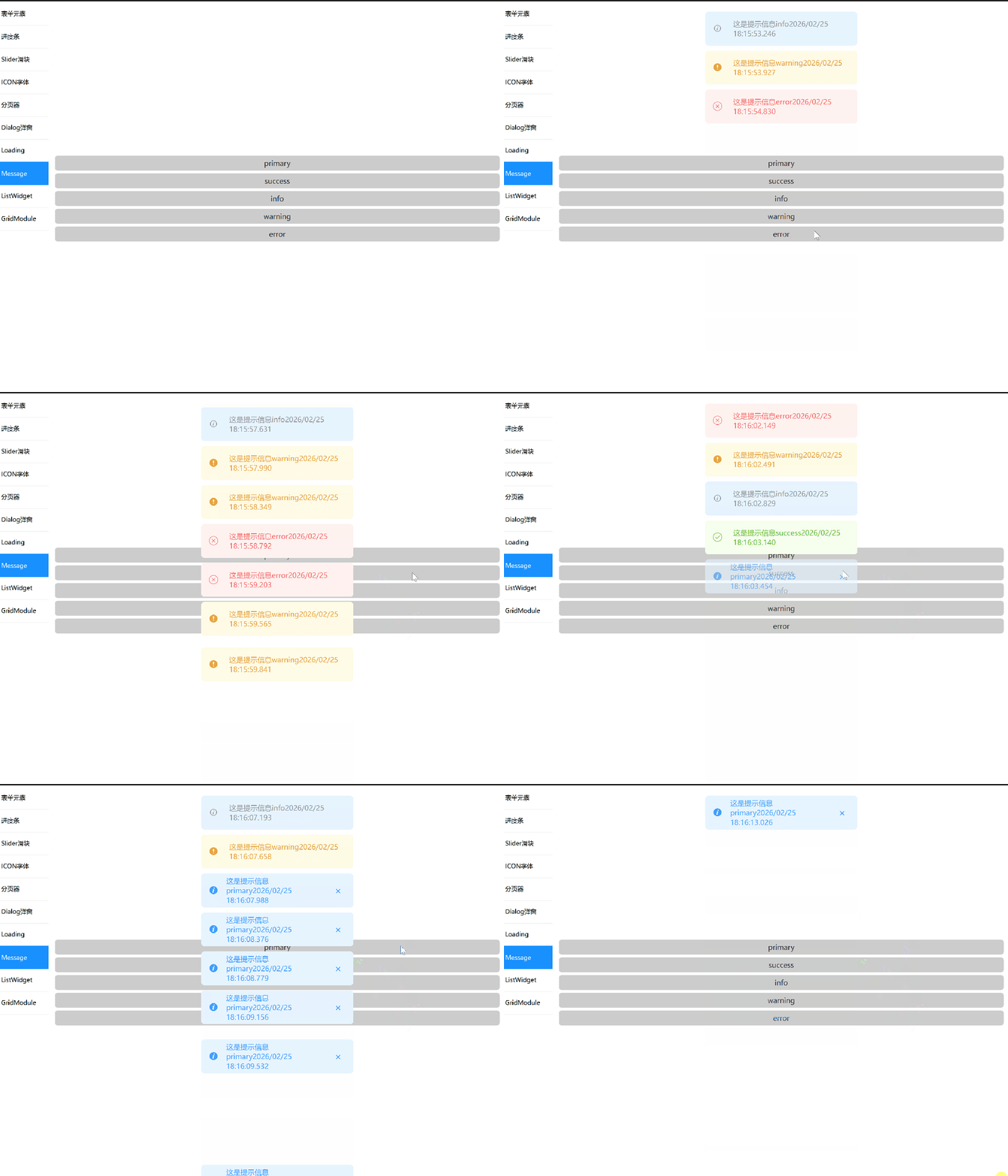
功能说明:
1、5种消息类型分别:info\success\warning\primary\error
2、默认3秒关闭消息盒子,可以自定义
3、可开启消息盒子的关闭按钮,默认关闭
4、消息框倒计时完成,从顶部消失,队列中消息盒子向上移动
ok接下来看看具体的源码
提示框样式枚举:messagetype.h
#pragma once/// <summary>/// 提示框样式枚举/// </summary>enum classMessageType{Primary,Success,Warning,Info,Error};
样式结构体 messagetype.h
#pragma once#include<QColor>#include<QIcon>#include"messagetype.h"struct MessageStyle {QColor textColor;QColor bgColor;QIcon icon;};/// <summary>/// 获取消息样式/// </summary>/// <param name="type"></param>/// <returns></returns>inline MessageStyle styleForType(MessageType type){switch (type){case MessageType::Primary:return { QColor("#409eff"), QColor("#E6F4FF"), QIcon(":/qss/img/primary.svg") };case MessageType::Success:return { QColor("#67c23a"), QColor("#F6FFED"), QIcon(":/qss/img/success.svg") };case MessageType::Warning:return { QColor("#e6a23c"), QColor("#FFFBE6"), QIcon(":/qss/img/warning.svg") };case MessageType::Info:return { QColor("#909399"), QColor("#E6F4FF"), QIcon(":/qss/img/info.svg") };case MessageType::Error:return { QColor("#f56c6c"), QColor("#FFF2F0"), QIcon(":/qss/img/error.svg") };default:return { QColor("#909399"), QColor("#E6F4FF"), QIcon(":/qss/img/info.svg") };}}
其中图片请自行补齐。
插件核心源码 messagewidget.h
#pragma once#include<QWidget>#include<QTimer>#include"messagetype.h"class MessageWidget : public QWidget{Q_OBJECTpublic:MessageWidget(const QString& text,MessageType type,QWidget* parent = nullptr,int countdownTime = 3,bool isShowClose = false);signals:voidrequestClose(MessageWidget* self);private:QTimer* m_timer;};
实现代码messagewidget.cpp
#include"messagewidget.h"#include"messagestyle.h"#include<QHBoxLayout>#include<QPushButton>#include<QLabel>MessageWidget::MessageWidget(const QString& text,MessageType type,QWidget* parent,int countdownTime,bool isShowClose ): QWidget(parent){// 关键:允许高度自适应setSizePolicy(QSizePolicy::Preferred, QSizePolicy::Minimum);auto style = styleForType(type);setAttribute(Qt::WA_StyledBackground);setStyleSheet(QString("background:%1;""border-radius:6px;""color:%2;").arg(style.bgColor.name(),style.textColor.name()));auto layout = new QHBoxLayout(this);layout->setContentsMargins(15, 5, 15, 5);QLabel* iconLabel = new QLabel;iconLabel->setPixmap(style.icon.pixmap(18, 18));QLabel* textLabel = new QLabel(text);//textLabel为自动宽度textLabel->setSizePolicy(QSizePolicy::Expanding, QSizePolicy::Preferred);//文本自动换行textLabel->setWordWrap(true);textLabel->setMaximumWidth(isShowClose ?200 : 230 );textLabel->adjustSize();QPushButton* closeBtn = new QPushButton("×");//设置字体大小closeBtn->setStyleSheet("font-size:20px;");closeBtn->setFixedSize(30, 30);closeBtn->setFlat(true);closeBtn->setVisible(isShowClose);layout->addWidget(iconLabel);layout->addWidget(textLabel);layout->addWidget(closeBtn);// 根据内容计算大小this->adjustSize();connect(closeBtn, &QPushButton::clicked, this, [=]() {emit requestClose(this);});// 自动关闭m_timer = new QTimer(this);m_timer->setSingleShot(true);m_timer->start(countdownTime*1000);connect(m_timer, &QTimer::timeout, this, [=]() {emit requestClose(this);});}
接下来设计一个单例类messagemanager,来调用messagewidget, 用队列方式来管理多个message对象集合。
messagemanager.h的源码如下:
#pragma once#include<QObject>#include<QList>#include"messagewidget.h"#include<qparallelanimationgroup.h>class MessageManager : public QObject{Q_OBJECTpublic:static MessageManager* instance();voidshowMessage(QWidget* parent,const QString& text,MessageType type,int countdownTime = 3,bool isShowClose = false);voidreposition(QWidget* parent);voidremoveMessage(MessageWidget* msg);booleventFilter(QObject* obj, QEvent* event)override;// 禁止拷贝MessageManager(const MessageManager&) = delete;MessageManager& operator=(const MessageManager&) = delete;private:explicitMessageManager(QObject* parent = nullptr); // 私有构造函数~MessageManager();private:QList<MessageWidget*> m_messages;QSet<QWidget*> m_installedParents;QSet<MessageWidget*> m_firstShowMessages; // 记录首次显示的消息框};
messagemanager.cpp 源码
#include"messagemanager.h"#include<qpropertyanimation.h>#include<QEvent>#include<qgraphicseffect.h>MessageManager::MessageManager(QObject* parent): QObject(parent){}MessageManager::~MessageManager(){}MessageManager* MessageManager::instance(){static MessageManager mgr;return &mgr;}voidMessageManager::showMessage(QWidget* parent,const QString& text,MessageType type,int countdownTime,bool isShowClose){if (!m_installedParents.contains(parent)){parent->installEventFilter(this);m_installedParents.insert(parent);connect(parent, &QObject::destroyed,this, [this, parent](){m_installedParents.remove(parent);// 清理与该父窗口相关的消息框for (auto it = m_firstShowMessages.begin(); it != m_firstShowMessages.end(); ) {MessageWidget* msg = *it;if (msg->parentWidget() == parent) {it = m_firstShowMessages.erase(it); // 从集合中移除msg->deleteLater(); // 删除消息框}else {++it;}}});}MessageWidget* msg = new MessageWidget(text, type, parent, countdownTime, isShowClose);// 记录为首次显示m_firstShowMessages.insert(msg);//调用关闭信号connect(msg, &MessageWidget::requestClose,this, &MessageManager::removeMessage);m_messages.append(msg);msg->show();reposition(parent);}voidMessageManager::reposition(QWidget* parent){int y = 20;int spacing = 10;for (int i = 0; i < m_messages.size(); ++i){auto msg = m_messages[i];int w = 300;int x = (parent->width() - w) / 2;// 如果位置发生变化,添加动画QRect targetRect(x, y, w, msg->height());// 判断是否是首次显示QRect startRect;if (m_firstShowMessages.contains(msg)) {// 首次显示,从底部进入startRect = QRect(x, parent->height(), w, msg->height());m_firstShowMessages.remove(msg); // 移除首次显示记录}else {// 非首次显示,从当前的位置移动startRect = msg->geometry();}if (msg->geometry() != targetRect) {QPropertyAnimation* anim = new QPropertyAnimation(msg, "geometry");anim->setDuration(300);anim->setStartValue(startRect);anim->setEndValue(targetRect);anim->setEasingCurve(QEasingCurve::OutQuad);connect(anim, &QPropertyAnimation::finished, anim, &QPropertyAnimation::deleteLater);anim->start();}y += msg->height() + spacing;}}boolMessageManager::eventFilter(QObject* obj, QEvent* event){if (event->type() == QEvent::Resize){QWidget* parent = qobject_cast<QWidget*>(obj);if (parent) {// 立即重新布局reposition(parent);}}return QObject::eventFilter(obj, event);}voidMessageManager::removeMessage(MessageWidget* msg){if (!msg) return;QWidget* parent = msg->parentWidget();if (!parent) return;// 从消息列表中移除m_messages.removeOne(msg);// 从首次显示集合中移除m_firstShowMessages.remove(msg);// 创建淡出动画QGraphicsOpacityEffect* effect = new QGraphicsOpacityEffect(msg);msg->setGraphicsEffect(effect);QPropertyAnimation* fadeAnim = new QPropertyAnimation(effect, "opacity");fadeAnim->setDuration(300);fadeAnim->setStartValue(1.0);fadeAnim->setEndValue(0.0);// 动画完成后删除消息框connect(fadeAnim, &QPropertyAnimation::finished, [msg, effect]() {msg->deleteLater();effect->deleteLater();});fadeAnim->start();// 重新布局剩余消息框reposition(parent);}
上面就是插件的全部代码,接下来举例怎么使用,demo的代码如下:messagewidgetdemo.h
#pragma once#include<QWidget>#include"ui_messagewidgetdemo.h"//声明类namespace Ui { class MessageWidgetDemoClass; };class MessageWidgetDemo : public QWidget{Q_OBJECTpublic:MessageWidgetDemo(QWidget *parent = nullptr);~MessageWidgetDemo();private:Ui::MessageWidgetDemoClass *ui;};
messagewidgetdemo.cpp
#include"messagewidgetdemo.h"#include<message/messagemanager.h>#include<QDateTime>MessageWidgetDemo::MessageWidgetDemo(QWidget *parent): QWidget(parent),ui(new Ui::MessageWidgetDemoClass){ui->setupUi(this);//primaryconnect(ui->pushButtonPrimary,&QPushButton::clicked,[this](){//当前时间毫秒QDateTime current = QDateTime::currentDateTime();QString customFormat = current.toString("yyyy/MM/dd HH:mm:ss.zzz");MessageManager::instance()->showMessage(this,"这是提示信息primary" + customFormat, //时间秒MessageType::Primary, 2, true);});//successconnect(ui->pushButtonSuccess, &QPushButton::clicked, [this]() {//当前时间毫秒QDateTime current = QDateTime::currentDateTime();QString customFormat = current.toString("yyyy/MM/dd HH:mm:ss.zzz");MessageManager::instance()->showMessage(this,"这是提示信息success" + customFormat,MessageType::Success);});//infoconnect(ui->pushButtonInfo, &QPushButton::clicked, [this]() {//当前时间毫秒QDateTime current = QDateTime::currentDateTime();QString customFormat = current.toString("yyyy/MM/dd HH:mm:ss.zzz");MessageManager::instance()->showMessage(this,"这是提示信息info" + customFormat,MessageType::Info);});//warningconnect(ui->pushButtonWarning, &QPushButton::clicked, [this]() {//当前时间毫秒QDateTime current = QDateTime::currentDateTime();QString customFormat = current.toString("yyyy/MM/dd HH:mm:ss.zzz");MessageManager::instance()->showMessage(this,"这是提示信息warning" + customFormat,MessageType::Warning);});//errorconnect(ui->pushButtonError, &QPushButton::clicked, [this]() {//当前时间毫秒QDateTime current = QDateTime::currentDateTime();QString customFormat = current.toString("yyyy/MM/dd HH:mm:ss.zzz");MessageManager::instance()->showMessage(this,"这是提示信息error"+ customFormat,//拼接customFormatMessageType::Error);});}MessageWidgetDemo::~MessageWidgetDemo(){}
messagewidgetdemo.ui代码:<?xml version="1.0" encoding="UTF-8"?><uiversion="4.0"><class>MessageWidgetDemoClass</class><widgetclass="QWidget"name="MessageWidgetDemoClass"><propertyname="geometry"><rect><x>0</x><y>0</y><width>446</width><height>205</height></rect></property><propertyname="windowTitle"><string>MessageWidgetDemo</string></property><layoutclass="QVBoxLayout"name="verticalLayout_2"><item><layoutclass="QVBoxLayout"name="verticalLayout"><item><widgetclass="QPushButton"name="pushButtonPrimary"><propertyname="text"><string>primary</string></property></widget></item><item><widgetclass="QPushButton"name="pushButtonSuccess"><propertyname="text"><string>success</string></property></widget></item><item><widgetclass="QPushButton"name="pushButtonInfo"><propertyname="text"><string>info</string></property></widget></item><item><widgetclass="QPushButton"name="pushButtonWarning"><propertyname="text"><string>warning</string></property></widget></item><item><widgetclass="QPushButton"name="pushButtonError"><propertyname="text"><string>error</string></property></widget></item></layout></item></layout></widget><layoutdefaultspacing="6"margin="11"/><resources/><connections/></ui>
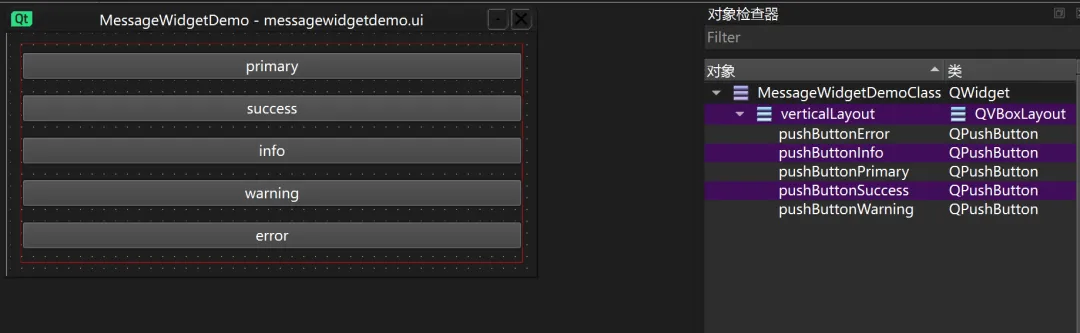
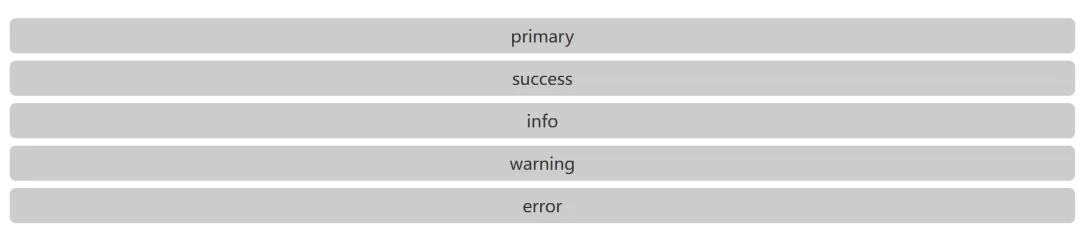
ok,到这里,一个兼具颜值与功能的 Qt 消息盒子就正式完工了。上面已经详细解释了本插件的全部源码和使用方法,代码中有注释希望对你有帮助。
通过自定义 QWidget,我们彻底摆脱了原生控件的束缚。你可以发现,其实做出一套让人赏心悦目的 UI 并不难,难的是对细节的把控——比如那零点几秒的渐变动画,或者是刚好不刺眼的背景色。
最后再给你几个优化的小锦囊(算是赠送的彩蛋):
动画加持:如果觉得弹出太生硬,可以试着用 QPropertyAnimation 给它加一个透明度渐入或从顶部滑下的效果。
堆叠管理:如果用户短时间内疯狂点击,记得处理一下消息框的堆叠位置,别让它们重叠在一起玩“消消乐”。
阴影滤镜:给窗体加一个 QGraphicsDropShadowEffect,那种悬浮感立马就让你的应用身价翻倍。
现在的它,已经准备好在你的项目中发光发热了。不管是成功后的喜悦,还是报错时的稳重,这套组件都能替你优雅地传达给用户。

▼点个「 」赞,是我持续更新的动力 ▼

