夜雨聆风
夜雨聆风


火车头(LocoySpider)C# 插件:自动统计文章字数 + 计算阅读时间
为了增强文章“专业感” 和 提升用户体验,在文章开头生成字数和阅读时间统计,示例:<p>本文共计XXX个文字,预计阅读时间需要X分钟。</p>
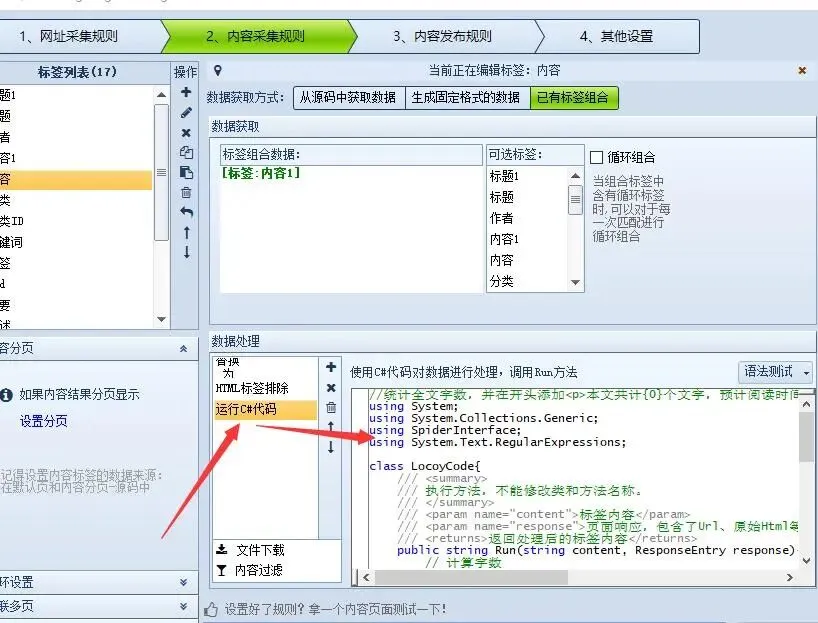
在火车头中的正确用法
打开火车头
进入“内容页规则”
找到你文章正文标签
选择:运行C#代码
粘贴这段代码
//统计全文字数,并在开头添加<p>本文共计{0}个文字,预计阅读时间需要{1}分钟。</p>using System;using System.Collections.Generic;using SpiderInterface;using System.Text.RegularExpressions;class LocoyCode{///<summary>/// 执行方法,不能修改类和方法名称。///</summary>///<param name="content">标签内容</param>///<param name="response">页面响应,包含了Url、原始Html等属性</param>///<returns>返回处理后的标签内容</returns>publicstringRun(string content, ResponseEntry response){// 计算字数int wordCount = CountWords(content);// 计算预计阅读时间(假设阅读速度为250字/分钟)int readingTimeMinutes = (int)Math.Ceiling((double)wordCount / 250);// 构建统计信息的HTMLstring statsHtml = string.Format("<p>本文共计{0}个文字,预计阅读时间需要{1}分钟。</p>", wordCount, readingTimeMinutes);// 将统计信息添加到内容开头content = statsHtml + content;return content;}///<summary>/// 计算字符串中的字数///</summary>///<param name="text">输入文本</param>///<returns>返回字数</returns>privateintCountWords(string text) {// 使用正则表达式匹配中文字符、中文标点符号和英文单词MatchCollection matches = Regex.Matches(text, @"[\u4e00-\u9fa5]|[\u3000-\u303F]|[\uFF00-\uFFEF]|\w+");return matches.Count;}}
如果是你那种大批量SEO内容站,这个插件非常实用。
效果: