夜雨聆风
夜雨聆风


什么?你使用Android原生下载也会遇到异常?

近日,中国互联网络信息中心的报告显示,截至2017年12月,中国网民规模达到7.72亿,普及率达55.8%,全年共计新增网民4074万人,其中,手机网民达7.53亿。报告显示,中国网民结构规模向高收入群体扩散,月收入在5000元以上的群体占比较2016年增长3.7个百分点,其中月收入在5001-8000元、8000元以上的群体占比分别占比11.7%和8.5%。
本篇文章来自投稿老司机 冷漠的学徒 的投稿。主要介绍了在使用Android原生下载遇到的问题,希望对大家有所帮助!
冷漠的学徒 的博客地址:
http://blog.csdn.net/lz8362
最近在进行一次测试用例中,发现测试手机在利用本地下载功能下载0K大小的文件时,进度条一直处于进度模糊状态中,虽然查看本地存储路径,发现文件已经存在,但是页面上并没有提示下载成功,此时只能对下载执行暂停或删除操作。最初只是怀疑是自身应用的问题,但是在试了自己的华为畅享5s(Android5.1)、联想S560(Android.4.2)(暴露贫穷了)及朋友的ZTE小鲜(Android6.0)、华为P9(Android7.0)等三款不同厂商的设备后,发现都有相同的现象,所以怀疑这是android自身的一个待优化点(说bug有点严重了,毕竟0K大小的文件谁会经常遇到呢)。在此基础上,对AOSP的DownloadProvider进行了一番研究,源码资源大家可以访问http://androidxref.com/,最新的Android Oreo源码也可以在上面查阅。
下面的调查以Android7.0和Android8.0的DownloadProvider源码为基础展开。将探讨两个问题:
-
进度条样式为什么是进度模糊样式?
-
0K文件是否真正意义上下载成功了?
Android的本地下载分为三部分:
-
frameworks/base/core/java/android/app/下的DownloadManager.java和frameworks/base/core/java/android/provider/下的Downloads.java
-
packages/apps/providers/下的DownloadProvider
-
frameworks/base/packages/下的DocumentsUI
其中,DocumentsUI就是我们常见的下载列表。而DownloadManager.java就是开放给开发者调用的下载器,也是系统自身使用的下载器,Downloads.java负责表路径和下载状态标记的管理,DownloadProvider负责下载过程中数据的处理和展示。鉴于ANDROID下载机制中,默认下载进度是以通知的形式展示的,所以我通过检索Notification,发现只在DownloadProvider中出现了调用,那么问题的根源可能就存在在DownloadProvider中。
DownloadProvider类目录结构如下:
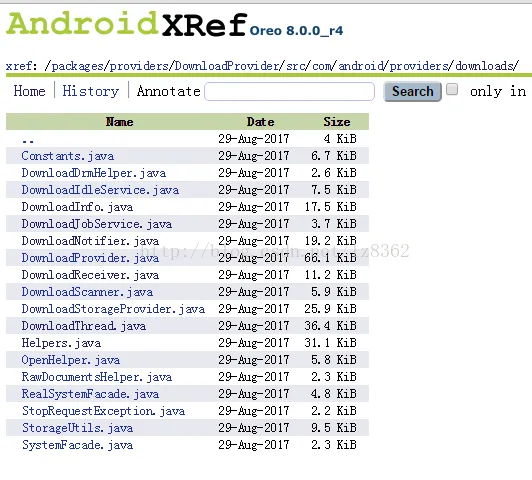
可以发现一个很明显的DownloadNotifier.java,分析其代码,DownloadNotifier在构造函数中创建了一个NotificationManager对象,代码详情如下:
DownloadNotifier的构造函数(Android8.0)
public DownloadNotifier(Context context) {
       mContext = context;
       mNotifManager = context.getSystemService(NotificationManager.class);

       // Ensure that all our channels are ready to use
        mNotifManager.createNotificationChannel(new NotificationChannel(CHANNEL_ACTIVE,
                context.getText(R.string.download_running),
                NotificationManager.IMPORTANCE_LOW));
        mNotifManager.createNotificationChannel(new NotificationChannel(CHANNEL_WAITING,
                context.getText(R.string.download_queued),
                NotificationManager.IMPORTANCE_DEFAULT));
        mNotifManager.createNotificationChannel(new NotificationChannel(CHANNEL_COMPLETE,
                context.getText(com.android.internal.R.string.done_label),
                NotificationManager.IMPORTANCE_DEFAULT));
}

DownloadNotifier的构造函数(Android8.0以下)
public DownloadNotifier(Context context) {
       mContext = context;
       mNotifManager = (NotificationManager) context.getSystemService(
               Context.NOTIFICATION_SERVICE);
}
更新下载通知的操作由update()(低版本中叫updateWith())来实现,该方法将被具体的下载线程进行调用,而通知样式围绕下载状态标记的具体实现则是updateWithLocked()内部的一个私有方法updateWithLocked(Cursor cursor)(这个方法名一直没有变),代码详情如下:
Android7.0及以上
public void update() {
       try (Cursor cursor = mContext.getContentResolver().query(
               Downloads.Impl.ALL_DOWNLOADS_CONTENT_URI, UpdateQuery.PROJECTION,
               Downloads.Impl.COLUMN_DELETED + " == '0'", null, null)) {
           synchronized (mActiveNotifs) {
               updateWithLocked(cursor);
           }
       }
}
Android7.0以下
public void updateWith(Collection<DownloadInfo> downloads) {
       synchronized (mActiveNotifs) {
           updateWithLocked(downloads);
       }
}
在解析updateWithLocked()方法前,先介绍下DownloadProvider是如何调用DownloadNotifier.update()方法的。DownloadProvider下载运行图如下:
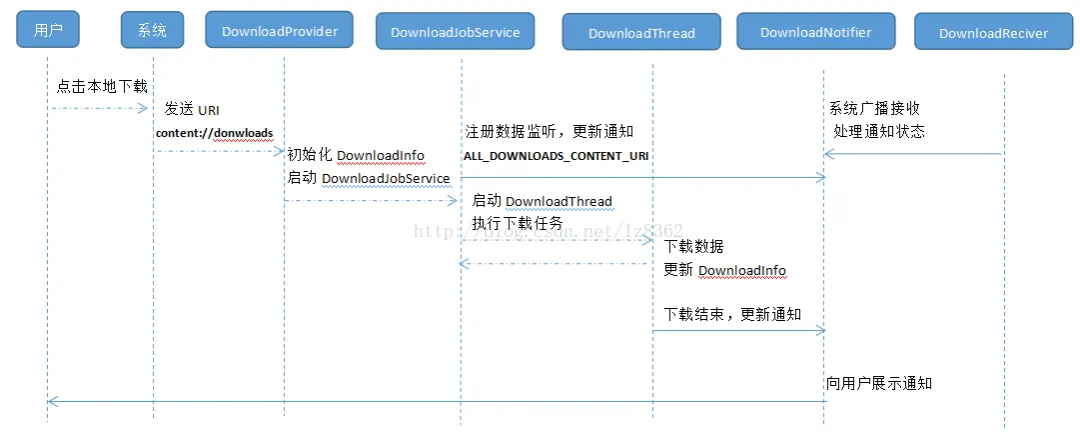
下载记录是统一保存在Downloads.Impl.ALL_DOWNLOADS_CONTENT_URI指向的表中,当用户执行下载操作时,系统通过URI调起DownloadProvider.java,该类负责统一管理DownloadProvider下各类的使用,首先初始化待访问的数据集合DownloadInfo,启动DownloadJobService管理本次下载,DownloadJobService会把DownloadProvider提供的DownloadInfo交给DownloadThread完成更新和操作,同时具体的数据读写也在DownloadThread中完成。DownloadJobService会先注册一个数据监听器:
public void onCreate() {
    super.onCreate();
    getContentResolver().registerContentObserver(ALL_DOWNLOADS_CONTENT_URI, true, mObserver);
}

private ContentObserver mObserver = new ContentObserver(Helpers.getAsyncHandler()) {
   @Override
    public void onChange(boolean selfChange) {
      Helpers.getDownloadNotifier(DownloadJobService.this).update();
    }
 };
监听下载过程中数据库的变化,及时调用DownloadNotifier.update()更新进度条。等到下载结束时,DownloadThread会再一次调用DownloadNotifier.update()。这便是下载中通知变化的流程。
下面来分析下updateWithLocked()中对通知更新的实现流程,总体上可以分成三步走:
不管入参是Cursor还是ArrayList<DoenloadInfo>,都是通过访问Downloads.Impl.ALL_DOWNLOADS_CONTENT_URI(content://downloads/all_downloads)获得当前下载记录。针对每条数据,根据status和visibility字段生成一个标记,作为key,一并保存到ArrayMap<String, IntArray> clustered中。
标记整体分为两部分:下载状态;当前调用下载的应用包名/下载记录的ID
标记生成方法如下:buildNotificationTag(Cursor cursor)
private static String buildNotificationTag(Cursor cursor) {
       final long id = cursor.getLong(UpdateQuery._ID);
       final int status = cursor.getInt(UpdateQuery.STATUS);
       final int visibility = cursor.getInt(UpdateQuery.VISIBILITY);
       final String notifPackage = cursor.getString(UpdateQuery.NOTIFICATION_PACKAGE);

       if (isQueuedAndVisible(status, visibility)) {
           return TYPE_WAITING + ":" + notifPackage;
       } else if (isActiveAndVisible(status, visibility)) {
           return TYPE_ACTIVE + ":" + notifPackage;
       } else if (isCompleteAndVisible(status, visibility)) {
           // Complete downloads always have unique notifs
           return TYPE_COMPLETE + ":" + id;
       } else {
           return null;
       }
   }
对clustered中每一条下载记录创建一条对应的通知对象。此时用到了一个全局变量mActiveNotifs,存放当前活跃的通知。
private final ArrayMap<String, Long> mActiveNotifs = new ArrayMap<>();根据clustered中提供的标记通过getNotificationTagType方法提取中下载类型type,实际上通过getNotificationTagType的实现代码,type就是步骤1中提到的下载状态,getNotificationTagType实现代码如下:
private static int getNotificationTagType(String tag) {
       return Integer.parseInt(tag.substring(0, tag.indexOf(':')));
   }
根据type的不同,通知将配置不同的文字、图片等样式,
删除未更新的过期通知。即只展示当前正在下载的通知。
关键看步骤2中当前进度的计算这段逻辑,代码如下:
// Calculate and show progress
  String remainingText = null;
  String percentText = null;
  if (type == TYPE_ACTIVE) {
      long current = 0;
      long total = 0;
      long speed = 0;
      synchronized (mDownloadSpeed) {
          for (int j = 0; j < cluster.size(); j++) {
              cursor.moveToPosition(cluster.get(j));

              final long id = cursor.getLong(UpdateQuery._ID);
              final long currentBytes = cursor.getLong(UpdateQuery.CURRENT_BYTES);
              final long totalBytes = cursor.getLong(UpdateQuery.TOTAL_BYTES);

              if (totalBytes != -1) {
                  current += currentBytes;
                  total += totalBytes;
                  speed += mDownloadSpeed.get(id);
              }
          }
      }
      if (total > 0) {
          percentText =
                  NumberFormat.getPercentInstance().format((double) current / total);

          if (speed > 0) {
              final long remainingMillis = ((total - current) * 1000) / speed;
              remainingText = res.getString(R.string.download_remaining,
                      DateUtils.formatDuration(remainingMillis));
          }

          final int percent = (int) ((current * 100) / total);
          builder.setProgress(100, percent, false);
      } else {
          builder.setProgress(100, 0, true);
      }
  }

  mNotifManager.notify(tag, 0, notif);
进度值的计算是在状态标记为TYPE_ACTIVE时才会触发。那么什么时候进入TYPE_ACTIVE状态呢,Downloads提供了详细的下载状态,但是DownloadManager可以更清晰的告诉我们。DownloadManager在Downloads基础上转化成五种下载状态:
-
DownloadManager.STATUS_PENDING
-
DownloadManager.STATUS_RUNNING
-
DownloadManager.STATUS_PAUSED
-
DownloadManager.STATUS_SUCCESSFUL
-
DownloadManager.STATUS_FAILED
任何一次下载都要经过 STATUS_PENDING->STATUS_RUNNING->STATUS_SUCCESSFUL/STATUS_FAILED 这样一个过程。重看buildNotificationTag(),你会发现TYPE_ACTIVE是通过isActiveAndVisible()生成的,代码如下:
private static boolean isActiveAndVisible(int status, int visibility) {
     return status == STATUS_RUNNING &&
             (visibility == VISIBILITY_VISIBLE
             || visibility == VISIBILITY_VISIBLE_NOTIFY_COMPLETED);
 }
STATUS_RUNNING表示当前下载链接已经建立成功,开始获取文件大小,并执行下载。换句话说,STATUS_RUNNING阶段不会因为文件大小是0K,就直接从STATUS_PENDING执行到STATUS_SUCCESSFUL/STATUS_FAILED,这是一个必要的过程。所以0K大小的文件下载时也会执行进度值计算。进度百分比percent分别通过字段total_bytes和current_bytes提供,total_bytes默认值为-1,只有当成功获取到文件大小时才会被赋值。正常下载过程中,进度条设置为builder.setProgress(100, percent, false);当下载状态为TYPE_ACTIVE且下载文件大小为0时,进度条设置为builder.setProgress(100, 0, true);这个true表示当前进度条为非明确样式,即表示进度的加载条充满进度槽并持续滚动,这样就导致了下载0K文件时进度条样式的不统一。
进度条样式的问题到这里就可以告一段落了,关于0K文件是否下载成功,我们可以回看DownloadThread。DownloadThread中读写操作是有transferData(InputStream in, OutputStream out, FileDescriptor outFd)来实现。这里有一个入参FileDescriptor。顾名思义它会先创建一个待写入的目标文件。transferData()中的读写操作如下:
private void transferData(InputStream in, OutputStream out, FileDescriptor outFd)throws StopRequestException {
      final byte buffer[] = new byte[Constants.BUFFER_SIZE];
      while (true) {
        if (mPolicyDirty) checkConnectivity();

        if (mShutdownRequested) {
            throw new StopRequestException(STATUS_HTTP_DATA_ERROR,
                    "Local halt requested; job probably timed out");
        }

        int len = -1;
        try {
           len = in.read(buffer);
        } catch (IOException e) {
           throw new StopRequestException(
                  STATUS_HTTP_DATA_ERROR, "Failed reading response: " + e, e);
         }

         if (len == -1) {
          break;
         }
         try {
            // When streaming, ensure space before each write
            if (mInfoDelta.mTotalBytes == -1) {
                final long curSize = Os.fstat(outFd).st_size;
                final long newBytes = (mInfoDelta.mCurrentBytes + len) - curSize;

                StorageUtils.ensureAvailableSpace(mContext, outFd, newBytes);
            }

            out.write(buffer, 0, len);

            mMadeProgress = true;
            mInfoDelta.mCurrentBytes += len;

            updateProgress(outFd);

        } catch (ErrnoException e) {
            throw new StopRequestException(STATUS_FILE_ERROR, e);
        } catch (IOException e) {
            throw new StopRequestException(STATUS_FILE_ERROR, e);
        }
     }
        ...
}
由于是一个0K文件,in.read(buffer)实际上是读不到数据的,所以len依然是-1,这就导致while循环不能完整执行,后续的写入操作、标志更新操作等都没有被执行,由于又没有异常产生,通知页面便始终处于下载中状态,直到超时。所以我在本地存储路径下看到的文件,实际上是没有执行写入操作的,严格意义上并没有下载成功。
这就是关于0K大小文件的下载异常分析,虽然在平时的文件下载需求中不大会出现0K这种现象,但不代表着永远不会遇到,也许你下载的文件的是破损压缩文件、上传失败的压缩文件或者是标记文件,这种场景下还是要考虑进来的,毕竟存在即为合理。对于0K文件直接本地创建即可,无需执行读写操作。
欢迎长按下图 -> 识别图中二维码
或者 扫一扫 关注我的公众号