 夜雨聆风
夜雨聆风


2026 年 UniApp 终极指南:从入门到性能极致优化,一篇就够了
💡 前言:在跨端开发框架百家争鸣的今天,为什么 UniApp 依然能占据国内开发者的心智?答案是:效率 + 生态。本文从3 个实战项目、10+ 性能优化技巧、20+ 代码示例出发,带你深入理解 UniApp 的核心优势、性能优化秘诀,以及 2026 年最新的技术趋势。建议收藏,随时查阅!

一、为什么选择 UniApp?2026 年的跨端格局分析
1.1 主流框架对比
|
|
|
|
|
|---|---|---|---|
| UniApp |
|
|
|
| UniApp X |
|
|
|
| Flutter |
|
|
|
| React Native |
|
|
|
| Taro |
|
|
|
1.2 UniApp 的核心竞争力
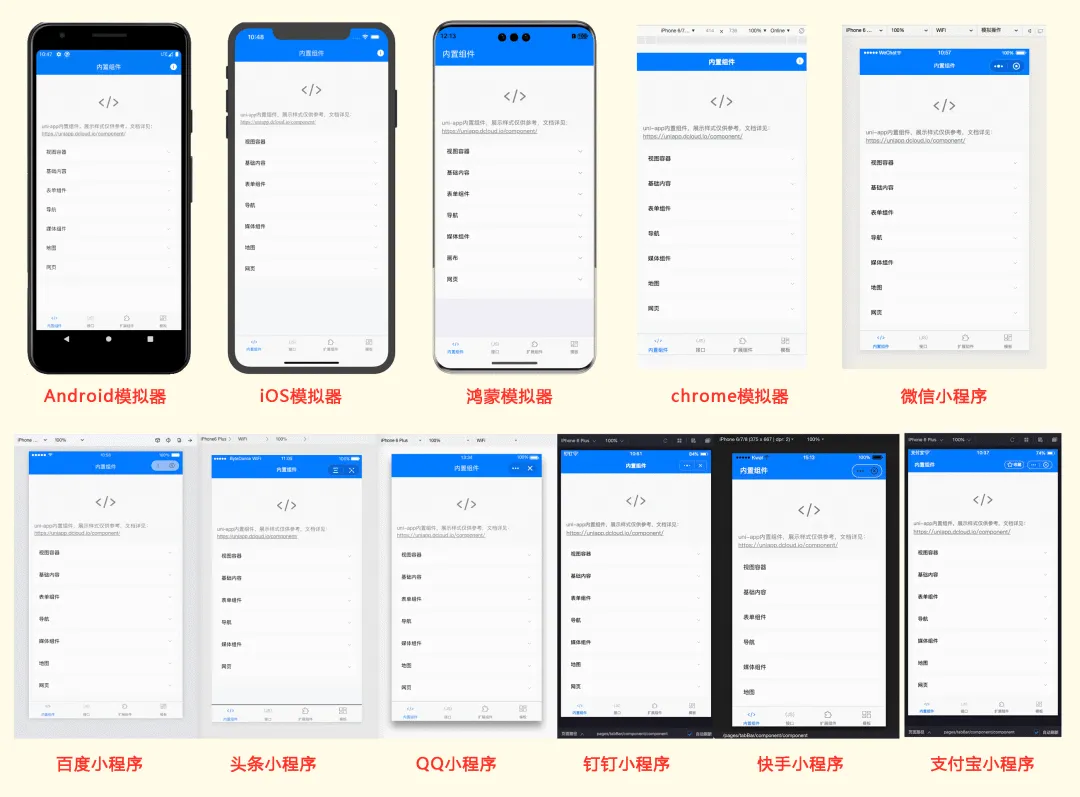
✅ 一套代码,多端运行(H5、小程序、App、Web)✅ Vue.js 语法体系,学习成本低✅ 丰富的插件市场(uni_modules)✅ 强大的 uniCloud 云开发支持✅ 国内生态完善,文档齐全二、UniApp X:2026 年的性能革命
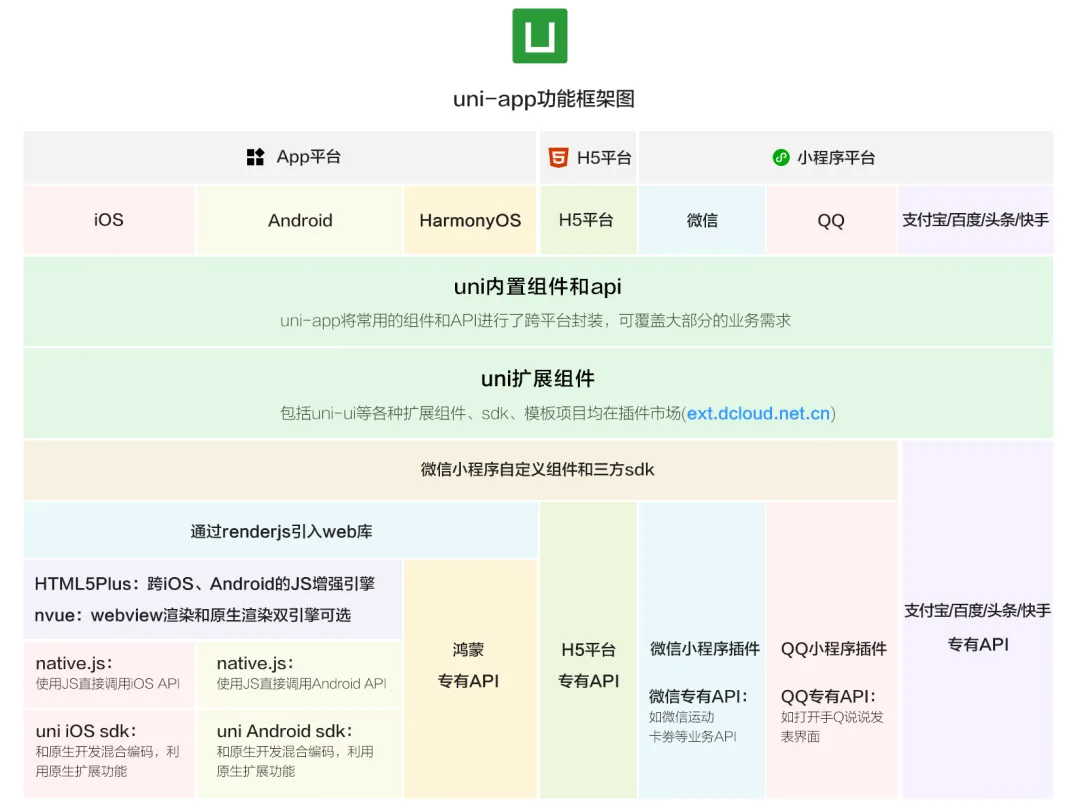
2.1 什么是 UniApp X?
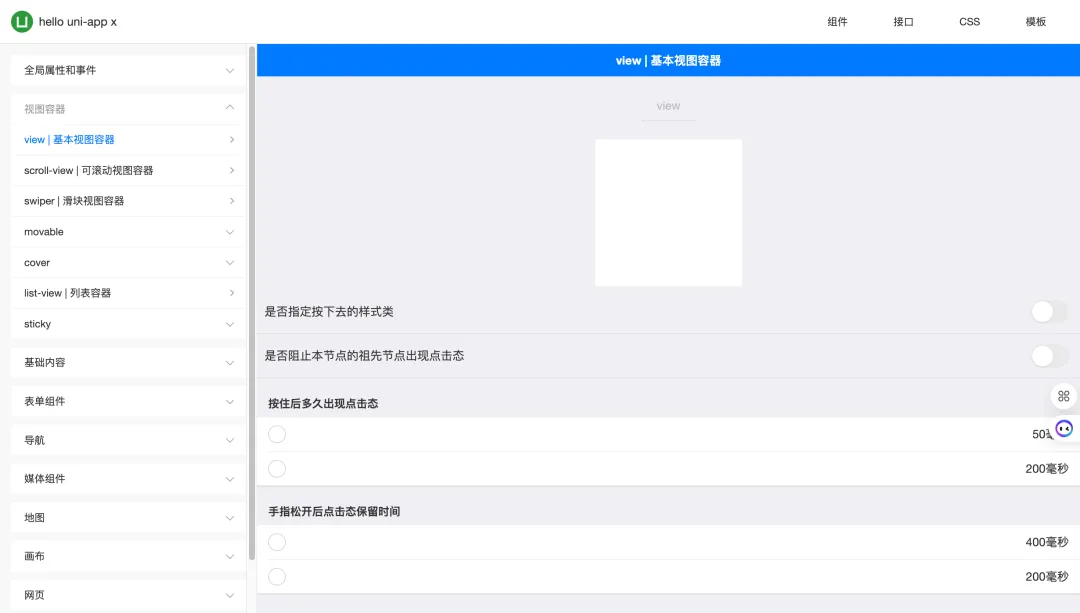
UniApp X 是 DCloud 推出的新一代框架,核心突破:
-
原生渲染:不再使用 WebView,直接渲染为原生组件 -
独立进程:网络请求和图片加载在独立协程中,不阻塞 UI -
性能提升:启动速度提升 50%,滚动流畅度接近原生
 2.3 性能对比实测数据 📊
|
|
|
|
|
|---|---|---|---|
|
|
|
|
50%
|
|
|
|
|
50%
|
|
|
|
|
30%
|
|
|
|
|
更小
|
|
|
|
|
更低
|
💡 实测环境:小米 12 Pro,Android 13,列表页面 100+ 数据项
 2.2 核心代码对比
传统 UniApp:
<template> <view class="container"> <text>{{ message }}</text> </view></template><script>export default { data() { return { message: 'Hello UniApp' } }}</script>UniApp X:
<template> <view class="container"> <text>{{ message }}</text> </view></template><script lang="uts">export default { data() { return { message: 'Hello UniApp X' } }, onLoad() { // 网络请求在独立协程,不会卡 UI this.fetchData() }}</script>三、性能优化实战:10 个立竿见影的技巧
3.1 启动优化
❌ 错误做法:
// 在 onLaunch 中做大量初始化工作onLaunch() {this.initConfig()this.loadUserdata()this.checkUpdate()this.initAnalytics()// ... 更多初始化}✅ 正确做法:
// 分阶段初始化,优先保证首屏onLaunch() {// 第一阶段:核心配置(同步)this.initCoreConfig()// 第二阶段:非关键数据(异步) setTimeout(() => {this.loadUserdata()this.initAnalytics() }, 0)}📈 优化效果对比:
|
|
|
|
|
|---|---|---|---|
|
|
|
|
|
|
|
|
|
|
3.2 长列表优化
使用虚拟列表:
<template> <recycle-list :list-data="listData" :item-height="80" @loadMore="loadMore" > <template v-slot:item="{ item }"> <list-item :data="item" /> </template> </recycle-list></template><script>export default { data() { return { listData: [], page: 1 } }, methods: { async loadMore() { const res = await this.fetchData(this.page++) this.listData = [...this.listData, ...res] } }}</script>🔧 自制虚拟列表组件(完整代码):
<!-- components/VirtualList.vue --><template> <scroll-view :scroll-y="true" :style="{ height: containerHeight + 'px' }" @scroll="onScroll" > <view :style="{ height: totalHeight + 'px', position: 'relative' }"> <view v-for="item in visibleList" :key="item.id" :style="{ position: 'absolute', top: item.top + 'px', width: '100%' }" > <slot :item="item.data"></slot> </view> </view> </scroll-view></template><script>export default { props: { listData: { type: Array, default: () => [] }, itemHeight: { type: Number, default: 80 }, pageSize: { type: Number, default: 20 } }, data() { return { containerHeight: 600, startIndex: 0, visibleCount: 10 } }, computed: { totalHeight() { return this.listData.length * this.itemHeight }, visibleList() { const end = Math.min(this.startIndex + this.visibleCount, this.listData.length) return this.listData.slice(this.startIndex, end).map((item, index) => ({ id: item.id, data: item, top: (this.startIndex + index) * this.itemHeight })) } }, methods: { onScroll(e) { const scrollTop = e.detail.scrollTop this.startIndex = Math.floor(scrollTop / this.itemHeight) // 触发加载更多 if (this.startIndex + this.visibleCount >= this.listData.length - 5) { this.$emit('loadMore') } } }}</script>📈 性能对比:
|
|
|
|
|
|---|---|---|---|
|
|
|
|
|
|
|
|
|
70%
|
|
|
|
|
85%
|
### 3.3 图片优化**懒加载 + CDN + 格式优化:**```vue<template> <image :src="imageUrl" lazy-load mode="aspectFill" show-loading :webp="true" /></template><script>export default { computed: {imageUrl() { // 根据屏幕密度返回不同尺寸 const pixelRatio = uni.getSystemInfoSync().pixelRatioreturn `${this.cdnUrl}/image_${pixelRatio}x.webp` } }}</script>3.4 网络请求优化
请求拦截 + 缓存 + 并发控制:
// utils/request.jsconst requestQueue = newMap()const CACHE_TIME = 5 * 60 * 1000// 5 分钟缓存exportfunctionrequest(options) {const cacheKey = `${options.url}_${JSON.stringify(options.data)}`// 检查缓存const cached = getCache(cacheKey)if (cached) returnPromise.resolve(cached)// 防止重复请求if (requestQueue.has(cacheKey)) {return requestQueue.get(cacheKey) }const promise = uni.request({ ...options,timeout: 10000 }).then(res => { setCache(cacheKey, res.data, CACHE_TIME)return res }).finally(() => { requestQueue.delete(cacheKey) }) requestQueue.set(cacheKey, promise)return promise}3.5 分包加载
pages.json 配置:
{"pages": [ {"path": "pages/index/index","style": { "navigationBarTitleText": "首页" } } ],"subPackages": [ {"root": "pages/mall","pages": [ { "path": "index", "style": {} }, { "path": "detail", "style": {} } ] }, {"root": "pages/user","pages": [ { "path": "profile", "style": {} }, { "path": "settings", "style": {} } ] } ],"preloadRule": {"pages/index/index": {"network": "all","packages": ["pages/mall"] } }}3.6 组件按需引入
// main.jsimport { createSSRApp } from'vue'import App from'./App.vue'// 按需引入 UI 组件import { Button, Input, Dialog } from'@dcloudio/uni-ui'exportfunctioncreateApp() {const app = createSSRApp(App) app.component('u-button', Button) app.component('u-input', Input) app.component('u-dialog', Dialog)return { app }}3.7 避免频繁 setData
❌ 错误做法:
// 循环中频繁修改数据for (let i = 0; i < list.length; i++) {this.list[i].checked = true}✅ 正确做法:
// 批量更新const newList = list.map(item => ({ ...item, checked: true }))this.list = newList3.8 使用计算属性缓存
exportdefault { data() {return {price: 100,count: 2,discount: 0.8 } },computed: {// 缓存计算结果,依赖不变时不重新计算 total() {returnthis.price * this.count * this.discount } }}3.9 防抖节流优化
// utils/optimize.jsexportfunctiondebounce(fn, delay = 300) {let timer = nullreturnfunction(...args) {if (timer) clearTimeout(timer) timer = setTimeout(() => fn.apply(this, args), delay) }}exportfunctionthrottle(fn, interval = 300) {let lastTime = 0returnfunction(...args) {const now = Date.now()if (now - lastTime >= interval) { lastTime = now fn.apply(this, args) } }}// 使用示例exportdefault {methods: {onSearch: debounce(function(value) {this.searchApi(value) }, 500),onScroll: throttle(function() {this.loadMore() }, 1000) }}3.10 内存泄漏预防
exportdefault { data() {return {timer: null,observer: null } }, onShow() {this.timer = setInterval(() => {this.updateData() }, 1000) }, onHide() {// 页面隐藏时清理定时器if (this.timer) { clearInterval(this.timer)this.timer = null } }, onUnload() {// 页面卸载时彻底清理if (this.timer) clearInterval(this.timer)if (this.observer) this.observer.disconnect() }}四、项目架构最佳实践
4.1 目录结构规范
project/├── components/ # 公共组件│ ├── base/ # 基础组件│ └── business/ # 业务组件├── pages/ # 页面目录│ ├── index/ # 首页│ ├── mall/ # 商城│ └── user/ # 用户中心├── static/ # 静态资源│ ├── images/│ └── icons/├── store/ # 状态管理│ ├── modules/│ └── index.js├── utils/ # 工具函数│ ├── request.js│ ├── storage.js│ └── validate.js├── api/ # API 接口│ ├── user.js│ └── mall.js├── config/ # 配置文件│ ├── index.js│ └── env.js└── uni_modules/ # 插件市场组件4.2 状态管理方案
// store/index.jsimport { createStore } from'vuex'exportdefault createStore({state: {userInfo: null,token: '',cartCount: 0 },mutations: { SET_USER_INFO(state, info) { state.userInfo = info }, SET_TOKEN(state, token) { state.token = token } },actions: {async login({ commit }, credentials) {const res = await api.login(credentials) commit('SET_TOKEN', res.token) commit('SET_USER_INFO', res.userInfo) uni.setStorageSync('token', res.token) } },getters: {isLoggedIn: state => !!state.token,userName: state => state.userInfo?.name }})4.3 API 统一管理
// api/index.jsimport request from'@/utils/request'// 基础配置const BASE_URL = process.env.VUE_APP_BASE_URL// 用户相关exportconst userApi = {login: (data) => request.post(`${BASE_URL}/user/login`, data),getInfo: () => request.get(`${BASE_URL}/user/info`),updateProfile: (data) => request.put(`${BASE_URL}/user/profile`, data)}// 商城相关exportconst mallApi = {getProducts: (params) => request.get(`${BASE_URL}/products`, { params }),getProductDetail: (id) => request.get(`${BASE_URL}/products/${id}`),addToCart: (data) => request.post(`${BASE_URL}/cart`, data)}五、常见坑点及解决方案
5.1 H5 跨域问题
解决方案:
// manifest.json{"h5": {"devServer": {"proxy": {"/api": {"target": "https://api.example.com","changeOrigin": true,"pathRewrite": {"^/api": "" } } } } }}5.2 小程序包体积超限
解决方案:
-
使用分包加载 -
图片资源使用 CDN -
移除未使用的组件和库 -
使用 tree-shaking
5.3 App 端白屏问题
解决方案:
// App.vueexportdefault { onLaunch() {// 添加加载超时处理 setTimeout(() => {if (!this.isLoaded) { uni.showToast({title: '加载超时,请重试',icon: 'none' }) } }, 10000) }}六、2026 年技术趋势展望
6.1 UniApp X 将成为主流
随着 UniApp X 的成熟,原生渲染将成为新项目的首选。建议:
-
新项目直接使用 UniApp X -
老项目逐步迁移核心页面
6.2 AI 辅助开发
-
代码生成(uni-app 代码助手) -
智能调试 -
自动化测试
6.3 云开发一体化
uniCloud 将更加成熟,Serverless 架构降低后端门槛:
-
云函数 -
云数据库 -
云存储 -
一键部署
七、实战案例:电商小程序从 0 到上线 🚀
7.1 项目背景
-
项目名称:优选商城 -
开发周期:3 周(2 人团队) -
支持平台:微信小程序、H5、App -
核心功能:商品展示、购物车、订单、支付、用户中心
7.2 技术选型
├── 框架:UniApp X├── UI:uView Plus├── 状态管理:Pinia├── 请求封装:uni.request + 拦截器├── 云开发:uniCloud└── 部署:uniCloud 一键发布7.3 核心代码片段
商品列表页(含下拉刷新 + 上拉加载):
<template> <view class="product-list"> <uv-navbar title="优选商城" :placeholder="true" /> <recycle-list :list-data="products" :item-height="180" @loadMore="loadMore" > <template v-slot:item="{ item }"> <product-card :product="item" @click="goDetail(item.id)" /> </template> </recycle-list> <uv-loadmore :status="loadMoreStatus" :is-loading="isLoading" /> </view></template><script lang="uts">export default { data() { return { products: [] as Product[], page: 1, isLoading: false, hasMore: true } }, computed: { loadMoreStatus(): string { if (this.isLoading) return 'loading' if (!this.hasMore) return 'nomore' return 'loadmore' } }, onPullDownRefresh() { this.refresh() }, methods: { async refresh() { this.page = 1 this.hasMore = true this.products = [] await this.loadMore() uni.stopPullDownRefresh() }, async loadMore() { if (this.isLoading || !this.hasMore) return this.isLoading = true try { const res = await api.getProducts({ page: this.page, pageSize: 20 }) if (res.list.length < 20) { this.hasMore = false } this.products = [...this.products, ...res.list] this.page++ } finally { this.isLoading = false } }, goDetail(id: number) { uni.navigateTo({ url: `/pages/product/detail?id=${id}` }) } }}</script><style scoped>.product-list { min-height: 100vh; background-color: #f5f5f5;}</style>7.4 上线成果
|
|
|
|---|---|
|
|
|
|
|
|
|
|
|
|
|
|
|
|
|
|
|
|
💡 经验总结:UniApp 的多端能力让我们用 1/3 的时间完成了原本需要 3 个团队的工作量。
八、推荐工具和资源
8.1 开发工具
|
|
|
|
|---|---|---|
|
|
|
|
|
|
|
|
|
|
|
|
|
|
|
|
|
|
|
|
8.2 学习资源
-
📚 官方文档:https://uniapp.dcloud.net.cn/ -
🔌 插件市场:https://ext.dcloud.net.cn/ -
💬 社区论坛:https://ask.dcloud.net.cn/ -
🎥 视频教程:B 站搜索「UniApp 教程」 -
📖 推荐书籍:《UniApp 跨平台开发实战》

九、结语 💭
UniApp 作为国产跨端框架的代表,在 2026 年依然保持着强大的生命力。无论是快速原型开发,还是企业级应用,UniApp 都能提供高效的解决方案。
🎯 核心建议(必读):
-
新项目优先考虑 UniApp X — 原生渲染是未来 -
重视性能优化,从项目初期开始 — 技术债越早还越好 -
善用插件市场,避免重复造轮子 — 站在巨人肩膀上 -
关注官方动态,及时跟进新技术 — 技术迭代快,保持学习
🚀 最后的话:
技术选型没有银弹,只有最适合。UniApp 的优势在于效率和生态,如果你需要快速多端落地,它绝对是首选之一。但如果是高性能游戏或复杂动画场景,可能需要考虑其他方案。
记住: 工具只是手段,解决问题才是目的。
✍️ 作者:[前端组件开发]📅 发布时间:2026 年📝 转载请注明出处
💬 互动话题
-
你在 UniApp 开发中遇到过哪些坑? 欢迎在评论区分享你的经验! -
你更看好哪个跨端框架? UniApp / Flutter / React Native / Taro? -
你最希望 UniApp 增加什么功能? 留言告诉官方!
📢 分享支持
如果本文对你有帮助:
-
👍 点赞 — 让更多人看到 -
⭐ 收藏 — 随时查阅不迷路 -
🔄 转发 — 帮助更多开发者 -
➕ 关注 — 获取更多前端技术干货
你的支持是我持续创作的最大动力! 🙏

软件接单交流群:

视频解说:

