 夜雨聆风
夜雨聆风


LangChain 源码剖析-模型类详解(Models)
LangChain 源码剖析-模型类详解(Models)
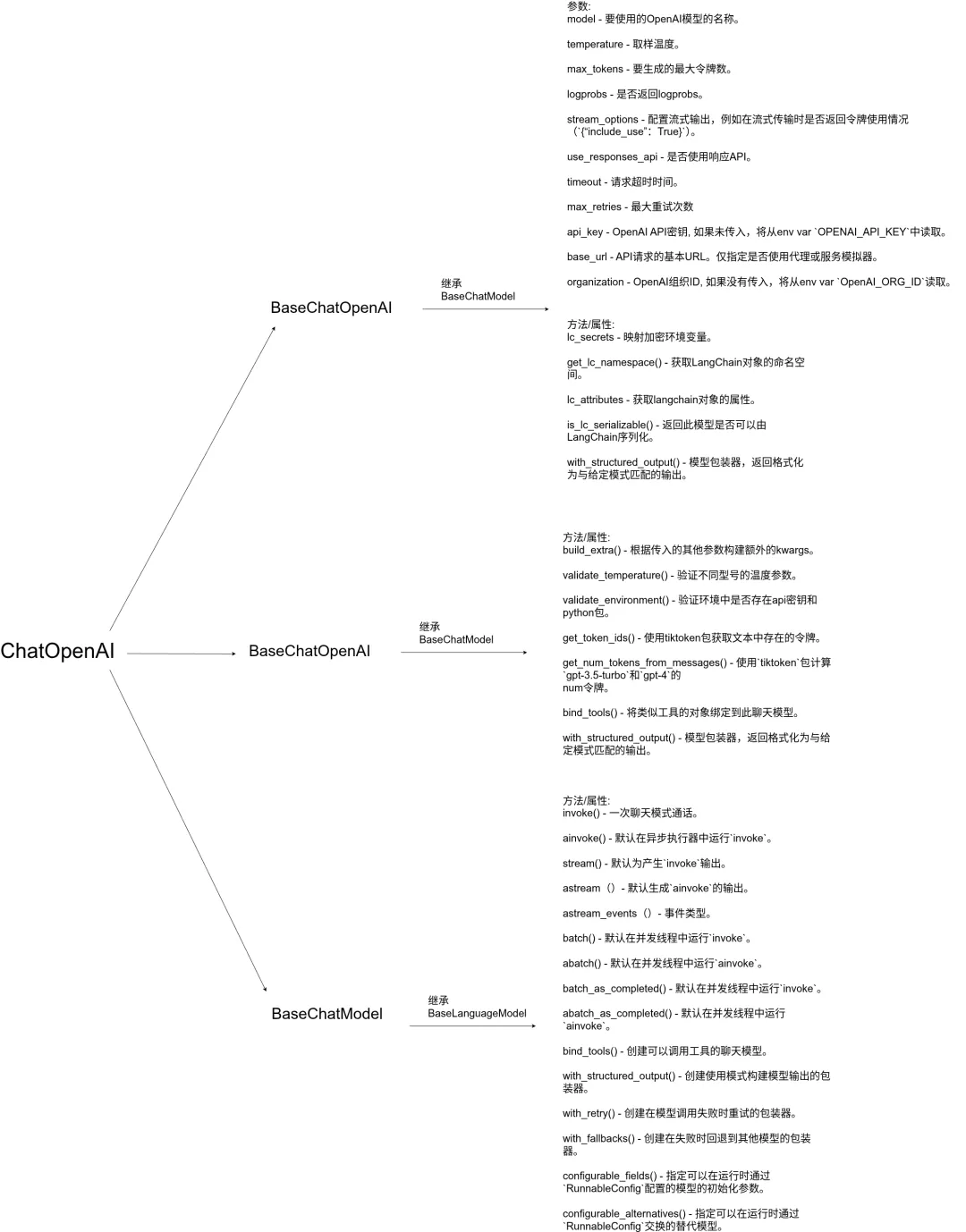
#安装依赖库: pydantic、langchain-openai
pip install -U langchain-openaipip install -U pydantic# or using uvuv add langchain-openaiuv add pydantic
使用所需参数创建模型实例
– 设置环境变量
export `OPENAI_API_KEY` = "xxxxxxxxxx"初始化
– 使用所需参数创建模型实例(init_chat_model)
import osfrom langchain.chat_models import init_chat_modelos.environ["OPENAI_API_KEY"] = "sk-..."model = init_chat_model("gpt-4.1")
– 使用所需参数创建模型实例(Model Class)
from langchain_openai import ChatOpenAImodel = ChatOpenAI(model="...",temperature=0,max_tokens=None,timeout=None,max_retries=2,# api_key="...",# base_url="...",# organization="...",# other params...)
– 每次调用模型
from langchain_openai import ChatOpenAIimport openaiChatOpenAI(..., frequency_penalty=0.2).invoke(...)# Results in underlying API call of:openai.OpenAI(..).chat.completions.create(..., frequency_penalty=0.2)# Which is also equivalent to:ChatOpenAI(...).invoke(..., frequency_penalty=0.2)
信息调用
– 从模型生成响应
messages = [("system","You are a helpful translator. Translate the user sentence to French.",),("human", "I love programming."),]model.invoke(messages)
– 通过AIMessage方式生成响应
AIMessage(content="J'adore la programmation.",response_metadata={"token_usage": {"completion_tokens": 5,"prompt_tokens": 31,"total_tokens": 36,},"model_name": "gpt-4o","system_fingerprint": "fp_43dfabdef1","finish_reason": "stop","logprobs": None,},id="run-012cffe2-5d3d-424d-83b5-51c6d4a593d1-0",usage_metadata={"input_tokens": 31, "output_tokens": 5, "total_tokens": 36},)
信息流Stream
– 从模型流式传输响应
for chunk in model.stream(messages):print(chunk.text, end="")
– 生成一系列具有部分内容的“AIMessageChunk”对象
AIMessageChunk(content="", id="run-9e1517e3-12bf-48f2-bb1b-2e824f7cd7b0")AIMessageChunk(content="J", id="run-9e1517e3-12bf-48f2-bb1b-2e824f7cd7b0")AIMessageChunk(content="'adore", id="run-9e1517e3-12bf-48f2-bb1b-2e824f7cd7b0")AIMessageChunk(content=" la", id="run-9e1517e3-12bf-48f2-bb1b-2e824f7cd7b0")AIMessageChunk(content=" programmation", id="run-9e1517e3-12bf-48f2-bb1b-2e824f7cd7b0")AIMessageChunk(content=".", id="run-9e1517e3-12bf-48f2-bb1b-2e824f7cd7b0")AIMessageChunk(content="",response_metadata={"finish_reason": "stop"},id="run-9e1517e3-12bf-48f2-bb1b-2e824f7cd7b0",)
– 要收集完整的消息,您可以将块连接起来
stream = model.stream(messages)full = next(stream)for chunk in stream:full += chunk
full = AIMessageChunk(content="J'adore la programmation.",response_metadata={"finish_reason": "stop"},id="run-bf917526-7f58-4683-84f7-36a6b671d140",)
异步消息:
– 异步等效的调用、流和批处理也可用
# Invokeawait model.ainvoke(messages)# Streamasync for chunk in (await model.astream(messages))# Batchawait model.abatch([messages])
结果为AIMessage响应
– 对于批处理,结果为list[AMessage]
AIMessage(content="J'adore la programmation.",response_metadata={"token_usage": {"completion_tokens": 5,"prompt_tokens": 31,"total_tokens": 36,},"model_name": "gpt-4o","system_fingerprint": "fp_43dfabdef1","finish_reason": "stop","logprobs": None,},id="run-012cffe2-5d3d-424d-83b5-51c6d4a593d1-0",usage_metadata={"input_tokens": 31,"output_tokens": 5,"total_tokens": 36,},)
信息工具调用:
– 调用工具
from pydantic import BaseModel, Fieldclass GetWeather(BaseModel):'''Get the current weather in a given location'''location: str = Field(..., description="The city and state, e.g. San Francisco, CA")class GetPopulation(BaseModel):'''Get the current population in a given location'''location: str = Field(..., description="The city and state, e.g. San Francisco, CA")model_with_tools = model.bind_tools([GetWeather, GetPopulation]# strict = True # Enforce tool args schema is respected)ai_msg = model_with_tools.invoke("Which city is hotter today and which is bigger: LA or NY?")ai_msg.tool_calls
– 响应信息:
[{"name": "GetWeather","args": {"location": "Los Angeles, CA"},"id": "call_6XswGD5Pqk8Tt5atYr7tfenU",},{"name": "GetWeather","args": {"location": "New York, NY"},"id": "call_ZVL15vA8Y7kXqOy3dtmQgeCi",},{"name": "GetPopulation","args": {"location": "Los Angeles, CA"},"id": "call_49CFW8zqC9W7mh7hbMLSIrXw",},{"name": "GetPopulation","args": {"location": "New York, NY"},"id": "call_6ghfKxV264jEfe1mRIkS3PE7",},]
并行工具调用
– 设置为“False”以禁用并行工具调用:
ai_msg = model_with_tools.invoke("What is the weather in LA and NY?", parallel_tool_calls=False)ai_msg.tool_calls
– 响应信息:
[{"name": "GetWeather","args": {"location": "Los Angeles, CA"},"id": "call_4OoY0ZR99iEvC7fevsH8Uhtz",}]
– 与其他运行时参数一样, parallel_tool_calls可以绑定到模型
– 使用model.bind(parallel_tool_calls=False)或在实例化过程中设置model_kwargs。
内置(服务器端)工具
– 调用
from langchain_openai import ChatOpenAImodel = ChatOpenAI(model="...", output_version="responses/v1")tool = {"type": "web_search"}model_with_tools = model.bind_tools([tool])response = model_with_tools.invoke("What was a positive news story from today?")response.content
– 响应信息:
[{"type": "text","text": "Today, a heartwarming story emerged from ...","annotations": [{"end_index": 778,"start_index": 682,"title": "Title of story","type": "url_citation","url": "<url of story>",}],}]
管理对话状态
– 从以前的消息中传递响应ID将继续会话线
from langchain_openai import ChatOpenAImodel = ChatOpenAI(model="...",use_responses_api=True,output_version="responses/v1",)response = model.invoke("Hi, I'm Bob.")response.text
– 响应信息:
"Hi Bob! How can I assist you today?"– 您还可以使用use_previous_response_id初始化ChatOpenAI, 然后从请求中删除最新响应之前的输入消息
model = ChatOpenAI(model="...", use_previous_response_id=True)推理输出
– 内部推理过程的总结。
from langchain_openai import ChatOpenAIreasoning = {"effort": "medium", # 'low', 'medium', or 'high'"summary": "auto", # 'detailed', 'auto', or None}model = ChatOpenAI(model="...", reasoning=reasoning, output_version="responses/v1")response = model.invoke("What is 3^3?")#Responsetextprint(f"Output: {response.text}")#Reasoningsummariesfor block in response.content:if block["type"] == "reasoning":for summary in block["summary"]:print(summary["text"])
– 响应信息:
Output: 3³ = 27Reasoning: The user wants to know...
“`结构化输出
– 使用pydantic格式化数据
from pydantic import BaseModel, Fieldclass Joke(BaseModel):'''Joke to tell user.'''setup: str = Field(description="The setup of the joke")punchline: str = Field(description="The punchline to the joke")rating: int | None = Field(description="How funny the joke is, from 1 to 10")structured_model = model.with_structured_output(Joke)structured_model.invoke("Tell me a joke about cats")
– json格式输出
json_model = model.bind(response_format={"type": "json_object"})ai_msg = json_model.invoke("Return a JSON object with key 'random_ints' and a value of 10 random ints in [0-99]")ai_msg.content
– 响应信息:
'\\n{\\n "random_ints": [23, 87, 45, 12, 78, 34, 56, 90, 11, 67]\\n}'图像输入
– 传入图片base64格式
import base64import httpxfrom langchain.messages import HumanMessageimage_url = "https://upload.wikimedia.org/wikipedia/commons/thumb/d/dd/Gfp-wisconsin-madison-the-nature-boardwalk.jpg/2560px-Gfp-wisconsin-madison-the-nature-boardwalk.jpg"image_data = base64.b64encode(httpx.get(image_url).content).decode("utf-8")message = HumanMessage(content=[{"type": "text", "text": "describe the weather in this image"},{"type": "image_url","image_url": {"url": f"data:image/jpeg;base64,{image_data}"},},])ai_msg = model.invoke([message])ai_msg.content
– 响应信息:
"The weather in the image appears to be clear and pleasant. The sky is mostly blue with scattered, light clouds, suggesting a sunny day with minimal cloud cover. There is no indication of rain or strong winds, and the overall scene looks bright and calm. The lush green grass and clear visibility further indicate good weather conditions."令牌使用情况
– 直接调用模型
ai_msg = model.invoke(messages)ai_msg.usage_metadata
– 响应信息:
{"input_tokens": 28, "output_tokens": 5, "total_tokens": 33}– 流式传输时,设置`stream_usage`参数
stream = model.stream(messages, stream_usage=True)full = next(stream)for chunk in stream:full += chunkfull.usage_metadata
– 响应信息:
{"input_tokens": 28, "output_tokens": 5, "total_tokens": 33}关于Logprobs(对数概率)的信息
– 绑定logprobs
logprobs_model = model.bind(logprobs=True)ai_msg = logprobs_model.invoke(messages)ai_msg.response_metadata["logprobs"]
– 响应信息:
{"content": [{"token": "J","bytes": [74],"logprob": -4.9617593e-06,"top_logprobs": [],},{"token": "'adore","bytes": [39, 97, 100, 111, 114, 101],"logprob": -0.25202933,"top_logprobs": [],},{"token": " la","bytes": [32, 108, 97],"logprob": -0.20141791,"top_logprobs": [],},{"token": " programmation","bytes": [32, 112, 114, 111, 103, 114, 97, 109, 109, 97, 116, 105, 111, 110,],"logprob": -1.9361265e-07,"top_logprobs": [],},{"token": ".","bytes": [46],"logprob": -1.2233183e-05,"top_logprobs": [],},]}
响应元数据
– 调用元数据属性
ai_msg = model.invoke(messages)ai_msg.response_metadata
– 响应信息:
{"token_usage": {"completion_tokens": 5,"prompt_tokens": 28,"total_tokens": 33,},"model_name": "gpt-4o","system_fingerprint": "fp_319be4768e","finish_reason": "stop","logprobs": None,}
信息Flex处理
– OpenAI提供多种[服务层](https://platform.openai.com/docs/guides/flex-processing?api-模式=响应)。
– 灵活层为请求提供了更便宜的定价,并进行了权衡响应可能需要更长的时间,资源可能并不总是可用。
– 这种方法最适合于非关键任务,数据增强或可以异步运行的作业。
– 要使用它,请使用service_tier=“flex”初始化模型:
例:
from langchain_openai import ChatOpenAImodel = ChatOpenAI(model="...", service_tier="flex")
– 请注意,这是一个测试版功能,仅适用于部分型号。
– 请参阅OpenAI[flex处理文档](https://platform.openai.com/docs/guides/flex-processing?api-模式=响应)了解更多细节。
信息OpenAI兼容API
– ChatOpenAI可以与OpenAI兼容的API一起使用,如[LM Studio](https://lmstudio.ai/),[vLLM](https://github.com/vllm-project/vllm),
[Ollama](https://ollama.com/)以及其他。
– LM Studio 例子
# title="LM Studio example with TTL (auto-eviction)"from langchain_openai import ChatOpenAImodel = ChatOpenAI(base_url="http://localhost:1234/v1",api_key="lm-studio", # Can be any stringmodel="mlx-community/QwQ-32B-4bit",temperature=0,extra_body={"ttl": 300}, # Auto-evict model after 5 minutes of inactivity)
– vLLM 例子
# title="vLLM example with custom parameters"model = ChatOpenAI(base_url="http://localhost:8000/v1",api_key="EMPTY",model="meta-llama/Llama-2-7b-chat-hf",extra_body={"use_beam_search": True, "best_of": 4},)
– model_kwargs与extra_body, 对不同类型的API参数使用正确的参数:
– 使用model_kwargs参数
– 未明确定义为类参数的标准OpenAI API参数
# Standard OpenAI parameters# 示例:`max_coompletion_tokens`、`stream_options`、`modalities`、`audio`model = ChatOpenAI(model="...",model_kwargs={"stream_options": {"include_usage": True},"max_completion_tokens": 300,"modalities": ["text", "audio"],"audio": {"voice": "alloy", "format": "wav"},},)
– 使用extra_body参数
– 特定于OpenAI兼容提供商(vLLM、LM Studio等)的自定义参数,
OpenRouter等)
– 任何非标准的OpenAI API参数
# Custom provider parametersmodel = ChatOpenAI(base_url="http://localhost:8000/v1",model="custom-model",extra_body={"use_beam_search": True, # vLLM parameter"best_of": 4, # vLLM parameter"ttl": 300, # LM Studio parameter},)
主要区别
– model_kwargs:参数被合并到顶级请求有效负载中
– extra_body:参数嵌套在请求中的extra-body键下
提示词缓存优化
– 对于具有重复提示的高容量应用程序,请使用prompt_cache_key每次调用以提高缓存命中率并降低成本:
model = ChatOpenAI(model="...")response = model.invoke(messages,prompt_cache_key="example-key-a", # Routes to same machine for cache hits)customer_response = model.invoke(messages, prompt_cache_key="example-key-b")support_response = model.invoke(messages, prompt_cache_key="example-key-c")# Dynamic cache keys based on contextcache_key = f"example-key-{dynamic_suffix}"response = model.invoke(messages, prompt_cache_key=cache_key)
– 缓存键有助于确保将具有相同提示前缀的请求路由到, 具有现有缓存的机器, 可降低成本并改善延迟缓存令牌。