 夜雨聆风
夜雨聆风


uniapp:视频video,记录播放进度
需求
-
播放暂停视频 -
不允许快进,可以后退 -
视频后退不会影响最高观看时长,例如看了10分钟,后退5分钟,观看时长依然是600秒 -
监听退出记录观看时间,下次进来接着看 -
视频看完积分 -
自定义视频是否有倍速 -

uniapp原生组件video 没有倍速
<template><view><!-- id:唯一标识,@timeupdate进度条变化的事件,@ended进度条到最后的事件,initial-time指定视频初始播放位置, --><videoid="myVideo"style="width: 100%;" @timeupdate="timeUpdate" @ended="ended":initial-time="initialTime":src="course.videos" :poster="course.img"></video></view></template><script>export default {data() {return {initialTime: 0, //初始播放位置duration: 0, // 视频时长videoContext: '', // 用来存储video对象watchTime: 0, // 实际观看时间videoRealTime: 0, // 实时播放进度course: {videos: "https://img.cdn.aliyun.dcloud.net.cn/guide/uniapp/%E7%AC%AC1%E8%AE%B2%EF%BC%88uni-app%E4%BA%A7%E5%93%81%E4%BB%8B%E7%BB%8D%EF%BC%89-%20DCloud%E5%AE%98%E6%96%B9%E8%A7%86%E9%A2%91%E6%95%99%E7%A8%8B@20181126-lite.m4v",img: 'https://cdn.uviewui.com/uview/swiper/swiper1.png'}};},onLoad(options) {uni.setNavigationBarTitle({title: options.id})// 调用接口取到该用户上次播放的位置(秒)this.watchTime = 67this.initialTime = 67},onReady() {// 视频唯一IDthis.videoContext = uni.createVideoContext('myVideo')},methods: {// 监听进度条变化:禁止拖动 e.detail = {currentTime, duration} 。触发频率 250ms 一次timeUpdate(e) {//视频时长this.duration = parseInt(e.detail.duration)// 记录用户当前视频进度var jumpTime = parseInt(e.detail.currentTime)// 判断用户当前视频进度比实际观看时间差别,这里只判断了用户快进if (jumpTime - this.watchTime > 1) {// 差别过大,调用seek方法跳转到实际观看时间this.videoContext.seek(this.watchTime)} else {this.videoRealTime = parseInt(e.detail.currentTime)if (this.videoRealTime > this.watchTime) {this.watchTime = this.videoRealTime}}},ended() {// 用户把进度条拉到最后,但是实际观看时间不够,跳转回去会自动暂停if (this.watchTime < this.duration) {this.videoContext.play()} else {console.log('看完了')}},// 监听返回:监听不了ios的左滑返回,目前的采用的解决方案是在onLoad设置禁用左滑// onLoad(option) {// // 单页禁止测滑返回// // #ifdef APP-PLUS// let currentWebview = this.$mp.page.$getAppWebview() //获取当前页面的webview对象// currentWebview.setStyle({// popGesture: 'none'// })// // #endif// }// 监听返回,记录视频的观看时长onBackPress(e) {//backbutton 是点击物理按键返回,navigateBack是uniapp中的返回(比如左上角的返回箭头)console.log('返回', e, this.watchTime, this.duration);},},}</script>
使用插件 x-video 视频播放:https://ext.dcloud.net.cn/plugin?id=10979
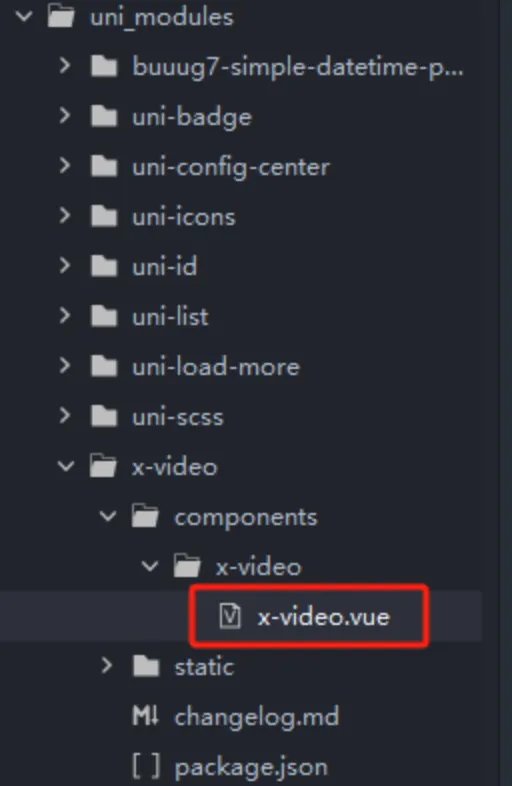
修改组件 实现不能往前拉的功能
<template><divclass="video-wrap":style="{ width: `${width}`, height: `${height}` }"><!-- video player --><view @click="handleControls"><videoclass="video-player":id="videoId":style="{ width: `${width}`, height: `${height}` }"webkit-playsinline="true" playsinline="true" x-webkit-airplay="allow" x5-video-player-type="h5-page"x5-video-orientation="portrait" :src="src" :initial-time="initialTime" :controls="isFullScreen":show-center-play-btn="false" :autoplay="autoplay" :muted="isMute" :poster="poster" @play="videoPlay"@pause="videoPause" @ended="videoEnded" @timeupdate="videoTimeUp" @loadedmetadata="videoLoaded"@seeked="videoSeeked" @seeking="videoSeeking" @waiting="videoWaiting" @error="videoError"@fullscreenchange="onFullScreen"></video></view><viewclass="abs-center"><!-- 中心播放按钮 --><imagesrc="../../static/play-btn.png"mode=""class="play-btn"v-if="!isVideoPlay && !showLoading"@click="videoPlayCenter"></image><!-- 加载中 --><divclass="video-loading"v-if="showLoading"><imagesrc="../../static/loading.png"mode=""class="loading-btn"></image></div></view><!-- 控制条 --><view:class="['controls-bar', controls ? 'show' : 'hide']"><!-- 播放 --><viewclass="play-box" @click="videoPlayClick"><imagesrc="../../static/pause.png"mode=""class="play-icon"v-if="isVideoPlay"></image><imagesrc="../../static/play.png"mode=""class="play-icon"v-else></image></view><!-- 声音 --><viewclass="mute-box" @click="videoMuteClick"><imagesrc="../../static/sound.png"mode=""class="mute-icon"v-if="!isMute"></image><imagesrc="../../static/mute.png"mode=""class="mute-icon"v-else></image></view><!-- 进度 --><viewclass="progress"><viewclass="currtime">{{ currentTimeStr }}</view><viewclass="slider-container"><slider @change="sliderChange" @changing="sliderChanging":step="step":value="sliderValue"backgroundColor="#9f9587" activeColor="#d6d2cc" block-color="#FFFFFF" block-size="12" /></view><viewclass="druationTime">{{ druationTimeStr }}</view></view><!-- 倍速 --><viewclass="play-rate" @click="videoPlayRate"v-if="showRate">{{ playbackRate }}x</view><!-- 全屏 --><viewclass="play-full" @click="videoFull"><imagesrc="../../static/fullscreen.png"mode=""class="play-icon" @click="videoFull"></image></view><!-- 倍速菜单 --><ulclass="play-rate-menu":style="{ height: height }"v-if="showRateMenu"><liv-for="item in playbackRates":key="item":class="[{ activeRate: playbackRate === item }, 'play-rate-item']"@click="changePlayRate(item)">{{ item }}x</li></ul></view></div></template><script>export default {name: 'XVideo',props: {// 视频地址videoId: {type: String,default: 'myVideo'},// 视频地址src: {type: String},// 自动播放autoplay: {type: Boolean,default: true},// 封面poster: {type: String},// 步长,表示占比,取值必须大于0且为整数step: {type: Number,default: 1},// 初始播放进度,表示占比progress: {type: Number},// 视频宽度width: {type: String,default: '100%'},// 视频高度height: {type: String,default: '484rpx'},// 播放错误提示errorTip: {type: String,default: '播放错误'},// 是否展示倍速showRate: {type: Boolean,default: true},// 播放速率playbackRates: {type: Array,default: () => [0.5, 0.8, 1, 1.25, 1.5, 2]}},data() {return {controls: false, //显示播放控件isVideoPlay: false, // 是否正在播放isMute: false, // 是否静音isVideoEnd: false, // 是否播放结束showPoster: true, // 是否显示视屏封面showLoading: false, // 加载中durationTime: 0, //总播放时间 时间戳currentTime: 0, //当前播放时间 时间戳watchTime: 0, //实际最高播放时间 时间戳druationTimeStr: '00:00', //总播放时间 字符串 计算后currentTimeStr: '00:00', //当前播放时间 字符串 计算后sliderValue: 0, //进度条的值 百分比isSeeked: true, //防止进度条拖拽失效playbackRate: 1, // 初始播放速率showRateMenu: false, //显示播放速率initialTime: 0, //初始播放时间isFullScreen: false, //是否全屏windowWidth: 0 //屏幕宽度}},mounted() {this.videoPlayer = uni.createVideoContext(this.videoId, this)// #ifdef H5// 处理微信不能自动播放if (this.autoplay) {document.addEventListener('WeixinJSBridgeReady',() => {this.videoPlayer.play()this.isVideoPlay = true},false)}// #endif},onHide() {clearTimeout(this.timer)},methods: {// 自动隐藏控制条hideControls() {this.timer = setTimeout(() => {this.controls = false}, 5000)},// 点击显示/隐藏控制条handleControls() {this.controls = !this.controls},// 根据秒获取时间formatSeconds(second) {second = Math.round(second)var hh = parseInt(second / 3600)var mm = parseInt((second - hh * 3600) / 60)if (mm < 10) mm = '0' + mmvar ss = parseInt((second - hh * 3600) % 60)if (ss < 10) ss = '0' + ssif (hh < 10) hh = hh == 0 ? '' : `0${hh}:`var length = hh + mm + ':' + ssif (second > 0) {return length} else {return '00:00'}},// 缓冲videoWaiting(e) {// 没有缓冲结束事件,所以在不播放的情况触发loadingif (!this.isVideoPlay) this.showLoading = true},// 视频信息加载完成videoLoaded(e) {// console.log(e.detail.duration, this.progress)this.durationTime = e.detail.durationthis.druationTimeStr = this.formatSeconds(this.durationTime)this.initialTime = this.progressthis.watchTime = this.progressthis.currentTime = this.progressthis.sliderValue = this.progress * 100 / this.durationTimethis.videoPlayer.seek(this.initialTime)this.currentTimeStr = this.formatSeconds(this.initialTime)this.controls = truethis.showLoading = falsethis.$emit('loadeddata', this.durationTime, this.videoPlayer)},// 播放进度更新,触发频率 250ms 一次// videoTimeUp(e) {// console.log(this.initialTime,this.currentTime,this.watchTime)// // 记录用户当前视频进度// var jumpTime = parseInt(e.detail.currentTime)// // 判断用户当前视频进度比实际观看时间差别,这里只判断了用户快进// if (jumpTime - this.currentTime > 1) {// // 差别过大,调用seek方法跳转到实际观看时间// this.videoPlayer.seek(this.currentTime)// this.currentTimeStr = this.formatSeconds(this.currentTime)// } else if (jumpTime - this.currentTime < -1) {// let sliderValue = Math.round((e.detail.currentTime / this.durationTime) * 100)// if (this.isSeeked) {// //判断拖拽完成后才触发更新,避免拖拽失效// if (sliderValue % this.step === 0)// // 比例值能被步进值整除// this.sliderValue = sliderValue// }// this.currentTimeStr = this.formatSeconds(e.detail.currentTime)// this.$emit('timeupdate', e)// } else {// let sliderValue = Math.round((e.detail.currentTime / this.durationTime) * 100)// if (this.isSeeked) {// //判断拖拽完成后才触发更新,避免拖拽失效// if (sliderValue % this.step === 0)// // 比例值能被步进值整除// this.sliderValue = sliderValue// }// this.currentTimeStr = this.formatSeconds(e.detail.currentTime)// this.currentTime = e.detail.currentTime// this.watchTime = e.detail.currentTime// this.$emit('timeupdate', e)// }// },videoTimeUp(e) {// console.log(this.initialTime, this.currentTime, this.watchTime)// 记录用户当前视频进度var jumpTime = e.detail.currentTime// 判断用户当前视频进度比实际观看时间差别,这里只判断了用户快进if (jumpTime - this.watchTime > 1) {// 差别过大,调用seek方法跳转到实际观看时间this.videoPlayer.seek(this.watchTime)// this.currentTimeStr = this.formatSeconds(this.currentTime)} else {this.currentTime = e.detail.currentTimelet sliderValue = Math.round((e.detail.currentTime / this.durationTime) * 100)if (this.isSeeked) {//判断拖拽完成后才触发更新,避免拖拽失效if (sliderValue % this.step === 0)// 比例值能被步进值整除this.sliderValue = sliderValue}this.currentTimeStr = this.formatSeconds(e.detail.currentTime)if (this.currentTime > this.watchTime) {this.watchTime = this.currentTime}this.$emit('timeupdate', this.watchTime)}},//正在拖动slidersliderChanging(e) {console.log(2, e.detail.value)this.isSeeked = false // 拖拽过程中,不允许更新进度条this.showLoading = truethis.videoPlayer.pause()this.$emit('seeking')},// 拖动slider完成后sliderChange(e) {console.log(1, e.detail.value, this.durationTime, (e.detail.value / 100) * this.durationTime)this.sliderValue = e.detail.valuelet currentTime = (this.sliderValue / 100) * this.durationTimethis.showLoading = falsethis.isSeeked = true // 完成拖动后允许更新滚动条this.videoPlayer.seek(currentTime)if (this.sliderValue < 100) {this.videoPlayer.play()} else {this.videoPlayer.pause()this.videoEnded()}this.hideControls()this.$emit('seeked', this.sliderValue)},// 点击中心播放videoPlayCenter() {this.videoPlayer.play()this.$emit('play')},// 点击左下角播放/暂停,会触发原始播放/暂停事件,分开写,防止重复触发videoPlayClick() {if (this.isVideoPlay) {this.videoPlayer.pause()} else {this.videoPlayer.play()this.$emit('play')}},// 原始播放videoPlay() {if (this.pauseTimer) {clearTimeout(this.pauseTimer)}this.isVideoPlay = truethis.isVideoEnd = falsethis.showLoading = falsethis.hideControls()},// 原始暂停videoPause() {// 处理播放结束和拖动会先触发暂停的问题this.pauseTimer = setTimeout(() => {if (this.isVideoEnd) returnif (!this.isSeeked) returnthis.isVideoPlay = falsethis.$emit('pause')}, 100)},// 静音videoMuteClick() {this.isMute = !this.isMute},// 播放结束videoEnded() {// 重置状态this.isVideoPlay = falsethis.showPoster = truethis.isVideoEnd = truethis.$emit('ended')},// 播放错误videoError(e) {// uni.showToast({// title: this.errorTip,// icon: 'none'// })this.$emit('error')},// 显示倍速videoPlayRate() {this.showRateMenu = true},// 点击倍速changePlayRate(rate) {this.playbackRate = ratethis.videoPlayer.playbackRate(rate)this.showRateMenu = falsethis.hideControls()},// 创建倍速按钮createPlayRateDOM() {const playRateDom = document.createElement('div')playRateDom.className = 'full-play-rate'playRateDom.innerText = `${this.playbackRate}x`playRateDom.onclick = () => {const playRateMenuDom = document.querySelector('.full-play-rate-menu')playRateMenuDom.style.display = 'block'}return playRateDom},// 创建倍速菜单createPlayRateMenuDom() {const playRateMenuDom = document.createElement('ul')playRateMenuDom.className = `play-rate-menu full-play-rate-menu`playRateMenuDom.style.height = this.windowWidth + 'px'playRateMenuDom.style.display = 'none'let liStr = ''this.playbackRates.forEach((item) => {liStr += `<li class="${this.playbackRate === item ? 'activeRate' : ''} play-rate-item full-play-rate-item">${item}x</li>`})playRateMenuDom.innerHTML = liStrreturn playRateMenuDom},// 处理全屏倍速功能videoFullRate() {this.windowWidth = uni.getSystemInfoSync().windowWidthconst fullScreen = document.querySelector('.uni-video-fullscreen')// 添加倍速菜单const playRateMenuDom = document.querySelector('.full-play-rate-menu')const videoContainer = document.querySelector('.uni-video-container')if (!playRateMenuDom) {videoContainer.appendChild(this.createPlayRateMenuDom())const lis = document.querySelectorAll('.full-play-rate-item')lis.forEach((item) => {item.style.lineHeight = this.windowWidth / this.playbackRates.length + 'px'item.onclick = () => {let rate = +item.innerText.slice(0, -1)this.playbackRate = ratethis.videoPlayer.playbackRate(rate)lis.forEach((li) => {li.classList.remove('activeRate')let rate = +li.innerText.slice(0, -1)if (this.playbackRate === rate) {li.classList.add('activeRate')}})const playRateMenuDom = document.querySelector('.full-play-rate-menu')playRateMenuDom.style.display = 'none'const playRateDom = document.querySelector('.full-play-rate')playRateDom.innerText = `${this.playbackRate}x`}})}// 添加倍速按钮const playRateDom = document.querySelector('.full-play-rate')if (!playRateDom) {fullScreen.parentNode.insertBefore(this.createPlayRateDOM(), fullScreen)}},// 点击全屏videoFull() {this.videoPlayer.requestFullScreen()// #ifdef H5if (this.showRate) {this.videoFullRate()}// #endif},// 监听原生全屏事件onFullScreen({detail}) {if (detail.fullScreen) {this.isFullScreen = true} else {this.isFullScreen = false// #ifdef H5const playRateMenuDom = document.querySelector('.full-play-rate-menu')playRateMenuDom.style.display = 'none'// #endif}}}}</script><stylelang="scss"scoped>/deep/ .uni-video-fullscreen {margin-left: 30px}.show {opacity: 1 !important;}.hide {opacity: 0 !important;pointer-events: none;}.abs-center {position: absolute;top: 50%;left: 50%;transform: translate(-50%, -50%);}::v-deep .full-play-rate {color: #cbcbcb;font-size: 32rpx;margin-left: 24rpx;margin-right: 24rpx;}::v-deep .full-play-rate-menu {position: fixed !important;}::v-deep .play-rate-menu {list-style-type: none;background-color: rgba(0, 0, 0, 0.7);width: 24%;position: absolute;right: 0;bottom: 0;padding-left: 0;box-sizing: border-box;}::v-deep .play-rate-item {line-height: 70rpx;font-size: 28rpx;text-align: center;color: #fff;}::v-deep .activeRate {color: #5785e3;}.video-wrap {position: relative;.play-btn {width: 120rpx;height: 120rpx;}@keyframes run {from {transform: rotate(0deg);}to {transform: rotate(360deg);}}.loading-btn {width: 120rpx;height: 120rpx;animation: run 0.8s linear 0s infinite;}.controls-bar {width: 100%;padding: 1% 1% 1% 0;position: absolute;bottom: 0;left: 0;right: 0;z-index: 99;display: flex;align-items: center;background: rgba(59, 57, 57, 0.7);color: #fff;opacity: 1;transition: opacity 1s;height: 84rpx;.play-box,.mute-box,.play-full {width: 84rpx;height: 100%;display: flex;align-items: center;justify-content: center;}.mute-icon {width: 40rpx;height: 40rpx;}.play-icon {width: 34rpx;height: 34rpx;}.progress {display: flex;align-items: center;flex: 1;font-size: 24rpx;margin-left: 16rpx;.slider-container {flex: 1;max-width: 58%;}.currtime {color: #ffffff;width: 11%;height: 100%;text-align: center;margin-right: 20rpx;}.druationTime {color: #ffffff;width: 12%;height: 100%;text-align: center;}}.play-rate {font-size: 32rpx;margin-right: 24rpx;}.play-rate-menu {padding-top: 26rpx;}.play-rate-item:first-child {margin-top: 30rpx;}}}</style>