夜雨聆风
夜雨聆风


《Word教案公文排版工具:一键搞定字体、段落、表格、图片,让格式自动化!》



“带你横跨办公自动化的数据江海”
@摸鱼
前言
关于摸鱼
(
ABOUT MOYU
)
闻道有先后,术业有专攻。
各位大佬朋友们好!
~我依旧是你们的老朋友摸鱼~
在职场摸爬滚打的这十多年里,我用Python悄悄干了不少“正事”——不知不觉攒下了一整套办公自动化的实用项目技巧。去年10月初创立了公众号 「码海听潮」 ,初衷很简单:把重复的劳动交给代码,把摸鱼的时间留给生活。
目前已经吭哧吭哧更新了120多篇原创文章,每一篇都是实操干货,不讲虚的,只聊怎么用代码真正解放双手,帮大家早点下班、准点摸鱼
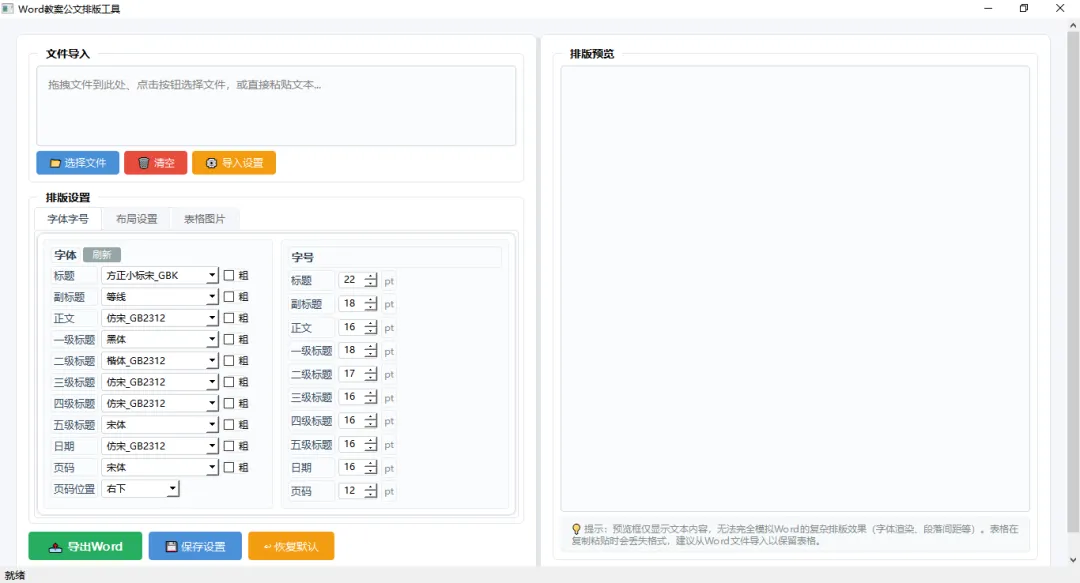
好了,多了不说,少了不唠,今天给大佬们分享一款本人原创的【Word教案公文排版工具】,这款小工具专为教育工作者和公文处理人员设计,具备智能文档解析、一键排版、字体字号精细控制等核心功能。它支持txt和docx文件的拖拽导入,能自动识别标题、副标题、各级标题、正文、日期、落款等文档结构元素,并按照标准公文格式进行智能排版。
《办公工具成品展示:》
《该办公工具核心功能亮点:》
01
亮点1:智能文档解析🎯
-
自动识别文档结构:标题、副标题、一级至五级标题、正文、日期、落款、附件、联系人等
-
支持TXT和DOCX文件拖拽导入,即拖即用
-
智能区分标题层级,无需手动标记
02
亮点2:配置管理📱
-
所有排版设置一键保存为配置文件
-
支持从配置文件快速导入设置
-
一键恢复默认设置
-
排版设置记录自动保存
03
亮点3:表格与图片处理⚡
-
表格字体、字号、加粗、居中对齐独立设置
-
支持保持原表格格式或统一格式化
-
图片对齐方式(左/中/右)自由切换
-
图片宽高自定义,支持保持原始比例
《该办公工具代码展示:》
下面,我就用python代码让各位大佬见识一下,什么叫”传统文化“遇上“赛博效率”
import sysfrom PyQt6.QtWidgets import (QApplication, QMainWindow, QWidget, QVBoxLayout, QHBoxLayout,QGridLayout, QPushButton, QLabel, QLineEdit, QComboBox, QTextEdit,QFileDialog, QMessageBox, QScrollArea, QGroupBox, QCheckBox,QSpinBox, QTabWidget, QProgressBar, QSplitter, QFrame)from PyQt6.QtCore import Qt, QMimeData, QUrl, QSettings, QPoint, QRect, QSize, pyqtSignalfrom PyQt6.QtGui import QDragEnterEvent, QDropEvent, QFont, QPixmap, QActionclass CustomTextEdit(QTextEdit):"""自定义文本编辑框,处理文件拖拽事件"""file_dropped = pyqtSignal(str)def __init__(self, parent=None):super().__init__(parent)self.setAcceptDrops(True)self.setReadOnly(False)self.setFocusPolicy(Qt.FocusPolicy.StrongFocus)self.setTextInteractionFlags(Qt.TextInteractionFlag.TextEditable |Qt.TextInteractionFlag.TextSelectableByMouse |Qt.TextInteractionFlag.TextSelectableByKeyboard)def dragEnterEvent(self, event):if event.mimeData().hasUrls():event.acceptProposedAction()else:super().dragEnterEvent(event)def dragMoveEvent(self, event):if event.mimeData().hasUrls():event.acceptProposedAction()else:super().dragMoveEvent(event)def dropEvent(self, event):if event.mimeData().hasUrls():file_path = event.mimeData().urls()[0].toLocalFile()self.file_dropped.emit(file_path)event.accept()else:super().dropEvent(event)class MainWindow(QMainWindow):def __init__(self):super().__init__()self.setWindowTitle('Word教案公文排版工具')self.setGeometry(100, 100, 1500, 1000)# 设置全局字体global_font = QFont()global_font.setPointSize(10)QApplication.setFont(global_font)self.init_ui()def init_ui(self):# 主窗口中央滚动区域scroll_area = QScrollArea()scroll_area.setWidgetResizable(True)scroll_area.setStyleSheet("QScrollArea { border: none; background:#f5f6fa; }")self.setCentralWidget(scroll_area)central_widget = QWidget()central_widget.setStyleSheet("background:#f5f6fa;")scroll_area.setWidget(central_widget)main_layout = QHBoxLayout(central_widget)main_layout.setContentsMargins(20, 20, 20, 20)main_layout.setSpacing(20)# ==================== 左侧面板 ====================left_panel = QWidget()left_panel.setStyleSheet("""QWidget {background: white;border-radius: 8px;border: 1px solid#e1e4e8;}""")left_layout = QVBoxLayout(left_panel)left_layout.setContentsMargins(16, 16, 16, 16)left_layout.setSpacing(10)# ---- 文件导入区域 ----file_group = QGroupBox("文件导入")file_group.setStyleSheet("""QGroupBox {font-size: 14px;font-weight: bold;border: 1px solid#e1e4e8;border-radius: 6px;margin-top: 8px;padding-top: 6px;background: white;}QGroupBox::title {subcontrol-origin: margin;left: 12px;padding: 0 8px;}""")file_layout = QVBoxLayout(file_group)file_layout.setSpacing(6)self.text_input = CustomTextEdit(self)self.text_input.setPlaceholderText('拖拽文件到此处、点击按钮选择文件,或直接粘贴文本...')self.text_input.setStyleSheet("""QTextEdit {border: 1px solid#d1d5db;border-radius: 4px;padding: 10px;font-size: 14px;min-height: 80px;background:#fafbfc;}QTextEdit:focus {border-color:#4a90d9;}QScrollBar:vertical {width: 10px;background:#f0f0f0;border-radius: 5px;}QScrollBar::handle:vertical {background:#c0c0c0;border-radius: 5px;min-height: 20px;}QScrollBar::add-line:vertical, QScrollBar::sub-line:vertical {height: 0px;}""")self.text_input.setVerticalScrollBarPolicy(Qt.ScrollBarPolicy.ScrollBarAsNeeded)self.text_input.setHorizontalScrollBarPolicy(Qt.ScrollBarPolicy.ScrollBarAsNeeded)btn_row = QHBoxLayout()btn_row.setSpacing(6)select_btn = QPushButton('📁 选择文件')select_btn.setStyleSheet("""QPushButton {font-size: 13px;padding: 6px 16px;background:#4a90d9;color: white;border: none;border-radius: 4px;font-weight: 500;}QPushButton:hover { background:#3a7bc8; }""")clear_btn = QPushButton('🗑️ 清空')clear_btn.setStyleSheet("""QPushButton {font-size: 13px;padding: 6px 16px;background:#e74c3c;color: white;border: none;border-radius: 4px;font-weight: 500;}QPushButton:hover { background:#c0392b; }""")import_setting_btn = QPushButton('⚙️ 导入设置')import_setting_btn.setStyleSheet("""QPushButton {font-size: 13px;padding: 6px 16px;background:#f39c12;color: white;border: none;border-radius: 4px;font-weight: 500;}QPushButton:hover { background:#e67e22; }""")btn_row.addWidget(select_btn)btn_row.addWidget(clear_btn)btn_row.addWidget(import_setting_btn)btn_row.addStretch()file_layout.addWidget(self.text_input)file_layout.addLayout(btn_row)# ---- 排版设置区域 ----settings_group = QGroupBox("排版设置")settings_group.setStyleSheet("""QGroupBox {font-size: 14px;font-weight: bold;border: 1px solid#e1e4e8;border-radius: 6px;margin-top: 8px;padding-top: 6px;background: white;}QGroupBox::title {subcontrol-origin: margin;left: 12px;padding: 0 8px;}""")settings_layout = QVBoxLayout(settings_group)settings_layout.setContentsMargins(6, 6, 6, 6)settings_layout.setSpacing(4)# Tab 控件self.tab_widget = QTabWidget()self.tab_widget.setStyleSheet("""QTabWidget::pane {border: 1px solid#e1e4e8;border-radius: 4px;background: white;padding: 2px;}QTabBar::tab {font-size: 13px;padding: 6px 16px;margin-right: 2px;border-top-left-radius: 4px;border-top-right-radius: 4px;background:#f5f6fa;color:#666;}QTabBar::tab:selected {background: white;color:#2c3e50;border: 1px solid#e1e4e8;border-bottom: none;}QTabBar::tab:hover:!selected {background:#e8ecf1;}""")# ----- Tab 1: 字体字号 -----font_size_tab = QWidget()font_size_tab.setStyleSheet("background: white;")font_size_layout = QVBoxLayout(font_size_tab)font_size_layout.setContentsMargins(8, 8, 8, 8)font_size_layout.setSpacing(6)# 字体和字号并排top_hbox = QHBoxLayout()top_hbox.setSpacing(10)# 字体设置font_frame = QFrame()font_frame.setFrameStyle(QFrame.Shape.StyledPanel)font_frame.setStyleSheet("""QFrame {border: 1px solid#e8ecf0;border-radius: 4px;background:#fafbfc;}""")font_layout = QVBoxLayout(font_frame)font_layout.setContentsMargins(8, 8, 8, 8)font_layout.setSpacing(3)font_header = QHBoxLayout()font_label = QLabel('字体')font_label.setStyleSheet('font-size: 14px; font-weight: bold; color:#2c3e50;')font_header.addWidget(font_label)refresh_btn = QPushButton('刷新')refresh_btn.setStyleSheet("""QPushButton {font-size: 12px;padding: 2px 12px;background:#95a5a6;color: white;border: none;border-radius: 3px;}QPushButton:hover { background:#7f8c8d; }""")font_header.addWidget(refresh_btn)font_header.addStretch()font_layout.addLayout(font_header)font_settings = [('title_font', '标题'),('subtitle_font', '副标题'),('body_font', '正文'),('heading1_font', '一级标题'),('heading2_font', '二级标题'),('heading3_font', '三级标题'),('heading4_font', '四级标题'),('heading5_font', '五级标题'),('date_font', '日期'),('page_font', '页码'),('page_position', '页码位置')]self.font_combos = {}self.bold_checkboxes = {}for font_key, label_text in font_settings:row = QHBoxLayout()row.setSpacing(4)label = QLabel(label_text)label.setStyleSheet('font-size: 13px; font-weight: 500; color:#34495e;')label.setFixedWidth(60)row.addWidget(label)if font_key == 'page_position':combo = QComboBox()combo.setFixedWidth(100)combo.setStyleSheet("""QComboBox {font-size: 12px;padding: 2px 6px;border: 1px solid#d1d5db;border-radius: 3px;background: white;}QComboBox:hover { border-color:#4a90d9; }""")combo.addItems(['右下', '中', '左下'])self.font_combos[font_key] = comboelse:combo = QComboBox()combo.setFixedWidth(150)combo.setStyleSheet("""QComboBox {font-size: 12px;padding: 2px 6px;border: 1px solid#d1d5db;border-radius: 3px;background: white;}QComboBox:hover { border-color:#4a90d9; }""")combo.addItems(['方正小标宋_GBK', '仿宋_GB2312', '黑体', '楷体_GB2312', '宋体', '新宋体', '等线', '仿宋', '楷体', '微软雅黑'])self.font_combos[font_key] = comborow.addWidget(combo)if font_key not in ['page_position']:chk = QCheckBox('粗')chk.setStyleSheet('font-size: 12px; font-weight: 500;')self.bold_checkboxes[font_key] = chkrow.addWidget(chk)row.addStretch()font_layout.addLayout(row)# 字号设置size_frame = QFrame()size_frame.setFrameStyle(QFrame.Shape.StyledPanel)size_frame.setStyleSheet("""QFrame {border: 1px solid#e8ecf0;border-radius: 4px;background:#fafbfc;}""")size_layout = QVBoxLayout(size_frame)size_layout.setContentsMargins(8, 8, 8, 8)size_layout.setSpacing(3)size_label = QLabel('字号')size_label.setStyleSheet('font-size: 14px; font-weight: bold; color:#2c3e50;')size_layout.addWidget(size_label)size_settings = [('title_size', '标题'),('subtitle_size', '副标题'),('body_size', '正文'),('heading1_size', '一级标题'),('heading2_size', '二级标题'),('heading3_size', '三级标题'),('heading4_size', '四级标题'),('heading5_size', '五级标题'),('date_size', '日期'),('page_size', '页码')]self.size_spins = {}for size_key, label_text in size_settings:row = QHBoxLayout()row.setSpacing(4)label = QLabel(label_text)label.setStyleSheet('font-size: 13px; font-weight: 500; color:#34495e;')label.setFixedWidth(60)row.addWidget(label)spin = QSpinBox()spin.setRange(8, 72)spin.setFixedWidth(50)spin.setStyleSheet("""QSpinBox {font-size: 12px;padding: 1px 4px;border: 1px solid#d1d5db;border-radius: 3px;background: white;}QSpinBox:hover { border-color:#4a90d9; }QSpinBox:focus { border-color:#4a90d9; }""")spin.setValue(16)self.size_spins[size_key] = spinrow.addWidget(spin)pt_lbl = QLabel('pt')pt_lbl.setStyleSheet('font-size: 12px; color:#7f8c8d;')row.addWidget(pt_lbl)row.addStretch()size_layout.addLayout(row)top_hbox.addWidget(font_frame, 1)top_hbox.addWidget(size_frame, 1)font_size_layout.addLayout(top_hbox)# ----- Tab 2: 布局设置 -----layout_tab = QWidget()layout_tab.setStyleSheet("background: white;")layout_layout = QVBoxLayout(layout_tab)layout_layout.setContentsMargins(8, 8, 8, 8)layout_layout.setSpacing(6)self.layout_spins = {}# 基本布局参数grid = QGridLayout()grid.setSpacing(6)grid.setVerticalSpacing(4)layout_params = [('left_margin', '左边距', 0, 0),('right_margin', '右边距', 0, 1),('top_margin', '上边距', 0, 2),('bottom_margin', '下边距', 0, 3),('lines_per_page', '每页行数', 1, 0),('chars_per_line', '每行字数', 1, 1),('line_spacing', '行距', 1, 2),('char_spacing', '字间距', 1, 3),('first_line_indent', '首行缩进', 2, 0),]for key, label, row, col in layout_params:lbl = QLabel(label)lbl.setStyleSheet('font-size: 13px; font-weight: 500; color:#34495e;')lbl.setFixedWidth(70)grid.addWidget(lbl, row, col * 2)spin = QSpinBox()spin.setFixedWidth(50)spin.setRange(0, 100)spin.setStyleSheet("""QSpinBox {font-size: 12px;padding: 1px 4px;border: 1px solid#d1d5db;border-radius: 3px;background: white;}QSpinBox:hover { border-color:#4a90d9; }""")spin.setValue(28)self.layout_spins[key] = spingrid.addWidget(spin, row, col * 2 + 1)unit = 'mm' if 'margin' in key else ''unit_lbl = QLabel(unit)unit_lbl.setStyleSheet('font-size: 12px; color:#7f8c8d;')grid.addWidget(unit_lbl, row, col * 2 + 2)layout_layout.addLayout(grid)# 段间距spacing_label = QLabel('段间距')spacing_label.setStyleSheet('font-size: 14px; font-weight: bold; color:#2c3e50; margin-top: 4px;')layout_layout.addWidget(spacing_label)spacing_grid = QGridLayout()spacing_grid.setSpacing(20)spacing_grid.setVerticalSpacing(10)spacing_grid.setColumnStretch(0, 0)spacing_grid.setColumnStretch(1, 0)spacing_grid.setColumnStretch(2, 0)spacing_grid.setColumnStretch(3, 1)header_before = QLabel('上段')header_before.setStyleSheet('font-size: 12px; font-weight: bold; color:#7f8c8d;')spacing_grid.addWidget(header_before, 0, 1)header_after = QLabel('下段')header_after.setStyleSheet('font-size: 12px; font-weight: bold; color:#7f8c8d;')spacing_grid.addWidget(header_after, 0, 2)spacing_settings = [('title', '主标题', 1),('heading1', '一级标题', 2),('heading2', '二级标题', 3),('heading3', '三级标题', 4),('heading4', '四级标题', 5),('heading5', '五级标题', 6),('paragraph', '正文', 7),]for label, display_name, row in spacing_settings:lbl = QLabel(display_name)lbl.setStyleSheet('font-size: 13px; font-weight: 500; color:#34495e;')lbl.setFixedWidth(60)spacing_grid.addWidget(lbl, row, 0)before_key = f'{label}_spacing_before'before_spin = QSpinBox()before_spin.setRange(0, 100)before_spin.setFixedWidth(45)before_spin.setStyleSheet("""QSpinBox {font-size: 12px;padding: 1px 4px;border: 1px solid#d1d5db;border-radius: 3px;background: white;}QSpinBox:hover { border-color:#4a90d9; }""")before_spin.setValue(8)self.layout_spins[before_key] = before_spinspacing_grid.addWidget(before_spin, row, 1)after_key = f'{label}_spacing_after'after_spin = QSpinBox()after_spin.setRange(0, 100)after_spin.setFixedWidth(45)after_spin.setStyleSheet("""QSpinBox {font-size: 12px;padding: 1px 4px;border: 1px solid#d1d5db;border-radius: 3px;background: white;}QSpinBox:hover { border-color:#4a90d9; }""")after_spin.setValue(8)self.layout_spins[after_key] = after_spinspacing_grid.addWidget(after_spin, row, 2)layout_layout.addLayout(spacing_grid)layout_layout.addStretch()# ----- Tab 3: 表格图片 -----table_image_tab = QWidget()table_image_tab.setStyleSheet("background: white;")table_image_layout = QVBoxLayout(table_image_tab)table_image_layout.setContentsMargins(8, 8, 8, 8)table_image_layout.setSpacing(8)# 表格设置table_frame = QFrame()table_frame.setFrameStyle(QFrame.Shape.StyledPanel)table_frame.setStyleSheet("""QFrame {border: 1px solid#e8ecf0;border-radius: 4px;background:#fafbfc;}""")table_vlayout = QVBoxLayout(table_frame)table_vlayout.setContentsMargins(8, 8, 8, 8)table_vlayout.setSpacing(4)table_label = QLabel('表格设置')table_label.setStyleSheet('font-size: 14px; font-weight: bold; color:#2c3e50;')table_vlayout.addWidget(table_label)tf_row = QHBoxLayout()tf_row.setSpacing(6)tf_lbl = QLabel('字体')tf_lbl.setStyleSheet('font-size: 13px; font-weight: 500; color:#34495e;')tf_lbl.setFixedWidth(50)tf_row.addWidget(tf_lbl)self.table_font_combo = QComboBox()self.table_font_combo.setFixedWidth(150)self.table_font_combo.setStyleSheet("""QComboBox {font-size: 12px;padding: 2px 6px;border: 1px solid#d1d5db;border-radius: 3px;background: white;}QComboBox:hover { border-color:#4a90d9; }""")self.table_font_combo.addItems(['宋体', '仿宋', '黑体', '楷体', '微软雅黑'])tf_row.addWidget(self.table_font_combo)table_bold_chk = QCheckBox('粗')table_bold_chk.setStyleSheet('font-size: 12px; font-weight: 500;')tf_row.addWidget(table_bold_chk)table_center_chk = QCheckBox('居中')table_center_chk.setStyleSheet('font-size: 12px; font-weight: 500;')tf_row.addWidget(table_center_chk)tf_row.addStretch()table_vlayout.addLayout(tf_row)ts_row = QHBoxLayout()ts_row.setSpacing(6)ts_lbl = QLabel('字号')ts_lbl.setStyleSheet('font-size: 13px; font-weight: 500; color:#34495e;')ts_lbl.setFixedWidth(50)ts_row.addWidget(ts_lbl)self.table_size_spin = QSpinBox()self.table_size_spin.setRange(8, 72)self.table_size_spin.setFixedWidth(50)self.table_size_spin.setStyleSheet("""QSpinBox {font-size: 12px;padding: 1px 4px;border: 1px solid#d1d5db;border-radius: 3px;background: white;}QSpinBox:hover { border-color:#4a90d9; }""")self.table_size_spin.setValue(12)ts_row.addWidget(self.table_size_spin)ts_pt = QLabel('pt')ts_pt.setStyleSheet('font-size: 12px; color:#7f8c8d;')ts_row.addWidget(ts_pt)table_original_chk = QCheckBox('保持原表格设置')table_original_chk.setStyleSheet('font-size: 12px; font-weight: 500;')ts_row.addWidget(table_original_chk)ts_row.addStretch()table_vlayout.addLayout(ts_row)table_image_layout.addWidget(table_frame)# 图片设置image_frame = QFrame()image_frame.setFrameStyle(QFrame.Shape.StyledPanel)image_frame.setStyleSheet("""QFrame {border: 1px solid#e8ecf0;border-radius: 4px;background:#fafbfc;}""")image_vlayout = QVBoxLayout(image_frame)image_vlayout.setContentsMargins(8, 8, 8, 8)image_vlayout.setSpacing(4)image_label = QLabel('图片设置')image_label.setStyleSheet('font-size: 14px; font-weight: bold; color:#2c3e50;')image_vlayout.addWidget(image_label)ia_row = QHBoxLayout()ia_row.setSpacing(6)ia_lbl = QLabel('对齐')ia_lbl.setStyleSheet('font-size: 13px; font-weight: 500; color:#34495e;')ia_lbl.setFixedWidth(50)ia_row.addWidget(ia_lbl)self.image_alignment_combo = QComboBox()self.image_alignment_combo.setFixedWidth(100)self.image_alignment_combo.setStyleSheet("""QComboBox {font-size: 12px;padding: 2px 6px;border: 1px solid#d1d5db;border-radius: 3px;background: white;}QComboBox:hover { border-color:#4a90d9; }""")self.image_alignment_combo.addItems(['左对齐', '居中', '右对齐'])ia_row.addWidget(self.image_alignment_combo)ia_row.addStretch()image_vlayout.addLayout(ia_row)iw_row = QHBoxLayout()iw_row.setSpacing(6)iw_lbl = QLabel('宽度')iw_lbl.setStyleSheet('font-size: 13px; font-weight: 500; color:#34495e;')iw_lbl.setFixedWidth(50)iw_row.addWidget(iw_lbl)self.image_width_spin = QSpinBox()self.image_width_spin.setRange(1, 20)self.image_width_spin.setFixedWidth(50)self.image_width_spin.setStyleSheet("""QSpinBox {font-size: 12px;padding: 1px 4px;border: 1px solid#d1d5db;border-radius: 3px;background: white;}QSpinBox:hover { border-color:#4a90d9; }""")self.image_width_spin.setValue(10)iw_row.addWidget(self.image_width_spin)iw_unit = QLabel('cm')iw_unit.setStyleSheet('font-size: 12px; color:#7f8c8d;')iw_row.addWidget(iw_unit)iw_row.addStretch()image_vlayout.addLayout(iw_row)ih_row = QHBoxLayout()ih_row.setSpacing(6)ih_lbl = QLabel('高度')ih_lbl.setStyleSheet('font-size: 13px; font-weight: 500; color:#34495e;')ih_lbl.setFixedWidth(50)ih_row.addWidget(ih_lbl)self.image_height_spin = QSpinBox()self.image_height_spin.setRange(0, 20)self.image_height_spin.setFixedWidth(50)self.image_height_spin.setStyleSheet("""QSpinBox {font-size: 12px;padding: 1px 4px;border: 1px solid#d1d5db;border-radius: 3px;background: white;}QSpinBox:hover { border-color:#4a90d9; }""")self.image_height_spin.setValue(0)ih_row.addWidget(self.image_height_spin)ih_unit = QLabel('cm (0=自动)')ih_unit.setStyleSheet('font-size: 12px; color:#7f8c8d;')ih_row.addWidget(ih_unit)ih_row.addStretch()image_vlayout.addLayout(ih_row)io_row = QHBoxLayout()self.image_original_size_checkbox = QCheckBox('保持原大小')self.image_original_size_checkbox.setStyleSheet('font-size: 13px; font-weight: 500;')io_row.addWidget(self.image_original_size_checkbox)io_row.addStretch()image_vlayout.addLayout(io_row)table_image_layout.addWidget(image_frame)table_image_layout.addStretch()# 添加Tabsself.tab_widget.addTab(font_size_tab, '字体字号')self.tab_widget.addTab(layout_tab, '布局设置')self.tab_widget.addTab(table_image_tab, '表格图片')settings_layout.addWidget(self.tab_widget)# ---- 底部操作按钮 ----action_layout = QHBoxLayout()action_layout.setSpacing(8)export_btn = QPushButton('📤 导出Word')export_btn.setStyleSheet("""QPushButton {font-size: 14px;padding: 8px 24px;background:#27ae60;color: white;border: none;border-radius: 4px;font-weight: 600;}QPushButton:hover { background:#219a52; }""")save_setting_btn = QPushButton('💾 保存设置')save_setting_btn.setStyleSheet("""QPushButton {font-size: 14px;padding: 8px 20px;background:#4a90d9;color: white;border: none;border-radius: 4px;font-weight: 500;}QPushButton:hover { background:#3a7bc8; }""")reset_btn = QPushButton('↩️ 恢复默认')reset_btn.setStyleSheet("""QPushButton {font-size: 14px;padding: 8px 20px;background:#f39c12;color: white;border: none;border-radius: 4px;font-weight: 500;}QPushButton:hover { background:#e67e22; }""")action_layout.addWidget(export_btn)action_layout.addWidget(save_setting_btn)action_layout.addWidget(reset_btn)action_layout.addStretch()left_layout.addWidget(file_group)left_layout.addWidget(settings_group)left_layout.addLayout(action_layout)# ==================== 右侧面板 ====================right_panel = QWidget()right_panel.setStyleSheet("""QWidget {background: white;border-radius: 8px;border: 1px solid#e1e4e8;}""")right_layout = QVBoxLayout(right_panel)right_layout.setContentsMargins(16, 16, 16, 16)right_layout.setSpacing(10)# 预览区域preview_group = QGroupBox("排版预览")preview_group.setStyleSheet("""QGroupBox {font-size: 14px;font-weight: bold;border: 1px solid#e1e4e8;border-radius: 6px;margin-top: 8px;padding-top: 6px;background: white;}QGroupBox::title {subcontrol-origin: margin;left: 12px;padding: 0 8px;}""")preview_layout = QVBoxLayout(preview_group)self.formatted_preview = CustomTextEdit()self.formatted_preview.setStyleSheet("""QTextEdit {border: 1px solid#d1d5db;border-radius: 4px;padding: 10px;font-size: 14px;background:#fafbfc;}QTextEdit:focus {border-color:#4a90d9;}QScrollBar:vertical {width: 10px;background:#f0f0f0;border-radius: 5px;}QScrollBar::handle:vertical {background:#c0c0c0;border-radius: 5px;min-height: 20px;}QScrollBar::add-line:vertical, QScrollBar::sub-line:vertical {height: 0px;}""")self.formatted_preview.setVerticalScrollBarPolicy(Qt.ScrollBarPolicy.ScrollBarAsNeeded)self.formatted_preview.setHorizontalScrollBarPolicy(Qt.ScrollBarPolicy.ScrollBarAsNeeded)self.formatted_preview.setFocusPolicy(Qt.FocusPolicy.StrongFocus)self.formatted_preview.setTextInteractionFlags(Qt.TextInteractionFlag.TextEditable |Qt.TextInteractionFlag.TextSelectableByMouse |Qt.TextInteractionFlag.TextSelectableByKeyboard |Qt.TextInteractionFlag.LinksAccessibleByMouse |Qt.TextInteractionFlag.LinksAccessibleByKeyboard)preview_layout.addWidget(self.formatted_preview)# 提示信息tip_label = QLabel('💡 提示:预览框仅显示文本内容,无法完全模拟Word的复杂排版效果(字体渲染、段落间距等)。''表格在复制粘贴时会丢失格式,建议从Word文件导入以保留表格。')tip_label.setStyleSheet("""QLabel {font-size: 12px;color:#7f8c8d;background:#f8f9fa;border-radius: 4px;padding: 6px 10px;border: 1px solid#e8ecf0;}""")tip_label.setWordWrap(True)preview_layout.addWidget(tip_label)right_layout.addWidget(preview_group)# ==================== 分割器 ====================splitter = QSplitter(Qt.Orientation.Horizontal)splitter.addWidget(left_panel)splitter.addWidget(right_panel)splitter.setStretchFactor(0, 1)splitter.setStretchFactor(1, 2)splitter.setHandleWidth(4)splitter.setStyleSheet("""QSplitter::handle {background:#e1e4e8;border-radius: 2px;margin: 4px 0;}QSplitter::handle:hover {background:#b0b8c0;}""")main_layout.addWidget(splitter)self.statusBar().showMessage('就绪')if __name__ == '__main__':app = QApplication(sys.argv)window = MainWindow()window.show()sys.exit(app.exec())
通过这款Word教案公文排版工具,仅需几分钟配置好字体、字号、页边距等排版参数,即可自动完成原需手动调整一整天的文档排版工作。从最初逐段调整格式的疲惫与焦虑,到用自动化工具实现一键导出标准Word文档的畅快,工作效率获得指数级提升,终于解放了双手和时间!
大佬们也可以举一反三,参照上面的代码思路根据自己工作中的实际情况来具体问题具体分析,实现自己定制化的需求。
《该办公工具的适用人群:》
-
🧑🏫 教师:日常教案、教学文档
-
👨💼 行政人员:公文、通知、报告
-
📖 学生:论文、报告、作业
-
💼 办公文员:各类文档排版
-
📋 文秘:会议材料、领导讲话稿
-
🖨️ 打印店:客户文档格式调整
结语
当Python遇见办公,牛马打工人终于笑出了猪叫声
【职场人必看】每天早上一睁眼,想到又要面对:
1.📊 堆积如山的Excel表格
2.📑 机械重复的复制粘贴
3.✍️ 永远改不完的各类文档
4.诸如此类的更多……..
是不是连Ctrl+Alt+Delete的心都有了?
别慌!别急,摸鱼这位“职场外挂”已经带着Python代码来拯救你了!
感谢各位大佬观看,还望各位大佬抬抬贵手一键三连,多多关注点赞转发评论,大佬们的支持才是摸鱼孜孜不倦更新原创干货的动力!
另外,本篇文章的exe已上传nas私有云盘,有需要的大佬私信摸鱼君获取