ARTICLE · 1353527
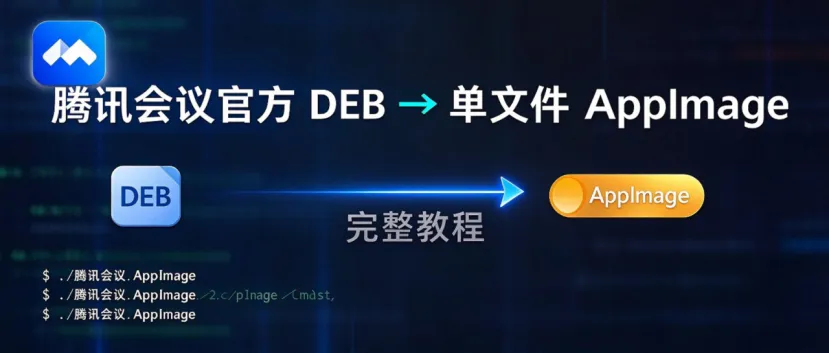
腾讯会议官方 DEB → 单文件 AppImage 完整教程
更新日期:2026-11-06适用版本:腾讯会议 Linux 3.26.10.401 x86_64实测环境:Manjaro Linux / X11 / PulseAudio 17 / x86_64目标:把官网
.deb转成可移动的单文件.AppImage,应用运行库与配置尽量隔离,同时正常使用摄像头、麦克风和扬声器。
0. 先说明原理
AppImage 可以理解成两部分:
AppImage 文件├── 静态 AppImage runtime(负责挂载/解压)└── SquashFS 文件系统└── AppDir/├── AppRun├── opt/wemeet/├── usr/share/applications/└── 图标等资源
腾讯会议的官方 .deb 本身是一个 ar 包:
TencentMeeting_*.deb├── debian-binary├── control.tar.xz # 包元数据和安装脚本└── data.tar.xz # 真正的程序文件
本次转换不是把腾讯会议重新编译,而是:
从 .deb中提取官方opt/wemeet程序目录;补上 AppImage 需要的 AppRun、桌面文件和图标;增加音视频兼容层; 用 appimagetool把AppDir压成单文件 AppImage。
关键原则
官方包已经自带 Qt 5.15、ICU、XCB 和 xcast 音视频引擎,不要重复打包另一套 Qt。 不要打包 glibc、libGL、libpulse、libasound。这些库需要与目标机器的内核、显卡驱动、PipeWire/PulseAudio 对齐。 AppImage 负责隔离“应用自己的库和配置”,不是安全沙箱;应用仍然需要访问宿主机图形、音频和摄像头设备。 libwemeetwrap.so是音频兼容的关键:它把 PipeWire/PulseAudio 的 sink 标记成硬件设备,让腾讯会议正常显示输出设备选项。
1. 准备环境
1.1 系统要求
x86_64 Linux; glibc 不低于 2.27; 可用的 X11 或 XWayland; PulseAudio 或 PipeWire-Pulse; 能读取 /dev/video*;当前用户有 video组权限(如果摄像头设备属于video组)。
1.2 安装工具
Manjaro / Arch:
sudo pacman -S --needed \base-devel pkgconf openssl libpulse libx11 \fuse2 squashfs-tools xz desktop-file-utils
Ubuntu / Debian:
sudo apt updatesudo apt install -y \build-essential pkg-config libssl-dev libpulse-dev libx11-dev \libfuse2 squashfs-tools xz-utils desktop-file-utils
检查摄像头和音频服务:
v4l2-ctl --list-devicespactl get-default-sinkpactl get-default-source
如果麦克风或扬声器正常,至少应该能分别看到:
alsa_output.pci-...alsa_input.pci-...
1.3 本机统一工程目录
这台机器上的构建相关内容统一放在:
/home/tony/Documents/wemeet-appimage/├── source/ # 官方 DEB、wrap.c├── tools/ # appimagetool、type2 runtime├── scripts/ # 构建、教程、麦克风修复脚本├── build/ # 解包后的 AppDir 和中间文件├── tests/ # 便携性、音视频和教程截图等测试产物└── docs/ # 教程、说明和文档图片
正式 AppImage 不放在工程目录里,而是放在:
/home/tony/.application/命令链接放在:
/home/tony/.local/bin/wemeet2. 从官网获取 Linux DEB
打开腾讯会议下载中心:
https://meeting.tencent.com/download/点击Linux → X86_64架构版。
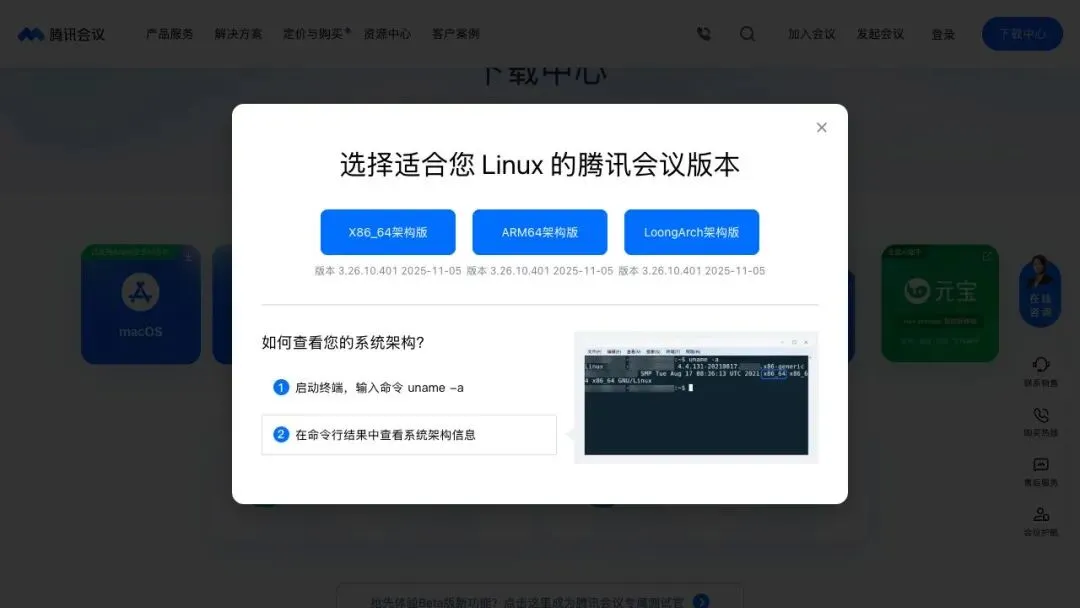
本次使用的官方包:
TencentMeeting_0300000000_3.26.10.401_x86_64_default.publish.officialwebsite.deb可以把文件保存为 ~/Documents/wemeet-appimage/source/wemeet.deb。后续脚本默认读取这个路径。
2.1 校验包
file ~/Documents/wemeet-appimage/source/wemeet.debsha256sum ~/Documents/wemeet-appimage/source/wemeet.debar t ~/Documents/wemeet-appimage/source/wemeet.deb
本次包的关键信息:
Version: 3.26.10.401Architecture: amd64SHA-256: 70f37b029209c0ef91be9813eebf6650c6cb9a00f7c718490158773e2fe6acaf
ar t 应显示:
debian-binarycontrol.tar.xzdata.tar.xz
3. 解包并检查官方 DEB
创建构建目录:
mkdir -p ~/Documents/wemeet-appimage/build/manualcd ~/Documents/wemeet-appimage/build/manualcp ~/Downloads/TencentMeeting_0300000000_3.26.10.401_x86_64_default.publish.officialwebsite.deb \~/Documents/wemeet-appimage/source/wemeet.deb
解包:
cd ~/Documents/wemeet-appimage/build/manualar x ~/Documents/wemeet-appimage/source/wemeet.debmkdir -p extractedtar -xf data.tar.xz -C extracted# 看包元数据tar -xOf control.tar.xz ./control | sed -n '1,16p'# 看程序目录du -sh extracted/opt/wemeetfind extracted/opt/wemeet/lib -maxdepth 1 -type f \\( -name 'libQt5Core*' -o -name 'libwemeet.so' -o -name 'libxcast*' \) | sort
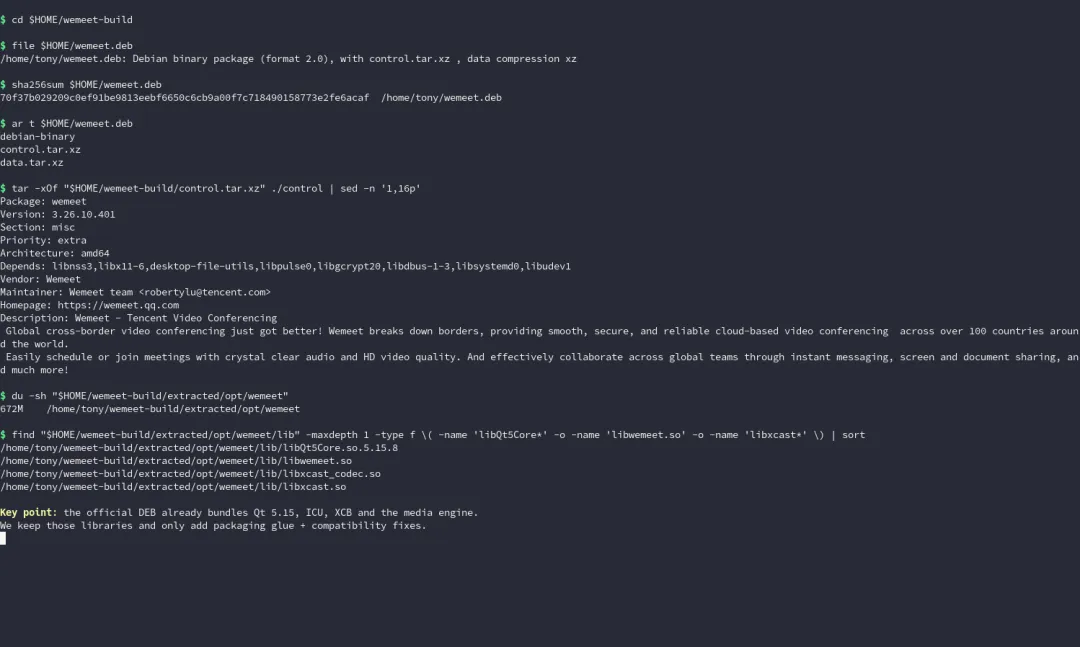
实测官方包解压后约672 MiB,并且已经包含:
libQt5Core.so.5.15.8libwemeet.solibxcast.solibxcast_codec.soplugins/resources/translations/
官方 control 中的依赖主要是:
libnss3,libx11-6,desktop-file-utils,libpulse0,libgcrypt20,libdbus-1-3,libsystemd0,libudev1
这些依赖在大多数现代 Linux 桌面上都存在。AppImage 不应把整套系统基础库硬塞进去,否则容易出现 glibc、显卡驱动和音频服务冲突。
4. 组装 AppDir
脚本会在 ~/Documents/wemeet-appimage/build/ 下创建:
TencentMeeting.AppDir-<时间戳>/├── AppRun├── opt/wemeet/├── usr/bin/├── usr/share/applications/tencent-meeting.desktop├── usr/share/icons/hicolor/scalable/apps/tencent-meeting.svg├── tencent-meeting.png└── .DirIcon -> tencent-meeting.png
手工版本的核心命令:
APPDIR=”$HOME/Documents/wemeet-appimage/build/TencentMeeting.AppDir”mkdir -p \”$APPDIR/opt” \”$APPDIR/usr/bin” \”$APPDIR/usr/share/applications” \”$APPDIR/usr/share/icons/hicolor/scalable/apps”cp -a extracted/opt/wemeet ”$APPDIR/opt/wemeet”cp extracted/usr/share/applications/wemeetapp.desktop \”$APPDIR/usr/share/applications/tencent-meeting.desktop”cp ”$APPDIR/opt/wemeet/wemeet.svg” \”$APPDIR/usr/share/icons/hicolor/scalable/apps/tencent-meeting.svg”cp ”$APPDIR/opt/wemeet/icons/hicolor/256x256/mimetypes/wemeetapp.png” \”$APPDIR/tencent-meeting.png”ln -s usr/share/applications/tencent-meeting.desktop \”$APPDIR/tencent-meeting.desktop”ln -s usr/share/icons/hicolor/scalable/apps/tencent-meeting.svg \”$APPDIR/tencent-meeting.svg”ln -s tencent-meeting.png ”$APPDIR/.DirIcon”
4.1 修正腾讯会议内部相对路径
官方包在启动时依赖 bin/ 目录作为当前目录,并依赖几个相对资源路径:
WEMEET_OPT=”$APPDIR/opt/wemeet”ln -sfn raw/xcast.conf ”$WEMEET_OPT/bin/xcast.conf”ln -sfn ../plugins ”$WEMEET_OPT/lib/plugins”ln -sfn ../resources ”$WEMEET_OPT/lib/resources”ln -sfn ../translations ”$WEMEET_OPT/lib/translations”
AppRun 最终需要执行:
cd ”$WEMEET_OPT/bin”exec ”$WEMEET_OPT/bin/wemeetapp” ”$@”
不要在 AppImage 中直接执行官方 wemeetapp.sh。AppRun 直接启动 bin/wemeetapp,可以完全控制私有 HOME、音频 socket、显示后端和兼容层加载顺序。
5. 音视频兼容层
5.1 为什么需要 libwemeetwrap.so
腾讯会议官方 Linux 版在 PipeWire / PulseAudio 环境下存在两个实际问题:
部分虚拟 sink 不会被识别为硬件输出设备,导致设备选择异常; 新版 glibc、OpenSSL 和 Qt 符号存在 ABI 兼容差异。
兼容层通过 LD_PRELOAD 做三件事:
拦截 PulseAudio sink 信息回调,给非硬件 sink 加上 PA_SINK_HARDWARE标志;提供 Qt setPaintsEnabled等符号兼容;提供 X11/Wayland 与新 OpenSSL 的兼容处理。
编译命令:
cc -O2 -Wall -Wextra -fPIC -shared \$(pkg-config --cflags libpulse x11) \-o ”$WEMEET_OPT/lib/libwemeetwrap.so” wrap.c \-D WRAP_FORCE_SINK_HARDWARE \$(pkg-config --libs libpulse x11) -ldl
wrap.c 已随本文档提供:
// by https://aur.archlinux.org/account/AvianaCruz#ifndef _GNU_SOURCE#define _GNU_SOURCE#endif#include<X11/Xlibint.h>#include<dlfcn.h>#include<openssl/ssl.h>#include<stdbool.h>#include<stdlib.h>#ifdef WRAP_FORCE_SINK_HARDWARE#include<pulse/introspect.h>#include<pulse/subscribe.h>#include<string.h>#endif#ifdef SSL_get_peer_certificate#undef SSL_get_peer_certificate#endiftypedef X509 *(*wrap_ssl_peer_cert_t)(const SSL *);X509 *SSL_get_peer_certificate(const SSL *s){static wrap_ssl_peer_cert_t get1 = NULL;static wrap_ssl_peer_cert_t get0 = NULL;if (!get1) {get1 = (wrap_ssl_peer_cert_t)dlsym(RTLD_NEXT, "SSL_get1_peer_certificate");}if (get1) {return get1(s);}if (!get0) {get0 = (wrap_ssl_peer_cert_t)dlsym(RTLD_NEXT, "SSL_get_peer_certificate");}return get0 ? get0(s) : NULL;}// temporary hack for Wayland crashesstaticboolwarp_is_wayland(){const char *env = getenv("XDG_SESSION_TYPE");return env != NULL && strcmp(env, "wayland") == 0;}typedefint(*wrap_XMapWindow_t)(Display *dpy, Window w);static wrap_XMapWindow_t wrap_orig_XMapWindow;intXMapWindow(Display *dpy, Window w){if (!warp_is_wayland()) {if (!wrap_orig_XMapWindow) {wrap_orig_XMapWindow = dlsym(RTLD_NEXT, "XMapWindow");}return wrap_orig_XMapWindow(dpy, w);}return 1;}typedefAtom(*wrap_XInternAtom_t)(Display *dpy, constchar *name,Bool onlyIfExists);static wrap_XInternAtom_t wrap_orig_XInternAtom;Atom XInternAtom(Display *dpy, constchar *name, Bool onlyIfExists){if (!warp_is_wayland()) {if (!wrap_orig_XInternAtom) {wrap_orig_XInternAtom = dlsym(RTLD_NEXT, "XInternAtom");}return wrap_orig_XInternAtom(dpy, name, onlyIfExists);} else {dpy->lock_fns = NULL;}return None;}typedefStatus(*wrap_XSendEvent_t)(Display *dpy, Window w, Bool propagate,long event_mask, XEvent *event);static wrap_XSendEvent_t wrap_orig_XSendEvent;Status XSendEvent(Display *dpy, Window w, Bool propagate, long event_mask,XEvent *event) {if (!warp_is_wayland()) {if (!wrap_orig_XSendEvent) {wrap_orig_XSendEvent = dlsym(RTLD_NEXT, "XSendEvent");}return wrap_orig_XSendEvent(dpy, w, propagate, event_mask, event);} else {dpy->lock_fns = NULL;}return 0;}typedefStatus(*wrap_XFlush_t)(Display *dpy);static wrap_XFlush_t wrap_orig_XFlush;Status XFlush(Display *dpy){if (!warp_is_wayland()) {if (!wrap_orig_XFlush) {wrap_orig_XFlush = dlsym(RTLD_NEXT, "XFlush");}return wrap_orig_XFlush(dpy);} else {dpy->lock_fns = NULL;}return 0;}/* workaround crash on Account and security page/opt/wemeet/bin/wemeetapp: symbol lookup error:/usr/lib/wemeet/libwemeet_framework.so: undefinedsymbol:_ZN7QWidget16setPaintsEnabledEb, version Qt_5 */void _ZN7QWidget16setPaintsEnabledEb() { return; }#ifdef WRAP_FORCE_SINK_HARDWAREtypedef pa_operation *(*wrap_pa_get_sink_by_name_t)(pa_context *c,const char *name,pa_sink_info_cb_t cb,void *userdata);typedef pa_operation *(*wrap_pa_get_sink_by_index_t)(pa_context *c,uint32_t idx,pa_sink_info_cb_t cb,void *userdata);typedef pa_operation *(*wrap_pa_get_sink_list_t)(pa_context *c,pa_sink_info_cb_t cb,void *userdata);static wrap_pa_get_sink_by_name_t wrap_orig_get_sink_info_by_name;static pa_sink_info_cb_t wrap_orig_sink_info_by_name_cb;static wrap_pa_get_sink_by_index_t wrap_orig_get_sink_info_by_index;static pa_sink_info_cb_t wrap_orig_sink_info_by_index_cb;static wrap_pa_get_sink_list_t wrap_orig_get_sink_list;static pa_sink_info_cb_t wrap_orig_sink_info_list_cb;staticvoidwrap_get_sink_info_callback(pa_context *c, const pa_sink_info *i,int eol, void *userdata,pa_sink_info_cb_t orig_cb) {if (i && !(i->flags & PA_SINK_HARDWARE)) {pa_sink_info sink_info[sizeof(pa_sink_info)];memcpy(sink_info, i, sizeof(pa_sink_info));sink_info->flags |= PA_SINK_HARDWARE;orig_cb(c, sink_info, eol, userdata);} else {orig_cb(c, i, eol, userdata);}}staticvoidwrap_get_sink_info_by_name_callback(pa_context *c,const pa_sink_info *i, int eol,void *userdata) {wrap_get_sink_info_callback(c, i, eol, userdata,wrap_orig_sink_info_by_name_cb);}staticvoidwrap_get_sink_info_by_index_callback(pa_context *c,const pa_sink_info *i, int eol,void *userdata) {wrap_get_sink_info_callback(c, i, eol, userdata,wrap_orig_sink_info_by_index_cb);}staticvoidwrap_get_sink_info_list_callback(pa_context *c,const pa_sink_info *i, int eol,void *userdata) {wrap_get_sink_info_callback(c, i, eol, userdata, wrap_orig_sink_info_list_cb);}pa_operation *pa_context_get_sink_info_list(pa_context *c, pa_sink_info_cb_t cb,void *userdata) {if (!wrap_orig_get_sink_list) {wrap_orig_get_sink_list = dlsym(RTLD_NEXT, "pa_context_get_sink_info_list");}wrap_orig_sink_info_list_cb = cb;return wrap_orig_get_sink_list(c, wrap_get_sink_info_list_callback, userdata);}pa_operation *pa_context_get_sink_info_by_index(pa_context *c, uint32_t idx,pa_sink_info_cb_t cb,void *userdata) {if (!wrap_orig_get_sink_info_by_index) {wrap_orig_get_sink_info_by_index =dlsym(RTLD_NEXT, "pa_context_get_sink_info_by_index");}wrap_orig_sink_info_by_index_cb = cb;return wrap_orig_get_sink_info_by_index(c, idx, wrap_get_sink_info_by_index_callback, userdata);}pa_operation *pa_context_get_sink_info_by_name(pa_context *c, constchar *name,pa_sink_info_cb_t cb,void *userdata) {if (!wrap_orig_get_sink_info_by_name) {wrap_orig_get_sink_info_by_name =dlsym(RTLD_NEXT, "pa_context_get_sink_info_by_name");}wrap_orig_sink_info_by_name_cb = cb;return wrap_orig_get_sink_info_by_name(c, name, wrap_get_sink_info_by_name_callback, userdata);}#endif
5.2 现代 glibc 的协程补丁
官方 libwemeet_base.so 中有一个 co_jump_to_link 函数。现代 glibc 下需要把比较参数从 %rdi 改成 %r12。
先检查汇编:
objdump -d \--start-address=0x94c82c \--stop-address=0x94c844 \”$WEMEET_OPT/lib/libwemeet_base.so”
补丁前可以看到:
94c833: 48 83 ff 00 cmp $0x0,%rdi94c837: 75 03 jne ...
将 4 个字节改为:
49 83 fc 00# cmp $0x0,%r12
脚本中的命令:
printf '\x49\x83\xfc\x00' | dd \of=”$WEMEET_OPT/lib/libwemeet_base.so” \bs=1 seek=$((0x94c833)) conv=notrunc status=none
重要:这个偏移只对应 3.26.10.401。新版本不能直接照抄。构建脚本带有字节检查:如果目标位置不是
48 83 ff 00,会停止构建并提示重新分析。
6. 编写 AppRun
AppRun 是 AppImage 启动入口。推荐直接从下载的构建脚本中查看完整版本:
#!/usr/bin/env bashset -euo pipefailVERSION="${WEMEET_VERSION:-3.26.10.401}"WORK_DIR="${WEMEET_WORK_DIR:-$HOME/Documents/wemeet-appimage}"BASE="${WEMEET_BUILD_DIR:-$WORK_DIR/build}"DEB="${WEMEET_DEB:-$WORK_DIR/source/wemeet.deb}"TOOL="${APPIMAGETOOL:-$WORK_DIR/tools/appimagetool}"RUNTIME="${APPIMAGE_RUNTIME:-$WORK_DIR/tools/runtime-x86_64}"WRAP_SRC="${1:-${WEMEET_WRAP_SRC:-$WORK_DIR/source/wrap.c}}"PATCH_OFFSET="${WEMEET_PATCH_OFFSET:-0x94c833}"BUILD_ID="$(date +%Y%m%d-%H%M%S)-$$"APPDIR="$BASE/TencentMeeting.AppDir-$BUILD_ID"OUT="${WEMEET_OUT:-$HOME/.application/TencentMeeting-${VERSION}-x86_64.AppImage}"EXTRACT="$BASE/extracted-$BUILD_ID"for cmd in ar tar cc pkg-config od file; docommand -v "$cmd" >/dev/null 2>&1 || { echo "Missing command: $cmd" >&2; exit 1; }done[ -f "$DEB" ] || { echo "DEB not found: $DEB" >&2; exit 1; }[ -f "$WRAP_SRC" ] || { echo "wrap.c not found: $WRAP_SRC" >&2; exit 1; }mkdir -p "$BASE" "$APPDIR/opt" "$APPDIR/usr/bin" "$APPDIR/usr/share/applications" "$APPDIR/usr/share/icons/hicolor/scalable/apps" "$(dirname "$TOOL")" "$(dirname "$RUNTIME")" "$(dirname "$OUT")"if [ ! -x "$TOOL" ]; thenecho "Downloading appimagetool..."curl -L --fail --retry 3 --max-time 180 -o "$TOOL" \https://github.com/AppImage/appimagetool/releases/download/continuous/appimagetool-x86_64.AppImagechmod +x "$TOOL"fiif [ ! -s "$RUNTIME" ]; thenecho "Downloading AppImage type2 runtime..."curl -L --fail --retry 3 --max-time 180 -o "$RUNTIME" \https://github.com/AppImage/type2-runtime/releases/download/continuous/runtime-x86_64chmod +x "$RUNTIME"ficd "$BASE"# Extract the official package without installing anything to the host.ar x "$DEB"mkdir -p "$EXTRACT"tar -xf data.tar.xz -C "$EXTRACT"cp -a "$EXTRACT/opt/wemeet" "$APPDIR/opt/wemeet"# Preserve the official desktop metadata but make paths AppImage-relative where possible.cp "$EXTRACT/usr/share/applications/wemeetapp.desktop" "$APPDIR/usr/share/applications/tencent-meeting.desktop"cp "$APPDIR/opt/wemeet/wemeet.svg" "$APPDIR/usr/share/icons/hicolor/scalable/apps/tencent-meeting.svg"ln -s usr/share/applications/tencent-meeting.desktop "$APPDIR/tencent-meeting.desktop"ln -s usr/share/icons/hicolor/scalable/apps/tencent-meeting.svg "$APPDIR/tencent-meeting.svg"cp "$APPDIR/opt/wemeet/icons/hicolor/256x256/mimetypes/wemeetapp.png" "$APPDIR/tencent-meeting.png"ln -s tencent-meeting.png "$APPDIR/.DirIcon"# Runtime compatibility fixes used by the Arch/AUR packaging ecosystem.WEMEET_OPT="$APPDIR/opt/wemeet"ln -sfn raw/xcast.conf "$WEMEET_OPT/bin/xcast.conf"ln -sfn ../plugins "$WEMEET_OPT/lib/plugins"ln -sfn ../resources "$WEMEET_OPT/lib/resources"ln -sfn ../translations "$WEMEET_OPT/lib/translations"# Modern-glibc coroutine register layout fix (official build is pinned to 3.26.10.401).# This offset is version-specific. The guard refuses to patch unknown bytes.if [ "${WEMEET_SKIP_PATCH:-0}" != "1" ]; thenBASE_SO="$WEMEET_OPT/lib/libwemeet_base.so"CURRENT_BYTES="$(od -An -v -tx1 -j $((PATCH_OFFSET)) -N4 "$BASE_SO" | tr -d ' \n')"case "$CURRENT_BYTES" in4883ff00)printf '\x49\x83\xfc\x00' | dd of="$BASE_SO" bs=1 seek=$((PATCH_OFFSET)) conv=notrunc status=noneecho "Applied coroutine patch at $PATCH_OFFSET";;4983fc00)echo "Coroutine patch already present at $PATCH_OFFSET";;*)echo "Refusing to patch: bytes at $PATCH_OFFSET are $CURRENT_BYTES, expected 4883ff00." >&2echo "Inspect the new binary, then set WEMEET_PATCH_OFFSET or WEMEET_SKIP_PATCH=1." >&2exit 2;;esacfi# Build an audio/X11 compatibility shim. It marks PipeWire/PulseAudio sinks as# hardware sinks so the client exposes output-device selection, and provides a# couple of ABI shims for newer glibc/OpenSSL stacks.cc -O2 -Wall -Wextra -fPIC -shared \$(pkg-config --cflags libpulse x11) \-o "$WEMEET_OPT/lib/libwemeetwrap.so" "$WRAP_SRC" \-D WRAP_FORCE_SINK_HARDWARE \$(pkg-config --libs libpulse x11) -ldlcat > "$APPDIR/AppRun" <<'APPRUN'#!/usr/bin/env bashset -euo pipefailAPPDIR="${APPDIR:-$(cd "$(dirname "$(readlink -f "$0")")" && pwd)}"WEMEET_OPT="$APPDIR/opt/wemeet"REAL_HOME="${HOME:-/home/$(id -un)}"REAL_XDG_CONFIG_HOME="${XDG_CONFIG_HOME:-$REAL_HOME/.config}"REAL_XDG_DATA_HOME="${XDG_DATA_HOME:-$REAL_HOME/.local/share}"# Keep the app's profile separate from the host account. It can still be moved# with the AppImage by exporting TENCENT_MEETING_DATA_DIR.DATA_ROOT="${TENCENT_MEETING_DATA_DIR:-$REAL_XDG_DATA_HOME/TencentMeeting-AppImage}"mkdir -p "$DATA_ROOT/home" "$DATA_ROOT/config" "$DATA_ROOT/cache" "$DATA_ROOT/data" "$DATA_ROOT/state" "$DATA_ROOT/tmp"export TENCENT_MEETING_DATA_DIR="$DATA_ROOT"export HOME="$DATA_ROOT/home"export XDG_CONFIG_HOME="$DATA_ROOT/config"export XDG_DATA_HOME="$DATA_ROOT/data"export XDG_CACHE_HOME="$DATA_ROOT/cache"export XDG_STATE_HOME="$DATA_ROOT/state"export TMPDIR="$DATA_ROOT/tmp"# Preserve desktop/session services while isolating the application profile.export XDG_RUNTIME_DIR="${XDG_RUNTIME_DIR:-/run/user/$(id -u)}"export DBUS_SESSION_BUS_ADDRESS="${DBUS_SESSION_BUS_ADDRESS:-unix:path=$XDG_RUNTIME_DIR/bus}"# Resolve X11 authorization before HOME is redirected into the private profile.# Prefer a file that actually has an entry for the current DISPLAY (GDM uses a# wildcard authority file under /run/user while a VNC session uses ~/.Xauthority).if [ -z "${XAUTHORITY:-}" ] && [ -n "${DISPLAY:-}" ]; thenfor candidate in "$REAL_HOME/.Xauthority" "/run/user/$(id -u)/gdm/Xauthority"; do[ -r "$candidate" ] || continueif command -v xauth >/dev/null 2>&1 && [ -n "$(XAUTHORITY="$candidate" xauth list "$DISPLAY" 2>/dev/null)" ]; thenexport XAUTHORITY="$candidate"breakfidoneif [ -z "${XAUTHORITY:-}" ]; thenif [ -r "$REAL_HOME/.Xauthority" ]; thenexport XAUTHORITY="$REAL_HOME/.Xauthority"elif [ -r "/run/user/$(id -u)/gdm/Xauthority" ]; thenexport XAUTHORITY="/run/user/$(id -u)/gdm/Xauthority"fififi# Keep the usual user folders accessible for file transfer and uploads.for d in Desktop Documents Downloads Music Pictures Videos; doif [ -d "$REAL_HOME/$d" ] && [ ! -e "$HOME/$d" ]; thenln -s "$REAL_HOME/$d" "$HOME/$d"fidone# Preserve the host IME for Chinese input.if [ -z "${QT_IM_MODULE:-}" ]; thencase "${XMODIFIERS:-}:${GTK_IM_MODULE:-}" in*ibus*) export QT_IM_MODULE=ibus ;;*fcitx*) export QT_IM_MODULE=fcitx ;;esacfi# PulseAudio/PipeWire-Pulse runs on the real user session, not inside the# private home. Probe the standard socket and keep the real cookie readable.if [ -z "${PULSE_SERVER:-}" ]; thenif [ -S "$XDG_RUNTIME_DIR/pulse/native" ]; thenexport PULSE_SERVER="unix:$XDG_RUNTIME_DIR/pulse/native"elif [ -S "/run/user/$(id -u)/pulse/native" ]; thenexport PULSE_SERVER="unix:/run/user/$(id -u)/pulse/native"fifiif [ -z "${PULSE_COOKIE:-}" ] && [ -r "$REAL_XDG_CONFIG_HOME/pulse/cookie" ]; thenexport PULSE_COOKIE="$REAL_XDG_CONFIG_HOME/pulse/cookie"fi# Tencent Meeting's Linux client is most reliable through XWayland. Keep native# video capture and microphone access on the host devices/services.if [ "${XDG_SESSION_TYPE:-}" = "wayland" ] || [ -n "${WAYLAND_DISPLAY:-}" ]; thenexport WEMEET_XWAYLAND=1fiexport XDG_SESSION_TYPE=x11export QT_QPA_PLATFORM=xcbunset WAYLAND_DISPLAYexport QT_STYLE_OVERRIDE=fusionexport QT_PLUGIN_PATH="$WEMEET_OPT/plugins"export XDG_DATA_DIRS="$APPDIR/usr/share:${XDG_DATA_DIRS:-/usr/local/share:/usr/share}"export PATH="$APPDIR/usr/bin:$WEMEET_OPT/bin:${PATH:-/usr/bin:/bin}"# Keep the app's own Qt and helper libraries first, while allowing host GPU,# audio, X11 and PipeWire components to integrate normally.INTERNAL_LIBS="$WEMEET_OPT/lib:$WEMEET_OPT/bin/modules:$WEMEET_OPT/translations"export LD_LIBRARY_PATH="$INTERNAL_LIBS${LD_LIBRARY_PATH:+:$LD_LIBRARY_PATH}"export LD_PRELOAD="$WEMEET_OPT/lib/libwemeetwrap.so${LD_PRELOAD:+:$LD_PRELOAD}"# Make URI/file opening leave the AppImage's private library environment.cat > "$DATA_ROOT/host-opener-env" <<'HOSTENV'export HOME="__REAL_HOME__"export XDG_CONFIG_HOME="__REAL_CONFIG__"export XDG_DATA_HOME="__REAL_DATA__"unset LD_PRELOADif [ -n "${ORIG_LD_LIBRARY_PATH:-}" ]; then export LD_LIBRARY_PATH="$ORIG_LD_LIBRARY_PATH"; else unset LD_LIBRARY_PATH; fiHOSTENVsed -i "s|__REAL_HOME__|$REAL_HOME|g;s|__REAL_CONFIG__|$REAL_XDG_CONFIG_HOME|g;s|__REAL_DATA__|$REAL_XDG_DATA_HOME|g" "$DATA_ROOT/host-opener-env"cd "$WEMEET_OPT/bin"exec "$WEMEET_OPT/bin/wemeetapp" "$@"APPRUNchmod +x "$APPDIR/AppRun"# Host opener shim: never leak AppImage LD_PRELOAD/LD_LIBRARY_PATH into external apps.cat > "$APPDIR/usr/bin/host-opener-shim" <<'SHIM'#!/usr/bin/env bashset -euo pipefailAPPDIR="${APPDIR:-$(cd "$(dirname "$(readlink -f "$0")")/../.." && pwd)}"DATA_ROOT="${TENCENT_MEETING_DATA_DIR:-${XDG_DATA_HOME:-$HOME/.local/share}/TencentMeeting-AppImage}"[ -r "$DATA_ROOT/host-opener-env" ] && . "$DATA_ROOT/host-opener-env"FILTERED_PATH="$(printf '%s' "${PATH:-}" | tr ':' '\n' | grep -v "^$APPDIR" | paste -sd: -)"CMD_NAME="$(basename "$0")"REAL_CMD="$(PATH="$FILTERED_PATH" command -v "$CMD_NAME" 2>/dev/null || true)"if [ -z "$REAL_CMD" ]; then REAL_CMD="$(PATH="$FILTERED_PATH" command -v xdg-open 2>/dev/null || true)"; fiif [ -z "$REAL_CMD" ]; then echo "No host opener found for $CMD_NAME" >&2; exit 127; fiexec "$REAL_CMD" "$@"SHIMchmod +x "$APPDIR/usr/bin/host-opener-shim"for c in xdg-open kde-open kde-open5 gnome-open gio; do ln -sfn host-opener-shim "$APPDIR/usr/bin/$c"; done# Desktop metadata.sed -i 's|^Name=.*|Name=Tencent Meeting|;s|^Name\[zh_CN\]=.*|Name[zh_CN]=腾讯会议|;s|^Exec=.*|Exec=tencent-meeting %u|;s|^Icon=.*|Icon=tencent-meeting|' "$APPDIR/usr/share/applications/tencent-meeting.desktop"cat >> "$APPDIR/usr/share/applications/tencent-meeting.desktop" <<'DESK'Comment=Tencent Meeting Linux client (portable AppImage)Comment[zh_CN]=腾讯会议 Linux 客户端(便携 AppImage)Keywords=wemeet;tencent;meeting;腾讯会议;DESKexport ARCH=x86_64"$TOOL" --appimage-extract-and-run --runtime-file "$RUNTIME" "$APPDIR" "$OUT"chmod +x "$OUT"echo "$OUT"
核心逻辑如下:
6.1 隔离应用配置
REAL_HOME=”$HOME”DATA_ROOT=”${TENCENT_MEETING_DATA_DIR:-$REAL_HOME/.local/share/TencentMeeting-AppImage}”mkdir -p \”$DATA_ROOT/home” \”$DATA_ROOT/config” \”$DATA_ROOT/cache” \”$DATA_ROOT/data” \”$DATA_ROOT/state” \”$DATA_ROOT/tmp”export HOME=”$DATA_ROOT/home”export XDG_CONFIG_HOME=”$DATA_ROOT/config”export XDG_DATA_HOME=”$DATA_ROOT/data”export XDG_CACHE_HOME=”$DATA_ROOT/cache”export XDG_STATE_HOME=”$DATA_ROOT/state”export TMPDIR=”$DATA_ROOT/tmp”
这样腾讯会议的账号、配置和日志会落到独立目录,不会污染宿主机的默认配置。
6.2 保留宿主音频设备
export XDG_RUNTIME_DIR=”${XDG_RUNTIME_DIR:-/run/user/$(id -u)}”if [ -S ”$XDG_RUNTIME_DIR/pulse/native” ]; thenexport PULSE_SERVER=”unix:$XDG_RUNTIME_DIR/pulse/native”elif [ -S ”/run/user/$(id -u)/pulse/native” ]; thenexport PULSE_SERVER=”unix:/run/user/$(id -u)/pulse/native”fiif [ -z ”${PULSE_COOKIE:-}” ] && \[ -r ”$REAL_XDG_CONFIG_HOME/pulse/cookie” ]; thenexport PULSE_COOKIE=”$REAL_XDG_CONFIG_HOME/pulse/cookie”fi
这一步保证私有 HOME 不会切断 PulseAudio / PipeWire-Pulse 连接。
6.3 在改 HOME 前解析 XAUTHORITY
这是很容易踩的坑。顺序必须是:
先记住真实 HOME; 找到当前 DISPLAY 对应的 .Xauthority;再切换 HOME。
否则某些 GDM 会话中会出现:
Authorization required, but no authorization protocol specified脚本会尝试:
$REAL_HOME/.Xauthority/run/user//gdm/Xauthority
并用 xauth list "$DISPLAY" 判断哪个文件包含当前显示器的条目。
6.4 固定 XWayland 并加载兼容层
if [ ”${XDG_SESSION_TYPE:-}” = ”wayland” ] || [ -n ”${WAYLAND_DISPLAY:-}” ]; thenexport WEMEET_XWAYLAND=1fiexport XDG_SESSION_TYPE=x11export QT_QPA_PLATFORM=xcbunset WAYLAND_DISPLAYINTERNAL_LIBS=”$WEMEET_OPT/lib:$WEMEET_OPT/bin/modules:$WEMEET_OPT/translations”export LD_LIBRARY_PATH=”$INTERNAL_LIBS${LD_LIBRARY_PATH:+:$LD_LIBRARY_PATH}”export LD_PRELOAD=”$WEMEET_OPT/lib/libwemeetwrap.so${LD_PRELOAD:+:$LD_PRELOAD}”
7. 安装 appimagetool 并生成 AppImage
7.1 下载 appimagetool
mkdir -p ~/Documents/wemeet-appimage/toolscurl -L --fail --retry 3 -o ~/Documents/wemeet-appimage/tools/appimagetool \https://github.com/AppImage/appimagetool/releases/download/continuous/appimagetool-x86_64.AppImagechmod +x ~/Documents/wemeet-appimage/tools/appimagetool
7.2 手动准备 type2 runtime
appimagetool 自动下载 runtime 有时会失败。更稳定的方式是手动下载后显式传入:
curl -L --fail --retry 3 -o ~/Documents/wemeet-appimage/tools/runtime-x86_64 \https://github.com/AppImage/type2-runtime/releases/download/continuous/runtime-x86_64chmod +x ~/Documents/wemeet-appimage/tools/runtime-x86_64
7.3 打包
ARCH=x86_64 \~/Documents/wemeet-appimage/tools/appimagetool \--appimage-extract-and-run \--runtime-file ~/Documents/wemeet-appimage/tools/runtime-x86_64 \”$APPDIR” \~/TencentMeeting-3.26.10.401-x86_64.AppImage
或者直接运行本文档附带的脚本:
cd ~/Documents/wemeet-appimagechmod +x scripts/build-wemeet-appimage.sh./scripts/build-wemeet-appimage.sh source/wrap.c
脚本默认读取:
~/Documents/wemeet-appimage/source/wemeet.deb~/Documents/wemeet-appimage/source/wrap.c
默认输出到:
~/.application/TencentMeeting-3.26.10.401-x86_64.AppImage也可以通过环境变量覆盖:
WEMEET_VERSION=3.26.10.401 \WEMEET_DEB=”$HOME/Downloads/TencentMeeting_3.26.10.401_x86_64.deb” \WEMEET_OUT=”$HOME/.application/TencentMeeting-3.26.10.401-x86_64.AppImage” \./scripts/build-wemeet-appimage.sh ”$HOME/Documents/wemeet-appimage/source/wrap.c”
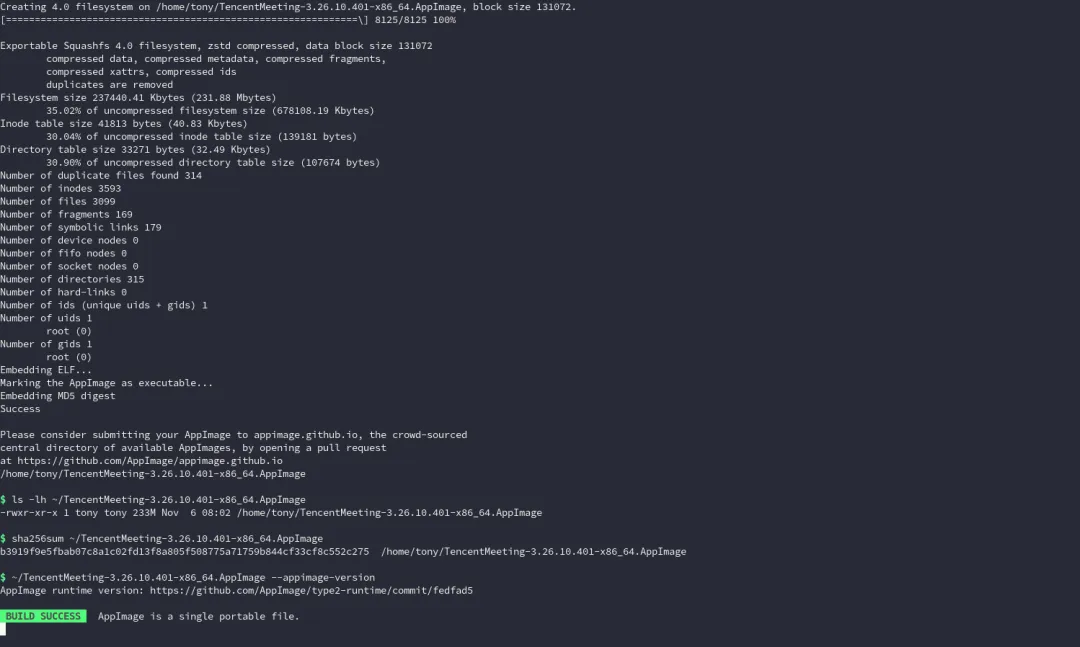
7.4 关于 .DirIcon 和 AppStream 警告
.DirIcon必须是 PNG,不要直接用 SVG 符号链接;脚本使用官方 256×256 PNG。 出现 AppStream upstream metadata is missing只是桌面商店元数据提示,不影响 AppImage 运行。
8. 验证 AppImage
8.1 检查 AppImage runtime
./TencentMeeting-3.26.10.401-x86_64.AppImage --appimage-version./TencentMeeting-3.26.10.401-x86_64.AppImage --appimage-offset
8.2 从另一个目录启动
mkdir -p ~/portable-testcp ~/TencentMeeting-3.26.10.401-x86_64.AppImage ~/portable-test/cd ~/portable-testchmod +x TencentMeeting-3.26.10.401-x86_64.AppImage./TencentMeeting-3.26.10.401-x86_64.AppImage
8.3 检查设备枚举
v4l2-ctl --list-devicespactl get-default-sinkpactl get-default-source
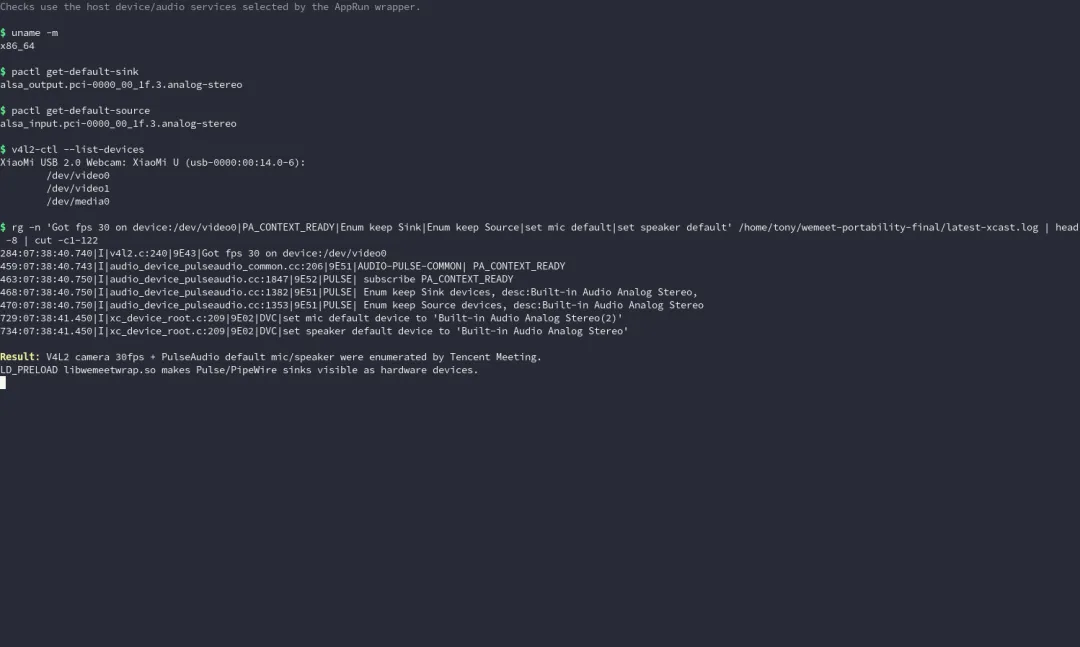
本次实测在腾讯会议日志中看到:
Got fps 30 on device:/dev/video0PA_CONTEXT_READYdefault_input:alsa_input.pci-0000_00_1f.3.analog-stereodefault_output:alsa_output.pci-0000_00_1f.3.analog-stereoEnum keep Sink devices ... type:hardwareEnum keep Source devices ... type:hardwareset mic default device to 'Built-in Audio Analog Stereo(2)'set speaker default device to 'Built-in Audio Analog Stereo'
定位日志:
find ~/.local/share/TencentMeeting-AppImage \-name 'xcast_*.log' -print
检查音频兼容层是否被加载:
pid=$(pgrep -x wemeetapp | head -1)grep libwemeetwrap /proc/$pid/maps
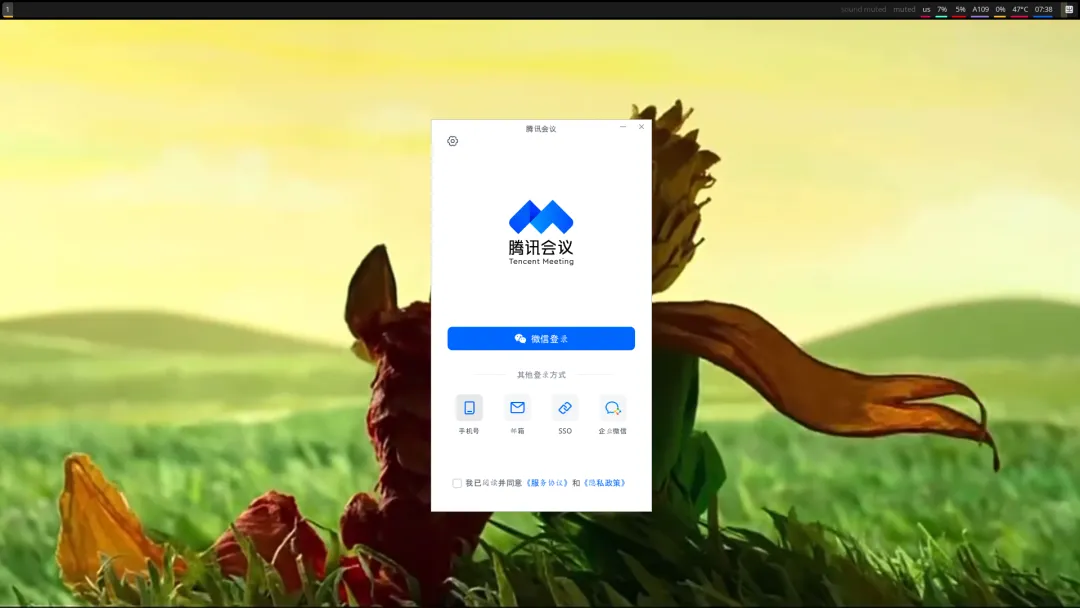
8.4 最终运行效果
到这一步说明:
AppImage 能正常挂载并启动; Qt/WebEngine 能加载官方资源; X11/XWayland 窗口正常; 摄像头 V4L2 能被识别; PulseAudio/PipeWire-Pulse 的默认麦克风和扬声器能被腾讯会议枚举。
真正加入会议还需要登录账号。本教程完成的是设备枚举和客户端音视频链路验证;登录后请在“设置 → 音频/视频”里再确认具体设备。
9. 日常使用
9.1 本机标准部署位置
本机采用“AppImage 放应用目录、命令放 bin 目录”的结构:
/home/tony/.application/TencentMeeting-3.26.10.401-x86_64.AppImage/home/tony/.local/bin/wemeet-> /home/tony/.application/TencentMeeting-3.26.10.401-x86_64.AppImage
部署命令:
mkdir -p ~/.application ~/.local/binmv ~/TencentMeeting-3.26.10.401-x86_64.AppImage \~/.application/TencentMeeting-3.26.10.401-x86_64.AppImageln -sfn ~/.application/TencentMeeting-3.26.10.401-x86_64.AppImage \~/.local/bin/wemeet
验证:
readlink -f ”$(command -v wemeet)”sha256sum ”$(command -v wemeet)”wemeet --appimage-version
现在终端里运行 wemeet,启动的就是新版腾讯会议 3.26.10.401。
旧版 Tencent-WemeetApp-v3.9.0.1-x86_64.AppImage 仍保留在 ~/.application/,但 wemeet 命令已经不再指向它。
9.2 FUSE 不可用时
./TencentMeeting-3.26.10.401-x86_64.AppImage --appimage-extract-and-run9.3 数据目录
默认:
~/.local/share/TencentMeeting-AppImage/让数据跟着 AppImage 放在同一个文件夹:
TENCENT_MEETING_DATA_DIR=”$PWD/TencentMeeting-data” \./TencentMeeting-3.26.10.401-x86_64.AppImage
9.4 手动生成校验值
sha256sum TencentMeeting-3.26.10.401-x86_64.AppImage \> TencentMeeting-3.26.10.401-x86_64.AppImage.sha256
不同时间重新构建时,SquashFS 元数据和压缩顺序可能导致 SHA 不同,这是正常的;请以当次生成的校验值为准。
10. 后续更新腾讯会议版本
第一步:下载新 DEB
去官网重新下载 Linux x86_64 包,保存为:
~/Documents/wemeet-appimage/source/wemeet-new.deb第二步:先检查新 DEB
file ~/Documents/wemeet-appimage/source/wemeet-new.debar t ~/Documents/wemeet-appimage/source/wemeet-new.debar p ~/Documents/wemeet-appimage/source/wemeet-new.deb control.tar.xz | tar -xOf - ./control | sed -n '1,16p'
第三步:重新构建
WEMEET_VERSION='3.27.x.y' \WEMEET_DEB=”$HOME/Documents/wemeet-appimage/source/wemeet-new.deb” \WEMEET_OUT=”$HOME/.application/TencentMeeting-3.27.x.y-x86_64.AppImage” \~/Documents/wemeet-appimage/scripts/build-wemeet-appimage.sh \”$HOME/Documents/wemeet-appimage/source/wrap.c”
将 WEMEET_VERSION 和 WEMEET_OUT 改成实际的新版本号。构建脚本现在默认也会把输出放到 ~/.application/。
部署新版本并切换 wemeet 命令
构建完成后,更新 wemeet 符号链接:
ln -sfn ~/.application/TencentMeeting-3.27.x.y-x86_64.AppImage \~/.local/bin/wemeetreadlink -f ”$(command -v wemeet)”wemeet --appimage-version
不要立即删除旧版 AppImage,建议先保留一段时间用于回退。
第四步:检查协程补丁是否仍然适用
新版本中 libwemeet_base.so 的函数地址可能变化。先临时解包新 DEB:
mkdir -p ~/Documents/wemeet-appimage/tests/inspect-newcd ~/Documents/wemeet-appimage/tests/inspect-newar x ~/Documents/wemeet-appimage/source/wemeet-new.debmkdir -p datatar -xf data.tar.xz -C dataobjdump -d data/opt/wemeet/lib/libwemeet_base.so \| rg -n -A5 -B5 'co_jump_to_link'
也可以在生成 AppDir 后直接检查:
find ~/Documents/wemeet-appimage/build -path '*/opt/wemeet/lib/libwemeet_base.so' | tail -1确认 co_jump_to_link 的比较指令和偏移,再决定:
如果偏移变了:设置 WEMEET_PATCH_OFFSET=0x新偏移;如果新版已经修复:设置 WEMEET_SKIP_PATCH=1;如果字节不是预期值:不要强行构建,先分析再打包。
示例:
WEMEET_PATCH_OFFSET=0x123456 \WEMEET_VERSION='3.27.x.y' \WEMEET_DEB=”$HOME/Documents/wemeet-appimage/source/wemeet-new.deb” \~/Documents/wemeet-appimage/scripts/build-wemeet-appimage.sh \”$HOME/Documents/wemeet-appimage/source/wrap.c”
第五步:回归验证
每次升级后重新做:
v4l2-ctl --list-devicespactl get-default-sourcepactl get-default-sink./你的新AppImage --appimage-version
并实际登录一次,在设置页确认麦克风、扬声器和摄像头。
11. 常见问题
dlopen(): error loading libfuse.so.2 | --appimage-extract-and-run,或安装 libfuse2 | |
Authorization required | XAUTHORITY;检查 $DISPLAY | |
pactl info、PULSE_SERVER、PULSE_COOKIE | ||
pactl set-source-mute @DEFAULT_SOURCE@ 0pactl get-source-mute @DEFAULT_SOURCE@ | ||
libwemeetwrap.so 被 LD_PRELOAD 加载 | ||
/dev/video* | video 组,重新登录会话 | |
objdump 重新定位 co_jump_to_link | ||
DISPLAY 有 XWayland/X11,QT_QPA_PLATFORM=xcb | ||
runtime-x86_64,传 --runtime-file | ||
12. 发布前检查清单
官方 DEB 的版本号、架构和 SHA-256 已记录; ar t显示 control.tar.xz和data.tar.xz;AppRun 可执行,且 cd到opt/wemeet/bin;libwemeetwrap.so编译成功; 协程补丁字节检查通过; .DirIcon是 PNG; AppImage 能从其他目录启动; 窗口正常显示; 摄像头 /dev/video0能被 V4L2 打开;默认麦克风和扬声器能被腾讯会议日志枚举; 记录最终 AppImage 的 SHA-256; 把使用说明和校验文件一起交付。
13. 本文档附带文件
当前机器工程目录:
/home/tony/Documents/wemeet-appimage/当前机器部署路径:
/home/tony/.application/TencentMeeting-3.26.10.401-x86_64.AppImage/home/tony/.local/bin/wemeet -> 上述 AppImage/home/tony/.local/bin/fix-wemeet-mic -> ~/Documents/wemeet-appimage/scripts/fix-wemeet-mic.sh
最终 AppImage 构建脚本 音视频兼容层源码 已有使用说明 SHA256 校验
腾讯会议官方 Linux 客户端为闭源软件,本教程只做格式转换、运行环境适配和本地打包,不修改腾讯会议的服务协议或授权方式。