 夜雨聆风
夜雨聆风字数 3290,阅读大约需 17 分钟
OpenClaw 多 Agent 配置指南
适配 OpenClaw 2026.3.x | 最后更新:2026-03-20
综合整理自 VA7 架构指南 + 飞书配置实战经验 + 雷神实际部署经验
引言:OPC 一人公司,如何打造你的 AI 军团?
一个人,能干多少事?
传统答案:一个人能干的事是有限的。写文章、做咨询、搞运维、管社群、做产品——每一项都需要一个专人。
2026年的答案:一个人 + 一支 AI Agent 军团,可以干一个团队的活。
这就是 OPC(One Person Company)的核心逻辑——不是"一个人什么都自己干",而是"一个人指挥一支 AI 团队干"。
雷神的 AI 军团:9 个 Agent,覆盖全业务链
以下是我在 OpenClaw 上实际搭建的 9 人 Agent 团队,覆盖了从内容生产到技术交付的完整业务链:
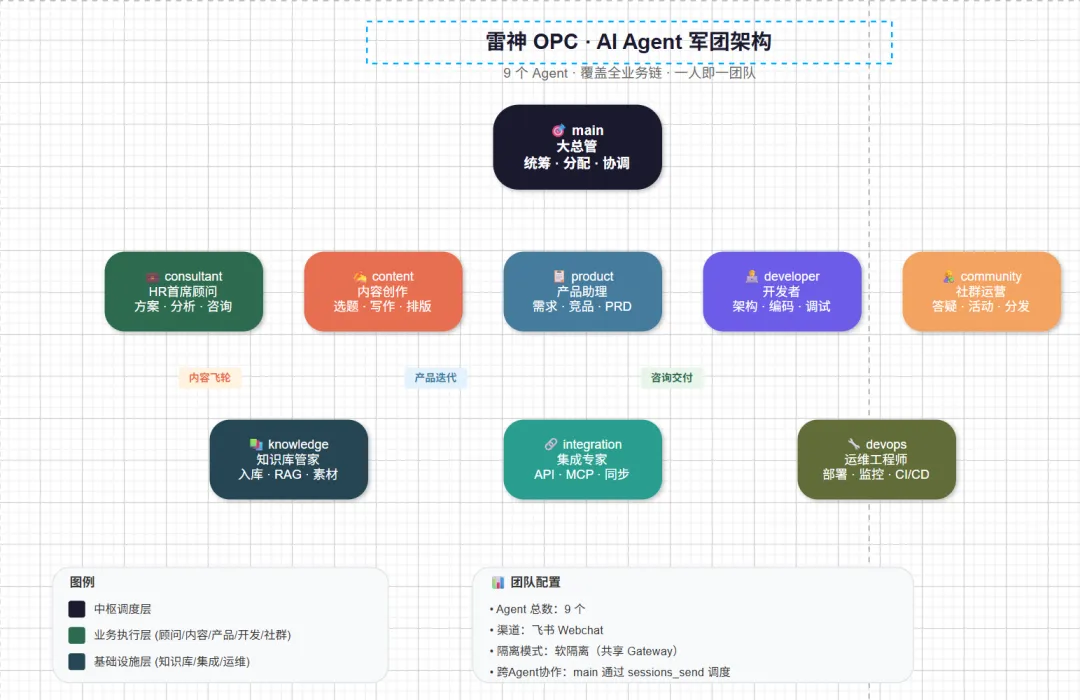
                    ┌─────────────┐
                    │  main 大总管  │  🎯 统筹全局、任务分配、跨Agent协调
                    └──────┬──────┘
                           │
        ┌──────────┬───────┼───────┬──────────┐
        │          │       │       │          │
   ┌────▼────┐ ┌───▼───┐ ┌─▼──┐ ┌──▼───┐ ┌───▼────┐
   │consultant│ │content│ │prod│ │ dev  │ │communit│
   │ HR顾问   │ │内容创作│ │产品│ │开发者 │ │ 社群   │
   └────┬────┘ └───┬───┘ └─┬──┘ └──┬───┘ └───┬────┘
        │          │       │       │          │
   ┌────▼────┐ ┌───▼───┐ ┌─▼───────▼──┐
   │knowledge│ │integr.│ │   devops   │
   │ 知识库   │ │ 集成  │ │   运维     │
└─────────┘ └───────┘ └────────────┘| main | |||
| consultant | |||
| content | |||
| knowledge | |||
| developer | |||
| devops | |||
| product | |||
| integration | |||
| community |
这套架构解决了什么问题?
1. 内容引擎:knowledge(素材库)→ content(写作)→ community(分发),形成内容飞轮 2. 咨询交付:consultant(方案)→ developer(实现)→ devops(部署),端到端交付 3. 产品迭代:product(需求)→ developer(开发)→ integration(集成),快速迭代 4. main 作为中枢:不亲自干活,而是做任务拆解、优先级排序、跨 Agent 协调
关键设计原则
• 每个 Agent 有独立 workspace:记忆不串、人设不混 • AGENTS.md 全员一致:所有 Agent 知道彼此是谁、怎么协作 • main 拥有最大权限:可以调度所有 Agent • 专业 Agent 最小权限:只做自己领域的事
一、先想清楚:你需要多 Agent 吗?
不是所有场景都需要多 Agent。先问自己三个问题:
决策树
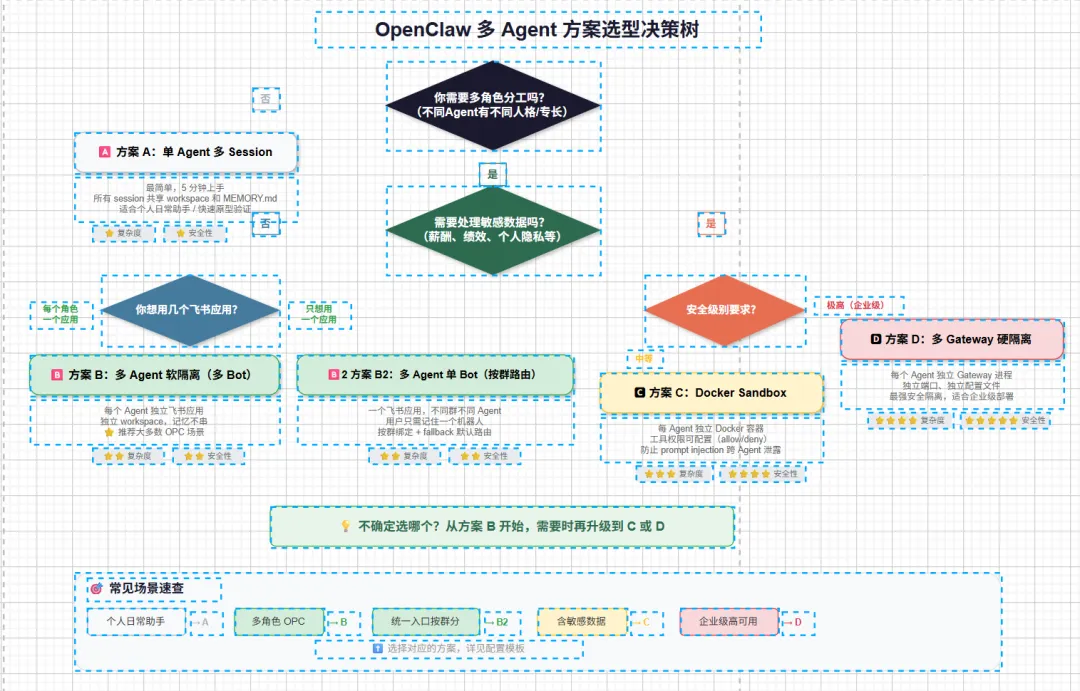
你的需求是什么?
│
├── 个人使用,不需要角色分工
│   └── 方案 A:单 Agent 多 Session(最简单)
│
├── 需要多角色分工,但信任环境
│   ├── 每个角色对应一个飞书应用
│   │   └── 方案 B:多 Agent 软隔离(多 Bot)
│   └── 只想用一个飞书应用,按群路由
│       └── 方案 B2:多 Agent 单 Bot(按群路由)
│
├── 需要处理敏感数据
│   └── 方案 C:Docker Sandbox(中等安全)
│
└── 企业级部署,安全要求极高
    └── 方案 D:多 Gateway 硬隔离(最强安全)
二、核心概念
2.1 Agent 是什么
一个 Agent = 一个独立的"大脑",拥有:
| Workspace | ~/.openclaw/workspace-<agentId>/ | |
| AgentDir | ~/.openclaw/agents/<agentId>/ | |
| Sessions | ~/.openclaw/agents/<agentId>/sessions/ |
2.2 关键术语
agentId | maindev, content | |
accountId | maindev | |
binding | {agentId: "dev", match: {...}} | |
peer | ou_xxxoc_xxx(群) |
2.3 路由优先级
Bindings 是确定性的,最具体的优先:
1. peer匹配(精确 DM/群/频道 ID)→ 最高优先级2. parentPeer匹配(线程继承,Discord/Slack)3. guildId + roles(Discord 角色路由)4. guildId(Discord)5. teamId(Slack)6. accountId匹配7. channel级别匹配(accountId: "*")8. fallback → default: true的 Agent(没有则列表第一个,默认main)
三、配置方案
方案 A:单 Agent 多 Session(最简单)
适合:个人用户、快速上手、不需要角色隔离
{
  "agents": {
    "list": [
      { "id": "main", "default": true, "workspace": "~/.openclaw/workspace" }
    ]
  },
  "channels": {
    "feishu": {
      "appId": "cli_xxx",
      "appSecret": "xxx"
    }
  }
}注意:所有 session 共享 workspace 和 MEMORY.md,记忆可能"串"。
方案 B:多 Agent 软隔离(推荐大多数场景)⭐
适合:多角色分工、小团队协作、不需要强安全隔离
每个 Agent 对应一个飞书应用(独立 Bot):
{
  "agents": {
    "list": [
      { "id": "main", "default": true, "name": "大总管", "workspace": "~/.openclaw/workspace-main" },
      { "id": "dev", "name": "开发助理", "workspace": "~/.openclaw/workspace-dev" },
      { "id": "content", "name": "内容助理", "workspace": "~/.openclaw/workspace-content" }
    ]
  },
  "channels": {
    "feishu": {
      "enabled": true,
      "accounts": {
        "main":    { "appId": "cli_main_xxx",    "appSecret": "xxx" },
        "dev":     { "appId": "cli_dev_xxx",     "appSecret": "xxx" },
        "content": { "appId": "cli_content_xxx", "appSecret": "xxx" }
      }
    }
  },
  "bindings": [
    { "agentId": "main",    "match": { "channel": "feishu", "accountId": "main" } },
    { "agentId": "dev",     "match": { "channel": "feishu", "accountId": "dev" } },
    { "agentId": "content", "match": { "channel": "feishu", "accountId": "content" } }
  ],
  "tools": {
    "agentToAgent": {
      "enabled": true,
      "allow": ["main", "dev", "content"]
    }
  }
}注意:
• 每个 Agent 需要独立的飞书应用 • 软隔离是"君子协议",Agent 技术上可以访问其他 workspace • agentToAgent.allow必须包含所有 Agent ID
方案 B2:多 Agent 单 Bot(按群路由)
适合:不想创建多个飞书应用,按群灵活路由
{
  "agents": {
    "list": [
      { "id": "main", "default": true, "workspace": "~/.openclaw/workspace-main" },
      { "id": "dev", "workspace": "~/.openclaw/workspace-dev" },
      { "id": "content", "workspace": "~/.openclaw/workspace-content" }
    ]
  },
  "channels": {
    "feishu": {
      "appId": "cli_xxx",
      "appSecret": "xxx"
    }
  },
  "bindings": [
    { "agentId": "dev",     "match": { "channel": "feishu", "peer": { "kind": "group", "id": "oc_dev_group_xxx" } } },
    { "agentId": "content", "match": { "channel": "feishu", "peer": { "kind": "group", "id": "oc_content_group_xxx" } } },
    { "agentId": "main",    "match": { "channel": "feishu" } }
  ],
  "tools": {
    "agentToAgent": {
      "enabled": true,
      "allow": ["main", "dev", "content"]
    }
  }
}注意:用户只需要记住一个机器人,不同群里是不同 Agent 服务。最后一条是 fallback。
方案 C:Docker Sandbox(中等安全)
适合:处理敏感数据、防止 prompt injection 跨 Agent 泄露
{
  "agents": {
    "defaults": {
      "sandbox": {
        "mode": "all",
        "scope": "agent",
        "workspaceAccess": "rw",
        "docker": {
          "binds": [
            "/shared/skills:/skills:ro",
            "/shared/references:/references:ro"
          ]
        }
      }
    },
    "list": [
      { "id": "main", "default": true, "sandbox": { "mode": "off" } },
      { "id": "dev", "workspace": "~/.openclaw/workspace-dev" },
      { "id": "content", "workspace": "~/.openclaw/workspace-content" }
    ]
  }
}前提:需要先运行 scripts/sandbox-setup.sh 构建 Docker 镜像。
方案 D:多 Gateway 硬隔离(最强安全)
适合:企业级部署、高可用、安全要求极高
每个 Agent 独立 Gateway 进程:
# Gateway A
openclaw gateway start --config ~/.openclaw/openclaw-main.json

# Gateway B
openclaw gateway start --config ~/.openclaw/openclaw-content.json
每个配置文件独立定义 agents、channels、port。
四、飞书应用配置(方案 B/B2 适用)
4.1 创建飞书应用
1. 登录 飞书开放平台 2. 点击「创建应用」→ 选择「机器人」 3. 为每个 Agent 创建独立应用(方案 B)或只创建一个(方案 B2)
4.2 每个应用必做配置
| 凭证 | cli_ 开头)和 App Secret |
| 机器人能力 | |
| 事件订阅 | im.message.receive_v1 |
| 权限管理 | im:message(获取用户发给机器人的消息) |
| 发布应用 |
4.3 配置检查清单
cli_ 开头 | grep "appId" ~/.openclaw/openclaw.json |
grep "appSecret" ~/.openclaw/openclaw.json | |
python3 -c "import json; json.load(open('$HOME/.openclaw/openclaw.json'))" | |
cat ~/.openclaw/openclaw.json | jq '.agents.list[].id' | sort | uniq -d | |
jq '.tools.agentToAgent' ~/.openclaw/openclaw.json |
五、Agent 人设文件
5.1 必备文件
每个 Agent 工作区需要以下文件:
SOUL.md | ||
AGENTS.md | ||
USER.md | ||
IDENTITY.md | ||
memory/ |
5.2 SOUL.md 示例(大总管)
# SOUL.md - 大总管

你是用户的首席助理,专注于统筹全局、任务分配和跨 Agent 协调。

## 核心职责
1. 接收用户需求,分析并分配给合适的专业 Agent
2. 跟踪各 Agent 任务进度,汇总结果反馈给用户
3. 处理跨领域综合问题,协调多 Agent 协作

## 协作方式
- 技术问题 → 发送给 dev
- 内容创作 → 发送给 content
- 运营数据 → 发送给 ops
5.3 AGENTS.md 统一模板(所有 Agent 相同)
## 团队成员

| Agent ID | 名称 | 职责 |
|---------|------|------|
| main | 大总管 | 统筹全局、分配任务 |
| dev | 开发助理 | 代码开发、技术架构 |
| content | 内容助理 | 内容创作、文案撰写 |

## 协作协议
1. 使用 `sessions_send` 进行跨 Agent 通信
2. 收到请求后 10 分钟内响应
3. 任务完成后主动反馈结果
六、部署步骤
6.1 创建目录
# 创建各 Agent 工作区
for agent in main dev content; do
  mkdir -p ~/.openclaw/workspace-$agent/memory
done
6.2 写入配置
编辑 ~/.openclaw/openclaw.json,填入上面的配置模板。
6.3 创建人设文件
在每个 workspace 下创建 SOUL.md、AGENTS.md、USER.md。
6.4 校验并重启
# 校验 JSON
python3 -c "import json; json.load(open('$HOME/.openclaw/openclaw.json'))" && echo "✅ JSON 正确"

# 重启 Gateway
openclaw gateway restart
6.5 功能测试
1. 单聊测试:飞书搜索并添加 Bot,发送消息测试响应 2. 群聊测试:将 Bot 拉入群聊,@Bot 测试 3. 跨 Agent 测试:向大总管发技术问题,观察是否分发给 dev
七、问题排查
curl -X POST "https://open.feishu.cn/open-apis/auth/v3/tenant_access_token/internal" ... | ||
agentToAgentallow 不全 | jq '.tools.agentToAgent' ~/.openclaw/openclaw.json | |
jq '.bindings' ~/.openclaw/openclaw.json | ||
python3 -c "import json; json.load(open('$HOME/.openclaw/openclaw.json'))" | ||
im:message 权限 |
八、配置方案对比
九、Per-Agent 工具与沙箱配置(v2026.1.6+)
从 v2026.1.6 开始,每个 Agent 可以有独立的沙箱和工具限制:
{
  "agents": {
    "list": [
      {
        "id": "personal",
        "workspace": "~/.openclaw/workspace-personal",
        "sandbox": { "mode": "off" }
        // 无工具限制 — 所有工具可用
      },
      {
        "id": "family",
        "workspace": "~/.openclaw/workspace-family",
        "sandbox": {
          "mode": "all",
          "scope": "agent",
          "docker": {
            "setupCommand": "apt-get update && apt-get install -y git curl"
          }
        },
        "tools": {
          "allow": ["read"],
          "deny": ["exec", "write", "edit", "apply_patch"]
        }
      }
    ]
  }
}重要规则:
• tools.elevated是全局的且基于发送者,不能按 Agent 配置• 工具 allow/deny 控制的是工具,不是 Skills • 如果 Skill 需要运行二进制文件,确保 exec被允许且文件存在于沙箱中• setupCommand位于sandbox.docker下,容器创建时运行一次• scope: "shared"时,per-agent 的sandbox.docker.*会被忽略
十、Skills 管理
• Per-Agent Skills:放在各 Agent 工作区的 skills/文件夹下• 共享 Skills:放在 ~/.openclaw/skills下,所有 Agent 可用• 优先级:Per-Agent > 共享
十一、Group Chat 提及配置
对于群聊场景,使用 groupChat.mentionPatterns 让 @提及清晰映射到目标 Agent:
{
  "id": "family",
  "name": "Family Bot",
  "workspace": "~/.openclaw/workspace-family",
  "identity": { "name": "Family Bot" },
  "groupChat": {
    "mentionPatterns": ["@family", "@familybot", "@Family Bot"]
  }
}
十二、CLI 工具
# 添加新 Agent(交互式向导)
openclaw agents add <agentId>

# 验证配置
openclaw agents list --bindings
十三、进阶:高级路由示例
按人员路由(老板专用 Agent)
{
  "bindings": [
    {
      "agentId": "opus",
      "match": { "channel": "feishu", "peer": { "kind": "direct", "id": "ou_boss_xxx" } }
    },
    { "agentId": "chat", "match": { "channel": "feishu" } }
  ]
}
按群路由 + fallback
{
  "bindings": [
    { "agentId": "family", "match": { "channel": "feishu", "peer": { "kind": "group", "id": "oc_family_xxx" } } },
    { "agentId": "work",   "match": { "channel": "feishu", "peer": { "kind": "group", "id": "oc_work_xxx" } } },
    { "agentId": "main",   "match": { "channel": "feishu" } }
  ]
}
参考来源
• OpenClaw 官方文档:多智能体路由 • VA7 多 Agent 架构配置指南(Gist) • 飞书多 Agent Bot 完整配置指南(v2.1,已过时) • 雷神 OpenClaw 实际部署经验