乐于分享
好东西不私藏

使用Ubuntu 安装openClaw

使用Ubuntu 安装openClaw
*系统版本:Ubuntu 24.04 LTS

*安装指导文档1、https://docs.openclaw.ai/zh-CN/install

2、https://www.runoob.com/ai-agent/openclaw-setup.html

一、使用快速安装

命令:curl -fsSL https://openclaw.ai/install.sh | bash

结果输出:

ubuntu@VM-0-4-ubuntu:~$ curl -fsSL https://openclaw.ai/install.sh | bash

  🦞 OpenClaw Installer  One CLI to rule them all, and one more restart because you changed the port.

✓ Detected: linux

Install planOS: linuxInstall method: npmRequested version: latest

[1/3] Preparing environment· Node.js not found, installing it now· Installing Node.js via NodeSource· Installing Linux build tools (make/g++/cmake/python3)✓ Build tools installed✓ Node.js v22 installed· Active Node.js: v22.22.1 (/usr/bin/node)· Active npm: 10.9.4 (/usr/bin/npm)

[2/3] Installing OpenClaw✓ Git already installed· Configuring npm for user-local installs✓ npm configured for user installs· Installing OpenClaw v2026.3.11! npm install failed for openclaw@latest  Command: env SHARP_IGNORE_GLOBAL_LIBVIPS=1 npm --loglevel error --silent --no-fund --no-audit install -g openclaw@latest  Installer log: /tmp/tmp.11tlpAnIzX! npm install failed; showing last log lines! npm install failed; retrying✓ OpenClaw npm package installed✓ OpenClaw installed

[3/3] Finalizing setup

! PATH missing npm global bin dir: /home/ubuntu/.npm-global/bin  This can make openclaw show as "command not found" in new terminals.  Fix (zsh: ~/.zshrc, bash: ~/.bashrc):    export PATH="/home/ubuntu/.npm-global/bin:$PATH"

🦞 OpenClaw installed successfully (OpenClaw 2026.3.11 (29dc654))!Home sweet home. Don't worry, I won't rearrange the furniture.

· Starting setup

🦞 OpenClaw 2026.3.11 (29dc654) — The lobster in your shell. 🦞

▄▄▄▄▄▄▄▄▄▄▄▄▄▄▄▄▄▄▄▄▄▄▄▄▄▄▄▄▄▄▄▄▄▄▄▄▄▄▄▄▄▄▄▄▄▄▄▄▄▄▄▄██░▄▄▄░██░▄▄░██░▄▄▄██░▀██░██░▄▄▀██░████░▄▄▀██░███░████░███░██░▀▀░██░▄▄▄██░█░█░██░█████░████░▀▀░██░█░█░████░▀▀▀░██░█████░▀▀▀██░██▄░██░▀▀▄██░▀▀░█░██░██▄▀▄▀▄██▀▀▀▀▀▀▀▀▀▀▀▀▀▀▀▀▀▀▀▀▀▀▀▀▀▀▀▀▀▀▀▀▀▀▀▀▀▀▀▀▀▀▀▀▀▀▀▀▀▀▀▀                  🦞 OPENCLAW 🦞                    

┌  OpenClaw onboarding◇  Security ─────────────────────────────────────────────────────────────────────────────────╮│                                                                                            ││  Security warning — please read.                                                           ││                                                                                            ││  OpenClaw is a hobby project and still in beta. Expect sharp edges.                        ││  By default, OpenClaw is a personal agent: one trusted operator boundary.                  ││  This bot can read files and run actions if tools are enabled.                             ││  A bad prompt can trick it into doing unsafe things.                                       ││                                                                                            ││  OpenClaw is not a hostile multi-tenant boundary by default.                               ││  If multiple users can message one tool-enabled agent, they share that delegated tool      ││  authority.                                                                                ││                                                                                            ││  If you’re not comfortable with security hardening and access control, don’t run           ││  OpenClaw.                                                                                 ││  Ask someone experienced to help before enabling tools or exposing it to the internet.     ││                                                                                            ││  Recommended baseline:                                                                     ││  - Pairing/allowlists + mention gating.                                                    ││  - Multi-user/shared inbox: split trust boundaries (separate gateway/credentials, ideally  ││    separate OS users/hosts).                                                               ││  - Sandbox + least-privilege tools.                                                        ││  - Shared inboxes: isolate DM sessions (session.dmScope: per-channel-peer) and keep      ││    tool access minimal.                                                                    ││  - Keep secrets out of the agent’s reachable filesystem.                                   ││  - Use the strongest available model for any bot with tools or untrusted inboxes.          ││                                                                                            ││  Run regularly:                                                                            ││  openclaw security audit --deep                                                            ││  openclaw security audit --fix                                                             ││                                                                                            ││  Must read: https://docs.openclaw.ai/gateway/security                                      ││                                                                                            │├────────────────────────────────────────────────────────────────────────────────────────────╯◆  I understand this is personal-by-default and shared/multi-user use requires lock-down. Continue?│  ○ Yes / ● No------>选择yes

  Onboarding mode│  QuickStart

 QuickStart ─────────────────────────╮│                                      ││  Gateway port: 18789                 ││  Gateway bind: Loopback (127.0.0.1)  ││  Gateway auth: Token (default)       ││  Tailscale exposure: Off             ││  Direct to chat channels.            ││                                      │├──────────────────────────────────────╯◇  Model/auth provider│  Qwen◓  Starting Qwen OAuth…│◇  Qwen OAuth ─────────────────────────────────────────────────────────────────────────╮│                                                                                      ││  Open https://chat.qwen.ai/authorize?user_code=NMG0BP54&client=qwen-code to approve  ││  access.                                                                             ││  If prompted, enter the code NMG0BP54.                                               ││                                                                                      │├──────────────────────────────────────────────────────────────────────────────────────╯◒  Waiting for Qwen OAuth approval…...

◇  Qwen OAuth failed◇  Qwen OAuth ────────────────────────────────────────────────────────────────╮│                                                                             ││  If OAuth fails, verify your Qwen account has portal access and try again.  ││                                                                             │├─────────────────────────────────────────────────────────────────────────────╯Error: Qwen OAuth timed out waiting for authorization.

我的安装失败了,重新安装,输入

ubuntu@VM-0-4-ubuntu:~$ openclaw onboard --install-daemoopenclaw: command not found

没用。进行下一步

ubuntu@VM-0-4-ubuntu:~$ echo 'export PATH="/home/ubuntu/.npm-global/bin:$PATH"' >> ~/.bashrcubuntu@VM-0-4-ubuntu:~$ source ~/.bashrcubuntu@VM-0-4-ubuntu:~$ openclaw -vOpenClaw 2026.3.11 (29dc654)  ----->出现版本号完成ubuntu@VM-0-4-ubuntu:~$ openclaw onboard

这次我选openrouter 模型

▄▄▄▄▄▄▄▄▄▄▄▄▄▄▄▄▄▄▄▄▄▄▄▄▄▄▄▄▄▄▄▄▄▄▄▄▄▄▄▄▄▄▄▄▄▄▄▄▄▄▄▄██░▄▄▄░██░▄▄░██░▄▄▄██░▀██░██░▄▄▀██░████░▄▄▀██░███░████░███░██░▀▀░██░▄▄▄██░█░█░██░█████░████░▀▀░██░█░█░████░▀▀▀░██░█████░▀▀▀██░██▄░██░▀▀▄██░▀▀░█░██░██▄▀▄▀▄██▀▀▀▀▀▀▀▀▀▀▀▀▀▀▀▀▀▀▀▀▀▀▀▀▀▀▀▀▀▀▀▀▀▀▀▀▀▀▀▀▀▀▀▀▀▀▀▀▀▀▀▀                  🦞 OPENCLAW 🦞                    

┌  OpenClaw onboarding◇  Security ─────────────────────────────────────────────────────────────────────────────────╮│                                                                                            ││  Security warning — please read.                                                           ││                                                                                            ││  OpenClaw is a hobby project and still in beta. Expect sharp edges.                        ││  By default, OpenClaw is a personal agent: one trusted operator boundary.                  ││  This bot can read files and run actions if tools are enabled.                             ││  A bad prompt can trick it into doing unsafe things.                                       ││                                                                                            ││  OpenClaw is not a hostile multi-tenant boundary by default.                               ││  If multiple users can message one tool-enabled agent, they share that delegated tool      ││  authority.                                                                                ││                                                                                            ││  If you’re not comfortable with security hardening and access control, don’t run           ││  OpenClaw.                                                                                 ││  Ask someone experienced to help before enabling tools or exposing it to the internet.     ││                                                                                            ││  Recommended baseline:                                                                     ││  - Pairing/allowlists + mention gating.                                                    ││  - Multi-user/shared inbox: split trust boundaries (separate gateway/credentials, ideally  ││    separate OS users/hosts).                                                               ││  - Sandbox + least-privilege tools.                                                        ││  - Shared inboxes: isolate DM sessions (session.dmScope: per-channel-peer) and keep      ││    tool access minimal.                                                                    ││  - Keep secrets out of the agent’s reachable filesystem.                                   ││  - Use the strongest available model for any bot with tools or untrusted inboxes.          ││                                                                                            ││  Run regularly:                                                                            ││  openclaw security audit --deep                                                            ││  openclaw security audit --fix                                                             ││                                                                                            ││  Must read: https://docs.openclaw.ai/gateway/security                                      ││                                                                                            │├────────────────────────────────────────────────────────────────────────────────────────────╯◇  I understand this is personal-by-default and shared/multi-user use requires lock-down. Continue?│  Yes◇  Onboarding mode│  QuickStart◇  QuickStart ─────────────────────────╮│                                      ││  Gateway port: 18789                 ││  Gateway bind: Loopback (127.0.0.1)  ││  Gateway auth: Token (default)       ││  Tailscale exposure: Off             ││  Direct to chat channels.            ││                                      │├──────────────────────────────────────╯◇  Model/auth provider│  OpenRouter◇  How do you want to provide this API key?│  Paste API key now◇  Enter OpenRouter API key│  sk-xxxxxxxxxxxxxxxxxxxxxxxxxxxxxx  ->输入你的密钥◇  Model configured ─────────────────────╮│                                        ││  Default model set to openrouter/auto  ││                                        │├────────────────────────────────────────╯◇  Default model│  Keep current (openrouter/auto)◇  Channel status ────────────────────────────╮│                                             ││  Telegram: needs token                      ││  WhatsApp (default): not linked             ││  Discord: needs token                       ││  Slack: needs tokens                        ││  Signal: needs setup                        ││  signal-cli: missing (signal-cli)           ││  iMessage: needs setup                      ││  imsg: missing (imsg)                       ││  IRC: not configured                        ││  Google Chat: not configured                ││  LINE: not configured                       ││  Feishu: install plugin to enable           ││  Google Chat: install plugin to enable      ││  Nostr: install plugin to enable            ││  Microsoft Teams: install plugin to enable  ││  Mattermost: install plugin to enable       ││  Nextcloud Talk: install plugin to enable   ││  Matrix: install plugin to enable           ││  BlueBubbles: install plugin to enable      ││  LINE: install plugin to enable             ││  Zalo: install plugin to enable             ││  Zalo Personal: install plugin to enable    ││  Synology Chat: install plugin to enable    ││  Tlon: install plugin to enable             ││                                             │├─────────────────────────────────────────────╯◇  How channels work ───────────────────────────────────────────────────────────────────────╮│                                                                                           ││  DM security: default is pairing; unknown DMs get a pairing code.                         ││  Approve with: openclaw pairing approve <channel><code>                                  ││  Public DMs require dmPolicy="open" + allowFrom=["*"].                                    ││  Multi-user DMs: run: openclaw config set session.dmScope "per-channel-peer" (or          ││  "per-account-channel-peer" for multi-account channels) to isolate sessions.              ││  Docs: channels/pairing              ││                                                                                           ││  Telegram: simplest way to get started — register a bot with @BotFather and get going.    ││  WhatsApp: works with your own number; recommend a separate phone + eSIM.                 ││  Discord: very well supported right now.                                                  ││  IRC: classic IRC networks with DM/channel routing and pairing controls.                  ││  Google Chat: Google Workspace Chat app with HTTP webhook.                                ││  Slack: supported (Socket Mode).                                                          ││  Signal: signal-cli linked device; more setup (David Reagans: "Hop on Discord.").         ││  iMessage: this is still a work in progress.                                              ││  LINE: LINE Messaging API webhook bot.                                                    ││  Feishu: 飞书/Lark enterprise messaging with doc/wiki/drive tools.                        ││  Nostr: Decentralized protocol; encrypted DMs via NIP-04.                                 ││  Microsoft Teams: Bot Framework; enterprise support.                                      ││  Mattermost: self-hosted Slack-style chat; install the plugin to enable.                  ││  Nextcloud Talk: Self-hosted chat via Nextcloud Talk webhook bots.                        ││  Matrix: open protocol; install the plugin to enable.                                     ││  BlueBubbles: iMessage via the BlueBubbles mac app + REST API.                            ││  Zalo: Vietnam-focused messaging platform with Bot API.                                   ││  Zalo Personal: Zalo personal account via QR code login.                                  ││  Synology Chat: Connect your Synology NAS Chat to OpenClaw with full agent capabilities.  ││  Tlon: decentralized messaging on Urbit; install the plugin to enable.                    ││                                                                                           │├───────────────────────────────────────────────────────────────────────────────────────────╯◇  Select channel (QuickStart)│  Skip for nowUpdated ~/.openclaw/openclaw.jsonWorkspace OK: ~/.openclaw/workspaceSessions OK: ~/.openclaw/agents/main/sessions◇  Web search ────────────────────────────────────────╮│                                                     ││  Web search lets your agent look things up online.  ││  Choose a provider and paste your API key.          ││  Docs: https://docs.openclaw.ai/tools/web           ││                                                     │├─────────────────────────────────────────────────────╯◇  Search provider│  Skip for now◇  Skills status ─────────────╮│                             ││  Eligible: 4                ││  Missing requirements: 40   ││  Unsupported on this OS: 7  ││  Blocked by allowlist: 0    ││                             │├─────────────────────────────╯◇  Configure skills now? (recommended)│  No◇  Hooks ──────────────────────────────────────────────────────────────────╮│                                                                          ││  Hooks let you automate actions when agent commands are issued.          ││  Example: Save session context to memory when you issue /new or /reset.  ││                                                                          ││  Learn more: https://docs.openclaw.ai/automation/hooks                   ││                                                                          │├──────────────────────────────────────────────────────────────────────────╯◇  Enable hooks?│  📝 command-logger, 💾 session-memory◇  Hooks Configured ────────────────────────────────╮│                                                   ││  Enabled 2 hooks: command-logger, session-memory  ││                                                   ││  You can manage hooks later with:                 ││    openclaw hooks list                            ││    openclaw hooks enable <name>                   ││    openclaw hooks disable <name>                  ││                                                   │├───────────────────────────────────────────────────╯Config overwrite: /home/ubuntu/.openclaw/openclaw.json (sha256 017b46fd7456c18d779356dac8d2d28f5f213576874accfdd3ecf6677e0912a0 -> a203be21c0733388fc1d460c3ebed1ee193513adfd11f43915b7f0ec8f265bc1, backup=/home/ubuntu/.openclaw/openclaw.json.bak)◇  Systemd ────────────────────────────────────────────────────────────────────────────────╮│                                                                                          ││  Linux installs use a systemd user service by default. Without lingering, systemd stops  ││  the user session on logout/idle and kills the Gateway.                                  ││  Enabling lingering now (may require sudo; writes /var/lib/systemd/linger).              ││                                                                                          │├──────────────────────────────────────────────────────────────────────────────────────────╯◇  Systemd ───────────────────────────────╮│                                         ││  Enabled systemd lingering for ubuntu.  ││                                         │├─────────────────────────────────────────╯◇  Gateway service runtime ────────────────────────────────────────────╮│                                                                      ││  QuickStart uses Node for the Gateway service (stable + supported).  ││                                                                      │├──────────────────────────────────────────────────────────────────────╯◑  Installing Gateway service…Installed systemd service: /home/ubuntu/.config/systemd/user/openclaw-gateway.service◇  Gateway service installed.Agents: main (default)Heartbeat interval: 30m (main)Session store (main): /home/ubuntu/.openclaw/agents/main/sessions/sessions.json (0 entries)◇  Optional apps ────────────────────────╮│                                        ││  Add nodes for extra features:         ││  - macOS app (system + notifications)  ││  - iOS app (camera/canvas)             ││  - Android app (camera/canvas)         ││                                        │├────────────────────────────────────────╯◇  Control UI ─────────────────────────────────────────────────────────────────────╮│                                                                                  ││  Web UI: http://127.0.0.1:18789/                                                 ││  Web UI (with token):                                                            ││  http://127.0.0.1:18789/#token=xxxxxxx ││  Gateway WS: ws://127.0.0.1:18789                                                ││  Gateway: reachable                                                              ││  Docs: https://docs.openclaw.ai/web/control-ui                                   ││                                                                                  │├──────────────────────────────────────────────────────────────────────────────────╯◇  Start TUI (best option!) ─────────────────────────────────╮│                                                            ││  This is the defining action that makes your agent you.    ││  Please take your time.                                    ││  The more you tell it, the better the experience will be.  ││  We will send: "Wake up, my friend!"                       ││                                                            │├────────────────────────────────────────────────────────────╯◇  Token ────────────────────────────────────────────────────────────────────────────────────╮│                                                                                            ││  Gateway token: shared auth for the Gateway + Control UI.                                  ││  Stored in: ~/.openclaw/openclaw.json (gateway.auth.token) or OPENCLAW_GATEWAY_TOKEN.      ││  View token: openclaw config get gateway.auth.token                                        ││  Generate token: openclaw doctor --generate-gateway-token                                  ││  Web UI keeps dashboard URL tokens in memory for the current tab and strips them from the  ││  URL after load.                                                                           ││  Open the dashboard anytime: openclaw dashboard --no-open                                  ││  If prompted: paste the token into Control UI settings (or use the tokenized dashboard     ││  URL).                                                                                     ││                                                                                            │├────────────────────────────────────────────────────────────────────────────────────────────╯◇  How do you want to hatch your bot?│  Open the Web UI◇  Dashboard ready ────────────────────────────────────────────────────────────────╮│                                                                                  ││  Dashboard link (with token):                                                    ││  http://127.0.0.1:18789/#token=XXXXXXXXXX ││  Copy/paste this URL in a browser on this machine to control OpenClaw.           ││  No GUI detected. Open from your computer:                                       ││  ssh -N -L 18789:127.0.0.1:18789 ubuntu@10.0.0.4                                 ││  Then open:                                                                      ││  http://localhost:18789/                                                         ││  http://localhost:18789/#token=  XXXXXXXXXX    ││  Docs:                                                                      ││  https://docs.openclaw.ai/gateway/remote                                         ││  https://docs.openclaw.ai/web/control-ui                                         ││                                                                                  │├──────────────────────────────────────────────────────────────────────────────────╯◇  Workspace backup ────────────────────────────────────────╮│                                                           ││  Back up your agent workspace.                            ││  Docs: https://docs.openclaw.ai/concepts/agent-workspace  ││                                                           │├───────────────────────────────────────────────────────────╯◇  Security ──────────────────────────────────────────────────────╮│                                                                 ││  Running agents on your computer is risky — harden your setup:  ││  https://docs.openclaw.ai/security                              ││                                                                 │├─────────────────────────────────────────────────────────────────╯◇  Shell completion ────────────────────────────────────────────────────────╮│                                                                           ││  Shell completion installed. Restart your shell or run: source ~/.bashrc  ││                                                                           │├───────────────────────────────────────────────────────────────────────────╯◇  Web search ───────────────────────────────────────╮│                                                    ││  Web search was skipped. You can enable it later:  ││    openclaw configure --section web                ││                                                    ││  Docs: https://docs.openclaw.ai/tools/web          ││                                                    │├────────────────────────────────────────────────────╯◇  What now ─────────────────────────────────────────────────────────────╮│                                                                        ││  What now: https://openclaw.ai/showcase ("What People Are Building").  ││                                                                        │├────────────────────────────────────────────────────────────────────────╯└  Onboarding complete. Use the dashboard link above to control OpenClaw.

二、对接企业微信职能机器人

第一步:以长连接方式创建智能机器人,获取Bot ID和Secret

通过长连接方式创建的智能机器人,支持主动向用户发送消息。

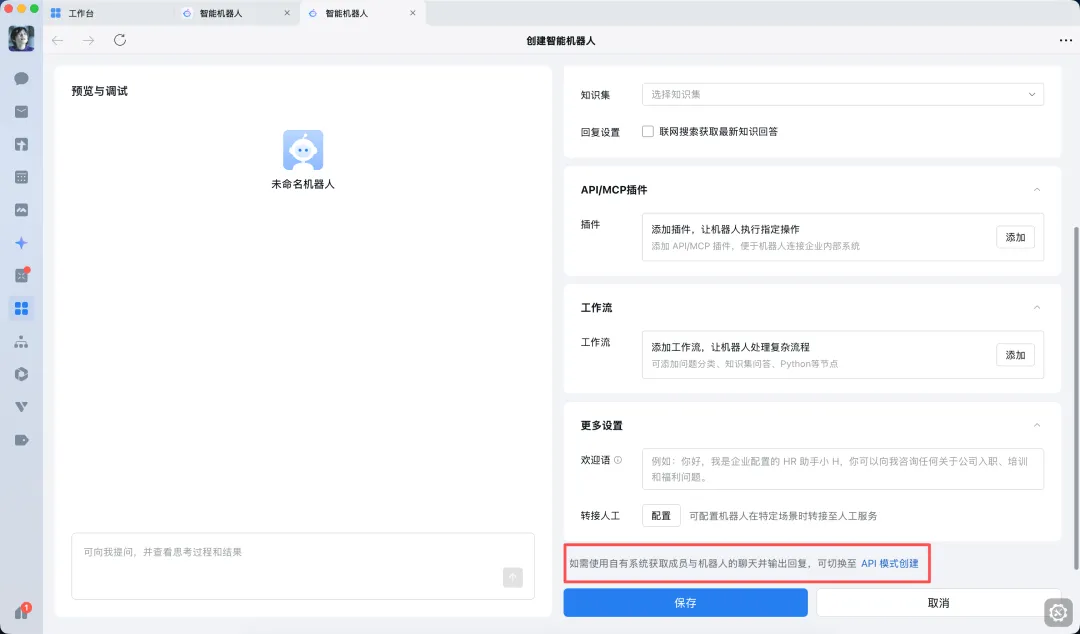
  1. 可在客户端-工作台,点击-智能机器人-创建机器人,选择API模式创建。

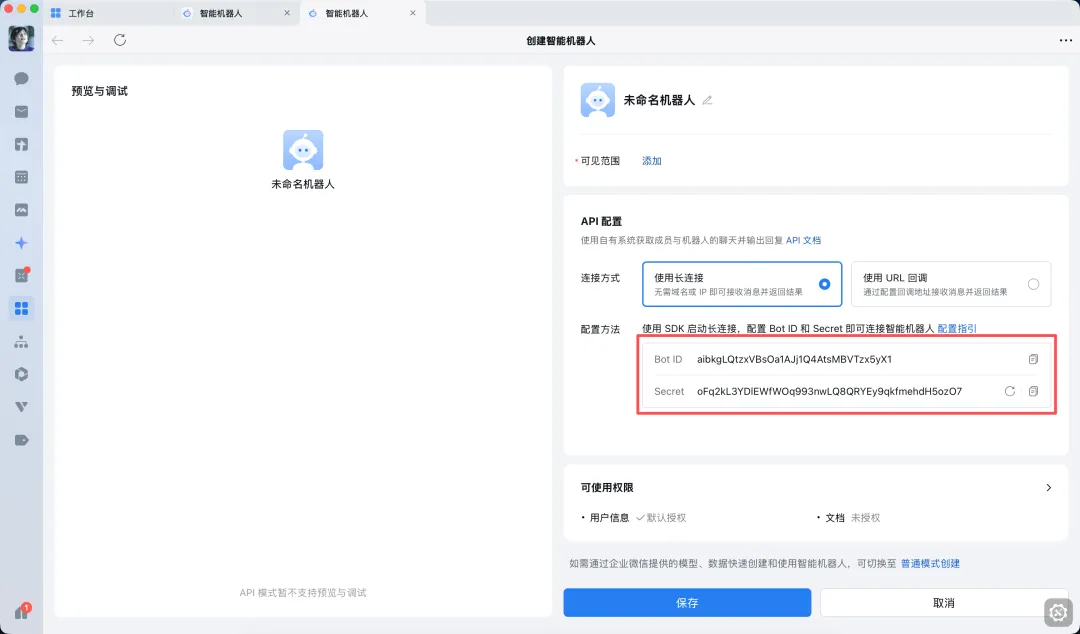
2、选择以「长连接」方式创建,并获取Bot ID 和 Secret。
在本地终端部署OpenClaw并关联机器人

执行命令:openclaw plugins install @wecom/wecom-openclaw-plugin

ubuntu@VM-0-4-ubuntu:~$ openclaw plugins install @wecom/wecom-openclaw-plugin

🦞 OpenClaw 2026.3.11 (29dc654)   One CLI to rule them all, and one more restart because you changed the port.

Downloading @wecom/wecom-openclaw-plugin…Extracting /tmp/openclaw-npm-pack-6j2QiV/wecom-wecom-openclaw-plugin-1.0.9.tgz…WARNING: Plugin "wecom-openclaw-plugin" contains dangerous code patterns: Enviro                                                                           nment variable access combined with network send — possible credential harvestin                                                                           g (/tmp/openclaw-plugin-nfNMo9/extract/package/dist/index.esm.js:591); Environme                                                                           nt variable access combined with network send — possible credential harvesting (                                                                           /tmp/openclaw-plugin-nfNMo9/extract/package/dist/index.cjs.js:596)Installing to /home/ubuntu/.openclaw/extensions/wecom-openclaw-plugin…Installing plugin dependencies…15:35:51 [plugins] plugins.allow is empty; discovered non-bundled plugins may au                                                                           to-load: wecom-openclaw-plugin (/home/ubuntu/.openclaw/extensions/wecom-openclaw                                                                           -plugin/dist/index.esm.js). Set plugins.allow to explicit trusted ids.Config overwrite: /home/ubuntu/.openclaw/openclaw.json (sha256 6dfaf343f9917e28b                                                                           871b67d332a7de8ddaa4cf0cb8210480dfa5c7bab8d2086 -> 8e43572bee2e491338f92d91ff27e                                                                           7ae270405c0d095fce29ee5872ab50bd9d9, backup=/home/ubuntu/.openclaw/openclaw.json                                                                           .bak)Installed plugin: wecom-openclaw-pluginRestart the gateway to load plugins.

重启OpenClaw。openclaw gateway start

在终端中,输入以下命令,添加渠道。openclaw channels add

select channel步骤,选择 channel 为企业微信

输入企业微信机器人Bot ID、Secret。

选择 finish

选择配对方式,选择 Pairing

完成后续配置,并可看到配置渠道成功。

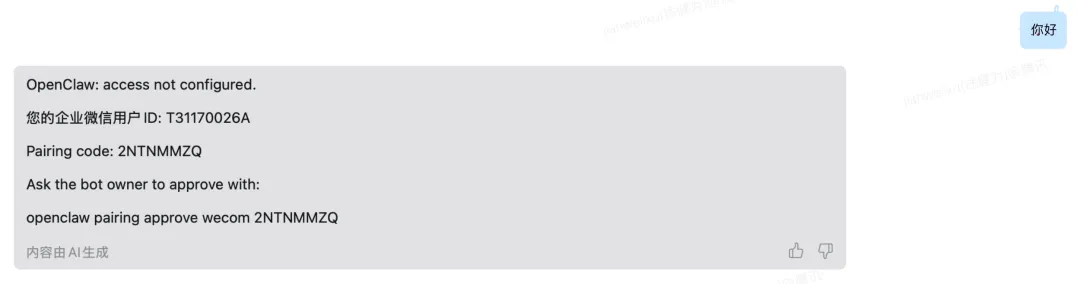
在企业微信中,保存机器人,并跟他发消息。会收到一个配置密钥

复制此信息最后一行,并输入在终端中,完成配对。

执行结果如下

ubuntu@VM-0-4-ubuntu:~$ openclaw gateway start

🦞 OpenClaw 2026.3.11 (29dc654)   Like having a senior engineer on call, except I don't bill hourly or sigh audibly.

Restarted systemd service: openclaw-gateway.serviceubuntu@VM-0-4-ubuntu:~$ openclaw channels add

🦞 OpenClaw 2026.3.11 (29dc654)   If it works, it's automation; if it breaks, it's a "learning opportunity."

15:58:15 [plugins] plugins.allow is empty; discovered non-bundled plugins may auto-load: wecom-openclaw-plugin (/home/ubuntu/.openclaw/extensions/wecom-openclaw-plugin/dist/index.esm.js). Set plugins.allow to explicit trusted ids.┌  Channel setup◇  Channel status ────────────────────────────╮│                                             ││  Telegram: needs token                      ││  WhatsApp (default): not linked             ││  Discord: needs token                       ││  Slack: needs tokens                        ││  Signal: needs setup                        ││  signal-cli: missing (signal-cli)           ││  iMessage: needs setup                      ││  imsg: missing (imsg)                       ││  企业微信: 需要 Bot ID 和 Secret            ││  IRC: not configured                        ││  Google Chat: not configured                ││  LINE: not configured                       ││  Feishu: install plugin to enable           ││  Google Chat: install plugin to enable      ││  Nostr: install plugin to enable            ││  Microsoft Teams: install plugin to enable  ││  Mattermost: install plugin to enable       ││  Nextcloud Talk: install plugin to enable   ││  Matrix: install plugin to enable           ││  BlueBubbles: install plugin to enable      ││  LINE: install plugin to enable             ││  Zalo: install plugin to enable             ││  Zalo Personal: install plugin to enable    ││  Synology Chat: install plugin to enable    ││  Tlon: install plugin to enable             ││                                             │├─────────────────────────────────────────────╯◇  Configure chat channels now?│  Yes◇  How channels work ──────────────────────────────────────────────────────╮│                                                                          ││  DM security: default is pairing; unknown DMs get a pairing code.        ││  Approve with: openclaw pairing approve <channel><code>                 ││  Public DMs require dmPolicy="open" + allowFrom=[""].                   ││  Multi-user DMs: run: openclaw config set session.dmScope                ││  "per-channel-peer" (or "per-account-channel-peer" for multi-account     ││  channels) to isolate sessions.                                          ││  Docs:                                                                   ││  channels/pairing   ││                                                                          ││  Telegram: simplest way to get started — register a bot with @BotFather  ││  and get going.                                                          ││  WhatsApp: works with your own number; recommend a separate phone +      ││  eSIM.                                                                   ││  Discord: very well supported right now.                                 ││  IRC: classic IRC networks with DM/channel routing and pairing           ││  controls.                                                               ││  Google Chat: Google Workspace Chat app with HTTP webhook.               ││  Slack: supported (Socket Mode).                                         ││  Signal: signal-cli linked device; more setup (David Reagans: "Hop on    ││  Discord.").                                                             ││  iMessage: this is still a work in progress.                             ││  LINE: LINE Messaging API webhook bot.                                   ││  企业微信: 企业微信智能机器人接入插件                                    ││  Feishu: 飞书/Lark enterprise messaging with doc/wiki/drive tools.       ││  Nostr: Decentralized protocol; encrypted DMs via NIP-04.                ││  Microsoft Teams: Bot Framework; enterprise support.                     ││  Mattermost: self-hosted Slack-style chat; install the plugin to         ││  enable.                                                                 ││  Nextcloud Talk: Self-hosted chat via Nextcloud Talk webhook bots.       ││  Matrix: open protocol; install the plugin to enable.                    ││  BlueBubbles: iMessage via the BlueBubbles mac app + REST API.           ││  Zalo: Vietnam-focused messaging platform with Bot API.                  ││  Zalo Personal: Zalo personal account via QR code login.                 ││  Synology Chat: Connect your Synology NAS Chat to OpenClaw with full     ││  agent capabilities.                                                     ││  Tlon: decentralized messaging on Urbit; install the plugin to enable.   ││                                                                          │├──────────────────────────────────────────────────────────────────────────╯◇  Select a channel│  企业微信 (WeCom)◇  企业微信设置 ─────────────────────╮│                                    ││  企业微信机器人需要以下配置信息:  ││  1. Bot ID: 企业微信机器人id       ││  2. Secret: 企业微信机器人密钥     ││                                    │├────────────────────────────────────╯◇  企业微信机器人 Bot ID│  aib8KPkgGtNJ9hSgQ8ufJFbItggTWuGNk3Y◇  企业微信机器人 Secret│  bCGgjQUEH2WwdOINoKQtu2qAa7EBgVWSGaUXcd34Bo8◇  Select a channel│  Finished◇  Selected channels ────────────────────────────────────────╮│                                                            ││  企业微信 — 企业微信智能机器人接入插件 Docs:               ││  wecom  ││                                                            │├────────────────────────────────────────────────────────────╯◇  Configure DM access policies now? (default: pairing)│  Yes◇  企业微信 DM access ────────────────────────────────────────────────────╮│                                                                         ││  Default: pairing (unknown DMs get a pairing code).                     ││  Approve: openclaw pairing approve wecom <code>                         ││  Allowlist DMs: channels.wecom.dmPolicy="allowlist" +                   ││  channels.wecom.allowFrom entries.                                      ││  Public DMs: channels.wecom.dmPolicy="open" + channels.wecom.allowFrom  ││  includes "".                                                          ││  Multi-user DMs: run: openclaw config set session.dmScope               ││  "per-channel-peer" (or "per-account-channel-peer" for multi-account    ││  channels) to isolate sessions.                                         ││  Docs:                                                                  ││  channels/pairing  ││                                                                         │├─────────────────────────────────────────────────────────────────────────╯◇  企业微信 DM policy│  Pairing (recommended)◇  Add display names for these accounts? (optional)│  Yes◇  wecom account name (default)│  企业微信Config overwrite: /home/ubuntu/.openclaw/openclaw.json (sha256 8e43572bee2e491338f92d91ff27e7ae270405c0d095fce29ee5872ab50bd9d9 -> 0d488b292a8b823c39e5722b9069fe561075ae3c467bda30ee52fc258b06654b, backup=/home/ubuntu/.openclaw/openclaw.json.bak)└  Channels updated.

ubuntu@VM-0-4-ubuntu:~$ openclaw pairing approve wecom 2LRUVHCF16:06:14 [plugins] plugins.allow is empty; discovered non-bundled plugins may auto-load: wecom-openclaw-plugin (/home/ubuntu/.openclaw/extensions/wecom-openclaw-plugin/dist/index.esm.js). Set plugins.allow to explicit trusted ids.

🦞 OpenClaw 2026.3.11 (29dc654)   Running on your hardware, reading your logs, judging nothing (mostly).

Approved wecom sender GaoQinWei.

安装tavily-search搜索工具

git clone https://github.com/framix-team/openclaw-tavily.git ~/.openclaw/extensions/openclaw-tavilycd ~/.openclaw/extensions/openclaw-tavilynpm install --omit=dev

验证:openclaw plugins list openclaw skills list


命令大全:

OpenClaw最全命令合集(通用版)

原创 数智拼图 数智拼图2026年3月10日 23:28北京 5人

本文整理OpenClaw全场景核心命令,按功能分类排版,涵盖基础操作、安装配置、模型管理等所有常用场景,命令可直接复制执行,适配通用版本,方便新手快速上手、老手查阅备用。

1. 基础信息/帮助命令

用于查看版本、获取命令帮助,快速熟悉工具基础用法

openclaw --version  # 查看OpenClaw版本openclaw --help   # 查看所有命令帮助openclaw help    # 简化版帮助查看openclaw help [命令] # 查看指定命令的详细帮助(将[命令]替换为具体命令)

2. 首次安装/初始化命令

完成OpenClaw首次安装、依赖配置及全流程初始化,适用于新环境部署

openclaw install   # 安装所需依赖openclaw onboard   # 全流程引导配置(含模型、频道、网关)openclaw onboard --force  # 强制重新初始化(用于配置异常时重置)

3. 配置系统(config)命令

用于查看、设置、重置OpenClaw各项配置(网关、模型、频道等),核心配置场景必用

3.1 查看配置

openclaw config list      # 查看所有配置列表openclaw config get all    # 查看全部配置详情openclaw config get gateway  # 查看网关配置openclaw config get models   # 查看模型配置openclaw config get channels  # 查看频道配置openclaw config get agents   # 查看智能体配置

3.2 设置配置

openclaw config set gateway.port 18789          # 设置网关端口为18789openclaw config set gateway.host 0.0.0.0         # 设置网关主机为0.0.0.0(允许外部访问)openclaw config set agents.main.model "claude-3-5-sonnet" # 设置主智能体模型为claude-3-5-sonnetopenclaw config set models.openai.api_key "sk-xxxx"   # 设置OpenAI API密钥(替换sk-xxxx为实际密钥)openclaw config set models.openai.base_url "https://api.openai.com/v1" # 设置OpenAI基础地址

3.3 取消/重置配置

openclaw config unset gateway.port  # 取消网关端口配置openclaw config reset        # 重置所有配置为默认值

4. 模型管理(models)命令

用于查看、添加、删除、设置默认模型,管理OpenClaw关联的所有模型

openclaw models list          # 查看所有已关联模型openclaw models status         # 查看模型运行状态openclaw models scan          # 扫描可关联的模型openclaw models probe         # 探测模型可用性openclaw models set default "gpt-4o" # 设置默认模型为gpt-4oopenclaw models add openai --api_key sk-xxxx --base_url https://...  # 添加OpenAI模型(替换密钥和地址)openclaw models remove openai     # 删除已关联的OpenAI模型

5. 频道/机器人登录(channels)命令

用于管理各类频道/机器人的登录、登出,查看频道状态

openclaw channels list        # 查看所有已配置频道openclaw channels status       # 查看频道运行状态openclaw channels probe        # 探测频道连接状态# 登录命令(按需选择对应频道)openclaw channels login telegram   # 登录Telegram频道openclaw channels login discord    # 登录Discord频道openclaw channels login whatsapp   # 登录WhatsApp频道openclaw channels login gq      # 登录GQ频道openclaw channels login slack     # 登录Slack频道# 登出命令openclaw channels logout telegram   # 登出Telegram频道openclaw channels logout all     # 登出所有已登录频道

6. 智能体/Agent命令

用于创建、删除、切换智能体,与智能体进行交互

openclaw agent list          # 查看所有智能体openclaw agent create myagent     # 创建名为myagent的智能体(可替换myagent为自定义名称)openclaw agent delete myagent     # 删除名为myagent的智能体openclaw agent use main        # 切换默认智能体为mainopenclaw agent chat "好"       # 与默认智能体进行简单聊天(替换"好"为自定义消息)openclaw agent --message "帮我写个启动脚本" # 向默认智能体发送指令(替换指令内容)

7. 网关/核心服务(gateway)命令

管理OpenClaw核心网关服务,包括启停、调试、设置开机自启

openclaw gateway start        # 启动网关服务openclaw gateway stop        # 停止网关服务openclaw gateway restart       # 重启网关服务openclaw gateway status       # 查看网关服务状态# 前台调试运行(用于排查问题)openclaw gateway run --verbose    # 前台运行并显示详细日志openclaw gateway run --port 18789  # 前台运行并指定端口为18789# 系统服务配置(开机自启)openclaw gateway install       # 将网关安装为系统服务(开机自启)openclaw gateway uninstall      # 卸载网关系统服务

8. 日志/调试命令

查看系统日志、筛选错误信息,用于排查OpenClaw运行异常

openclaw logs            # 查看所有日志openclaw logs -f           # 实时查看日志(持续输出)openclaw logs --error        # 只查看错误日志openclaw logs --gateway       # 只查看网关相关日志openclaw logs --channels       # 只查看频道相关日志

9. 健康检查/修复命令

检查OpenClaw运行状态,自动修复常见异常问题

openclaw doctor           # 执行健康检查,查看异常信息openclaw doctor --fix        # 执行健康检查并自动修复可解决的问题openclaw check            # 简易健康检查openclaw validate          # 验证配置及服务可用性

10. 插件/扩展命令

管理OpenClaw插件和技能,扩展工具功能

# 插件管理openclaw plugins list        # 查看所有已安装插件openclaw plugins install [插件名/路径]  # 安装插件(替换[插件名/路径]为实际内容)openclaw plugins uninstall [插件名]   # 卸载插件(替换[插件名]为实际插件名称)openclaw plugins enable [插件名]    # 启用插件(替换[插件名]为实际插件名称)openclaw plugins disable [插件名]    # 禁用插件(替换[插件名]为实际插件名称)# 技能管理openclaw skills list         # 查看所有可用技能openclaw skills enable [技能]     # 启用指定技能(替换[技能]为实际技能名称)openclaw skills disable [技能]    # 禁用指定技能(替换[技能]为实际技能名称)

11. 浏览器/自动化能力命令

控制浏览器进行自动化操作,包括启动、打开网页、截图等

openclaw browser start        # 启动浏览器服务openclaw browser stop        # 停止浏览器服务openclaw browser open https://baidu.com  # 打开指定网页(替换为目标URL)openclaw browser screenshot     # 对当前浏览器页面截图openclaw browser type "内容"    # 在浏览器输入框输入内容(替换"内容"为实际文本)openclaw browser click "按钮文字"  # 点击浏览器页面指定按钮(替换"按钮文字"为实际按钮文本)

12. 工作区/文件命令

管理OpenClaw工作区,查看路径、清理缓存等

openclaw workspace list       # 查看工作区列表openclaw workspace clean       # 清理工作区缓存及临时文件openclaw workspace path       # 查看当前工作区路径

13. 权限/密钥管理命令

管理OpenClaw相关权限密钥,添加、删除、查看密钥信息

openclaw keys list          # 查看所有已存储密钥openclaw keys add mykey "内容"   # 添加密钥(mykey为密钥名称,"内容"为密钥实际值)openclaw keys remove mykey      # 删除指定名称的密钥(替换mykey为实际密钥名称)

14. 常用一键组合命令(高频必备)

整合日常最常用的完整操作流程,一键完成配置、启动全流程,直接复制执行即可

# OpenClaw完整启动流程(常用)openclaw config set gateway.port 18789openclaw config set models.openai.api_key "sk-xxxx" # 替换为实际API密钥openclaw models probeopenclaw channels login telegram       # 按需替换为需要登录的频道openclaw gateway installopenclaw gateway startopenclaw gateway statusopenclaw logs -f

补充说明

  • 所有命令均基于OpenClaw通用版本,执行前确保已完成基础安装和环境配置;

  • 命令中[ ]包裹的内容(如[命令]、[插件名]),需替换为实际内容后再执行;

  • 涉及API密钥、端口等配置,需根据自身环境和需求调整,避免直接使用示例中的默认值;

  • 若执行命令时出现报错,可通过「openclaw logs --error」查看错误详情,或执行「openclaw doctor --fix」尝试自动修复。

基本 文件 流程 错误 SQL 调试
  1. 请求信息 : 2026-04-02 00:09:48 HTTP/1.1 GET : https://www.yeyulingfeng.com/a/487962.html
  2. 运行时间 : 0.144627s [ 吞吐率:6.91req/s ] 内存消耗:5,086.26kb 文件加载:145
  3. 缓存信息 : 0 reads,0 writes
  4. 会话信息 : SESSION_ID=b9933b4af19d8683284b9871c8f7d845
  1. /yingpanguazai/ssd/ssd1/www/wwww.yeyulingfeng.com/public/index.php ( 0.79 KB )
  2. /yingpanguazai/ssd/ssd1/www/wwww.yeyulingfeng.com/vendor/autoload.php ( 0.17 KB )
  3. /yingpanguazai/ssd/ssd1/www/wwww.yeyulingfeng.com/vendor/composer/autoload_real.php ( 2.49 KB )
  4. /yingpanguazai/ssd/ssd1/www/wwww.yeyulingfeng.com/vendor/composer/platform_check.php ( 0.90 KB )
  5. /yingpanguazai/ssd/ssd1/www/wwww.yeyulingfeng.com/vendor/composer/ClassLoader.php ( 14.03 KB )
  6. /yingpanguazai/ssd/ssd1/www/wwww.yeyulingfeng.com/vendor/composer/autoload_static.php ( 6.05 KB )
  7. /yingpanguazai/ssd/ssd1/www/wwww.yeyulingfeng.com/vendor/topthink/think-helper/src/helper.php ( 8.34 KB )
  8. /yingpanguazai/ssd/ssd1/www/wwww.yeyulingfeng.com/vendor/topthink/think-validate/src/helper.php ( 2.19 KB )
  9. /yingpanguazai/ssd/ssd1/www/wwww.yeyulingfeng.com/vendor/ralouphie/getallheaders/src/getallheaders.php ( 1.60 KB )
  10. /yingpanguazai/ssd/ssd1/www/wwww.yeyulingfeng.com/vendor/topthink/think-orm/src/helper.php ( 1.47 KB )
  11. /yingpanguazai/ssd/ssd1/www/wwww.yeyulingfeng.com/vendor/topthink/think-orm/stubs/load_stubs.php ( 0.16 KB )
  12. /yingpanguazai/ssd/ssd1/www/wwww.yeyulingfeng.com/vendor/topthink/framework/src/think/Exception.php ( 1.69 KB )
  13. /yingpanguazai/ssd/ssd1/www/wwww.yeyulingfeng.com/vendor/topthink/think-container/src/Facade.php ( 2.71 KB )
  14. /yingpanguazai/ssd/ssd1/www/wwww.yeyulingfeng.com/vendor/symfony/deprecation-contracts/function.php ( 0.99 KB )
  15. /yingpanguazai/ssd/ssd1/www/wwww.yeyulingfeng.com/vendor/symfony/polyfill-mbstring/bootstrap.php ( 8.26 KB )
  16. /yingpanguazai/ssd/ssd1/www/wwww.yeyulingfeng.com/vendor/symfony/polyfill-mbstring/bootstrap80.php ( 9.78 KB )
  17. /yingpanguazai/ssd/ssd1/www/wwww.yeyulingfeng.com/vendor/symfony/var-dumper/Resources/functions/dump.php ( 1.49 KB )
  18. /yingpanguazai/ssd/ssd1/www/wwww.yeyulingfeng.com/vendor/topthink/think-dumper/src/helper.php ( 0.18 KB )
  19. /yingpanguazai/ssd/ssd1/www/wwww.yeyulingfeng.com/vendor/symfony/var-dumper/VarDumper.php ( 4.30 KB )
  20. /yingpanguazai/ssd/ssd1/www/wwww.yeyulingfeng.com/vendor/guzzlehttp/guzzle/src/functions_include.php ( 0.16 KB )
  21. /yingpanguazai/ssd/ssd1/www/wwww.yeyulingfeng.com/vendor/guzzlehttp/guzzle/src/functions.php ( 5.54 KB )
  22. /yingpanguazai/ssd/ssd1/www/wwww.yeyulingfeng.com/vendor/topthink/framework/src/think/App.php ( 15.30 KB )
  23. /yingpanguazai/ssd/ssd1/www/wwww.yeyulingfeng.com/vendor/topthink/think-container/src/Container.php ( 15.76 KB )
  24. /yingpanguazai/ssd/ssd1/www/wwww.yeyulingfeng.com/vendor/psr/container/src/ContainerInterface.php ( 1.02 KB )
  25. /yingpanguazai/ssd/ssd1/www/wwww.yeyulingfeng.com/app/provider.php ( 0.19 KB )
  26. /yingpanguazai/ssd/ssd1/www/wwww.yeyulingfeng.com/vendor/topthink/framework/src/think/Http.php ( 6.04 KB )
  27. /yingpanguazai/ssd/ssd1/www/wwww.yeyulingfeng.com/vendor/topthink/think-helper/src/helper/Str.php ( 7.29 KB )
  28. /yingpanguazai/ssd/ssd1/www/wwww.yeyulingfeng.com/vendor/topthink/framework/src/think/Env.php ( 4.68 KB )
  29. /yingpanguazai/ssd/ssd1/www/wwww.yeyulingfeng.com/app/common.php ( 0.03 KB )
  30. /yingpanguazai/ssd/ssd1/www/wwww.yeyulingfeng.com/vendor/topthink/framework/src/helper.php ( 18.78 KB )
  31. /yingpanguazai/ssd/ssd1/www/wwww.yeyulingfeng.com/vendor/topthink/framework/src/think/Config.php ( 5.54 KB )
  32. /yingpanguazai/ssd/ssd1/www/wwww.yeyulingfeng.com/config/alipay.php ( 3.59 KB )
  33. /yingpanguazai/ssd/ssd1/www/wwww.yeyulingfeng.com/vendor/topthink/framework/src/think/facade/Env.php ( 1.67 KB )
  34. /yingpanguazai/ssd/ssd1/www/wwww.yeyulingfeng.com/config/app.php ( 0.95 KB )
  35. /yingpanguazai/ssd/ssd1/www/wwww.yeyulingfeng.com/config/cache.php ( 0.78 KB )
  36. /yingpanguazai/ssd/ssd1/www/wwww.yeyulingfeng.com/config/console.php ( 0.23 KB )
  37. /yingpanguazai/ssd/ssd1/www/wwww.yeyulingfeng.com/config/cookie.php ( 0.56 KB )
  38. /yingpanguazai/ssd/ssd1/www/wwww.yeyulingfeng.com/config/database.php ( 2.48 KB )
  39. /yingpanguazai/ssd/ssd1/www/wwww.yeyulingfeng.com/config/filesystem.php ( 0.61 KB )
  40. /yingpanguazai/ssd/ssd1/www/wwww.yeyulingfeng.com/config/lang.php ( 0.91 KB )
  41. /yingpanguazai/ssd/ssd1/www/wwww.yeyulingfeng.com/config/log.php ( 1.35 KB )
  42. /yingpanguazai/ssd/ssd1/www/wwww.yeyulingfeng.com/config/middleware.php ( 0.19 KB )
  43. /yingpanguazai/ssd/ssd1/www/wwww.yeyulingfeng.com/config/route.php ( 1.89 KB )
  44. /yingpanguazai/ssd/ssd1/www/wwww.yeyulingfeng.com/config/session.php ( 0.57 KB )
  45. /yingpanguazai/ssd/ssd1/www/wwww.yeyulingfeng.com/config/trace.php ( 0.34 KB )
  46. /yingpanguazai/ssd/ssd1/www/wwww.yeyulingfeng.com/config/view.php ( 0.82 KB )
  47. /yingpanguazai/ssd/ssd1/www/wwww.yeyulingfeng.com/app/event.php ( 0.25 KB )
  48. /yingpanguazai/ssd/ssd1/www/wwww.yeyulingfeng.com/vendor/topthink/framework/src/think/Event.php ( 7.67 KB )
  49. /yingpanguazai/ssd/ssd1/www/wwww.yeyulingfeng.com/app/service.php ( 0.13 KB )
  50. /yingpanguazai/ssd/ssd1/www/wwww.yeyulingfeng.com/app/AppService.php ( 0.26 KB )
  51. /yingpanguazai/ssd/ssd1/www/wwww.yeyulingfeng.com/vendor/topthink/framework/src/think/Service.php ( 1.64 KB )
  52. /yingpanguazai/ssd/ssd1/www/wwww.yeyulingfeng.com/vendor/topthink/framework/src/think/Lang.php ( 7.35 KB )
  53. /yingpanguazai/ssd/ssd1/www/wwww.yeyulingfeng.com/vendor/topthink/framework/src/lang/zh-cn.php ( 13.70 KB )
  54. /yingpanguazai/ssd/ssd1/www/wwww.yeyulingfeng.com/vendor/topthink/framework/src/think/initializer/Error.php ( 3.31 KB )
  55. /yingpanguazai/ssd/ssd1/www/wwww.yeyulingfeng.com/vendor/topthink/framework/src/think/initializer/RegisterService.php ( 1.33 KB )
  56. /yingpanguazai/ssd/ssd1/www/wwww.yeyulingfeng.com/vendor/services.php ( 0.14 KB )
  57. /yingpanguazai/ssd/ssd1/www/wwww.yeyulingfeng.com/vendor/topthink/framework/src/think/service/PaginatorService.php ( 1.52 KB )
  58. /yingpanguazai/ssd/ssd1/www/wwww.yeyulingfeng.com/vendor/topthink/framework/src/think/service/ValidateService.php ( 0.99 KB )
  59. /yingpanguazai/ssd/ssd1/www/wwww.yeyulingfeng.com/vendor/topthink/framework/src/think/service/ModelService.php ( 2.04 KB )
  60. /yingpanguazai/ssd/ssd1/www/wwww.yeyulingfeng.com/vendor/topthink/think-trace/src/Service.php ( 0.77 KB )
  61. /yingpanguazai/ssd/ssd1/www/wwww.yeyulingfeng.com/vendor/topthink/framework/src/think/Middleware.php ( 6.72 KB )
  62. /yingpanguazai/ssd/ssd1/www/wwww.yeyulingfeng.com/vendor/topthink/framework/src/think/initializer/BootService.php ( 0.77 KB )
  63. /yingpanguazai/ssd/ssd1/www/wwww.yeyulingfeng.com/vendor/topthink/think-orm/src/Paginator.php ( 11.86 KB )
  64. /yingpanguazai/ssd/ssd1/www/wwww.yeyulingfeng.com/vendor/topthink/think-validate/src/Validate.php ( 63.20 KB )
  65. /yingpanguazai/ssd/ssd1/www/wwww.yeyulingfeng.com/vendor/topthink/think-orm/src/Model.php ( 23.55 KB )
  66. /yingpanguazai/ssd/ssd1/www/wwww.yeyulingfeng.com/vendor/topthink/think-orm/src/model/concern/Attribute.php ( 21.05 KB )
  67. /yingpanguazai/ssd/ssd1/www/wwww.yeyulingfeng.com/vendor/topthink/think-orm/src/model/concern/AutoWriteData.php ( 4.21 KB )
  68. /yingpanguazai/ssd/ssd1/www/wwww.yeyulingfeng.com/vendor/topthink/think-orm/src/model/concern/Conversion.php ( 6.44 KB )
  69. /yingpanguazai/ssd/ssd1/www/wwww.yeyulingfeng.com/vendor/topthink/think-orm/src/model/concern/DbConnect.php ( 5.16 KB )
  70. /yingpanguazai/ssd/ssd1/www/wwww.yeyulingfeng.com/vendor/topthink/think-orm/src/model/concern/ModelEvent.php ( 2.33 KB )
  71. /yingpanguazai/ssd/ssd1/www/wwww.yeyulingfeng.com/vendor/topthink/think-orm/src/model/concern/RelationShip.php ( 28.29 KB )
  72. /yingpanguazai/ssd/ssd1/www/wwww.yeyulingfeng.com/vendor/topthink/think-helper/src/contract/Arrayable.php ( 0.09 KB )
  73. /yingpanguazai/ssd/ssd1/www/wwww.yeyulingfeng.com/vendor/topthink/think-helper/src/contract/Jsonable.php ( 0.13 KB )
  74. /yingpanguazai/ssd/ssd1/www/wwww.yeyulingfeng.com/vendor/topthink/think-orm/src/model/contract/Modelable.php ( 0.09 KB )
  75. /yingpanguazai/ssd/ssd1/www/wwww.yeyulingfeng.com/vendor/topthink/framework/src/think/Db.php ( 2.88 KB )
  76. /yingpanguazai/ssd/ssd1/www/wwww.yeyulingfeng.com/vendor/topthink/think-orm/src/DbManager.php ( 8.52 KB )
  77. /yingpanguazai/ssd/ssd1/www/wwww.yeyulingfeng.com/vendor/topthink/framework/src/think/Log.php ( 6.28 KB )
  78. /yingpanguazai/ssd/ssd1/www/wwww.yeyulingfeng.com/vendor/topthink/framework/src/think/Manager.php ( 3.92 KB )
  79. /yingpanguazai/ssd/ssd1/www/wwww.yeyulingfeng.com/vendor/psr/log/src/LoggerTrait.php ( 2.69 KB )
  80. /yingpanguazai/ssd/ssd1/www/wwww.yeyulingfeng.com/vendor/psr/log/src/LoggerInterface.php ( 2.71 KB )
  81. /yingpanguazai/ssd/ssd1/www/wwww.yeyulingfeng.com/vendor/topthink/framework/src/think/Cache.php ( 4.92 KB )
  82. /yingpanguazai/ssd/ssd1/www/wwww.yeyulingfeng.com/vendor/psr/simple-cache/src/CacheInterface.php ( 4.71 KB )
  83. /yingpanguazai/ssd/ssd1/www/wwww.yeyulingfeng.com/vendor/topthink/think-helper/src/helper/Arr.php ( 16.63 KB )
  84. /yingpanguazai/ssd/ssd1/www/wwww.yeyulingfeng.com/vendor/topthink/framework/src/think/cache/driver/File.php ( 7.84 KB )
  85. /yingpanguazai/ssd/ssd1/www/wwww.yeyulingfeng.com/vendor/topthink/framework/src/think/cache/Driver.php ( 9.03 KB )
  86. /yingpanguazai/ssd/ssd1/www/wwww.yeyulingfeng.com/vendor/topthink/framework/src/think/contract/CacheHandlerInterface.php ( 1.99 KB )
  87. /yingpanguazai/ssd/ssd1/www/wwww.yeyulingfeng.com/app/Request.php ( 0.09 KB )
  88. /yingpanguazai/ssd/ssd1/www/wwww.yeyulingfeng.com/vendor/topthink/framework/src/think/Request.php ( 55.78 KB )
  89. /yingpanguazai/ssd/ssd1/www/wwww.yeyulingfeng.com/app/middleware.php ( 0.25 KB )
  90. /yingpanguazai/ssd/ssd1/www/wwww.yeyulingfeng.com/vendor/topthink/framework/src/think/Pipeline.php ( 2.61 KB )
  91. /yingpanguazai/ssd/ssd1/www/wwww.yeyulingfeng.com/vendor/topthink/think-trace/src/TraceDebug.php ( 3.40 KB )
  92. /yingpanguazai/ssd/ssd1/www/wwww.yeyulingfeng.com/vendor/topthink/framework/src/think/middleware/SessionInit.php ( 1.94 KB )
  93. /yingpanguazai/ssd/ssd1/www/wwww.yeyulingfeng.com/vendor/topthink/framework/src/think/Session.php ( 1.80 KB )
  94. /yingpanguazai/ssd/ssd1/www/wwww.yeyulingfeng.com/vendor/topthink/framework/src/think/session/driver/File.php ( 6.27 KB )
  95. /yingpanguazai/ssd/ssd1/www/wwww.yeyulingfeng.com/vendor/topthink/framework/src/think/contract/SessionHandlerInterface.php ( 0.87 KB )
  96. /yingpanguazai/ssd/ssd1/www/wwww.yeyulingfeng.com/vendor/topthink/framework/src/think/session/Store.php ( 7.12 KB )
  97. /yingpanguazai/ssd/ssd1/www/wwww.yeyulingfeng.com/vendor/topthink/framework/src/think/Route.php ( 23.73 KB )
  98. /yingpanguazai/ssd/ssd1/www/wwww.yeyulingfeng.com/vendor/topthink/framework/src/think/route/RuleName.php ( 5.75 KB )
  99. /yingpanguazai/ssd/ssd1/www/wwww.yeyulingfeng.com/vendor/topthink/framework/src/think/route/Domain.php ( 2.53 KB )
  100. /yingpanguazai/ssd/ssd1/www/wwww.yeyulingfeng.com/vendor/topthink/framework/src/think/route/RuleGroup.php ( 22.43 KB )
  101. /yingpanguazai/ssd/ssd1/www/wwww.yeyulingfeng.com/vendor/topthink/framework/src/think/route/Rule.php ( 26.95 KB )
  102. /yingpanguazai/ssd/ssd1/www/wwww.yeyulingfeng.com/vendor/topthink/framework/src/think/route/RuleItem.php ( 9.78 KB )
  103. /yingpanguazai/ssd/ssd1/www/wwww.yeyulingfeng.com/route/app.php ( 3.94 KB )
  104. /yingpanguazai/ssd/ssd1/www/wwww.yeyulingfeng.com/vendor/topthink/framework/src/think/facade/Route.php ( 4.70 KB )
  105. /yingpanguazai/ssd/ssd1/www/wwww.yeyulingfeng.com/vendor/topthink/framework/src/think/route/dispatch/Controller.php ( 4.74 KB )
  106. /yingpanguazai/ssd/ssd1/www/wwww.yeyulingfeng.com/vendor/topthink/framework/src/think/route/Dispatch.php ( 10.44 KB )
  107. /yingpanguazai/ssd/ssd1/www/wwww.yeyulingfeng.com/app/controller/Index.php ( 9.87 KB )
  108. /yingpanguazai/ssd/ssd1/www/wwww.yeyulingfeng.com/app/BaseController.php ( 2.05 KB )
  109. /yingpanguazai/ssd/ssd1/www/wwww.yeyulingfeng.com/vendor/topthink/think-orm/src/facade/Db.php ( 0.93 KB )
  110. /yingpanguazai/ssd/ssd1/www/wwww.yeyulingfeng.com/vendor/topthink/think-orm/src/db/connector/Mysql.php ( 5.44 KB )
  111. /yingpanguazai/ssd/ssd1/www/wwww.yeyulingfeng.com/vendor/topthink/think-orm/src/db/PDOConnection.php ( 52.47 KB )
  112. /yingpanguazai/ssd/ssd1/www/wwww.yeyulingfeng.com/vendor/topthink/think-orm/src/db/Connection.php ( 8.39 KB )
  113. /yingpanguazai/ssd/ssd1/www/wwww.yeyulingfeng.com/vendor/topthink/think-orm/src/db/ConnectionInterface.php ( 4.57 KB )
  114. /yingpanguazai/ssd/ssd1/www/wwww.yeyulingfeng.com/vendor/topthink/think-orm/src/db/builder/Mysql.php ( 16.58 KB )
  115. /yingpanguazai/ssd/ssd1/www/wwww.yeyulingfeng.com/vendor/topthink/think-orm/src/db/Builder.php ( 24.06 KB )
  116. /yingpanguazai/ssd/ssd1/www/wwww.yeyulingfeng.com/vendor/topthink/think-orm/src/db/BaseBuilder.php ( 27.50 KB )
  117. /yingpanguazai/ssd/ssd1/www/wwww.yeyulingfeng.com/vendor/topthink/think-orm/src/db/Query.php ( 15.71 KB )
  118. /yingpanguazai/ssd/ssd1/www/wwww.yeyulingfeng.com/vendor/topthink/think-orm/src/db/BaseQuery.php ( 45.13 KB )
  119. /yingpanguazai/ssd/ssd1/www/wwww.yeyulingfeng.com/vendor/topthink/think-orm/src/db/concern/TimeFieldQuery.php ( 7.43 KB )
  120. /yingpanguazai/ssd/ssd1/www/wwww.yeyulingfeng.com/vendor/topthink/think-orm/src/db/concern/AggregateQuery.php ( 3.26 KB )
  121. /yingpanguazai/ssd/ssd1/www/wwww.yeyulingfeng.com/vendor/topthink/think-orm/src/db/concern/ModelRelationQuery.php ( 20.07 KB )
  122. /yingpanguazai/ssd/ssd1/www/wwww.yeyulingfeng.com/vendor/topthink/think-orm/src/db/concern/ParamsBind.php ( 3.66 KB )
  123. /yingpanguazai/ssd/ssd1/www/wwww.yeyulingfeng.com/vendor/topthink/think-orm/src/db/concern/ResultOperation.php ( 7.01 KB )
  124. /yingpanguazai/ssd/ssd1/www/wwww.yeyulingfeng.com/vendor/topthink/think-orm/src/db/concern/WhereQuery.php ( 19.37 KB )
  125. /yingpanguazai/ssd/ssd1/www/wwww.yeyulingfeng.com/vendor/topthink/think-orm/src/db/concern/JoinAndViewQuery.php ( 7.11 KB )
  126. /yingpanguazai/ssd/ssd1/www/wwww.yeyulingfeng.com/vendor/topthink/think-orm/src/db/concern/TableFieldInfo.php ( 2.63 KB )
  127. /yingpanguazai/ssd/ssd1/www/wwww.yeyulingfeng.com/vendor/topthink/think-orm/src/db/concern/Transaction.php ( 2.77 KB )
  128. /yingpanguazai/ssd/ssd1/www/wwww.yeyulingfeng.com/vendor/topthink/framework/src/think/log/driver/File.php ( 5.96 KB )
  129. /yingpanguazai/ssd/ssd1/www/wwww.yeyulingfeng.com/vendor/topthink/framework/src/think/contract/LogHandlerInterface.php ( 0.86 KB )
  130. /yingpanguazai/ssd/ssd1/www/wwww.yeyulingfeng.com/vendor/topthink/framework/src/think/log/Channel.php ( 3.89 KB )
  131. /yingpanguazai/ssd/ssd1/www/wwww.yeyulingfeng.com/vendor/topthink/framework/src/think/event/LogRecord.php ( 1.02 KB )
  132. /yingpanguazai/ssd/ssd1/www/wwww.yeyulingfeng.com/vendor/topthink/think-helper/src/Collection.php ( 16.47 KB )
  133. /yingpanguazai/ssd/ssd1/www/wwww.yeyulingfeng.com/vendor/topthink/framework/src/think/facade/View.php ( 1.70 KB )
  134. /yingpanguazai/ssd/ssd1/www/wwww.yeyulingfeng.com/vendor/topthink/framework/src/think/View.php ( 4.39 KB )
  135. /yingpanguazai/ssd/ssd1/www/wwww.yeyulingfeng.com/app/controller/Es.php ( 3.30 KB )
  136. /yingpanguazai/ssd/ssd1/www/wwww.yeyulingfeng.com/vendor/topthink/framework/src/think/Response.php ( 8.81 KB )
  137. /yingpanguazai/ssd/ssd1/www/wwww.yeyulingfeng.com/vendor/topthink/framework/src/think/response/View.php ( 3.29 KB )
  138. /yingpanguazai/ssd/ssd1/www/wwww.yeyulingfeng.com/vendor/topthink/framework/src/think/Cookie.php ( 6.06 KB )
  139. /yingpanguazai/ssd/ssd1/www/wwww.yeyulingfeng.com/vendor/topthink/think-view/src/Think.php ( 8.38 KB )
  140. /yingpanguazai/ssd/ssd1/www/wwww.yeyulingfeng.com/vendor/topthink/framework/src/think/contract/TemplateHandlerInterface.php ( 1.60 KB )
  141. /yingpanguazai/ssd/ssd1/www/wwww.yeyulingfeng.com/vendor/topthink/think-template/src/Template.php ( 46.61 KB )
  142. /yingpanguazai/ssd/ssd1/www/wwww.yeyulingfeng.com/vendor/topthink/think-template/src/template/driver/File.php ( 2.41 KB )
  143. /yingpanguazai/ssd/ssd1/www/wwww.yeyulingfeng.com/vendor/topthink/think-template/src/template/contract/DriverInterface.php ( 0.86 KB )
  144. /yingpanguazai/ssd/ssd1/www/wwww.yeyulingfeng.com/runtime/temp/c935550e3e8a3a4c27dd94e439343fdf.php ( 31.80 KB )
  145. /yingpanguazai/ssd/ssd1/www/wwww.yeyulingfeng.com/vendor/topthink/think-trace/src/Html.php ( 4.42 KB )
  1. CONNECT:[ UseTime:0.000962s ] mysql:host=127.0.0.1;port=3306;dbname=wenku;charset=utf8mb4
  2. SHOW FULL COLUMNS FROM `fenlei` [ RunTime:0.000697s ]
  3. SELECT * FROM `fenlei` WHERE `fid` = 0 [ RunTime:0.000349s ]
  4. SELECT * FROM `fenlei` WHERE `fid` = 63 [ RunTime:0.000328s ]
  5. SHOW FULL COLUMNS FROM `set` [ RunTime:0.000502s ]
  6. SELECT * FROM `set` [ RunTime:0.000177s ]
  7. SHOW FULL COLUMNS FROM `article` [ RunTime:0.000567s ]
  8. SELECT * FROM `article` WHERE `id` = 487962 LIMIT 1 [ RunTime:0.002970s ]
  9. UPDATE `article` SET `lasttime` = 1775059788 WHERE `id` = 487962 [ RunTime:0.012151s ]
  10. SELECT * FROM `fenlei` WHERE `id` = 64 LIMIT 1 [ RunTime:0.000249s ]
  11. SELECT * FROM `article` WHERE `id` < 487962 ORDER BY `id` DESC LIMIT 1 [ RunTime:0.000419s ]
  12. SELECT * FROM `article` WHERE `id` > 487962 ORDER BY `id` ASC LIMIT 1 [ RunTime:0.004302s ]
  13. SELECT * FROM `article` WHERE `id` < 487962 ORDER BY `id` DESC LIMIT 10 [ RunTime:0.000942s ]
  14. SELECT * FROM `article` WHERE `id` < 487962 ORDER BY `id` DESC LIMIT 10,10 [ RunTime:0.002223s ]
  15. SELECT * FROM `article` WHERE `id` < 487962 ORDER BY `id` DESC LIMIT 20,10 [ RunTime:0.009536s ]
0.146299s