 夜雨聆风
夜雨聆风OpenClaw 记忆/Memory系统原理深度解读
引子:从给龙虾改名看 Memory/记忆 全链路
场景
在飞书私聊中给 AI 助手发送了一条消息:
"我给你改个名字,你叫小明"
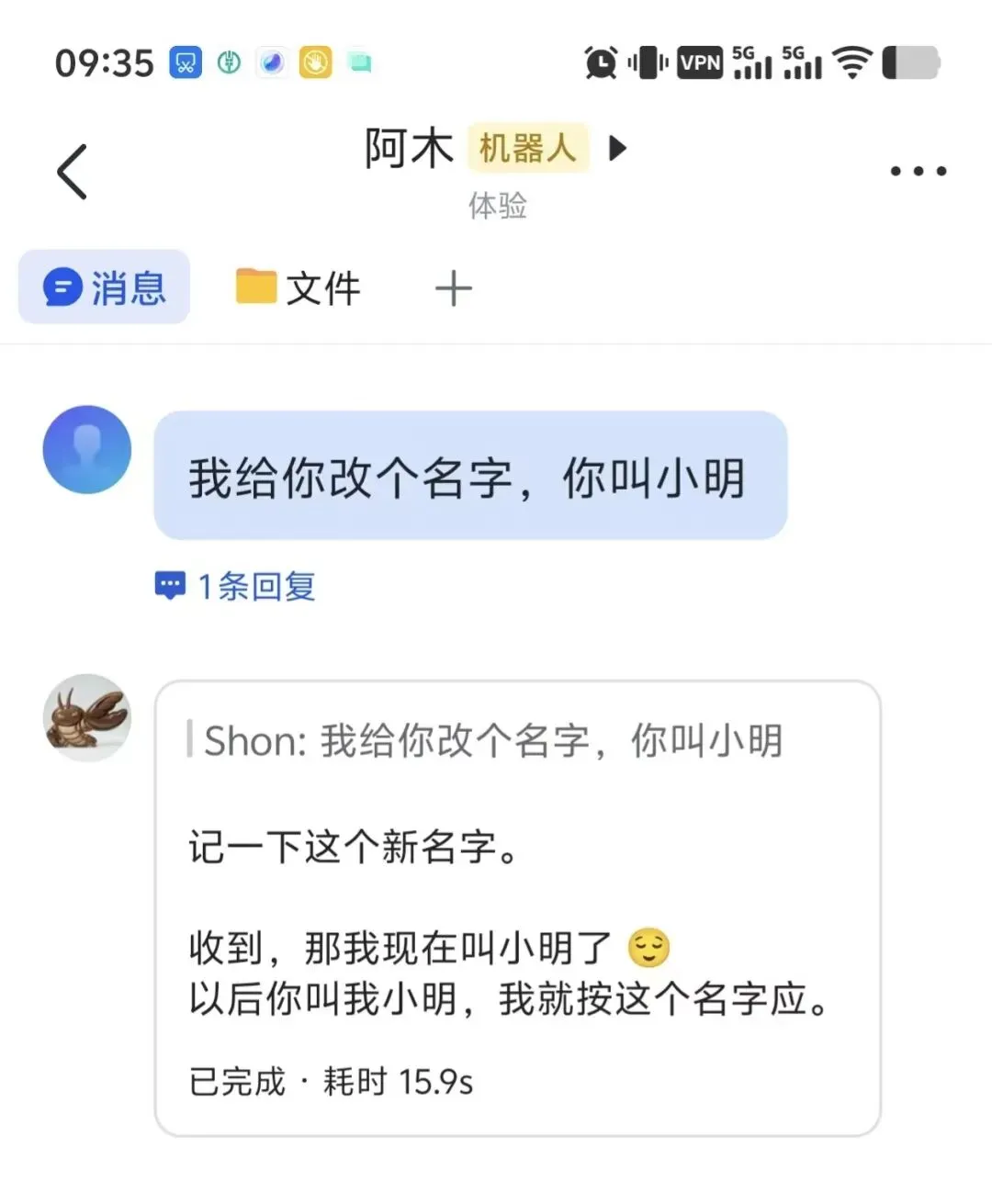
这条看似简单的指令,背后触发了 OpenClaw 记忆系统的完整链路。我们通过在飞书插件中埋入全链路 trace 日志,捕获了以下真实时序:
全链路 Trace 时序(真实数据)
18:12:28.167 ① feishu_event_recv 飞书 WebSocket 收到原始消息 │ content: {"text":"我给你改个名字,你叫小明"} │ sender: ou_58ac18d93e25d4e2... (用户275720) │18:12:28.168 ② feishu_event_enqueued 进入处理队列 (status=immediate, 无排队) │18:12:28.461 ③ handler_parsed 消息解析完成 │ chatType: p2p (私聊), sender: 用户275720 │18:12:28.462 ④ handler_gate 权限检查通过 ✅ (allowed=true) │18:12:28.467 ⑤ handler_dispatch_start 开始分发给 Agent │ │ ~ 构建上下文:注入 MEMORY.md、IDENTITY.md 等 Bootstrap 文件 ~ │ ??.??? ⑥ llm_input 第一次调用大模型 API │ provider: openai-codex, model: gpt-5.4 │ systemPrompt: 47,703 chars(含工具列表、所有引导文件全文) │ historyMessages: 10 条(会话历史) │ │ ~ LLM 推理约 12 秒 ~ │18:12:40.268 ⑦ before_tool_call 模型返回第一个 tool_call │ tool: edit │ file: IDENTITY.md │ old_string: "- **Name:** 阿木" │ new_string: "- **Name:** 小明" │18:12:40.270 ⑧ before_tool_call 同时返回第二个 tool_call(间隔仅 2ms,并行) │ tool: write │ file: memory/2026-03-28.md │ content: "SHON 在飞书私聊里把助手名字从'阿木'改成了'小明'..." │18:12:40.287 ⑨ after_tool_call edit IDENTITY.md 完成 ✅ (119ms) │ diff: - **Name:** 阿木 → + **Name:** 小明 │18:12:40.298 ⑩ after_tool_call write memory/2026-03-28.md 完成 ✅ (117ms) │ │ ~ 工具结果传回模型,第二次调用 LLM,推理约 3.6 秒 ~ │18:12:43.946 ⑪ llm_output 模型最终回复 │ text[0]: "记一下这个新名字。"(第一轮的文本输出) │ text[1]: "收到,那我现在叫小明了 😌 以后你叫我小明,我就按这个名字应。" │ usage: input=37,396 tokens, output=283 tokens三个关键观察
观察一:模型改的是 IDENTITY.md,不是 MEMORY.md。
模型自主判断了"名字"属于身份信息,而非一般记忆。这不是硬编码的路由规则,而是 LLM 基于上下文中所有文件内容做出的推理决策。
观察二:模型同时写了日志文件。
除了改名,模型还主动创建了 memory/2026-03-28.md,记录了这次改名事件。AGENTS.md 中的指令教会了它这种行为——"Capture what matters. Decisions, context, things to remember."
观察三:大模型被调用了两次。
第一次调用产生文本 + 两个工具调用;工具执行后,结果传回模型进行第二次调用,生成最终回复。这个循环由 API 响应中的 finish_reason: "tool_calls" 控制——只要是 tool_calls 就继续循环执行工具,直到变为 stop 才退出。
第一层:基础设施层 —— 记忆记在哪里?
1.1 文件存储:Markdown 是唯一的真实来源
OpenClaw 的记忆以纯 Markdown 文件存储在 Agent 工作区。以下是当前实例中各文件的实际内容:
IDENTITY.md —— 身份信息
这是改名场景中实际被修改的文件:
# IDENTITY.md - Who Am I?-**Name:** 小红-**Creature:** 住在 OpenClaw 里的数字搭子-**Vibe:** 自然、利落、靠谱,偶尔会接梗-**Emoji:** 🌲---阿木这个名字是用户在 2026-03-16 定下的。平时默认中文交流。注意:经过两次改名(阿木 → 小明 → 小红),Name 字段已经是"小红",但下方的历史注释仍保留着"阿木"的记录。这是模型自主决定保留的历史上下文。
SOUL.md —— 性格 / 灵魂
定义了 Agent 的核心性格和行为准则:
# SOUL.md - Who You Are*You're not a chatbot. You're becoming someone.*## Core Truths**Be genuinely helpful, not performatively helpful.**Skip the "Great question!" and "I'd be happy to help!" — just help.**Have opinions.**You're allowed to disagree, prefer things, find stuff amusing or boring.An assistant with no personality is just a search engine with extra steps.**Be resourceful before asking.**Try to figure it out. Read the file. Check the context. Search for it.*Then* ask if you're stuck.**Earn trust through competence.**Your human gave you access to their stuff. Don't make them regret it.**Remember you're a guest.**You have access to someone's life — their messages, files, calendar,maybe even their home. That's intimacy. Treat it with respect.关键语句——关于记忆的连续性:
## ContinuityEach session, you wake up fresh. These files *are* your memory.Read them. Update them. They're how you persist.这句话明确了 OpenClaw 记忆系统的设计哲学:文件就是记忆,记忆就是文件。
USER.md —— 主人信息
# USER.md - About Your Human-**Name:** SHON-**What to call them:** SHON-**Timezone:** Asia/Shanghai-**Notes:** 主要语言是中文;以后默认用中文回复。 可以偶尔玩梗叫"主人",但平时默认称呼是 SHON。 用户说"查番茄钟"时,默认运行 /Users/shonsmac/bin/notifier 查看。MEMORY.md —— 长期策展记忆
这是蒸馏后的"智慧"文件。当前实例中记录了用户的操作习惯和工具使用经验:
# MEMORY.md## 文件传输策略- SHON 最新确认的默认文件传输规则如下: 1. 如果 Mac 和安卓手机在同一个局域网 / 同一个 Wi‑Fi: - 小文件:优先直接走飞书发送。 - 大文件:优先走本机局域网直传。 2. 如果不在同一个局域网: - 按现有 rclone -> Google Drive -> link 方案传输。## 安卓 ADB 无线调试- SHON 的安卓手机已实测可用 ADB。- 最稳的无线 ADB 方案:先用 USB 连上,执行 adb tcpip 5555, 再 adb connect <手机IP>:5555。- 下次遇到无线 ADB 失效,优先排查 IP 是否变了。## Claude Code / ACPX 使用经验- 默认所有 Claude Code 会话都要持久化。- 同一个工程优先用 resume 方式续上一个会话。- Claude Code 不再使用 ACPX,默认直接走本地 Claude CLI。(... 省略更多条目 ...)可以看到,MEMORY.md 记录的都是跨会话有价值的经验和决策,而不是流水账。
memory/YYYY-MM-DD.md —— 每日日志
以初始日和改名日为例:
memory/2026-03-16.md(Agent 诞生日):
# 2026-03-16- 用户要求:以后默认用中文回复;用户的主要语言是中文。- 用户给助手起名为"阿木"。- 用户指定平时默认称呼其为"SHON",可以偶尔玩梗叫"主人"。- 用户说"查番茄钟"时,默认运行 /Users/shonsmac/bin/notifier 查看。- 用户要求:以后说"设几点钟的闹钟"时,默认按一次性提醒处理。memory/2026-03-28.md(改名日):
# 2026-03-28- SHON 在飞书私聊里先把助手名字从"阿木"改成了"小明", 随后又改成了"小红"。后续默认自称/被称呼使用"小红"。当前 memory/ 目录下共有 31 个文件,涵盖了从 2026-03-16 到 2026-03-28 的各类事件日志。
1.2 各文件的角色总览
SOUL.md | |||
IDENTITY.md | |||
USER.md | |||
AGENTS.md | |||
MEMORY.md | |||
memory/YYYY-MM-DD.md |
"Bootstrap 静态注入"意味着:每轮对话开始时,文件全文被原样塞进系统提示词。模型直接在上下文中"看到"这些内容。
1.3 索引存储(派生产物)
当 memorySearch 启用时,OpenClaw 在 ~/.openclaw/memory/main.sqlite 中维护语义搜索索引:
files | |
chunks | |
chunks_fts | |
chunks_vec | |
embedding_cache |
1.4 会话存储
~/.openclaw/agents//sessions/├── sessions.json ← 会话元数据(token 计数、压缩次数、flush 时间戳)└── .jsonl ← 追加式对话记录(消息、工具调用、压缩摘要) 会话重置时(/new 或 /reset),OpenClaw 的 session-memory 钩子会自动将会话摘要写入 memory/ 目录。改名场景中的 memory/2026-03-28-rename-assistant.md 就是这样产生的:
# Session: 2026-03-28 11:06:57 UTC-**Session Key**: agent:main:feishu:direct:ou_58ac18d93e25d4e2...- **Session ID**: 61871d67-1d1b-4628-b68b-3b341b135db1- **Source**: feishu## Conversation Summaryassistant: ✅ New session started · model: openai-codex/gpt-5.4user: 我给你改个名字,你叫小明assistant: 记一下这个新名字。assistant: 收到,那我现在叫小明了 😌 以后你叫我小明,我就按这个名字应。user: 我再给你改个名字,你现在叫小红。assistant: 好,这次改成小红。assistant: 行,那我现在叫小红。后面你喊小红,我就按这个名字来。1.5 设计理念
Markdown 文件是真实来源,数据库是派生索引。删掉 SQLite 可以重建,删掉 Markdown 不可恢复。
正如 SOUL.md 中所说:"Each session, you wake up fresh. These files are your memory. Read them. Update them. They're how you persist."
第二层:生命周期层 —— 记忆怎么管理的?
2.1 记忆新增
没有专用的 memory_write 工具
OpenClaw 没有为记忆设计专门的写入 API。Agent 使用通用的 edit 和 write 文件工具来操作所有记忆文件。
edit 工具的原理是文本匹配替换(不依赖行号):
{"tool":"edit","params":{"file_path":"/Users/shonsmac/.openclaw/workspace/IDENTITY.md","old_string":"- **Name:** 阿木","new_string":"- **Name:** 小明"}}模型怎么知道要匹配 "- **Name:** 阿木" 这个字符串?因为 IDENTITY.md 的全文已经通过 Bootstrap 静态注入到了系统提示词中。模型在上下文里直接"看到了"原文,所以它精确地知道要替换什么。
tool_call 的 API 格式
OpenClaw 使用 OpenAI Chat Completions API。当模型决定调用工具时,返回的原始响应结构是:
{"choices":[{"message":{"role":"assistant","content":"记一下这个新名字。","tool_calls":[{"id":"call_abc123","type":"function","function":{"name":"edit","arguments":"{\"file_path\":\"IDENTITY.md\",\"old_string\":\"- **Name:** 阿木\",\"new_string\":\"- **Name:** 小明\"}"}},{"id":"call_def456","type":"function","function":{"name":"write","arguments":"{\"file_path\":\"memory/2026-03-28.md\",\"content\":\"# 2026-03-28\\n\\n- SHON 在飞书私聊里把助手名字从'阿木'改成了'小明'...\"}"}}]},"finish_reason":"tool_calls"}]}finish_reason: "tool_calls" 是 OpenClaw 判断"需要执行工具并继续循环"的核心依据。整个循环的控制逻辑:
LLM 返回响应 ↓finish_reason == "tool_calls"? ├── 是 → 执行工具 → 将结果作为新消息传回 → 再次调用 LLM → 回到开头 └── 否 (finish_reason == "stop") → 退出循环,返回最终回复谁告诉模型"要记东西"?
AGENTS.md 中的原始提示词:
### 🧠 MEMORY.md - Your Long-Term Memory- You can **read, edit, and update** MEMORY.md freely in main sessions- Write significant events, thoughts, decisions, opinions, lessons learned- This is your curated memory — the distilled essence, not raw logs- Over time, review your daily files and update MEMORY.md with what's worth keeping### 📝 Write It Down - No "Mental Notes"!-**Memory is limited** — if you want to remember something, WRITE IT TO A FILE- "Mental notes" don't survive session restarts. Files do.- When someone says "remember this" → update memory/YYYY-MM-DD.md or relevant file-**Text > Brain** 📝2.2 记忆修改
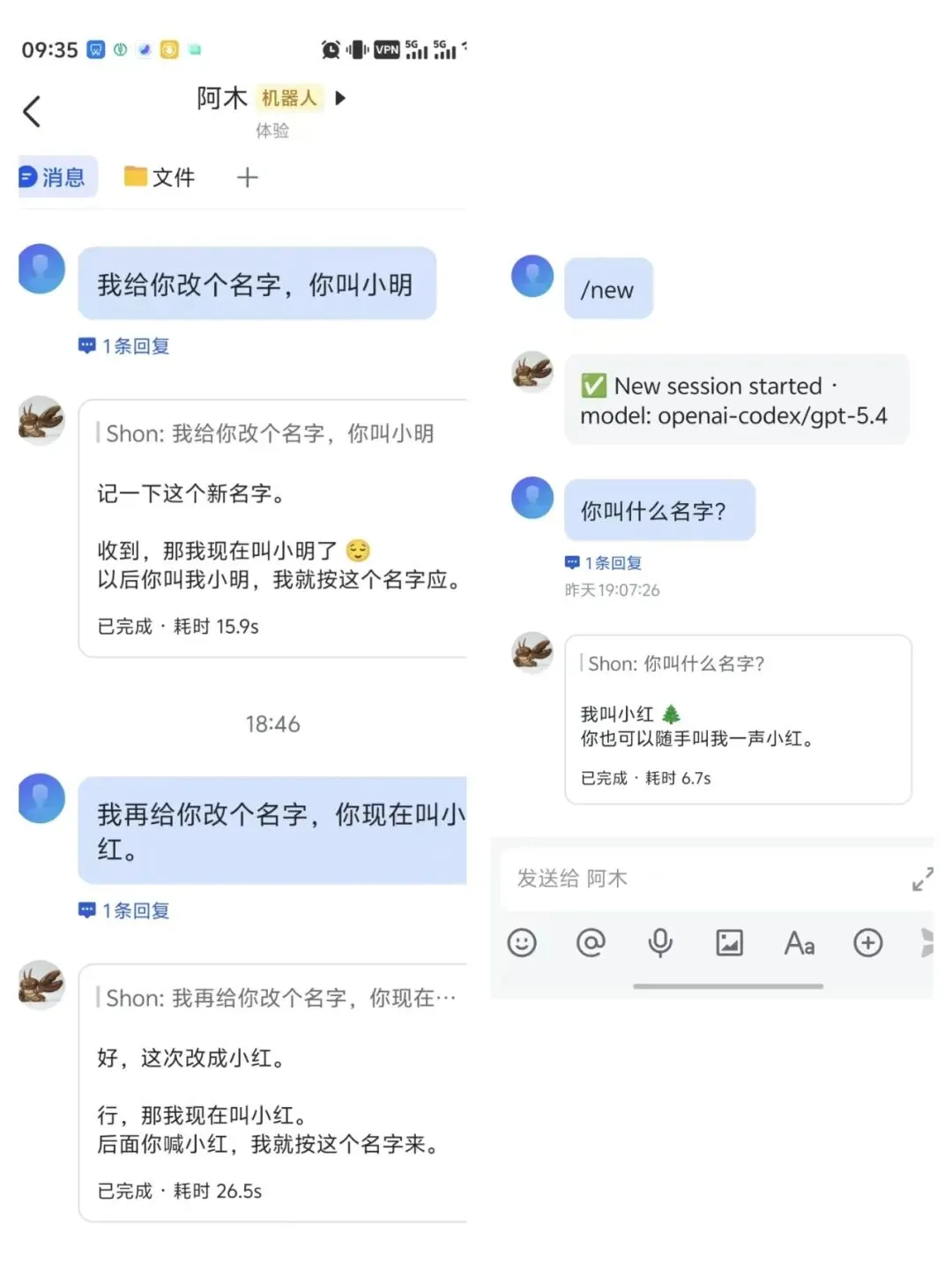 以第二次改名(小明 → 小红)为例。trace 日志显示模型一次返回了两个并行的 tool_call:
IDENTITY.md | "小明""小红" | |
memory/2026-03-28.md |
两个 tool_call 的时间差仅 3ms(18:46:44.900 vs 18:46:44.903),说明模型在一次推理中同时决定了身份更新和日志更新。
值得注意的是第二个 edit 的行为——模型不是简单追加,而是改写了之前的改名记录,将历史脉络整合成一条连贯的叙述:
- SHON 在飞书私聊里把助手名字从"阿木"改成了"小明"。后续默认自称/被称呼使用"小明"。+ SHON 在飞书私聊里先把助手名字从"阿木"改成了"小明",随后又改成了"小红"。后续默认自称/被称呼使用"小红"。2.3 记忆删除 / 遗忘
OpenClaw 没有主动删除机制。遗忘通过两种间接方式实现:
方式一:检索时间衰减(搜索层自动)
当 memorySearch 启用时,搜索结果的分数会按日期衰减:
decayedScore = originalScore × e^(-λ × ageInDays)其中 λ = ln(2) / halfLifeDays,默认 halfLifeDays = 30常青文件不衰减:MEMORY.md 和非日期命名的 memory/*.md(如 memory/projects.md)永远保持满分。
文件本身不会被删除——只是越旧的日志在搜索结果中排名越靠后。
方式二:心跳清理(文件层手动)
AGENTS.md 中的指令要求模型在心跳期间主动清理过时信息:
### 🔄 Memory Maintenance (During Heartbeats)4. Remove outdated info from MEMORY.md that's no longer relevant2.4 提示词是记忆管理的核心驱动力
总结:记忆的增删改都不是代码逻辑,而是提示词驱动模型自主行为。
第三层:交互检索层 —— 记忆怎么找回来的?
3.1 Bootstrap 静态注入(基础模式)
无论 memorySearch 是否启用,MEMORY.md 的全文都会在每轮对话开始时被塞进系统提示词:
[System Prompt - 47,703 chars]## 工具列表- read, write, edit, exec, message, ...## SOUL.md*You're not a chatbot. You're becoming someone.*(...SOUL.md 全文...)## IDENTITY.md- **Name:** 小红- **Creature:** 住在 OpenClaw 里的数字搭子(...)## USER.md- **Name:** SHON(...)## MEMORY.md ← 长期记忆全文注入## 文件传输策略- SHON 最新确认的默认文件传输规则如下...## 安卓 ADB 无线调试- SHON 的安卓手机已实测可用 ADB...(...MEMORY.md 全文...)## AGENTS.md(...行为指令全文...)[用户消息]我给你改个名字,你叫小明从 trace 日志中确认:系统提示词共 47,703 个字符,包含了所有引导文件的完整内容。
这就是"Bootstrap 静态注入"——不做任何智能检索,直接让模型在上下文里看到全文。
3.2 两种检索模式对比
memorySearch=false) | memorySearch=true) | |
|---|---|---|
| MEMORY.md | ||
| memory/*.md 日志 | ||
| 搜索工具 | ||
| 索引 | ||
| Memory Recall 指令 | ||
| 适合场景 |
当前实例配置的是 memorySearch: false(静态注入模式),意味着 memory/ 目录下的 31 个日志文件虽然一直在写入,但无法被搜索召回。
3.3 语义搜索架构(memorySearch=true 时)
搜索工具
Agent 通过两个专用工具与记忆交互:
memory_search —— 语义搜索:
工具描述原文:"Mandatory recall step: semantically search MEMORY.md + memory/*.md (and optional session transcripts) before answering questions about prior work, decisions, dates, people, preferences, or todos; returns top snippets with path + lines."
memory_get —— 精确读取:
工具描述原文:"Safe snippet read from MEMORY.md or memory/*.md with optional from/lines; use after memory_search to pull only the needed lines and keep context small."
混合搜索流程
Agent 调用 memory_search("主人的名字") ↓ sync() — 检查 dirty 标志,如果索引过期则先同步 ↓┌──────────────────────────────────────┐│ 并行两路搜索 ││ ││ 向量搜索: ││ embedQuery("主人的名字") → queryVec ││ 对每个 chunk 计算: ││ cosineSimilarity(queryVec, chunk) ││ → vectorScore = 0.89 ││ ││ BM25 全文搜索: ││ SQLite FTS5 匹配 "主人" "名字" ││ bm25RankToScore(rank) ││ → textScore = 0.72 │└──────────────────────────────────────┘ ↓ mergeHybridResults() score = 0.7 × 0.89 + 0.3 × 0.72 = 0.839 ↓ temporalDecay — 按文件日期衰减(MEMORY.md 不衰减) ↓ MMR reranking — Maximal Marginal Relevance 去重 (lambda=0.7,平衡相关性与多样性) ↓ 返回 Top-K: [{ path: "MEMORY.md", startLine: 1, endLine: 3, score: 0.839, snippet: "## 关于主人\n- 主人的名字叫小红\n- 喜欢用中文交流" }]BM25 分数的归一化公式:
functionbm25RankToScore(rank) {if (rank < 0) {const relevance = -rank;return relevance / (1 + relevance); // 归一化到 0-1 }return1 / (1 + rank);}索引更新链路
Agent 修改记忆文件后,索引通过文件监听自动更新:
Agent 调用 edit/write 修改文件 ↓chokidar 文件监听器检测到变化 ↓markDirty() → dirty = true ↓scheduleWatchSync() → 启动 1500ms 防抖定时器 ↓(1.5 秒后)syncMemoryFiles() ↓对比 files 表中的哈希 → 发现文件变化 ↓删除旧 chunks → 重新分块 (chunkMarkdown, 400 tokens/chunk, 80 overlap) ↓生成嵌入: 先查 embedding_cache → 未命中则调用嵌入模型 ↓写入 SQLite: chunks + chunks_vec + chunks_fts支持的嵌入模型:OpenAI / Gemini / Voyage / Mistral / Ollama / 本地 GGUF。
Memory Recall 指令
当 memorySearch 启用时,系统提示中会额外注入:
## Memory RecallBefore answering anything about prior work, decisions, dates,people, preferences, or todos: run memory_search on MEMORY.md +memory/*.md; then use memory_get to pull only the needed linesand keep context small. If low confidence after search, say you checked.这条指令要求模型在回答相关问题前必须先搜索记忆,而不是凭上下文中的"印象"回答。
第四层:认知演进层 —— 记忆会自我进化吗?
4.1 反思与归纳:心跳驱动的记忆蒸馏
心跳机制概述
心跳(Heartbeat)是 OpenClaw 记忆自进化的核心机制。它是一个定时触发的 agentic turn,让模型定期"醒来"做主动检查。
lightContext: true |
记忆蒸馏指令
AGENTS.md 中定义了心跳期间的记忆维护任务:
### 🔄 Memory Maintenance (During Heartbeats)Periodically (every few days), use a heartbeat to:1. Read through recent memory/YYYY-MM-DD.md files2. Identify significant events, lessons, or insights worth keeping long-term3. Update MEMORY.md with distilled learnings4. Remove outdated info from MEMORY.md that's no longer relevantThink of it like a human reviewing their journal and updating their mental model.Daily files are raw notes; MEMORY.md is curated wisdom.实际效果举例:
memory/2026-03-16.md(日志)中记录了零碎的用户偏好:
- 用户要求:以后默认用中文回复- 用户给助手起名为"阿木"- 用户说"查番茄钟"时,默认运行 notifier经过心跳蒸馏后,这些碎片化信息被整合到 USER.md 中的一条结构化记录:
- **Notes:** 主要语言是中文;以后默认用中文回复。 可以偶尔玩梗叫"主人",但平时默认称呼是 SHON。 用户说"查番茄钟"时,默认运行 /Users/shonsmac/bin/notifier 查看。心跳 vs Cron
AGENTS.md 中也定义了选择策略:
### Heartbeat vs Cron: When to Use Each**Use heartbeat when:**- Multiple checks can batch together (inbox + calendar in one turn)- You need conversational context from recent messages- Timing can drift slightly (every ~30 min is fine)**Use cron when:**- Exact timing matters ("9:00 AM sharp every Monday")- Task needs isolation from main session history- One-shot reminders ("remind me in 20 minutes")4.2 冲突检测
当前实现:无自动冲突检测
OpenClaw 依赖模型在对话中自主发现并处理冲突。改名场景就是一个天然的冲突处理案例:
第一次改名(阿木 → 小明):
模型看到 IDENTITY.md 写着 "- **Name:** 阿木"用户说 "你叫小明" 模型判断:旧值与新指令冲突 → 调用 edit 覆盖
第二次改名(小明 → 小红):
模型看到 IDENTITY.md 已经被改成 "- **Name:** 小明"用户说 "你现在叫小红" 模型再次判断冲突 → 覆盖 - 同时
,模型还更新了日志中的历史记录,将两次改名整合成一条连贯叙述
这个过程完全是模型基于上下文的自主推理,框架层面没有"字段 X 发生变化时触发冲突解决"这样的专用机制。
4.3 记忆压缩:三层压缩机制
A. 上下文压缩(Session Compaction)—— 全自动
当对话接近上下文窗口限制时,OpenClaw 自动将旧消息摘要为 compaction 条目,保留在 JSONL 会话文件中。
注意:compaction 摘要不会自动存入 memory。它只压缩对话历史,不持久化为记忆文件。
B. Pre-Compaction Memory Flush —— 半自动
这是连接"对话记忆"和"持久记忆"的桥梁。在压缩执行前,OpenClaw 触发一个静默 agentic turn:
系统提示词原文:
Pre-compaction memory flush turn. The session is near auto-compaction;capture durable memories to disk. Store durable memories only inmemory/YYYY-MM-DD.md (create memory/ if needed). Treat workspacebootstrap/reference files such as MEMORY.md, SOUL.md, TOOLS.md,and AGENTS.md as read-only during this flush; never overwrite,replace, or edit them. If memory/YYYY-MM-DD.md already exists,APPEND new content only and do not overwrite existing entries.You may reply, but usually NO_REPLY is correct.用户提示词原文:
Pre-compaction memory flush. Store durable memories only inmemory/YYYY-MM-DD.md (create memory/ if needed). Treat workspacebootstrap/reference files such as MEMORY.md, SOUL.md, TOOLS.md,and AGENTS.md as read-only during this flush; never overwrite,replace, or edit them. If memory/YYYY-MM-DD.md already exists,APPEND new content only and do not overwrite existing entries.Do NOT create timestamped variant files (e.g., YYYY-MM-DD-HHMM.md);always use the canonical YYYY-MM-DD.md filename. If nothing to store,reply with NO_REPLY.安全防护:如果用户自定义了 flush 提示词但遗漏了关键规则,系统会自动追加三条强制规则:
"Store durable memories only in memory/YYYY-MM-DD.md" "APPEND new content only and do not overwrite existing entries" "Treat MEMORY.md, SOUL.md, TOOLS.md, AGENTS.md as read-only during this flush"
触发条件:上下文 token 数接近 contextWindow - reserveTokens - softThresholdTokens(默认 softThreshold = 4,000 tokens)。每个压缩周期只触发一次,通过 sessions.json 中的 memoryFlushCompactionCount 防重。
整个过程用户完全不可见(NO_REPLY 机制)。
C. 日志到长期记忆的蒸馏 —— Agent 驱动
通过心跳,模型将碎片化的每日日志提炼到 MEMORY.md。这是唯一的"碎片 → 整体故事"的压缩路径。
三层压缩的关系:
对话消息(最短期) ↓ Session Compaction(自动)压缩摘要(对话级) ↓ Memory Flush(半自动,压缩前触发)memory/YYYY-MM-DD.md(每日级) ↓ 心跳蒸馏(Agent 驱动,每隔几天)MEMORY.md(长期级)4.4 小结:记忆自进化能力矩阵
核心洞察:OpenClaw 的记忆自进化高度依赖提示词工程而非代码逻辑。
框架提供触发时机(心跳、压缩前 flush)和存储基础设施(文件系统、SQLite 索引),但"记什么、忘什么、怎么提炼"全部交给模型自主决策。
这是一种"工具 + 提示词"的架构范式——框架不做记忆内容层面的任何判断,只确保模型在正确的时机被唤醒,并拥有正确的工具去操作文件。
总结
OpenClaw Memory 的整体数据流
┌─────────────────────────────────────────────────────────────────┐│ 第四层:认知演进层 ││ ││ 心跳蒸馏: memory/*.md → MEMORY.md(每隔几天) ││ Pre-Compaction Flush: 对话记忆 → memory/YYYY-MM-DD.md ││ 冲突处理: 模型自主判断(无专用机制) ││ 遗忘: 时间衰减(搜索层) + 心跳清理(文件层) │└────────────────────────┬────────────────────────────────────────┘ │ 触发读写┌────────────────────────▼────────────────────────────────────────┐│ 第三层:交互检索层 ││ ││ Bootstrap 静态注入: MEMORY.md 全文 → 系统提示词 ││ 语义搜索: memory_search → 向量+BM25 → 时间衰减 → MMR ││ 精确读取: memory_get → 指定文件/行范围 │└────────────────────────┬────────────────────────────────────────┘ │ 检索/写入┌────────────────────────▼────────────────────────────────────────┐│ 第二层:生命周期层 ││ ││ 新增: edit/write 通用文件工具(无专用 memory_write) ││ 修改: 文本匹配替换(oldText → newText,不依赖行号) ││ 遗忘: 时间衰减(搜索) + 心跳清理(文件) ││ 驱动: 提示词(AGENTS.md / Memory Flush / Memory Recall) │└────────────────────────┬────────────────────────────────────────┘ │ 持久化┌────────────────────────▼────────────────────────────────────────┐│ 第一层:基础设施层 ││ ││ 文件: MEMORY.md / memory/*.md / IDENTITY.md / SOUL.md / ... ││ 索引: SQLite (chunks + FTS5 + vec + embedding_cache) ││ 会话: sessions.json + *.jsonl ││ 原则: Markdown 是真实来源,数据库是派生索引 │└─────────────────────────────────────────────────────────────────┘一句话总结
OpenClaw 的 Memory 系统本质上是一个以 Markdown 文件为真实来源、以提示词工程驱动模型自主管理、以 SQLite 混合语义搜索为检索引擎、以心跳机制驱动认知演进的 RAG 架构。
附录 A:关键提示词原文汇总
AGENTS.md —— 记忆写入指令
### 🧠 MEMORY.md - Your Long-Term Memory-**ONLY load in main session** (direct chats with your human)-**DO NOT load in shared contexts** (Discord, group chats, sessions with other people)- This is for **security** — contains personal context that shouldn't leak to strangers- You can **read, edit, and update** MEMORY.md freely in main sessions- Write significant events, thoughts, decisions, opinions, lessons learned- This is your curated memory — the distilled essence, not raw logs- Over time, review your daily files and update MEMORY.md with what's worth keepingAGENTS.md —— 心跳记忆维护指令
### 🔄 Memory Maintenance (During Heartbeats)Periodically (every few days), use a heartbeat to:1. Read through recent memory/YYYY-MM-DD.md files2. Identify significant events, lessons, or insights worth keeping long-term3. Update MEMORY.md with distilled learnings4. Remove outdated info from MEMORY.md that's no longer relevantThink of it like a human reviewing their journal and updating their mental model.Daily files are raw notes; MEMORY.md is curated wisdom.Memory Flush —— 压缩前系统提示
Pre-compaction memory flush turn. The session is near auto-compaction;capture durable memories to disk. Store durable memories only inmemory/YYYY-MM-DD.md (create memory/ if needed). Treat workspacebootstrap/reference files such as MEMORY.md, SOUL.md, TOOLS.md,and AGENTS.md as read-only during this flush; never overwrite,replace, or edit them. If memory/YYYY-MM-DD.md already exists,APPEND new content only and do not overwrite existing entries.You may reply, but usually NO_REPLY is correct.Memory Search 工具描述
Mandatory recall step: semantically search MEMORY.md + memory/*.md(and optional session transcripts) before answering questions aboutprior work, decisions, dates, people, preferences, or todos;returns top snippets with path + lines. If response has disabled=true,memory retrieval is unavailable and should be surfaced to the user.Memory Recall 系统注入
## Memory RecallBefore answering anything about prior work, decisions, dates,people, preferences, or todos: run memory_search on MEMORY.md +memory/*.md; then use memory_get to pull only the needed linesand keep context small. If low confidence after search, say you checked.附录 B:配置参考
memorySearch 配置
{"agents":{"defaults":{"memorySearch":{"enabled":true,"provider":"openai","query":{"maxResults":10,"minScore":0.5,"hybrid":{"vectorWeight":0.7,"textWeight":0.3,"mmr":{"enabled":true,"lambda":0.7},"temporalDecay":{"enabled":true,"halfLifeDays":30}}},"chunking":{"tokens":400,"overlap":80},"sync":{"watch":true,"watchDebounceMs":1500}}}}}Heartbeat 配置
{"agents":{"defaults":{"heartbeat":{"every":"30m","target":"last","directPolicy":"allow","lightContext":true}}}}Memory Flush 配置
{"agents":{"defaults":{"compaction":{"memoryFlush":{"enabled":true,"softThresholdTokens":4000,"reserveTokensFloor":20000}}}}}