
乐于分享
好东西不私藏

【OpenClaw】通过 Nanobot 源码学习架构---(3)AgentLoop

【OpenClaw】通过 Nanobot 源码学习架构---(3)AgentLoop

【OpenClaw】通过Nanobot源码学习架构---(3)AgentLoop

  • 0x00 概要
  • 0x01 原理
    • 1.1 Agent:负责“执行”
    • 1.2 Pi-Agent框架
  • 0x02 AgentLoop
    • 2.1 架构
    • 2.2 流程
    • 2.3 定义和初始化
    • 2.4 run
    • 2.5 _dispatch
    • 2.6 _process_message()
    • 2.7 _run_agent_loop()
  • 0xFF 参考

0x00 概要

OpenClaw 应该有40万行代码,阅读理解起来难度过大,因此,本系列通过Nanobot来学习 OpenClaw 的特色。

Nanobot是由香港大学数据科学实验室(HKUDS)开源的超轻量级个人 AI 助手框架,定位为"Ultra-Lightweight OpenClaw"。非常适合学习Agent架构。

Agent 是“业务执行者”,解决“消息怎样变成模型调用、工具执行和最终回复”。它们具备独立的上下文(与主对话隔离)和可使用的特定工具,并且具备定义明确的角色和方法论。每次 Agent 收到消息时运行的核心推理周期如下:

  • 从总线接收消息
  • 组装上下文
  • 推理该做什么(这是 LLM 调用)
  • 根据决定行动(调用工具、执行命令)
  • 观察结果,保存状态
  • 判断:我完成了吗?还是再循环一次?
  • 完成后回复

注:本系列借鉴的文章过多,可能在参考文献中有遗漏的文章,如果有,还请大家指出。

0x01 原理

1.1 Agent:负责“执行”

一个 Agent = 一个完整的 AI “大脑实例”,每个 Agent 都拥有独立资源。Agent 是“执行平面”,解决“消息怎样变成模型调用、工具执行和最终回复”。具体如下图(来自MiniClaw)。

Feishu Cloud    |    |  HTTP POST /feishu/events    |  (im.message.receive_v1)    v[ESP32 Webhook Server :18790]    |    |  message_bus_push_inbound()    v[Message Bus] ──> [Agent Loop] ──> [Message Bus]                   (Claude/GPT)         |                                        |  outbound dispatch                                        v                              [feishu_send_message()]                                        |                                        |  POST /im/v1/messages                                        v                                   Feishu API

下图是Agent 的最小循环。每个 AI Agent 都需要这个循环。模型决定何时调用工具、何时停止。代码只是执行模型的要求。

An agentic loop is the full “real” run of an agent: intake → context assembly → model inference → tool execution → streaming replies → persistence.                    THE AGENT PATTERN                    =================    User --> messages[] --> LLM --> response                                      |                            stop_reason == "tool_use"?                           /                          \                         yes                           no                          |                             |                    execute tools                    return text                    append results                    loop back -----------------> messages[]

1.2 Pi-Agent框架

OpenClaw所使用的引擎是Pi-Agent框架,它是一个仅有四个工具、系统提示词不到1000个token,秉持“精简至上”原则的AI编程Agent。与其他编程Agent相比,Pi的工程设计和决策机制极为简洁,形成了鲜明对比。

下图是 OpenClaw 的循环概要。

runEmbeddedPiAgent()  └── while (true) {  // 主重试循环        ├── 检查重试次数限制 (MAX_RUN_LOOP_ITERATIONS)        ├── 调用 runEmbeddedAttempt()  // 单次推理尝试        ├── 处理 context overflow → 自动压缩        ├── 处理 auth failure → profile轮换        ├── 处理 timeout → 重试或报错        └── 成功则返回 payloads      }

Pi的设计理念可以总结为:不是为LLM打造一个复杂的“控制台”,而是给它一把“多功能小刀”——工具虽少但实用,提示虽简但明确,让模型的原生能力成为主导,而不是被框架的复杂性所掩盖。Pi 这种设计理念是基于一个关键事实——经过强化学习训练的前沿LLM模型,已经具备了很强的理解和执行能力。它们能明确知道“编码Agent”的主要任务是什么,根本不需要长篇大论的系统提示词和复杂的辅助模块来“指导”它们工作。

从数据层面分析:Pi的系统提示词加上工具定义,总长度还不到1000个token,仅仅是Claude Code的十分之一;内置工具也只有4个,远少于同类产品。这说明,Pi在主流Agent都在强化的方面,几乎都做了简化:

  • 系统提示词简短明了
  • 内置工具数量精简
  • 没有复杂的规划模式和多代理通信协议(Plan Mode和MCP)支持
  • 更没有难以监控的子Agent

Pi的核心策略是:去除冗余辅助模块,让LLM模型发挥核心作用,用最简洁的结构实现最核心的功能。

或许有人会问:如此简单的设计,真的能应对复杂的编码任务吗?实际上,Pi的简洁并非“简陋”,而是**“精准”**。接下来,我们详细解析这4个内置工具的设计思路——readwriteeditbash

工具
主要功能
read
读取文件、审查代码、获取上下文信息
write
创建文件、写入内容
edit
修改代码、进行增量更新
bash
执行命令、操作环境、通过自我调用来拆分任务

这四个工具几乎涵盖了编码Agent的所有核心需求。特别是bash工具的引入,既实现了复杂任务的拆分和执行,保证了功能的完整性,又避免了引入子Agent可能带来的不可预测性和监控难题——这就是Pi敢于放弃子Agent架构的原因。

同时,Pi使用简短的系统提示词,并非降低了对LLM的引导标准,而是充分信任前沿LLM的能力。正如Mario Zechner所倡导的:与其用大量token去“教导”LLM如何成为Agent,不如用简洁的提示词明确其核心任务,让LLM充分发挥自身的理解和执行能力。

这种设计思路带来了三大好处:

  1. 节省上下文空间——降低推理成本,提高运行效率
  2. 行为更加灵活自主——LLM能根据实际情况动态调整策略,不受冗长规则限制
  3. 更好的适应性——简洁的结构意味着更低的认知负担和更强的泛化能力

0x02 AgentLoop

AgentLoop 是nanobot Agent运行的核心。智能体循环是区分聊天机器人和智能体的关键。

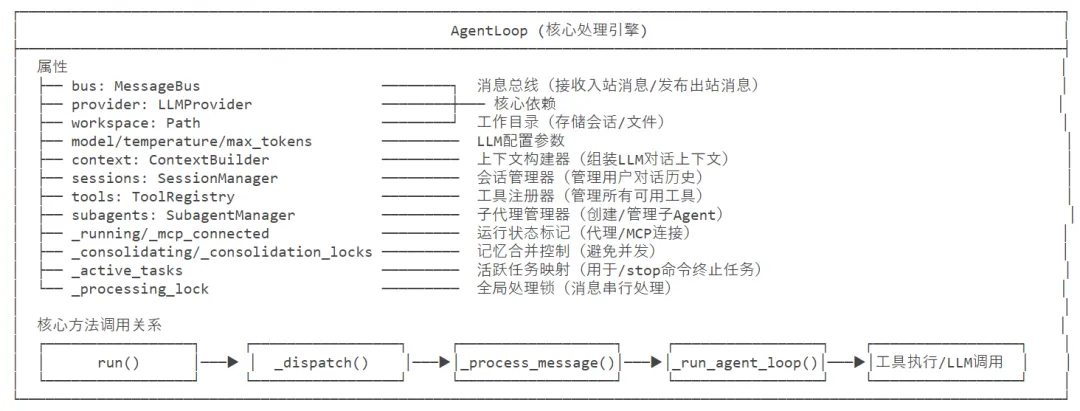
2.1 架构

AgentLoop 类的架构如下:
AgentLoop-1

2.2 流程

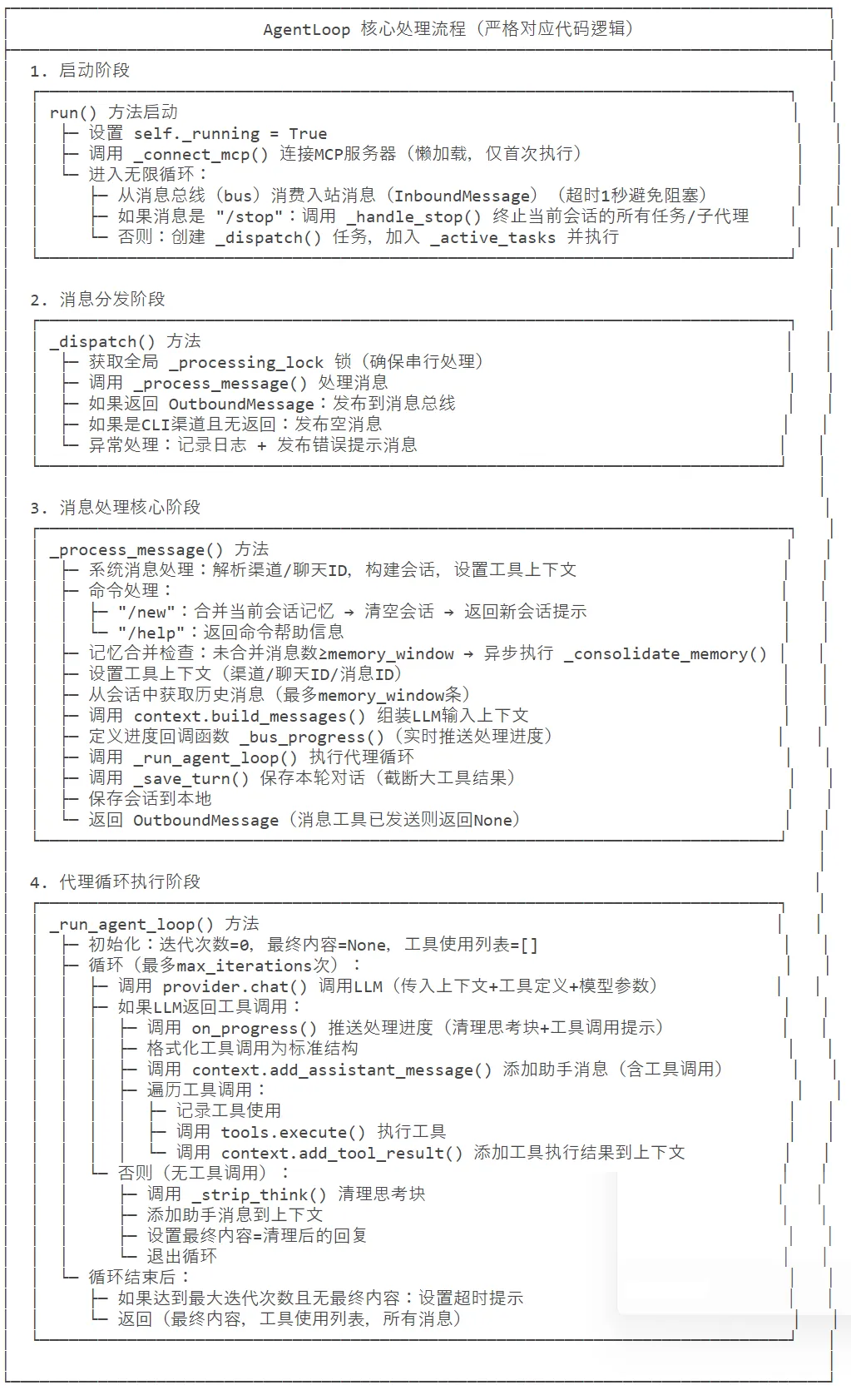
下面是一个 AI Agent(智能体)的消息处理流程图,展示了从消息接收到响应发送的完整链路,包括 LLM 交互、工具调用循环等核心机制。

入口:消息到达(InboundMessage)    ↓AgentLoop.run() - 监听并接收消息    ↓AgentLoop._dispatch() - 分派处理    ↓AgentLoop._process_message() - 主要处理逻辑    ↓ContextBuilder.build_messages() - 构建上下文    ↓AgentLoop._run_agent_loop() - 核心代理循环    ↓Provider.chat() - LLM交互    ↓← 判断是否有工具调用    ↓ 否← 返回最终内容    ↓ 是← 执行工具调用    ↓ContextBuilder.add_tool_result() - 添加工具结果    ↓← 继续循环直到没有更多工具调用    ↓AgentLoop._save_turn() - 保存交互记录    ↓通过MessageBus发布OutboundMessage - 发送响应

部分环节详细拆解如下
AgentLoop-2

2.3 定义和初始化

AgentLoop 的定义和初始化代码如下

class AgentLoop:    """    The agent loop is the core processing engine.    It:    1. Receives messages from the bus    2. Builds context with history, memory, skills    3. Calls the LLM    4. Executes tool calls    5. Sends responses back    """    def __init__(        self,        bus: MessageBus,                # 消息总线,用于接收/发送消息        provider: LLMProvider,          # LLM提供者(如OpenAI/本地模型)        workspace: Path,                # Agent工作目录,用于隔离文件操作        model: str | None = None,       # 使用的LLM模型名称        max_iterations: int = 40,       # Agent最大迭代次数(防止无限循环)        temperature: float = 0.1,       # LLM温度参数(越低越确定)        max_tokens: int = 4096,         # LLM最大生成Token数        memory_window: int = 100,       # 记忆窗口大小(会话历史最大条数)        brave_api_key: str | None = None,  # Brave搜索API密钥(用于网页搜索工具)        exec_config: ExecToolConfig | None = None,  # 命令执行工具配置        cron_service: CronService | None = None,    # 定时任务服务(可选)        restrict_to_workspace: bool = False,        # 是否限制Agent仅操作工作区        session_manager: SessionManager | None = None,  # 会话管理器(可选)        mcp_servers: dict | None = None,              # MCP服务器配置(可选)        channels_config: ChannelsConfig | None = None,  # 通道配置(可选)    ):        # 解决循环导入问题:仅运行时导入ExecToolConfig        from nanobot.config.schema import ExecToolConfig        # 基础属性初始化        self.bus = bus                          # 消息总线实例        self.channels_config = channels_config  # 通道配置        self.provider = provider                # LLM提供者实例        self.workspace = workspace              # 工作目录路径        # 模型名称:优先传入值,否则使用LLM提供者默认模型        self.model = model or provider.get_default_model()        self.max_iterations = max_iterations    # 最大迭代次数        self.temperature = temperature          # LLM温度        self.max_tokens = max_tokens            # LLM最大Token数        self.memory_window = memory_window      # 记忆窗口大小        self.brave_api_key = brave_api_key      # Brave API密钥        # 执行工具配置:默认空配置        self.exec_config = exec_config or ExecToolConfig()        self.cron_service = cron_service        # 定时任务服务        self.restrict_to_workspace = restrict_to_workspace  # 工作区限制开关        # 核心组件初始化        self.context = ContextBuilder(workspace)  # 上下文构建器:构建LLM输入上下文        # 会话管理器:优先传入实例,否则创建新实例        self.sessions = session_manager or SessionManager(workspace)        self.tools = ToolRegistry()  # 工具注册表:管理所有可用工具        # 子Agent管理器:用于生成子Agent处理子任务        self.subagents = SubagentManager(            provider=provider,            workspace=workspace,            bus=bus,            model=self.model,            temperature=self.temperature,            max_tokens=self.max_tokens,            brave_api_key=brave_api_key,            exec_config=self.exec_config,            restrict_to_workspace=restrict_to_workspace,        )        # 运行状态与资源管理属性        self._running = False                  # Agent循环是否运行        self._mcp_servers = mcp_servers or {}   # MCP服务器配置        self._mcp_stack: AsyncExitStack | None = None  # MCP连接上下文栈        self._mcp_connected = False             # MCP是否已连接        self._mcp_connecting = False            # MCP是否正在连接        self._consolidating: set[str] = set()   # 正在进行记忆合并的会话Key集合        self._consolidation_tasks: set[asyncio.Task] = set()  # 记忆合并任务集合        self._consolidation_locks: dict[str, asyncio.Lock] = {}  # 会话记忆合并锁        self._active_tasks: dict[strlist[asyncio.Task]] = {}  # 活跃任务:session_key -> 任务列表        self._processing_lock = asyncio.Lock()  # 全局消息处理锁(防止并发冲突)        self._register_default_tools()          # 注册默认工具    def _register_default_tools(self) -> None:        """Register the default set of tools. 注册默认工具集"""        # 确定文件工具的允许目录:如果限制工作区则为工作目录,否则为None(无限制)        allowed_dir = self.workspace if self.restrict_to_workspace else None        # 注册文件系统工具:读/写/编辑/列目录        for cls in (ReadFileTool, WriteFileTool, EditFileTool, ListDirTool):            self.tools.register(cls(workspace=self.workspace, allowed_dir=allowed_dir))        # 注册命令执行工具        self.tools.register(ExecTool(            working_dir=str(self.workspace),       # 工作目录            timeout=self.exec_config.timeout,      # 执行超时时间            restrict_to_workspace=self.restrict_to_workspace,  # 工作区限制            path_append=self.exec_config.path_append,          # 环境变量PATH追加        ))        # 注册网页相关工具:搜索/爬取        self.tools.register(WebSearchTool(api_key=self.brave_api_key))        self.tools.register(WebFetchTool())        # 注册消息发送工具:回调函数为消息总线发布出站消息        self.tools.register(MessageTool(send_callback=self.bus.publish_outbound))        # 注册子Agent生成工具        self.tools.register(SpawnTool(manager=self.subagents))        # 如果有定时任务服务,注册定时任务工具        if self.cron_service:            self.tools.register(CronTool(self.cron_service))    async def _connect_mcp(self) -> None:        """Connect to configured MCP servers (one-time, lazy). 连接MCP服务器(懒加载,仅一次)"""        # 跳过条件:已连接/正在连接/无MCP配置        if self._mcp_connected or self._mcp_connecting or not self._mcp_servers:            return        self._mcp_connecting = True  # 标记为正在连接        from nanobot.agent.tools.mcp import connect_mcp_servers  # 延迟导入MCP连接函数        try:            # 创建异步上下文栈,用于管理MCP连接资源            self._mcp_stack = AsyncExitStack()            await self._mcp_stack.__aenter__()  # 进入上下文栈            # 连接MCP服务器,将工具注册到MCP            await connect_mcp_servers(self._mcp_servers, self.tools, self._mcp_stack)            self._mcp_connected = True  # 标记为已连接        except Exception as e:            # 连接失败:记录日志,下次消息处理时重试            logger.error("Failed to connect MCP servers (will retry next message): {}", e)            if self._mcp_stack:                try:                    await self._mcp_stack.aclose()  # 关闭上下文栈                except Exception:                    pass                self._mcp_stack = None        finally:            self._mcp_connecting = False  # 清除正在连接标记    def _set_tool_context(self, channel: str, chat_id: str, message_id: str | None = None) -> None:        """Update context for all tools that need routing info. 更新需要路由信息的工具上下文"""        # 消息工具:设置通道/聊天ID/消息ID(用于消息发送路由)        if message_tool := self.tools.get("message"):            if isinstance(message_tool, MessageTool):                message_tool.set_context(channel, chat_id, message_id)        # 子Agent生成工具:设置通道/聊天ID        if spawn_tool := self.tools.get("spawn"):            if isinstance(spawn_tool, SpawnTool):                spawn_tool.set_context(channel, chat_id)        # 定时任务工具:设置通道/聊天ID        if cron_tool := self.tools.get("cron"):            if isinstance(cron_tool, CronTool):                cron_tool.set_context(channel, chat_id)

2.4 run

run 是代理的主循环入口。

  1. 核心作用:run 负责持续消费消息总线的入站消息,并异步分发处理,同时保证 /stop 指令的实时响应。
  2. 关键逻辑:
    • 1 秒超时消费消息:避免主线程阻塞,确保 /stop 能及时被处理;
    • 异步任务分发:非 /stop 消息通过 _dispatch 异步处理,不阻塞主循环;
    • 任务追踪:通过 _active_tasks 记录各会话的活跃任务,配合回调自动清理,支持 /stop 批量终止。
  3. 异常处理:超时无消息时直接跳过,不中断主循环,保证代理持续运行。
    async def run(self) -> None:        """Run the agent loop, dispatching messages as tasks to stay responsive to /stop."""        # 将代理运行状态标记为True,表示开始运行        self._running = True        # 异步连接MCP服务器(懒加载,仅首次执行,失败会在后续重试)        await self._connect_mcp()        # 记录日志:代理循环已启动        logger.info("Agent loop started")        # 核心循环:只要代理处于运行状态,就持续消费并处理消息        while self._running:            try:                # 从消息总线消费入站消息,设置1秒超时(避免无限阻塞,保证/stop指令响应性)                # asyncio.wait_for:超时会抛出TimeoutError,触发continue继续循环                msg = await asyncio.wait_for(self.bus.consume_inbound(), timeout=1.0)            except asyncio.TimeoutError:                # 超时无消息时,跳过本次循环,继续等待下一轮                continue            # 判断消息内容是否为/stop指令(忽略首尾空格、大小写)            if msg.content.strip().lower() == "/stop":                # 处理/stop指令:终止当前会话的所有活跃任务和子代理                await self._handle_stop(msg)            else:                # 非/stop指令:创建异步任务处理消息(保证主线程不阻塞,响应后续/stop)                task = asyncio.create_task(self._dispatch(msg))                # 将任务添加到_active_tasks映射中(session_key为键,便于后续批量终止)                # setdefault:如果session_key不存在则创建空列表,再追加任务                self._active_tasks.setdefault(msg.session_key, []).append(task)                # 为任务添加完成回调:任务结束后从_active_tasks中移除(避免内存泄漏)                # 匿名函数参数k绑定当前msg.session_key,t为完成的任务对象                # 逻辑:如果任务仍在对应session的任务列表中,则移除;否则无操作                task.add_done_callback(lambda t, k=msg.session_key: self._active_tasks.get(k, []) and self._active_tasks[k].remove(t) if t in self._active_tasks.get(k, []) else None)

2.5 _dispatch

_dispatch 是消息分发的核心方法。

  • 核心作用:_dispatch 在全局锁保护下执行消息处理,保证串行化,同时统一处理异常和响应发布。
  • 关键逻辑:
    • 全局锁 _processing_lock:避免多任务并发处理消息导致的资源冲突;
    • 响应发布规则:有响应则发布响应、CLI 渠道无响应则发布空消息、异常则发布错误提示;
    • 异常处理:区分任务取消异常(重新抛出)和通用异常(记录 + 返回错误提示),保证异常链路清晰。
  • 边界处理:针对 CLI 渠道做特殊适配,发布空消息避免命令行交互阻塞。
    async def _dispatch(self, msg: InboundMessage) -> None:        """Process a message under the global lock."""        # 获取全局处理锁(异步上下文管理器),确保消息串行处理,避免资源竞争        async with self._processing_lock:            try:                # 调用核心消息处理方法,传入入站消息,获取出站响应(可能为None)                response = await self._process_message(msg)                # 如果处理后有非空的出站响应                if response is not None:                    # 将响应发布到消息总线的出站队列                    await self.bus.publish_outbound(response)                # 如果无响应且消息渠道是CLI(命令行界面)                elif msg.channel == "cli":                    # 向CLI渠道发布空内容的出站消息(保证CLI交互的完整性,避免阻塞)                    await self.bus.publish_outbound(OutboundMessage(                        channel=msg.channel, chat_id=msg.chat_id,                        content="", metadata=msg.metadata or {},                    ))            # 捕获任务取消异常(如/stop指令触发的任务终止)            except asyncio.CancelledError:                # 记录日志:会话对应的任务已被取消                logger.info("Task cancelled for session {}", msg.session_key)                # 重新抛出取消异常,让上层逻辑处理(如清理任务列表)                raise            # 捕获所有其他未预期的异常            except Exception:                # 记录异常日志(包含堆栈信息),便于问题排查                logger.exception("Error processing message for session {}", msg.session_key)                # 向消息来源渠道发布统一的错误提示消息                await self.bus.publish_outbound(OutboundMessage(                    channel=msg.channel, chat_id=msg.chat_id,                    content="Sorry, I encountered an error.",                ))

2.6 _process_message()

_process_message 是单条消息处理的核心入口。

核心作用_process_message 支持系统消息、斜杠命令、普通对话三种场景,完成「上下文构建→代理循环→结果保存→响应返回」全流程。

关键逻辑

  • 系统消息处理:解析渠道信息,独立构建会话和上下文,适用于后台任务;
  • 斜杠命令:/new 合并记忆并清空会话,/help 返回命令列表;
  • 记忆合并:未合并消息达阈值时异步执行,避免阻塞主流程;
  • 进度回调:实时推送处理进度(含工具调用提示),提升交互体验;
  • 重复回复防护:消息工具已发送过消息则返回 None,避免重复响应。

边界处理

  • 兜底默认回复:无最终内容时返回标准化提示;
  • 媒体消息支持:构建上下文时兼容图片等媒体内容;
  • 会话锁机制:通过合并锁避免并发修改会话记忆。
    async def _process_message(        self,        msg: InboundMessage,        session_key: str | None = None,        on_progress: Callable[[str], Awaitable[None]] | None = None,    ) -> OutboundMessage | None:        """Process a single inbound message and return the response."""        # 处理系统消息:从chat_id中解析原始渠道和聊天ID(格式为"channel:chat_id")        if msg.channel == "system":            # 拆分chat_id:有分隔符则拆分为渠道+聊天ID,否则默认CLI渠道            channel, chat_id = (msg.chat_id.split(":"1if ":" in msg.chat_id                                else ("cli", msg.chat_id))            # 记录日志:正在处理来自指定发送者的系统消息            logger.info("Processing system message from {}", msg.sender_id)            # 构建会话唯一标识(渠道+聊天ID)            key = f"{channel}:{chat_id}"            # 获取或创建该会话(不存在则新建)            session = self.sessions.get_or_create(key)            # 为工具设置上下文(渠道、聊天ID、消息ID,用于消息路由)            self._set_tool_context(channel, chat_id, msg.metadata.get("message_id"))            # 从会话中获取历史消息(最多保留memory_window条,控制上下文长度)            history = session.get_history(max_messages=self.memory_window)            # 构建LLM所需的完整上下文消息(历史+当前消息+渠道信息)            messages = self.context.build_messages(                history=history,                current_message=msg.content, channel=channel, chat_id=chat_id,            )            # 运行代理核心循环,获取最终回复内容、使用的工具列表、所有消息            final_content, _, all_msgs = await self._run_agent_loop(messages)            # 保存本轮对话到会话(跳过已存在的历史消息,仅保存新内容)            self._save_turn(session, all_msgs, 1 + len(history))            # 将更新后的会话持久化到本地            self.sessions.save(session)            # 返回系统消息处理结果:无内容则默认"Background task completed."            return OutboundMessage(channel=channel, chat_id=chat_id,                                  content=final_content or "Background task completed.")        # 非系统消息:截取消息内容预览(超过80字符则截断加省略号)        preview = msg.content[:80] + "..." if len(msg.content) > 80 else msg.content        # 记录日志:正在处理来自指定渠道/发送者的消息(展示预览)        logger.info("Processing message from {}:{}: {}", msg.channel, msg.sender_id, preview)        # 确定会话key:优先使用传入的session_key,否则使用消息自带的session_key        key = session_key or msg.session_key        # 获取或创建该会话        session = self.sessions.get_or_create(key)        # 处理斜杠命令(Slash commands)        # 标准化命令:去除首尾空格并转为小写        cmd = msg.content.strip().lower()        # 处理"/new"命令:新建会话(合并当前记忆并清空)        if cmd == "/new":            # 获取该会话的记忆合并锁(避免并发合并)            lock = self._get_consolidation_lock(session.key)            # 将会话标记为"正在合并记忆"            self._consolidating.add(session.key)            try:                # 加锁执行记忆合并(异步锁,防止并发操作)                async with lock:                    # 截取会话中未合并的消息(从上次合并位置到末尾)                    snapshot = session.messages[session.last_consolidated:]                    # 如果有未合并的消息                    if snapshot:                        # 创建临时会话对象,仅包含未合并的消息                        temp = Session(key=session.key)                        temp.messages = list(snapshot)                        # 执行记忆合并(归档所有消息),失败则返回错误提示                        if not await self._consolidate_memory(temp, archive_all=True):                            return OutboundMessage(                                channel=msg.channel, chat_id=msg.chat_id,                                content="Memory archival failed, session not cleared. Please try again.",                            )            # 捕获合并过程中的所有异常            except Exception:                # 记录异常日志(含堆栈),便于排查                logger.exception("/new archival failed for {}", session.key)                # 返回合并失败的错误提示                return OutboundMessage(                    channel=msg.channel, chat_id=msg.chat_id,                    content="Memory archival failed, session not cleared. Please try again.",                )            # 无论成功/失败,最终执行:            finally:                # 取消会话的"正在合并"标记                self._consolidating.discard(session.key)                # 清理该会话的合并锁(未锁定则移除)                self._prune_consolidation_lock(session.key, lock)            # 清空当前会话的所有消息            session.clear()            # 保存清空后的会话            self.sessions.save(session)            # 使会话缓存失效(确保下次获取最新状态)            self.sessions.invalidate(session.key)            # 返回新建会话成功的提示            return OutboundMessage(channel=msg.channel, chat_id=msg.chat_id,                                  content="New session started.")        # 处理"/help"命令:返回可用命令列表        if cmd == "/help":            return OutboundMessage(channel=msg.channel, chat_id=msg.chat_id,                                  content="🐈 nanobot commands:\n/new — Start a new conversation\n/stop — Stop the current task\n/help — Show available commands")        # 计算会话中未合并的消息数量(总消息数 - 上次合并位置)        unconsolidated = len(session.messages) - session.last_consolidated        # 如果未合并消息数≥内存窗口,且会话未在合并中:异步执行记忆合并        if (unconsolidated >= self.memory_window and session.key not in self._consolidating):            # 标记会话为"正在合并"            self._consolidating.add(session.key)            # 获取该会话的合并锁            lock = self._get_consolidation_lock(session.key)            # 定义异步函数:合并记忆并解锁            async def _consolidate_and_unlock():                try:                    # 加锁执行记忆合并                    async with lock:                        await self._consolidate_memory(session)                finally:                    # 取消"正在合并"标记                    self._consolidating.discard(session.key)                    # 清理合并锁                    self._prune_consolidation_lock(session.key, lock)                    # 获取当前任务对象                    _task = asyncio.current_task()                    # 从合并任务集合中移除当前任务(避免内存泄漏)                    if _task is not None:                        self._consolidation_tasks.discard(_task)            # 创建异步任务执行合并操作            _task = asyncio.create_task(_consolidate_and_unlock())            # 将任务加入合并任务集合(强引用,防止被GC回收)            self._consolidation_tasks.add(_task)        # 为工具设置上下文(渠道、聊天ID、消息ID)        self._set_tool_context(msg.channel, msg.chat_id, msg.metadata.get("message_id"))        # 获取消息工具实例(如果存在)        if message_tool := self.tools.get("message"):            # 验证工具类型并标记本轮对话开始            if isinstance(message_tool, MessageTool):                message_tool.start_turn()        # 从会话中获取历史消息(最多memory_window条)        history = session.get_history(max_messages=self.memory_window)        # 构建LLM初始上下文消息(历史+当前消息+媒体+渠道信息)        initial_messages = self.context.build_messages(            history=history,            current_message=msg.content,            media=msg.media if msg.media else None,  # 处理带媒体的消息(如图片)            channel=msg.channel, chat_id=msg.chat_id,        )        # 定义进度回调函数:向消息总线发布处理进度(支持工具调用提示标记)        async def _bus_progress(content: str, *, tool_hint: bool = False) -> None:            # 复制消息元数据(避免修改原数据)            meta = dict(msg.metadata or {})            # 标记为进度消息            meta["_progress"] = True            # 标记是否为工具调用提示            meta["_tool_hint"] = tool_hint            # 发布进度消息到消息总线            await self.bus.publish_outbound(OutboundMessage(                channel=msg.channel, chat_id=msg.chat_id, content=content, metadata=meta,            ))        # 运行代理核心循环:传入初始上下文和进度回调(优先使用传入的on_progress)        final_content, _, all_msgs = await self._run_agent_loop(            initial_messages, on_progress=on_progress or _bus_progress,        )        # 兜底:如果最终内容为空,设置默认提示语        if final_content is None:            final_content = "I've completed processing but have no response to give."        # 截取回复内容预览(超过120字符则截断加省略号)        preview = final_content[:120] + "..." if len(final_content) > 120 else final_content        # 记录日志:返回给指定渠道/发送者的回复(展示预览)        logger.info("Response to {}:{}: {}", msg.channel, msg.sender_id, preview)        # 保存本轮对话到会话(跳过已存在的历史消息)        self._save_turn(session, all_msgs, 1 + len(history))        # 持久化更新后的会话        self.sessions.save(session)        # 检查消息工具:如果本轮对话中已通过消息工具发送过消息,则返回None(避免重复回复)        if message_tool := self.tools.get("message"):            if isinstance(message_tool, MessageTool) and message_tool._sent_in_turn:                return None        # 返回最终的出站消息(包含回复内容、渠道、聊天ID和元数据)        return OutboundMessage(            channel=msg.channel, chat_id=msg.chat_id, content=final_content,            metadata=msg.metadata or {},        )

2.7 _run_agent_loop()

核心逻辑:该函数是智能体的核心执行循环,通过不断调用大模型并根据响应决定是否调用工具,直到模型返回最终回答或达到最大迭代次数。

关键分支

  • 分支 1(有工具调用):记录工具调用、执行工具、将工具结果加入对话上下文,继续循环。
  • 分支 2(无工具调用):将模型回答作为最终结果,终止循环。

边界处理:当达到最大迭代次数仍未得到最终回答时,会生成提示文本并记录警告日志,保证函数有明确的返回值。

    async def _run_agent_loop(        self,        initial_messages: list[dict],        on_progress: Callable[..., Awaitable[None]] | None = None,    ) -> tuple[str | Nonelist[str], list[dict]]:        """Run the agent iteration loop. Returns (final_content, tools_used, messages)."""        # 初始化对话消息列表:将传入的初始上下文(历史+当前消息)赋值给循环变量,后续持续更新        messages = initial_messages        # 初始化迭代计数器:用于控制最大循环次数,避免无限迭代导致死循环        iteration = 0        # 初始化最终回复内容:存储LLM最终无工具调用时的直接回复内容,初始为None        final_content = None        # 初始化工具使用列表:记录本次循环中调用过的所有工具名称,用于后续统计/日志        tools_used: list[str] = []        # 核心循环:迭代执行「LLM调用→工具执行」逻辑,直到达到最大迭代次数        while iteration < self.max_iterations:            # 迭代次数自增(每次循环先计数,再执行核心逻辑)            iteration += 1            # 调用大模型提供商的聊天接口,获取模型响应            # 参数说明:            # - messages: 当前完整的对话上下文            # - tools: 可供模型调用的工具定义列表            # - model: 指定使用的大模型名称            # - temperature: 模型生成的随机性参数            # - max_tokens: 模型生成的最大令牌数            response = await self.provider.chat(                messages=messages,                tools=self.tools.get_definitions(),                model=self.model,                temperature=self.temperature,                max_tokens=self.max_tokens,            )            # 判断模型响应是否包含工具调用指令            if response.has_tool_calls:                # 如果传入了进度回调函数,则执行进度通知                if on_progress:                    # 清理模型响应内容,移除思考过程等辅助文本                    clean = self._strip_think(response.content)                    # 如果清理后有有效内容,则调用进度回调                    if clean:                        await on_progress(clean)                    # 调用进度回调,传递工具调用提示信息,并标记为tool_hint类型                    await on_progress(self._tool_hint(response.tool_calls), tool_hint=True)                # 将模型返回的工具调用对象转换为标准格式的字典列表                tool_call_dicts = [                    {                        "id": tc.id,          # 工具调用的唯一标识ID                        "type""function",   # 工具调用类型(固定为function)                        "function": {                            "name": tc.name,  # 要调用的工具名称                            # 将工具调用参数转换为JSON字符串(确保非ASCII字符不转义)                            "arguments": json.dumps(tc.arguments, ensure_ascii=False)                        }                    }                    for tc in response.tool_calls  # 遍历所有工具调用指令                ]                # 将模型的响应(包含工具调用)添加到对话消息列表中                # 同时记录推理过程内容(reasoning_content)                messages = self.context.add_assistant_message(                    messages, response.content, tool_call_dicts,                    reasoning_content=response.reasoning_content,                )                # 遍历每一个工具调用指令,执行具体的工具调用逻辑                for tool_call in response.tool_calls:                    # 记录本次调用的工具名称到工具使用列表                    tools_used.append(tool_call.name)                    # 将工具参数转换为JSON字符串(截取前200字符避免日志过长)                    args_str = json.dumps(tool_call.arguments, ensure_ascii=False)                    # 记录工具调用日志,包含工具名称和参数(截断显示)                    logger.info("Tool call: {}({})", tool_call.name, args_str[:200])                    # 执行工具调用,获取工具返回结果(异步执行)                    result = await self.tools.execute(tool_call.name, tool_call.arguments)                    # 将工具调用的结果添加到对话消息列表中,关联对应的工具调用ID                    messages = self.context.add_tool_result(                        messages, tool_call.id, tool_call.name, result                    )            # 如果模型响应不包含工具调用(直接返回最终回答)            else:                # 清理模型响应内容,移除思考过程等辅助文本                clean = self._strip_think(response.content)                # 将模型的最终回答添加到对话消息列表中                messages = self.context.add_assistant_message(                    messages, clean, reasoning_content=response.reasoning_content,                )                # 将清理后的内容赋值给最终返回内容                final_content = clean                # 跳出循环,结束智能体迭代                break        # 处理循环结束但未得到最终回答的情况(达到最大迭代次数)        if final_content is None and iteration >= self.max_iterations:            # 记录警告日志,提示达到最大迭代次数            logger.warning("Max iterations ({}) reached"self.max_iterations)            # 生成默认的提示文本,告知用户达到最大迭代次数            final_content = (                f"I reached the maximum number of tool call iterations ({self.max_iterations}) "                "without completing the task. You can try breaking the task into smaller steps."            )        # 返回最终结果:最终回答内容、使用过的工具列表、完整的对话消息列表        return final_content, tools_used, messages

0xFF 参考

3500 行代码打造轻量级AI Agent:Nanobot 架构深度解析

Kimi Agent产品很厉害,然后呢?

OpenClaw真完整解说:架构与智能体内核

Agent/Skills/Teams 架构演进过程及技术选型之道

别再把多 Bot 和多 Agent 搞混了:OpenClaw 协作全景与架构避坑指南

一文讲透:OpenClaw多agent模式下Skills的分层调用机制

从底层机制一文讲透:OpenClaw🦞如何运行多Agents

别再把多 Bot 和多 Agent 搞混了:OpenClaw 协作全景与架构避坑指南

https://ppaolo.substack.com/p/openclaw-system-architecture-overview

Thinking in Context: 何时需要多智能体

万字】带你实现一个Agent(上),从Tools、MCP到Skills

3500 行代码打造轻量级AI Agent:Nanobot 架构深度解析

Kimi Agent产品很厉害,然后呢?

OpenClaw真完整解说:架构与智能体内核

https://github.com/shareAI-lab/learn-claude-code

深入理解OpenClaw技术架构与实现原理(上)

深度解析:一张图拆解OpenClaw的Agent核心设计

OpenClaw小龙虾架构全面解析

OpenClaw架构-Agent Runtime 运行时深度拆解

OpenClaw 架构详解 · 第一部分:控制平面、会话管理与事件循环

从回答问题到替你做事,AI Agent 为什么突然火了?

基本 文件 流程 错误 SQL 调试
  1. 请求信息 : 2026-04-05 14:29:34 HTTP/1.1 GET : https://www.yeyulingfeng.com/a/498415.html
  2. 运行时间 : 0.085711s [ 吞吐率:11.67req/s ] 内存消耗:4,833.74kb 文件加载:145
  3. 缓存信息 : 0 reads,0 writes
  4. 会话信息 : SESSION_ID=e2992464f159c8c8455b5d64f3248c5a
  1. /yingpanguazai/ssd/ssd1/www/wwww.yeyulingfeng.com/public/index.php ( 0.79 KB )
  2. /yingpanguazai/ssd/ssd1/www/wwww.yeyulingfeng.com/vendor/autoload.php ( 0.17 KB )
  3. /yingpanguazai/ssd/ssd1/www/wwww.yeyulingfeng.com/vendor/composer/autoload_real.php ( 2.49 KB )
  4. /yingpanguazai/ssd/ssd1/www/wwww.yeyulingfeng.com/vendor/composer/platform_check.php ( 0.90 KB )
  5. /yingpanguazai/ssd/ssd1/www/wwww.yeyulingfeng.com/vendor/composer/ClassLoader.php ( 14.03 KB )
  6. /yingpanguazai/ssd/ssd1/www/wwww.yeyulingfeng.com/vendor/composer/autoload_static.php ( 6.05 KB )
  7. /yingpanguazai/ssd/ssd1/www/wwww.yeyulingfeng.com/vendor/topthink/think-helper/src/helper.php ( 8.34 KB )
  8. /yingpanguazai/ssd/ssd1/www/wwww.yeyulingfeng.com/vendor/topthink/think-validate/src/helper.php ( 2.19 KB )
  9. /yingpanguazai/ssd/ssd1/www/wwww.yeyulingfeng.com/vendor/ralouphie/getallheaders/src/getallheaders.php ( 1.60 KB )
  10. /yingpanguazai/ssd/ssd1/www/wwww.yeyulingfeng.com/vendor/topthink/think-orm/src/helper.php ( 1.47 KB )
  11. /yingpanguazai/ssd/ssd1/www/wwww.yeyulingfeng.com/vendor/topthink/think-orm/stubs/load_stubs.php ( 0.16 KB )
  12. /yingpanguazai/ssd/ssd1/www/wwww.yeyulingfeng.com/vendor/topthink/framework/src/think/Exception.php ( 1.69 KB )
  13. /yingpanguazai/ssd/ssd1/www/wwww.yeyulingfeng.com/vendor/topthink/think-container/src/Facade.php ( 2.71 KB )
  14. /yingpanguazai/ssd/ssd1/www/wwww.yeyulingfeng.com/vendor/symfony/deprecation-contracts/function.php ( 0.99 KB )
  15. /yingpanguazai/ssd/ssd1/www/wwww.yeyulingfeng.com/vendor/symfony/polyfill-mbstring/bootstrap.php ( 8.26 KB )
  16. /yingpanguazai/ssd/ssd1/www/wwww.yeyulingfeng.com/vendor/symfony/polyfill-mbstring/bootstrap80.php ( 9.78 KB )
  17. /yingpanguazai/ssd/ssd1/www/wwww.yeyulingfeng.com/vendor/symfony/var-dumper/Resources/functions/dump.php ( 1.49 KB )
  18. /yingpanguazai/ssd/ssd1/www/wwww.yeyulingfeng.com/vendor/topthink/think-dumper/src/helper.php ( 0.18 KB )
  19. /yingpanguazai/ssd/ssd1/www/wwww.yeyulingfeng.com/vendor/symfony/var-dumper/VarDumper.php ( 4.30 KB )
  20. /yingpanguazai/ssd/ssd1/www/wwww.yeyulingfeng.com/vendor/guzzlehttp/guzzle/src/functions_include.php ( 0.16 KB )
  21. /yingpanguazai/ssd/ssd1/www/wwww.yeyulingfeng.com/vendor/guzzlehttp/guzzle/src/functions.php ( 5.54 KB )
  22. /yingpanguazai/ssd/ssd1/www/wwww.yeyulingfeng.com/vendor/topthink/framework/src/think/App.php ( 15.30 KB )
  23. /yingpanguazai/ssd/ssd1/www/wwww.yeyulingfeng.com/vendor/topthink/think-container/src/Container.php ( 15.76 KB )
  24. /yingpanguazai/ssd/ssd1/www/wwww.yeyulingfeng.com/vendor/psr/container/src/ContainerInterface.php ( 1.02 KB )
  25. /yingpanguazai/ssd/ssd1/www/wwww.yeyulingfeng.com/app/provider.php ( 0.19 KB )
  26. /yingpanguazai/ssd/ssd1/www/wwww.yeyulingfeng.com/vendor/topthink/framework/src/think/Http.php ( 6.04 KB )
  27. /yingpanguazai/ssd/ssd1/www/wwww.yeyulingfeng.com/vendor/topthink/think-helper/src/helper/Str.php ( 7.29 KB )
  28. /yingpanguazai/ssd/ssd1/www/wwww.yeyulingfeng.com/vendor/topthink/framework/src/think/Env.php ( 4.68 KB )
  29. /yingpanguazai/ssd/ssd1/www/wwww.yeyulingfeng.com/app/common.php ( 0.03 KB )
  30. /yingpanguazai/ssd/ssd1/www/wwww.yeyulingfeng.com/vendor/topthink/framework/src/helper.php ( 18.78 KB )
  31. /yingpanguazai/ssd/ssd1/www/wwww.yeyulingfeng.com/vendor/topthink/framework/src/think/Config.php ( 5.54 KB )
  32. /yingpanguazai/ssd/ssd1/www/wwww.yeyulingfeng.com/config/alipay.php ( 3.59 KB )
  33. /yingpanguazai/ssd/ssd1/www/wwww.yeyulingfeng.com/vendor/topthink/framework/src/think/facade/Env.php ( 1.67 KB )
  34. /yingpanguazai/ssd/ssd1/www/wwww.yeyulingfeng.com/config/app.php ( 0.95 KB )
  35. /yingpanguazai/ssd/ssd1/www/wwww.yeyulingfeng.com/config/cache.php ( 0.78 KB )
  36. /yingpanguazai/ssd/ssd1/www/wwww.yeyulingfeng.com/config/console.php ( 0.23 KB )
  37. /yingpanguazai/ssd/ssd1/www/wwww.yeyulingfeng.com/config/cookie.php ( 0.56 KB )
  38. /yingpanguazai/ssd/ssd1/www/wwww.yeyulingfeng.com/config/database.php ( 2.48 KB )
  39. /yingpanguazai/ssd/ssd1/www/wwww.yeyulingfeng.com/config/filesystem.php ( 0.61 KB )
  40. /yingpanguazai/ssd/ssd1/www/wwww.yeyulingfeng.com/config/lang.php ( 0.91 KB )
  41. /yingpanguazai/ssd/ssd1/www/wwww.yeyulingfeng.com/config/log.php ( 1.35 KB )
  42. /yingpanguazai/ssd/ssd1/www/wwww.yeyulingfeng.com/config/middleware.php ( 0.19 KB )
  43. /yingpanguazai/ssd/ssd1/www/wwww.yeyulingfeng.com/config/route.php ( 1.89 KB )
  44. /yingpanguazai/ssd/ssd1/www/wwww.yeyulingfeng.com/config/session.php ( 0.57 KB )
  45. /yingpanguazai/ssd/ssd1/www/wwww.yeyulingfeng.com/config/trace.php ( 0.34 KB )
  46. /yingpanguazai/ssd/ssd1/www/wwww.yeyulingfeng.com/config/view.php ( 0.82 KB )
  47. /yingpanguazai/ssd/ssd1/www/wwww.yeyulingfeng.com/app/event.php ( 0.25 KB )
  48. /yingpanguazai/ssd/ssd1/www/wwww.yeyulingfeng.com/vendor/topthink/framework/src/think/Event.php ( 7.67 KB )
  49. /yingpanguazai/ssd/ssd1/www/wwww.yeyulingfeng.com/app/service.php ( 0.13 KB )
  50. /yingpanguazai/ssd/ssd1/www/wwww.yeyulingfeng.com/app/AppService.php ( 0.26 KB )
  51. /yingpanguazai/ssd/ssd1/www/wwww.yeyulingfeng.com/vendor/topthink/framework/src/think/Service.php ( 1.64 KB )
  52. /yingpanguazai/ssd/ssd1/www/wwww.yeyulingfeng.com/vendor/topthink/framework/src/think/Lang.php ( 7.35 KB )
  53. /yingpanguazai/ssd/ssd1/www/wwww.yeyulingfeng.com/vendor/topthink/framework/src/lang/zh-cn.php ( 13.70 KB )
  54. /yingpanguazai/ssd/ssd1/www/wwww.yeyulingfeng.com/vendor/topthink/framework/src/think/initializer/Error.php ( 3.31 KB )
  55. /yingpanguazai/ssd/ssd1/www/wwww.yeyulingfeng.com/vendor/topthink/framework/src/think/initializer/RegisterService.php ( 1.33 KB )
  56. /yingpanguazai/ssd/ssd1/www/wwww.yeyulingfeng.com/vendor/services.php ( 0.14 KB )
  57. /yingpanguazai/ssd/ssd1/www/wwww.yeyulingfeng.com/vendor/topthink/framework/src/think/service/PaginatorService.php ( 1.52 KB )
  58. /yingpanguazai/ssd/ssd1/www/wwww.yeyulingfeng.com/vendor/topthink/framework/src/think/service/ValidateService.php ( 0.99 KB )
  59. /yingpanguazai/ssd/ssd1/www/wwww.yeyulingfeng.com/vendor/topthink/framework/src/think/service/ModelService.php ( 2.04 KB )
  60. /yingpanguazai/ssd/ssd1/www/wwww.yeyulingfeng.com/vendor/topthink/think-trace/src/Service.php ( 0.77 KB )
  61. /yingpanguazai/ssd/ssd1/www/wwww.yeyulingfeng.com/vendor/topthink/framework/src/think/Middleware.php ( 6.72 KB )
  62. /yingpanguazai/ssd/ssd1/www/wwww.yeyulingfeng.com/vendor/topthink/framework/src/think/initializer/BootService.php ( 0.77 KB )
  63. /yingpanguazai/ssd/ssd1/www/wwww.yeyulingfeng.com/vendor/topthink/think-orm/src/Paginator.php ( 11.86 KB )
  64. /yingpanguazai/ssd/ssd1/www/wwww.yeyulingfeng.com/vendor/topthink/think-validate/src/Validate.php ( 63.20 KB )
  65. /yingpanguazai/ssd/ssd1/www/wwww.yeyulingfeng.com/vendor/topthink/think-orm/src/Model.php ( 23.55 KB )
  66. /yingpanguazai/ssd/ssd1/www/wwww.yeyulingfeng.com/vendor/topthink/think-orm/src/model/concern/Attribute.php ( 21.05 KB )
  67. /yingpanguazai/ssd/ssd1/www/wwww.yeyulingfeng.com/vendor/topthink/think-orm/src/model/concern/AutoWriteData.php ( 4.21 KB )
  68. /yingpanguazai/ssd/ssd1/www/wwww.yeyulingfeng.com/vendor/topthink/think-orm/src/model/concern/Conversion.php ( 6.44 KB )
  69. /yingpanguazai/ssd/ssd1/www/wwww.yeyulingfeng.com/vendor/topthink/think-orm/src/model/concern/DbConnect.php ( 5.16 KB )
  70. /yingpanguazai/ssd/ssd1/www/wwww.yeyulingfeng.com/vendor/topthink/think-orm/src/model/concern/ModelEvent.php ( 2.33 KB )
  71. /yingpanguazai/ssd/ssd1/www/wwww.yeyulingfeng.com/vendor/topthink/think-orm/src/model/concern/RelationShip.php ( 28.29 KB )
  72. /yingpanguazai/ssd/ssd1/www/wwww.yeyulingfeng.com/vendor/topthink/think-helper/src/contract/Arrayable.php ( 0.09 KB )
  73. /yingpanguazai/ssd/ssd1/www/wwww.yeyulingfeng.com/vendor/topthink/think-helper/src/contract/Jsonable.php ( 0.13 KB )
  74. /yingpanguazai/ssd/ssd1/www/wwww.yeyulingfeng.com/vendor/topthink/think-orm/src/model/contract/Modelable.php ( 0.09 KB )
  75. /yingpanguazai/ssd/ssd1/www/wwww.yeyulingfeng.com/vendor/topthink/framework/src/think/Db.php ( 2.88 KB )
  76. /yingpanguazai/ssd/ssd1/www/wwww.yeyulingfeng.com/vendor/topthink/think-orm/src/DbManager.php ( 8.52 KB )
  77. /yingpanguazai/ssd/ssd1/www/wwww.yeyulingfeng.com/vendor/topthink/framework/src/think/Log.php ( 6.28 KB )
  78. /yingpanguazai/ssd/ssd1/www/wwww.yeyulingfeng.com/vendor/topthink/framework/src/think/Manager.php ( 3.92 KB )
  79. /yingpanguazai/ssd/ssd1/www/wwww.yeyulingfeng.com/vendor/psr/log/src/LoggerTrait.php ( 2.69 KB )
  80. /yingpanguazai/ssd/ssd1/www/wwww.yeyulingfeng.com/vendor/psr/log/src/LoggerInterface.php ( 2.71 KB )
  81. /yingpanguazai/ssd/ssd1/www/wwww.yeyulingfeng.com/vendor/topthink/framework/src/think/Cache.php ( 4.92 KB )
  82. /yingpanguazai/ssd/ssd1/www/wwww.yeyulingfeng.com/vendor/psr/simple-cache/src/CacheInterface.php ( 4.71 KB )
  83. /yingpanguazai/ssd/ssd1/www/wwww.yeyulingfeng.com/vendor/topthink/think-helper/src/helper/Arr.php ( 16.63 KB )
  84. /yingpanguazai/ssd/ssd1/www/wwww.yeyulingfeng.com/vendor/topthink/framework/src/think/cache/driver/File.php ( 7.84 KB )
  85. /yingpanguazai/ssd/ssd1/www/wwww.yeyulingfeng.com/vendor/topthink/framework/src/think/cache/Driver.php ( 9.03 KB )
  86. /yingpanguazai/ssd/ssd1/www/wwww.yeyulingfeng.com/vendor/topthink/framework/src/think/contract/CacheHandlerInterface.php ( 1.99 KB )
  87. /yingpanguazai/ssd/ssd1/www/wwww.yeyulingfeng.com/app/Request.php ( 0.09 KB )
  88. /yingpanguazai/ssd/ssd1/www/wwww.yeyulingfeng.com/vendor/topthink/framework/src/think/Request.php ( 55.78 KB )
  89. /yingpanguazai/ssd/ssd1/www/wwww.yeyulingfeng.com/app/middleware.php ( 0.25 KB )
  90. /yingpanguazai/ssd/ssd1/www/wwww.yeyulingfeng.com/vendor/topthink/framework/src/think/Pipeline.php ( 2.61 KB )
  91. /yingpanguazai/ssd/ssd1/www/wwww.yeyulingfeng.com/vendor/topthink/think-trace/src/TraceDebug.php ( 3.40 KB )
  92. /yingpanguazai/ssd/ssd1/www/wwww.yeyulingfeng.com/vendor/topthink/framework/src/think/middleware/SessionInit.php ( 1.94 KB )
  93. /yingpanguazai/ssd/ssd1/www/wwww.yeyulingfeng.com/vendor/topthink/framework/src/think/Session.php ( 1.80 KB )
  94. /yingpanguazai/ssd/ssd1/www/wwww.yeyulingfeng.com/vendor/topthink/framework/src/think/session/driver/File.php ( 6.27 KB )
  95. /yingpanguazai/ssd/ssd1/www/wwww.yeyulingfeng.com/vendor/topthink/framework/src/think/contract/SessionHandlerInterface.php ( 0.87 KB )
  96. /yingpanguazai/ssd/ssd1/www/wwww.yeyulingfeng.com/vendor/topthink/framework/src/think/session/Store.php ( 7.12 KB )
  97. /yingpanguazai/ssd/ssd1/www/wwww.yeyulingfeng.com/vendor/topthink/framework/src/think/Route.php ( 23.73 KB )
  98. /yingpanguazai/ssd/ssd1/www/wwww.yeyulingfeng.com/vendor/topthink/framework/src/think/route/RuleName.php ( 5.75 KB )
  99. /yingpanguazai/ssd/ssd1/www/wwww.yeyulingfeng.com/vendor/topthink/framework/src/think/route/Domain.php ( 2.53 KB )
  100. /yingpanguazai/ssd/ssd1/www/wwww.yeyulingfeng.com/vendor/topthink/framework/src/think/route/RuleGroup.php ( 22.43 KB )
  101. /yingpanguazai/ssd/ssd1/www/wwww.yeyulingfeng.com/vendor/topthink/framework/src/think/route/Rule.php ( 26.95 KB )
  102. /yingpanguazai/ssd/ssd1/www/wwww.yeyulingfeng.com/vendor/topthink/framework/src/think/route/RuleItem.php ( 9.78 KB )
  103. /yingpanguazai/ssd/ssd1/www/wwww.yeyulingfeng.com/route/app.php ( 3.94 KB )
  104. /yingpanguazai/ssd/ssd1/www/wwww.yeyulingfeng.com/vendor/topthink/framework/src/think/facade/Route.php ( 4.70 KB )
  105. /yingpanguazai/ssd/ssd1/www/wwww.yeyulingfeng.com/vendor/topthink/framework/src/think/route/dispatch/Controller.php ( 4.74 KB )
  106. /yingpanguazai/ssd/ssd1/www/wwww.yeyulingfeng.com/vendor/topthink/framework/src/think/route/Dispatch.php ( 10.44 KB )
  107. /yingpanguazai/ssd/ssd1/www/wwww.yeyulingfeng.com/app/controller/Index.php ( 9.87 KB )
  108. /yingpanguazai/ssd/ssd1/www/wwww.yeyulingfeng.com/app/BaseController.php ( 2.05 KB )
  109. /yingpanguazai/ssd/ssd1/www/wwww.yeyulingfeng.com/vendor/topthink/think-orm/src/facade/Db.php ( 0.93 KB )
  110. /yingpanguazai/ssd/ssd1/www/wwww.yeyulingfeng.com/vendor/topthink/think-orm/src/db/connector/Mysql.php ( 5.44 KB )
  111. /yingpanguazai/ssd/ssd1/www/wwww.yeyulingfeng.com/vendor/topthink/think-orm/src/db/PDOConnection.php ( 52.47 KB )
  112. /yingpanguazai/ssd/ssd1/www/wwww.yeyulingfeng.com/vendor/topthink/think-orm/src/db/Connection.php ( 8.39 KB )
  113. /yingpanguazai/ssd/ssd1/www/wwww.yeyulingfeng.com/vendor/topthink/think-orm/src/db/ConnectionInterface.php ( 4.57 KB )
  114. /yingpanguazai/ssd/ssd1/www/wwww.yeyulingfeng.com/vendor/topthink/think-orm/src/db/builder/Mysql.php ( 16.58 KB )
  115. /yingpanguazai/ssd/ssd1/www/wwww.yeyulingfeng.com/vendor/topthink/think-orm/src/db/Builder.php ( 24.06 KB )
  116. /yingpanguazai/ssd/ssd1/www/wwww.yeyulingfeng.com/vendor/topthink/think-orm/src/db/BaseBuilder.php ( 27.50 KB )
  117. /yingpanguazai/ssd/ssd1/www/wwww.yeyulingfeng.com/vendor/topthink/think-orm/src/db/Query.php ( 15.71 KB )
  118. /yingpanguazai/ssd/ssd1/www/wwww.yeyulingfeng.com/vendor/topthink/think-orm/src/db/BaseQuery.php ( 45.13 KB )
  119. /yingpanguazai/ssd/ssd1/www/wwww.yeyulingfeng.com/vendor/topthink/think-orm/src/db/concern/TimeFieldQuery.php ( 7.43 KB )
  120. /yingpanguazai/ssd/ssd1/www/wwww.yeyulingfeng.com/vendor/topthink/think-orm/src/db/concern/AggregateQuery.php ( 3.26 KB )
  121. /yingpanguazai/ssd/ssd1/www/wwww.yeyulingfeng.com/vendor/topthink/think-orm/src/db/concern/ModelRelationQuery.php ( 20.07 KB )
  122. /yingpanguazai/ssd/ssd1/www/wwww.yeyulingfeng.com/vendor/topthink/think-orm/src/db/concern/ParamsBind.php ( 3.66 KB )
  123. /yingpanguazai/ssd/ssd1/www/wwww.yeyulingfeng.com/vendor/topthink/think-orm/src/db/concern/ResultOperation.php ( 7.01 KB )
  124. /yingpanguazai/ssd/ssd1/www/wwww.yeyulingfeng.com/vendor/topthink/think-orm/src/db/concern/WhereQuery.php ( 19.37 KB )
  125. /yingpanguazai/ssd/ssd1/www/wwww.yeyulingfeng.com/vendor/topthink/think-orm/src/db/concern/JoinAndViewQuery.php ( 7.11 KB )
  126. /yingpanguazai/ssd/ssd1/www/wwww.yeyulingfeng.com/vendor/topthink/think-orm/src/db/concern/TableFieldInfo.php ( 2.63 KB )
  127. /yingpanguazai/ssd/ssd1/www/wwww.yeyulingfeng.com/vendor/topthink/think-orm/src/db/concern/Transaction.php ( 2.77 KB )
  128. /yingpanguazai/ssd/ssd1/www/wwww.yeyulingfeng.com/vendor/topthink/framework/src/think/log/driver/File.php ( 5.96 KB )
  129. /yingpanguazai/ssd/ssd1/www/wwww.yeyulingfeng.com/vendor/topthink/framework/src/think/contract/LogHandlerInterface.php ( 0.86 KB )
  130. /yingpanguazai/ssd/ssd1/www/wwww.yeyulingfeng.com/vendor/topthink/framework/src/think/log/Channel.php ( 3.89 KB )
  131. /yingpanguazai/ssd/ssd1/www/wwww.yeyulingfeng.com/vendor/topthink/framework/src/think/event/LogRecord.php ( 1.02 KB )
  132. /yingpanguazai/ssd/ssd1/www/wwww.yeyulingfeng.com/vendor/topthink/think-helper/src/Collection.php ( 16.47 KB )
  133. /yingpanguazai/ssd/ssd1/www/wwww.yeyulingfeng.com/vendor/topthink/framework/src/think/facade/View.php ( 1.70 KB )
  134. /yingpanguazai/ssd/ssd1/www/wwww.yeyulingfeng.com/vendor/topthink/framework/src/think/View.php ( 4.39 KB )
  135. /yingpanguazai/ssd/ssd1/www/wwww.yeyulingfeng.com/app/controller/Es.php ( 3.30 KB )
  136. /yingpanguazai/ssd/ssd1/www/wwww.yeyulingfeng.com/vendor/topthink/framework/src/think/Response.php ( 8.81 KB )
  137. /yingpanguazai/ssd/ssd1/www/wwww.yeyulingfeng.com/vendor/topthink/framework/src/think/response/View.php ( 3.29 KB )
  138. /yingpanguazai/ssd/ssd1/www/wwww.yeyulingfeng.com/vendor/topthink/framework/src/think/Cookie.php ( 6.06 KB )
  139. /yingpanguazai/ssd/ssd1/www/wwww.yeyulingfeng.com/vendor/topthink/think-view/src/Think.php ( 8.38 KB )
  140. /yingpanguazai/ssd/ssd1/www/wwww.yeyulingfeng.com/vendor/topthink/framework/src/think/contract/TemplateHandlerInterface.php ( 1.60 KB )
  141. /yingpanguazai/ssd/ssd1/www/wwww.yeyulingfeng.com/vendor/topthink/think-template/src/Template.php ( 46.61 KB )
  142. /yingpanguazai/ssd/ssd1/www/wwww.yeyulingfeng.com/vendor/topthink/think-template/src/template/driver/File.php ( 2.41 KB )
  143. /yingpanguazai/ssd/ssd1/www/wwww.yeyulingfeng.com/vendor/topthink/think-template/src/template/contract/DriverInterface.php ( 0.86 KB )
  144. /yingpanguazai/ssd/ssd1/www/wwww.yeyulingfeng.com/runtime/temp/c935550e3e8a3a4c27dd94e439343fdf.php ( 31.80 KB )
  145. /yingpanguazai/ssd/ssd1/www/wwww.yeyulingfeng.com/vendor/topthink/think-trace/src/Html.php ( 4.42 KB )
  1. CONNECT:[ UseTime:0.000648s ] mysql:host=127.0.0.1;port=3306;dbname=wenku;charset=utf8mb4
  2. SHOW FULL COLUMNS FROM `fenlei` [ RunTime:0.000720s ]
  3. SELECT * FROM `fenlei` WHERE `fid` = 0 [ RunTime:0.000303s ]
  4. SELECT * FROM `fenlei` WHERE `fid` = 63 [ RunTime:0.000281s ]
  5. SHOW FULL COLUMNS FROM `set` [ RunTime:0.000615s ]
  6. SELECT * FROM `set` [ RunTime:0.000191s ]
  7. SHOW FULL COLUMNS FROM `article` [ RunTime:0.000655s ]
  8. SELECT * FROM `article` WHERE `id` = 498415 LIMIT 1 [ RunTime:0.000605s ]
  9. UPDATE `article` SET `lasttime` = 1775370574 WHERE `id` = 498415 [ RunTime:0.003950s ]
  10. SELECT * FROM `fenlei` WHERE `id` = 64 LIMIT 1 [ RunTime:0.000216s ]
  11. SELECT * FROM `article` WHERE `id` < 498415 ORDER BY `id` DESC LIMIT 1 [ RunTime:0.000440s ]
  12. SELECT * FROM `article` WHERE `id` > 498415 ORDER BY `id` ASC LIMIT 1 [ RunTime:0.001900s ]
  13. SELECT * FROM `article` WHERE `id` < 498415 ORDER BY `id` DESC LIMIT 10 [ RunTime:0.000726s ]
  14. SELECT * FROM `article` WHERE `id` < 498415 ORDER BY `id` DESC LIMIT 10,10 [ RunTime:0.001227s ]
  15. SELECT * FROM `article` WHERE `id` < 498415 ORDER BY `id` DESC LIMIT 20,10 [ RunTime:0.000636s ]
0.087451s