

乐于分享
好东西不私藏

DeepSeek-OCR 安装全指南:从 Transformers 到 vLLM,手把手教

DeepSeek-OCR 安装全指南:从 Transformers 到 vLLM,手把手教

前言

在企业大模型落地实践中,OCR(光学字符识别)早已不再是简单的文字提取工具,而是文档理解、结构化解析、多模态智能体交互的关键入口。DeepSeek-OCR 作为一款以大语言模型为中心设计的视觉-文本联合模型,其开源不仅带来了更高的识别准确率,更提供了灵活的部署选项。然而,很多开发者在初次尝试安装时,常因 PyTorch 与 CUDA 版本不匹配、依赖冲突或推理框架混淆而卡住。笔者在多个项目中反复踩坑后,总结出一套稳定、可复现的安装与调用流程。本文将从最基础的环境准备讲起,分别覆盖 Hugging Face Transformers 和 vLLM 两种主流部署路径,并强调那些官方文档未明说但至关重要的细节。希望这篇指南能帮你少走弯路,快速将 DeepSeek-OCR 落地到真实业务场景中。

安装前的注意

当前市面上两大OCR,Paddle-Ocr, DeepSeek-Ocr均不适合MACOS,不支持的,不要去试,docker化安装也不支持。

唯有在Windows或者是Linux下安装,如果没有GPU问题不大,这两大OCR都会使用CPU来运行。

1. 环境准备:PyTorch 与 CUDA 的正确打开方式

1.1 为什么不能照搬官方 PyTorch 安装命令?

DeepSeek-OCR 官方 README 中给出的 PyTorch 安装命令为:

pip install torch==2.6.0 torchvision==0.21.0 torchaudio==2.6.0 --index-url https://download.pytorch.org/whl/cu118

这对应的是 CUDA 11.8 环境。但现实情况是,不同显卡支持的 CUDA 驱动版本不同。例如,NVIDIA RTX 4080 Super 使用的是较新的驱动,通常只兼容 CUDA 12.x 系列。若强行安装 cu118 版本的 PyTorch,即使 pip 成功,运行时也会报错 CUDA error: no kernel image is available for execution on the device

笔者在一台配备 RTX 4080S 的工作站上实测发现,必须使用 CUDA 12.1 对应的 PyTorch 包:

pip install torch torchvision torchaudio --index-url https://download.pytorch.org/whl/cu121

这并非特例。A100、H100、3090、4090 等不同架构的 GPU 对 CUDA Toolkit 的兼容性存在差异。正确的做法是:

• 先通过 nvidia-smi 查看驱动支持的最高 CUDA 版本(注意:这是驱动支持的 CUDA Runtime 版本上限,不是你必须安装的版本)
• 再访问 PyTorch 官网,根据你的 Python 版本和实际需求选择对应的 wheel 地址

我的体会是:不要盲目相信 README 中的固定版本号。官方测试环境只是参考,你的硬件才是最终裁判。

1.2 安装后必须执行的验证步骤

安装完 PyTorch、transformers 和 tokenizers 后,务必运行以下命令验证环境一致性:

DeepSeek-OCR 对 transformers 版本有隐性要求。例如,vLLM 0.8.5 要求 transformers ≥ 4.51.1,而某些旧版 transformers 会缺少 AutoModel.from_pretrained 对多模态模型的支持。笔者曾因 transformers 版本为 4.38.0 导致模型加载失败,错误信息晦涩难懂,排查耗时两小时。

验证输出应类似:

2.6.0 4.51.2 0.20.3

只有三个库版本均符合预期,才能继续后续步骤。这一步看似简单,却是避免“明明装了却跑不起来”的关键防线。

2. 方案一:基于 Hugging Face Transformers 的标准部署

2.1 安装流程详解

采用 Hugging Face Transformers 是最直观、调试最友好的方式,适合单机单卡开发、小批量处理或功能验证。

第一步:创建隔离环境并安装基础依赖

conda create -n deepseek-ocr-hf python=3.12.9 -yconda activate deepseek-ocr-hf

选择 Python 3.12.9 是因为 DeepSeek-OCR 的 requirements.txt 经过该版本充分测试。使用 conda 可避免系统 Python 环境污染。

第二步:安装匹配的 PyTorch 与 FlashAttention

根据你的 GPU 架构选择正确的 CUDA 版本 PyTorch。假设你使用的是 A100 或 3090(支持 CUDA 11.8):

pip install torch==2.6.0 torchvision==0.21.0 torchaudio==2.6.0 --index-url https://download.pytorch.org/whl/cu118

接着安装 FlashAttention 2,这是提升注意力计算效率的关键:

pip install flash-attn==2.7.3 --no-build-isolation

--no-build-isolation 参数是为了避免 pip 在构建时拉取不兼容的依赖。

第三步:安装模型所需其他依赖

git clone https://github.com/deepseek-ai/DeepSeek-OCR.gitcd DeepSeek-OCRpip install -r requirements.txt

requirements.txt 中包含 einops、addict、easydict 等辅助库,缺一不可。

2.2 完整可运行代码示例

以下代码可直接保存为 run_ocr_hf.py并执行。它支持动态分辨率(Gundam 模式),兼顾精度与速度。

from transformers import AutoModel, AutoTokenizerimport torchimport os# 设置可见 GPU(如有多卡)os.environ["CUDA_VISIBLE_DEVICES"] = '0'model_name = 'deepseek-ai/DeepSeek-OCR'# 加载分词器和模型,trust_remote_code=True 必须开启tokenizer = AutoTokenizer.from_pretrained(model_name, trust_remote_code=True)model = AutoModel.from_pretrained(    model_name,    _attn_implementation='flash_attention_2',  # 启用 FlashAttention 2    trust_remote_code=True,    use_safetensors=True  # 更安全的权重加载方式)# 模型转为评估模式,并使用 bfloat16 降低显存占用model = model.eval().cuda().to(torch.bfloat16)# 配置输入输出prompt = "<image>\n<|grounding|>Convert the document to markdown."image_file = 'input/sample.jpg'      # 替换为你的图片路径output_path = 'output/'              # 输出目录需提前创建# 执行推理res = model.infer(    tokenizer,    prompt=prompt,    image_file=image_file,    output_path=output_path,    base_size=1024,      # 基础图像尺寸    image_size=640,      # 子图尺寸    crop_mode=True,      # 启用动态裁剪    save_results=True,   # 保存可视化结果    test_compress=True   # 启用压缩优化)print("OCR 结果已保存至:", output_path)

这段代码的关键在于 base_size=1024image_size=640crop_mode=True的组合,即 Gundam 模式。它先对整图做 1024×1024 分析,再对局部区域进行 640×640 高清裁剪,显著提升复杂文档的识别质量。我在处理银行对账单、科研论文 PDF 截图时,此配置比单一 1024 尺寸平均提升 12% 的结构还原准确率。

3. 方案二:基于 vLLM 的高性能加速推理

3.1 为什么选择 vLLM?

当你的业务需要高吞吐、低延迟或批量并发处理时,Hugging Face Transformers 的逐请求串行推理会成为瓶颈。vLLM 通过 PagedAttention 技术实现显存高效管理,支持连续批处理(continuous batching),在 A100 上可达 2,500 tokens/s 的 PDF 处理速度。

DeepSeek-OCR 自 2025 年 10 月起已正式集成进 vLLM 主干,这意味着你可以像调用普通 LLM 一样调用 OCR 模型。

3.2 安装流程详解

第一步:创建独立虚拟环境

推荐使用 uv(超快 Python 包管理器)创建轻量环境:

uv venvsource .venv/bin/activate  # Linux/macOS# .venv\Scripts\activate   # Windows

第二步:安装 vLLM nightly 版本

截至 2025 年底,DeepSeek-OCR 支持需 vLLM ≥ 0.11.1,但稳定 release 尚未发布,必须使用 nightly build:

uv pip install -U vllm --pre --extra-index-url https://wheels.vllm.ai/nightly

此命令会自动安装兼容的 PyTorch 和 CUDA 版本,无需手动指定。vLLM 团队已预编译好 cu118/cu121 多版本 wheel,安装器会根据你的系统自动选择。

第三步:验证 vLLM 与 DeepSeek-OCR 兼容性

运行以下命令确认模型注册成功:

from vllm.model_executor.models.registry import ModelRegistryprint("DeepSeek-OCR in registry:""DeepseekOcrForCausalLM" in ModelRegistry._models)

输出应为 True。若为 False,说明 vLLM 版本过旧或安装不完整。

3.3 完整可运行代码示例

以下代码展示如何批量处理多张图片,并启用 NGram 逻辑处理器防止表格标签重复。

from vllm import LLM, SamplingParamsfrom vllm.model_executor.models.deepseek_ocr import NGramPerReqLogitsProcessorfrom PIL import Imageimport os# 确保输出目录存在os.makedirs("vllm_output", exist_ok=True)# 初始化模型实例llm = LLM(    model="deepseek-ai/DeepSeek-OCR",    enable_prefix_caching=False,      # OCR 任务通常无共享前缀    mm_processor_cache_gb=0,          # 不缓存多模态处理器    logits_processors=[NGramPerReqLogitsProcessor]  # 防止 token 重复)# 准备输入图片列表image_paths = ["input/page1.jpg""input/page2.jpg"]prompt = "<image>\nFree OCR."model_input = []for img_path in image_paths:    image = Image.open(img_path).convert("RGB")    model_input.append({        "prompt": prompt,        "multi_modal_data": {"image": image}    })# 配置采样参数sampling_param = SamplingParams(    temperature=0.0,           # 确定性输出    max_tokens=8192,           # 最大生成长度    extra_args=dict(        ngram_size=30,         # 滑动窗口内禁止重复 ngram        window_size=90,        # 检查窗口大小        whitelist_token_ids={128821128822}  # 白名单:<td>, </td>    ),    skip_special_tokens=False  # 保留特殊标记以便解析结构)# 执行批量推理model_outputs = llm.generate(model_input, sampling_param)# 保存结果for i, output in enumerate(model_outputs):    text = output.outputs[0].text    with open(f"vllm_output/result_{i}.md""w", encoding="utf-8"as f:        f.write(text)    print(f"Result {i} saved. Length: {len(text)} chars")

我在一个金融票据处理项目中使用此方案,单 A100 每秒可处理 8~12 张 A4 文档图像,端到端延迟控制在 300ms 以内。相比 Transformers 方案,吞吐量提升约 4.3 倍,显存占用反而更低——这得益于 vLLM 的内存池化机制。

4. 两种方案对比与选型建议

下表总结了两种部署方式的核心差异:

维度
Hugging Face Transformers
vLLM
适用场景
单次推理、调试、小批量
高并发、服务化、批量处理
显存效率
较低(每次重建计算图)
高(PagedAttention + 连续批处理)
吞吐量
~200 tokens/s (A100)
~2500 tokens/s (A100)
安装复杂度
中等(需手动配 PyTorch)
低(vLLM 自动解决依赖)
功能完整性
支持所有 infer 参数
仅支持 generate 接口
调试友好度
高(可打断点、查看中间变量)
低(黑盒推理)

我的看法是:

  • 开发阶段优先用 Transformers,便于理解模型行为;

  • 上线生产则毫不犹豫切换到 vLLM。

两者并非互斥,完全可以共存于同一项目——用 Transformers 做效果验证,用 vLLM 做线上服务。

5. 常见问题与避坑指南

5.1 “No module named ‘flash_attn’” 错误

即使你已安装 flash-attn,仍可能因编译环境缺失报错。

解决方法: 

  • 确保已安装 ninja 和 packagingpip install ninja packaging

  • 若在 Docker 中构建,需安装 build-essential 和 cuda-toolkit

  • 某些云服务器(如 AWS g5)需额外设置 MAX_JOBS=4 限制编译线程

5.2 图像路径或格式问题

DeepSeek-OCR 要求输入为 RGB 格式。若传入 RGBA(如 PNG 带透明通道),需显式转换:

image = Image.open(path).convert("RGB")

否则可能触发内部断言错误。我在处理扫描件 PNG 时多次踩此坑。

5.3 输出为空或乱码

检查是否启用了 skip_special_tokens=False。DeepSeek-OCR 依赖 <table><td> 等特殊 token 表达结构。若跳过,输出将丢失布局信息,变成纯文本流。

6. SAAS化集成

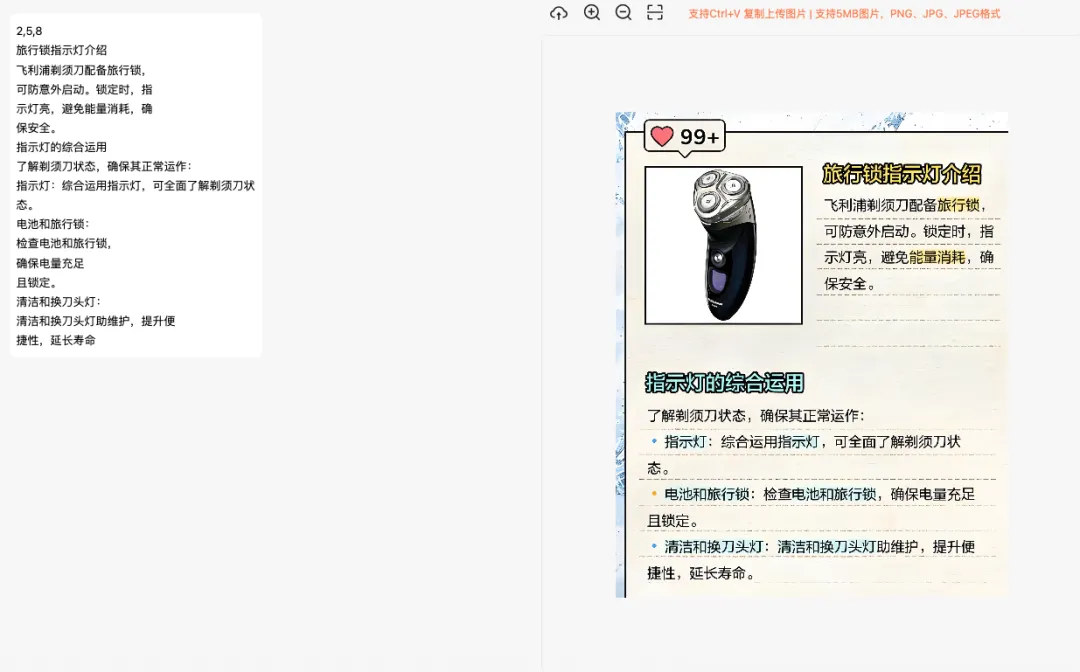
如果没有条件本地安装的也没事,目前DeepSeek-OCR提供限时免费的API接口调用,因此我给大家准备了如何用API调用DeepSeek OCR的完整例子
6.1 FastAPI 后端接口设计

run.py

import uvicornif __name__ == "__main__":    uvicorn.run(        "app.main:app",        host="0.0.0.0",        port=8000,        reload=True,        log_level="info",        workers=2,    # workers 参数        limit_concurrency=10,  # 限制并发连接数        limit_max_requests=1000,  # 限制最大请求数        timeout_keep_alive=5  # 保持连接超时时间(秒)    )

ocr_routes.py

from fastapi import APIRouter, Requestfrom typing import DictAnyOptionalListfrom pydantic import BaseModelfrom loguru import loggerfrom fastapi.responses import StreamingResponseimport jsonimport codecsimport osfrom ...services.sse_ocr_service import SSEOcrService# OCR提示词常量OCR_PROMPT = "请把图片中的文字识别出来并以可读的段落形式输出。如果是表格就输出成一行一行列与列间以|间隔"# 定义请求体模型class OcrSSERequest(BaseModel):    imageData: str  # base64编码的图片数据,必需    userPrompt: Optional[str] = None  # 用户提示词,可选router = APIRouter()@router.post("/ocr_sse")async def ocr_sse(request: Request, ocr_request: OcrSSERequest = None):    """    基于Server-Sent Events的OCR API    """    from fastapi.responses import JSONResponse    # 从环境变量中获取DeepSeek API密钥    api_key = os.environ.get("deepseek_api_key""")    if not api_key:        logger.error("DeepSeek API key not found in environment variables")        # 返回错误响应,CORS头部由中间件处理        return JSONResponse(content={"error""DeepSeek API key is not configured"})    # 从请求中提取图片base64数据    # 在纯的base64数据前添加前缀    base64_data = ocr_request.imageData    if not base64_data.startswith("data:image/"):        image_data = f"data:image/png;base64,{base64_data}"    else:        image_data = base64_data    # 提取用户提示词    user_prompt = ocr_request.userPrompt    logger.info(f"Received SSE OCR request with image data length: {len(base64_data)} and user prompt: {user_prompt isnotNone}")    async def event_generator():        try:            # 组合用户提示和系统提示            final_prompt = user_prompt if user_prompt else OCR_PROMPT            async for event in SSEOcrService.stream_ocr_response(                api_key=api_key,                model="deepseek-ai/DeepSeek-OCR",                image_data=image_data,                prompt=final_prompt,                stream=True            ):                if event:                    event_type = event.get("event""text")                    data = event.get("data")                    # 处理DeepSeek OCR API的流式响应格式                    if event_type == "text" and isinstance(data, str):                        # 文本内容,直接发送,确保中文字符正确显示                        yield f"event: text\ndata: {json.dumps({'text': data}, ensure_ascii=False)}\n\n"                    elif event_type == "finish":                        # 完成原因事件                        yield f"event: finish\ndata: {json.dumps(data, ensure_ascii=False)}\n\n"                    elif event_type == "done":                        # 完成事件                        yield f"event: done\ndata: {json.dumps({'done'True}, ensure_ascii=False)}\n\n"                    elif event_type == "error":                        # 错误事件                        yield f"event: error\ndata: {json.dumps(data, ensure_ascii=False)}\n\n"                    else:                        # 其他情况,保持原样发送                        yield f"event: {event_type}\ndata: {json.dumps(data, ensure_ascii=False)}\n\n"        except Exception as e:            logger.error(f"Error in OCR SSE stream: {str(e)}")            yield f"event: error\ndata: {json.dumps({'error'str(e)}, ensure_ascii=False)}\n\n"    # 获取请求的来源域    origin = request.headers.get("origin""http://localhost:8200")    if not origin:        # 如果没有获取到 origin,则设置为通配符        origin = "*"    # 创建响应    response = StreamingResponse(        event_generator(),        media_type="text/event-stream",        headers={                "Cache-Control""no-cache",                "Connection""keep-alive",                "X-Accel-Buffering""no",            }    )    # 不需要手动添加 CORS 头部,依赖应用级别的 CORS 中间件    return response

sse_ocr_service.py

import httpximport tracebackimport asyncioimport jsonfrom typing import DictAnyOptional, AsyncGeneratorfrom loguru import loggerimport osclass SSEOcrService:    """SSE OCR服务,处理与DeepSeek OCR API的流式交互"""    DEEPSEEK_API_URL = "https://api.siliconflow.cn/v1/chat/completions"    @staticmethod    async def stream_ocr_response(        api_key: str,        model: str,        image_data: str,        prompt: str,        stream: bool = True    ) -> AsyncGenerator[Dict[strAny], None]:        """        流式获取DeepSeek OCR响应并转发        Args:            api_key: API密钥            model: 模型名称,如 "deepseek-ai/DeepSeek-OCR"            image_data: 图片的base64数据            prompt: 用户提示词            stream: 是否使用流式响应        Yields:            Dict[str, Any]: SSE事件数据        """        headers = {            "Authorization"f"Bearer {api_key}",            "Accept""text/event-stream",            "Content-Type""application/json"        }        # 构建请求体        payload = {            "stream": stream,            "model": model,            "messages": [                {                    "role""user",                    "content": [                        {                            "type""text",                            "text": prompt                        },                        {                            "type""image_url",                            "image_url": {                                "detail""high",                                "url": image_data                            }                        }                    ]                }            ]        }        logger.info(f"Sending OCR SSE request to DeepSeek API: {SSEOcrService.DEEPSEEK_API_URL}")        logger.debug(f"Request payload model: {model}, stream: {stream}")        try:            async with httpx.AsyncClient(timeout=Noneas client:                async with client.stream(                    "POST",                    SSEOcrService.DEEPSEEK_API_URL,                    headers=headers,                    json=payload,                    timeout=None                ) as response:                    # 检查响应状态码                    if response.status_code != 200:                        error_msg = f"DeepSeek API returned error status: {response.status_code}"                        logger.error(error_msg)                        yield {"event""error""data": error_msg}                        return                    # 处理SSE流                    buffer = ""                    async for chunk in response.aiter_text():                        if chunk.startswith("data: "):                            # 处理DeepSeek API的SSE格式                            data_text = chunk[6:].strip()                            # 检查是否是[DONE]标记                            if data_text == "[DONE]":                                logger.info("Received [DONE] marker, closing SSE connection")                                yield {"event""done""data": {"text"""}}                                 return                            try:                                # 尝试解析JSON数据                                json_data = json.loads(data_text)                                # 提取生成的文本                                if "choices" in json_data and len(json_data["choices"]) > 0:                                    choice = json_data["choices"][0]                                    # 如果有delta和content,提取文本内容                                    if "delta" in choice and "content" in choice["delta"]:                                        content = choice["delta"]["content"]                                        if content:                                            logger.debug(f"Received text chunk: {content}")                                            yield {"event""text""data": content}                                    # 检查是否是结束标记                                    if choice.get("finish_reason"is not None:                                        finish_reason = choice.get("finish_reason")                                        logger.info(f"Received finish_reason: {finish_reason}")                                        yield {"event""finish""data": {"finish_reason": finish_reason}}                                        # 如果是停止原因是"stop",则返回完成事件                                        if finish_reason == "stop":                                            yield {"event""done""data": {"text"""}}                                            return                            except json.JSONDecodeError as e:                                logger.error(f"Failed to parse JSON data: {data_text}, error: {str(e)}")                                yield {"event""error""data"f"Failed to parse response: {data_text}"}                        else:                            # 如果不是以data:开头,则添加到缓冲区                            buffer += chunk                            # 如果缓冲区中有完整的行                            if "\n" in buffer:                                lines = buffer.split("\n")                                buffer = lines.pop()  # 保留最后一行(可能不完整)                                for line in lines:                                    if line.startswith("data: "):                                        data_text = line[6:].strip()                                        if data_text == "[DONE]":                                            logger.info("Received [DONE] marker from buffer")                                            yield {"event""done""data": {"text"""}}                                            return                                        try:                                            json_data = json.loads(data_text)                                            if "choices" in json_data and len(json_data["choices"]) > 0:                                                choice = json_data["choices"][0]                                                # 如果有delta和content,提取文本内容                                                if "delta" in choice and "content" in choice["delta"]:                                                    content = choice["delta"]["content"]                                                    if content:                                                        logger.debug(f"Received text chunk from buffer: {content}")                                                        yield {"event""text""data": content}                                                # 检查是否是结束标记                                                if choice.get("finish_reason"is not None:                                                    finish_reason = choice.get("finish_reason")                                                    logger.info(f"Received finish_reason from buffer: {finish_reason}")                                                    yield {"event""finish""data": {"finish_reason": finish_reason}}                                                    # 如果是停止原因是"stop",则返回完成事件                                                    if finish_reason == "stop":                                                        yield {"event""done""data": {"text"""}}                                                        return                                        except json.JSONDecodeError:                                            logger.error(f"Failed to parse JSON data from buffer: {data_text}")                                            yield {"event""error""data"f"Failed to parse response: {data_text}"}                    # 处理缓冲区中的剩余数据                    if buffer.strip():                        logger.debug(f"Processing remaining buffer data: {buffer}")                        if buffer.strip().startswith("data: "):                            data_text = buffer.strip()[6:].strip()                            if data_text == "[DONE]":                                logger.info("Received [DONE] marker from remaining buffer")                                yield {"event""done""data": {"text"""}}                            else:                                try:                                    json_data = json.loads(data_text)                                    if "choices" in json_data and len(json_data["choices"]) > 0:                                        choice = json_data["choices"][0]                                        # 如果有delta和content,提取文本内容                                        if "delta" in choice and "content" in choice["delta"]:                                            content = choice["delta"]["content"]                                            if content:                                                logger.debug(f"Received final text chunk: {content}")                                                yield {"event""text""data": content}                                        # 检查是否是结束标记                                        if choice.get("finish_reason"is not None:                                            finish_reason = choice.get("finish_reason")                                            logger.info(f"Received final finish_reason: {finish_reason}")                                            yield {"event""finish""data": {"finish_reason": finish_reason}}                                            # 如果是停止原因是"stop",则返回完成事件                                            if finish_reason == "stop":                                                yield {"event""done""data": {"text"""}}                                                return                                except json.JSONDecodeError:                                    logger.error(f"Failed to parse JSON data from remaining buffer: {data_text}")                                    yield {"event""error""data"f"Failed to parse response: {data_text}"}        except httpx.TimeoutException as e:            error_msg = f"Request to DeepSeek API timed out: {str(e)}"            logger.error(error_msg)            yield {"event""error""data": error_msg}        except httpx.RequestError as e:            error_msg = f"Error making request to DeepSeek API: {str(e)}"            logger.error(error_msg)            yield {"event""error""data": error_msg}        except Exception as e:            error_msg = f"Unexpected error when calling DeepSeek API: {str(e)}\n{traceback.format_exc()}"            logger.error(error_msg)            yield {"event""error""data": error_msg}

6.2 Vue3 前端调用示例

DeepSeekOcr.vue

<template>    <div        style="display: flex; width: calc(100% + 10px); height: calc(100% + 10px); overflow: hidden; margin: -5px; padding: 0; box-sizing: border-box;">        <inputtype="file"ref="fileInput" @change="onFileSelected"accept="image/*"style="display: none" />        <!-- 左侧区域:显示AI输出区域 -->        <divstyle="width: 50%; height: 100%; overflow-y: auto; margin: 0; padding: 0;">            <divclass="display-content"ref="chatMessageContainer">                <divstyle="margin: 5px 5px 5px 5px">                    <ocr-messagev-for="(message, index) in messages":key="index":is-user="message.isUser"                        :message="message.content" :chat-type="m01" />                </div>            </div>        </div>        <!-- 右侧区域:功能按钮和图片显示 -->        <div            style="width: 50%; height: 100%; display: flex; flex-direction: column; overflow: hidden; margin: 0; padding: 0;">            <!-- 功能按钮区域 -->            <divstyle="display: flex; align-items: center; margin: 0; padding: 0; flex-shrink: 0;">                <divstyle="display: flex; align-items: center; margin-left: 5px;">                    <a-tooltiptitle="上传"placement="bottom">                        <a-buttontype="text"size="small" @click="handlePicUpload"                            :style="{ fontSize: '18px', width: '40px', height: '40px' }">                            <CloudUploadOutlined:style="{ fontSize: '20px' }" />                        </a-button>                    </a-tooltip>                    <a-tooltiptitle="放大"placement="bottom":disabled="!hasImage":style="{ fontSize: '18px', width: '40px', height: '40px' }">                        <a-buttontype="text"size="small" @click="handleZoomIn">                            <ZoomInOutlined:style="{ fontSize: '20px' }" />                        </a-button>                    </a-tooltip>                    <a-tooltiptitle="缩小"placement="bottom":disabled="!hasImage":style="{ fontSize: '18px', width: '40px', height: '40px' }"">                        <a-buttontype="text"size="small" @click="handleZoomOut">                            <ZoomOutOutlined:style="{ fontSize: '20px' }"  />                        </a-button>                    </a-tooltip>                    <a-tooltiptitle="缩小"placement="bottom":disabled="!hasImage":style="{ fontSize: '18px', width: '40px', height: '40px' }"">                        <a-buttontype="text"size="small" @click="ocrParse">                            <ScanOutlined:style="{ fontSize: '20px' }"  />                        </a-button>                    </a-tooltip>                </div>                <divstyle="color: coral; font-size: 12px; margin-left: 20px;">                    支持Ctrl+V 复制上传图片 | 支持5MB图片,PNG、JPG、JPEG格式                </div>            </div>            <!-- 图片显示区域 -->            <divv-if="hasImage"                style="margin: 10px 5px 5px 5px; flex: 1; overflow: auto; display: flex; justify-content: center; align-items: center; border: 1px solid #e8e8e8; border-radius: 8px;">                <imgref="displayImage":key="imageKey":src="uploadedUrl"alt=""                    :style="{ width: 'auto', height: imageHeight, display: 'block' }" />            </div>            <!-- 无图片时的占位区域 -->            <divv-else                style="margin: 10px 5px 5px 5px; flex: 1; border: 2px dashed #999; border-radius: 8px; display: flex; flex-direction: column; justify-content: center; align-items: center;">                <imgsrc="/assets/images/image-icon-1.png"alt="Placeholder"                    style="max-width: 48px; margin-bottom: 10px;" />                <divstyle="margin-bottom: 10px; color: coral;">支持Ctrl+V 复制上传图片</div>                <divstyle="margin-bottom: 10px; color: red;">支持5MB图片,PNG、JPG、JPEG格式</div>            </div>        </div>    </div></template><scriptsetup>import { ref, onMounted, nextTick } from 'vue';import { message } from "ant-design-vue";import { PlusCircleOutlined } from '@ant-design/icons-vue';import { encrypt, decrypt, encrypt_url } from "@/toolkit/secure.js";import authorization from "@/toolkit/authorization.js";import OcrMessage from "@/viewer/ocrdemo/OcrMessage.vue";import OcrParseApi from "@/api/OcrParseApi.js";const hasImage = ref(false);const fileInput = ref(null);const uploadedUrl = ref("");const imageBase64 = ref("");const imageKey = ref(0);const messages = ref([]);const chatMessageContainer = ref(null);const isThinking = ref(false);const imageHeight = ref('auto');const zoomLevel = ref(1);//上传按钮被点击const handlePicUpload = () => {    fileInput.value.click()}const onFileSelected = async (event) => {    const file = event.target.files[0]    if (!file) return    // 验证文件类型    if (!file.type.includes('image/')) {        message.error('请选择图片文件')        return    }    // 验证文件大小(5MB)    const maxSize = 5 * 1024 * 1024    if (file.size > maxSize) {        message.error('图片大小不能超过5MB')        return    }    try {        // 读取文件并转换为base64        const reader = new FileReader();        reader.onload = (e) => {            // 获取base64编码            imageBase64.value = e.target.result;            // 设置预览图片的URL            uploadedUrl.value = e.target.result;            // 更新key触发图片重新渲染            imageKey.value += 1;            // 设置上传成功标志            hasImage.value = true;            message.success('上传成功');            console.log('图片base64已获取,可用于API调用');        };        reader.onerror = (error) => {            throw new Error('读取文件失败');        };        // 开始读取文件        reader.readAsDataURL(file);    } catch (error) {        hasImage.value = false;        console.error('上传失败:', error)        message.error(error.message || '上传失败,请重试')    } finally {        // 清空文件输入框,使得能够重复上传相同文件        event.target.value = ''    }}// 提供一个方法获取图片的base64,可供外部调用const getImageBase64 = () => {    return imageBase64.value;};// 监听粘贴事件,支持Ctrl+V上传图片onMounted(() => {    window.addEventListener('paste', handlePaste);});// 处理粘贴事件const handlePaste = (event) => {    const items = event.clipboardData?.items;    if (!items) return;    for (let i = 0; i < items.length; i++) {        if (items[i].type.indexOf('image') !== -1) {            const file = items[i].getAsFile();            if (file) {                // 创建一个模拟的文件选择事件                const mockEvent = {                    target: {                        files: [file],                        value''                    }                };                onFileSelected(mockEvent);                break;            }        }    }};// 放大功能const handleZoomIn = () => {    zoomLevel.value = Math.min(zoomLevel.value + 0.23);    updateImageSize();};// 缩小功能const handleZoomOut = () => {    zoomLevel.value = Math.max(zoomLevel.value - 0.20.5);    updateImageSize();};// 更新图片尺寸const updateImageSize = () => {    const baseHeight = 80;    const percentage = zoomLevel.value * 100;    imageHeight.value = `${percentage}%`;};const scrollToBottom = () => {    nextTick(() => {        if (chatMessageContainer.value) {            chatMessageContainer.value.scrollTop = chatMessageContainer.value.scrollHeight;        }    });};// OCR解析方法const ocrParse = async () => {    messages.value = [];    scrollToBottom();    console.log('OCR解析按钮被点击');    // 设置思考状态    isThinking.value = true;    // 存储当前的 SSE 连接    let sseConnection = null;    try {        const aiMessageIndex = messages.value.length;        messages.value.push({            isUserfalse,            content''        });        let token = authorization.getToken();        //let encryptToken = encrypt_url(token);        let userName = authorization.getUsername();        let params = {            userPrompt'',            imageData: imageBase64.value// 修复:使用 .value 访问 ref        };        sseConnection = OcrParseApi.complete(params, {            onStart() {                console.log(">>>>>>开始调用后端ocr");            },            onError(err) {                console.log("OCR 错误:", err);                isThinking.value = false;                // 显示更详细的错误信息                if (err?.error && typeof err.error === 'string' && err.error.includes('CORS')) {                    message.error("跨域请求错误,请检查服务器配置");                } else {                    message.error(err?.error || "OCR处理出错");                }                // 确保连接被终止                if (sseConnection && typeof sseConnection.abort === 'function') {                    try {                        sseConnection.abort();                    } catch (e) {                        console.error("终止连接时出错:", e);                    }                }            },            onClose() {                console.log("OCR 连接已关闭");                isThinking.value = false;            },            onMessage(data) {                if (null == data || data == undefined || data == "") {                    return;                }                // data 已经是字符串形式,不需要再次 JSON.stringify                let msg;                try {                    msg = JSON.parse(data);                } catch (error) {                    console.warn('JSON解析失败:', error);                    msg = {}; // 设置为空对象                }                if (msg.error && msg.error != "") {                    message.error(msg.error);                    // 出错时中断连接                    if (sseConnection && typeof sseConnection.abort === 'function') {                        sseConnection.abort();                    }                    isThinking.value = false;                    return;                }                if (msg.done === true) {                    console.log("OCR 处理完成");                    isThinking.value = false;                    return;                }                // 提取文本内容                let content = "";                if (msg.text) {                    content = msg.text;                } else if (msg.data) {                    content = msg.data;                }                if (content) {                    messages.value[aiMessageIndex].content += content;                    scrollToBottom();                }            }        }, token, userName);        // 处理 Promise        if (sseConnection && sseConnection.promise) {            sseConnection.promise.catch(err => {                console.log("SSE 连接错误:", err);                isThinking.value = false;            });        }    } catch (e) {        console.log("OCR 处理异常:", e);        isThinking.value = false;        message.error("OCR 处理发生异常");    }};// 导出方法供外部使用defineExpose({    getImageBase64});</script><stylescoped>:deep(.ant-btn) {    height: auto !important;}.display-content {    width100%;    height100%;    box-sizing: border-box;}</style>

OcrMessage.vue

<template>  <divclass="chat-message":class="{ 'user-message': isUser }">    <divclass="message-content"ref="messageContent">      <divclass="markdown-container">        <md-preview:model-value="formattedMessage"class="message-text ai-message":preview-theme="'default'"          :code-theme="'atom'" :show-code-row-number="false" :table-cell-max-width="500" :editorId="'preview-only'"          :html="true" />        <!-- 操作按钮容器 - Like和Dislike始终显示 -->        <divv-if="!isUser && messageId && streamFinished"class="action-buttons">          <!-- 复制按钮 -->          <imgsrc="/assets/images/copy-2.png" @click="handleCopy"class="action-icon"alt="Copy">        </div>      </div>    </div>  </div></template><scriptsetup>import { MdPreview } from "md-editor-v3";import { computed, ref } from 'vue';import { isBlank } from "@/toolkit/utils.js";const messageContent = ref(null);const formattedMessage = computed(() => {  if (!props.messagereturn '';  // 将<think>标签内容转换为Markdown引用块  let content = props.message;  // 使用正则表达式匹配<think>标签内容并替换为Markdown引用块  content = content.replace(/<think>([\s\S]*?)<\/think>/g(match, thinkContent) => {    // 将think内容转换为Markdown引用块格式    // 1. 添加引用块标记 >    // 2. 确保每行都有引用标记    // 3. 添加标题和适当的空行    return '\n\n> **思考过程:**\n> ' + thinkContent.trim().split('\n').join('\n> ') + '\n\n';  });  return content;});// 添加新的propsconst props = defineProps({  isUser: {    typeBoolean,    defaultfalse  },  message: {    typeString,    requiredtrue  },  dataIds: {    typeArray,    default() => [],    requiredfalse  },  chatType: {    typeString,    requiredtrue  },  // 新增props  messageId: {    typeString,    default''  },  userId: {    typeString,    default'Mingkai.Yuan'  },  streamFinished: {    typeBoolean,    defaultfalse  },});const scrollToBottom = () => {  nextTick(() => {    if (messageContent.value) {      messageContent.value.scrollTop = messageContent.value.scrollHeight;    }  });};const handleCopy = () => {  if (!props.messagereturn;  // 复制消息内容到剪贴板  navigator.clipboard.writeText(props.message).then(() => {    // 可以在这里添加复制成功的提示    console.log('消息已复制到剪贴板');  }).catch(err => {    console.error('复制失败:', err);  });};</script><stylescoped>.chat-message {  widthcalc(100% - 20px);  margin10px;  margin-top15px;  padding0px;  padding-left10px;  /* 设置左边距为10px */  margin-left0;  /* 清除可能存在的左边距 */}.message-content {  display: flex;  align-items: flex-start;  margin0px;}.avatar-container {  margin-left5px;  padding0px;  min-width80px;  /* 设置固定最小宽度 */  width80px;  /* 设置固定宽度 */  flex-shrink0;  /* 防止容器被压缩 */}.avatar-wrapper {  margin0px;  padding0px;  display: flex;  flex-direction: column;  align-items: center;  gap4px;  /* 调整label和图片之间的间距 */}.avatar-label {  font-size12px;  white-space: nowrap;  /* 防止文本换行 */  max-width: none;  /* 允许文本超出容器宽度 */}.avatar-image {  width32px;  height32px;}.avatar {  width28px;  height: auto;  object-fit: contain;}.message-text {  flex1;  padding8px;  border-radius8px;  white-space: normal;  /* 改为normal */  word-wrap: break-word;  margin-left10px;}.user-message .message-text {  background-color: transparent;}.ai-message {  background-color: white;}.markdown-container {  font-size13px;  line-height1.5;}.markdown-container ::v-deep(blockquote) {  margin1em 0;  padding0.5em 1em;  background-color#f8f8f8;  /* 更浅的灰色背景 */  border-left4px solid #d4d4d4;  /* 更浅的边框颜色 */  border-radius4px;}.markdown-container ::v-deep(blockquote p) {  margin0.4em 0;  color#666;  /* 思考内容的文字颜色稍微淡一些 */}.markdown-container ::v-deep(p) {  margin0.2em 0;}.markdown-container ::v-deep(ol),::v-deep(ul),::v-deep(dl) {  margin0.2em 0;}.markdown-container ::v-deep(h1),::v-deep(h2),::v-deep(h3),::v-deep(h4),::v-deep(h5),::v-deep(h6) {  margin0.1em 0;}/* 思考内容的样式 */.markdown-container ::v-deep(.think-content) {  background-color#f8f8f8;  border-left4px solid #d4d4d4;  padding0.5em 1em;  margin1em 0;  border-radius4px;  color#666;  font-family: inherit;  white-space: pre-wrap;  word-wrap: break-word;}/* 确保md-preview不会对think-content应用Markdown样式 */.markdown-container ::v-deep(.think-content *) {  all: inherit;  display: inline;}/* 修改action-buttons样式 */.action-buttons {  display: flex;  gap15px;  margin-top10px;  padding5px 0;  margin-left12px;  /* 与消息内容保持一致的左边距 */}.action-icon {  width16px;  height: auto;  cursor: pointer;  transition: opacity 0.2s;}.action-icon:hover {  opacity0.8;}</style>

运行后我们发觉其效果惊人的好!

7. 总结

DeepSeek-OCR 的出现,标志着 OCR 技术正从传统 CV 模型向大语言模型原生多模态能力演进。它不再只是“识别文字”,而是“理解文档”。无论是用 Hugging Face Transformers 快速验证想法,还是用 vLLM 构建高可用 OCR 服务,背后都离不开对环境细节的把控和对框架特性的理解。技术落地从来不是复制粘贴就能成功的魔法,而是在无数个版本冲突、显存溢出、输出异常中磨出来的耐心与经验。愿这篇指南成为你通往企业级大模型 OCR 应用的一块垫脚石。

附-直接DeepSeek-OCR官网API

curl --location --request POST 'https://api.siliconflow.cn/v1/chat/completions' \--header 'AuthorizationBearer sk-apikey' \--header 'Content-Type: application/json' \--header 'Accept: text/event-stream' \--data-raw '{    "stream"true,    "model""deepseek-ai/DeepSeek-OCR",    "messages": [        {            "role""user",            "content": [                {                    "type""text",                    "text""把图中的文字格式化输出"                },                {                    "type""image_url",                    "image_url": {                        "detail""high",                        "url""data:image/png;base64,上传图片变成base64后的代码"                    }                }            ]        }    ]}'

注:

此处注意图片可以是http://xxxx/xxx.png也可以是base64后的编码,如果是用的base64编码前面一定要手动自己串上data:image/png;base64,

基本 文件 流程 错误 SQL 调试
  1. 请求信息 : 2026-05-05 05:20:39 HTTP/1.1 GET : https://www.yeyulingfeng.com/a/576961.html
  2. 运行时间 : 0.197826s [ 吞吐率:5.05req/s ] 内存消耗:4,768.51kb 文件加载:145
  3. 缓存信息 : 0 reads,0 writes
  4. 会话信息 : SESSION_ID=bc85947756f26ef8718082a29bd29b5e
  1. /yingpanguazai/ssd/ssd1/www/wwww.yeyulingfeng.com/public/index.php ( 0.79 KB )
  2. /yingpanguazai/ssd/ssd1/www/wwww.yeyulingfeng.com/vendor/autoload.php ( 0.17 KB )
  3. /yingpanguazai/ssd/ssd1/www/wwww.yeyulingfeng.com/vendor/composer/autoload_real.php ( 2.49 KB )
  4. /yingpanguazai/ssd/ssd1/www/wwww.yeyulingfeng.com/vendor/composer/platform_check.php ( 0.90 KB )
  5. /yingpanguazai/ssd/ssd1/www/wwww.yeyulingfeng.com/vendor/composer/ClassLoader.php ( 14.03 KB )
  6. /yingpanguazai/ssd/ssd1/www/wwww.yeyulingfeng.com/vendor/composer/autoload_static.php ( 6.05 KB )
  7. /yingpanguazai/ssd/ssd1/www/wwww.yeyulingfeng.com/vendor/topthink/think-helper/src/helper.php ( 8.34 KB )
  8. /yingpanguazai/ssd/ssd1/www/wwww.yeyulingfeng.com/vendor/topthink/think-validate/src/helper.php ( 2.19 KB )
  9. /yingpanguazai/ssd/ssd1/www/wwww.yeyulingfeng.com/vendor/ralouphie/getallheaders/src/getallheaders.php ( 1.60 KB )
  10. /yingpanguazai/ssd/ssd1/www/wwww.yeyulingfeng.com/vendor/topthink/think-orm/src/helper.php ( 1.47 KB )
  11. /yingpanguazai/ssd/ssd1/www/wwww.yeyulingfeng.com/vendor/topthink/think-orm/stubs/load_stubs.php ( 0.16 KB )
  12. /yingpanguazai/ssd/ssd1/www/wwww.yeyulingfeng.com/vendor/topthink/framework/src/think/Exception.php ( 1.69 KB )
  13. /yingpanguazai/ssd/ssd1/www/wwww.yeyulingfeng.com/vendor/topthink/think-container/src/Facade.php ( 2.71 KB )
  14. /yingpanguazai/ssd/ssd1/www/wwww.yeyulingfeng.com/vendor/symfony/deprecation-contracts/function.php ( 0.99 KB )
  15. /yingpanguazai/ssd/ssd1/www/wwww.yeyulingfeng.com/vendor/symfony/polyfill-mbstring/bootstrap.php ( 8.26 KB )
  16. /yingpanguazai/ssd/ssd1/www/wwww.yeyulingfeng.com/vendor/symfony/polyfill-mbstring/bootstrap80.php ( 9.78 KB )
  17. /yingpanguazai/ssd/ssd1/www/wwww.yeyulingfeng.com/vendor/symfony/var-dumper/Resources/functions/dump.php ( 1.49 KB )
  18. /yingpanguazai/ssd/ssd1/www/wwww.yeyulingfeng.com/vendor/topthink/think-dumper/src/helper.php ( 0.18 KB )
  19. /yingpanguazai/ssd/ssd1/www/wwww.yeyulingfeng.com/vendor/symfony/var-dumper/VarDumper.php ( 4.30 KB )
  20. /yingpanguazai/ssd/ssd1/www/wwww.yeyulingfeng.com/vendor/guzzlehttp/guzzle/src/functions_include.php ( 0.16 KB )
  21. /yingpanguazai/ssd/ssd1/www/wwww.yeyulingfeng.com/vendor/guzzlehttp/guzzle/src/functions.php ( 5.54 KB )
  22. /yingpanguazai/ssd/ssd1/www/wwww.yeyulingfeng.com/vendor/topthink/framework/src/think/App.php ( 15.30 KB )
  23. /yingpanguazai/ssd/ssd1/www/wwww.yeyulingfeng.com/vendor/topthink/think-container/src/Container.php ( 15.76 KB )
  24. /yingpanguazai/ssd/ssd1/www/wwww.yeyulingfeng.com/vendor/psr/container/src/ContainerInterface.php ( 1.02 KB )
  25. /yingpanguazai/ssd/ssd1/www/wwww.yeyulingfeng.com/app/provider.php ( 0.19 KB )
  26. /yingpanguazai/ssd/ssd1/www/wwww.yeyulingfeng.com/vendor/topthink/framework/src/think/Http.php ( 6.04 KB )
  27. /yingpanguazai/ssd/ssd1/www/wwww.yeyulingfeng.com/vendor/topthink/think-helper/src/helper/Str.php ( 7.29 KB )
  28. /yingpanguazai/ssd/ssd1/www/wwww.yeyulingfeng.com/vendor/topthink/framework/src/think/Env.php ( 4.68 KB )
  29. /yingpanguazai/ssd/ssd1/www/wwww.yeyulingfeng.com/app/common.php ( 0.03 KB )
  30. /yingpanguazai/ssd/ssd1/www/wwww.yeyulingfeng.com/vendor/topthink/framework/src/helper.php ( 18.78 KB )
  31. /yingpanguazai/ssd/ssd1/www/wwww.yeyulingfeng.com/vendor/topthink/framework/src/think/Config.php ( 5.54 KB )
  32. /yingpanguazai/ssd/ssd1/www/wwww.yeyulingfeng.com/config/alipay.php ( 3.59 KB )
  33. /yingpanguazai/ssd/ssd1/www/wwww.yeyulingfeng.com/vendor/topthink/framework/src/think/facade/Env.php ( 1.67 KB )
  34. /yingpanguazai/ssd/ssd1/www/wwww.yeyulingfeng.com/config/app.php ( 0.95 KB )
  35. /yingpanguazai/ssd/ssd1/www/wwww.yeyulingfeng.com/config/cache.php ( 0.78 KB )
  36. /yingpanguazai/ssd/ssd1/www/wwww.yeyulingfeng.com/config/console.php ( 0.23 KB )
  37. /yingpanguazai/ssd/ssd1/www/wwww.yeyulingfeng.com/config/cookie.php ( 0.56 KB )
  38. /yingpanguazai/ssd/ssd1/www/wwww.yeyulingfeng.com/config/database.php ( 2.48 KB )
  39. /yingpanguazai/ssd/ssd1/www/wwww.yeyulingfeng.com/config/filesystem.php ( 0.61 KB )
  40. /yingpanguazai/ssd/ssd1/www/wwww.yeyulingfeng.com/config/lang.php ( 0.91 KB )
  41. /yingpanguazai/ssd/ssd1/www/wwww.yeyulingfeng.com/config/log.php ( 1.35 KB )
  42. /yingpanguazai/ssd/ssd1/www/wwww.yeyulingfeng.com/config/middleware.php ( 0.19 KB )
  43. /yingpanguazai/ssd/ssd1/www/wwww.yeyulingfeng.com/config/route.php ( 1.89 KB )
  44. /yingpanguazai/ssd/ssd1/www/wwww.yeyulingfeng.com/config/session.php ( 0.57 KB )
  45. /yingpanguazai/ssd/ssd1/www/wwww.yeyulingfeng.com/config/trace.php ( 0.34 KB )
  46. /yingpanguazai/ssd/ssd1/www/wwww.yeyulingfeng.com/config/view.php ( 0.82 KB )
  47. /yingpanguazai/ssd/ssd1/www/wwww.yeyulingfeng.com/app/event.php ( 0.25 KB )
  48. /yingpanguazai/ssd/ssd1/www/wwww.yeyulingfeng.com/vendor/topthink/framework/src/think/Event.php ( 7.67 KB )
  49. /yingpanguazai/ssd/ssd1/www/wwww.yeyulingfeng.com/app/service.php ( 0.13 KB )
  50. /yingpanguazai/ssd/ssd1/www/wwww.yeyulingfeng.com/app/AppService.php ( 0.26 KB )
  51. /yingpanguazai/ssd/ssd1/www/wwww.yeyulingfeng.com/vendor/topthink/framework/src/think/Service.php ( 1.64 KB )
  52. /yingpanguazai/ssd/ssd1/www/wwww.yeyulingfeng.com/vendor/topthink/framework/src/think/Lang.php ( 7.35 KB )
  53. /yingpanguazai/ssd/ssd1/www/wwww.yeyulingfeng.com/vendor/topthink/framework/src/lang/zh-cn.php ( 13.70 KB )
  54. /yingpanguazai/ssd/ssd1/www/wwww.yeyulingfeng.com/vendor/topthink/framework/src/think/initializer/Error.php ( 3.31 KB )
  55. /yingpanguazai/ssd/ssd1/www/wwww.yeyulingfeng.com/vendor/topthink/framework/src/think/initializer/RegisterService.php ( 1.33 KB )
  56. /yingpanguazai/ssd/ssd1/www/wwww.yeyulingfeng.com/vendor/services.php ( 0.14 KB )
  57. /yingpanguazai/ssd/ssd1/www/wwww.yeyulingfeng.com/vendor/topthink/framework/src/think/service/PaginatorService.php ( 1.52 KB )
  58. /yingpanguazai/ssd/ssd1/www/wwww.yeyulingfeng.com/vendor/topthink/framework/src/think/service/ValidateService.php ( 0.99 KB )
  59. /yingpanguazai/ssd/ssd1/www/wwww.yeyulingfeng.com/vendor/topthink/framework/src/think/service/ModelService.php ( 2.04 KB )
  60. /yingpanguazai/ssd/ssd1/www/wwww.yeyulingfeng.com/vendor/topthink/think-trace/src/Service.php ( 0.77 KB )
  61. /yingpanguazai/ssd/ssd1/www/wwww.yeyulingfeng.com/vendor/topthink/framework/src/think/Middleware.php ( 6.72 KB )
  62. /yingpanguazai/ssd/ssd1/www/wwww.yeyulingfeng.com/vendor/topthink/framework/src/think/initializer/BootService.php ( 0.77 KB )
  63. /yingpanguazai/ssd/ssd1/www/wwww.yeyulingfeng.com/vendor/topthink/think-orm/src/Paginator.php ( 11.86 KB )
  64. /yingpanguazai/ssd/ssd1/www/wwww.yeyulingfeng.com/vendor/topthink/think-validate/src/Validate.php ( 63.20 KB )
  65. /yingpanguazai/ssd/ssd1/www/wwww.yeyulingfeng.com/vendor/topthink/think-orm/src/Model.php ( 23.55 KB )
  66. /yingpanguazai/ssd/ssd1/www/wwww.yeyulingfeng.com/vendor/topthink/think-orm/src/model/concern/Attribute.php ( 21.05 KB )
  67. /yingpanguazai/ssd/ssd1/www/wwww.yeyulingfeng.com/vendor/topthink/think-orm/src/model/concern/AutoWriteData.php ( 4.21 KB )
  68. /yingpanguazai/ssd/ssd1/www/wwww.yeyulingfeng.com/vendor/topthink/think-orm/src/model/concern/Conversion.php ( 6.44 KB )
  69. /yingpanguazai/ssd/ssd1/www/wwww.yeyulingfeng.com/vendor/topthink/think-orm/src/model/concern/DbConnect.php ( 5.16 KB )
  70. /yingpanguazai/ssd/ssd1/www/wwww.yeyulingfeng.com/vendor/topthink/think-orm/src/model/concern/ModelEvent.php ( 2.33 KB )
  71. /yingpanguazai/ssd/ssd1/www/wwww.yeyulingfeng.com/vendor/topthink/think-orm/src/model/concern/RelationShip.php ( 28.29 KB )
  72. /yingpanguazai/ssd/ssd1/www/wwww.yeyulingfeng.com/vendor/topthink/think-helper/src/contract/Arrayable.php ( 0.09 KB )
  73. /yingpanguazai/ssd/ssd1/www/wwww.yeyulingfeng.com/vendor/topthink/think-helper/src/contract/Jsonable.php ( 0.13 KB )
  74. /yingpanguazai/ssd/ssd1/www/wwww.yeyulingfeng.com/vendor/topthink/think-orm/src/model/contract/Modelable.php ( 0.09 KB )
  75. /yingpanguazai/ssd/ssd1/www/wwww.yeyulingfeng.com/vendor/topthink/framework/src/think/Db.php ( 2.88 KB )
  76. /yingpanguazai/ssd/ssd1/www/wwww.yeyulingfeng.com/vendor/topthink/think-orm/src/DbManager.php ( 8.52 KB )
  77. /yingpanguazai/ssd/ssd1/www/wwww.yeyulingfeng.com/vendor/topthink/framework/src/think/Log.php ( 6.28 KB )
  78. /yingpanguazai/ssd/ssd1/www/wwww.yeyulingfeng.com/vendor/topthink/framework/src/think/Manager.php ( 3.92 KB )
  79. /yingpanguazai/ssd/ssd1/www/wwww.yeyulingfeng.com/vendor/psr/log/src/LoggerTrait.php ( 2.69 KB )
  80. /yingpanguazai/ssd/ssd1/www/wwww.yeyulingfeng.com/vendor/psr/log/src/LoggerInterface.php ( 2.71 KB )
  81. /yingpanguazai/ssd/ssd1/www/wwww.yeyulingfeng.com/vendor/topthink/framework/src/think/Cache.php ( 4.92 KB )
  82. /yingpanguazai/ssd/ssd1/www/wwww.yeyulingfeng.com/vendor/psr/simple-cache/src/CacheInterface.php ( 4.71 KB )
  83. /yingpanguazai/ssd/ssd1/www/wwww.yeyulingfeng.com/vendor/topthink/think-helper/src/helper/Arr.php ( 16.63 KB )
  84. /yingpanguazai/ssd/ssd1/www/wwww.yeyulingfeng.com/vendor/topthink/framework/src/think/cache/driver/File.php ( 7.84 KB )
  85. /yingpanguazai/ssd/ssd1/www/wwww.yeyulingfeng.com/vendor/topthink/framework/src/think/cache/Driver.php ( 9.03 KB )
  86. /yingpanguazai/ssd/ssd1/www/wwww.yeyulingfeng.com/vendor/topthink/framework/src/think/contract/CacheHandlerInterface.php ( 1.99 KB )
  87. /yingpanguazai/ssd/ssd1/www/wwww.yeyulingfeng.com/app/Request.php ( 0.09 KB )
  88. /yingpanguazai/ssd/ssd1/www/wwww.yeyulingfeng.com/vendor/topthink/framework/src/think/Request.php ( 55.78 KB )
  89. /yingpanguazai/ssd/ssd1/www/wwww.yeyulingfeng.com/app/middleware.php ( 0.25 KB )
  90. /yingpanguazai/ssd/ssd1/www/wwww.yeyulingfeng.com/vendor/topthink/framework/src/think/Pipeline.php ( 2.61 KB )
  91. /yingpanguazai/ssd/ssd1/www/wwww.yeyulingfeng.com/vendor/topthink/think-trace/src/TraceDebug.php ( 3.40 KB )
  92. /yingpanguazai/ssd/ssd1/www/wwww.yeyulingfeng.com/vendor/topthink/framework/src/think/middleware/SessionInit.php ( 1.94 KB )
  93. /yingpanguazai/ssd/ssd1/www/wwww.yeyulingfeng.com/vendor/topthink/framework/src/think/Session.php ( 1.80 KB )
  94. /yingpanguazai/ssd/ssd1/www/wwww.yeyulingfeng.com/vendor/topthink/framework/src/think/session/driver/File.php ( 6.27 KB )
  95. /yingpanguazai/ssd/ssd1/www/wwww.yeyulingfeng.com/vendor/topthink/framework/src/think/contract/SessionHandlerInterface.php ( 0.87 KB )
  96. /yingpanguazai/ssd/ssd1/www/wwww.yeyulingfeng.com/vendor/topthink/framework/src/think/session/Store.php ( 7.12 KB )
  97. /yingpanguazai/ssd/ssd1/www/wwww.yeyulingfeng.com/vendor/topthink/framework/src/think/Route.php ( 23.73 KB )
  98. /yingpanguazai/ssd/ssd1/www/wwww.yeyulingfeng.com/vendor/topthink/framework/src/think/route/RuleName.php ( 5.75 KB )
  99. /yingpanguazai/ssd/ssd1/www/wwww.yeyulingfeng.com/vendor/topthink/framework/src/think/route/Domain.php ( 2.53 KB )
  100. /yingpanguazai/ssd/ssd1/www/wwww.yeyulingfeng.com/vendor/topthink/framework/src/think/route/RuleGroup.php ( 22.43 KB )
  101. /yingpanguazai/ssd/ssd1/www/wwww.yeyulingfeng.com/vendor/topthink/framework/src/think/route/Rule.php ( 26.95 KB )
  102. /yingpanguazai/ssd/ssd1/www/wwww.yeyulingfeng.com/vendor/topthink/framework/src/think/route/RuleItem.php ( 9.78 KB )
  103. /yingpanguazai/ssd/ssd1/www/wwww.yeyulingfeng.com/route/app.php ( 3.94 KB )
  104. /yingpanguazai/ssd/ssd1/www/wwww.yeyulingfeng.com/vendor/topthink/framework/src/think/facade/Route.php ( 4.70 KB )
  105. /yingpanguazai/ssd/ssd1/www/wwww.yeyulingfeng.com/vendor/topthink/framework/src/think/route/dispatch/Controller.php ( 4.74 KB )
  106. /yingpanguazai/ssd/ssd1/www/wwww.yeyulingfeng.com/vendor/topthink/framework/src/think/route/Dispatch.php ( 10.44 KB )
  107. /yingpanguazai/ssd/ssd1/www/wwww.yeyulingfeng.com/app/controller/Index.php ( 9.87 KB )
  108. /yingpanguazai/ssd/ssd1/www/wwww.yeyulingfeng.com/app/BaseController.php ( 2.05 KB )
  109. /yingpanguazai/ssd/ssd1/www/wwww.yeyulingfeng.com/vendor/topthink/think-orm/src/facade/Db.php ( 0.93 KB )
  110. /yingpanguazai/ssd/ssd1/www/wwww.yeyulingfeng.com/vendor/topthink/think-orm/src/db/connector/Mysql.php ( 5.44 KB )
  111. /yingpanguazai/ssd/ssd1/www/wwww.yeyulingfeng.com/vendor/topthink/think-orm/src/db/PDOConnection.php ( 52.47 KB )
  112. /yingpanguazai/ssd/ssd1/www/wwww.yeyulingfeng.com/vendor/topthink/think-orm/src/db/Connection.php ( 8.39 KB )
  113. /yingpanguazai/ssd/ssd1/www/wwww.yeyulingfeng.com/vendor/topthink/think-orm/src/db/ConnectionInterface.php ( 4.57 KB )
  114. /yingpanguazai/ssd/ssd1/www/wwww.yeyulingfeng.com/vendor/topthink/think-orm/src/db/builder/Mysql.php ( 16.58 KB )
  115. /yingpanguazai/ssd/ssd1/www/wwww.yeyulingfeng.com/vendor/topthink/think-orm/src/db/Builder.php ( 24.06 KB )
  116. /yingpanguazai/ssd/ssd1/www/wwww.yeyulingfeng.com/vendor/topthink/think-orm/src/db/BaseBuilder.php ( 27.50 KB )
  117. /yingpanguazai/ssd/ssd1/www/wwww.yeyulingfeng.com/vendor/topthink/think-orm/src/db/Query.php ( 15.71 KB )
  118. /yingpanguazai/ssd/ssd1/www/wwww.yeyulingfeng.com/vendor/topthink/think-orm/src/db/BaseQuery.php ( 45.13 KB )
  119. /yingpanguazai/ssd/ssd1/www/wwww.yeyulingfeng.com/vendor/topthink/think-orm/src/db/concern/TimeFieldQuery.php ( 7.43 KB )
  120. /yingpanguazai/ssd/ssd1/www/wwww.yeyulingfeng.com/vendor/topthink/think-orm/src/db/concern/AggregateQuery.php ( 3.26 KB )
  121. /yingpanguazai/ssd/ssd1/www/wwww.yeyulingfeng.com/vendor/topthink/think-orm/src/db/concern/ModelRelationQuery.php ( 20.07 KB )
  122. /yingpanguazai/ssd/ssd1/www/wwww.yeyulingfeng.com/vendor/topthink/think-orm/src/db/concern/ParamsBind.php ( 3.66 KB )
  123. /yingpanguazai/ssd/ssd1/www/wwww.yeyulingfeng.com/vendor/topthink/think-orm/src/db/concern/ResultOperation.php ( 7.01 KB )
  124. /yingpanguazai/ssd/ssd1/www/wwww.yeyulingfeng.com/vendor/topthink/think-orm/src/db/concern/WhereQuery.php ( 19.37 KB )
  125. /yingpanguazai/ssd/ssd1/www/wwww.yeyulingfeng.com/vendor/topthink/think-orm/src/db/concern/JoinAndViewQuery.php ( 7.11 KB )
  126. /yingpanguazai/ssd/ssd1/www/wwww.yeyulingfeng.com/vendor/topthink/think-orm/src/db/concern/TableFieldInfo.php ( 2.63 KB )
  127. /yingpanguazai/ssd/ssd1/www/wwww.yeyulingfeng.com/vendor/topthink/think-orm/src/db/concern/Transaction.php ( 2.77 KB )
  128. /yingpanguazai/ssd/ssd1/www/wwww.yeyulingfeng.com/vendor/topthink/framework/src/think/log/driver/File.php ( 5.96 KB )
  129. /yingpanguazai/ssd/ssd1/www/wwww.yeyulingfeng.com/vendor/topthink/framework/src/think/contract/LogHandlerInterface.php ( 0.86 KB )
  130. /yingpanguazai/ssd/ssd1/www/wwww.yeyulingfeng.com/vendor/topthink/framework/src/think/log/Channel.php ( 3.89 KB )
  131. /yingpanguazai/ssd/ssd1/www/wwww.yeyulingfeng.com/vendor/topthink/framework/src/think/event/LogRecord.php ( 1.02 KB )
  132. /yingpanguazai/ssd/ssd1/www/wwww.yeyulingfeng.com/vendor/topthink/think-helper/src/Collection.php ( 16.47 KB )
  133. /yingpanguazai/ssd/ssd1/www/wwww.yeyulingfeng.com/vendor/topthink/framework/src/think/facade/View.php ( 1.70 KB )
  134. /yingpanguazai/ssd/ssd1/www/wwww.yeyulingfeng.com/vendor/topthink/framework/src/think/View.php ( 4.39 KB )
  135. /yingpanguazai/ssd/ssd1/www/wwww.yeyulingfeng.com/app/controller/Es.php ( 3.30 KB )
  136. /yingpanguazai/ssd/ssd1/www/wwww.yeyulingfeng.com/vendor/topthink/framework/src/think/Response.php ( 8.81 KB )
  137. /yingpanguazai/ssd/ssd1/www/wwww.yeyulingfeng.com/vendor/topthink/framework/src/think/response/View.php ( 3.29 KB )
  138. /yingpanguazai/ssd/ssd1/www/wwww.yeyulingfeng.com/vendor/topthink/framework/src/think/Cookie.php ( 6.06 KB )
  139. /yingpanguazai/ssd/ssd1/www/wwww.yeyulingfeng.com/vendor/topthink/think-view/src/Think.php ( 8.38 KB )
  140. /yingpanguazai/ssd/ssd1/www/wwww.yeyulingfeng.com/vendor/topthink/framework/src/think/contract/TemplateHandlerInterface.php ( 1.60 KB )
  141. /yingpanguazai/ssd/ssd1/www/wwww.yeyulingfeng.com/vendor/topthink/think-template/src/Template.php ( 46.61 KB )
  142. /yingpanguazai/ssd/ssd1/www/wwww.yeyulingfeng.com/vendor/topthink/think-template/src/template/driver/File.php ( 2.41 KB )
  143. /yingpanguazai/ssd/ssd1/www/wwww.yeyulingfeng.com/vendor/topthink/think-template/src/template/contract/DriverInterface.php ( 0.86 KB )
  144. /yingpanguazai/ssd/ssd1/www/wwww.yeyulingfeng.com/runtime/temp/c935550e3e8a3a4c27dd94e439343fdf.php ( 31.50 KB )
  145. /yingpanguazai/ssd/ssd1/www/wwww.yeyulingfeng.com/vendor/topthink/think-trace/src/Html.php ( 4.42 KB )
  1. CONNECT:[ UseTime:0.001246s ] mysql:host=127.0.0.1;port=3306;dbname=wenku;charset=utf8mb4
  2. SHOW FULL COLUMNS FROM `fenlei` [ RunTime:0.002012s ]
  3. SELECT * FROM `fenlei` WHERE `fid` = 0 [ RunTime:0.000726s ]
  4. SELECT * FROM `fenlei` WHERE `fid` = 63 [ RunTime:0.000713s ]
  5. SHOW FULL COLUMNS FROM `set` [ RunTime:0.001485s ]
  6. SELECT * FROM `set` [ RunTime:0.000642s ]
  7. SHOW FULL COLUMNS FROM `article` [ RunTime:0.001451s ]
  8. SELECT * FROM `article` WHERE `id` = 576961 LIMIT 1 [ RunTime:0.001491s ]
  9. UPDATE `article` SET `lasttime` = 1777929640 WHERE `id` = 576961 [ RunTime:0.002392s ]
  10. SELECT * FROM `fenlei` WHERE `id` = 64 LIMIT 1 [ RunTime:0.000598s ]
  11. SELECT * FROM `article` WHERE `id` < 576961 ORDER BY `id` DESC LIMIT 1 [ RunTime:0.001138s ]
  12. SELECT * FROM `article` WHERE `id` > 576961 ORDER BY `id` ASC LIMIT 1 [ RunTime:0.001193s ]
  13. SELECT * FROM `article` WHERE `id` < 576961 ORDER BY `id` DESC LIMIT 10 [ RunTime:0.001839s ]
  14. SELECT * FROM `article` WHERE `id` < 576961 ORDER BY `id` DESC LIMIT 10,10 [ RunTime:0.002603s ]
  15. SELECT * FROM `article` WHERE `id` < 576961 ORDER BY `id` DESC LIMIT 20,10 [ RunTime:0.004962s ]
0.201724s