 夜雨聆风
夜雨聆风
网上看到有人通过调用DeepSeek API的方式写了个仿微信聊天界面的小程序,觉得挺有意思的,所以我也来测试一下。
step 1: 引入程序所需要的库
import osimport jsonfrom flask import Flask, render_template_string, request, jsonifyfrom openai import OpenAIfrom datetime import datetime
step 2: 初始化客户端
app = Flask(__name__)# 请在此处设置您的DeepSeek API KeyDEEPSEEK_API_KEY = "DeepSeek_API_Key"# 初始化DeepSeek客户端client = OpenAI(api_key=" DeepSeek_API_Key ",base_url="https://api.deepseek.com")
step 3: 设置系统提示词
SYSTEM_PROMPT = """你是一位专注于会计领域的智能助手,仅为大家解答各类会计相关问题。如果用户咨询的是会计以外的问题,比如天气情况、时事新闻、娱乐资讯、编程技术、医疗健康等非会计类内容,你将礼貌谢绝解答。同时你会引导大家咨询会计相关问题,可咨询的内容包含但不限于:账务处理方法、税务相关知识、财务报表编制与分析、会计准则规范、会计分录实操、会计相关制度等。针对所有会计相关问题,你都会为大家提供专业、严谨、准确的解答内容。"""
step 4: 仿微信聊天界面的HTML模板(含历史记录和搜索功能)
由于代码较多,此处省略。
step 5: Flask路由装饰器:绑定根路径 / 到下方index函数
@app.route('/')def index():"""主页 - 聊天界面"""return render_template_string(HTML_TEMPLATE)
step 6: Flask路由装饰器:绑定接口路径 /ask,仅接收POST方式请求
@app.route('/ask', methods=['POST'])def ask():"""处理用户问题,调用DeepSeek API"""data = request.get_json()question = data.get('question', '').strip()if not question:return jsonify({'error': '问题不能为空'}), 400try:# 调用DeepSeek APIresponse = client.chat.completions.create(model="deepseek-chat",messages=[{"role": "system", "content": SYSTEM_PROMPT},{"role": "user", "content": question}],temperature=0.7,max_tokens=1024,stream=False)answer = response.choices[0].message.contentreturn jsonify({'answer': answer})except Exception as e:error_msg = str(e)if "API key" in error_msg.lower() or "authentication" in error_msg.lower():return jsonify({'error': 'API密钥无效,请检查DeepSeek API Key配置'}), 500return jsonify({'error': f'AI服务出错: {error_msg[:100]}'}), 500
step 7: 主程序
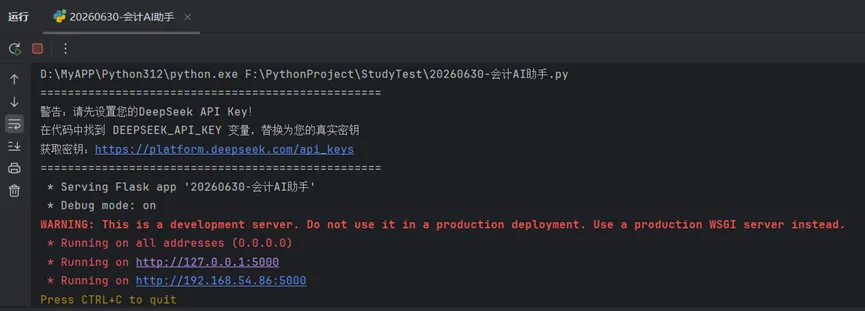
if __name__ == '__main__':if DEEPSEEK_API_KEY == "deepseek_api_key":print("=" * 50)print("警告:请先设置您的DeepSeek API Key!")print("在代码中找到 DEEPSEEK_API_KEY 变量,替换为您的真实密钥")print("获取密钥:https://platform.deepseek.com/api_keys")print("=" * 50)else:print("会计小助手已启动,请访问 http://127.0.0.1:5000")app.run(debug=True, host='0.0.0.0', port=5000)
运行结果:
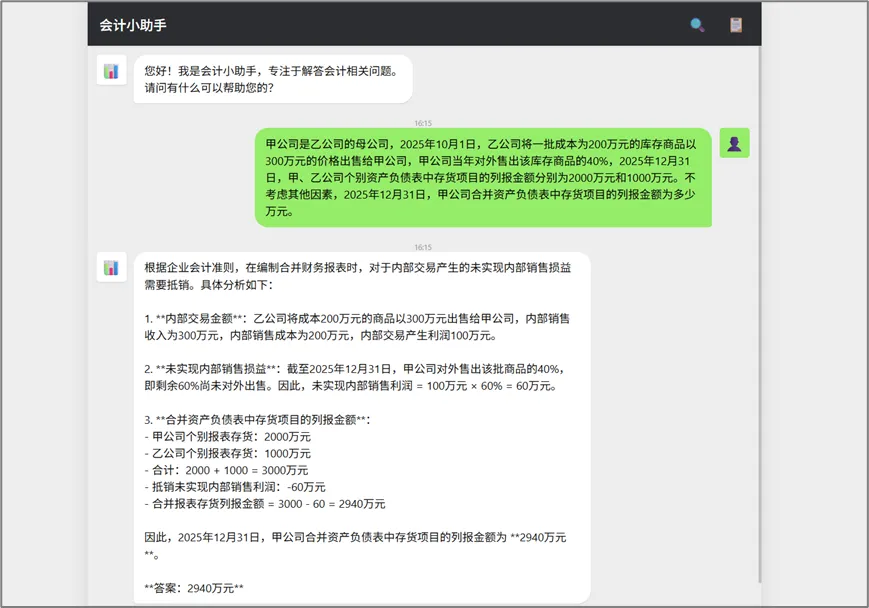
测试结果:
然后看了一下deepseek的账单,也没花什么钱。
需要注意的是,本地测试可以把API KEY写死在代码中,否则应该通过环境变量的方式读取密钥。
今天的分享就到这儿啦,非常感谢您对“Python SQL审天下”公众号的关注和点赞。如果您觉得我的公众号能给您带来一丝丝的收获,请多多转发给您的朋友圈,让更多的人看到并了解。也许您不经意间的点赞和转发,会给他人带来独特的体验和感受。