ARTICLE · 948353
PDFBox!一个强大的开源 PDF 处理库
环境:Spring Boot 3.5.0
1. 简介
Apache PDFBox® 库是一个用于处理 PDF 文档的开源 Java 工具。该项目支持创建新的 PDF 文档、操作现有文档以及从文档中提取内容。Apache PDFBox 还包含若干命令行实用程序。
核心功能:
Extract Text|文本提取
从 PDF 文档提取 Unicode 文本内容
支持解析页面文字,可用于 PDF 内容检索、文本导出
Split & Merge|PDF 拆分与合并
将一份 PDF 拆分为多个 PDF 小文件
把多份 PDF 合并成单个 PDF 文档
Fill Forms|表单处理(就是你前面写问卷表单用到的)
读取 PDF 表单里填写的数据
填充 PDF 表单、创建交互式表单(输入框、复选框等)
Preflight|PDF/A 校验
校验 PDF 文档是否符合 PDF/A‑1b 归档标准
检查文档合规性,用于档案、归档场景
Print|PDF 打印
调用 Java 标准打印 API,直接打印 PDF 文档
Save as Image|PDF 转图片
将 PDF 页面导出为图片格式:PNG、JPEG 等
Create PDFs|从零创建 PDF
完全从头生成全新 PDF 文件
支持嵌入字体、图片,绘制文字、图形(你的问卷就是这个能力)
Signing|数字签名
对 PDF 文件做数字签名,防篡改、身份认证
File file = new File("e:/技术架构.pdf") ;try (PDDocument document = Loader.loadPDF(file)) {AccessPermission ap = document.getCurrentAccessPermission();if (!ap.canExtractContent()) {throw new IOException("没有权限抽取文本内容");}PDFTextStripper stripper = new PDFTextStripper();stripper.setSortByPosition(true);for (int p = 1; p <= document.getNumberOfPages(); ++p) {// 设置要提取的页面间隔。如果不设置,则所有页面都会被提取stripper.setStartPage(p);stripper.setEndPage(p);String text = stripper.getText(document);String pageStr = String.format("page %d:", p);System.out.println(pageStr);for (int i = 0; i < pageStr.length(); ++i) {System.out.print("-");}System.out.println();System.out.println(text.trim());System.out.println();}}
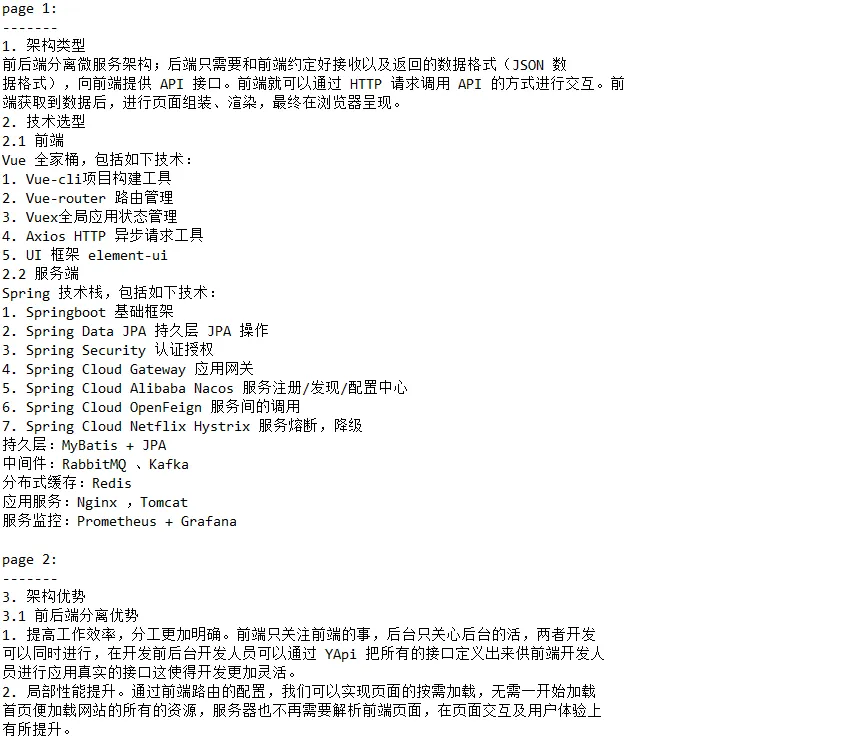
File file = new File("e:/技术架构.pdf") ;try (PDDocument document = Loader.loadPDF(file)) {PDFTextStripperByArea stripper = new PDFTextStripperByArea();stripper.setSortByPosition(true);Rectangle rect = new Rectangle(10, 280, 275, 60);stripper.addRegion("f-region", rect);PDPage firstPage = document.getPage(0);stripper.extractRegions(firstPage);System.out.println("该区域的文本内容: %s".formatted(rect));System.out.println(stripper.getTextForRegion("f-region"));}

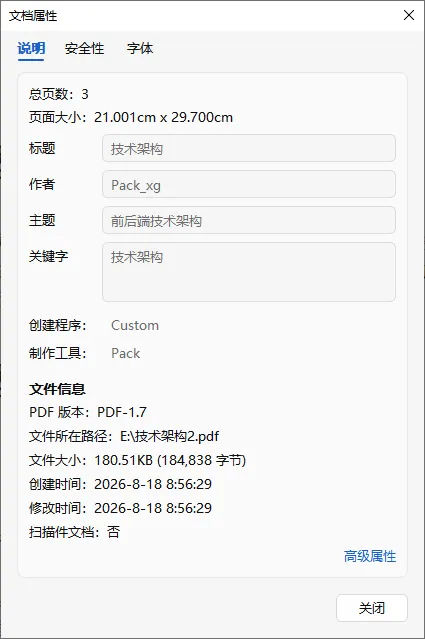
public static void main(String[] args) throws IOException, XmpParsingException, BadFieldValueException {File file = new File("e:/技术架构.pdf") ;try (PDDocument document = Loader.loadPDF(file)) {PDDocumentCatalog catalog = document.getDocumentCatalog();PDMetadata meta = catalog.getMetadata();if (meta != null) {DomXmpParser xmpParser = new DomXmpParser();try {XMPMetadata metadata = xmpParser.parse(meta.toByteArray());showDublinCoreSchema(metadata);showAdobePDFSchema(metadata);showXMPBasicSchema(metadata);} catch (XmpParsingException e) {System.err.println("An error occurred when parsing the metadata: " + e.getMessage());}} else {PDDocumentInformation information = document.getDocumentInformation();if (information != null) {showDocumentInformation(information);}}}}private static void showXMPBasicSchema(XMPMetadata metadata) {XMPBasicSchema basic = metadata.getXMPBasicSchema();if (basic != null) {display("Create Date:", basic.getCreateDate());display("Modify Date:", basic.getModifyDate());display("Creator Tool:", basic.getCreatorTool());}}private static void showAdobePDFSchema(XMPMetadata metadata) {AdobePDFSchema pdf = metadata.getAdobePDFSchema();if (pdf != null) {display("Keywords:", pdf.getKeywords());display("PDF Version:", pdf.getPDFVersion());display("PDF Producer:", pdf.getProducer());}}private static void showDublinCoreSchema(XMPMetadata metadata) throws BadFieldValueException {DublinCoreSchema dc = metadata.getDublinCoreSchema();if (dc != null) {display("Title:", dc.getTitle());display("Description:", dc.getDescription());listString("Creators: ", dc.getCreators());listCalendar("Dates:", dc.getDates());listString("Subjects:", dc.getSubjects());}}private static void showDocumentInformation(PDDocumentInformation information) {display("Title:", information.getTitle());display("Subject:", information.getSubject());display("Author:", information.getAuthor());display("Creator:", information.getCreator());display("Producer:", information.getProducer());}private static void listString(String title, List<String> list) {if (list == null) {return;}System.out.println(title);for (String string : list) {System.out.println(" " + string);}}private static void listCalendar(String title, List<Calendar> list) {if (list == null) {return;}System.out.println(title);for (Calendar calendar : list) {System.out.println(" " + format(calendar));}}private static String format(Object o) {if (o instanceof Calendar) {Calendar cal = (Calendar) o;return DateFormat.getDateInstance().format(cal.getTime());} else {return o.toString();}}private static void display(String title, Object value) {if (value != null) {System.out.println(title + " " + format(value));}}

public class AddImageToPdf {public void createPDFFromImage(String inputFile, String imagePath, String outputFile) throws IOException {try (PDDocument doc = Loader.loadPDF(new File(inputFile))) {PDPage page = doc.getPage(0);PDImageXObject pdImage = PDImageXObject.createFromFile(imagePath, doc);try (PDPageContentStream contentStream = new PDPageContentStream(doc, page, AppendMode.APPEND, true, true)) {float scale = 1f;contentStream.drawImage(pdImage, 20, 20, pdImage.getWidth() * scale, pdImage.getHeight() * scale);}doc.save(outputFile);}}public static void main(String[] args) throws IOException {new AddImageToPdf().createPDFFromImage("e:/技术架构.pdf", "d:/images/8.png", "e:/技术架构2.pdf");}}

File file = new File("e:/技术架构.pdf");try (PDDocument document = Loader.loadPDF(file)) {PDDocumentCatalog catalog = document.getDocumentCatalog();XMPMetadata metadata = XMPMetadata.createXMPMetadata();AdobePDFSchema pdfSchema = metadata.createAndAddAdobePDFSchema();pdfSchema.setKeywords("技术架构") ;pdfSchema.setProducer("Pack") ;XMPBasicSchema basicSchema = metadata.createAndAddXMPBasicSchema();basicSchema.setModifyDate(Calendar.getInstance());basicSchema.setCreateDate(Calendar.getInstance());basicSchema.setCreatorTool("Custom");basicSchema.setMetadataDate(new GregorianCalendar());DublinCoreSchema dcSchema = metadata.createAndAddDublinCoreSchema();dcSchema.setTitle("技术架构");dcSchema.addCreator("Pack_xg");dcSchema.setDescription("前后端技术架构");PDMetadata metadataStream = new PDMetadata(document);catalog.setMetadata(metadataStream);XmpSerializer serializer = new XmpSerializer();ByteArrayOutputStream baos = new ByteArrayOutputStream();serializer.serialize(metadata, baos, false);metadataStream.importXMPMetadata(baos.toByteArray());document.save("e:/技术架构2.pdf");}
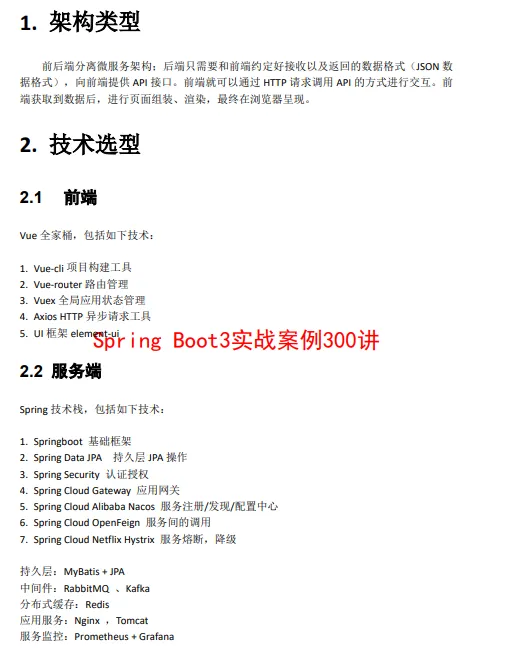
try (PDDocument doc = Loader.loadPDF(new File(file))) {File fontFile = new File("C:/Windows/Fonts/simhei.ttf");FileInputStream fis = new FileInputStream(fontFile) ;PDType0Font font = PDType0Font.load(doc, fis, true);float fontSize = 22.0f;for (PDPage page : doc.getPages()) {PDRectangle pageSize = page.getMediaBox();float stringWidth = font.getStringWidth(message) * fontSize / 1000f;int rotation = page.getRotation();boolean rotate = rotation == 90 || rotation == 270;float pageWidth = rotate ? pageSize.getHeight() : pageSize.getWidth();float pageHeight = rotate ? pageSize.getWidth() : pageSize.getHeight();float centerX = rotate ? pageHeight / 2f : (pageWidth - stringWidth) / 2f;float centerY = rotate ? (pageWidth - stringWidth) / 2f : pageHeight / 2f;try (PDPageContentStream contentStream = new PDPageContentStream(doc, page, AppendMode.PREPEND, true, true)) {contentStream.beginText();contentStream.setFont(font, fontSize);contentStream.setNonStrokingColor(Color.red);if (rotate) {contentStream.setTextMatrix(Matrix.getRotateInstance(Math.PI / 2, centerX, centerY));} else {contentStream.setTextMatrix(Matrix.getTranslateInstance(centerX, centerY));}contentStream.showText(message);contentStream.endText();}}doc.save(outfile);}}public static void main(String[] args) throws IOException {new AddMessageToEachPage().doIt("e:/技术架构.pdf", "Spring Boot3实战案例300讲", "e:/技术架构2.pdf");}
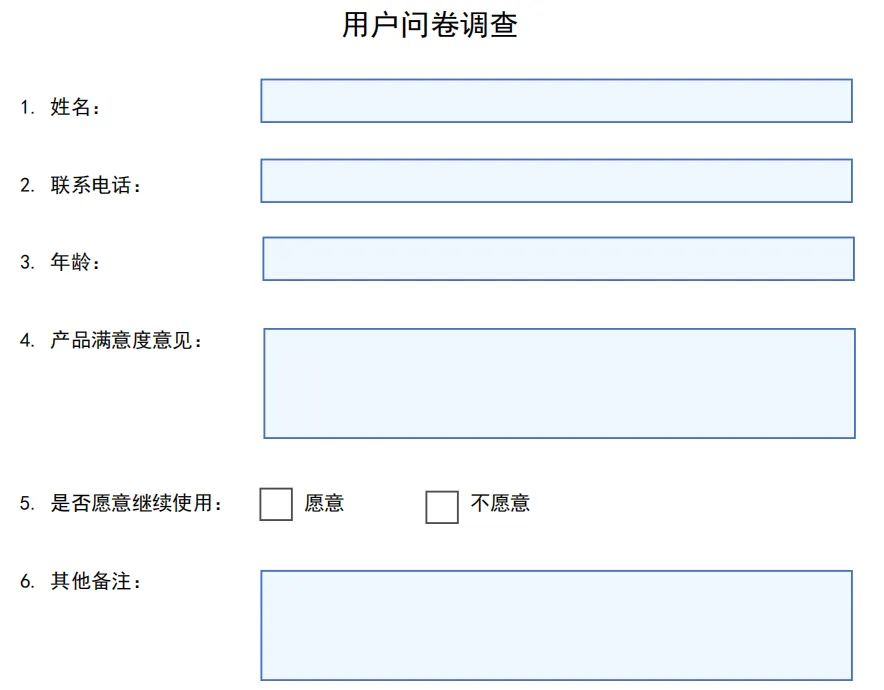
public static void main(String[] args) throws IOException {try (PDDocument document = new PDDocument()) {PDPage page = new PDPage(PDRectangle.A4);document.addPage(page);File fontFile = new File("C:/Windows/Fonts/simhei.ttf");PDFont chineseFont;try (FileInputStream fis = new FileInputStream(fontFile)) {chineseFont = PDType0Font.load(document, fis, true);}PDResources resources = new PDResources();resources.put(COSName.getPDFName("SimHei"), chineseFont);PDAcroForm acroForm = new PDAcroForm(document);document.getDocumentCatalog().setAcroForm(acroForm);acroForm.setDefaultResources(resources);acroForm.setDefaultAppearance("/SimHei 10 Tf 0 0 0 rg");float pageWidth = PDRectangle.A4.getWidth();// 表单整体尺寸float formWidth = 460;float left = (pageWidth - formWidth) / 2f;float labelWidth = 130;float fieldX = left + labelWidth;float fieldW = formWidth - labelWidth - 10;// 行距float rowHeight = 42;// 顶部起始位置float baseY = page.getMediaBox().getHeight() - 80;try (PDPageContentStream cs = new PDPageContentStream(document, page)) {// 标题cs.beginText();cs.setFont(chineseFont, 16);cs.newLineAtOffset(left, baseY + 10);cs.showText("用户问卷调查");cs.endText();cs.setFont(chineseFont, 11);// ================== 1 姓名 ==================drawText(cs, left, baseY, "1. 姓名:");addTextField(document, acroForm, page, "name", fieldX, baseY - 14, fieldW, 24);baseY -= rowHeight;// ================== 2 联系电话 ==================drawText(cs, left, baseY, "2. 联系电话:");addTextField(document, acroForm, page, "phone", fieldX, baseY - 14, fieldW, 24);baseY -= rowHeight;// ================== 3 年龄 ==================drawText(cs, left, baseY, "3. 年龄:");addTextField(document, acroForm, page, "age", fieldX, baseY - 14, fieldW, 24);baseY -= rowHeight;// ================== 4 产品满意度意见 ==================drawText(cs, left, baseY, "4. 产品满意度意见:");addMultilineField(document, acroForm, page, "satisfyOpinion", fieldX, baseY - 70, fieldW, 60);baseY -= 88;// ================== 5 是否愿意继续使用 ==================drawText(cs, left, baseY, "5. 是否愿意继续使用:");String yesValue = "愿意";String noValue = "不愿意";float checkBoxSize = 18;float textOffsetY = 4;// 愿意addCheckBox(document, acroForm, page, "useYes", fieldX, baseY - 10, checkBoxSize, checkBoxSize);drawText(cs, fieldX + 22, baseY + textOffsetY, yesValue);// 不愿意float noX = fieldX + 90;addCheckBox(document, acroForm, page, "useNo", noX, baseY - 10, checkBoxSize, checkBoxSize);drawText(cs, noX + 22, baseY + textOffsetY, noValue);baseY -= rowHeight;// ================== 6 其他备注 ==================drawText(cs, left, baseY, "6. 其他备注:");addMultilineField(document, acroForm, page, "otherRemark", fieldX, baseY - 70, fieldW, 60);}document.save("e:/survey_form.pdf");System.out.println("问卷表单生成完成:e:/survey_form.pdf");}}private static void drawText(PDPageContentStream cs, float x, float y, String text) throws IOException {cs.beginText();cs.newLineAtOffset(x, y);cs.showText(text);cs.endText();}private static PDTextField createTextField(PDAcroForm acroForm, String fieldName, String defaultAppear) {PDTextField textField = new PDTextField(acroForm);textField.setPartialName(fieldName);textField.setDefaultAppearance(defaultAppear);textField.setQ(PDVariableText.QUADDING_LEFT);acroForm.getFields().add(textField);return textField;}private static PDCheckBox createCheckBox(PDAcroForm acroForm, String fieldName) {PDCheckBox checkBox = new PDCheckBox(acroForm);checkBox.setPartialName(fieldName);acroForm.getFields().add(checkBox);return checkBox;}private static void addTextField(PDDocument doc, PDAcroForm acroForm, PDPage page, String fieldName, float x, float y,float w, float h) throws IOException {PDTextField field = createTextField(acroForm, fieldName, "/SimHei 10 Tf 0 0 0 rg");PDAnnotationWidget widget = field.getWidgets().get(0);widget.setRectangle(new PDRectangle(x, y, w, h));widget.setPage(page);PDAppearanceCharacteristicsDictionary dict = new PDAppearanceCharacteristicsDictionary(new COSDictionary());dict.setBackground(new PDColor(new float[] { 0.94f, 0.97f, 1.0f }, PDDeviceRGB.INSTANCE));dict.setBorderColour(new PDColor(new float[] { 0.28f, 0.45f, 0.75f }, PDDeviceRGB.INSTANCE));widget.setAppearanceCharacteristics(dict);widget.setPrinted(true);page.getAnnotations().add(widget);}private static void addMultilineField(PDDocument doc, PDAcroForm acroForm, PDPage page, String fieldName, float x,float y, float w, float h) throws IOException {PDTextField field = createTextField(acroForm, fieldName, "/SimHei 10 Tf 0 0 0 rg");field.setMultiline(true);PDAnnotationWidget widget = field.getWidgets().get(0);widget.setRectangle(new PDRectangle(x, y, w, h));widget.setPage(page);PDAppearanceCharacteristicsDictionary dict = new PDAppearanceCharacteristicsDictionary(new COSDictionary());dict.setBackground(new PDColor(new float[] { 0.94f, 0.97f, 1.0f }, PDDeviceRGB.INSTANCE));dict.setBorderColour(new PDColor(new float[] { 0.28f, 0.45f, 0.75f }, PDDeviceRGB.INSTANCE));widget.setAppearanceCharacteristics(dict);widget.setPrinted(true);page.getAnnotations().add(widget);}private static void addCheckBox(PDDocument doc, PDAcroForm acroForm, PDPage page, String fieldName, float x, float y,float w, float h) throws IOException {PDCheckBox checkBox = createCheckBox(acroForm, fieldName);PDAnnotationWidget widget = checkBox.getWidgets().get(0);widget.setRectangle(new PDRectangle(x, y, w, h));widget.setPage(page);PDAppearanceCharacteristicsDictionary dict = new PDAppearanceCharacteristicsDictionary(new COSDictionary());dict.setBackground(new PDColor(new float[] { 1, 1, 1 }, PDDeviceRGB.INSTANCE));dict.setBorderColour(new PDColor(new float[] { 0.3f, 0.3f, 0.3f }, PDDeviceRGB.INSTANCE));widget.setAppearanceCharacteristics(dict);widget.setPrinted(true);page.getAnnotations().add(widget);}
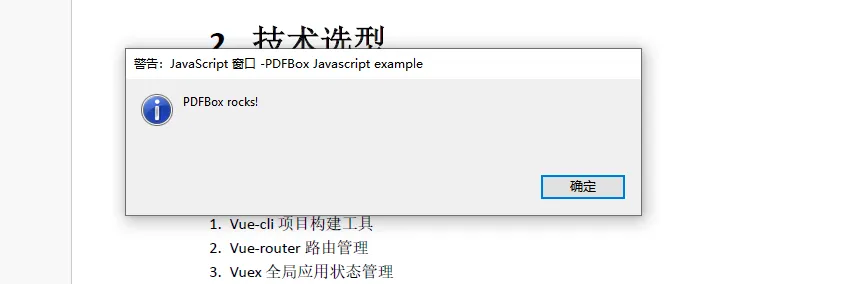
try (PDDocument document = Loader.loadPDF(new File("e:/技术架构.pdf"))) {PDActionJavaScript javascript = new PDActionJavaScript("app.alert( {cMsg: 'PDFBox rocks!', nIcon: 3, nType: 0, cTitle: 'PDFBox Javascript' } );");document.getDocumentCatalog().setOpenAction(javascript);if (document.isEncrypted()) {throw new IOException("Encrypted documents are not supported for this example");}document.save("e:/技术架构2.pdf");}
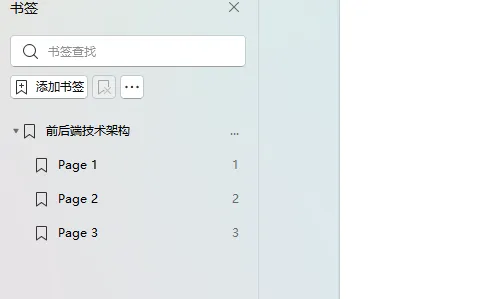
try (PDDocument document = Loader.loadPDF(new File("e:/技术架构.pdf"))) {PDDocumentOutline outline = new PDDocumentOutline();document.getDocumentCatalog().setDocumentOutline(outline);PDOutlineItem pagesOutline = new PDOutlineItem();pagesOutline.setTitle("前后端技术架构");outline.addLast(pagesOutline);int pageNum = 0;for (PDPage page : document.getPages()) {pageNum++;PDPageDestination dest = new PDPageFitWidthDestination();dest.setPage(page);PDOutlineItem bookmark = new PDOutlineItem();bookmark.setDestination(dest);bookmark.setTitle("Page " + pageNum);pagesOutline.addLast(bookmark);}pagesOutline.openNode();outline.openNode();document.getDocumentCatalog().setPageMode(PageMode.USE_OUTLINES);document.save("e:/技术架构2.pdf");}
别再造轮子了!你要的 Spring Boot 接口幂等它都封好了
零侵入!基于 Spring Boot 自定义JDBC 核心组件实现字段加解密
配置即接口:基于 Spring Boot 3 打造零代码动态网关组件
告别多源查询混乱!Spring Boot + Calcite 实现跨库查询
不会前端技术?Spring Boot + HTMX:零JS打造SPA
一招搞定!Spring Boot 动态创建 Controller 接口
Spring Boot 日志处理的两大核心技术:请求跟踪与日志过滤
强大!Spring Boot 使用强大的@Formula注解简化查询
高级开发!Spring Boot 零侵入读写分离:基于SQL解析全自动路由