ARTICLE · 993988
一款针对WEB的AI自动化渗透测试工具
一款针对WEB的AI自动化渗透测试工具工具简介 ORTHRUS 是一个集侦察(recon)→ 扫描(scan)→ 利用确认(exploit-confirm)→ 关联(correlation)→ 报告(reporting)于一体的集成 DAST 框架,专为授权安全测试设计。 工作原理 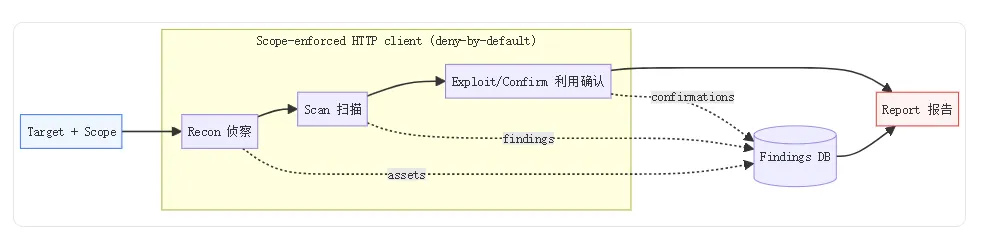
安装部署 使用示例 并支持插件拓展功能
🔗 源码: https://github.com/ankitjha67/orthrus | MIT | Python 3.11+ | v0.1.0
ORTHRUS 的不同在于——它在发现之后还有一个**利用确认(exploitation-confirmation)阶段**,会对可疑发现发送真实攻击载荷去"证明"它:XSS 在真实浏览器里执行、SSRF 收到外带回调、JWT 的弱密钥被恢复并伪造出合法签名。输出报告能明确区分"疑似"(tentative)与"已被证实可利用"(confirmed)。这是它区别于 Burp/ZAP/nuclei 的核心能力。
核心能力
- 70 个漏洞扫描器
覆盖 Web/API/LLM/auth-flow - 28 个利用确认模块
重新证明发现,升级为 confirmed - 18 个侦察模块
爬虫、指纹、JS 分析、参数挖掘 - AI 咨询报告
Big-Four 级交付物,模型无法幻觉漏洞 - 范围强制
deny-by-default 安全边界
检测范围
不只爬 URL,而是全方位摸清目标:
爬虫:范围感知的 Web 爬虫 + 无头浏览器动态爬取 + SPA 客户端路由发现 JS 分析:从 JS 中提取端点和密钥,source-map 恢复(从泄漏的 .map文件还原端点)参数挖掘:Arjun 风格隐藏参数发现 内容发现:robots.txt / sitemap.xml / /.well-known/探测子域与 DNS:子域枚举、DNS 枚举 + AXFR 尝试 API 发现:REST/GraphQL API 发现、Wayback 历史 URL 被动情报:反向 DNS / ASN / 地理位置 / 云归属 / 同主机收集 端口扫描:可选的 Nmap(需要 nmap 二进制)
漏洞扫描器(70 个)
| 注入 | |
| XSS | |
| 访问/逻辑 | |
| 认证/会话 | |
| 服务端 | |
| 配置/传输 | |
| 协议/API | |
| AI/LLM |
利用确认模块(28 个)
- 注入
SQLi、命令注入、SSTI、LFI、XXE、NoSQL - XSS
Playwright 浏览器执行 + 截图 - 重定向/头
开放重定向、CRLF、主机头注入 - 访问/对象
IDOR、批量赋值 - 跨源/令牌
CORS、JWT(恢复弱密钥并伪造签名) - JS 运行时/DoS
原型污染、GraphQL DoS - OOB
SSRF collaborator 回调
bashgit clone https://github.com/ankitjha67/orthrus.gitcd orthruspython -m venv .venv# Windows: .\.venv\Scripts\Activate.ps1pip install -e .# 可选依赖pip install -e ".[browser]" # Playwright(DOM/存储 XSS)pip install -e ".[scanners]" # jwt/tls 等pip install -e ".[postgres]" # PostgreSQLplaywright install chromium# 或 Docker(免克隆)docker run --rm ghcr.io/ankitjha67/orthrus scan -t http://TARGET --scope TARGET
bash# 1) 预览范围 + 计划(不发流量)orthrus scan -t https://yoursite.com --scope "yoursite.com,*.yoursite.com" --dry-run# 2) 完整流水线 → 技术 HTML 报告orthrus scan -t https://yoursite.com \--scope "yoursite.com,*.yoursite.com" \--rate-limit 10 --crawl-depth 3 --max-pages 200 \--exclude-paths "/logout,/admin/delete/.*" \-o reports/yoursite.html --format html --template technical# 3) 认证扫描orthrus scan -t https://app.target.com \--auth-cookie "session=abc123; csrf=def456" \--headers '{"Authorization": "Bearer eyJ..."}' -o report.json# CI 门禁orthrus scan -t https://yoursite.com --fail-on high -o report.json
高级特性-v2.0 运营平台
- Operator graph
程序 → 资产 → 端点 → 去重发现,哈希链审计 - 持续侦察
recon-run`/`recon-watch`,新资产 diff,Slack 告警 - 流量桥接
Burp/Caido/HAR 历史导入 - 团队模式
角色 + API key + Cockpit
优点
- 确认导向
tentative → confirmed,不是"看起来有漏洞" 针对性强 可针对web进行,SRC挖掘 - 覆盖面广
70 扫描器 + 28 确认器 + 18 侦察模块 - AI 只解释不发明
确定性代码发现,模型不能幻觉漏洞 - 范围强制 deny-by-default
极强的安全边界 - 本地 AI
Ollama 全本地,数据不出内网 - MIT 许可
最宽松协议
完整扫描工作流
# 1) 预览范围与计划(不发流量)orthrus scan -t https://yoursite.com --scope ”yoursite.com,*.yoursite.com” --dry-run# 2) 完整流水线 → 技术 HTML 报告orthrus scan -t https://yoursite.com \--scope ”yoursite.com,*.yoursite.com” \--rate-limit 10 --crawl-depth 3 --max-pages 200 \--exclude-paths ”/logout,/admin/delete/.*” \-o reports/yoursite.html --format html --template technical# 3) 同一存储扫描导出更多格式orthrus scansorthrus report --scan-id --format pdf --template executive -o execorthrus report --scan-id --format sarif -o reports/yoursite# 4) CI 门禁:出现高危即失败orthrus scan -t https://yoursite.com --fail-on high -o report.json
6.4 认证扫描与指定模块
# 认证扫描(复用会话 cookie)orthrus scan -t https://app.target.com \--auth-cookie ”session=abc123; csrf=def456” \--headers '{”Authorization”: ”Bearer eyJ...”}' -o report.json# 只跑指定扫描器orthrus scan -t https://app.target.com --modules sqli,xss,ssti,ssrf -o report.json# 路由代理(Burp/ZAP 可视化所有请求)orthrus scan -t https://app.target.com --proxy http://127.0.0.1:8080 --rate-limit 10
🔗 源码: https://github.com/ankitjha67/orthrus