 夜雨聆风
夜雨聆风


MyBatis插件模块详解
MyBatis插件模块详解
一、MyBatis整体架构与插件模块
在深入插件模块之前,我们先了解MyBatis的整体架构,以及插件模块在其中的重要地位。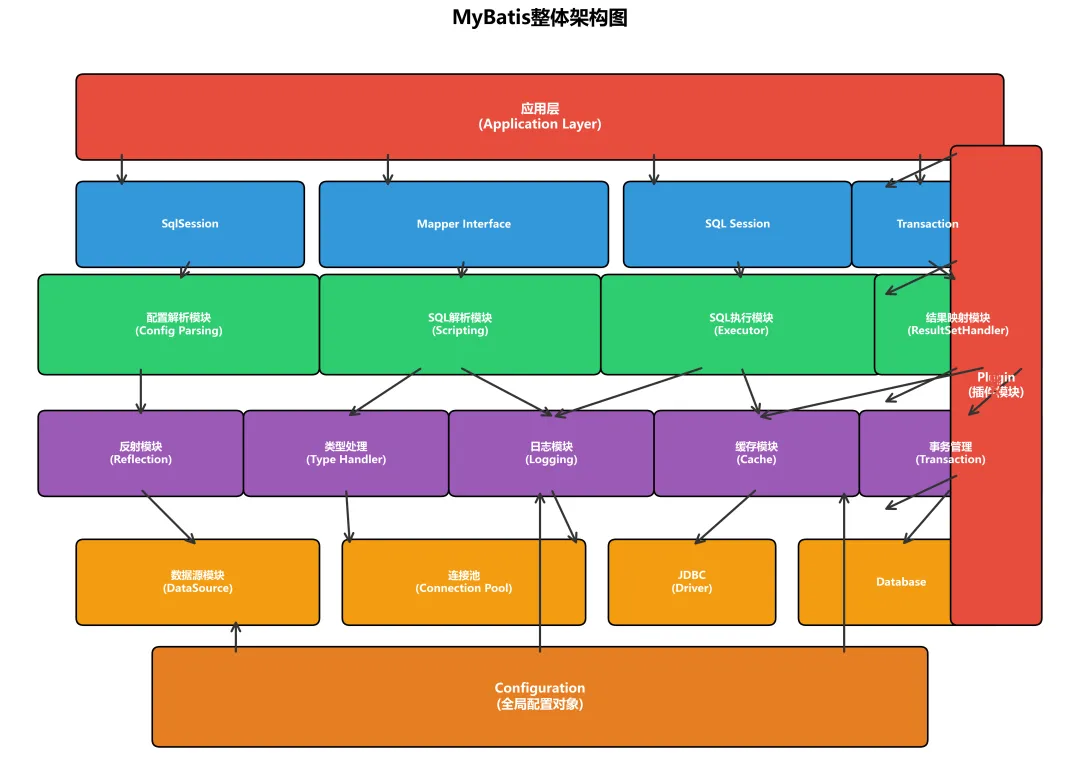
从上图可以看出,MyBatis采用了分层架构设计,而插件模块(Plugin)通过动态代理机制横切整个框架,能够在核心组件的执行过程中插入自定义逻辑。它为MyBatis提供了强大的扩展能力,使得开发者可以在不修改源码的情况下增强框架功能。
1.1 插件模块的核心职责
插件模块主要承担以下核心职责:
-
扩展框架功能:在不动源码的情况下增强MyBatis功能 -
拦截核心组件:拦截Executor、StatementHandler、ParameterHandler、ResultSetHandler -
实现AOP功能:通过动态代理实现面向切面编程 -
统一权限控制:实现数据权限过滤 -
性能监控:记录SQL执行时间和性能指标 -
分页查询:实现物理分页功能
1.2 为什么需要插件
在实际开发中,我们经常有这些需求:
需求场景:├── SQL性能监控:记录慢查询├── 数据权限控制:根据用户权限过滤数据├── 分页查询:自动实现物理分页├── 乐观锁:自动更新版本号├── 审计日志:记录操作日志└── 加密解密:敏感数据加密存储如果没有插件机制,我们需要修改MyBatis源码或编写大量重复代码。插件机制让我们可以优雅地实现这些功能。
1.3 插件的实现原理
MyBatis的插件基于动态代理实现:
目标对象 ↓使用Plugin.wrap()包装 ↓生成代理对象 ↓调用intercept()方法 ↓执行自定义逻辑 ↓调用目标方法或继续传递二、插件拦截机制
MyBatis的插件机制基于Java动态代理和责任链模式。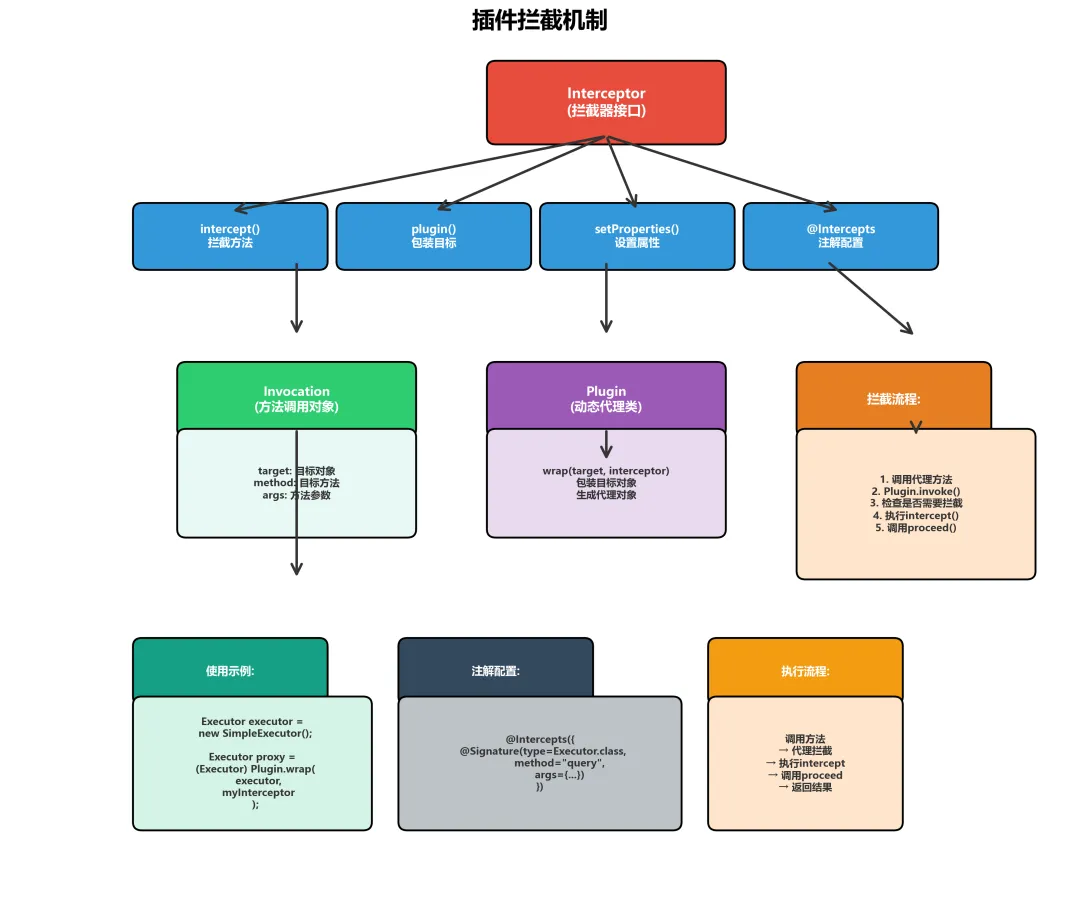
2.1 Interceptor接口
MyBatis插件的核心是Interceptor接口:
publicinterfaceInterceptor{/** * 拦截方法,在这里实现自定义逻辑 * @param invocation 代理调用对象 * @return 方法执行结果 * @throws Throwable 异常 */Object intercept(Invocation invocation)throws Throwable;/** * 包装目标对象,生成代理对象 * @param target 目标对象 * @return 代理对象 */default Object plugin(Object target){return Plugin.wrap(target, this); }/** * 设置插件属性 * @param properties 配置属性 */defaultvoidsetProperties(Properties properties){// NOP }}2.2 Invocation类
Invocation封装了方法调用的相关信息:
publicclassInvocation{privatefinal Object target; // 目标对象privatefinal Method method; // 目标方法privatefinal Object[] args; // 方法参数publicInvocation(Object target, Method method, Object[] args){this.target = target;this.method = method;this.args = args; }// 执行目标方法public Object proceed()throws InvocationTargetException, IllegalAccessException {return method.invoke(target, args); }// Getter方法public Object getTarget(){ return target; }public Method getMethod(){ return method; }public Object[] getArgs() { return args; }}2.3 Plugin类
Plugin是代理对象的InvocationHandler:
publicclassPluginimplementsInvocationHandler{privatefinal Object target;privatefinal Interceptor interceptor;privatefinal Map<Class<?>, Set<Method>> signatureMap;privatePlugin(Object target, Interceptor interceptor, Map<Class<?>, Set<Method>> signatureMap){this.target = target;this.interceptor = interceptor;this.signatureMap = signatureMap; }// 静态工厂方法,包装目标对象publicstatic Object wrap(Object target, Interceptor interceptor){// 获取拦截的类和方法签名 Map<Class<?>, Set<Method>> signatureMap = getSignatureMap(interceptor); Class<?> type = target.getClass();// 获取需要拦截的接口 Class<?>[] interfaces = getAllInterfaces(type, signatureMap);if (interfaces.length > 0) {// 创建代理对象return Proxy.newProxyInstance( type.getClassLoader(), interfaces,new Plugin(target, interceptor, signatureMap) ); }return target; }@Overridepublic Object invoke(Object proxy, Method method, Object[] args)throws Throwable {try {// 获取需要拦截的方法集合 Set<Method> methods = signatureMap.get(method.getDeclaringClass());if (methods != null && methods.contains(method)) {// 执行拦截器的intercept方法return interceptor.intercept(new Invocation(target, method, args)); }// 不需要拦截,直接执行return method.invoke(target, args); } catch (Exception e) {throw ExceptionUtil.unwrapThrowable(e); } }// 获取签名映射privatestatic Map<Class<?>, Set<Method>> getSignatureMap(Interceptor interceptor) { Intercepts interceptsAnnotation = interceptor.getClass().getAnnotation(Intercepts.class);if (interceptsAnnotation == null) {thrownew PluginException("No @Intercepts annotation was found in interceptor " + interceptor.getClass().getName()); } Signature[] sigs = interceptsAnnotation.value(); Map<Class<?>, Set<Method>> signatureMap = new HashMap<>();for (Signature sig : sigs) { Set<Method> methods = signatureMap.computeIfAbsent(sig.type(), k -> new HashSet<>());try { Method method = sig.type().getMethod(sig.method(), sig.args()); methods.add(method); } catch (NoSuchMethodException e) {thrownew PluginException("Could not find method on " + sig.type() + " named " + sig.method() + ". Cause: " + e, e); } }return signatureMap; }// 获取所有需要拦截的接口privatestatic Class<?>[] getAllInterfaces(Class<?> type, Map<Class<?>, Set<Method>> signatureMap) { Set<Class<?>> interfaces = new HashSet<>();while (type != null) {for (Class<?> c : type.getInterfaces()) {if (signatureMap.containsKey(c)) { interfaces.add(c); } } type = type.getSuperclass(); }return interfaces.toArray(new Class<?>[interfaces.size()]); }}三、四大核心拦截点
MyBatis允许拦截四个核心组件。
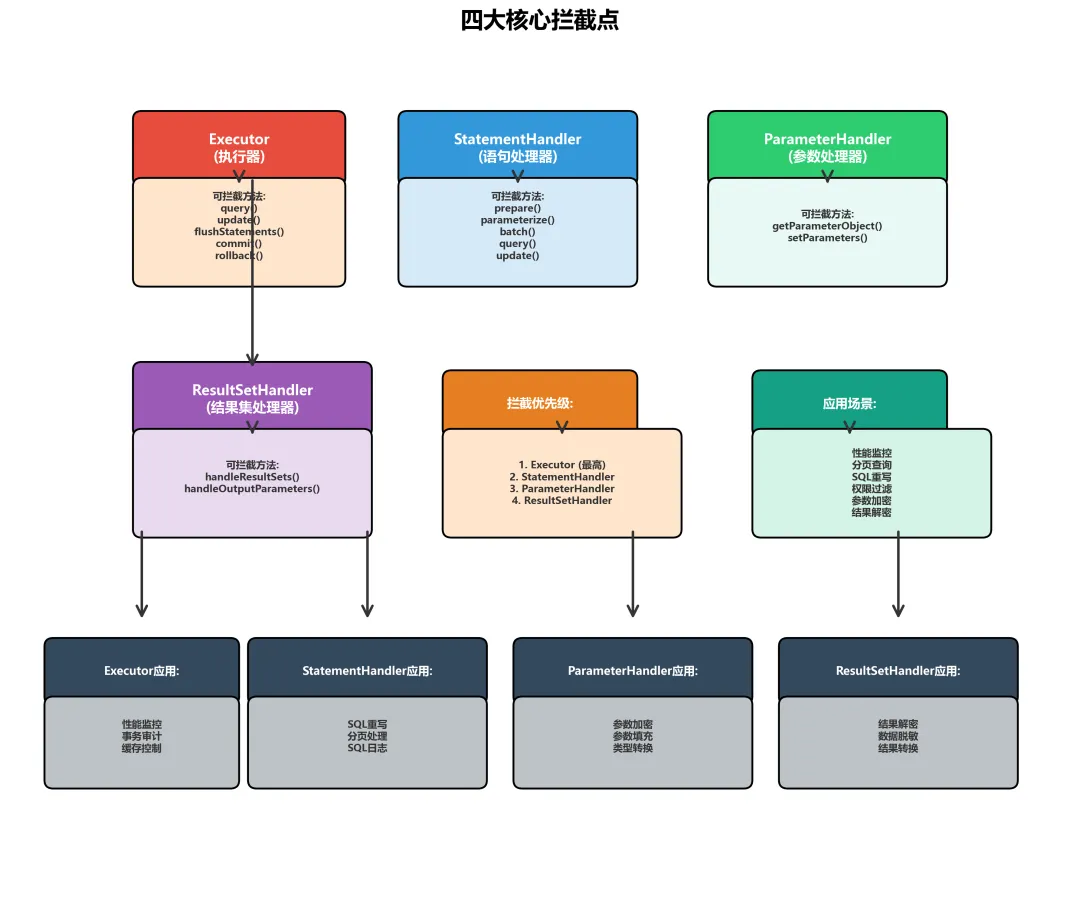
3.1 Executor(执行器)
Executor是MyBatis的核心执行器,负责SQL的执行。
可拦截方法:
-
update(MappedStatement ms, Object parameter)– 执行增删改 -
query(MappedStatement ms, Object parameter, RowBounds rowBounds, ResultHandler resultHandler)– 查询 -
query(MappedStatement ms, Object parameter, RowBounds rowBounds, ResultHandler resultHandler, CacheKey cacheKey, BoundSql boundSql)– 查询(带缓存) -
flushStatements()– 刷新批处理 -
commit()– 提交事务 -
rollback()– 回滚事务 -
getTransaction()– 获取事务 -
close()– 关闭会话 -
isClosed()– 是否关闭
示例:性能监控插件
@Intercepts({@Signature(type = Executor.class,method= "update", args = {MappedStatement.class, Object.class}), @Signature(type= Executor.class,method= "query", args = {MappedStatement.class, Object.class, RowBounds.class, ResultHandler.class})})publicclassPerformanceMonitorPluginimplementsInterceptor{privatelong threshold; // 慢查询阈值@Overridepublic Object intercept(Invocation invocation)throws Throwable { MappedStatement ms = (MappedStatement) invocation.getArgs()[0];long start = System.currentTimeMillis();try {// 执行目标方法return invocation.proceed(); } finally {long end = System.currentTimeMillis();long time = end - start;if (time > threshold) { String sql = ms.getBoundSql(null).getSql(); System.out.println("慢查询警告: " + ms.getId() + " 耗时: " + time + "ms"); System.out.println("SQL: " + sql); } } }@OverridepublicvoidsetProperties(Properties properties){this.threshold = Long.parseLong(properties.getProperty("threshold", "1000")); }}3.2 StatementHandler(语句处理器)
StatementHandler负责创建Statement对象并设置参数。
可拦截方法:
-
prepare(Connection connection)– 准备Statement -
parameterize(Statement statement)– 设置参数 -
batch(Statement statement)– 批处理 -
update(Statement statement)– 执行更新 -
query(Statement statement, ResultHandler resultHandler)– 执行查询 -
getBoundSql()– 获取BoundSql -
getParameterHandler()– 获取ParameterHandler -
getResultHandler()– 获取ResultSetHandler
示例:SQL重写插件
@Intercepts({@Signature(type = StatementHandler.class,method= "prepare", args = {Connection.class, Integer.class})})publicclassSQLRewritePluginimplementsInterceptor{@Overridepublic Object intercept(Invocation invocation)throws Throwable { StatementHandler handler = (StatementHandler) invocation.getTarget(); BoundSql boundSql = handler.getBoundSql(); String sql = boundSql.getSql();// 重写SQL:添加数据权限过滤if (sql.toLowerCase().startsWith("select")) { sql = rewriteSQL(sql);// 使用反射修改sql字段 Field field = boundSql.getClass().getDeclaredField("sql"); field.setAccessible(true); field.set(boundSql, sql); }return invocation.proceed(); }private String rewriteSQL(String sql){// 添加数据权限过滤条件return sql + " AND tenant_id = '" + getCurrentTenantId() + "'"; }private String getCurrentTenantId(){// 获取当前租户IDreturn"1001"; }}3.3 ParameterHandler(参数处理器)
ParameterHandler负责设置PreparedStatement的参数。
可拦截方法:
-
getParameterObject()– 获取参数对象 -
setParameters(PreparedStatement ps)– 设置参数
示例:参数加密插件
@Intercepts({@Signature(type = ParameterHandler.class,method= "setParameters", args = {PreparedStatement.class})})publicclassParameterEncryptPluginimplementsInterceptor{@Overridepublic Object intercept(Invocation invocation)throws Throwable { ParameterHandler handler = (ParameterHandler) invocation.getTarget(); PreparedStatement ps = (PreparedStatement) invocation.getArgs()[0];// 获取参数对象 Object parameterObject = handler.getParameterObject();if (parameterObject instanceof User) { User user = (User) parameterObject;// 加密敏感字段if (user.getPassword() != null) { user.setPassword(encrypt(user.getPassword())); } }// 继续执行return invocation.proceed(); }private String encrypt(String plainText){// Base64简单加密return Base64.getEncoder().encodeToString(plainText.getBytes()); }}3.4 ResultSetHandler(结果集处理器)
ResultSetHandler负责将ResultSet映射为Java对象。
可拦截方法:
-
handleResultSets(Statement stmt)– 处理结果集 -
handleOutputParameters(CallableStatement cs)– 处理存储过程输出参数
示例:结果解密插件
@Intercepts({@Signature(type = ResultSetHandler.class,method= "handleResultSets", args = {Statement.class})})publicclassResultDecryptPluginimplementsInterceptor{@Overridepublic Object intercept(Invocation invocation)throws Throwable {// 执行查询 Object result = invocation.proceed();if (result instanceof List) { List<?> list = (List<?>) result;for (Object obj : list) {if (obj instanceof User) { User user = (User) obj;// 解密敏感字段if (user.getIdCard() != null) { user.setIdCard(decrypt(user.getIdCard())); } } } }return result; }private String decrypt(String cipherText){// Base64解密byte[] decoded = Base64.getDecoder().decode(cipherText);returnnew String(decoded); }}四、插件实现流程
理解插件的实现和配置流程非常重要。
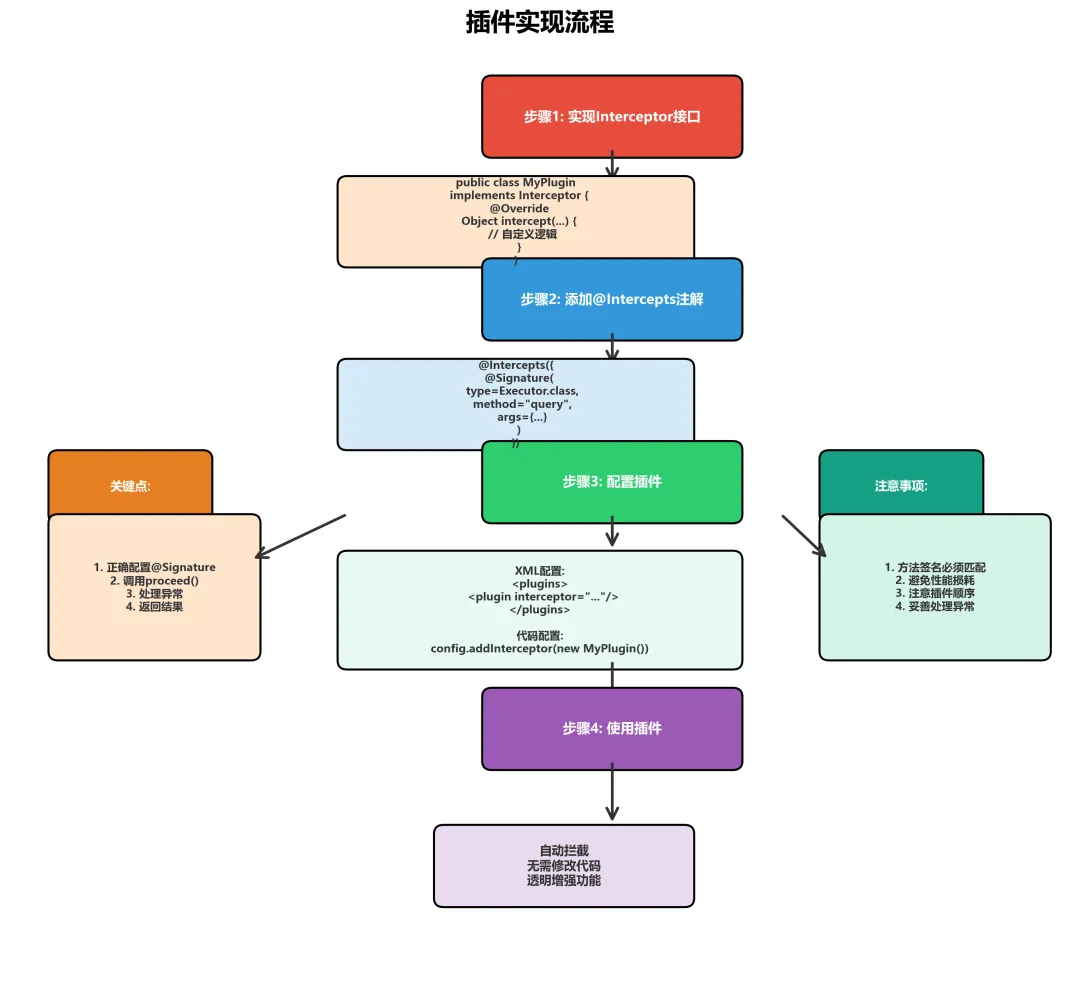
4.1 实现自定义插件
步骤1:实现Interceptor接口
@Intercepts({@Signature(type = Executor.class,method= "query", args = {MappedStatement.class, Object.class, RowBounds.class, ResultHandler.class})})publicclassCustomPluginimplementsInterceptor{@Overridepublic Object intercept(Invocation invocation)throws Throwable {// 前置逻辑 System.out.println("Before: " + invocation.getMethod().getName());// 执行目标方法 Object result = invocation.proceed();// 后置逻辑 System.out.println("After: " + invocation.getMethod().getName());return result; }@Overridepublic Object plugin(Object target){// 使用Plugin.wrap包装目标对象return Plugin.wrap(target, this); }@OverridepublicvoidsetProperties(Properties properties){// 读取配置属性 String propertyName = properties.getProperty("propertyName"); System.out.println("Property: " + propertyName); }}4.2 配置插件
方式1:XML配置
<configuration><plugins><!-- 性能监控插件 --><plugininterceptor="com.example.plugin.PerformanceMonitorPlugin"><propertyname="threshold"value="1000"/></plugin><!-- 分页插件 --><plugininterceptor="com.github.pagehelper.PageInterceptor"><propertyname="helperDialect"value="mysql"/></plugin><!-- 自定义插件 --><plugininterceptor="com.example.plugin.CustomPlugin"><propertyname="propertyName"value="propertyValue"/></plugin></plugins></configuration>方式2:代码配置
// 创建ConfigurationConfiguration configuration = new Configuration();// 添加插件configuration.addInterceptor(new PerformanceMonitorPlugin());configuration.addInterceptor(new PageInterceptor());configuration.addInterceptor(new CustomPlugin());// 创建SqlSessionFactorySqlSessionFactory sqlSessionFactory = new SqlSessionFactoryBuilder().build(configuration);方式3:Spring配置
@ConfigurationpublicclassMyBatisConfig{@Beanpublic PerformanceMonitorPlugin performanceMonitorPlugin(){ PerformanceMonitorPlugin plugin = new PerformanceMonitorPlugin(); Properties properties = new Properties(); properties.setProperty("threshold", "1000"); plugin.setProperties(properties);return plugin; }@Beanpublic SqlSessionFactory sqlSessionFactory(DataSource dataSource)throws Exception { SqlSessionFactoryBean sessionFactory = new SqlSessionFactoryBean(); sessionFactory.setDataSource(dataSource);// 添加插件 sessionFactory.setPlugins(new Interceptor[]{ performanceMonitorPlugin(),new PageInterceptor() } );return sessionFactory.getObject(); }}4.3 插件链的执行顺序
当配置了多个插件时,它们会形成责任链:
原始Executor ↓被Plugin1包装 ↓被Plugin2包装 ↓被Plugin3包装 ↓最终代理对象执行顺序:
// 配置顺序<plugin interceptor="Plugin1"/><plugin interceptor="Plugin2"/><plugin interceptor="Plugin3"/>// 执行顺序Plugin3.intercept() → Plugin2.intercept() → Plugin1.intercept() → 目标方法// 返回顺序目标方法 → Plugin1处理 → Plugin2处理 → Plugin3处理 → 最终结果五、动态代理链
多个插件会形成多层代理。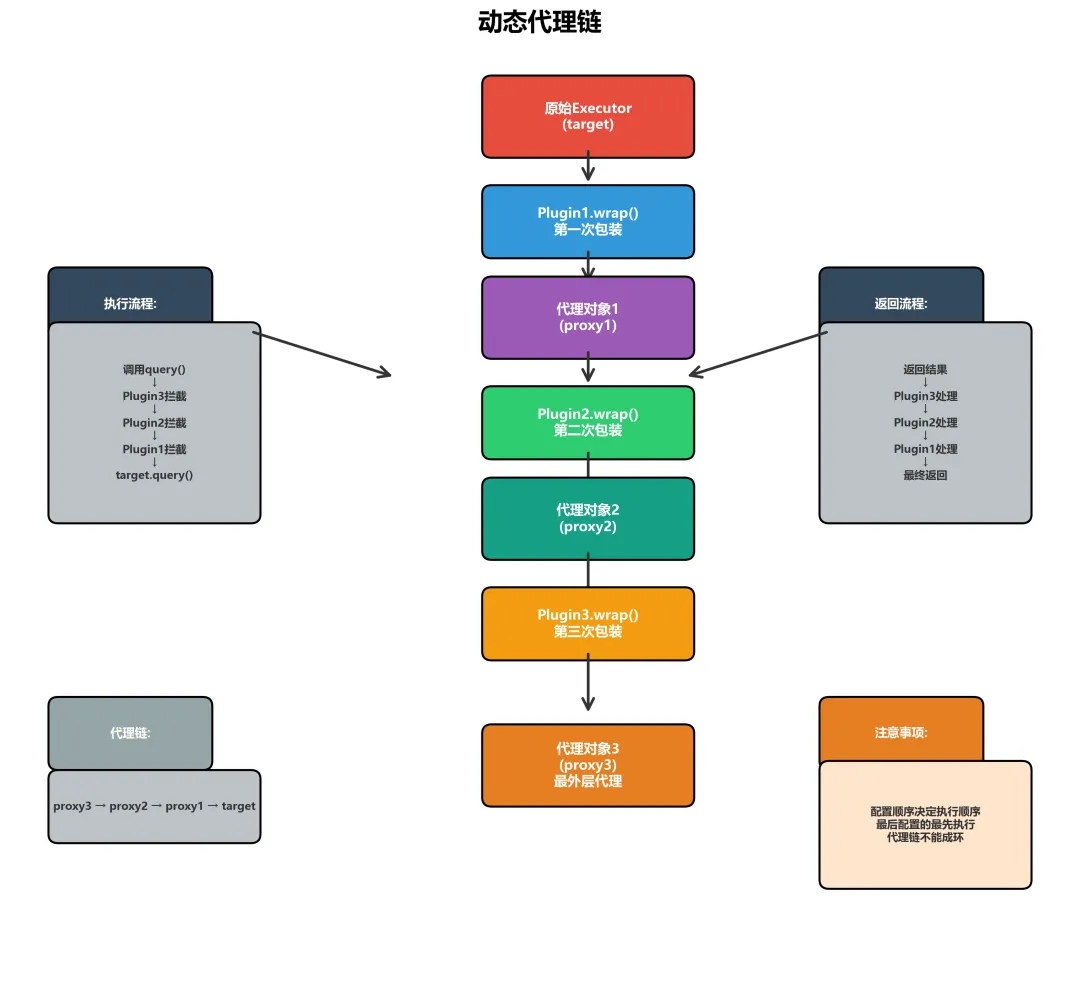
5.1 代理链的构建
// 原始对象Executor target = new SimpleExecutor();// 第一次包装Executor proxy1 = (Executor) Plugin.wrap(target, plugin1);// 第二次包装(包装的是代理对象)Executor proxy2 = (Executor) Plugin.wrap(proxy1, plugin2);// 第三次包装Executor proxy3 = (Executor) Plugin.wrap(proxy2, plugin3);// proxy3是最外层的代理5.2 代理链的执行
调用 proxy3.query() ↓Plugin3.invoke() ↓Plugin3.intercept() ↓invocation.proceed() 调用 proxy2.query() ↓Plugin2.invoke() ↓Plugin2.intercept() ↓invocation.proceed() 调用 proxy1.query() ↓Plugin1.invoke() ↓Plugin1.intercept() ↓invocation.proceed() 调用 target.query() ↓执行真正的查询 ↓返回结果 ↓Plugin1处理返回值 ↓Plugin2处理返回值 ↓Plugin3处理返回值 ↓最终返回5.3 代理链示例代码
@Intercepts(@Signature(type = Executor.class, method= "query", args = {MappedStatement.class, Object.class, RowBounds.class, ResultHandler.class}))publicclassPlugin1implementsInterceptor{@Overridepublic Object intercept(Invocation invocation)throws Throwable { System.out.println("Plugin1 Before"); Object result = invocation.proceed(); System.out.println("Plugin1 After");return result; }}@Intercepts(@Signature(type = Executor.class, method= "query", args = {MappedStatement.class, Object.class, RowBounds.class, ResultHandler.class}))publicclassPlugin2implementsInterceptor{@Overridepublic Object intercept(Invocation invocation)throws Throwable { System.out.println("Plugin2 Before"); Object result = invocation.proceed(); System.out.println("Plugin2 After");return result; }}// 输出结果:// Plugin2 Before// Plugin1 Before// 执行查询// Plugin1 After// Plugin2 After六、典型应用场景
插件在实际开发中有很多应用场景。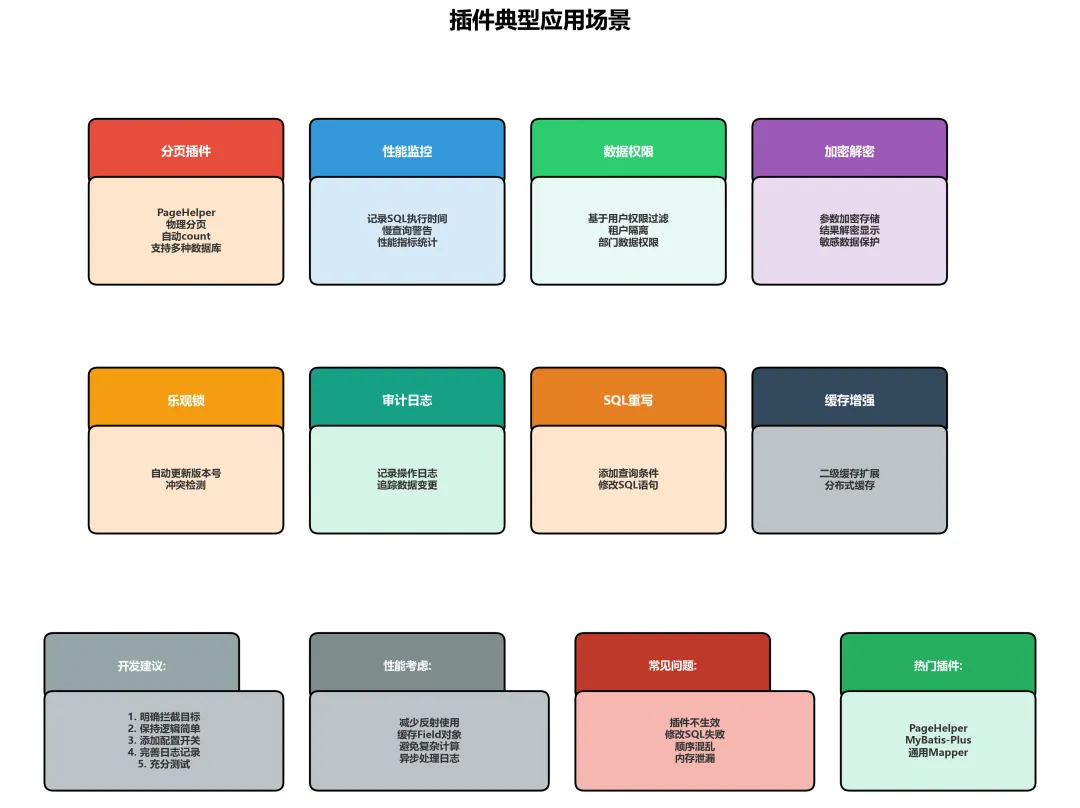
6.1 分页插件
PageHelper是最著名的MyBatis分页插件:
<dependency><groupId>com.github.pagehelper</groupId><artifactId>pagehelper</artifactId><version>5.3.2</version></dependency>配置:
<plugininterceptor="com.github.pagehelper.PageInterceptor"><propertyname="helperDialect"value="mysql"/><propertyname="reasonable"value="true"/></plugin>使用:
// 查询前调用分页PageHelper.startPage(1, 10);List<User> users = userMapper.selectAll();// 获取分页信息PageInfo<User> pageInfo = new PageInfo<>(users);System.out.println("总数: " + pageInfo.getTotal());System.out.println("页数: " + pageInfo.getPages());6.2 性能监控插件
@Intercepts({@Signature(type = Executor.class,method= "update", args = {MappedStatement.class, Object.class}), @Signature(type= Executor.class,method= "query", args = {MappedStatement.class, Object.class, RowBounds.class, ResultHandler.class})})publicclassSlowQueryMonitorPluginimplementsInterceptor{privatestaticfinal Logger logger = LoggerFactory.getLogger(SlowQueryMonitorPlugin.class);privatelong slowQueryThreshold;@Overridepublic Object intercept(Invocation invocation)throws Throwable { MappedStatement ms = (MappedStatement) invocation.getArgs()[0];long start = System.currentTimeMillis();try {return invocation.proceed(); } finally {long cost = System.currentTimeMillis() - start;if (cost > slowQueryThreshold) { BoundSql boundSql = ms.getBoundSql(invocation.getArgs()[1]); String sql = boundSql.getSql(); logger.warn("慢查询: {} 耗时: {}ms\nSQL: {}", ms.getId(), cost, sql); } } }@OverridepublicvoidsetProperties(Properties properties){this.slowQueryThreshold = Long.parseLong(properties.getProperty("threshold", "1000")); }}6.3 数据权限插件
@Intercepts({@Signature(type = StatementHandler.class,method= "prepare", args = {Connection.class, Integer.class})})publicclassDataPermissionPluginimplementsInterceptor{@Overridepublic Object intercept(Invocation invocation)throws Throwable { StatementHandler handler = (StatementHandler) invocation.getTarget(); BoundSql boundSql = handler.getBoundSql(); String sql = boundSql.getSql();// 获取当前用户的数据权限 Set<Long> deptIds = getCurrentUserDeptIds();// 重写SQL,添加数据权限过滤if (sql.toLowerCase().startsWith("select") && !deptIds.isEmpty()) { String condition = "dept_id IN (" + String.join(",", deptIds.toString()) + ")"; sql = addDataPermission(sql, condition);// 使用反射修改SQL Field field = boundSql.getClass().getDeclaredField("sql"); field.setAccessible(true); field.set(boundSql, sql); }return invocation.proceed(); }private String addDataPermission(String sql, String condition){// 简单实现:在WHERE后添加条件if (sql.toLowerCase().contains("where")) {return sql + " AND " + condition; } else {return sql + " WHERE " + condition; } }private Set<Long> getCurrentUserDeptIds(){// 从上下文获取当前用户的数据权限return SecurityContextHolder.getCurrentUserDataPermission(); }}6.4 乐观锁插件
@Intercepts({@Signature(type = Executor.class,method= "update", args = {MappedStatement.class, Object.class})})publicclassOptimisticLockPluginimplementsInterceptor{@Overridepublic Object intercept(Invocation invocation)throws Throwable { Object parameter = invocation.getArgs()[1];if (parameter instanceof BaseEntity) { BaseEntity entity = (BaseEntity) parameter;// 自动设置版本号if (entity.getVersion() == null) { entity.setVersion(0); } else { entity.setVersion(entity.getVersion() + 1); } }return invocation.proceed(); }}6.5 审计日志插件
@Intercepts({@Signature(type = Executor.class,method= "update", args = {MappedStatement.class, Object.class})})publicclassAuditLogPluginimplementsInterceptor{@Overridepublic Object intercept(Invocation invocation)throws Throwable { MappedStatement ms = (MappedStatement) invocation.getArgs()[0]; Object parameter = invocation.getArgs()[1];// 记录操作日志 String operation = ms.getId(); String operator = getCurrentUser(); Date operateTime = new Date(); System.out.println("操作人: " + operator); System.out.println("操作时间: " + operateTime); System.out.println("操作类型: " + operation); System.out.println("操作数据: " + parameter);// 执行目标方法 Object result = invocation.proceed();// 记录操作结果 System.out.println("影响行数: " + result);return result; }private String getCurrentUser(){// 获取当前登录用户return SecurityContextHolder.getCurrentUser().getUsername(); }}七、最佳实践
7.1 插件设计原则
-
最小侵入:尽量不修改原有逻辑 -
可配置性:通过属性配置开关 -
性能考虑:避免在插件中执行耗时操作 -
异常处理:妥善处理异常,避免影响正常流程 -
日志记录:记录关键操作日志
7.2 性能优化
-
减少反射使用:缓存Field/Method对象 -
避免复杂计算:插件逻辑要简单高效 -
使用缓存:缓存常用数据 -
异步处理:日志等操作异步执行
7.3 常见问题解决
问题1:插件不生效
// 原因:@Signature配置错误// 错误:方法签名不匹配@Signature(type = Executor.class,method= "query", args = {MappedStatement.class, Object.class}) // 缺少参数// 正确:完整的方法签名@Signature(type= Executor.class,method= "query", args = {MappedStatement.class, Object.class, RowBounds.class, ResultHandler.class})问题2:修改SQL失败
// 原因:直接修改sql字段不生效boundSql.setSql(newSql); // BoundSql没有setSql方法// 正确:使用反射修改Field field = boundSql.getClass().getDeclaredField("sql");field.setAccessible(true);field.set(boundSql, newSql);问题3:插件顺序混乱
<!-- 建议:按执行顺序配置 --><!-- 分页插件应该先执行 --><plugininterceptor="PageInterceptor"/><!-- 数据权限插件后执行 --><plugininterceptor="DataPermissionPlugin"/>7.4 插件开发模板
/** * 插件开发模板 */@Intercepts({@Signature(type = Executor.class,method= "query", args = {MappedStatement.class, Object.class, RowBounds.class, ResultHandler.class})})publicclassTemplatePluginimplementsInterceptor{privatestaticfinal Logger logger = LoggerFactory.getLogger(TemplatePlugin.class);// 配置属性private String configProperty;@Overridepublic Object intercept(Invocation invocation)throws Throwable {// 1. 前置处理 Object target = invocation.getTarget(); Method method = invocation.getMethod(); Object[] args = invocation.getArgs(); logger.debug("Before intercept: {}", method.getName());try {// 2. 执行目标方法 Object result = invocation.proceed();// 3. 后置处理 logger.debug("After intercept: {}", method.getName());return result; } catch (Exception e) {// 4. 异常处理 logger.error("Plugin error", e);throw e; } }@Overridepublic Object plugin(Object target){return Plugin.wrap(target, this); }@OverridepublicvoidsetProperties(Properties properties){this.configProperty = properties.getProperty("configProperty", "defaultValue"); logger.info("Plugin initialized with property: {}", configProperty); }}八、总结
MyBatis的插件模块提供了强大的扩展能力,使得开发者可以在不修改源码的情况下增强框架功能。
核心要点
-
Interceptor接口:定义插件的核心接口 -
四大拦截点:Executor、StatementHandler、ParameterHandler、ResultSetHandler -
动态代理:基于JDK动态代理实现 -
责任链模式:多个插件形成责任链 -
应用场景:分页、监控、权限、加密、日志等

