 夜雨聆风
夜雨聆风





Flink源码阅读:Mailbox线程模型
本文我们来梳理 Flink 的线程模型——Mailbox。
写在前面
在以前的线程模型中,Flink 通过 checkpointLock 来隔离保证不同线程在修改内部状态时的正确性。通过 checkpointLock 控制并发会在代码中出现大量的 synchronize(lock) 这样非常不利于阅读和调试。Flink 也提供了一些 API 将锁对象暴露给用户,如果没有正确使用锁,很容易导致线程安全问题。
为了解决这些问题,Flink 社区提出了基于 Mailbox 的线程模型。它是通过单线程加阻塞队列来实现。这样内部状态的修改就由单线程来完成了。
旧的线程模型中,checkpointLock 主要用在三个地方:
-
Event Process:包括 event、watermark、barrier 的处理和发送
-
Checkpoint:包括 Checkpoint 的触发和完成通知
-
ProcessTime Timer:ProcessTime 的回调通常涉及对状态的修改
在 Mailbox 模型中,将所有需要处理的事件都封装成 Mail 投递到 Mailbox 中,然后由单线程按照顺序处理。
相关定义
下面我们来看 Mailbox 的具体实现,具体涉及到以下这些类。
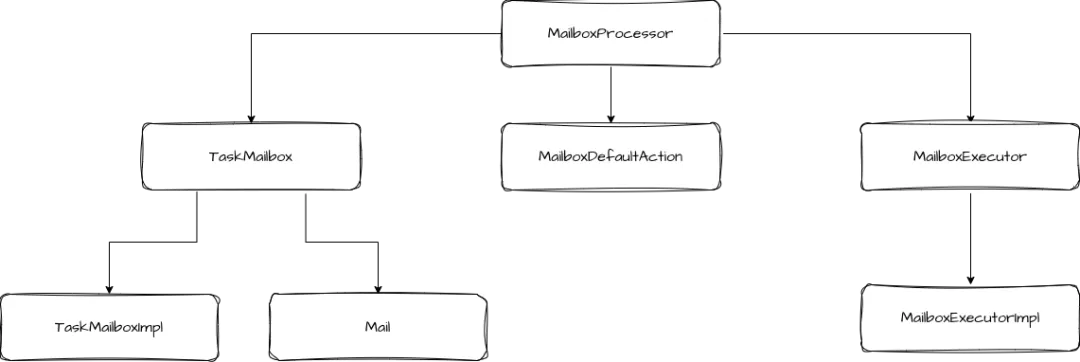
我们来逐个看一下这些类的定义和作用。
在 Mailbox 线程模型中,Mail 是最基础的一个类,它用来封装需要处理的消息和执行的动作。Checkpoint Trigger 和 ProcessTime Trigger 都是通过 Mail 来触发的。Mail 中包含以下属性:
// 选项,包括两个选项:isUrgent 和 deferrable
privatefinal MailOptionsImpl mailOptions;

// 要执行的动作
privatefinal ThrowingRunnable<? extends Exception> runnable;

// 优先级,这里的优先级不决定执行顺序,而是避免上下游之间的死锁问题
privatefinalint priority;

// 描述信息
privatefinal String descriptionFormat;

privatefinal Object[] descriptionArgs;

// 用于执行 runnable 的执行器
privatefinal StreamTaskActionExecutor actionExecutor;
TaskMailbox
有了 Mail 之后,Flink 用 TaskMailbox 来存储它,在需要执行时,再从 TaskMailbox 中取出。具体的处理逻辑在 TaskMailboxImpl 中。
// 内部对于 queue 和 state 的并发访问都需要被这个锁保护
privatefinal ReentrantLock lock = new ReentrantLock();

// 实际存储 Mail 的队列
@GuardedBy("lock")
privatefinal Deque<Mail> queue = new ArrayDeque<>();

// 与 lock 关联的 Condition,主要用于队列从空变为非空时唤醒等待获取 Mail 的线程
@GuardedBy("lock")
privatefinal Condition notEmpty = lock.newCondition();

// 状态,包括 OPEN/QUIESCED/CLOSED
@GuardedBy("lock")
private State state = OPEN;

// 指定的邮箱线程的引用
@Nonnullprivatefinal Thread taskMailboxThread;

// 用于性能优化的设计
privatefinal Deque<Mail> batch = new ArrayDeque<>();

// queue队列是否为空,用于性能优化,避免频繁访问主队列
privatevolatileboolean hasNewMail = false;

// 是否有紧急邮件,同样用于性能优化,减少检查队列中是否有紧急邮件的次数
privatevolatileboolean hasNewUrgentMail = false;
通过上面的属性,我们知道 TaskMailbox 底层是用 ArrayDeque 来存储 Mail 的,它内部包含了一个状态字段 state,state 的状态包括:
-
OPEN:可以正常访问,接收和发送 Mail。
-
QUIESCED:处于静默状态,不接收新的 Mail,已有的 Mail 仍然可以被取出。
-
CLOSED:关闭状态,不能进行任何操作。
在 TaskMailbox 内部,并发访问 queue 队列和 state 状态都需要 lock 这个锁的保护。此外 TaskMailbox 内部还做了一些性能优化,比如增加了 batch 队列,在处理 Mail 时,先将一批 Mail 从 queue 队列转移到 batch,之后会优先从 batch 队列中取,这样就减少了访问 queue 队列的次数,缓解了锁竞争压力。
MailboxProcessor
MailboxProcessor 可以认为是 Mailbox 相关的核心入口,MailboxProcessor 的核心方法就是事件循环,这个循环中主要是从 TaskMailbox 中取出 Mail 执行相应动作和执行默认动作(MailboxDefaultAction)。
MailboxProcessor 还对外提供了 MailboxExecutor,其他组件可以利用 MailboxExecutor 来提交事件。
MailboxExecutor
我们接着来看 MailboxExecutor,它的实现类是 MailboxExecutorImpl。包括以下属性:
// 实际存储的 mailbox 实例
@Nonnullprivatefinal TaskMailbox mailbox;

// 优先级,MailboxExecutor 提供的默认优先级,提交 mail 时会带上这个字段
privatefinalint priority;

// 执行器,运行 mail 的动作
privatefinal StreamTaskActionExecutor actionExecutor;

// 执行 MailboxProcessor,主要用于 isIdle 方法
privatefinal MailboxProcessor mailboxProcessor;
MailboxExecutor 的主要作用是向 TaskMailbox 中投递 mail,核心方法是 execute。这个方法可以在任意线程中执行,因为 mailbox 内部控制了并发。
publicvoidexecute(
        MailOptions mailOptions,
final ThrowingRunnable<? extends Exception> command,
final String descriptionFormat,
final Object... descriptionArgs){
try {
        mailbox.put(
new Mail(
                        mailOptions,
                        command,
                        priority,
                        actionExecutor,
                        descriptionFormat,
                        descriptionArgs));
    } catch (MailboxClosedException mbex) {
thrownew RejectedExecutionException(mbex);
    }
}
除了 execute 方法以外,MailboxExecutor 中还有一个重要的方法,就是 yield。
publicvoidyield()throws InterruptedException {
    Mail mail = mailbox.take(priority);
try {
        mail.run();
    } catch (Exception ex) {
throw WrappingRuntimeException.wrapIfNecessary(ex);
    }
}
这个方法的主要目的是为了让出对当前事件的处理。这么做的原因有二:
-
如果不考虑优先级的因素,Mailbox 队列是 FIFO 的顺序处理,如果当前事件依赖后面的事件完成,则有可能造成”死锁“。
-
当前事件处理事件较长,会阻塞其他事件。因此需要让出执行权,让相同或更高优先级的事件有机会执行。
需要注意的是 yield 方法只能有 mailbox 线程自身调用。另外,Flink 也提供了非阻塞版本的方法,就是 tryYield。
执行流程
主流程
在创建 StreamTask 时,会创建 mailboxProcessor,同时也会持有 mainMailboxExecutor。
new TaskMailboxImpl(Thread.currentThread()));

...
this.mailboxProcessor =
new MailboxProcessor(
this::processInput, mailbox, actionExecutor, mailboxMetricsControl);

...

this.mainMailboxExecutor = mailboxProcessor.getMainMailboxExecutor();
可以看到这里将 processInput 作为 MailboxDefaultAction 传入 MailboxProcessor。在 StreamTask 启动时,会调用 MailboxProcessor 的核心方法。
publicfinalvoidinvoke()throws Exception {
// Allow invoking method 'invoke' without having to call 'restore' before it.
if (!isRunning) {
        LOG.debug("Restoring during invoke will be called.");
        restoreInternal();
    }

// final check to exit early before starting to run
    ensureNotCanceled();

    scheduleBufferDebloater();

// let the task do its work
    getEnvironment().getMetricGroup().getIOMetricGroup().markTaskStart();
    runMailboxLoop();

// if this left the run() method cleanly despite the fact that this was canceled,
// make sure the "clean shutdown" is not attempted
    ensureNotCanceled();

    afterInvoke();
}

publicvoidrunMailboxLoop()throws Exception {
    mailboxProcessor.runMailboxLoop();
}
runMailboxLoop 的核心逻辑是一个 while 循环,在循环中处理 mail 并执行默认动作。
publicvoidrunMailboxLoop()throws Exception {
    suspended = !mailboxLoopRunning;

final TaskMailbox localMailbox = mailbox;

    checkState(
            localMailbox.isMailboxThread(),
"Method must be executed by declared mailbox thread!");

assert localMailbox.getState() == TaskMailbox.State.OPEN : "Mailbox must be opened!";

final MailboxController mailboxController = new MailboxController(this);

while (isNextLoopPossible()) {
// The blocking `processMail` call will not return until default action is available.
        processMail(localMailbox, false);
if (isNextLoopPossible()) {
            mailboxDefaultAction.runDefaultAction(
                    mailboxController); // lock is acquired inside default action as needed
        }
    }
}


privatebooleanisNextLoopPossible(){
// 'Suspended' can be false only when 'mailboxLoopRunning' is true.
return !suspended;
}
首先是做了前置检查,包括确保 TaskMailbox 是指定的 mailbox 线程,TaskMailbox 的状态是 OPEN。接着创建了 MailboxController,它用于 MailboxDefaultAction 与 MailboxProcessor 的交互。
然后就进入到 while (isNextLoopPossible()) 循环了,循环中调用了 processMail,在这个方法中对 mail 进行处理。
privatebooleanprocessMail(TaskMailbox mailbox, boolean singleStep)throws Exception {
// Doing this check is an optimization to only have a volatile read in the expected hot
// path, locks are only
// acquired after this point.
boolean isBatchAvailable = mailbox.createBatch();

// Take mails in a non-blockingly and execute them.
boolean processed = isBatchAvailable && processMailsNonBlocking(singleStep);
if (singleStep) {
return processed;
    }

// If the default action is currently not available, we can run a blocking mailbox execution
// until the default action becomes available again.
    processed |= processMailsWhenDefaultActionUnavailable();

return processed;
}
processMail 方法中先创建 batch,然后非阻塞的处理这批 mail。
privatebooleanprocessMailsNonBlocking(boolean singleStep)throws Exception {
long processedMails = 0;
    Optional<Mail> maybeMail;

while (isNextLoopPossible() && (maybeMail = mailbox.tryTakeFromBatch()).isPresent()) {
if (processedMails++ == 0) {
            maybePauseIdleTimer();
        }
        runMail(maybeMail.get());
if (singleStep) {
break;
        }
    }
if (processedMails > 0) {
        maybeRestartIdleTimer();
returntrue;
    } else {
returnfalse;
    }
}

privatevoidrunMail(Mail mail)throws Exception {
    mailboxMetricsControl.getMailCounter().inc();
    mail.run();
if (!suspended) {
// start latency measurement on first mail that is not suspending mailbox execution,
// i.e., on first non-poison mail, otherwise latency measurement is not started to avoid
// overhead
if (!mailboxMetricsControl.isLatencyMeasurementStarted()
                && mailboxMetricsControl.isLatencyMeasurementSetup()) {
            mailboxMetricsControl.startLatencyMeasurement();
        }
    }
}
processMailsNonBlocking 直接调用 runMail 方法,最终是调用 mail.run 执行具体动作。
processMailsWhenDefaultActionUnavailable 的逻辑是如果当前默认动作不可用,会接着调用 runMail 尝试处理 Mail,这里会阻塞的等待,直到有新的需要处理的 Mail 或者默认动作可用。
当默认动作可用时,就会执行默认动作,也就是 Stream.processInput,这里就是处理 StreamRecord 了。
protectedvoidprocessInput(MailboxDefaultAction.Controller controller)throws Exception {
    DataInputStatus status = inputProcessor.processInput();
switch (status) {
case MORE_AVAILABLE:
if (taskIsAvailable()) {
return;
            }
break;
case NOTHING_AVAILABLE:
break;
case END_OF_RECOVERY:
thrownew IllegalStateException("We should not receive this event here.");
case STOPPED:
            endData(StopMode.NO_DRAIN);
return;
case END_OF_DATA:
            endData(StopMode.DRAIN);
            notifyEndOfData();
return;
case END_OF_INPUT:
// Suspend the mailbox processor, it would be resumed in afterInvoke and finished
// after all records processed by the downstream tasks. We also suspend the default
// actions to avoid repeat executing the empty default operation (namely process
// records).
            controller.suspendDefaultAction();
            mailboxProcessor.suspend();
return;
    }

    ...
}
当 status 是 MORE_AVAILABLE,表示还有更多数据可用立即处理,判断当前任务可用就立即返回。当 status 是 END_OF_INPUT 时,表示所有的输入都结束了,这时就会暂停循环事件的调用。
Checkpoint 流程
触发 Checkpoint 的流程是调用 Stream.triggerCheckpointAsync 方法。
public CompletableFuture<Boolean> triggerCheckpointAsync(
        CheckpointMetaData checkpointMetaData, CheckpointOptions checkpointOptions){
    checkForcedFullSnapshotSupport(checkpointOptions);

    MailboxExecutor.MailOptions mailOptions =
            CheckpointOptions.AlignmentType.UNALIGNED == checkpointOptions.getAlignment()
                    ? MailboxExecutor.MailOptions.urgent()
                    : MailboxExecutor.MailOptions.options();

    CompletableFuture<Boolean> result = new CompletableFuture<>();
    mainMailboxExecutor.execute(
            mailOptions,
            () -> {
try {
boolean noUnfinishedInputGates =
                            Arrays.stream(getEnvironment().getAllInputGates())
                                    .allMatch(InputGate::isFinished);

if (noUnfinishedInputGates) {
                        result.complete(
                                triggerCheckpointAsyncInMailbox(
                                        checkpointMetaData, checkpointOptions));
                    } else {
                        result.complete(
                                triggerUnfinishedChannelsCheckpoint(
                                        checkpointMetaData, checkpointOptions));
                    }
                } catch (Exception ex) {
// Report the failure both via the Future result but also to the mailbox
                    result.completeExceptionally(ex);
throw ex;
                }
            },
"checkpoint %s with %s",
            checkpointMetaData,
            checkpointOptions);
return result;
}
通过调用 mainMailboxExecutor.execute 方法来向 Mailbox 中提交 Mail。Checkpoint 完成的通知也是一样放在 Mailbox 中执行的,不过这里提交的是一个高优先级的操作。
private Future<Void> notifyCheckpointOperation(
        RunnableWithException runnable, String description){
    CompletableFuture<Void> result = new CompletableFuture<>();
    mailboxProcessor
            .getMailboxExecutor(TaskMailbox.MAX_PRIORITY)
            .execute(
                    () -> {
try {
                            runnable.run();
                        } catch (Exception ex) {
                            result.completeExceptionally(ex);
throw ex;
                        }
                        result.complete(null);
                    },
                    description);
return result;
}
总结
本文我们梳理了 Mailbox 相关的源码。Flink 通过 Mailbox 线程模型来简化相关代码逻辑。我们先了解了几个核心类:Mail、TaskMailbox、MailboxProcessor、MailboxExecutor。然后梳理了具体的事件处理和触发的流程。

