夜雨聆风
夜雨聆风


vue+cesium示例:透视分析(附源码下载)
基于cesium和vue实现透视分析效果,适合学习Cesium与前端框架结合开发3D可视化项目。
demo源码运行环境以及配置
运行环境:依赖Node安装环境,demo本地Node版本:推荐v18+。
运行工具:vscode或者其他工具。
配置方式:下载demo源码,vscode打开,然后顺序执行以下命令:
(1)下载demo环境依赖包命令:npm install
(2)启动demo命令:npm run dev
(3)打包demo命令: npm run build
技术栈
Vue 3.5.13
Vite 6.2.0
Cesium 1.128.0
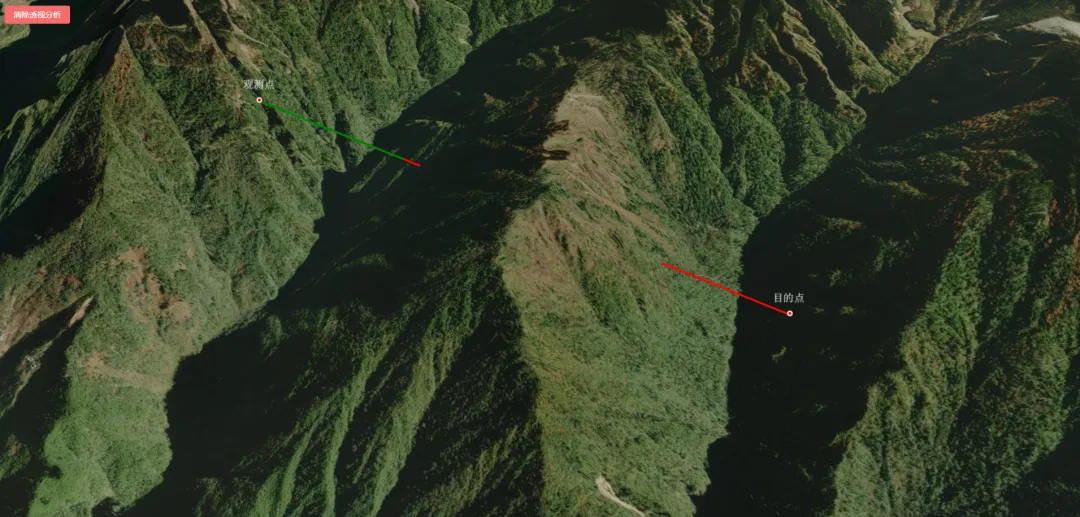
示例效果
核心源码
<template><divid="cesiumContainer"class="cesium-container"></div><divclass="toolsDiv"><el-buttontype="danger" @click="clearAll">清除透视分析</el-button></div></template><scriptsetup>import { onMounted, onUnmounted, ref } from 'vue';import * as Cesium from 'cesium';// 使用loadScripts函数加载viewshed相关JS文件Cesium.Ion.defaultAccessToken = 'eyJhbGciOiJIUzI1NiIsInR5cCI6IkpXVCJ9.eyJqdGkiOiIxZjhjYjhkYS1jMzA1LTQ1MTEtYWE1Mi0zODc5NDljOGVkMDYiLCJpZCI6MTAzNjEsInNjb3BlcyI6WyJhc2wiLCJhc3IiLCJhc3ciLCJnYyJdLCJpYXQiOjE1NzA2MDY5ODV9.X7tj92tunUvx6PkDpj3LFsMVBs_SBYyKbIL_G9xKESA';// 声明Cesium Viewer实例let viewer = null;let start = null;let end = null;let hello = null;let word = null;let line1 = null;let line2 = null;let clickHandler = null;let clickStage = 0;// 组件挂载后初始化CesiumonMounted(async () => {initMap();});const initMap = async () => {// 初始化Cesium Viewerviewer = new Cesium.Viewer('cesiumContainer', {// 基础配置animation: false, // 动画小部件baseLayerPicker: false, // 底图选择器fullscreenButton: false, // 全屏按钮vrButton: false, // VR按钮geocoder: false, // 地理编码搜索框homeButton: false, // 主页按钮infoBox: false, // 信息框sceneModePicker: false, // 场景模式选择器selectionIndicator: false, // 选择指示器timeline: false, // 时间轴navigationHelpButton: false, // 导航帮助按钮navigationInstructionsInitiallyVisible: false, // 导航说明初始可见性scene3DOnly: false, // 仅3D场景contextOptions: {requestWebgl1: true,}});// 隐藏logoviewer.cesiumWidget.creditContainer.style.display = "none";//前提先把场景上的图层全部移除或者隐藏viewer.scene.globe.baseColor = new Cesium.Color(0.0, 0.1, 0.2, 1.0); //修改地图为暗蓝色背景// 设置抗锯齿viewer.scene.postProcessStages.fxaa.enabled = true;// 清除默认底图viewer.imageryLayers.remove(viewer.imageryLayers.get(0));// 加载底图 - 使用更暗的地图服务const imageryProvider = await Cesium.ArcGisMapServerImageryProvider.fromUrl("https://services.arcgisonline.com/ArcGIS/rest/services/World_Imagery/MapServer");viewer.imageryLayers.addImageryProvider(imageryProvider);// 加载Cesium在线地形const terrainProvider = await Cesium.CesiumTerrainProvider.fromIonAssetId(3956);viewer.terrainProvider = terrainProvider;// 启用地形照明效果viewer.scene.globe.enableLighting = true;// 启用深度测试,确保地形正确渲染viewer.scene.globe.depthTestAgainstTerrain = true;// 设置默认视图位置 - 默认显示全球视图viewer.camera.setView({destination: Cesium.Cartesian3.fromDegrees(98.685331, 27.780325, 7318.6),orientation: {heading: Cesium.Math.toRadians(73),pitch: Cesium.Math.toRadians(-52.2),roll: 0.0}});setupClickHandler();}// 抬高位置:沿法线方向增加 offset 米(默认 10)function raisePosition(cartesian, offset = 10) {const cartographic = Cesium.Cartographic.fromCartesian(cartesian);cartographic.height += offset;return Cesium.Cartesian3.fromRadians(cartographic.longitude,cartographic.latitude,cartographic.height);}const setupClickHandler = () => {if (clickHandler) {clickHandler.destroy();}clickHandler = new Cesium.ScreenSpaceEventHandler(viewer.scene.canvas);clickHandler.setInputAction((movement) => {const picked = pickCartesian(viewer, movement.position);if (!picked || !picked.cartesian) {return;}if (clickStage === 0) {start = picked.cartesian; // 原始坐标,用于通视计算const raisedStart = raisePosition(start); // 抬高后的坐标,用于显示if (hello) {hello.position = raisedStart;} else {hello = viewer.entities.add({name: '观测点',position: raisedStart,point: {pixelSize: 5,color: Cesium.Color.RED,outlineColor: Cesium.Color.WHITE,outlineWidth: 2,// 可选:禁用深度测试,确保点始终可见(与抬高并用更保险)disableDepthTestDistance: Number.POSITIVE_INFINITY,},label: {text: '观测点',font: '14pt monospace',outlineWidth: 2,pixelOffset: new Cesium.Cartesian2(0, -20), // 将标签放在点上方verticalOrigin: Cesium.VerticalOrigin.BOTTOM,}});}clearLine();clickStage = 1;} else {end = picked.cartesian; // 原始坐标const raisedEnd = raisePosition(end);if (word) {word.position = raisedEnd;} else {word = viewer.entities.add({name: '目的点',position: raisedEnd,point: {pixelSize: 5,color: Cesium.Color.RED,outlineColor: Cesium.Color.WHITE,outlineWidth: 2,disableDepthTestDistance: Number.POSITIVE_INFINITY,},label: {text: '目的点',font: '14pt monospace',outlineWidth: 2,pixelOffset: new Cesium.Cartesian2(0, -20),verticalOrigin: Cesium.VerticalOrigin.BOTTOM,}});}clearLine();loadLine();clickStage = 0;}}, Cesium.ScreenSpaceEventType.LEFT_CLICK);}const loadLine = () => {if (!start || !end) {return;}const center = sightline(start, end);// return;console.log("障碍点坐标-------------------------" + center)if (center.x == 0 && center.y == 0 && center.z == 0) {// alert("可视")line1 = viewer.entities.add({polyline: {positions: [start, end],width: 3,material: Cesium.Color.GREEN,clampToGround: false,}});} else {// alert("不可视")line1 = viewer.entities.add({polyline: {positions: [start, center],width: 3,material: Cesium.Color.GREEN,clampToGround: false,}});line2 = viewer.entities.add({polyline: {positions: [center, end],width: 3,material: Cesium.Color.RED,clampToGround: false,}});}}const clearAll = () => {clearLine();clearPoint();}const clearLine = () => {if (line1) {viewer.entities.remove(line1);line1 = null;}if (line2) {viewer.entities.remove(line2);line2 = null;}}const clearPoint = () => {if (hello) {viewer.entities.remove(hello);hello = null;}if (word) {viewer.entities.remove(word);word = null;}}function sightline(startWorldPoint, endWorldPoint) {var barrierPoint = Cesium.Cartesian3.ZERO;var startPoint = convertCartesian3ToCartesian2(viewer, startWorldPoint);var endPoint = convertCartesian3ToCartesian2(viewer, endWorldPoint);var worldLength = calculateSpatialDistance(startWorldPoint, endWorldPoint);var windowLength = calculateWindowDistance(startPoint, endPoint);var worldInterval = worldLength / 100.0;var windowInterval = windowLength / 100.0;for (var i = 1; i < 100; i++) {var tempWindowPoint = findWindowPositionByPixelInterval(startPoint, endPoint, windowInterval * i);var tempPoint = findCartesian3ByDistance(startWorldPoint, endWorldPoint, worldInterval * i);var surfacePoint = pickCartesian(viewer, tempWindowPoint);var tempRad = Cesium.Cartographic.fromCartesian(tempPoint);var surfaceRad = Cesium.Cartographic.fromCartesian(surfacePoint.cartesian);if (surfaceRad.height > tempRad.height) {barrierPoint = tempPoint;break;}}return barrierPoint;}function convertCartesian3ToCartesian2(viewer, position) {return Cesium.SceneTransforms.worldToWindowCoordinates(viewer.scene, position);}function calculateSpatialDistance(startPoint, endPoint) {return Math.sqrt(Math.pow(endPoint.x - startPoint.x, 2) + Math.pow(endPoint.y - startPoint.y, 2) + Math.pow(endPoint.z - startPoint.z, 2));}function calculateWindowDistance(startPoint, endPoint) {return Math.sqrt(Math.pow(endPoint.y - startPoint.y, 2) + Math.pow(endPoint.x - startPoint.x, 2));}function findWindowPositionByPixelInterval(startPosition, endPosition, interval) {var result = new Cesium.Cartesian2(0, 0);var length = Math.sqrt(Math.pow(endPosition.x - startPosition.x, 2) + Math.pow(endPosition.y - startPosition.y, 2));if (length < interval) {return result;}else {var x = (interval / length) * (endPosition.x - startPosition.x) + startPosition.x;var y = (interval / length) * (endPosition.y - startPosition.y) + startPosition.y;result.x = x;result.y = y;}return result;}function findCartesian3ByDistance(startPosition, endPosition, interval) {var result = new Cesium.Cartesian3(0, 0, 0);var length = Math.sqrt(Math.pow(endPosition.z - startPosition.z, 2) + Math.pow(endPosition.x - startPosition.x, 2) + Math.pow(endPosition.y - startPosition.y, 2));if (length < interval) {return result;}else {var x = (interval / length) * (endPosition.x - startPosition.x) + startPosition.x;var y = (interval / length) * (endPosition.y - startPosition.y) + startPosition.y;var z = (interval / length) * (endPosition.z - startPosition.z) + startPosition.z;result.x = x;result.y = y;result.z = z;}return result;}function pickCartesian(viewer, windowPosition) {//根据窗口坐标,从场景的深度缓冲区中拾取相应的位置,返回笛卡尔坐标。var cartesianModel = viewer.scene.pickPositionSupported ? viewer.scene.pickPosition(windowPosition) : undefined;//场景相机向指定的鼠标位置(屏幕坐标)发射射线var ray = viewer.camera.getPickRay(windowPosition);//获取射线与三维球相交的点(即该鼠标位置对应的三维球坐标点,因为模型不属于球面的物体,所以无法捕捉模型表面)var cartesianTerrain = Cesium.defined(ray) ? viewer.scene.globe.pick(ray, viewer.scene) : undefined;// var result = new PickResult();var result = {};if (Cesium.defined(cartesianModel) || Cesium.defined(cartesianTerrain)) {result.cartesian = cartesianModel || cartesianTerrain;result.CartesianModel = cartesianModel;result.cartesianTerrain = cartesianTerrain;result.windowCoordinates = windowPosition.clone();//坐标不一致,证明是模型,采用绝对高度。否则是地形,用贴地模式。if (Cesium.defined(cartesianModel) && Cesium.defined(cartesianTerrain)) {result.altitudeMode = cartesianModel.z.toFixed(0) !== cartesianTerrain.z.toFixed(0) ? Cesium.HeightReference.NONE : Cesium.HeightReference.CLAMP_TO_GROUND;} else {result.altitudeMode = Cesium.defined(cartesianModel) ? Cesium.HeightReference.NONE : Cesium.HeightReference.CLAMP_TO_GROUND;}}return result;}// 组件卸载前清理资源onUnmounted(() => {// 销毁viewerif (viewer && !viewer.isDestroyed()) {try {if (clickHandler) {clickHandler.destroy();clickHandler = null;}viewer.destroy();} catch (error) {console.error('Error destroying viewer:', error);} finally {viewer = null;}}});</script><stylescoped>.cesium-container {width: 100%;height: 100vh;margin: 0;padding: 0;overflow: hidden;}.toolsDiv {position: absolute;top: 10px;left: 10px;button {margin-right: 10px;}}</style>
源码下载