 夜雨聆风
夜雨聆风


游标卡尺读数练习微信小程序源码
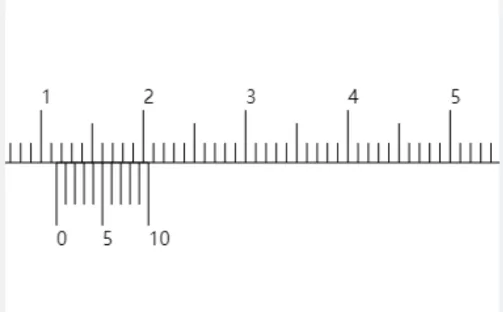
-
.js // 游标卡尺练习小程序 - 核心逻辑页(误差容错版)Page({data: {__route__: "",canvasContext: null,canvasWidth: 0,canvasHeight: 240,pixelsPerMM: 0,localRange: 50,caliperOffsetX: 0,caliperScale: 1.0,touchState: {isTouching: false,touchType: '',startX: 0,startOffsetX: 0,startDistance: 0,startScale: 0},currentQuestion: {mainRuler: 0,alignIndex: 0,mainScalePosition: 0,vernierScalePosition: 0,vernierLengthMM: 0,divisions: 10,specialType: false},currentReading: 0,currentReadingStr: "",currentUnit: "mm",currentPrecision: 1,requiredPrecisionValue: 0.1,unitHint: "请输入读数(单位:mm,仅输入数字)",userInput: "",feedback: "",feedbackType: "",isChallengeMode: false,timeLeft: 100,score: 0,questionCount: 0,maxQuestions: 5,timer: null,currentDivisions: 10,currentSpecialType: false,correctStreak: 0,maxStreak: 0,errorCount: 0,divisionOptions: [{ name: "10分度", divisions: 10, specialType: false, step: 0.9, accuracy: 0.1 },{ name: "20分度", divisions: 20, specialType: false, step: 0.95, accuracy: 0.05 },{ name: "特殊20分度", divisions: 20, specialType: true, step: 0.95, accuracy: 0.05 },{ name: "50分度", divisions: 50, specialType: false, step: 0.98, accuracy: 0.02 }],selectedDivisionIndex: 0,showAlignLine: true},toggleAlignLine() {if (this.data.isChallengeMode) {wx.showToast({title: "挑战模式下隐藏对齐线",icon: "none",duration: 1500});return;}this.setData({showAlignLine: !this.data.showAlignLine}, () => {this.redrawCaliper(true);});},confirmExitChallenge() {return new Promise((resolve) => {wx.showModal({title: "退出挑战确认",content: "挑战模式中途退出将清空当前进度,是否确定退出?",confirmText: "确定退出",cancelText: "继续挑战",success: (res) => {if (res.confirm) {if (this.data.timer) {clearInterval(this.data.timer);this.setData({ timer: null });}this.setData({isChallengeMode: false,timeLeft: 100,score: 0,questionCount: 0,correctStreak: 0,maxStreak: 0,errorCount: 0,showAlignLine: true});resolve(true);} else {resolve(false);}}});});},onDivisionChange(e) {if (this.data.isChallengeMode) {this.confirmExitChallenge().then((isExit) => {if (!isExit) {return;}const index = e.detail.value;const selectedOption = this.data.divisionOptions[index];this.setData({selectedDivisionIndex: index,currentDivisions: selectedOption.divisions,currentSpecialType: selectedOption.specialType,errorCount: 0,isChallengeMode: false}, () => {this.startExercise(selectedOption.divisions, selectedOption.specialType);});});} else {const index = e.detail.value;const selectedOption = this.data.divisionOptions[index];this.setData({selectedDivisionIndex: index,currentDivisions: selectedOption.divisions,currentSpecialType: selectedOption.specialType,errorCount: 0,isChallengeMode: false}, () => {this.startExercise(selectedOption.divisions, selectedOption.specialType);});}},onBackPress(options) {if (this.data.isChallengeMode && options.from === 'backbutton') {this.confirmExitChallenge();return true;}return false;},enforceAccuracy(num, accuracy) {return Math.round(num / accuracy) * accuracy;},formatNumber(num, decimalPlaces) {return parseFloat(num).toFixed(decimalPlaces);},initCanvas() {wx.showLoading({ title: "初始化卡尺..." });try {const systemInfo = wx.getSystemInfoSync();const screenWidth = systemInfo.screenWidth;const canvasDisplayWidth = screenWidth * 2;const canvasDisplayHeight = 240;const pixelsPerMM = canvasDisplayWidth / (this.data.localRange * 2);const ctx = wx.createCanvasContext('caliperCanvas', this);if (!ctx) throw new Error("创建Canvas上下文失败");this.setData({canvasContext: ctx,canvasWidth: canvasDisplayWidth,canvasHeight: canvasDisplayHeight,pixelsPerMM});wx.hideLoading();this.start10();} catch (e) {wx.hideLoading();console.error("Canvas初始化失败:", e);wx.showToast({ title: "卡尺初始化成功(兼容模式)", icon: "none" });this.start10();}},getTouchDistance(touches) {if (touches.length < 2) return 0;const x1 = touches[0].clientX, y1 = touches[0].clientY;const x2 = touches[1].clientX, y2 = touches[1].clientY;return Math.sqrt(Math.pow(x2 - x1, 2) + Math.pow(y2 - y1, 2));},handleTouchStart(e) {const touches = e.touches;const touchState = { ...this.data.touchState };if (touches.length === 1) {touchState.isTouching = true;touchState.touchType = 'single';touchState.startX = touches[0].clientX;touchState.startOffsetX = this.data.caliperOffsetX;} else if (touches.length === 2) {touchState.isTouching = true;touchState.touchType = 'double';touchState.startDistance = this.getTouchDistance(touches);touchState.startScale = this.data.caliperScale;}this.setData({ touchState });},handleTouchMove(e) {const { touchState, caliperScale, canvasWidth, localRange, pixelsPerMM } = this.data;if (!touchState.isTouching || !this.data.canvasContext) return;if (this.lastMoveTime && Date.now() - this.lastMoveTime < 5) return;this.lastMoveTime = Date.now();const touches = e.touches;if (touchState.touchType === 'single' && touches.length === 1) {const moveX = touches[0].clientX - touchState.startX;const maxOffset = ((200 - localRange * 2) * pixelsPerMM * caliperScale) * 2;const newOffsetX = Math.max(-maxOffset, Math.min(maxOffset, touchState.startOffsetX + moveX));this.setData({ caliperOffsetX: newOffsetX }, () => this.redrawCaliper(true));} else if (touchState.touchType === 'double' && touches.length === 2) {const currentDistance = this.getTouchDistance(touches);const scaleRatio = currentDistance / touchState.startDistance;let newScale = touchState.startScale * scaleRatio;newScale = Math.max(0.8, Math.min(3.0, newScale));this.setData({ caliperScale: newScale }, () => this.redrawCaliper(true));}},handleTouchEnd(e) {const touchState = { ...this.data.touchState };touchState.isTouching = false;touchState.touchType = '';this.setData({ touchState });this.lastMoveTime = 0;},zoomIn() {let newScale = this.data.caliperScale + 0.1;newScale = Math.min(3.0, newScale);this.setData({ caliperScale: newScale }, () => this.redrawCaliper(true));},zoomOut() {let newScale = this.data.caliperScale - 0.1;newScale = Math.max(0.8, newScale);this.setData({ caliperScale: newScale }, () => this.redrawCaliper(true));},moveLeft() {const { caliperOffsetX, caliperScale, localRange, pixelsPerMM } = this.data;const maxOffset = ((200 - localRange * 2) * pixelsPerMM * caliperScale) * 2;const newOffsetX = Math.max(-maxOffset, caliperOffsetX - 50);this.setData({ caliperOffsetX: newOffsetX }, () => this.redrawCaliper(true));},moveRight() {const { caliperOffsetX, caliperScale, localRange, pixelsPerMM } = this.data;const maxOffset = ((200 - localRange * 2) * pixelsPerMM * caliperScale) * 2;const newOffsetX = Math.min(maxOffset, caliperOffsetX + 50);this.setData({ caliperOffsetX: newOffsetX }, () => this.redrawCaliper(true));},resetCaliper() {this.setData({ caliperOffsetX: 0, caliperScale: 1.0 }, () => this.redrawCaliper(true));},calculateAlignPosition(mainScalePosition, vernierScalePosition, divisions, specialType) {const selectedOption = this.data.divisionOptions.find(item => item.divisions === divisions && item.specialType === specialType);const vernierStep = selectedOption ? selectedOption.step : 0.9;const { pixelsPerMM, caliperOffsetX, caliperScale, canvasWidth } = this.data;const mainScaleCenterY = this.data.canvasHeight / 2;const canvasLeftQuarterX = canvasWidth * 0.05;const mmToScreenX = (mm) => {const rawPX = mm * pixelsPerMM;const scaledPX = rawPX * caliperScale;return canvasLeftQuarterX + caliperOffsetX - (mainScalePosition * pixelsPerMM * caliperScale) + scaledPX;};let minDistance = Infinity;let alignMainScale = mainScalePosition;const vernierMaxIndex = specialType && divisions === 20 ? 20 : divisions;const mainScaleStart = Math.max(0, Math.floor(vernierScalePosition - 50));const mainScaleEnd = Math.min(200, Math.ceil(vernierScalePosition + 50));for (let mainMM = mainScaleStart; mainMM <= mainScaleEnd; mainMM++) {const mainX = mmToScreenX(mainMM);for (let vernierIndex = 0; vernierIndex <= vernierMaxIndex; vernierIndex++) {const vernierMM = vernierScalePosition + vernierIndex * vernierStep;const vernierX = mmToScreenX(vernierMM);const distance = Math.abs(mainX - vernierX);if (distance < minDistance) {minDistance = distance;alignMainScale = mainMM;}}}return alignMainScale;},redrawCaliper(forceUpdate = false) {const { currentQuestion } = this.data;const divisions = currentQuestion.divisions;const specialType = currentQuestion.specialType;const alignScalePosition = forceUpdate? this.calculateAlignPosition(currentQuestion.mainScalePosition, currentQuestion.vernierScalePosition, divisions, specialType): currentQuestion.alignScalePosition;this.drawCaliper(currentQuestion.mainScalePosition,currentQuestion.vernierScalePosition,divisions,specialType,alignScalePosition,currentQuestion.vernierLengthMM);},drawCaliper(mainScalePosition, vernierScalePosition, divisions, specialType = false, alignScalePosition, vernierLengthMM) {const {canvasContext, canvasWidth, canvasHeight,pixelsPerMM, localRange, caliperOffsetX, caliperScale,showAlignLine, isChallengeMode} = this.data;if (!canvasContext) return;canvasContext.clearRect(0, 0, canvasWidth, canvasHeight);canvasContext.save();const longTickHeight = canvasHeight / 6;const shortTickHeight = canvasHeight / 8;const vernierTickHeight = canvasHeight / 5;const mainScaleCenterY = canvasHeight / 2;const canvasLeftQuarterX = canvasWidth * 0.05;const mmToScreenX = (mm) => {const rawPX = mm * pixelsPerMM;const scaledPX = rawPX * caliperScale;return canvasLeftQuarterX + caliperOffsetX - (mainScalePosition * pixelsPerMM * caliperScale) + scaledPX;};canvasContext.setLineWidth(1);canvasContext.beginPath();canvasContext.moveTo(mmToScreenX(0), mainScaleCenterY);canvasContext.lineTo(mmToScreenX(200), mainScaleCenterY);canvasContext.setStrokeStyle("#000");canvasContext.stroke();for (let i = Math.ceil(0); i <= Math.floor(200); i++) {const x = mmToScreenX(i);canvasContext.beginPath();canvasContext.moveTo(x, mainScaleCenterY);if (i % 10 === 0) {canvasContext.lineTo(x, mainScaleCenterY - longTickHeight);canvasContext.setFontSize(14);canvasContext.fillText((i / 10).toString(), x, mainScaleCenterY - longTickHeight - 5);} else if (i % 5 === 0) {canvasContext.lineTo(x, mainScaleCenterY - shortTickHeight);} else {canvasContext.lineTo(x, mainScaleCenterY - shortTickHeight / 2);}canvasContext.stroke();}const selectedOption = this.data.divisionOptions.find(item => item.divisions === divisions && item.specialType === specialType);const vernierStep = selectedOption ? selectedOption.step : 0.9;const vernierMaxIndex = specialType && divisions === 20 ? 20 : divisions;const actualVernierLengthMM = vernierMaxIndex * vernierStep;const vernierStartMM = vernierScalePosition;const vernierEndMM = vernierStartMM + actualVernierLengthMM;canvasContext.setLineWidth(0.8);canvasContext.beginPath();canvasContext.moveTo(mmToScreenX(vernierStartMM), mainScaleCenterY);canvasContext.lineTo(mmToScreenX(vernierEndMM), mainScaleCenterY);canvasContext.stroke();const vernierTopY = mainScaleCenterY;const vernierBottomY = mainScaleCenterY + vernierTickHeight;const drawLimitOffset = divisions === 50 ? 100 : 50;for (let i = 0; i <= vernierMaxIndex; i++) {const mm = vernierStartMM + i * vernierStep;const x = mmToScreenX(mm);if (x < mmToScreenX(0) - drawLimitOffset || x > mmToScreenX(200) + drawLimitOffset) continue;canvasContext.beginPath();canvasContext.moveTo(x, vernierTopY);if (specialType && divisions === 20) {if (i % 2 === 0) {canvasContext.setLineWidth(1.0);canvasContext.lineTo(x, vernierTopY + vernierTickHeight);canvasContext.fillText((i / 2).toString(), x, vernierTopY + vernierTickHeight + 15);} else {canvasContext.setLineWidth(1.0);canvasContext.lineTo(x, vernierTopY + vernierTickHeight / 1.5);}} else if (divisions === 50) {if (i % 5 === 0) {canvasContext.setLineWidth(1.0);canvasContext.lineTo(x, vernierTopY + vernierTickHeight);canvasContext.fillText((i / 5).toString(), x, vernierTopY + vernierTickHeight + 15);} else {canvasContext.setLineWidth(1.0);canvasContext.lineTo(x, vernierTopY + vernierTickHeight / 2);}} else {if (i % 5 === 0) {canvasContext.setLineWidth(1.0);canvasContext.lineTo(x, vernierTopY + vernierTickHeight);canvasContext.fillText(i.toString(), x, vernierTopY + vernierTickHeight + 15);} else {canvasContext.setLineWidth(1.0);canvasContext.lineTo(x, vernierTopY + vernierTickHeight / 1.5);}}canvasContext.stroke();}if (!isChallengeMode && showAlignLine) {const alignX = mmToScreenX(alignScalePosition);canvasContext.setLineWidth(1);canvasContext.setStrokeStyle("#ff5722");canvasContext.beginPath();canvasContext.moveTo(alignX, mainScaleCenterY - longTickHeight * 1.5);canvasContext.lineTo(alignX, mainScaleCenterY + vernierTickHeight * 1.5);canvasContext.stroke();canvasContext.setFontSize(16);canvasContext.setFillStyle("#ff5722");canvasContext.fillText(``, alignX + 10, mainScaleCenterY - longTickHeight * 1.8);}canvasContext.restore();canvasContext.draw();},generateRandomPositionAndUnit(divisions, specialType = false) {const caliperMaxMM = 200;const selectedOption = this.data.divisionOptions.find(item => item.divisions === divisions && item.specialType === specialType);const { step: vernierStep, accuracy } = selectedOption;const vernierMaxIndex = specialType && divisions === 20 ? 20 : divisions;const vernierLengthMM = vernierMaxIndex * vernierStep;const mainRuler = Math.floor(Math.random() * 190) + 5;const alignIndex = Math.floor(Math.random() * divisions);let readingInMM = mainRuler + alignIndex * accuracy;readingInMM = this.enforceAccuracy(readingInMM, accuracy);const mainScalePosition = (mainRuler + alignIndex) - alignIndex * vernierStep;const vernierScalePosition = mainScalePosition;const alignScalePosition = mainRuler + alignIndex;const units = ["mm", "cm"];const randomUnit = units[Math.floor(Math.random() * units.length)];let finalReading = readingInMM;let decimalPlaces = 1;let unitAccuracy = accuracy;if (divisions === 10) {if (randomUnit === "mm") {decimalPlaces = 1;unitAccuracy = 0.1;} else {decimalPlaces = 2;unitAccuracy = 0.01;}} else if (divisions === 20 || divisions === 50) {if (randomUnit === "mm") {decimalPlaces = 2;} else {decimalPlaces = 3;}unitAccuracy = randomUnit === "mm" ? accuracy : accuracy / 10;}if (randomUnit === "cm") {finalReading = readingInMM / 10;}finalReading = this.enforceAccuracy(finalReading, unitAccuracy);const correctReadingStr = this.formatNumber(finalReading, decimalPlaces);return {mainRuler,alignIndex,mainScalePosition,vernierScalePosition,alignScalePosition,vernierLengthMM,divisions,specialType,correctReading: finalReading,correctReadingStr,unit: randomUnit,decimalPlaces,accuracy: unitAccuracy};},startExercise(divisions, specialType = false) {if (!this.data.canvasContext) return;this.setData({ errorCount: 0, feedback: "", feedbackType: "", userInput: "" });const position = this.generateRandomPositionAndUnit(divisions, specialType);const currentReading = position.correctReading;const currentReadingStr = position.correctReadingStr;const currentUnit = position.unit;const currentPrecision = position.decimalPlaces;const requiredPrecisionValue = position.accuracy;this.setData({currentQuestion: {mainRuler: position.mainRuler,alignIndex: position.alignIndex,mainScalePosition: position.mainScalePosition,vernierScalePosition: position.vernierScalePosition,alignScalePosition: position.alignScalePosition,vernierLengthMM: position.vernierLengthMM,divisions: position.divisions,specialType: position.specialType},currentReading,currentReadingStr,currentUnit,currentPrecision,requiredPrecisionValue,unitHint: `请输入读数(单位:${currentUnit})`,caliperOffsetX: 0,caliperScale: 1.0}, () => {this.drawCaliper(position.mainScalePosition,position.vernierScalePosition,divisions,specialType,position.alignScalePosition,position.vernierLengthMM);});},nextQuestion() {const { currentQuestion } = this.data;this.setData({ errorCount: 0, feedback: "", feedbackType: "", userInput: "" });this.startExercise(currentQuestion.divisions, currentQuestion.specialType);},// ========== 核心修改:提交答案逻辑(添加误差容错判定) ==========submitAnswer() {const {userInput, currentReadingStr, currentPrecision,currentUnit, isChallengeMode, score, questionCount, maxQuestions,correctStreak, maxStreak, currentQuestion} = this.data;if (!userInput.trim()) {this.setData({ feedback: "请输入读数!", feedbackType: "error" });return;}let feedback, newScore = score, newQuestionCount = questionCount;let newCorrectStreak = correctStreak, newMaxStreak = maxStreak;this.setData({ feedbackType: "error" });// 1. 校验小数位数const inputDecimalPart = userInput.split(".")[1] || "";if (inputDecimalPart.length !== currentPrecision) {feedback = `错误:请输入${currentPrecision}位小数!正确答案是 ${currentReadingStr}`;this.setData({ feedback });if (isChallengeMode) {this.handleChallengeNextQuestion(newQuestionCount, maxQuestions);}return;}// 2. 数值转换const userValue = parseFloat(userInput);const correctValue = parseFloat(currentReadingStr);const divisions = currentQuestion.divisions;// 3. 定义各分度的允许误差(mm单位)let allowErrorMM = 0;switch(divisions) {case 20:allowErrorMM = 0.5; // 20分度允许±0.5mmbreak;case 50:allowErrorMM = 0.04; // 50分度允许±0.04mmbreak;default:allowErrorMM = 0; // 10分度精确匹配}// 4. 单位转换:cm单位误差 = mm误差 / 10const allowError = currentUnit === "cm" ? allowErrorMM / 10 : allowErrorMM;// 5. 误差判定(加1e-6解决浮点精度问题)const diff = Math.abs(userValue - correctValue);const isCorrect = diff <= allowError + 1e-6;if (isCorrect) {// 答对逻辑feedback = "正确!";this.setData({ feedbackType: "success" });newCorrectStreak += 1;newMaxStreak = Math.max(newMaxStreak, newCorrectStreak);newScore += 5;if (newCorrectStreak % 5 === 0) {newScore += 5;feedback = `正确!连续答对${newCorrectStreak}题,额外加5分🎉`;}} else {// 答错逻辑feedback = `错误,正确答案是 ${currentReadingStr}`;newCorrectStreak = 0;}this.setData({feedback,score: newScore,correctStreak: newCorrectStreak,maxStreak: newMaxStreak});// 挑战模式自动下一题if (isChallengeMode) {newQuestionCount++;this.setData({ questionCount: newQuestionCount });if (newQuestionCount < maxQuestions) {setTimeout(() => {const divisionTypes = [{ divisions: 10, specialType: false },{ divisions: 20, specialType: false },{ divisions: 20, specialType: true },{ divisions: 50, specialType: false }];const randomType = divisionTypes[Math.floor(Math.random() * divisionTypes.length)];this.startExercise(randomType.divisions, randomType.specialType);this.setData({ userInput: "", feedback: "", feedbackType: "" });}, 1000);} else {this.endGame();}} else {// 普通模式答对自动下一题if (isCorrect) {setTimeout(() => {this.startExercise(currentQuestion.divisions, currentQuestion.specialType);this.setData({ userInput: "", feedback: "", feedbackType: "" });}, 1000);} else {const newErrorCount = this.data.errorCount + 1;this.setData({ errorCount: newErrorCount });if (newErrorCount >= 3) {feedback = `错误次数已用完!正确答案是:${currentReadingStr}`;this.setData({ feedback });setTimeout(() => {this.startExercise(currentQuestion.divisions, currentQuestion.specialType);this.setData({ userInput: "", feedback: "", feedbackType: "", errorCount: 0 });}, 3000);}}}},handleChallengeNextQuestion(questionCount, maxQuestions) {let newQuestionCount = questionCount + 1;this.setData({ questionCount: newQuestionCount });if (newQuestionCount < maxQuestions) {setTimeout(() => {const divisionTypes = [{ divisions: 10, specialType: false },{ divisions: 20, specialType: false },{ divisions: 20, specialType: true },{ divisions: 50, specialType: false }];const randomType = divisionTypes[Math.floor(Math.random() * divisionTypes.length)];this.startExercise(randomType.divisions, randomType.specialType);this.setData({ userInput: "", feedback: "", feedbackType: "" });}, 1000);} else {this.endGame();}},startChallengeMode() {if (!this.data.canvasContext) {wx.showToast({ title: "卡尺已就绪,开始挑战!", icon: "none" });return;}this.setData({isChallengeMode: true,timeLeft: 100,score: 0,questionCount: 0,correctStreak: 0,maxStreak: 0,errorCount: 0,showAlignLine: false}, () => {if (this.data.timer) clearInterval(this.data.timer);const timer = setInterval(() => {this.setData({ timeLeft: this.data.timeLeft - 1 }, () => {if (this.data.timeLeft <= 0) {clearInterval(timer);this.endGame();}});}, 1000);this.setData({ timer });});const divisionTypes = [{ divisions: 10, specialType: false },{ divisions: 20, specialType: false },{ divisions: 20, specialType: true },{ divisions: 50, specialType: false }];const randomType = divisionTypes[Math.floor(Math.random() * divisionTypes.length)];this.startExercise(randomType.divisions, randomType.specialType);},endGame() {if (this.data.timer) {clearInterval(this.data.timer);this.setData({ timer: null });}const { score, timeLeft, maxQuestions, questionCount, maxStreak } = this.data;let feedback, resultDesc;if (timeLeft <= 0) {feedback = `时间到!挑战结束,最终得分:${score}分`;resultDesc = "超时结束";} else if (questionCount >= maxQuestions) {feedback = score === 25 ? `挑战成功!满分${score}分` : `挑战完成!得分:${score}分`;resultDesc = "完成所有题目";} else {feedback = `挑战结束!得分:${score}分`;resultDesc = "提前结束";}const record = {id: Date.now(),score,maxStreak,totalQuestions: questionCount,correctQuestions: Math.floor(score / 5),timeUsed: 100 - timeLeft,resultDesc,createTime: new Date().toLocaleString()};const historyRecords = wx.getStorageSync('caliperChallengeRecords') || [];historyRecords.unshift(record);wx.setStorageSync('caliperChallengeRecords', historyRecords);this.setData({feedback,isChallengeMode: false,userInput: "",correctStreak: 0,maxStreak: 0,errorCount: 0,showAlignLine: true});wx.showModal({title: "挑战结束",content: feedback,cancelText: "返回",confirmText: "查看战绩",success: (res) => {if (res.confirm) wx.navigateTo({ url: '/pages/records/records' });}});setTimeout(() => {this.setData({ feedback: "", feedbackType: "", timeLeft: 100, score: 0, questionCount: 0 });}, 3000);},onInputChange(e) {this.setData({ userInput: e.detail.value });},goToRecords() {wx.navigateTo({ url: '/pages/records/records' });},start10() {this.setData({ isChallengeMode: false, selectedDivisionIndex: 0 });this.startExercise(10, false);},start20() {this.setData({ isChallengeMode: false, selectedDivisionIndex: 1 });this.startExercise(20, false);},start20Special() {this.setData({ isChallengeMode: false, selectedDivisionIndex: 2 });this.startExercise(20, true);},start50() {this.setData({ isChallengeMode: false, selectedDivisionIndex: 3 });this.startExercise(50, false);},onLoad(options) {this.setData({ __route__: this.route || "" });this.initCanvas();},onHide() {if (this.data.timer && this.data.isChallengeMode) {clearInterval(this.data.timer);this.setData({ timer: null });}},onShow() {if (this.data.isChallengeMode && this.data.timeLeft > 0 && !this.data.timer) {const timer = setInterval(() => {this.setData({ timeLeft: this.data.timeLeft - 1 }, () => {if (this.data.timeLeft <= 0) {clearInterval(timer);this.endGame();}});}, 1000);this.setData({ timer });}if (this.data.canvasContext) this.redrawCaliper(true);},onUnload() {if (this.data.timer) clearInterval(this.data.timer);}}); -
.json {"usingComponents": {"navigation-bar": "/components/navigation-bar/navigation-bar"}} -
.wxss /* 游标卡尺练习小程序 - 样式文件核心修改:1. 画布容器支持横向滚动 2. 画布宽度自适应 3. 适配不同屏幕 *//* 页面根容器 */.container {padding: 15rpx;box-sizing: border-box;background-color: #f8f9fa;min-height: 60vh;}/* 标题样式 */.title {font-size: 40rpx;text-align: center;margin-bottom: 40rpx;font-weight: 600;color: #1e88e5;letter-spacing: 2rpx;}/* 按钮组样式 - 分度选择/挑战模式/查看战绩 */.btn-group {display: flex;flex-wrap: wrap; /* 自动换行,适配小屏幕 */gap: 20rpx; /* 按钮间距 */margin-bottom: 16rpx;padding: 0 10rpx;align-items: center; /* 垂直居中 */}/* 新增:分度下拉选择器样式 */.division-picker {flex: 1; /* 占满剩余宽度 */min-width: 200rpx;height: 80rpx;line-height: 80rpx;background-color: #ffffff;border: 1px solid #e0e0e0;border-radius: 16rpx;padding: 0 20rpx;font-size: 28rpx;color: #333;}.picker-text {white-space: nowrap;overflow: hidden;text-overflow: ellipsis;}.btn-group button {flex: none; /* 取消均分,固定宽度 */min-width: 160rpx; /* 最小宽度,避免按钮过窄 */height: 80rpx;line-height: 80rpx;border-radius: 16rpx; /* 圆角 */font-size: 28rpx;padding: 0 20rpx;transition: all 0.2s ease; /* 过渡动画 */}/* 普通按钮样式 */.btn-group button:not([type="primary"]) {background-color: #ffffff;border: 1px solid #e0e0e0;color: #333;}.btn-group button:not([type="primary"]):hover {background-color: #f5f5f5; /* hover效果 */}/* 主按钮样式(挑战模式) */.btn-group button[type="primary"] {background-color: #1e88e5;border: none;color: #fff;box-shadow: 0 4rpx 8rpx rgba(30, 136, 229, 0.2); /* 阴影 */}.btn-group button[type="primary"]:hover {background-color: #1976d2; /* 深色hover */}/* 挑战模式状态栏 - 倒计时+得分 */.status-bar {display: flex;justify-content: space-between; /* 左右分布 */align-items: center;margin-bottom: 16rpx;padding: 20rpx 30rpx;background-color: #ffffff;border-radius: 20rpx;box-shadow: 0 4rpx 12rpx rgba(0, 0, 0, 0.05); /* 轻微阴影 */}.timer, .score {font-size: 30rpx;font-weight: 500;}.timer { color: #e53935; } /* 倒计时红色 */.score { color: #1e88e5; } /* 得分蓝色 *//* ========== 核心修改:卡尺画布容器 ========== */.caliper-container {width: 100%;margin: 10rpx auto 40rpx;overflow-x: auto; /* 允许横向滚动,查看全部刻度 */overflow-y: hidden; /* 禁止纵向滚动 */background-color: #ffffff;border-radius: 24rpx;box-shadow: 0 8rpx 24rpx rgba(0, 0, 0, 0.08); /* 立体阴影 */padding: 20rpx 0; /* 上下内边距,左右无内边距避免截断 */}/* 卡尺Canvas样式 */.caliper-canvas {width: auto; /* 自适应宽度,不限制100% */min-width: 100%; /* 最小宽度为容器宽度 */height: 480rpx; /* 固定高度(rpx适配不同屏幕) */background-color: #ffffff;display: block;margin: 0 auto;border-radius: 16rpx;}/* 答题输入区域 */.input-box {display: flex;align-items: center;gap: 24rpx; /* 元素间距 */margin-top: 40rpx;padding: 0 10rpx;flex-wrap: wrap; /* 自动换行 */}.unit-hint {font-size: 28rpx;color: #666666;min-width: 200rpx; /* 最小宽度,避免提示文字被挤压 */}.input-box input {flex: 1; /* 占满剩余宽度 */min-width: 300rpx; /* 最小宽度 */height: 80rpx;border: 1px solid #e0e0e0;border-radius: 16rpx;padding: 0 30rpx;font-size: 30rpx;background-color: #ffffff;box-shadow: inset 0 2rpx 6rpx rgba(30, 136, 229, 0.05); /* 内阴影 */}.input-box input:focus {border-color: #1e88e5; /* 聚焦时蓝色边框 */outline: none;}/* 提交/下一题按钮 */.input-box button {min-width: 180rpx;height: 80rpx;border-radius: 16rpx;background-color: #1e88e5;border: none;color: #fff;font-size: 30rpx;box-shadow: 0 4rpx 12rpx rgba(30, 136, 229, 0.2); /* 阴影 */}/* 下一题按钮(默认样式) */.input-box button[type="default"] {background-color: #ffffff;border: 1px solid #e0e0e0;color: #333;box-shadow: none;}.input-box button[type="default"]:hover {background-color: #f5f5f5;}/* 按钮hover效果 */.input-box button:hover {background-color: #1976d2;}/* 答题反馈提示 */.feedback {margin-top: 30rpx;text-align: center;font-size: 30rpx;padding: 16rpx 0;border-radius: 16rpx;font-weight: 500;}/* 正确反馈(绿色) */.feedback.success {color: #43a047;background-color: #e8f5e9;}/* 错误反馈(红色) */.feedback.error {color: #e53935;background-color: #ffebee;}/* 控制按钮组(缩放/移动,备用) */.control-btn-group {display: flex;gap: 20rpx;margin: 30rpx auto;justify-content: center;max-width: 600rpx;}.control-btn-group button {width: 80rpx;height: 80rpx;border-radius: 50%; /* 圆形按钮 */display: flex;align-items: center;justify-content: center;background-color: #fff;border: 1px solid #e0e0e0;color: #333;}.control-btn-group button:hover {background-color: #f5f5f5;} -
.wxml <!-- 页面根容器 --><viewclass="container"><!-- 分度选择+功能按钮组 --><viewclass="btn-group"><pickermode="selector"range="{{divisionOptions}}"range-key="name"value="{{selectedDivisionIndex}}"bindchange="onDivisionChange"class="division-picker"><viewclass="picker-text">当前分度:{{divisionOptions[selectedDivisionIndex].name}}</view></picker><buttonsize="mini"type="primary"bindtap="startChallengeMode">挑战模式</button><buttonsize="mini"type="default"bindtap="goToRecords">查看战绩</button><!-- 优化后的切换按钮 --><buttonsize="mini"type="{{showAlignLine ? 'warn' : 'default'}}"bindtap="toggleAlignLine"class="toggle-align-btn"disabled="{{isChallengeMode}}">{{isChallengeMode ? '挑战模式隐藏对齐线' : (showAlignLine ? '隐藏对齐线' : '显示对齐线')}}</button></view><!-- 挑战模式状态 --><viewclass="status-bar"wx:if="{{isChallengeMode === true}}"><viewclass="timer">⏰ 倒计时:{{timeLeft}}秒</view><viewclass="score">🏆 当前分数:{{score}}</view></view><!-- Canvas容器 --><viewclass="caliper-container"><canvasid="caliperCanvas"canvas-id="caliperCanvas"class="caliper-canvas"bindtouchstart="handleTouchStart"bindtouchmove="handleTouchMove"bindtouchend="handleTouchEnd"bindtouchcancel="handleTouchEnd"></canvas></view><!-- 答题输入区域 --><viewclass="input-box"><textclass="unit-hint">{{unitHint}}</text><inputtype="digit"confirm-type="done"adjust-position="true"cursor-spacing="10"placeholder="请输入读数"bindinput="onInputChange"value="{{userInput}}"/><buttontype="primary"bindtap="submitAnswer">提交答案</button><buttontype="default"bindtap="nextQuestion"wx:if="{{!isChallengeMode}}"size="mini">下一题</button></view><!-- 答题反馈 --><viewclass="feedback {{feedbackType}}"wx:if="{{feedback}}">{{feedback}}</view></view>代码由豆包AI生成

