夜雨聆风
夜雨聆风


fixWord!升级!全新D版本来袭!

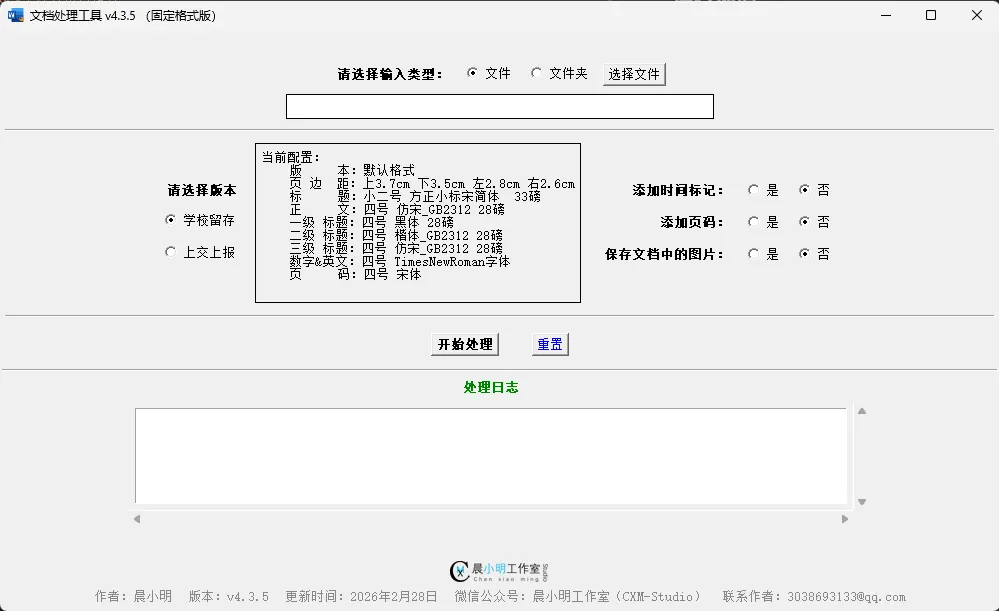
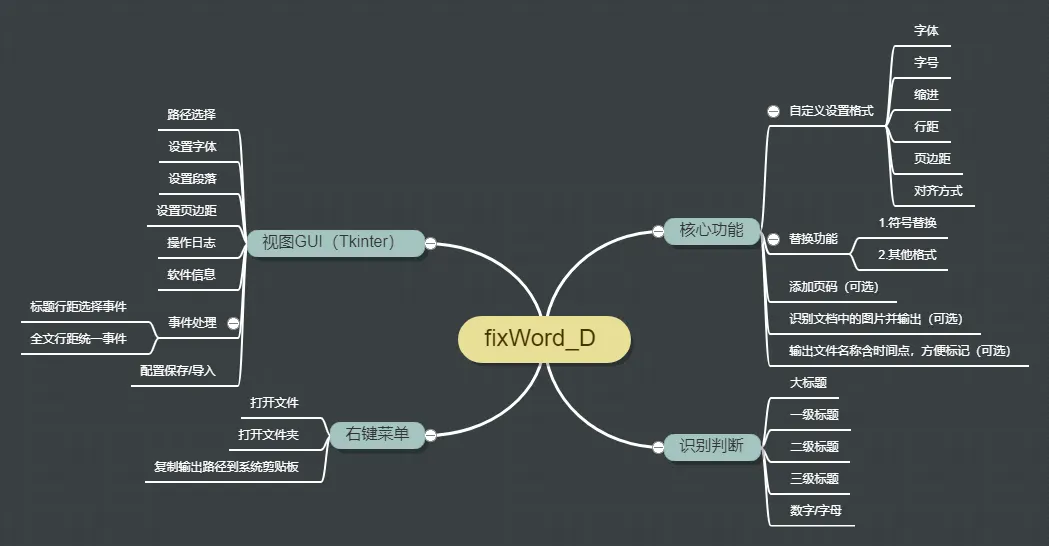
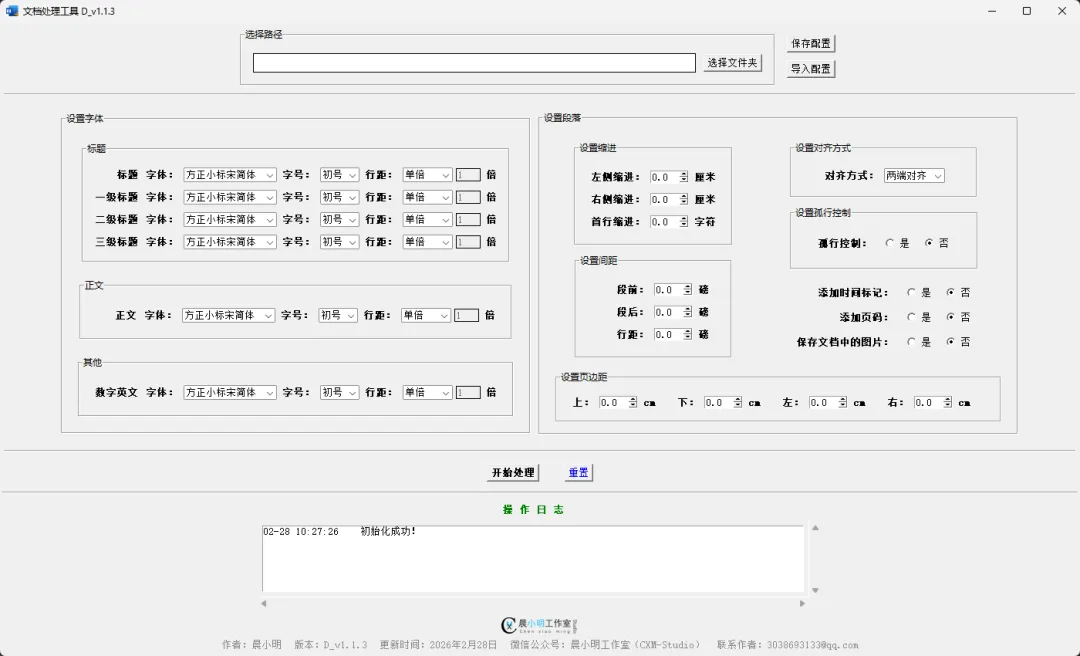
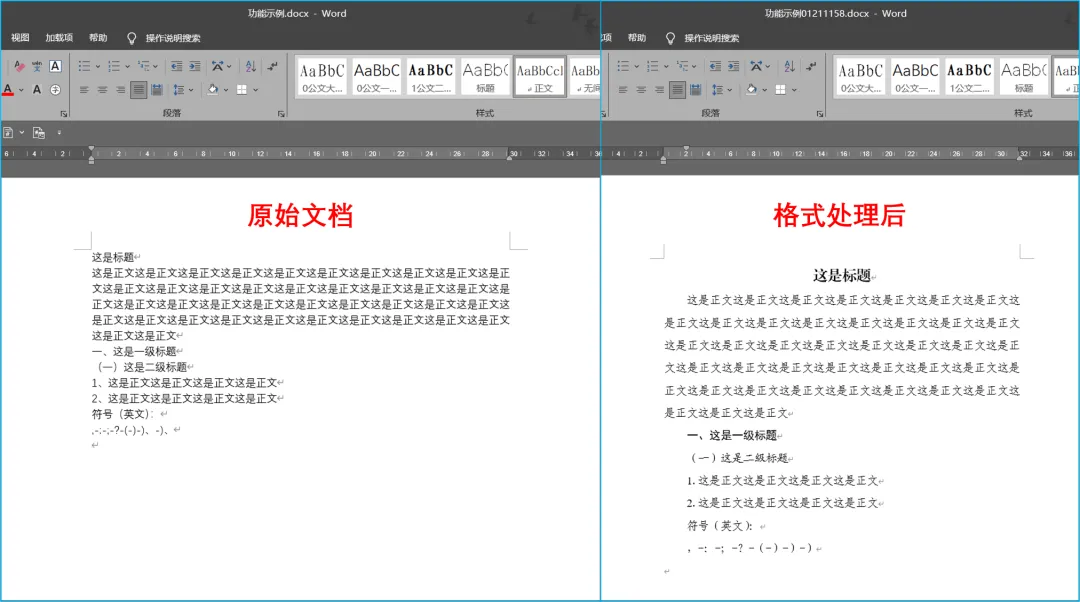
支持用户自定义输出格式:
页边距、字体、字号、行距、各级标题格式等;
批量处理;
配置保存/导入;
一、前期准备
-
开发工具
-
编程语言
-
第三方库
-
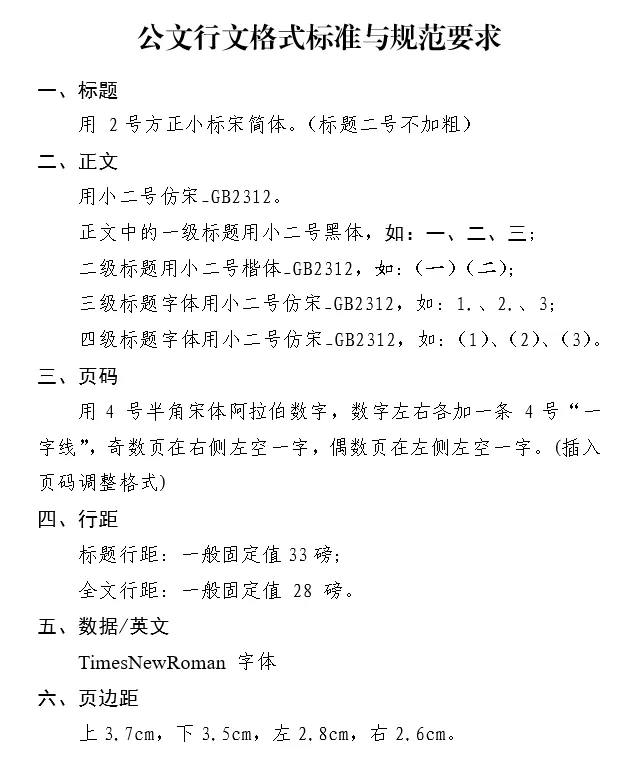
标题 -
一级标题 -
二级标题 -
三级标题 -
段落间距 -
页边距 -
页码 -
数字、英文 -
图片? -
其他 字体、字号、替换文字(符号)
-
导入库
from docx import Documentfrom docx.shared import Pt, Cm # 用来设置字体的大小from docx.oxml.ns import qn # 设置字体from docx.enum.text import WD_ALIGN_PARAGRAPH, WD_PARAGRAPH_ALIGNMENT # 设置对其方式from docx.oxml import OxmlElementfrom os import listdir, path, makedirs, getcwd, startfilefrom tkinter import Tk, Entry, Button, Label, filedialog, messagebox, SUNKEN, Radiobutton, Frame, ttk, Listbox, StringVar, END, Toplevel, Canvas, Menufrom time import localtime, strftimefrom PIL import Image, ImageTkfrom webbrowser import open as webopen
-
标题
run_title = p.add_run(i)if is_digit == "num_or_let":run_title.font.name = NUMBERFONTelse:run_title.font.name = TITLEFONTrun_title._element.rPr.rFonts.set(qn('w:eastAsia'), TITLEFONT)if version_ipt == "school":run_title.font.size = Pt(FONTSIZEDICT["小二号"])else:run_title.font.size = Pt(FONTSIZEDICT["二号"])
-
一级标题
index1_list = ["一、", "二、", "三、", "四、", "五、", "六、", "七、", "八、", "九、", "十、", "十一、", "十二、", "十三、", "十四、", "十五、", "十六、", "十七、", "十八、", "十九、", "二十、"]for i in index1_list:if i in p.text[:3]:if '。' in p.text:p.text = p.text.replace('。', '')if '?' in p.text:p.text = p.text.replace('?', '')if ':' in p.text:p.text = p.text.replace(':', '')if ';' in p.text:p.text = p.text.replace(';', '')return "level1"else:continue
-
二级标题
index2_list = ["(一)", "(二)", "(三)", "(四)", "(五)", "(六)", "(七)", "(八)", "(九)", "(十)", "(十一)", "(十二)", "(十三)", "(十四)", "(十五)", "(十六)", "(十七)", "(十八)", "(十九)", "(二十)"]for i in index2_list:if i in p.text[:4]:if '。' in p.text:p.text = p.text.replace('。', '')if '?' in p.text:p.text = p.text.replace('?', '')if ':' in p.text:p.text = p.text.replace(':', '')if ';' in p.text:p.text = p.text.replace(';', '')return "level2"else:continue
-
替换文字(符号)
def replace(p):""" 替换函数 """# 替换符号if '(' in p.text:p.text = p.text.replace('(', '(')if ')' in p.text:p.text = p.text.replace(')', ')')if ',' in p.text:p.text = p.text.replace(',', ',')if ':' in p.text:p.text = p.text.replace(':', ':')if ';' in p.text:p.text = p.text.replace(';', ';')if '?' in p.text:p.text = p.text.replace('?', '?')if '》、' in p.text:p.text = p.text.replace('》、', '》')if '.' in p.text: # U+ff0ep.text = p.text.replace('.', '.')if ' ' in p.text: # 空格p.text = p.text.replace(' ', '')if ' ' in p.text: # U+3000p.text = p.text.replace(' ', '')if ' ' in p.text: # U+2003p.text = p.text.replace(' ', '')return p
-
判断是否是数字(字母)
def isNumberOrLetter(char):""" 判断是否为数字或字母 """number_and_letter_strs = '0123456789abcdefghijklmnopqrstuvwxyzABCDEFGHIJKLMNOPQRSTUVWXYZ'if char in number_and_letter_strs:return "num_or_let"else:return False
-
段落函数
def paragraphFun(is_title, p):""" 段落函数 """try:p.paragraph_format.element.pPr.ind.set(qn("w:leftChars"), '0') # 左侧缩进p.paragraph_format.element.pPr.ind.set(qn("w:rightChars"), '0') # 右侧缩进p.paragraph_format.element.pPr.ind.set(qn("w:left"), '0') # 缩进(cm)p.paragraph_format.element.pPr.ind.set(qn("w:right"), '0') # 缩进(cm)except Exception as e:pass# print('错误:', e, f'\t{p.text} 不支持设置缩进')if is_title == "title":p.alignment = WD_ALIGN_PARAGRAPH.CENTERp.paragraph_format.line_spacing = Pt(TITLEMARGIN) # 行距p.paragraph_format.first_line_indent = Nonep.paragraph_format.space_before = Pt(0)p.paragraph_format.space_after = Pt(0)elif is_title == "odd_footer":p.alignment = WD_PARAGRAPH_ALIGNMENT.RIGHTp.paragraph_format.right_indent = Pt(14)p.paragraph_format.line_spacing = Pt(TEXTMARGIN)elif is_title == "even_footer":p.alignment = WD_PARAGRAPH_ALIGNMENT.LEFTp.paragraph_format.left_indent = Pt(14)p.paragraph_format.line_spacing = Pt(TEXTMARGIN)else:p.alignment = WD_ALIGN_PARAGRAPH.JUSTIFYp.paragraph_format.line_spacing = Pt(TEXTMARGIN) # 行距p.paragraph_format.space_before = Pt(0)p.paragraph_format.space_after = Pt(0)p.paragraph_format.widow_control = False
-
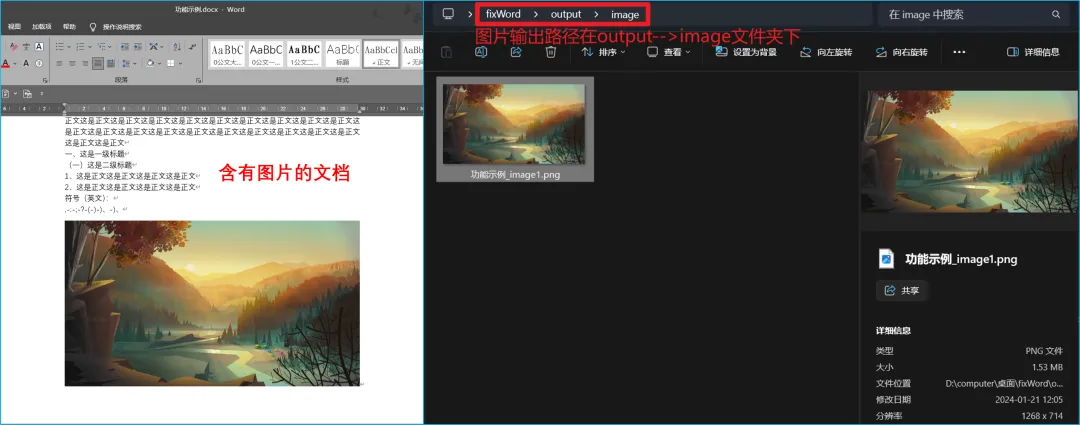
图片输出
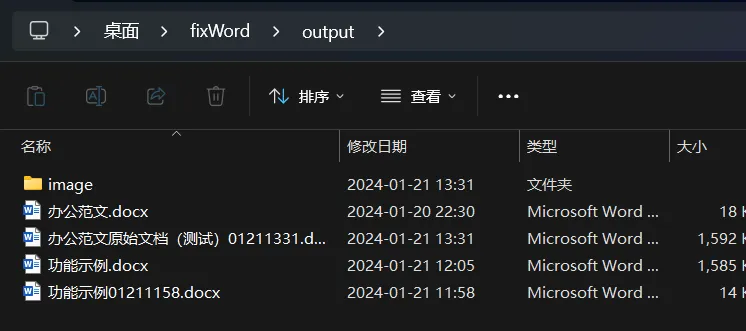
def pic_fix(docx, file, output_path):""" 图片处理 """img_path = output_path + "\image"file_name = path.splitext(file)[0]parts = docx.part.related_partsparts_values = parts.values()parts_keys = parts.keys()list_val = list(parts_values)list_key = list(parts_keys)parts_length = len(parts_values)if parts_length > 5:# print(type(list(parts_values)[-1]))k = 0for i in range(parts_length):# print(type(list_val[i]))if 'image' in str(type(list_val[i])):if not path.isdir(img_path):makedirs(img_path)# print('找到图片数据')k += 1try:img_data = parts[list_key[i]].image.blobimg_type = parts[list_key[i]].image.extfull_path = f'{img_path}\{file_name}_image{k}.{img_type}'print(f"··>提示<·· 正在输出:{full_path}")with open(full_path, 'wb') as f:f.write(img_data)except:print(f"··>错误<·· 图片{k}输出失败!")if k == 0:print(f"··>提示<·· 未找到图片!")
-
页边距
def margin(docx):""" 设置页边距 """for s in docx.sections:s.top_margin = Cm(PAGETOPMARGIN)s.bottom_margin = Cm(PAGEBOTTOMMARGIN)s.left_margin = Cm(PAGELEFTMARGIN)s.right_margin = Cm(PAGERIGHTMARGIN)
-
设置奇偶数页不同
# 奇偶页不同docx.settings.odd_and_even_pages_header_footer = True
-
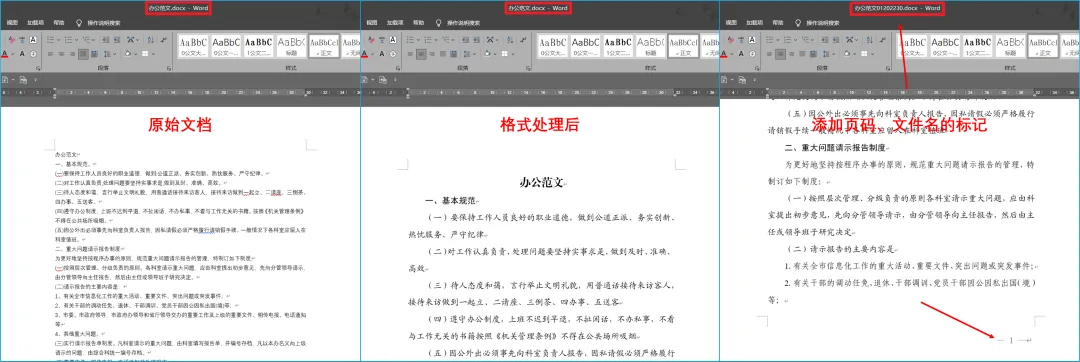
添加页码
def footer(docx):""" 设置页脚,添加页码 """# print(len(docx.sections))def AddFooterNumber(p):t1 = p.add_run("— ")font = t1.fontfont.name = PAGENUMBERFONTfont.size = Pt(PAGENUMBERFONTSIZE) # 14号字体t1._element.rPr.rFonts.set(qn("w:eastAsia"), PAGENUMBERFONT)run1 = p.add_run('')fldChar1 = OxmlElement('w:fldChar') # creates a new elementfldChar1.set(qn('w:fldCharType'), 'begin') # sets attribute on elementrun1._element.append(fldChar1)run2 = p.add_run('')instrText = OxmlElement('w:instrText')instrText.set(qn('xml:space'), 'preserve') # sets attribute on elementinstrText.text = 'PAGE'font = run2.fontfont.name = PAGENUMBERFONTfont.size = Pt(PAGENUMBERFONTSIZE) # 14号字体run2._element.rPr.rFonts.set(qn("w:eastAsia"), PAGENUMBERFONT)run2._element.append(instrText)run3 = p.add_run('')fldChar2 = OxmlElement('w:fldChar')fldChar2.set(qn('w:fldCharType'), 'end')run3._element.append(fldChar2)t2 = p.add_run(" —")font = t2.fontfont.name = PAGENUMBERFONTfont.size = Pt(PAGENUMBERFONTSIZE) # 14号字体t2._element.rPr.rFonts.set(qn("w:eastAsia"), PAGENUMBERFONT)for s in docx.sections:# print(s.footer)footer = s.footer # 获取第一个节的页脚footer.is_linked_to_previous = True# 编号续前一节paragraph = footer.paragraphs[0] # 获取页脚的第一个段落paragraphFun("odd_footer", paragraph)AddFooterNumber(paragraph)even_footer = s.even_page_footer # 获取第一个节的页脚even_footer.is_linked_to_previous = True# 编号续前一节paragraph = even_footer.paragraphs[0] # 获取页脚的第一个段落paragraphFun("even_footer", paragraph)AddFooterNumber(paragraph)
-
输入路径
def inputPath():""" 输入路径 """input_path = type_radio_value.get()if input_path == "file_path":file_path = filedialog.askopenfile(title="请选择文件", filetypes=[("docx文件", "*.docx")])if file_path != None:path_label["text"] = file_path.nameelif input_path == "dir_path":dir_path = filedialog.askdirectory(title="请选择文件夹")if dir_path != "":path_label["text"] = dir_path
-
入口函数
def main():""" 主函数 """if checkPath():merge_button.config(state="disabled", cursor="wait", text="正在处理")reset_button.config(state="disabled")merge_button.update()reset_button.update()input_path = path_entry.get().replace("/", "\\")version_ipt = version_radio_value.get()file_type = type_radio_value.get()time_ipt = time_radio_value.get()page_ipt = page_radio_value.get()img_ipt = img_radio_value.get()if file_type == "dir_path":output_path = input_path + "\output"have_docx = 0done_list = []for file in listdir(input_path):if '~' in file:continueelif file.endswith('.docx'):if not path.isdir(output_path):makedirs(output_path)have_docx += 1file_path = path.join(input_path, file)save_time, is_done = fixWord(file_path, file, output_path, time_ipt, page_ipt, img_ipt, version_ipt)if is_done:done_list.append(file_path)if have_docx == 0:print("··>错误<·· 没有找到.docx文件")messagebox.showwarning("警告", "没有找到.docx文件!")else:if len(done_list) == have_docx:messagebox.showinfo("提示", f"全部处理完成!\n共 {have_docx} 个文件\n输出路径:" + output_path)else:messagebox.showinfo("提示", f"处理完成!\n共 {have_docx} 个文件,成功 {len(done_list)} 个,失败 {have_docx - len(done_list)} 个\n输出路径:" + output_path)elif file_type == "file_path":# 文件名file = input_path.split("\\")[-1]# 输出路径dir_path = input_path.split("\\")dir_path.pop()result = '\\'.join(str(x) for x in dir_path)output_path = result + "\output"if not path.isdir(output_path):makedirs(output_path)save_time, is_done = fixWord(input_path, file, output_path, time_ipt, page_ipt, img_ipt, version_ipt)if is_done:messagebox.showinfo("提示", "处理完成!\n输出路径:" + output_path + "\\" + file.split(".")[0] + save_time + ".docx")
-
功能整合
def fixWord(docx_path, file, output_path, time_ipt, page_ipt, img_ipt, version_ipt):""" 文档处理 """docx = Document(docx_path)# 页边距margin(docx)# 修改格式fixDocx(docx, version_ipt)# 添加时间后缀file_name = path.splitext(file)[0]if time_ipt == "1":save_time = strftime("%m%d%H%M", localtime())save_path = output_path + f"\{file_name}" + save_time + ".docx"else:save_time = ""save_path = output_path + f"\{file_name}" + ".docx"# 设置页码if page_ipt == "1":# 奇偶页不同docx.settings.odd_and_even_pages_header_footer = Truefooter(docx)# 保存文档中的图片if img_ipt == "1":picFix(docx, file, output_path)# 保存文档output_time = strftime("%m-%d %H:%M:%S", localtime())try:docx.save(save_path)output_txt = output_time + " " + save_pathplay_history_frm_listbox.insert(END, output_txt)play_history_frm_listbox.update()# print(f"··>提示<·· 已保存:{output_txt}")# 设置滚动条位置到最大值,即拖动到最底部play_history_frm_listbox.yview_moveto(1)return save_time, Trueexcept PermissionError:output_txt = output_time + " " + f"{file_name} 保存失败!文件已打开,请关闭后重试!"play_history_frm_listbox.insert(END, output_txt)play_history_frm_listbox.update()play_history_frm_listbox.yview_moveto(1)messagebox.showerror("错误", f"{file_name} 保存失败!文件已打开,请关闭后重试!")return save_time, False
pyinstaller -D -w fix_word.py -n fixWord_v4.3.5 -i icon.ico## 项目简介
fixWord是一个基于python开发的Word文档修复工具,能够自动修复Word文档中的常见错误,如拼写错误、格式错误等。
## 开发环境
– Python 3.10.7
– python-docx 1.2.0
– pyinstaller 6.14.2
## 项目特点
– 支持多种常见错误修复,如拼写错误、格式错误等。
– 支持自定义错误类型和修复规则。
– 支持单文件和批量修复多个Word文档。
– 支持自定义输出结果格式。
## 运行环境
|
|
内存 | 磁盘 |
|
Windows10及以上版本 |
至少2GB |
至少75MB |
## 使用说明
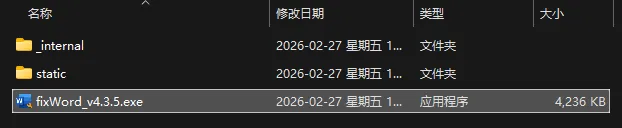
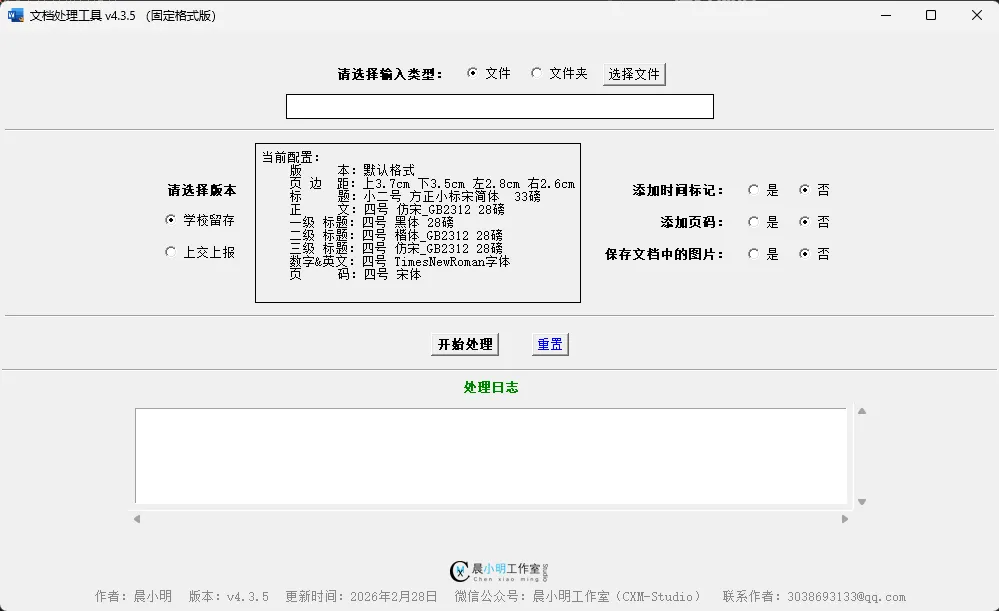
1.下载地址1(推荐):https://gitee.com/cxmStudio/fixWord/releases/download/v4.3.5/fixWord_v4.3.5.zip
下载地址2:https://github.com/Sam-CXM/fixWord/releases/download/v4.3.5/fixWord_v4.3.5.zip
2.将安装包解压到本地。
3.运行fixWord_v4.3.5.exe`文件,点击【文件】选项或【文件夹】选项,或输入含有文档的路径。
4. 点击【开始处理】按钮等待处理完成即可。
5. 处理完成后,会提示输出路径信息。
## 更新日志:
– 维护日期:2025.6.17 全新4.0版本
– 【新增】支持用户手动输入路径,输入类型多样化;
–【新增】底部版本信息;
–【新增】全角空格替换;
–【新增】左侧缩进为0(不是首行缩进);
–【新增】段前段后为0;
–【新增】取消孤行控制;
–【优化】界面排版优化,视觉效果更佳;
–【优化】去掉控制台显示;
–【优化】本地项目可直接运行;
–【修复】两位数字后为顿号(、)时,会丢失相邻数之前的数字;
–【修复】其他问题。
– 维护日期:2025.5.6
– 【新增】字体常量,便于统一;
– 【新增】两个版本:学校留存;上交上报;
– 【新增】当前格式显示;
– 【优化】其他内容;
– 【修复】弹窗的路径不准确的情况。
–维护日期:2024.8.21
– 【优化】解决了首行缩进 2 字符的问题;
– 【优化】设置基础信息常量。
– 维护日期:2024.3.12
– 【修复】解决了批量处理时选项需要重复输入的问题。
– 维护日期:2024.1.22
– 【修复】解决了含有图片的文档处理后图片被删除的问题。
– 维护日期:2024.1.21
– 【新增】可选项判断;
– 【新增】处理完成后倒计时自动关闭;
– 【优化】图片输出逻辑。
## 注意事项
– 本程序仅处理 `.docx` 类型的文件;
– 本程序暂不支持处理含有表格内容的文件;
– 含有图片的文档图片导出后可能会被压缩;
– 本程序无法处理图片格式,如果图片独立成段,本程序所用API识别到图片会被默认是空段落。为了防止图片删除,只能放弃处理空段落及图片格式;
– 本程序已开源,可免费使用。
持续维护中…