夜雨聆风
夜雨聆风


uni-app没有根组件?仅需3行代码实现全局 Toast 和 Modal
前言
在 uni-app 开发中,你是否曾被 uni.showToast 和 uni.showModal 的各种限制折磨得痛不欲生?本文将带你深入了解 uView Pro 如何通过 useToast 和 useModal 彻底解决这些痛点,并介绍两种实现全局提示的可行方案。
一、uni-app 官方 API 的痛点
1.1 uni-app 没有真正的根组件
这是一个很多开发者忽略但非常重要的问题:
-
App.vue 不是根组件:它只是应用入口文件,不会作为 Vue 的根组件渲染 -
页面是独立的:每个 pages 下的页面都是独立的 Vue 实例,相互之间无法共享状态 -
全局组件难以实现:想在所有页面显示同一个 Toast 或 Modal,技术上非常困难
这导致了一个根本性问题:uni-app 官方无法提供真正的全局 Toast 和 Modal 解决方案。
1.2 uni.showToast 的困境
uni.showToast 看似简单:
uni.showToast({ title: '加载中...', icon: 'loading'})但实际开发中,这些问题会让你崩溃:
|
|
|
|---|---|
| 全局单例 |
|
| 样式固定 |
|
| 类型单一 |
|
| 无法管理 |
|
典型场景:用户上传多个文件时,每个文件的进度提示会相互覆盖,最后用户只能看到最后一个提示。
1.3 uni.showModal 的痛点
uni.showModal({ title: '确认删除?', content: '删除后数据无法恢复', success(res) {if (res.confirm) {// 确认逻辑// 如果这里还要弹窗,就是回调嵌套 } }})存在的问题:
-
回调嵌套:多个弹窗组合使用时,代码变成「回调地狱」 -
样式受限:按钮颜色、文字、大小都无法自定义 -
功能单一:不支持输入框、选择列表等复杂交互 -
平台差异:不同端表现不一致,可能需要额外适配
二、uView Pro 的提示、弹窗解决方案
uView Pro 是全面支持 Vue3.0、TypeScript 的 uni-app 生态框架,提供了 80+ 精选 UI 组件、便捷工具、常用模板,支持多主题,暗黑模式,国际化,全面支持H5/APP/鸿蒙/小程序多端开发。
2.1 useToast:多实例、灵活可控
uView Pro 提供的 useToast 是真正的「游戏规则改变者」:
import { useToast } from'uview-pro'const toast1 = useToast({ page: 'upload' })const toast2 = useToast({ page: 'network' })const toast3 = useToast({ page: 'toast' })// ✅ 多个 Toast 同时显示,互不干扰toast1.show({ title: '上传中...', type: 'loading', position: 'top' })toast2.show({ title: '网络波动', type: 'warning', position: 'center' })toast3.show({ title: '上传成功', type: 'success', position: 'bottom' })核心优势:
|
|
|
|---|---|
| 多实例支持 |
|
| 全局模式 |
|
| 局部模式 |
|
| 位置灵活 |
|
| 类型丰富 |
|
| 完全可控 |
|
| 样式自定义 |
|
三种调用方式:
// 全局模式 - 整个应用共享一个 Toast 实例const globalToast = useToast()// 局部模式 - 当前页面独立实例const pageToast = useToast({ page: true })// 自定义 pageId - 页面中多个独立实例const topToast = useToast({ page: 'topArea' })const bottomToast = useToast({ page: 'bottomArea' })pageId 实现多实例的原理:
当你在页面中放置多个 <u-toast /> 组件,并通过 pageId 区分时,每个 Toast 实例都是完全独立的:
<template> <view> <!-- 顶部提示区域 --> <u-toast page="topArea" /> <!-- 底部提示区域 --> <u-toast page="bottomArea" /> </view></template>// 不同区域的 Toast 互不干扰const topToast = useToast({ page: 'topArea' })const bottomToast = useToast({ page: 'bottomArea' })// 顶部显示警告topToast.show({ title: '注意:网络波动', type: 'warning', position: 'top' })// 底部显示成功bottomToast.show({ title: '保存成功', type: 'success', position: 'bottom' })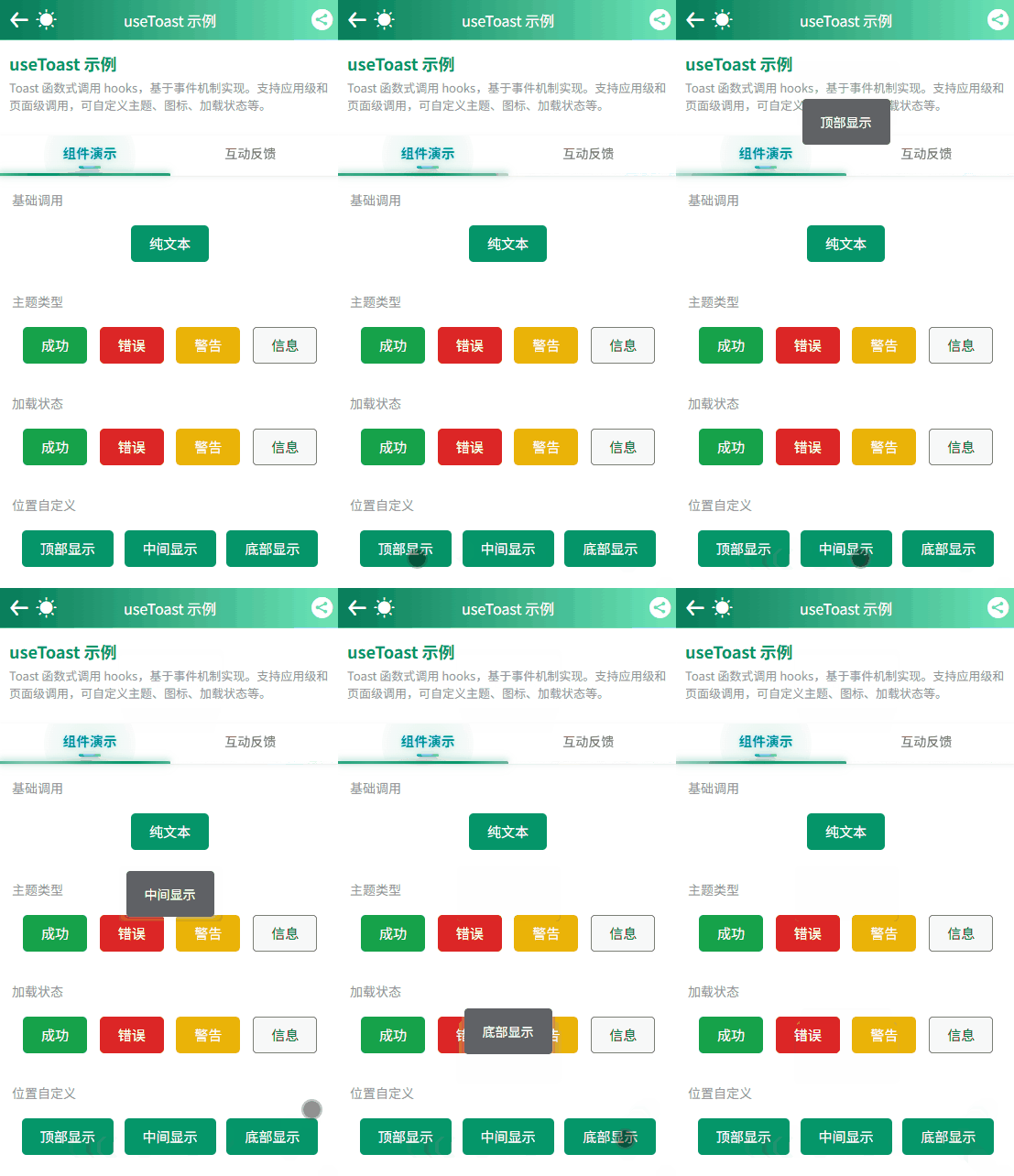
pageId 匹配机制:
|
|
|
|
|
|---|---|---|---|
useToast({ page: 'topArea' }) |
<u-toast page="topArea" /> |
|
|
useToast({ page: 'topArea' }) |
<u-toast page /> |
|
|
useToast({ page: true }) |
<u-toast page /> |
|
|
useToast() |
<u-toast global /> |
|
|
典型使用场景:子组件中触发父页面的 Toast
// 子组件中const toast = useToast({ page: 'parentToast' })toast.success('子组件触发的提示')<!-- 父页面中 --><template> <view> <ChildComponent /> <!-- 子组件会触发这个 Toast --> <u-toast page="parentToast" /> </view></template>2.2 useModal:函数式调用,灵活可控
uView Pro 的 useModal 提供简洁的模态框显示功能:
import { useModal } from'uview-pro'const modal = useModal()// ✅ 单按钮弹窗modal.show({ title: '操作成功', content: '您的订单已提交成功'})// ✅ 双按钮确认弹窗modal.confirm({ title: '确认删除?', content: '删除后数据无法恢复', onConfirm: () => {// 确认回调console.log('用户点击了确认') }, onCancel: () => {// 取消回调console.log('用户点击了取消') }})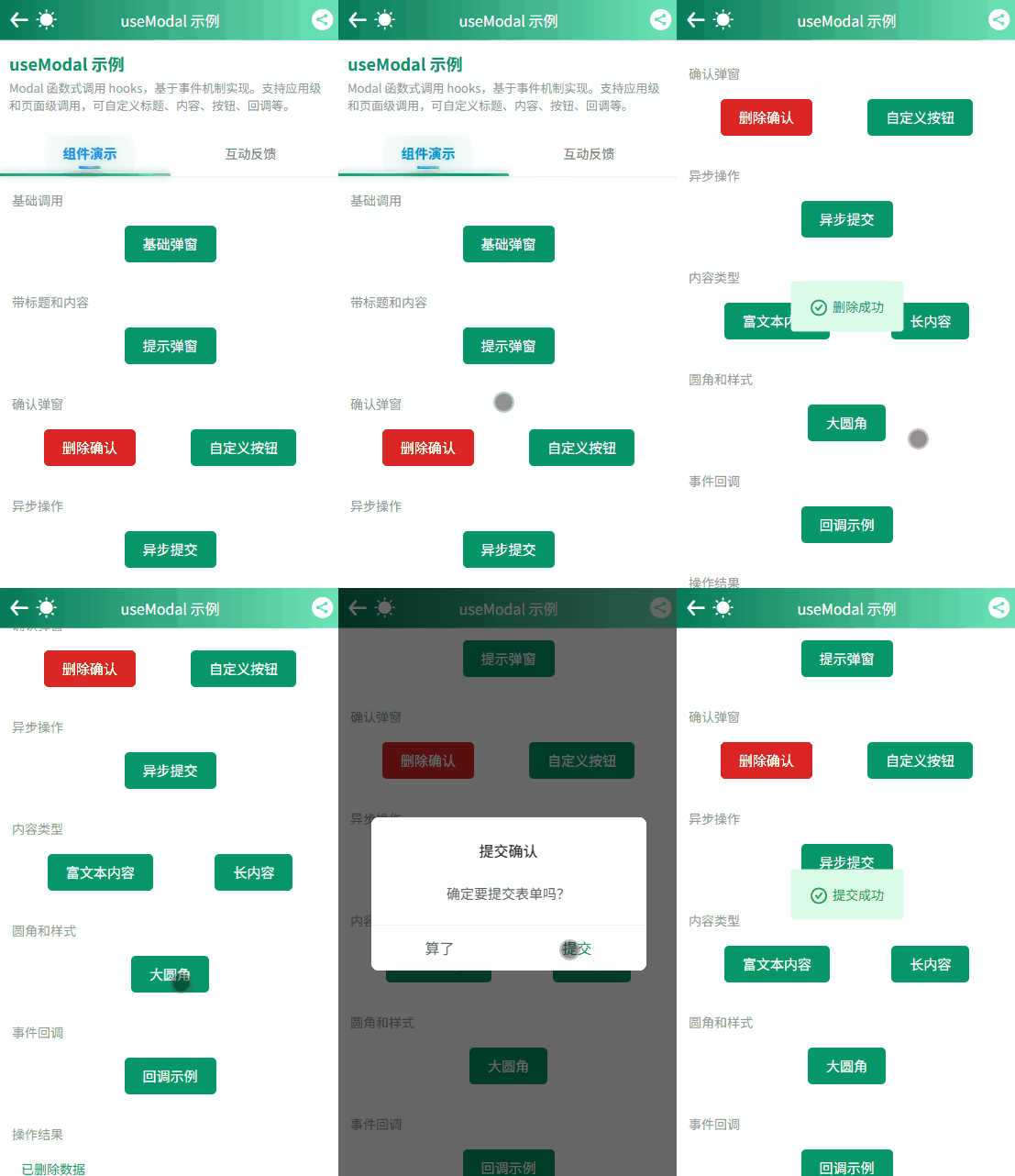
useModal 特性:
|
|
|
|---|---|
| 多实例支持 |
|
| 全局模式 |
|
| 局部模式 |
|
| 双显示方式 |
|
| 回调函数 |
|
| 高度可定制 |
|
| 异步关闭 |
|
三种调用方式:
// 全局模式 - 整个应用共享一个 Modal 实例const globalModal = useModal()// 局部模式 - 当前页面独立实例const pageModal = useModal({ page: true })// 自定义 pageId - 页面中多个独立实例const deleteModal = useModal({ page: 'deleteConfirm' })const loginModal = useModal({ page: 'loginExpired' })pageId 实现多实例的原理:
当你在页面中放置多个 <u-modal /> 组件,并通过 pageId 区分时,每个 Modal 实例都是完全独立的,可以实现不同的交互需求:
<template> <view> <!-- 普通确认 Modal --> <u-modal page /> <!-- 删除确认 Modal - 红色警告色 --> <u-modal page="deleteConfirm" /> <!-- 登录过期 Modal --> <u-modal page="loginExpired" /> </view></template>// 删除操作 - 使用专门的 deleteConfirm 实例const deleteModal = useModal({ page: 'deleteConfirm' })deleteModal.confirm({ title: '确认删除', content: '确定要删除这条数据吗?', confirmColor: '#ff4d4f', onConfirm: () => {// 执行删除 deleteItem(id) }})// 登录过期 - 使用专门的 loginExpired 实例const loginModal = useModal({ page: 'loginExpired' })loginModal.confirm({ title: '登录已过期', content: '请重新登录以继续操作', showCancelButton: false, confirmText: '重新登录', onConfirm: () => {// 跳转登录页 uni.reLaunch({ url: '/pages/login/index' }) }})pageId 匹配机制:
|
|
|
|
|
|---|---|---|---|
useModal({ page: 'deleteConfirm' }) |
<u-modal page="deleteConfirm" /> |
|
|
useModal({ page: 'deleteConfirm' }) |
<u-modal page /> |
|
|
useModal({ page: true }) |
<u-modal page /> |
|
|
useModal() |
<u-modal global /> |
|
|
典型使用场景:子组件中触发父页面的 Modal
// 子组件中const modal = useModal({ page: 'parentModal' })modal.confirm({ title: '确认操作', content: '子组件触发的弹窗', onConfirm: () => {// 确认逻辑 }})<!-- 父页面中 --><template> <view> <ChildComponent /> <!-- 子组件会触发这个 Modal --> <u-modal page="parentModal" /> </view></template>三、两种全局注入方案
3.1 方案一:使用全局包裹组件(适合新项目)
对于新项目,可以在每个页面中使用 app-page 组件来包裹内容,从而实现 Toast 和 Modal 的全局管理。
创建 AppPage.vue:
<template> <view class="app-page"> <slot /> <!-- 页面级 Toast 和 Modal --> <u-toast page /> <u-modal page /> </view></template>在每个页面中使用:
<template> <AppPage> <view class="content"> <button @click="handleToast">显示提示</button> <button @click="handleModal">显示弹窗</button> </view> </AppPage></template><script setup>import AppPage from '@/components/AppPage.vue'import { useToast, useModal } from 'uview-pro'const toast = useToast()const modal = useModal()const handleToast = () => { toast.show({ title: '全局提示', type: 'success' })}const handleModal = () => { modal.confirm({ title: '确认操作?', content: '这是一个全局弹窗', onConfirm: () => { toast.show({ title: '已确认' }) } })}</script>优点:
-
✅ 新项目首选:从一开始就建立良好的架构 -
✅ 完全可控:每个页面的 Toast/Modal 都受管理 -
✅ 易于维护:统一的页面布局管理模式
3.2 方案二:使用 Vite 插件(适合老项目,无侵入)
对于现有项目,可以使用 @uni-ku/root 插件,它可以在不修改任何现有代码的情况下,为应用注入全局根组件。
安装配置:
npm install @uni-ku/root// vite.config.tsimport { defineConfig } from'vite'import Uni from'@dcloudio/vite-plugin-uni';import UniKuRoot from'@uni-ku/root';exportdefault defineConfig({ plugins: [ UniKuRoot(), Uni(), ]})创建 App.ku.vue:
在 App.vue 同级创建 App.ku.vue,并加入以下代码
<template> <view> <KuRootView /> <!-- 全局 Toast 和 Modal --> <u-toast global /> <u-modal global /> </view></template>优点:
-
✅ 完全无侵入:不需要修改任何页面代码 -
✅ 即装即用:安装插件即可获得全局能力 -
✅ 适合老项目:不需要重构现有代码
四、实战对比:代码更优雅
4.1 登录表单场景
传统方案(uni.showToast):
const handleLogin = () => { uni.showToast({ title: '登录中...', icon: 'loading', duration: 0 }) loginApi(formData).then((res) => { uni.hideToast() uni.showToast({ title: '登录成功', icon: 'success', duration: 2000 }) setTimeout(() => uni.navigateTo({ url: '/pages/home' }), 2000) }).catch((error) => { uni.hideToast() uni.showToast({ title: error.message || '登录失败', icon: 'error' }) })}uView Pro 方案(useToast):
const toast = useToast()const handleLogin = () => { toast.loading('正在登录...'); loginApi(formData).then((res) => { toast.success({ title: '登录成功', callback: () => { uni.navigateTo({ url: '/pages/home' }) } }) }).catch((error) => { toast.error('登录失败') })}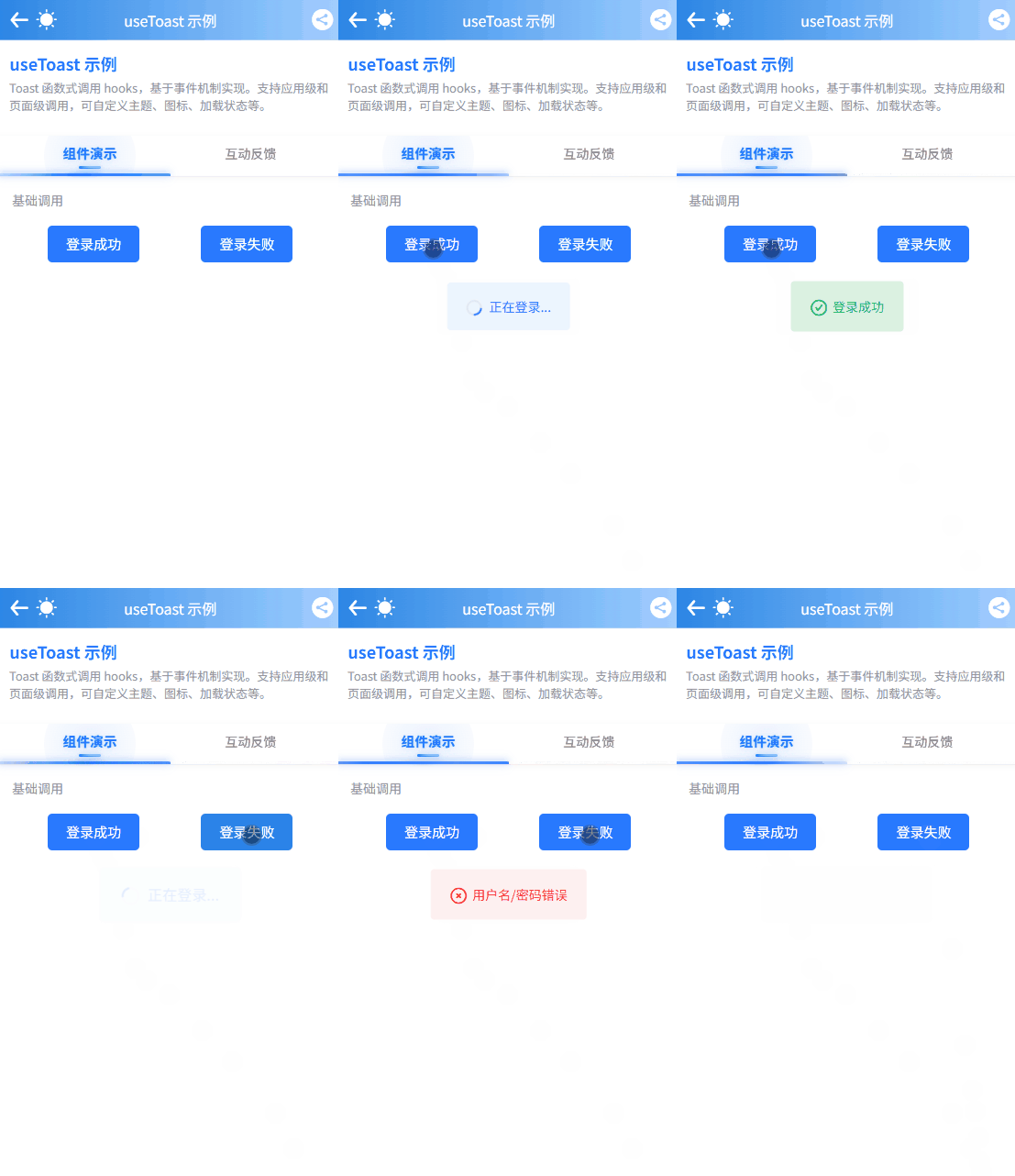
对比:
|
|
|
|
|---|---|---|
|
|
|
|
|
|
|
|
|
|
|
|
4.2 确认弹窗场景
传统方案(uni.showModal):
const handleDelete = () => { uni.showModal({ title: '确认删除?', content: '删除后数据无法恢复', success(res) {if (res.confirm) {// 删除逻辑 deleteApi(id).then(() => { uni.showToast({ title: '删除成功' }) }) } } })}uView Pro 方案(useModal):
const modal = useModal()const toast = useToast()const handleDelete = () => { modal.confirm({ title: '确认删除?', content: '删除后数据无法恢复', onConfirm: () => { deleteApi(id).then(() => { modal.close(); toast.success('删除成功') }) }, onCancel: () => { toast.warning('已取消删除'); } })}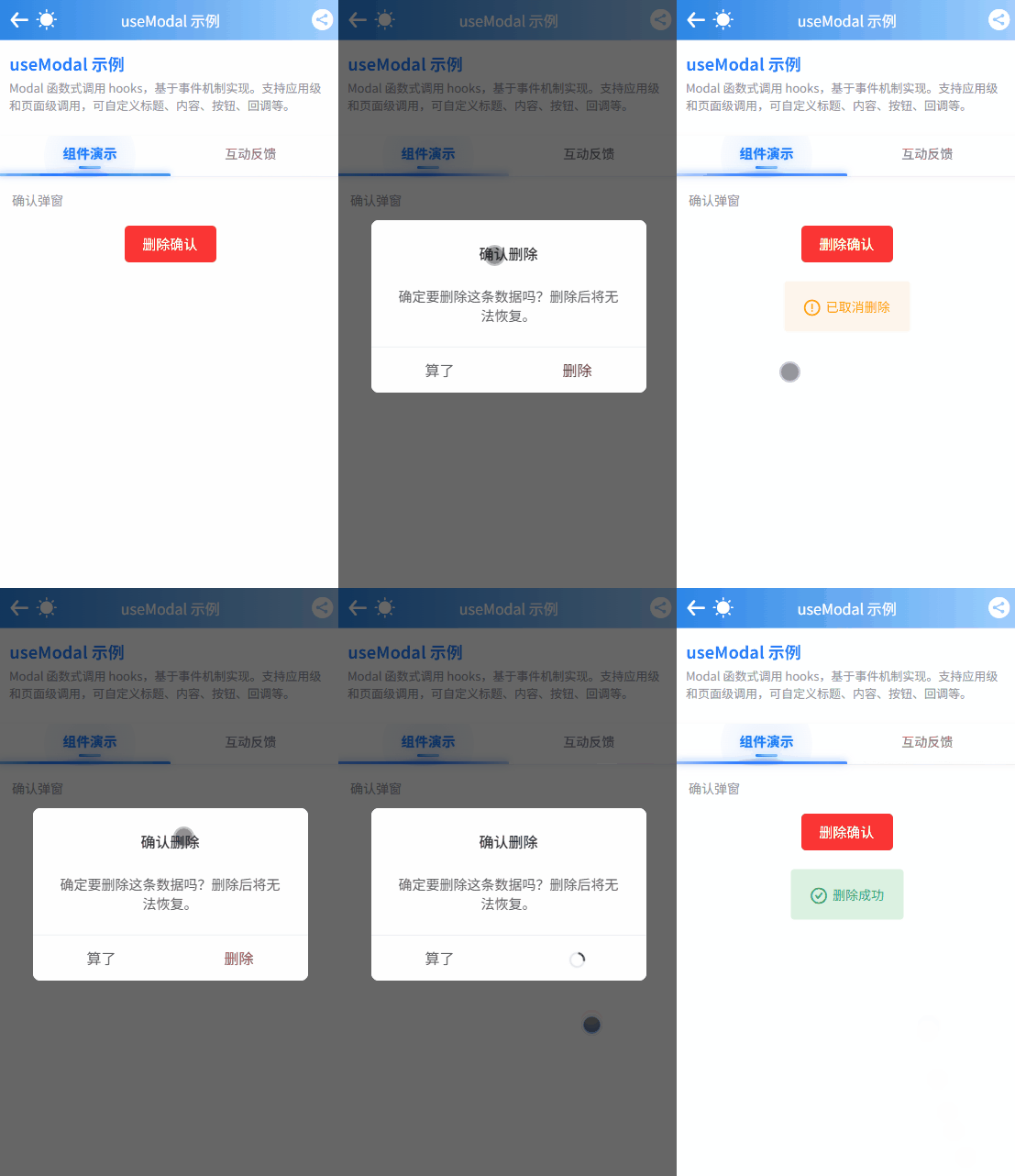
对比:
|
|
|
|
|---|---|---|
|
|
|
|
|
|
|
|
|
|
|
|
五、项目推荐与总结
5.1 为什么选择 uView Pro?
|
|
|
|
|---|---|---|
|
|
|
|
|
|
|
|
|
|
|
|
|
|
|
|
|
|
|
|
5.2 集成建议
|
|
|
|---|---|
|
|
|
|
|
|
|
|
|
5.3 快速开始
如果你正要开始一个 uni-app 新项目,我推荐使用 uView Pro Starter,它是一个基于 uView Pro UI 组件库的快速启动项目。
uView Pro Starter 项目供了一套完整的项目骨架和最佳实践,可以快速构建H5、Android、iOS、鸿蒙、各类小程序等跨平台应用。
使用 uView Pro Starter 快速启动项目
方式一:直接克隆
git clone https://github.com/anyup/uView-Pro-Starter.git方式二:使用 create-uni 脚手架创建
pnpm create uni <项目名称> -t uview-pro-starter创建完成后安装依赖即可运行项目,推荐使用 pnpm,当然你也可以使用 npm、yarn 来管理项目
cd uView-Pro-Starterpnpm installpnpm run dev更多用法请参考 uView Pro Starter 文档:https://starter.uviewpro.cn/
相关资源
-
uView Pro 文档:https://uviewpro.cn/ -
uView Pro Starter 文档:https://starter.uviewpro.cn/ -
GitHub:https://github.com/anyup/uView-Pro -
Gitee:https://gitee.com/anyup/uView-Pro
附录:核心 API 速查
useToast API
// 创建 Toast 实例const toast = useToast() // 全局模式const toast = useToast({ page: true }) // 局部模式(当前页面)const toast = useToast({ page: 'customId' }) // 自定义 pageId(多实例)// 显示 Toasttoast.show(content) // 基础用法toast.show({ title, type, position, duration })// 便捷方法toast.success(content)toast.error(content)toast.warning(content)toast.info(content)toast.loading(content)// 控制toast.close() // 关闭当前toast.closeAll() // 关闭所有pageId 使用示例:
// 顶部提示const topToast = useToast({ page: 'topArea' })topToast.show({ title: '顶部提示', position: 'top' })// 底部提示const bottomToast = useToast({ page: 'bottomArea' })bottomToast.show({ title: '底部提示', position: 'bottom' })useModal API
// 创建 Modal 实例const modal = useModal() // 全局模式const modal = useModal({ page: true }) // 局部模式(当前页面)const modal = useModal({ page: 'deleteModal' }) // 自定义 pageId(多实例)// 显示单按钮弹窗modal.show(content)modal.show({ title, content, onConfirm })// 显示确认弹窗modal.confirm(content)modal.confirm({ title, content, onConfirm, onCancel})// 控制modal.close()modal.clearLoading()pageId 使用示例:
// 删除确认弹窗const deleteModal = useModal({ page: 'deleteModal' })deleteModal.confirm({ title: '确认删除', content: '确定要删除吗?', confirmColor: '#ff4d4f', onConfirm: () => { deleteItem(id) }})// 登录过期弹窗const loginModal = useModal({ page: 'loginExpired' })loginModal.confirm({ title: '登录已过期', content: '请重新登录', showCancelButton: false, confirmText: '重新登录', onConfirm: () => { uni.reLaunch({ url: '/pages/login/index' }) }})全局 vs 局部 vs 多实例对比
|
|
|
|
|---|---|---|
| 全局模式 | useToast()
useModal() |
|
| 局部模式 | useToast({ page: true }) |
|
| 多实例模式 | useToast({ page: 'customId' }) |
|