夜雨聆风
夜雨聆风


OpenClaw 源码开发环境:微信插件 openclaw-weixin 安装与实践
本文介绍如何在 OpenClaw 源码开发环境 中安装、配置和使用微信插件openclaw-weixin,实现 AI 助手与微信的集成。遇到的一个比较大的坑是 扫码后找不到机器人入口的问题,最终重启手机后解决。
一.安装和扫码登录步骤
1. 安装插件
pnpm openclaw plugins install "@tencent-weixin/openclaw-weixin"2. 启用插件
pnpm openclaw config set plugins.entries.openclaw-weixin.enabled true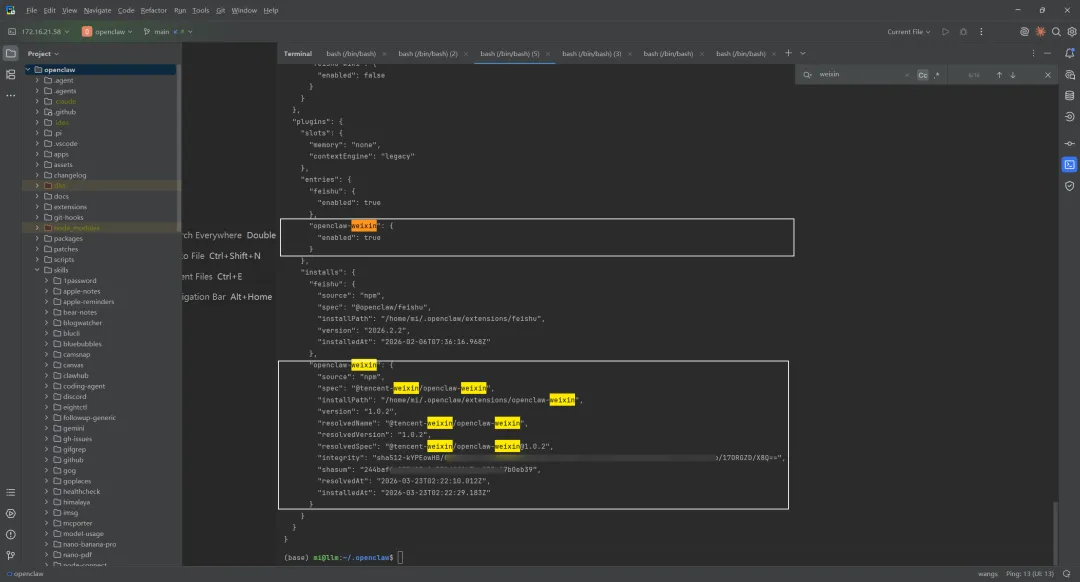
3. 执行扫码命令
登录会保存微信账号的凭证信息。
pnpm openclaw channels login --channel openclaw-weixin4. 重启 Gateway
重启 gateway 会加载新安装的插件和刚才保存的登录配置。
pnpm openclaw gateway restart或者:
# 停止现有 Gatewaypkill -f "openclaw-gateway"# 启动 Gateway(带环境变量)export 环境变量的Key=环境变量的Valuepnpm openclaw gateway run --verbose二.验证测试
1. 检查 Gateway 状态
应该看到 Gateway 进程在运行。
ps aux | grep "openclaw-gateway" | grep -v grep2. 检查通道状态
openclaw channels status应该看到类似这样的日志:
Gateway reachable.- Feishu default: enabled, configured, running- openclaw-weixin 56bbdbc5d6ea-im-bot: enabled, configured, running, in:2h ago3. 查看日志
tail -f /tmp/openclaw/openclaw-*.log4. 测试微信消息
在微信中发送测试消息(如”你好”),检查 Gateway 日志是否收到消息:
tail -f /tmp/openclaw/openclaw-*.log | grep "weixin"应该看到类似这样的日志:
inbound: from=o9cq809Yt-BSXZQnryHPIIo39txU@im.wechat bodyLen=2outbound: text sent OK三.常见问题
Q1: 扫码后找不到机器人入口的问题?
A: 重启手机操作系统。
Q2: 每次重启都需要重新扫码吗?
A: 不需要。
凭证持久化:
-
登录凭证自动保存在:
/home/mi/.openclaw/openclaw-weixin/accounts/<account-id>.json-
包含 token、userId、baseUrl 等信息
-
Gateway 重启会自动加载保存的凭证
自动恢复:
# Gateway 重启后日志显示[openclaw-weixin] weixin monitor started[openclaw-weixin] [weixin] resuming from previous sync bufQ3: Gateway 启动失败,提示”gateway already running”
A: 旧的 Gateway 进程还在运行。
解决方法:
# 方法 1:使用 Gateway 停止命令pnpm openclaw gateway stop# 方法 2:强制停止进程pkill -9 -f "openclaw-gateway"# 重新启动pnpm openclaw gateway runQ4: 收到微信消息但没有回复
A: 检查以下几点:
Gateway 是否正常运行
ps aux | grep "openclaw-gateway"微信通道是否连接
tail -f /tmp/openclaw/openclaw-*.log | grep "weixin"Agent 是否配置正确
openclaw config get agent.model查看完整日志
tail -n 100 /tmp/openclaw/openclaw-*.logQ5:添加更多微信账号
每次扫码登录都会创建一个新的账号条目,支持多个微信号同时在线。
openclaw channels login --channel openclaw-weixinQ6:多账号上下文隔离
默认情况下,所有渠道的 AI 会话共享同一个上下文。如果希望每个微信账号的对话上下文相互隔离:
openclaw config set agents.mode per-channel-per-peer这样每个「微信账号 + 发消息用户」组合都会拥有独立的 AI 记忆,账号之间不会串台。
-
per-peer:不管你在哪个通道,你都是你。(只区分人,不区分渠道)
-
per-channel-per-peer:你在微信上的身份 ≠ 你在 飞书 上的身份。(既区分人,也区分渠道)
四.会话管理
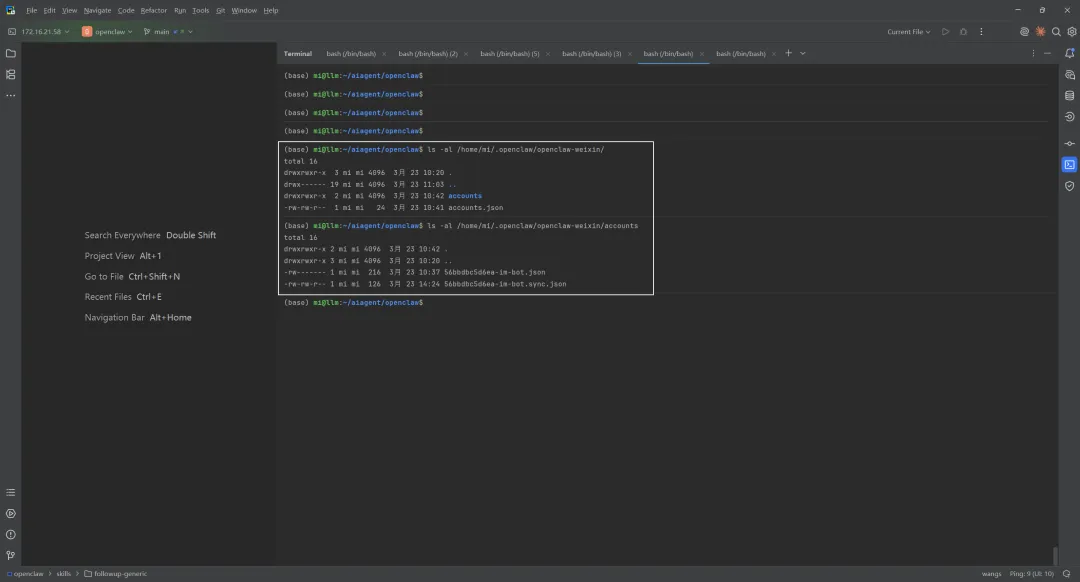
1.登录凭证存储位置
/home/mi/.openclaw/openclaw-weixin/├── accounts.json # 账号列表└── accounts/ ├── e59690a95481-im-bot.json # 凭证文件 └── e59690a95481-im-bot.sync.json # 同步状态2.查看已登录账号
cat /home/mi/.openclaw/openclaw-weixin/accounts.json3.查看账号凭证
cat /home/mi/.openclaw/openclaw-weixin/accounts/<account-id>.json包含信息:
-
token: 访问令牌 -
userId: 用户ID -
savedAt: 保存时间 -
baseUrl: API地址
4.删除账号凭证
# 删除特定账号rm /home/mi/.openclaw/openclaw-weixin/accounts/<account-id>.json# 或从列表中移除echo'[]' > /home/mi/.openclaw/openclaw-weixin/accounts.json5.相关配置文件位置
-
OpenClaw 配置:
~/.openclaw/openclaw.json -
微信插件数据:
~/.openclaw/openclaw-weixin/ -
凭证存储:
~/.openclaw/openclaw-weixin/accounts/ -
日志文件:
/tmp/openclaw/openclaw-*.log -
Gateway 日志:
/tmp/openclaw/openclaw-*.log
参考文献
[0] OpenClaw 源码开发环境:微信插件 openclaw-weixin 安装与实践:https://my.feishu.cn/wiki/Gr0XwkxnQihG3OkxIopcExUKnWg
[1] OpenClaw 官方文档:https://docs.openclaw.ai
[2] GitHub 仓库:https://github.com/openclaw/openclaw
[3] 微信插件包@tencent-weixin/openclaw-weixin:https://www.npmjs.com/package/@tencent-weixin/openclaw-weixin
知识星球:Dify源码剖析及答疑,OpenClaw源码剖析及答疑。加微信buxingtianxia21进NLP工程化资料群,Dify源码交流群,OpenClaw源码交流群。