 夜雨聆风
夜雨聆风


Excel VBA 编程基础 — 结构化数据类型(六)- 集合(一)
-
访问方式:数组元素需要通过索引(即元素的相对位置)来访问,而集合的元素是通过名字(即键值 Key)来访问的。 -
更新方式:数组元素在程序运行过程中是可以更新的,但集合元素一旦赋值即不允许更新,只能通过“删除旧的,加入新的”方式来更新。 -
可变尺寸:静态数组不允许改变大小,动态数组可以通过 ReDim 更改大小,集合的大小则可以随着 Add() 和 Remove() 方法的调用而自动增减。 -
查找效率:数组只能通过查找来找到某个元素,集合则通过 Key 直接找到相应元素,效率比数组要高得多。
Dim fruits As CollectionDim i As IntegerSet fruits = New Collectionfruits.Add "Apple"fruits.Add "Orange"fruits.Add "Strawberry"fruits.Add "Pear"For i = 1 to fruits.CountDebug.Print fruits(i)Next i
Dim fruits As Collection ' 声明 fruits 是一个 Collection 类型的变量Set fruits = New Collection ' 实例化 Collection,赋给 fruits 变量
Dim fruits As New CollectionFor Each element in group[ statements ][ Exit For ][ statements ]Next [ element ]
Dim myA() As IntegerDim v As VariantReDim myA(3)myA(0) = 10myA(1) = 23myA(2) = 210For Each v in myADebug.Print vNext v
Dim v As VariantFor Each v in fruitsDebug.Print vNext v
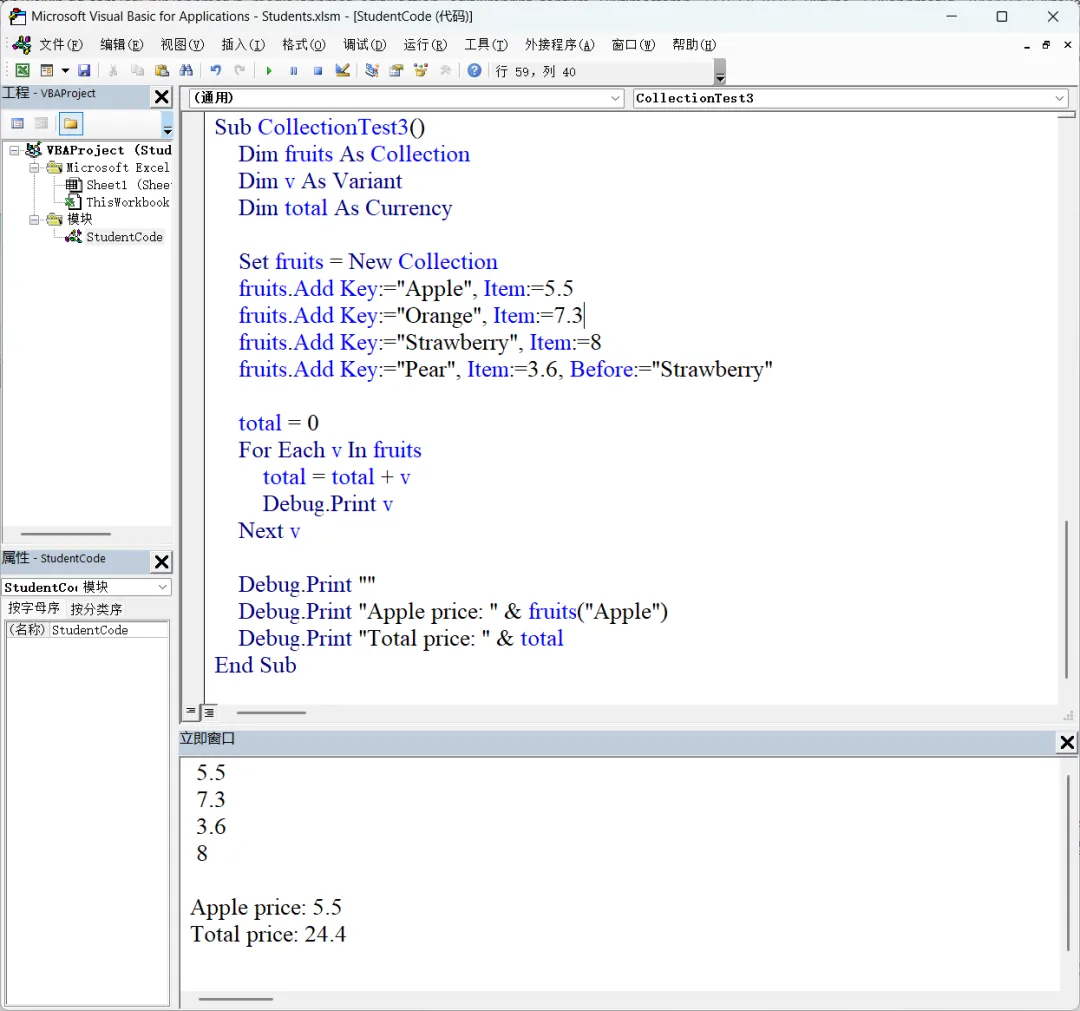
object.Add item, key, before, afterfruits.Add Key := "Pear", Item := 3.6, Before := "Strawberry"fruits.Add Key := "Pear", Item := 3.6, After := "Orange"fruits.Add 3.6, "Pear", , "Orange"-
添加元素时,作为元素的键值,起到标识元素的作用,如 fruits.Add Item := 3.6, Key := “Lemon” -
添加元素时,如果要插入到某个元素的前面或后面,作为参照的元素必须使用 Key 来标识,如上例的 Before := “Strawberry” -
读取元素的值时,可以使用 Key 来定位元素,如 fruits(“Apple”) -
删除某元素时,也必须指定元素的 Key,如删除集合 fruits 中的 Apple 元素 fruits.Remove "Apple"