 夜雨聆风
夜雨聆风


【App Service】常规排查 App Service 启动 Application Insights 无数据的步骤 (.NET版本)
问题描述
Application Insights(应用服务见解)是非常有用的日志分析工具,当应用部署在App Service后,通过Codeless的方式启动Application Insights服务,能轻松查看应用的状态并主动收集异常完整信息。
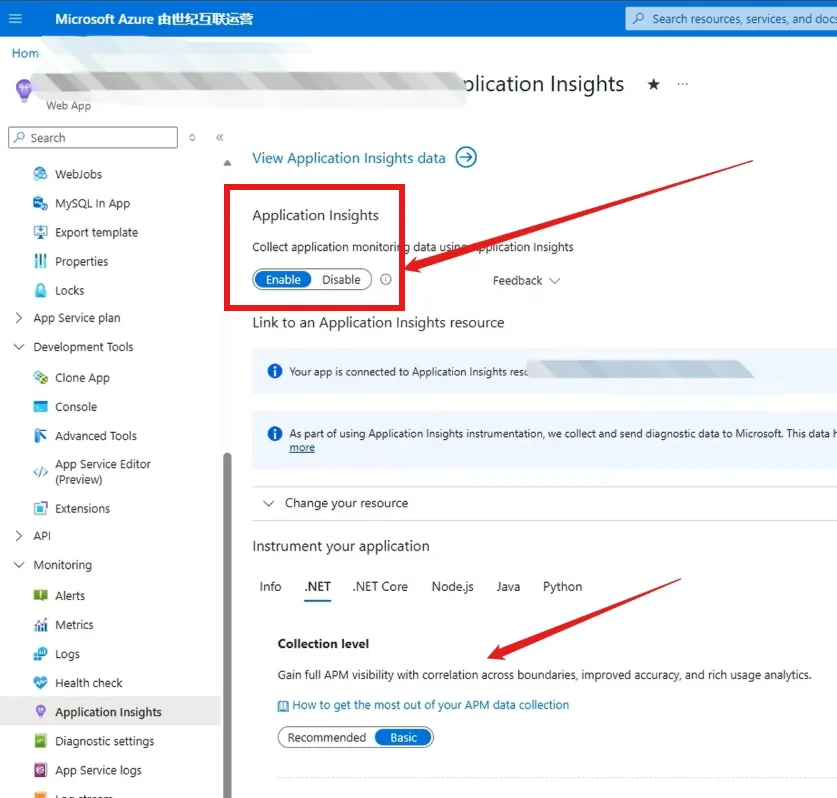
但是,常常会因为各种原因导致Application Insights没有日志数据的情况。
本文将从 网络限制,加载Application Insights模块,DLL冲突 三个方面来查看没有数据的情况。
问题解答
第一:先从网络的连通性进行判断
在App Service的门户页面中,选择网络(Networking)页面
点击(Troubleshooting)按钮,进入如下图的 Diagnostic Tools页面
选择Network Troubleshooter工具,在出现的页面中,设置Destination type为 specify manually, URI or IP:Port值则输入:https://chinanorth3-0.in.applicationinsights.azure.cn/v2/track (注:所有中国区Azure的Application Insights都是这个地址)
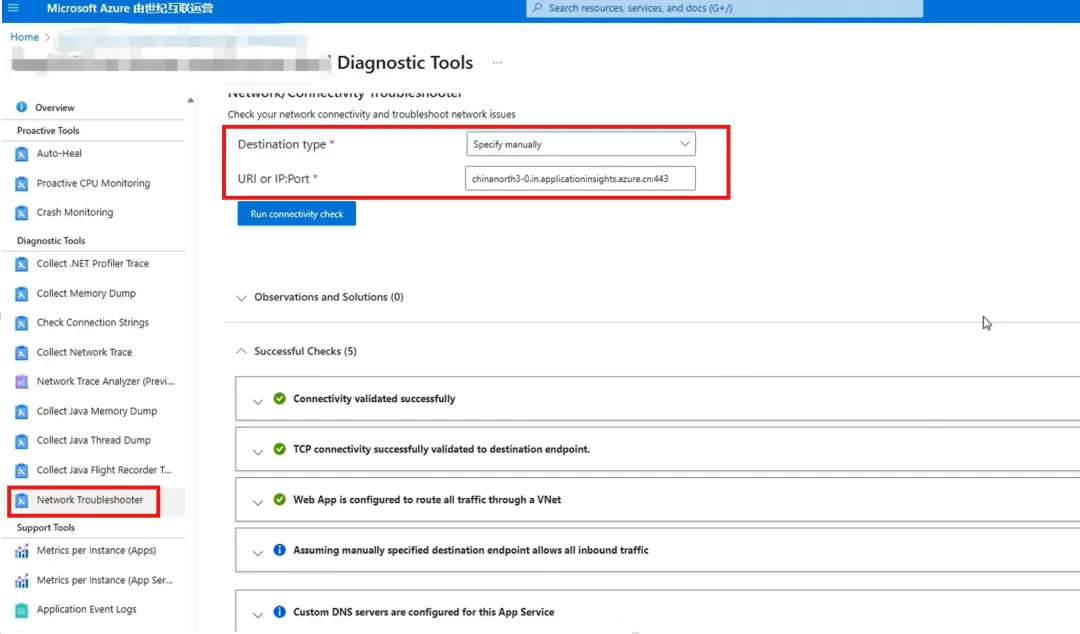
这个操作会检查很多内容:比如DNS解析,443端口是否ping通,App Service所在的虚拟网络NSG等规则,如有任何失败的信息,就需要基于错误提示针对性解决。
如果全部检查成功,则可以得出结论:App Service到Application Insights之间的网络畅通。
第二:从App Service的w3wp.exe进程是否加载了Application Insights模块
进入App Service的Kudu站点中(https://<your app service name>.scm.chinacloudsites.cn/ProcessExplorer/)中的Process Explorer页面
查看w3wp.exe 进程的modules信息,检查其中是否包含了ApplicationInsights的相关dll文件
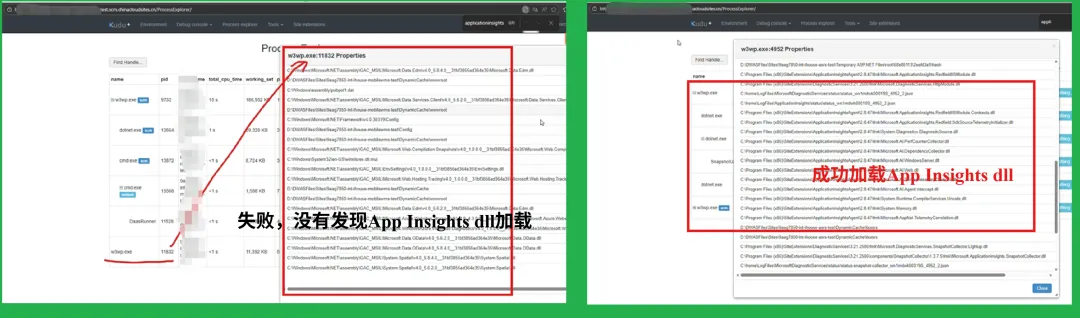
如果在w3wp.exe中没有发现app insights dll相关加载,则表示有不支持的情况发生( 比如 Application Insights Auto-Instrumentation 不支持 IIS Classic Pipeline 模式 )。
在App Service中,可以通过配置页面查看是否设置:
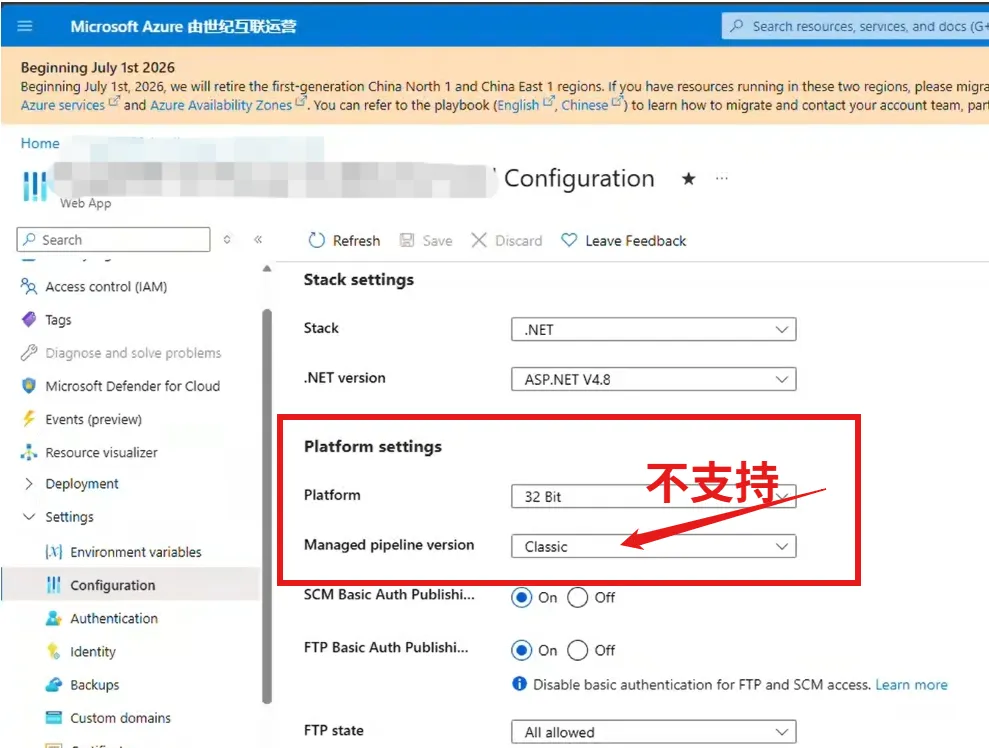
除此之外,就需要考虑是否有DLL冲突的问题,可以参考第三步。
第三:是否存在DLL冲突
进入App Service中自带的Application Insights状态查看页面(https://<your app service name>.scm.chinacloudsites.cn/ApplicationInsights)
如果第二步中,无法加载Application Insights的dll, 则这个页面会看见报错:Cannot retrieve Application Insight’s attach status.
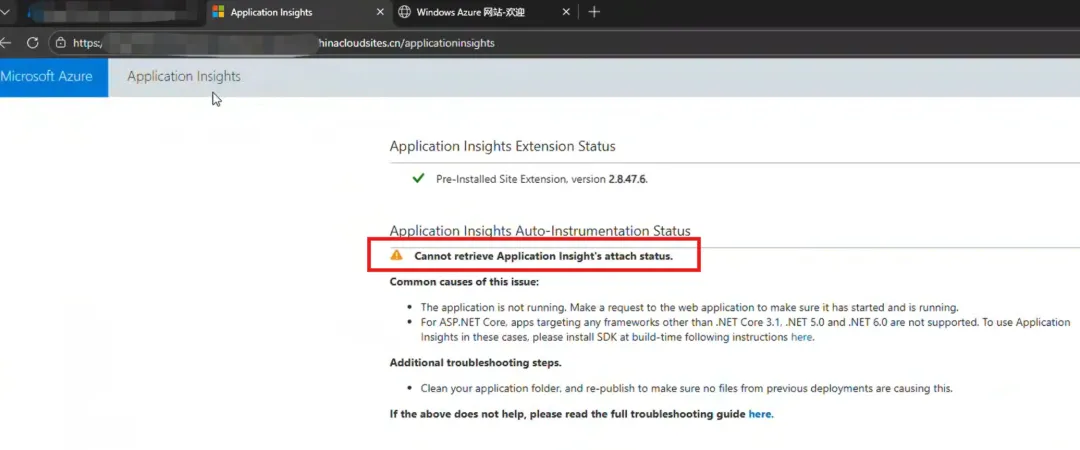
如果第二步中的内容加载成功,则可以查看到Application Insights的状态值:
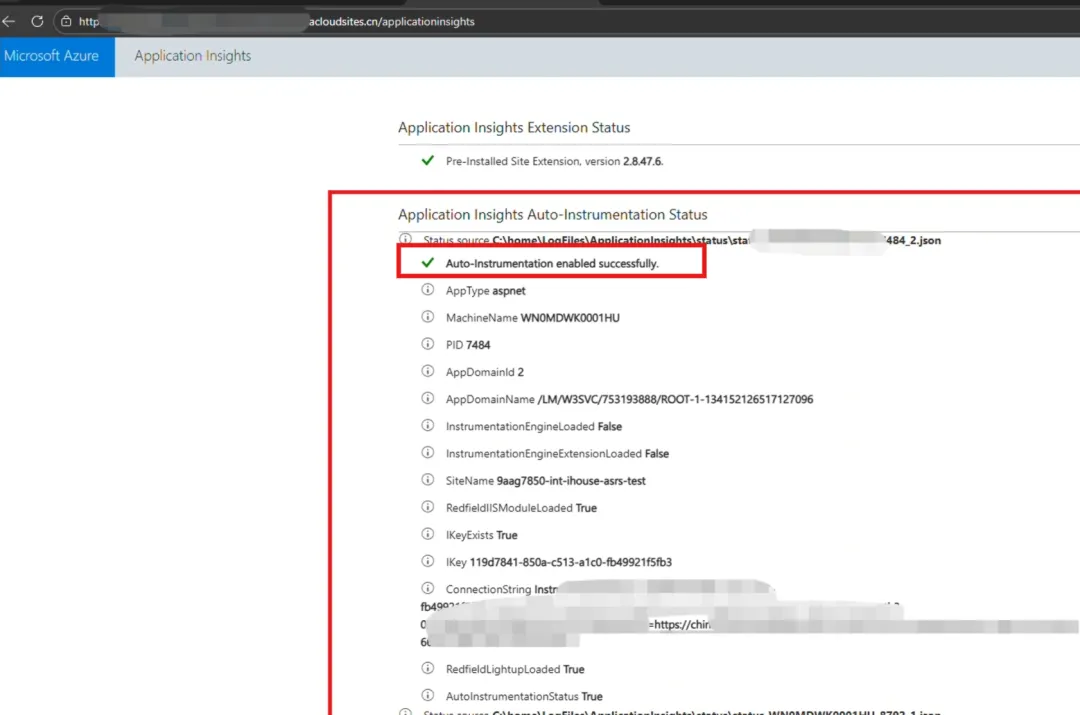
当然,这里必须注意下列的三个值:
-
AppAlreadyInstrumented -
AppContainsDiagnosticSourceAssembly -
AppContainsAspNetTelemetryCorrelationAssembly
如以上三个值存在,则代表DLL冲突,必须删除应用中所包含的如下DLL
-
Microsoft.ApplicationInsights -
System.Diagnostics.DiagnosticSource -
Microsoft.AspNet.TelemetryCorrelation.
参考官方文档说明:https://learn.microsoft.com/en-us/troubleshoot/azure/azure-monitor/app-insights/telemetry/troubleshoot-app-service-issues?tabs=net%2Cnet-1%2Cnet-2%2Cpython-3
Confirm that there are no entries for AppAlreadyInstrumented, AppContainsDiagnosticSourceAssembly, and AppContainsAspNetTelemetryCorrelationAssembly.
If any of these entries exist, remove the following packages from your application: Microsoft.ApplicationInsights, System.Diagnostics.DiagnosticSource, and Microsoft.AspNet.TelemetryCorrelation.
参考资料
Application Insights 简介 : https://learn.microsoft.com/zh-cn/azure/azure-monitor/app/app-insights-overview?tabs=webapps
Troubleshoot Application Insights integration with Azure App Service : https://learn.microsoft.com/en-us/troubleshoot/azure/azure-monitor/app-insights/telemetry/troubleshoot-app-service-issues?tabs=net%2Cnet-1%2Cnet-2%2Cpython-3
排查 Azure 应用程序 Insights 代理问题 : https://learn.microsoft.com/zh-cn/troubleshoot/azure/azure-monitor/app-insights/agent/status-monitor-v2-troubleshoot#iis-classic-pipeline-mode
当在复杂的环境中面临问题,格物之道需:
浊而静之徐清,安以动之徐生。
云中,恰是如此!