 夜雨聆风
夜雨聆风


OpenClaw ——LiteLLM设置失败(2)
-
openclaw onboard --auth-choice sk-8……A
(base) xxxxx@xxxxx-ubuntu24:~/openclaw$ openclaw onboard --auth-choice sk-8......A
Config warnings:
- plugins.entries.qwen-portal-auth: plugin not found: qwen-portal-auth (stale config entry ignored; remove it from plugins config)

............
◇  I understand this is personal-by-default and shared/multi-user use requires lock-down. Continue?
│  Yes
│
◇  Setup mode
│  QuickStart
│
◇  Existing config detected ─────────╮
│                                    │
│  workspace: ~/.openclaw/workspace  │
│  model: litellm/claude-opus-4-6    │
............
├────────────────────────────────────╯
│
◇  Config handling
│  Use existing values
│
◇  QuickStart ─────────────────────────────╮
............
├──────────────────────────────────────────╯
│
............
◇  Select channel (QuickStart)
│  Skip for now
Config warnings:
- plugins.entries.qwen-portal-auth: plugin not found: qwen-portal-auth (stale config entry ignored; remove it from plugins config)
Config overwrite: /home/xxxxx/.openclaw/openclaw.json (sha256 ab35d8ebef0e2f01cdacdf81e0d92829864d658a5d5ea0d568c2c79e9ff24dcd -> cbb32c7c304c959926ea8a4aa8735ca076fa29f4948056ab99d03ef55b5b78f5, backup=/home/xxxxx/.openclaw/openclaw.json.bak)
Config warnings:
- plugins.entries.qwen-portal-auth: plugin not found: qwen-portal-auth (stale config entry ignored; remove it from plugins config)
Updated ~/.openclaw/openclaw.json
Workspace OK: ~/.openclaw/workspace
Sessions OK: ~/.openclaw/agents/main/sessions
│
◇  Web search ─────────────────────────────────────────────────────────────────╮
.............
├──────────────────────────────────────────────────────────────────────────────╯
│
◇  Search provider
│  Skip for now
│
◇  Skills status ─────────────╮
.............
├─────────────────────────────╯
│
◇  Configure skills now? (recommended)
│  Yes
│
◇  Install missing skill dependencies
│  🧩 clawhub, 💎 obsidian, 🧵 tmux
│
◇  Homebrew recommended ──────────────────────────────────────────────────────────╮
..............
├─────────────────────────────────────────────────────────────────────────────────╯
│
◇  Show Homebrew install command?
│  No
│
◇  Preferred node manager for skill installs
│  pnpm
│
◇  Install failed: tmux — brew not installed — Homebrew is not installed. ......
│
◇  Install failed: clawhub (exit 1) — Run "pnpm setup" to create it automatically, or set the global-bin-dir setting, or the PNPM_HOME env variable. The global bin directory sho…
ERR_PNPM_NO_GLOBAL_BIN_DIR  Unable to find the global bin directory

Run "pnpm setup" to create it automatically, or set the global-bin-dir setting, or the PNPM_HOME env variable. The global bin directory should be in the PATH.
Tip: run `openclaw doctor` to review skills + requirements.
Docs: https://docs.openclaw.ai/skills
│
◇  Install failed: obsidian — brew not installed — Homebrew is not installed. ..............
│
◇  Set GOOGLE_PLACES_API_KEY for goplaces?
│  No
│
◇  Set NOTION_API_KEY for notion?
│  No
│
◇  Set OPENAI_API_KEY for openai-whisper-api?
│  No
│
◇  Set ELEVENLABS_API_KEY for sag?
│  No
│
◇  Hooks ──────────────────────────────────────────────────────────────────╮
│                                                                          │
│  Hooks let you automate actions when agent commands are issued.          │
│  Example: Save session context to memory when you issue /new or /reset.  │
│                                                                          │
│  Learn more: https://docs.openclaw.ai/automation/hooks                   │
│                                                                          │
├──────────────────────────────────────────────────────────────────────────╯
│
◇  Enable hooks?
│  🚀 boot-md, 📝 command-logger, 💾 session-memory
│
◇  Hooks Configured ─────────────────────────────────────────╮
│                                                            │
│  Enabled 3 hooks: boot-md, command-logger, session-memory  │
│                                                            │
│  You can manage hooks later with:                          │
│    openclaw hooks list                                     │
│    openclaw hooks enable <name>                            │
│    openclaw hooks disable <name>                           │
│                                                            │
├────────────────────────────────────────────────────────────╯
Config warnings:
- plugins.entries.qwen-portal-auth: plugin not found: qwen-portal-auth (stale config entry ignored; remove it from plugins config)
Config overwrite: /home/xxxxx/.openclaw/openclaw.json (sha256 cbb32c7c304c959926ea8a4aa8735ca076fa29f4948056ab99d03ef55b5b78f5 -> 5bad0407b4adab78fd66e2e6fbdc7017ec3b95a3a4819dce9850393a46922d1d, backup=/home/xxxxx/.openclaw/openclaw.json.bak)
Config warnings:
- plugins.entries.qwen-portal-auth: plugin not found: qwen-portal-auth (stale config entry ignored; remove it from plugins config)
│
◇  Gateway service runtime ────────────────────────────────────────────╮
│                                                                      │
│  QuickStart uses Node for the Gateway service (stable + supported).  │
│                                                                      │
├──────────────────────────────────────────────────────────────────────╯
│
◇  Gateway service already installed
│  Restart
│
◒  Restarting Gateway service…Restarted systemd service: openclaw-gateway.service
◇  Gateway service restarted.
│
◇
Agents: main (default)
Heartbeat interval: 30m (main)
Session store (main): /home/xxxxx/.openclaw/agents/main/sessions/sessions.json (1 entries)
- agent:main:main (12m ago)
│
◇  Optional apps ────────────────────────╮
..............
├────────────────────────────────────────╯
│
◇  Control UI ─────────────────────────────────────────────────────────────────────╮
..............
├──────────────────────────────────────────────────────────────────────────────────╯
│
◇  Start TUI (best option!) ─────────────────────────────────╮
.............
├────────────────────────────────────────────────────────────╯
│
◇  Token ────────────────────────────────────────────────────────────────────────────────────╮
│                                                                                            │
│  Gateway token: shared auth for the Gateway + Control UI.                                  │
│  Stored in: $OPENCLAW_CONFIG_PATH (default: ~/.openclaw/openclaw.json) under               │
│  gateway.auth.token, or in OPENCLAW_GATEWAY_TOKEN.                                         │
│  View token: openclaw config get gateway.auth.token                                        │
│  Generate token: openclaw doctor --generate-gateway-token                                  │
│  Web UI keeps dashboard URL tokens in memory for the current tab and strips them from the  │
│  URL after load.                                                                           │
│  Open the dashboard anytime: openclaw dashboard --no-open                                  │
│  If prompted: paste the token into Control UI settings (or use the tokenized dashboard     │
│  URL).                                                                                     │
│                                                                                            │
├────────────────────────────────────────────────────────────────────────────────────────────╯
│
◇  How do you want to hatch your bot?
│  Hatch in Terminal (recommended)
Config warnings:
- plugins.entries.qwen-portal-auth: plugin not found: qwen-portal-auth (stale config entry ignored; remove it from plugins config)
Config warnings:
- plugins.entries.qwen-portal-auth: plugin not found: qwen-portal-auth (stale config entry ignored; remove it from plugins config)

🦞 OpenClaw 2026.4.23 (a979721) — I don't just autocomplete—I auto-commit (emotionally), then ask you to review (logically).

│
◇  Config warnings ──────────────────────────────────────────────────────────────────────╮
│                                                                                        │
│  - plugins.entries.qwen-portal-auth: plugin not found: qwen-portal-auth (stale config  │
│    entry ignored; remove it from plugins config)                                       │
│                                                                                        │
├────────────────────────────────────────────────────────────────────────────────────────╯
skills那儿应该跳过的,把基础版本跑起来再说。
-
使用终端CLI对话,我始终在这里打转
HTTP 401 authentication_error: The API Key appears to be invalid or may have expired. Please verify your credentials and try again.
[Bootstrap 待定] 请在工作区阅读 BOOTSTRAP.md 并按照其中的说明进行操作,然后再正常回复。 如果本次运行能够完成BOOTSTRAP.md的工作流程,那就请完成它。 如果无法解决,请简要说明阻碍因素,继续执行此处仍可执行的任何引导步骤,并提供最简单的下一步操作。 当引导程序尚未完成时,不要假装它已经完成。 在处理完BOOTSTRAP.md之前,不要使用通用问候语或正常回复。 对于待引导的工作区,您向用户展示的第一个回复必须遵循BOOTSTRAP.md中的规范,而不是一句普通的问候语。
 .......
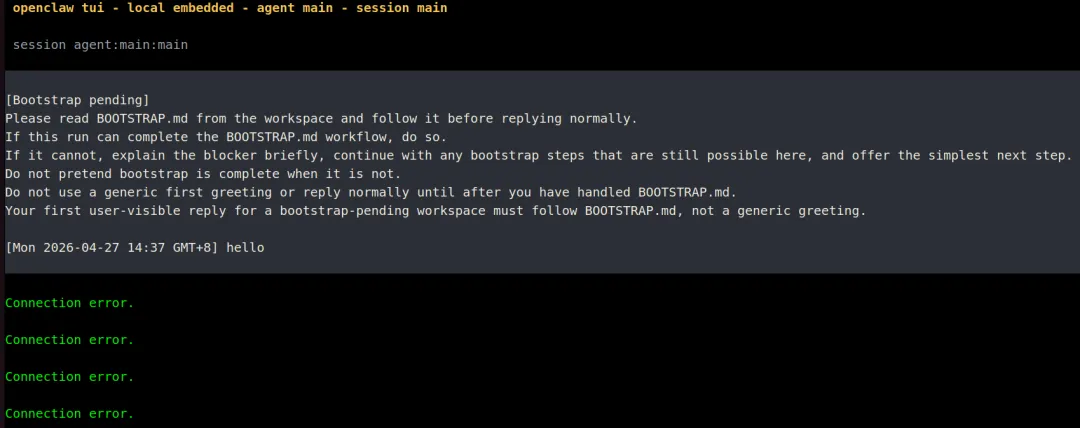
openclaw tui - local embedded - agent main - session main
............

session agent:main:main
............

Wake up, my friend!
............

HTTP 401 authentication_error: The API Key appears to be invalid or may have expired. Please verify your credentials and try again.                                                           ...........

为什么连接失败 #哈哈,我也是病急乱投医了,跟它死磕起来了
............
HTTP 401 authentication_error: The API Key appears to be invalid or may have expired. Please verify your credentials and try again.
............
[Bootstrap pending]
Please read BOOTSTRAP.md from the workspace and follow it before replying normally.

If this run can complete the BOOTSTRAP.md workflow, do so.

If it cannot, explain the blocker briefly, continue with any bootstrap steps that are still possible here, and offer the simplest next step.
Do not pretend bootstrap is complete when it is not.

Do not use a generic first greeting or reply normally until after you have handled BOOTSTRAP.md.
Your first user-visible reply for a bootstrap-pending workspace must follow BOOTSTRAP.md, not a generic greeting.

[Sat 2026-04-25 14:21 GMT+8] 请你帮我整理一下https://space.bilibili.com/49092xxxx/favlist?fid=965960968&ftype=createB站的收藏夹,请将他们分门别类
                                                                                               ....................
[Sat 2026-04-25 14:29 GMT+8] Wake up, my friend!

Connection error.
Connection error.
Connection error.
Connection error.

Usage: /session idle <duration|off> | /session max-age <duration|off> (example: /session idle 24h)

 run error: 404 {"error":"model 'qwen2.5-coder:14b' not found"}
local ready | press ctrl+c again to exit
 agent main | session main (openclaw-tui) | ollama/qwen2.5-coder:14b | tokens ?/33k                                                                                                             ..................
我就是这么急躁,瞎试一通,随时ctrl+c,智能体好像是说可以把对话挂起来Usage: /session idle <duration|off> | /session max-age <duration|off> (example: /session idle 24h)
-
安装litellm pip install 'litellm[proxy]'
(base) xxxxx@xxxxx-ubuntu24:~/openclaw$ pip install 'litellm[proxy]'
......
ERROR: pip's dependency resolver does not currently take into account all the packages that are installed. This behaviour is the source of the following dependency conflicts.
aiobotocore 2.12.3 requires botocore<1.34.70,>=1.34.41, but you have botocore 1.42.96 which is incompatible.
pyopenssl 24.2.1 requires cryptography<44,>=41.0.5, but you have cryptography 46.0.7 which is incompatible.
haddock3 2025.5.0 requires plotly==6.2.0, but you have plotly 6.3.1 which is incompatible.
......
我印象里安装了3次左右的litellm,每次都有依赖冲突,以后还是构建一个干净的环境。
-
折腾litellm,测试litellm_config.yaml文件
litellm --config litellm_config.yaml --port 4000
15:20:57 - LiteLLM:WARNING: get_model_cost_map.py:271 - LiteLLM: Failed to fetch remote model cost map from https://raw.githubusercontent.com/BerriAI/litellm/main/model_prices_and_context_window.json: _ssl.c:983: The handshake operation timed out. Falling back to local backup.对于正在撞南墙的我来说,我对有些问题视而不见
15:36:07 - LiteLLM Proxy:ERROR: internal_user_endpoints.py:1379 - litellm.proxy.proxy_server.user_update(): Exception occured - Not connected to DB!
(base) xxxxx@xxxxxx-ubuntu24:~/openclaw$ vi litellm_config.yaml
(base) xxxxxx@xxxxxx-ubuntu24:~/openclaw$ litellm --config litellm_config.yaml --port 4000
15:20:57 - LiteLLM:WARNING: get_model_cost_map.py:271 - LiteLLM: Failed to fetch remote model cost map from https://raw.githubusercontent.com/BerriAI/litellm/main/model_prices_and_context_window.json: _ssl.c:983: The handshake operation timed out. Falling back to local backup.
INFO:     Started server process [660101]
INFO:     Waiting for application startup.
............

............

Give Feedback / Get Help: https://github.com/BerriAI/litellm/issues/new

INFO:     Application startup complete.
INFO:     Uvicorn running on http://0.0.0.0:4000 (Press CTRL+C to quit)
INFO:     127.0.0.1:45360 - "GET / HTTP/1.1" 200 OK
INFO:     127.0.0.1:45372 - "GET /swagger/swagger-ui-bundle.js HTTP/1.1" 200 OK
INFO:     127.0.0.1:45360 - "GET /swagger/swagger-ui.css HTTP/1.1" 200 OK
INFO:     127.0.0.1:45372 - "GET /openapi.json HTTP/1.1" 200 OK
INFO:     127.0.0.1:45360 - "GET /swagger/favicon.png HTTP/1.1" 200 OK
INFO:     127.0.0.1:59376 - "GET / HTTP/1.1" 200 OK
INFO:     127.0.0.1:59376 - "GET /openapi.json HTTP/1.1" 200 OK
INFO:     127.0.0.1:59986 - "GET / HTTP/1.1" 200 OK
INFO:     127.0.0.1:59986 - "GET /openapi.json HTTP/1.1" 200 OK
INFO:     127.0.0.1:45696 - "GET /ui/model_hub_table HTTP/1.1" 307 Temporary Redirect
INFO:     127.0.0.1:45696 - "GET /ui/model_hub_table/ HTTP/1.1" 200 OK
INFO:     127.0.0.1:41082 - "GET /litellm-asset-prefix/_next/static/chunks/4e20891f2fd03463.css HTTP/1.1" 200 OK
............
INFO:     127.0.0.1:41116 - "GET /ui/model_hub_table/favicon.ico HTTP/1.1" 404 Not Found
INFO:     127.0.0.1:41116 - "GET /get/ui_settings HTTP/1.1" 500 Internal Server Error
INFO:     127.0.0.1:41100 - "GET /litellm/.well-known/litellm-ui-config HTTP/1.1" 200 OK
INFO:     127.0.0.1:41116 - "GET /public/model_hub HTTP/1.1" 200 OK
INFO:     127.0.0.1:41116 - "GET /litellm/.well-known/litellm-ui-config HTTP/1.1" 200 OK
INFO:     127.0.0.1:41100 - "GET /public/litellm_blog_posts HTTP/1.1" 200 OK
INFO:     127.0.0.1:41098 - "GET /health/readiness HTTP/1.1" 200 OK
INFO:     127.0.0.1:41082 - "GET /get/ui_theme_settings HTTP/1.1" 200 OK
INFO:     127.0.0.1:41116 - "GET /litellm/.well-known/litellm-ui-config HTTP/1.1" 200 OK
INFO:     127.0.0.1:45696 - "HEAD / HTTP/1.1" 200 OK
INFO:     127.0.0.1:41082 - "GET /get/ui_settings HTTP/1.1" 500 Internal Server Error
INFO:     127.0.0.1:41126 - "GET /get_image HTTP/1.1" 200 OK
INFO:     127.0.0.1:41116 - "GET /__next._tree.txt?_rsc=o16mb HTTP/1.1" 404 Not Found
INFO:     127.0.0.1:41100 - "GET /public/model_hub/info HTTP/1.1" 200 OK
INFO:     127.0.0.1:41098 - "GET /public/model_hub HTTP/1.1" 200 OK
INFO:     127.0.0.1:41082 - "GET /public/agent_hub HTTP/1.1" 200 OK
INFO:     127.0.0.1:41126 - "GET /public/mcp_hub HTTP/1.1" 200 OK
INFO:     127.0.0.1:45696 - "GET /public/skill_hub HTTP/1.1" 500 Internal Server Error
INFO:     127.0.0.1:41116 - "GET /get/ui_settings HTTP/1.1" 500 Internal Server Error
INFO:     127.0.0.1:41116 - "GET /get/ui_settings HTTP/1.1" 500 Internal Server Error
INFO:     127.0.0.1:42930 - "GET /ui HTTP/1.1" 307 Temporary Redirect
INFO:     127.0.0.1:42930 - "GET /ui/ HTTP/1.1" 200 OK
INFO:     127.0.0.1:42930 - "GET /litellm-asset-prefix/_next/static/chunks/3f3fa56b5786d58c.css HTTP/1.1" 200 OK
............
............
INFO:     127.0.0.1:42942 - "GET /ui/login/favicon.ico HTTP/1.1" 404 Not Found
INFO:     127.0.0.1:42942 - "GET /litellm/.well-known/litellm-ui-config HTTP/1.1" 200 OK
15:36:07 - LiteLLM Proxy:ERROR: internal_user_endpoints.py:1379 - litellm.proxy.proxy_server.user_update(): Exception occured - Not connected to DB!
Traceback (most recent call last):
  File "/home/xxxxx/anaconda3/lib/python3.12/site-packages/litellm/proxy/management_endpoints/internal_user_endpoints.py", line 1373, in user_update
    response = await _update_single_user_helper(
               ^^^^^^^^^^^^^^^^^^^^^^^^^^^^^^^^^
  File "/home/xxxxx/anaconda3/lib/python3.12/site-packages/litellm/proxy/management_endpoints/internal_user_endpoints.py", line 1133, in _update_single_user_helper
    raise Exception("Not connected to DB!")
Exception: Not connected to DB!
15:36:07 - LiteLLM Proxy:ERROR: proxy_server.py:11662 - litellm.proxy.proxy_server.login_v2(): Exception occurred -
Traceback (most recent call last):
  File "/home/xxxxx/anaconda3/lib/python3.12/site-packages/litellm/proxy/management_endpoints/internal_user_endpoints.py", line 1373, in user_update
    response = await _update_single_user_helper(
               ^^^^^^^^^^^^^^^^^^^^^^^^^^^^^^^^^
  File "/home/xxxxxx/anaconda3/lib/python3.12/site-packages/litellm/proxy/management_endpoints/internal_user_endpoints.py", line 1133, in _update_single_user_helper
    raise Exception("Not connected to DB!")
Exception: Not connected to DB!

During handling of the above exception, another exception occurred:

Traceback (most recent call last):
  File "/home/xxxxx/anaconda3/lib/python3.12/site-packages/litellm/proxy/proxy_server.py", line 11624, in login_v2
    login_result = await authenticate_user(
                   ^^^^^^^^^^^^^^^^^^^^^^^^
  File "/home/xxxxx/anaconda3/lib/python3.12/site-packages/litellm/proxy/auth/login_utils.py", line 183, in authenticate_user
    await user_update(
  File "/home/xxxxx/anaconda3/lib/python3.12/site-packages/litellm/proxy/management_helpers/utils.py", line 459, in wrapper
    raise e
  File "/home/xxxxx/anaconda3/lib/python3.12/site-packages/litellm/proxy/management_helpers/utils.py", line 375, in wrapper
    result = await func(*args, **kwargs)
             ^^^^^^^^^^^^^^^^^^^^^^^^^^^
  File "/home/xxxxx/anaconda3/lib/python3.12/site-packages/litellm/proxy/management_endpoints/internal_user_endpoints.py", line 1394, in user_update
    raise ProxyException(
litellm.proxy._types.ProxyException
INFO:     127.0.0.1:47718 - "POST /v2/login HTTP/1.1" 400 Bad Request
^CINFO:     Shutting down
INFO:     Waiting for application shutdown.
INFO:     Application shutdown complete.
INFO:     Finished server process [660101]
-
litellm --config litellm_config.yaml --port 4000
15:38:20 - LiteLLM Router:ERROR: router.py:6801 - Error creating deployment: litellm.BadRequestError: LLM Provider NOT provided. Pass in the LLM provider you are trying to call. You passed model=deepseek-chat Pass model as E.g. For 'Huggingface' inference endpoints pass in completion(model=’huggingface/starcoder’,..) Learn more: https://docs.litellm.ai/docs/providers, ignoring and continuing with other deployments.好像说是LLM Provider NOT provided,我觉得可能是我的base url没设置,导致liteLLM找不到模型的提供方
(base) xxxxx@xxxxx-ubuntu24:~/openclaw$ litellm --config litellm_config.yaml --port 4000
INFO:     Started server process [662922]
INFO:     Waiting for application startup.

............

 Thank you for using LiteLLM! - Krrish & Ishaan

Give Feedback / Get Help: https://github.com/BerriAI/litellm/issues/new

LiteLLM: Proxy initialized with Config, Set models:
    deepseek
15:38:20 - LiteLLM Router:ERROR: router.py:6801 - Error creating deployment: litellm.BadRequestError: LLM Provider NOT provided. Pass in the LLM provider you are trying to call. You passed model=deepseek-chat
 Pass model as E.g. For 'Huggingface' inference endpoints pass in `completion(model='huggingface/starcoder',..)` Learn more: https://docs.litellm.ai/docs/providers, ignoring and continuing with other deployments.
Traceback (most recent call last):
  File "/home/xxxxx/anaconda3/lib/python3.12/site-packages/litellm/router.py", line 6791, in _create_deployment
    deployment = self._add_deployment(deployment=deployment)
                 ^^^^^^^^^^^^^^^^^^^^^^^^^^^^^^^^^^^^^^^^^^^
  File "/home/xxxxx/anaconda3/lib/python3.12/site-packages/litellm/router.py", line 7043, in _add_deployment
    ) = litellm.get_llm_provider(
        ^^^^^^^^^^^^^^^^^^^^^^^^^
  File "/home/xxxxx/anaconda3/lib/python3.12/site-packages/litellm/litellm_core_utils/get_llm_provider_logic.py", line 490, in get_llm_provider
    raise e
  File "/home/xxxxx/anaconda3/lib/python3.12/site-packages/litellm/litellm_core_utils/get_llm_provider_logic.py", line 471, in get_llm_provider
    raise litellm.exceptions.BadRequestError(  # type: ignore
litellm.exceptions.BadRequestError: litellm.BadRequestError: LLM Provider NOT provided. Pass in the LLM provider you are trying to call. You passed model=deepseek-chat
 Pass model as E.g. For 'Huggingface' inference endpoints pass in `completion(model='huggingface/starcoder',..)` Learn more: https://docs.litellm.ai/docs/providers
INFO:     Application startup complete.
INFO:     Uvicorn running on http://0.0.0.0:4000 (Press CTRL+C to quit)
^CINFO:     Shutting down
INFO:     Waiting for application shutdown.
INFO:     Application shutdown complete.
INFO:     Finished server process [662922]
一遇到问题就暴力终止,不愧是我,我好像一直是这样的做事风格
-
openclaw onboard --auth-choice sk-8......A跟12一样,不以解决问题为导向的测试都是瞎搞