ARTICLE · 1008885
DSH 插件开发教程 —— 从零开始写一个 DeepSeek Harness
DSH 插件开发教程 —— 从零开始写一个 DeepSeek Harness 插件
dsh-soul、dsh-rewind、dsh-share-page)与 DSH 官方文档,可直接对照阅读。目录
•1. 这份教程讲什么
•2. 背景知识:先弄懂 5 个词
•3. 插件能做什么
•4. 开发前的准备
•5. 实战一:十分钟写一个最小插件
•6. 宿主端(index.mjs)开发详解
•7. 客户端(client/index.mjs)开发详解
•8. 调试与排错(真实踩坑记录)
•9. 发布到 npm
•10. 进阶:动态插件(另一条路线)
•11. 附录
1. 这份教程讲什么
DSH(DeepSeek Harness) 是一个 AI Agent 运行框架:它启动后提供一个 Web 界面(http://127.0.0.1:3080),里面有会话、Agent、工具系统、系统提示词、设置页等。你可以把它类比成"一个可以装扩展的 AI 工作台"。
DSH 插件 就是给这个工作台"加功能"的 npm 包。装上插件后,你可以:
•给 Web 界面加一个新的设置页、按钮、面板;
•给 Agent 增加它可调用的工具(Tool);
•往系统提示词里注入自定义内容(比如人设、规则);
•添加 /mycmd 斜杠命令;
•注册 HTTP 接口、读写配置文件、和外部服务交互。
学完本教程你将能够: 从零建一个插件项目 → 装进本地 DSH 调试 → 处理常见报错 → 发布到 npm 给别人安装。
2. 背景知识:先弄懂 5 个词
2.1 一张图看懂 DSH 的结构
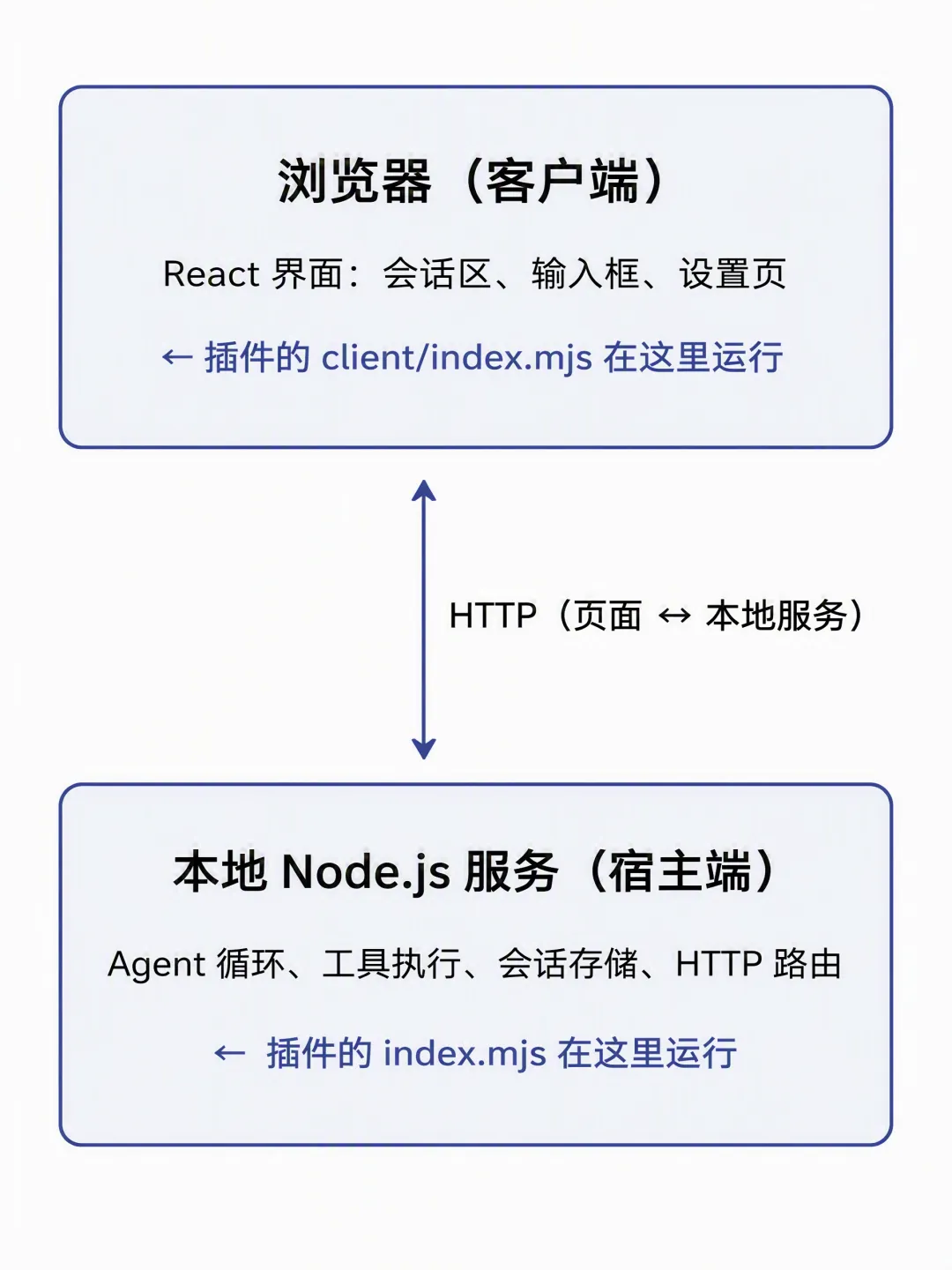
关键认知:一个插件有两半。
index.mjs | |||
client/index.mjs |
两半可以只写一半:纯客户端插件的宿主端 index.mjs 就是空的。
2.2 五个核心概念
| Host / Client | ||
| Profile | $DSH_HOME/profiles/<名字>),记录装了哪些插件 | |
| Bundle | ||
| cordis.patch.yml | ||
| Cordis | ctx.provide / ctx.inject / ctx.effect 等机制 |
配置树的叠加顺序(后叠加的覆盖先叠加的):
2.3 插件的两种形态
| npm 包插件 | dsh plugin add 安装进 profile,随 DSH 启动加载 | |
| 动态插件 | cordis_define / cordis_run 等工具现场定义,代码存于进程内 |
3. 插件能做什么
能力总览(宿主端)
webServer.register(...) | /api/mycmd 给页面调用 | |
commands.register(...) | /你的命令 | |
systemPrompt.section(...) | ||
tools.register(defineTool(...)) | ||
agent.inject(createUserMessage(...)) | ||
ctx.provide(...) |
能力总览(客户端)
settings.section | ||
conversation.input.dock | ||
conversation.chat.assistant-actions | ||
ctx.locale.register(...) |
4. 开发前的准备
4.1 环境要求
1.Node.js ≥ 20(Windows 用户建议通过 nvm 管理);
2.DSH 已安装(终端能执行 dsh --help);
3.一个可用的 profile。DSH 自带 web profile(dsh web 就是启动它),首次使用会自动初始化。profile 目录在:
4.建议装 pnpm(dsh plugin 内部转发给 pnpm 安装包)。
4.2 认识 profile 目录(可选,有助于理解)
4.3 建议的练习姿势
新建一个空白目录作为你的插件项目(本教程以 dsh-hello 为例),和 DSH 源码无关、随时可删。
5. 实战一:十分钟写一个最小插件
目标:写一个叫 dsh-hello 的插件,它提供:
1.一条斜杠命令 /hello,回复一句话;
2.一个 HTTP 接口 GET /api/hello,返回 JSON。
(客户端 UI 第 7 节再加。)
5.1 目录结构
5.2 写 package.json
这是插件最"讲究"的一个文件,逐字段解释:
json
{"name": "dsh-hello","version": "0.1.0","description": "我的第一个 DSH 插件","type": "module","main": "index.mjs","license": "MIT","keywords": ["dsh","dsh-plugin","hello"],"peerDependencies": {"@deepseek-ai/cordis": "^4.0.1"},"dsh": {"bundle": {"patch": "./cordis.patch.yml"},"client": {"inject": ["@deepseek-ai/dsh-client-locale"],"platform": "web"}},"exports": {".": {"default": "./index.mjs"},"./client": "./client/index.mjs","./cordis.patch.yml": "./cordis.patch.yml","./package.json": "./package.json"},"files": ["index.mjs","client","cordis.patch.yml","README.md"]}
type: "module"main: "index.mjs" | index.mjs |
dsh.bundle.patch | |
dsh.client.inject | |
dsh.client.platform | web 平台 |
exports["./client"] | |
files |
peerDependencies 声明"宿主环境会提供这些依赖",插件自己不打包它们。5.3 写 cordis.patch.yml
yaml
- insert:- id: helloname: dsh-hello
含义:往配置树里插入一行插件,id 是它在配置树里的名字(自取,建议全小写),name 必须等于 npm 包名。
5.4 写宿主端 index.mjs
javascript
// index.mjs — dsh-hello 宿主端入口const name = 'hello'/*** @param {object} ctx - cordis 上下文,插件的"总插座"*/export async function apply(ctx) {// —— 1. 注册斜杠命令 /hello ——// inject(['commands'], ...) 表示:等 'commands' 服务就绪后再执行回调ctx.inject(['commands'], (cmdCtx) => {cmdCtx.commands.register({name: 'hello',description: '打个招呼',input: { hint: '[名字]' },async handler(invocation) {const who = String(invocation.rawInput || '').trim() || '世界'return { kind: 'success', text: `你好,${who}!这是来自 dsh-hello 的问候。` }},})})// —— 2. 注册 HTTP 接口 GET /api/hello ——ctx.inject(['webServer'], (wsCtx) => {wsCtx.webServer.register({kind: 'exact',path: '/api/hello',handler: async (req, res) => {res.writeHead(200, { 'content-type': 'application/json' })res.end(JSON.stringify({ ok: true, message: 'hello from dsh-hello' }))},})})}export { name }
就这么多。两个固定约定:
1.导出 name(插件名,小写);
2.导出 apply(ctx)(装载函数,DSH 启动时会调用它一次)。
5.5 装进 profile 并运行
powershell
dsh web 这个别名命令不能再接收全局选项(如 --patch),需要全局选项时写全称 dsh --profile web ...。5.6 验证
1.浏览器打开 http://127.0.0.1:3080;
2.输入框输入 /hello Nick → 应看到回复「你好,Nick!……」;
3.另开终端:curl http://127.0.0.1:3080/api/hello → 应返回 JSON。
不想启动也能先验证配置(只做配置树叠加检查,不启动服务):
powershell
输出里能看到 hello 这一行,说明 patch 已正确合入。
6. 宿主端(index.mjs)开发详解
6.1 ctx 的四个核心方法
apply(ctx) 里的 ctx 是 cordis 上下文,记住四个方法就够了:
ctx.provide(name, service) | ||
ctx.inject([names], callback) | webServer / commands / systemPrompt / tools 等 | |
ctx.get(name) | undefined | |
ctx.effect(setup, tag) |
真实插件中的惯用法(摘自 dsh-soul/index.mjs,有删减):
js
// 可选服务:agents 服务不在就安静跳过function injectPromptToAllAgents(ctx, config) {const agents = ctx.get('agents')if (!agents || typeof agents.list !== 'function') returnfor (const agent of agents.list()) {try {agent.inject(/* … */)} catch (err) {/* … */}}}// 副作用清理:插件卸载/重载时自动执行清理函数ctx.effect(() => {const disposeSection = spCtx.systemPrompt.section({ /* … */ })return () => disposeSection?.() // 返回清理函数}, 'dsh-soul: system prompt section')
ctx.effect() 挂到插件生命周期上——插件停止、更新、重载时 cordis 会自动调用清理函数,避免"幽灵残留"。6.2 宿主端可用的服务清单
从三个真实插件中验证过的服务名:
webServer | webServer.register({ kind: 'exact', path, handler }) | |
commands | commands.register({ name, description, input, handler }) | |
systemPrompt | systemPrompt.section({ name, order, text }) | |
tools | tools.register(defineTool({...})) | |
agents | agents.list()agent.inject(msg) | |
sessionPersistence | dsh-share-page | |
logger | logger.warn('[插件名] ...') |
cordis_inspect_list 工具在会话里直接列出当前所有可用服务。6.3 能力一:HTTP 接口(webServer)
js
ctx.inject(['webServer'], (wsCtx) => {wsCtx.webServer.register({kind: 'exact', // 精确匹配路径path: '/api/hello',handler: async (req, res) => {// 原生 Node.js req/res// 读 POST body 的写法:// let raw = ''// for await (const chunk of req) raw += chunk// const body = JSON.parse(raw)res.writeHead(200, { 'content-type': 'application/json' })res.end(JSON.stringify({ ok: true }))},})})
•handler 就是原生 (req, res),没有框架封装,自己处理 method、body、错误;
•惯例:返回 { ok: true/false, ... } 结构,出错时 { ok: false, error: '...' }。
6.4 能力二:斜杠命令(commands)
js
ctx.inject(['commands'], (cmdCtx) => {cmdCtx.commands.register({name: 'hello', // /hellodescription: '打个招呼',input: { hint: '[show|reset|名字]' }, // 输入框里的灰色提示async handler(invocation) {const raw = String(invocation.rawInput || '').trim()if (raw === 'show') {return { kind: 'success', text: '当前配置:…' }}return { kind: 'error', text: `未知参数:${raw}` }},})})
•invocation.rawInput:命令后面的原始文本(/hello Nick → 'Nick');
•返回 { kind: 'success' | 'error', text },text 会直接显示在会话里;
•关键字子命令注意大小写策略(参考 dsh-soul:关键字比较前 toLowerCase(),昵称等内容保留原样)。
6.5 能力三:系统提示词(systemPrompt)
js
ctx.inject(['systemPrompt'], (spCtx) => {const disposeSection = spCtx.systemPrompt.section({name: 'hello:rules', // 分区名,用 '插件:用途' 命名避免冲突order: 0, // 数字越小越靠前text: () => '【插件注入】回答时保持专业严谨。', // 每次请求时调用})})
•text 是函数,每次组装提示词时实时调用,所以可以读最新的配置;
•返回空字符串表示该分区本此不注入;
•要更新提示词内容时,标准做法是:先 disposeSection() 移除旧分区,再重新注册(见 dsh-soul 的 registerSection())——这样 DSH 会丢弃旧缓存,下一次请求立即用新内容。
6.6 能力四:Agent 工具(tools + @deepseek-ai/dsh-tools)
给模型增加一个可调用的工具,比如「设置人设」(摘自 dsh-soul,有删减):
js
// 注意:@deepseek-ai/dsh-tools 是可选依赖且 ABI 敏感,// 真实插件用"动态 import + 守卫"防止宿主版本不匹配时整个插件挂掉ctx.inject(['tools'], (toolsCtx) => {import('@deepseek-ai/dsh-tools').then(({ defineTool, TOOL_RUNTIME_SCHEDULER }) => {if(typeof TOOL_RUNTIME_SCHEDULER !== 'symbol') {throw new Error('requires @deepseek-ai/dsh-tools ^0.1.0-rc.6')}toolsCtx.tools.register(defineTool({name: 'set_persona',description: '调整当前个性化人设。当用户明确要求改变称呼、语气或风格时使用。',parameters: {nickname: { type: 'string', description: '用户昵称。' },style: {type: 'string',enum: ['professional', 'casual'],description: '回复风格:professional=专业严谨,casual=轻松自然。',},},output: {schema: {type: 'object',additionalProperties: false,required: ['ok'],properties: {ok: { type: 'boolean' },message: { type: 'string' },},},},async execute(args) {// args 即模型按 parameters 传来的参数return { ok: true, message: `昵称已设为 ${args.nickname}` }},}))}).catch((err) => {toolsCtx.logger?.warn?.('[dsh-hello] tool not registered: ' + err.message)})})
要点:
•description 和参数的 description 写得越清楚,模型调用越准——这是给模型看的文档;
•参数与返回值必须可 JSON 序列化;
•execute 只负责业务结果;展示层(工具卡片 UI)是另一套机制,初学阶段不必管。
6.7 能力五:向活动会话注入上下文(agents + agent.inject)
配置变化后,让正在进行的会话立即感知(摘自 dsh-soul,有删减):
js
import { createUserMessage } from '@deepseek-ai/dsh-llm'functioninjectToAllAgents(ctx, text) {const agents = ctx.get('agents')if(!agents) returnfor(const agent of agents.list()) {try {agent.inject(createUserMessage({content: [{ type: 'text', text }],source: {// 标记消息来源(惯例,便于追溯)kind: 'plugin',plugin: 'dsh-soul',form: 'snapshot',sections: [{ name: 'soul:persona', text }],},}))} catch {/* 单个失败不影响其他会话 */}}}
行为特点(官方语义,务必记住):
•inject() 把内容放进 Agent 的待处理上下文,在下一次模型请求时生效;
•它不会主动触发新请求,也不会改写历史消息。
6.8 配置持久化
没有专门的配置 API,惯例是读写 DSH 用户数据目录下的 JSON 文件(摘自 dsh-soul):
js
import { readFile, writeFile, mkdir } from 'node:fs/promises'import { join } from 'node:path'import { homedir } from 'node:os'function configPath() {// $DSH_HOME/my-plugin-config.json;未设置 DSH_HOME 时用 ~/.dshreturn join(process.env.DSH_HOME || join(homedir(), '.dsh'), 'hello-config.json')}async function saveConfig(config) {await mkdir(join(configPath(), '..'), { recursive: true })await writeFile(configPath(), JSON.stringify(config, null, 2), 'utf8')}
7. 客户端(client/index.mjs)开发详解
客户端没有构建步骤:手写 JS + 官方已加载的 React,DSH 的模块加载器直接在浏览器里执行你的文件。
7.1 文件骨架
js
// client/index.mjs — dsh-hello Web UI 插件window.__ModuleLoader__.load({id: 'dsh-hello',factory: (require) => {const module = { exports: {} }// ① 拿 React(17+ 的 jsx-runtime 约定)const { jsx: h, jsxs: hs, Fragment } = require('react/jsx-runtime')const React = require('react')// ② 拿官方 UI 组件库(按钮、输入框、开关等)const ui = require('@deepseek-ai/dsh-client-ui-primitives')// ③ jsx-runtime 的"坑":h(type, props, child) 的第三个参数是 key,// 直接这样传 child 会被当成 key 丢掉!用一个包装函数统一把 children 塞进 props:const e = (type, props, ...children) => {const p = props || {}if (children.length === 0) return h(type, p)if (children.length === 1) return h(type, { ...p, children: children[0] })return hs(type, { ...p, children })}// —— 你的 React 组件 ——function HelloPanel(props) {const [text, setText] = React.useState('')return e('div', { style: { padding: 12 } },e('div', null, 'Hello 面板'),e(ui.Input ?? 'input', {value: text,onChange: (ev) => setText(ev.target?.value ?? ev),}),e('p', null, `你输入了:${text}`),)}// ④ cordis 装配:inject 声明硬依赖的服务,apply 里注册 UIconst inject = ['slots', 'locale']function apply(ctx) {// 多语言词典(可选)ctx.effect(() => ctx.locale.register('hello', {zh: { 'panel.title': '打招呼' },en: { 'panel.title': 'Say Hello' },}), 'dsh-hello: dictionaries')// 把组件注册进"设置页栏目"槽位ctx.slots.inject('settings.section', () => ctx.slots.register({name: 'settings.section',id: 'hello-settings', // 全局唯一order: 60, // 栏目排序label: () => '打招呼', // 左侧导航文字locale: 'hello',}, HelloPanel))}exports.apply = applyexports.inject = injectreturn module.exports},})
骨架里四件事必须理解:
1.window.__ModuleLoader__.load({ id, factory }):客户端插件的装载协议,id 与包名一致;
2.jsx-runtime 的 children 坑:必须用 props.children 传子元素(上面 e() 包装已解决),否则界面空白且难排查;
3.exports.inject:声明本插件要注入的 cordis 服务(slots、locale 等),之后才能安全使用 ctx.slots / ctx.locale;
4.槽位注册:ctx.slots.inject('槽位名', () => ctx.slots.register(配置, 组件)) —— slots.inject 表示"等这个槽位可用后再注册"。
7.2 客户端能 require 到哪些模块?
reactreact/jsx-runtime | ||
@deepseek-ai/dsh-client-ui-primitives | ||
@deepseek-ai/dsh-client-locale | package.json 的 dsh.client.inject 声明 | |
@deepseek-ai/dsh-client-ui-conversation | dsh.client.inject 声明 | |
@deepseek-ai/dsh-client-runtime | dsh.client.inject 声明 | 会话运行时服务sessions.fork、workspaces.archiveSession 等) |
两个重要限制(来自 dsh-soul 的实测注释):
•平台只预置 seed 一小撮模块,第三方插件不能直接 require('@deepseek-ai/dsh-client-runtime/client');
•需要会话写操作(fork 等)时,像 dsh-rewind 那样在 package.json 声明 "@deepseek-ai/dsh-client-runtime",并在组件的 inject 里拿 sessions / workspaces 服务。
7.3 客户端 ↔ 宿主端通信
客户端插件调用宿主端能力,最常用的方式就是fetch 你在宿主端注册的 HTTP 接口:
js
// client/index.mjs — dsh-hello Web UI 插件window.__ModuleLoader__.load({id: 'dsh-hello',factory: (require) => {const module = { exports: {} }// ① 拿 React(17+ 的 jsx-runtime 约定)const { jsx: h, jsxs: hs, Fragment } = require('react/jsx-runtime')const React = require('react')// ② 拿官方 UI 组件库(按钮、输入框、开关等)const ui = require('@deepseek-ai/dsh-client-ui-primitives')// ③ jsx-runtime 的"坑":h(type, props, child) 的第三个参数是 key,// 直接这样传 child 会被当成 key 丢掉!用一个包装函数统一把 children 塞进 props:const e = (type, props, ...children) => {const p = props || {}if (children.length === 0) return h(type, p)if (children.length === 1) return h(type, { ...p, children: children[0] })return hs(type, { ...p, children })}// —— 你的 React 组件 ——function HelloPanel(props) {const [text, setText] = React.useState('')return e('div', { style: { padding: 12 } },e('div', null, 'Hello 面板'),e(ui.Input ?? 'input', {value: text,onChange: (ev) => setText(ev.target?.value ?? ev),}),e('p', null, `你输入了:${text}`),)}// ④ cordis 装配:inject 声明硬依赖的服务,apply 里注册 UIconst inject = ['slots', 'locale']function apply(ctx) {// 多语言词典(可选)ctx.effect(() => ctx.locale.register('hello', {zh: { 'panel.title': '打招呼' },en: { 'panel.title': 'Say Hello' },}), 'dsh-hello: dictionaries')// 把组件注册进"设置页栏目"槽位ctx.slots.inject('settings.section', () => ctx.slots.register({name: 'settings.section',id: 'hello-settings', // 全局唯一order: 60, // 栏目排序label: () => '打招呼', // 左侧导航文字locale: 'hello',}, HelloPanel))}exports.apply = applyexports.inject = injectreturn module.exports},})
7.4 客户端状态管理
浏览器里的 React.useSyncExternalStore 需要一个 store。第三方插件拿不到官方内部 store 工具,自己实现一个极简的(摘自 dsh-soul,可整段复制):
js
const createSnapshotStore = (init) => {let state = initconst listeners = new Set()const notify = () => {for (const fn of [...listeners]) fn()}return {getSnapshot: () => state,subscribe: (fn) => {listeners.add(fn)return () => listeners.delete(fn)},update: (mutator) => {const next = { ...state }mutator(next)state = nextnotify()},set: (next) => {state = nextnotify()},}}// 组件里使用:function useStore(store) {return React.useSyncExternalStore(store.subscribe, store.getSnapshot)}
如果面板很简单,直接 useState 也完全够用——别为小事上框架。
7.5 常用槽位速查
settings.section | dsh-soul | |
conversation.input.dock | dsh-rewindorder: 600) | |
conversation.chat.assistant-actions | dsh-rewind |
cordis_inspect_list / Slots.listSubTree 查(见第 10 节),比猜靠谱得多。8. 调试与排错(真实踩坑记录)
以下坑全部来自本目录插件的真实开发过程,遇到问题先对照此表。
8.1 最大的坑:改了源码,页面没反应
根因:dsh plugin add ./my-plugin 走 pnpm 的 file: 协议,pnpm 会把整个包复制一份到 profile 的 node_modules——服务跑的是那份副本,不是你的源码目录。
修法(三选一):
powershell
自检三连(纯读,不改任何东西):
powershell
8.2 常见报错对照表
Cannot find package 'dsh-hello' imported from …\profiles\web\ | node_modules | dsh plugin add,再启动 |
dsh web --patch ./x.ymlweb takes none of … | web | dsh --profile web --patch … |
h(type, props, child) 把 child 当成了 key | e() 包装 | |
agent.inject() | ||
service "x" is not declared | ctx.x 但没在 inject 里声明 | ctx.get('x') + 判空,或真硬依赖就声明 inject: ['x'] |
dsh-tools | @deepseek-ai/dsh-tools 版本与宿主匹配 | |
version 再发 |
8.3 调试技巧
•宿主端:在 index.mjs 里临时 console.log(DSH 启动它的终端能看到);调试完记得删;
•客户端:浏览器 DevTools Console 看报错;Network 面板确认 /plugins/<名字>/client.js 是否返回了新代码;
•配置层:dsh --profile web --dump-config 随时检查合并结果,不用启动;
•最小复现:把插件裁到只剩一个 apply 里的一句 console.log,确认装载链路通,再逐个加功能。
9. 发布到 npm
9.1 发布前检查
bash
确认列表里包含且仅包含:
9.2 手动发布
bash
9.3 自动发布(推荐:GitHub Release + OIDC 可信发布)
dsh-soul 的做法(.github/workflows/publish.yml):发布 GitHub Release → CI 校验 tag 与 package.json 版本一致 → npm pack --dry-run → 幂等检查 → npm publish(OIDC,无需保存 token)。首次需在 npmjs.com 的包设置里配置一次 Trusted Publishing(仓库 / 工作流文件名),此后零 token 维护。
9.4 别人怎么装你的插件
bash
10. 进阶:动态插件(另一条路线)
除了 npm 包插件,DSH 还支持在会话里现场定义的动态插件:让 Agent 使用 cordis_define(提交代码)→ cordis_run(激活)等工具,代码以纯 JS 函数体的形式存于运行时,进程重启即消失。
与 npm 包插件的关键差异:
{ apply(ctx) } | ||
React.createElement(...),禁 JSX | ||
ctx.injectctx.get | ctx.inject / ctx.get | |
inject: ['timer'],用 ctx.timeout / ctx.interval | ||
harness.handle(method, handler)host.call(method, args),参数必须无损 JSON | ||
动态插件的开发心法(来自官方 cordis-plugin-development 技能文档,同样值得包插件作者参考):
1.先查再写:不要凭服务名猜 API。用 cordis_inspect_list 列出当前 Host/Client 的所有服务、事件、槽位、主题 token,再用 cordis_inspect_query 读准确签名,最后动手;
2.选最近的平台:数据在宿主就写宿主端,UI 属于页面就写客户端;Slot props 已经给的数据不要绕道宿主再拉一遍;
3.内部对象别序列化:Service 实例、会话快照、Slot props 是"活的内部数据",不要 JSON.stringify 整个对象、不要整棵复制——只提取需要的标量字段;
4.每个贡献都可回收:listener、section、定时器全部挂到 ctx.effect,插件停止时自动清理。
即使你只写 npm 包插件,第 1、2、4 条也是通用的好习惯。
11. 附录
A. 插件模板(复制即用)
客户端最小骨架(不需要 UI 时也建议保留,保持两半结构完整):
js
window.__ModuleLoader__.load({id: 'dsh-hello',factory: () => {const exports = {}exports.inject = []exports.apply = function () {}return exports},})
文中代码链接,可直接使用
https://github.com/Aliuyanfeng/dsh-hello
*本教程基于 DSH 0.1.x 生态与三个真实插件源码整理。插件 API 仍在演进中,遇到与本教程不符的行为,以你安装的 DSH 版本的运行时自省结果(cordis_inspect_list)与官方文档为准。*
本教程基于 DSH 0.1.x 生态与三个真实插件源码整理
插件 API 仍在演进中,以运行时自省结果与官方文档为准