ARTICLE · 1021782
我把 Zotero 插件商店翻了一遍:300+ 插件,按 8 类整理,附下载地址

别再问 Zotero 应该装哪些插件了。
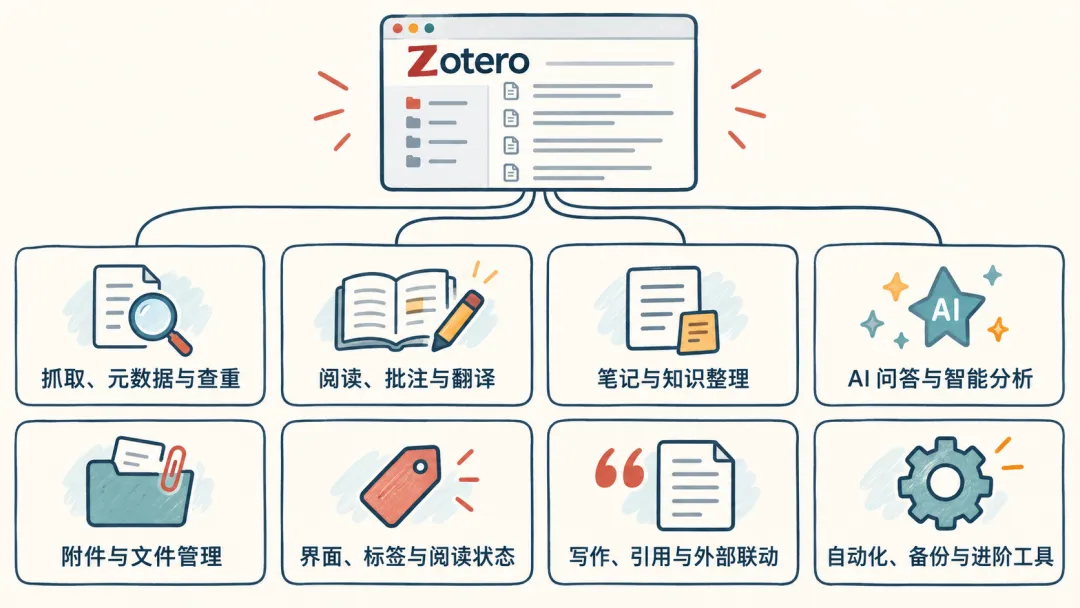
截至 2026 年 9 月 15 日,Zotero 中文社区插件商店已经收录 308 个插件项目。插件一直在更新,数字以后还会变。这篇不做简单的“必装排行榜”,也不拿有没有开源许可证当筛选条件,而是以当前商店收录项目为主要依据,整理 63 款常用插件,按实际用途分成 8 类。
你缺什么功能,就去对应分类里找。没有明确需求,就先别装。
建议先收藏,需要时再回来查。
先说怎么下载插件
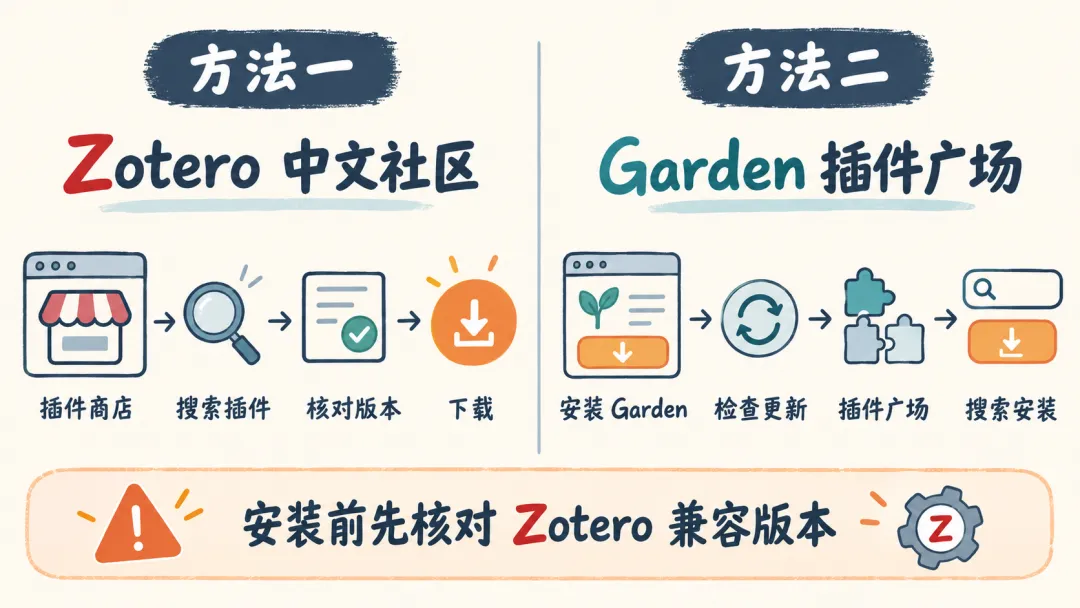
法一:从 Zotero 中文社区下载
插件商店地址:
https://zotero-chinese.com/plugins/〔1〕
打开插件商店,按自己正在使用的 Zotero 版本筛选,再输入插件名。进入插件卡片后,先核对兼容版本和更新时间,再下载对应的 .xpi 文件。下载页同时提供多个通道时,优先选择官方通道。
如果点击后被 Firefox 直接打开,可以右键下载按钮,选择“链接另存为”。
法二:从 Garden 插件广场安装
Garden 下载地址:
https://ftp.magiczotero.top/%E6%8F%92%E4%BB%B6%E5%AE%89%E8%A3%85%E5%8C%85/〔2〕
进入页面下载文件名以 garden_ 开头的 .xpi 安装包。在 Zotero 中打开“工具—插件”,点击右上角齿轮,选择“从文件安装插件”,安装后重启 Zotero。
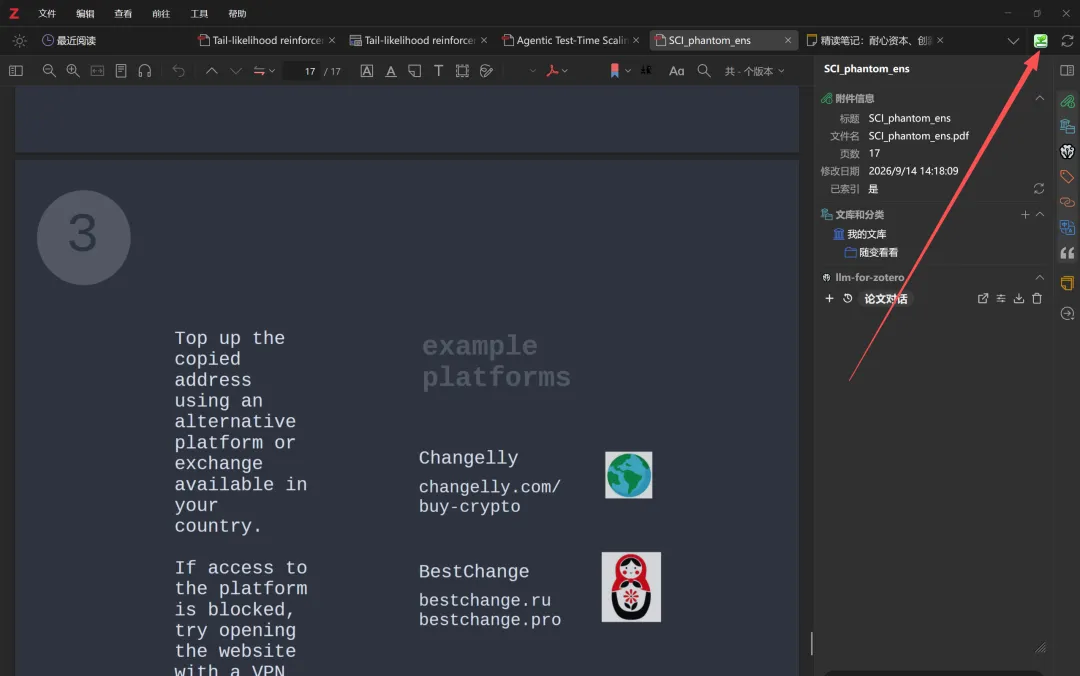
首次安装后,先在插件管理器中检查 Garden 更新。打开新版 Garden,进入左侧的“插件广场”,就可以搜索、筛选和安装插件。点开插件后先看 Zotero 兼容版本,再点击“安装”。已经装过的插件也可以在这里更新、启用、禁用或卸载。
一、抓取、元数据与查重
这一类主要解决中文题录识别错误、作者与期刊信息不完整、DOI 缺失、重复条目和期刊信息显示等问题。
1. Jasminum(茉莉花)
用途:识别中文 PDF 和 CAJ 的元数据,补充中文转换器与引用样式。
项目地址:https://github.com/l0o0/jasminum〔3〕
2. Linter for Zotero
用途:批量规范标题、期刊缩写、语言等元数据,也能辅助检测重复条目。
项目地址:https://github.com/northword/zotero-format-metadata〔4〕
3. Zoplicate
用途:检测和管理 Zotero 文献库中的重复条目。
项目地址:https://github.com/ChenglongMa/zoplicate〔5〕
4. Green Frog(绿青蛙)
用途:更新期刊信息,并提供作者、标题、期刊名称等字段的批量处理工具。
项目地址:https://github.com/redleafnew/zotero-updateifsE〔6〕
5. DOI Manager
用途:批量获取、验证和清理 DOI,也能处理短 DOI。
项目地址:https://github.com/bwiernik/zotero-shortdoi〔7〕
6. ZotMeta
用途:更新论文和图书条目的元数据信息。
项目地址:https://github.com/RoadToDream/ZotMeta〔8〕
7. Zotero CCF Info
用途:在 Zotero 中查看计算机领域论文的 CCF 等级及会议、期刊信息。
项目地址:https://github.com/TimeTrapzz/zotero-ccf-info〔9〕
如果你经常使用知网、万方,或者准备整理一个积累多年的旧文献库,可以先从这一组找工具。
二、阅读、批注与翻译
这一类解决外文阅读、整篇翻译、参考文献跳转、图表公式提取和听读等问题。功能重合度比较高,翻译插件通常选一款主力即可。
1. Translate for Zotero
用途:逐句翻译 PDF、EPub、网页、元数据、批注和笔记,支持多种翻译服务。
项目地址:https://github.com/windingwind/zotero-pdf-translate〔10〕
2. Magic for Zotero
用途:高频英文文献阅读用户必装插件,可以一次性128元买断,支持全文翻译、指定页码翻译、章节翻译和批量 PDF 翻译。译文可以直接在阅读界面查看,也可以生成双语 PDF 或整理到 Note;AI 列还能批量完成文献总结、关键词提取和方法分析。
产品地址:https://www.magiczotero.top/〔11〕
3. Zotero PDF2zh
用途:在 Zotero 中调用 PDF2zh,生成适合整篇阅读的双语 PDF,配置门槛相对高。
项目地址:https://github.com/guaguastandup/zotero-pdf2zh〔12〕
4. Ethereal Reference
用途:在阅读 PDF 时识别和查看参考文献,方便沿着引文继续查找资料。
项目地址:https://github.com/MuiseDestiny/zotero-reference〔13〕
5. PDF Figure
用途:提取和管理 PDF 中的图片、表格与公式。
项目地址:https://github.com/MuiseDestiny/zotero-figure〔14〕
6. Bionic for Zotero
用途:在 Zotero 阅读器中提供仿生阅读显示。
项目地址:https://github.com/windingwind/bionic-for-zotero〔15〕
7. Immersive Translate 沉浸式翻译
用途:把沉浸式翻译的 BabelDOC PDF 翻译能力接入 Zotero,目前面向沉浸式翻译 Pro 会员。
项目地址:https://github.com/immersive-translate/zotero-immersivetranslate〔16〕
8. ZoTTS
用途:给 Zotero 增加文本转语音功能,用听的方式阅读文献。
项目地址:https://github.com/ImperialSquid/zotero-zotts〔17〕
9. Weavero
用途:给 Zotero 阅读器增加书签、可点击链接、筛选和标签页管理等功能。
项目地址:https://github.com/mjthoraval/Weavero〔18〕
三、笔记与知识整理
如果你用 Zotero 不只是“存论文”,还准备把批注整理成长期笔记,重点看这一类。
1. Better Notes for Zotero
用途:在 Zotero 内集中管理文献笔记,支持模板、链接和笔记工作区。
项目地址:https://github.com/windingwind/zotero-better-notes〔19〕
2. ZotCard
用途:通过模板创建卡片笔记,适合卡片式写作和长期积累。
项目地址:https://github.com/018/zotcard〔20〕
3. Annotation Summary
用途:汇总和索引 PDF 批注,读完论文后快速整理重点。
项目地址:https://github.com/OneOneLiu/zotero-annotation-summary〔21〕
4. zotero-annotation-manage
用途:集中查看、筛选和管理 Zotero 中的批注。
项目地址:https://github.com/zzlb0224/zotero-annotation-manage〔22〕
5. Zotero Annotation Markdown
用途:把批注内容按 Markdown 与 LaTeX 形式显示。目前项目页列出的兼容范围为 Zotero 9 和 10。
项目地址:https://github.com/qrkks/zotero-annotation-markdown〔23〕
6. zotero-docling
用途:利用 Docling 将 PDF 附件转换为 Markdown。
项目地址:https://github.com/max3925vats/zotero-docling〔24〕
7. PDF to Markdown
用途:通过 MinerU 把 PDF 转换成结构化 Markdown。GitHub 上有同名项目,本文指下面这个版本。
项目地址:https://github.com/LuckYang1/PDF-to-md〔25〕
8. Zotero AI Notes
用途:把 PDF 高亮和评论整理为 Markdown 笔记、思维导图,并支持写回 Zotero。目前项目页列出的兼容版本为 Zotero 9。
项目地址:https://github.com/STRUGGLE1999/zotero-ai-notes〔26〕
平时使用 Obsidian、Markdown 或卡片笔记,可以重点关注这一组。不过先想清楚笔记最后放在哪里,避免同一份批注被多个插件重复整理。
四、AI 问答与智能分析
这几年增长最快的就是 Zotero AI 插件。它们的差别主要在于能不能读取全文、能不能批量处理、能不能写回笔记,以及是否支持自定义模型接口。

1. Awesome GPT
用途:把 GPT 能力接入 Zotero,围绕条目、选中文本和 PDF 内容提问。
项目地址:https://github.com/MuiseDestiny/zotero-gpt〔27〕
2. llm-for-zotero
用途:基于个人 Zotero 文献库运行研究智能体,支持检索、问答和研究流程扩展。
项目地址:https://github.com/yilewang/llm-for-zotero〔28〕
3. PapersGPT
用途:接入多种大模型,在 Zotero 中进行文献问答、分析和自动化研究。
项目地址:https://github.com/papersgpt/papersgpt-for-zotero〔29〕
4. zotero-ai-butler
用途:自动阅读论文并把生成的总结保存到 Zotero 笔记。
项目地址:https://github.com/steven-jianhao-li/zotero-AI-Butler〔30〕
5. Zotero MCP Plugin
用途:通过 MCP 让 Claude、Codex 等 AI 工具读取和处理 Zotero 文献库。
项目地址:https://github.com/cookjohn/zotero-mcp〔31〕
6. Beaver
用途:在 Zotero 中提供 AI 对话、文献处理和研究辅助功能。
项目地址:https://github.com/jlegewie/beaver-zotero〔32〕
7. AI Paper Chat
用途:直接与当前 PDF 对话,辅助理解文献内容。
项目地址:https://github.com/syt2/paper-chat-for-zotero〔33〕
8. Collection for Zotero
用途:根据标题和摘要推荐文献分类,再由用户确认。
项目地址:https://github.com/justinfjx/zotero-ai-collection〔34〕
这一组通常还需要配置模型、接口或本地环境。安装之前先读项目说明,不要只看演示图。
五、附件与文件管理
如果你的 Zotero 附件越来越乱,或者换电脑时经常丢文件,这一类更实用。
1. ZotMoov
用途:自动移动附件,并把移动后的文件重新链接到 Zotero 条目。
项目地址:https://github.com/wileyyugioh/zotmoov〔35〕
2. Zotero Attanger
用途:匹配、重命名、移动和复制附件,按固定目录整理文件。
项目地址:https://github.com/MuiseDestiny/zotero-attanger〔36〕
3. Zotero OCR
用途:给扫描版 PDF 和图片型附件增加 OCR 文字识别。
项目地址:https://github.com/UB-Mannheim/zotero-ocr〔37〕
4. Attachment Scanner
用途:批量扫描附件状态,检查缺失文件和异常链接。
项目地址:https://github.com/SciImage/zotero-attachment-scanner〔38〕
5. Zotero PDF Rename
用途:按照规则批量重命名 PDF 文件。
项目地址:https://github.com/Theigrams/zotero-pdf-custom-rename〔39〕
6. Zotero Watch Folder
用途:监控指定文件夹,自动导入 PDF、获取元数据并处理重复文件。
项目地址:https://github.com/josesiqueira/zotero-watch-folder〔40〕
7. Zotero MinerU Parser
用途:使用 MinerU 解析 PDF,并转换为 Zotero 笔记。目前项目页列出的兼容版本为 Zotero 8、9 和 10。
项目地址:https://github.com/lisontowind/zotero-mineru〔41〕
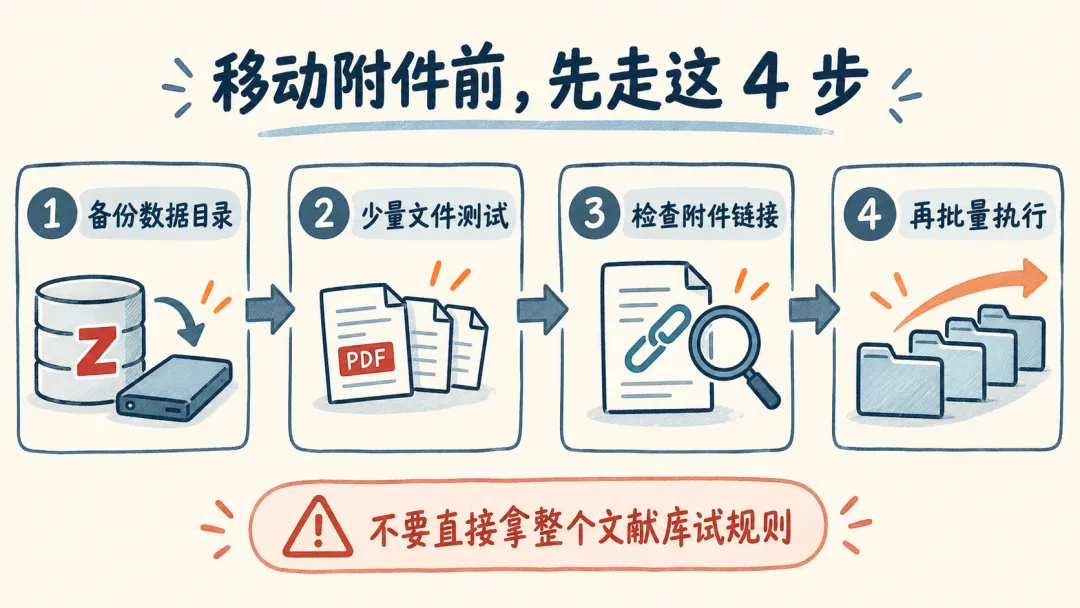
以前常见的 ZotFile 主要面向旧版 Zotero。使用 Zotero 7 及以上版本,可以优先了解 ZotMoov 和 Zotero Attanger。涉及附件移动时,先备份数据目录,再拿少量文件测试规则。
六、界面、标签与阅读状态
这一类不一定增加核心功能,但能改善每天查看列表、标签和阅读状态的体验。建议少量安装,因为多个插件同时修改界面时更容易发生冲突。
1. Ethereal Style
用途:增强文献列表和界面信息显示。它的正式名称是 Ethereal Style,很多老用户也熟悉其项目名 ZoteroStyle。
项目地址:https://github.com/MuiseDestiny/ZoteroStyle〔42〕
2. Zotero Reading List
用途:给文献增加待读、阅读中、已读等状态。
项目地址:https://github.com/Dominic-DallOsto/zotero-reading-list〔43〕
3. Chartero
用途:在 Zotero 中生成和查看文献统计图表。
项目地址:https://github.com/volatile-static/Chartero〔44〕
4. Zotero Better Authors
用途:自定义文献列表中的作者显示方式。
项目地址:https://github.com/github-young/zotero-better-authors〔45〕
5. Zotero Categorial Tags
用途:把大量标签按类别分组管理。
项目地址:https://github.com/panhaoyu/zotero-categorial-tags〔46〕
6. Tab Enhance
用途:增强标签页的切换、定位和管理体验。
项目地址:https://github.com/Rphone/zotero-tab-enhance〔47〕
7. Zotero Spotlight
用途:增加快速搜索和命令入口。
项目地址:https://github.com/Royshare/zotero-spotlight〔48〕
8. Zotero Annotations Count
用途:直接在文献列表中显示每篇文献的批注数量。
项目地址:https://github.com/Dominic-DallOsto/zotero-annotations-count〔49〕
七、写作、引用与外部联动
写论文,或者使用 LaTeX、Notion、Markdown 和其他笔记软件,可以从这里找。
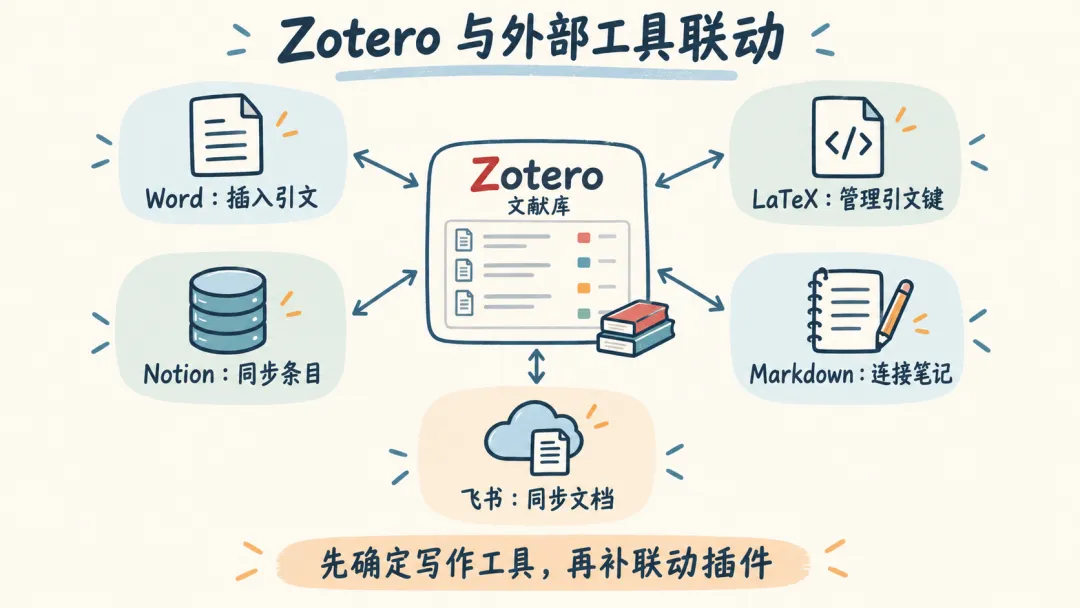
1. Better BibTeX for Zotero
用途:强化 BibTeX、BibLaTeX 和 LaTeX 引用工作流,提供稳定的引文键和自动导出。
项目地址:https://github.com/retorquere/zotero-better-bibtex〔50〕
2. Easier Citation
用途:让 Zotero 在 Word 中插入和显示引文时更清楚、更顺手。
项目地址:https://github.com/MuiseDestiny/eaiser-citation〔51〕
3. Notero
用途:把 Zotero 条目和笔记同步到 Notion 数据库。
项目地址:https://github.com/dvanoni/notero〔52〕
4. MarkDB-Connect
用途:连接 Markdown 数据库与 Zotero,实现条目和外部笔记互相跳转。
项目地址:https://github.com/daeh/zotero-markdb-connect〔53〕
5. zotxt
用途:让文本编辑器和命令行工具访问 Zotero 数据。
项目地址:https://github.com/egh/zotxt〔54〕
6. Inciteful Zotero Plugin
用途:把文献发现和引用关系分析能力接入 Zotero。
项目地址:https://github.com/inciteful-xyz/inciteful-zotero-plugin〔55〕
7. Zotero Gemini Notebook
用途:把 Zotero 文献导入 Gemini Notebook 或 NotebookLM。
项目地址:https://github.com/peterdresslar/zotero-gemini-notebook〔56〕
8. Zotero Feishu Sync
用途:将论文信息、PDF 标注和笔记同步到飞书云文档。
项目地址:https://github.com/wu-uk/zotero-feishu〔57〕
如果只使用 Word 写论文,Zotero 自带的 Word 插件已经能完成基本引用,不必为了“插件齐全”额外安装工具。LaTeX 用户再重点看 Better BibTeX。
八、自动化、备份与进阶工具
这一类适合已经熟悉 Zotero,希望减少重复操作或迁移配置的用户。
1. Actions and Tags for Zotero
用途:通过动作、触发条件、快捷键和标签,自定义 Zotero 自动化流程。
项目地址:https://github.com/windingwind/zotero-actions-tags〔58〕
2. Add-on Market for Zotero
用途:直接在 Zotero 中浏览、安装和查看社区插件。
项目地址:https://github.com/syt2/zotero-addons〔59〕
3. 蒲公英
用途:备份和恢复 Zotero 设置、插件、转换器与引文样式,适合迁移电脑。
项目地址:https://github.com/l0o0/tara〔60〕
4. Zotero Settings Sync
用途:跨设备同步 Zotero 设置、插件配置和引文样式。
项目地址:https://github.com/gaviiiinnnn/zotero-settings-sync〔61〕
5. Zotero Search & Replace
用途:使用正则表达式、预览和数据规则,对条目字段进行批量搜索替换。
项目地址:https://github.com/milekpl/zotero-search-replace〔62〕
6. XT Zotero Auto Classifier
用途:利用大模型给论文分类、创建标签和分类目录。目前项目页列出的兼容版本为 Zotero 8、9 和 10。
项目地址:https://github.com/peekabooXT/Zotero_Paper_Classification_XT〔63〕
7. DOI Fix
用途:通过 Crossref 批量获取、更新和校验 DOI。
项目地址:https://github.com/pandaAIGC/zotero-doi-fix〔64〕
8. Zotero Vim Plus
用途:在 PDF 阅读器中加入 Vim 风格的键盘导航和快捷操作。
项目地址:https://github.com/ZorroStardust/zotero-vim-plus〔65〕
不同用户怎么选
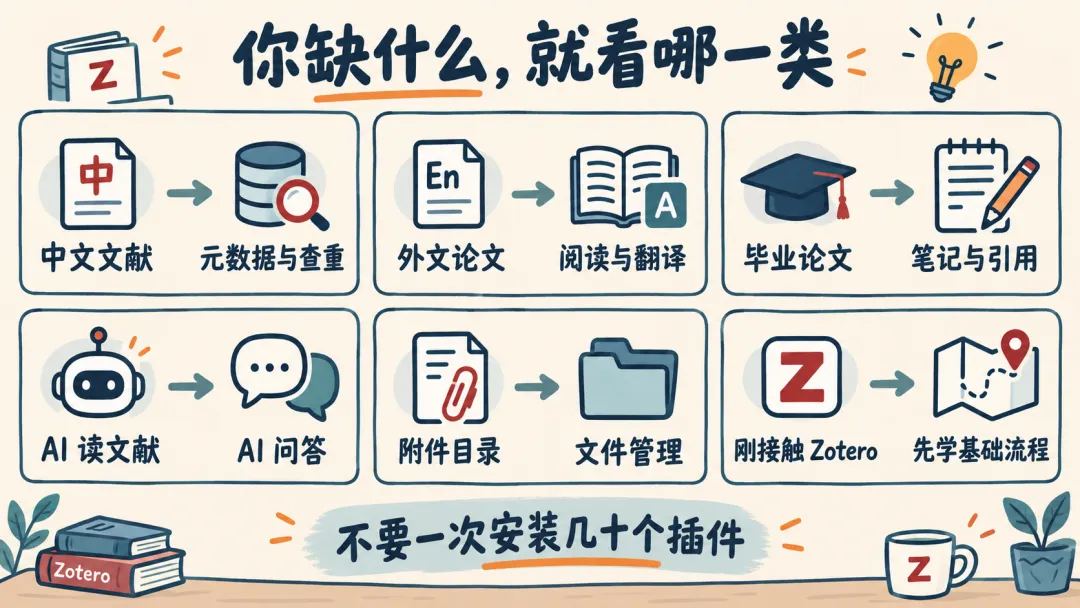
如果你主要看中文文献,可以先试 Jasminum、Linter for Zotero 和 Zoplicate。
如果你主要阅读外文论文,Translate for Zotero、Zotero PDF2zh、Immersive Translate 和 Magic for Zotero 的功能有重合,按翻译形式和付费方式选一款主力即可。
如果你要写毕业论文,先用 Zotero 自带的 Word 插件;需要集中整理笔记时再加 Better Notes,LaTeX 用户再装 Better BibTeX。
如果你想让 AI 读取自己的文献库,可以在 llm-for-zotero、PapersGPT 和 Zotero MCP Plugin 中按模型接口和工作流选一款。
如果你使用 WebDAV 或自定义附件目录,可以在 ZotMoov 和 Zotero Attanger 中选一款,先用少量附件测试。
如果你刚接触 Zotero,先跑通文献入库、阅读批注、Word 引用和备份,再考虑 Add-on Market。不要第一天就安装几十个插件。
安装前,至少检查这三件事
第一,插件是否兼容你正在使用的 Zotero 版本。版本号不能只看文章,要看下载页当前说明。
第二,项目最近是否仍在更新。如果插件长期没有发布记录,升级 Zotero 前要格外谨慎。
第三,下载文件是否来自中文社区列出的项目页或开发者发布页。
插件不是越多越好。一个插件对应一个明确需求,缺什么再装什么,Zotero 才更稳定,也更容易排查问题。
你现在装了多少个 Zotero 插件?评论区可以把插件列表交出来了。
文中链接(尾注)
〔1〕 https://zotero-chinese.com/plugins/
〔2〕 https://ftp.magiczotero.top/%E6%8F%92%E4%BB%B6%E5%AE%89%E8%A3%85%E5%8C%85/
〔3〕 https://github.com/l0o0/jasminum
〔4〕 https://github.com/northword/zotero-format-metadata
〔5〕 https://github.com/ChenglongMa/zoplicate
〔6〕 https://github.com/redleafnew/zotero-updateifsE
〔7〕 https://github.com/bwiernik/zotero-shortdoi
〔8〕 https://github.com/RoadToDream/ZotMeta
〔9〕 https://github.com/TimeTrapzz/zotero-ccf-info
〔10〕 https://github.com/windingwind/zotero-pdf-translate
〔11〕 https://www.magiczotero.top/
〔12〕 https://github.com/guaguastandup/zotero-pdf2zh
〔13〕 https://github.com/MuiseDestiny/zotero-reference
〔14〕 https://github.com/MuiseDestiny/zotero-figure
〔15〕 https://github.com/windingwind/bionic-for-zotero
〔16〕 https://github.com/immersive-translate/zotero-immersivetranslate
〔17〕 https://github.com/ImperialSquid/zotero-zotts
〔18〕 https://github.com/mjthoraval/Weavero
〔19〕 https://github.com/windingwind/zotero-better-notes
〔20〕 https://github.com/018/zotcard
〔21〕 https://github.com/OneOneLiu/zotero-annotation-summary
〔22〕 https://github.com/zzlb0224/zotero-annotation-manage
〔23〕 https://github.com/qrkks/zotero-annotation-markdown
〔24〕 https://github.com/max3925vats/zotero-docling
〔25〕 https://github.com/LuckYang1/PDF-to-md
〔26〕 https://github.com/STRUGGLE1999/zotero-ai-notes
〔27〕 https://github.com/MuiseDestiny/zotero-gpt
〔28〕 https://github.com/yilewang/llm-for-zotero
〔29〕 https://github.com/papersgpt/papersgpt-for-zotero
〔30〕 https://github.com/steven-jianhao-li/zotero-AI-Butler
〔31〕 https://github.com/cookjohn/zotero-mcp
〔32〕 https://github.com/jlegewie/beaver-zotero
〔33〕 https://github.com/syt2/paper-chat-for-zotero
〔34〕 https://github.com/justinfjx/zotero-ai-collection
〔35〕 https://github.com/wileyyugioh/zotmoov
〔36〕 https://github.com/MuiseDestiny/zotero-attanger
〔37〕 https://github.com/UB-Mannheim/zotero-ocr
〔38〕 https://github.com/SciImage/zotero-attachment-scanner
〔39〕 https://github.com/Theigrams/zotero-pdf-custom-rename
〔40〕 https://github.com/josesiqueira/zotero-watch-folder
〔41〕 https://github.com/lisontowind/zotero-mineru
〔42〕 https://github.com/MuiseDestiny/ZoteroStyle
〔43〕 https://github.com/Dominic-DallOsto/zotero-reading-list
〔44〕 https://github.com/volatile-static/Chartero
〔45〕 https://github.com/github-young/zotero-better-authors
〔46〕 https://github.com/panhaoyu/zotero-categorial-tags
〔47〕 https://github.com/Rphone/zotero-tab-enhance
〔48〕 https://github.com/Royshare/zotero-spotlight
〔49〕 https://github.com/Dominic-DallOsto/zotero-annotations-count
〔50〕 https://github.com/retorquere/zotero-better-bibtex
〔51〕 https://github.com/MuiseDestiny/eaiser-citation
〔52〕 https://github.com/dvanoni/notero
〔53〕 https://github.com/daeh/zotero-markdb-connect
〔54〕 https://github.com/egh/zotxt
〔55〕 https://github.com/inciteful-xyz/inciteful-zotero-plugin
〔56〕 https://github.com/peterdresslar/zotero-gemini-notebook
〔57〕 https://github.com/wu-uk/zotero-feishu
〔58〕 https://github.com/windingwind/zotero-actions-tags
〔59〕 https://github.com/syt2/zotero-addons
〔60〕 https://github.com/l0o0/tara
〔61〕 https://github.com/gaviiiinnnn/zotero-settings-sync
〔62〕 https://github.com/milekpl/zotero-search-replace
〔63〕 https://github.com/peekabooXT/Zotero_Paper_Classification_XT
〔64〕 https://github.com/pandaAIGC/zotero-doi-fix
〔65〕 https://github.com/ZorroStardust/zotero-vim-plus