 夜雨聆风
夜雨聆风热衷于分享各种干货知识,大家有想看或者想学的可以评论区留言,秉承着“开源知识来源于互联网,回归于互联网”的理念,分享一些日常工作中能用到或者比较重要的内容,希望大家能够喜欢,不足之处请大家多提宝贵地意见,我们一起提升,守住自己的饭碗。
关注公众号,技术道路不迷路

从“只会聊天的机器人”到“能动手干活的智能助手”,Skills 是 OpenClaw 的灵魂装备
📖 引言
2026 年,AI Agent 领域迎来爆发式增长,而 OpenClaw(曾用名 Clawdbot、Moltbot)作为 MIT 开源协议的自托管 AI Agent 网关,已成为开发者心中的“顶流”。它能将 Discord、Telegram、微信、QQ 等通讯工具与主流大模型无缝对接,实现轻量化 AI 助理部署。
但很多用户安装后却陷入 “只会聊天、不会干活” 的困境——核心原因是缺少 Skills(技能插件)。
如果把 OpenClaw 比作一台顶配电脑,那 Skills 就是安装的各类软件:没装浏览器就不能上网,没装 Office 就不能处理文档。同理,想让 OpenClaw 真正干活,必须先给它装上合适的技能。
截至 2026 年 3 月,ClawHub 已收录超 13700+ 个社区技能,国内也有 CocoLoop 等技能商店提供本土化服务。但你是否想过:与其等待别人开发,不如自己动手打造专属 Skills?
本文将手把手教你从零开始开发 OpenClaw Skills,让你的 AI Agent 拥有真正的 “行动能力”。
第一部分:Skills 到底是什么?
1.1 概念解析
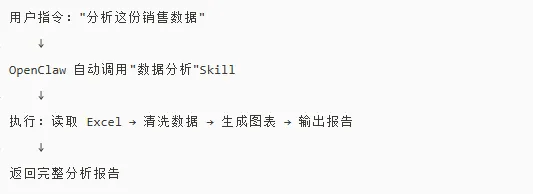
Skills(技能) 是 OpenClaw 的核心扩展机制,它将复杂的业务逻辑封装成可复用的 “技能模块”,让 AI 能够像人类专家一样按需调用专业能力。
1.2 Skill 的组成
一个完整的 Skill 包含以下核心组件:
manifest.json | ||
index.js/ts | ||
schema.json | ||
README.md |
1.3 Skills 的获取渠道
| ClawHub | ||
| CocoLoop | ||
| GitHub | openclaw-skills | |
| 自定义开发 |
第二部分:为什么你的 OpenClaw 必须装 Skills?
✅ 理由 1:原生能力极其有限
OpenClaw 原生仅支持基础对话和简单命令,无法执行:
• ❌ 文件读写操作 • ❌ API 调用 • ❌ 数据库查询 • ❌ 自动化工作流
✅ 理由 2:Skills 让 AI“学会用工具”
通过 Skills,AI 可以:
• ✅ 调用外部 API(天气、股票、新闻) • ✅ 操作本地文件(读取、写入、转换) • ✅ 执行系统命令(部署、监控、备份) • ✅ 连接第三方服务(钉钉、企业微信、Slack)
✅ 理由 3:生态是 OpenClaw 的最大优势
ClawHub 生态已覆盖:
• 📱 通讯类:whatsapp-message、telegram-message、discord-notify • 💻 开发类:code-review、git-ops、docker-deploy • 📊 工作流类:data-analysis、report-generator、auto-schedule
第三部分:开发自己的 Skills——完整教程
3.1 环境准备
# 安装 Node.js(>= 22)node -v # 建议 v22+# 安装 OpenClaw CLInpm install -g openclaw# 创建 Skills 开发目录mkdir my-skills && cd my-skills# 初始化项目openclaw skills init my-first-skill3.2 项目结构
my-first-skill/├── manifest.json # 技能描述├── src/│ ├── index.js # 主逻辑│ └── utils.js # 工具函数├── schema.json # 输入输出定义├── README.md # 使用文档└── tests/ # 测试文件3.3 编写 manifest.json
{"name":"weather-query","version":"1.0.0","description":"查询实时天气信息","author":"YourName","license":"MIT","keywords":["weather","api","query"],"entry":"src/index.js","permissions":["http_request"],"dependencies":{"axios":"^1.6.0"},"config":{"api_key":{"type":"string","required":true,"description":"天气 API 密钥"}}}3.4 编写主逻辑(index.js)
const axios = require('axios');module.exports = {name: 'weather-query',description: '查询指定城市的实时天气信息',parameters: {city: {type: 'string',required: true,description: '城市名称' },unit: {type: 'string',required: false,default: 'celsius',enum: ['celsius', 'fahrenheit'] } },asyncexecute(params, context) {const { city, unit } = params;const apiKey = context.config.api_key;try {const response = await axios.get(`https://api.weather.com/v1/current?city=${city}&key=${apiKey}` );return {success: true,data: {city: response.data.city,temperature: response.data.temperature,condition: response.data.condition,humidity: response.data.humidity,unit: unit } }; } catch (error) {return {success: false,error: `天气查询失败:${error.message}` }; } },asyncvalidate(params) {if (!params.city) {thrownewError('城市名称不能为空'); }returntrue; }};3.5 编写 schema.json
{"input":{"type":"object","properties":{"city":{"type":"string","description":"要查询的城市名称","example":"北京"},"unit":{"type":"string","enum":["celsius","fahrenheit"],"default":"celsius"}},"required":["city"]},"output":{"type":"object","properties":{"success":{"type":"boolean"},"data":{"type":"object","properties":{"city":{"type":"string"},"temperature":{"type":"number"},"condition":{"type":"string"},"humidity":{"type":"number"}}},"error":{"type":"string"}}}}3.6 本地测试
# 加载技能openclaw skills load ./my-first-skill# 测试执行openclaw skills test weather-query --params '{"city": "北京"}'# 查看日志openclaw logs --skill weather-query3.7 发布到 ClawHub
# 登录 ClawHubopenclaw login --token your_clawhub_token# 发布技能openclaw skills publish ./my-first-skill# 验证发布openclaw skills list --published第四部分:实战案例——MySQL 运维 Skills
基于 MySQL 运维专家的思路,我们可以开发一个完整的 MySQLOps Skills:
4.1 manifest.json
{"name":"mysql-ops","version":"1.0.0","description":"MySQL 数据库运维专家 - 性能优化、主从复制、备份恢复、故障诊断","author":"OpenOcta","license":"MIT","keywords":["mysql","database","devops","performance"],"entry":"src/index.js","permissions":["shell_exec","file_read","http_request"],"dependencies":{"mysql2":"^3.9.0","lodash":"^4.17.21"},"config":{"mysql_host":{"type":"string","default":"localhost"},"mysql_port":{"type":"integer","default":3306},"mysql_user":{"type":"string","required":true},"mysql_password":{"type":"string","required":true}}}4.2 核心功能实现
const mysql = require('mysql2/promise');classMySQLOps {constructor(config) {this.config = config;this.connection = null; }asynccheckConnection() {try {this.connection = await mysql.createConnection({host: this.config.mysql_host,port: this.config.mysql_port,user: this.config.mysql_user,password: this.config.mysql_password });awaitthis.connection.execute('SELECT 1');return { success: true, message: '连接成功' }; } catch (error) {return { success: false, error: error.message }; } }asyncgetProcesslist(options = {}) {const query = options.showFull ? 'SHOW FULL PROCESSLIST' : 'SHOW PROCESSLIST';const [rows] = awaitthis.connection.execute(query);return { success: true, data: rows }; }asyncgetSlaveStatus() {const [rows] = awaitthis.connection.execute('SHOW SLAVE STATUS');return { success: true, data: rows[0] || null }; }asyncgetSlowQueries(limit = 20) {const query = ` SELECT * FROM performance_schema.events_statements_summary_by_digest ORDER BY AVG_TIMER_WAIT DESC LIMIT ? `;const [rows] = awaitthis.connection.execute(query, [limit]);return { success: true, data: rows }; }asynccheckTableSizes(database = null, limit = 20) {const dbFilter = database ? `AND table_schema = '${database}'` : '';const query = ` SELECT table_schema, table_name, ROUND((data_length + index_length) / 1024 / 1024 / 1024, 2) AS size_gb, table_rows FROM information_schema.tables WHERE table_schema NOT IN ('information_schema', 'mysql', 'performance_schema', 'sys')${dbFilter} ORDER BY (data_length + index_length) DESC LIMIT ? `;const [rows] = awaitthis.connection.execute(query, [limit]);return { success: true, data: rows }; }asyncanalyzeLocks() {const queries = ['SELECT * FROM information_schema.INNODB_TRX','SELECT * FROM information_schema.INNODB_LOCK_WAITS','SHOW ENGINE INNODB STATUS' ];const results = [];for (const q of queries) {const [rows] = awaitthis.connection.execute(q); results.push(rows); }return { success: true, data: results }; }asyncclose() {if (this.connection) {awaitthis.connection.end(); } }}module.exports = MySQLOps;4.3 使用示例
// 用户指令:"检查 MySQL 连接状态"const ops = newMySQLOps({mysql_host: 'localhost',mysql_port: 3306,mysql_user: 'root',mysql_password: 'password'});const result = await ops.checkConnection();// 返回:{ success: true, message: '连接成功' }// 用户指令:"查看当前慢查询"const slowQueries = await ops.getSlowQueries(10);// 返回 Top 10 慢查询统计// 用户指令:"检查主从复制状态"const slaveStatus = await ops.getSlaveStatus();// 返回复制延迟、IO/SQL 线程状态等第五部分:Skills 开发最佳实践
🛡️ 5.1 安全规范
// ✅ 正确:参数验证asyncexecute(params) {if (!params.city || typeof params.city !== 'string') {thrownewError('城市名称必须是非空字符串'); }// 防止 SQL 注入const sanitized = params.city.replace(/['";]/g, '');}// ❌ 错误:直接使用用户输入asyncexecute(params) {const query = `SELECT * FROM users WHERE name = '${params.name}'`;// 存在 SQL 注入风险!}❌ 5.2 错误处理
asyncexecute(params, context) {try {const result = awaitthis.doSomething(params);return { success: true, data: result }; } catch (error) {return {success: false,error: error.message,code: error.code || 'UNKNOWN_ERROR',timestamp: newDate().toISOString() }; }}⚡ 5.3 性能优化
// ✅ 使用连接池const pool = mysql.createPool({host: config.host,connectionLimit: 10,waitForConnections: true});// ✅ 缓存频繁查询结果const cache = newMap();asyncgetCachedData(key, ttl = 300) {const cached = cache.get(key);if (cached && Date.now() - cached.timestamp < ttl * 1000) {return cached.data; }const data = awaitfetchData(key); cache.set(key, { data, timestamp: Date.now() });return data;}📦 常用 CLI 命令速查
# 初始化技能openclaw skills init <skill-name># 本地加载技能openclaw skills load <path># 测试技能openclaw skills test <skill-name> --params '{"key": "value"}'# 查看日志openclaw logs --skill <skill-name># 热重载openclaw skills reload🎯 结语
OpenClaw 的 Skills 生态正在重塑 AI Agent 的能力边界。从“只会聊天”到“能干活”,Skills 是关键桥梁。
与其等待别人开发适合你的技能,不如自己动手!通过本文的教程,你已经掌握了:
• ✅ Skills 的核心概念和组成 • ✅ 完整的开发流程和工具链 • ✅ 实战案例(MySQL 运维 Skills) • ✅ 最佳实践和安全规范
下一步行动:
1. 访问 ClawHub 或 CocoLoop 浏览现有技能 2. 使用 openclaw skills init创建你的第一个技能3. 加入 OpenClaw 社区,与其他开发者交流经验
💡 提示:开发 Skills 不仅是技术实践,更是构建个人/企业 AI 能力资产的过程。今天的一个小技能,明天可能成为千万用户的核心工具!
📚 参考资料
• OpenClaw 官方文档 • ClawHub 技能商店 • CocoLoop 国内技能商店 • OpenClaw GitHub 仓库 • 阿里云开发者社区 - OpenClaw 专栏
如果觉得有用,欢迎点赞、在看、转发,让更多开发者一起玩转 OpenClaw! 🚀
文中的概念来源于互联网,如有侵权,请联系我删除。
欢迎关注公众号:小周的数据库进阶之路,一起交流AI、数据库、中间件和云计算等技术。如果觉得读完本文有收获,可以转发给其他朋友,大家一起学习进步!感兴趣的朋友可以加我微信,拉您进群与业界的大佬们一起交流学习。