 夜雨聆风
夜雨聆风

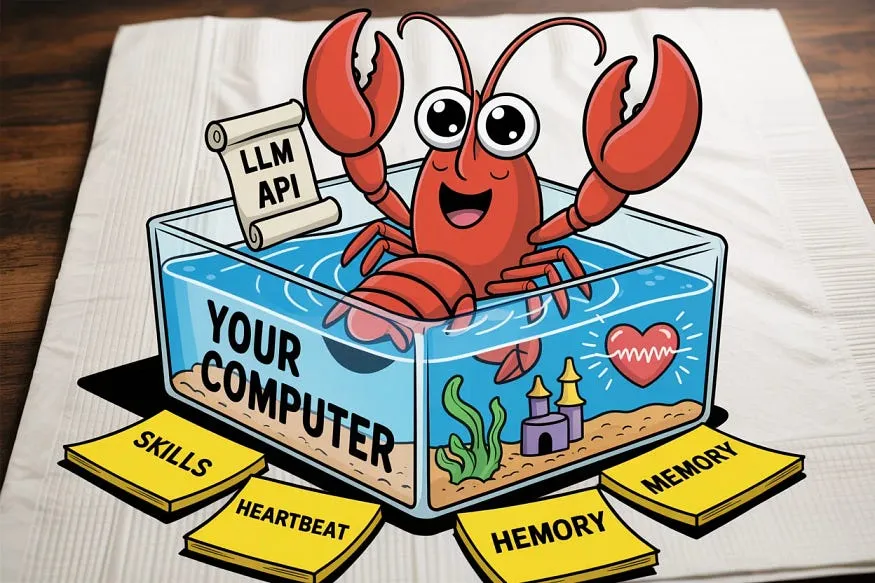
养宠物龙虾需要一个鱼缸。你的电脑(或者虚拟专用服务器)就是鱼缸。OpenClaw 则运行在本地,它就驻留在你的硬件上。 宠物龙虾需要食物。这就是你的 LLM API 密钥。OpenClaw 本身没有智能。你需要喂它 Claude、GPT、DeepSeek,甚至可以通过 Ollama 喂它本地模型。模型越智能,龙虾就越智能。 宠物龙虾需要规则。这指的是SOUL.md一个纯文本文件,你在里面写下它应该如何表现。“要专业。未经允许不得删除文件。早上7:30给我发送晨间简报。”龙虾每次醒来都会阅读这个文件。 宠物龙虾有记忆力。这就是它memory/的记忆文件夹。它每天都会写一篇日记。所有重要的事都会记录下来MEMORY.md。它记得你。它记得你的项目。它记得你讨厌饼图。 宠物龙虾可以学习各种小把戏。这些就是技能。Markdown 指令文件可以教你的龙虾如何做特定的事情:管理你的 Gmail、整理 Obsidian 笔记、监控服务器健康状况或在社交媒体上发布内容。 宠物龙虾有心跳。真的。OpenClaw 也配备了心跳系统。它每隔 30 分钟(可配置)就会唤醒,检查状态HEARTBEAT.md,并决定是否需要为你执行某些操作。无需你发出指令。
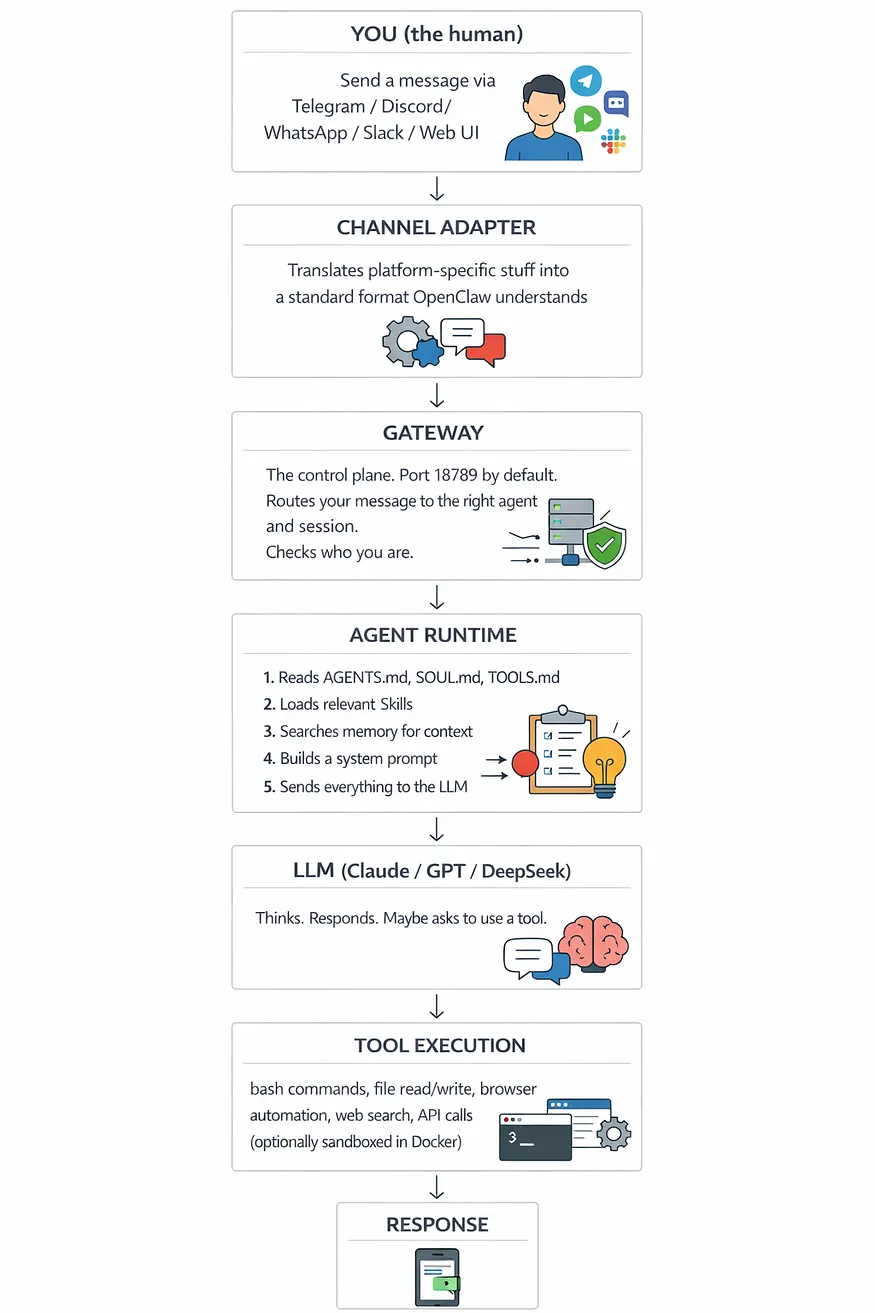
# 它只是一个 npm 包。就是这样。这就是推文内容。npm install -g openclaw @latest
mkdir -p ~/.npm-global
npm config set prefix '~/.npm-global'
echo 'export PATH=~/.npm-global/bin:$PATH' >> ~/.bashrc
source ~/.bashrc
npm install -g openclaw@latest
# 它会引导你完成所有操作
openclaw onboard --install-daemon
安全警告。它会告诉你这个机器人运行在你的本地计算机上,并且拥有实际权限。请阅读、接受并尊重它。 快速入门 vs 自定义设置。首次使用请选择快速入门。 模型选择。选择您的 AI 提供商。如果您有 Anthropologie API 密钥,请选择 Claude。如果您有 OpenAI,请选择它。两者均可。 频道设置。首先选择一个即时通讯平台。我推荐 Telegram,因为它的设置最简单。 技能。您可以暂时跳过这部分。我们稍后会添加技能内容。 用户界面选择。目前请选择 Web 用户界面(控制用户界面)。这样更容易查看发生了什么。
openclaw gateway start
openclaw dashboard
# 这将打开http://127.0.0.1:18789/
# 或者直接编辑配置文件:
openclaw config
"channels" : {
"telegram" : {
"enabled" : true ,
"token" : "YOUR_BOT_TOKEN_FROM_BOTFATHER" ,
"allowFrom" : [ "YOUR_TELEGRAM_USER_ID" ]
}
}
}
openclaw gateway restart
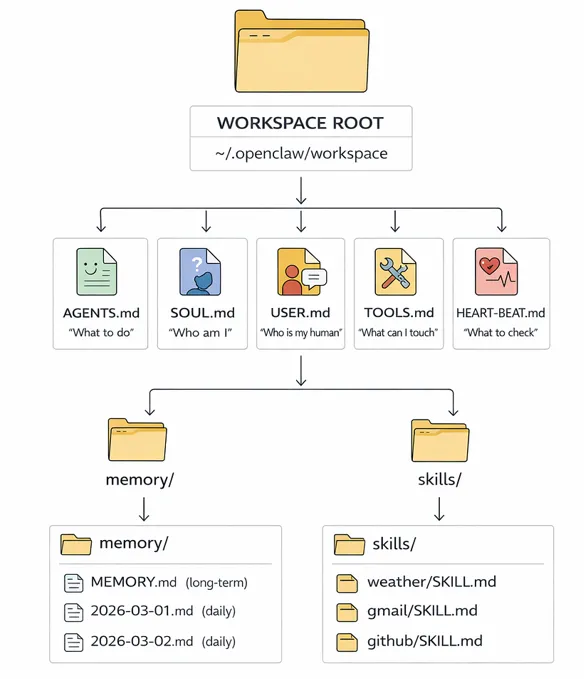
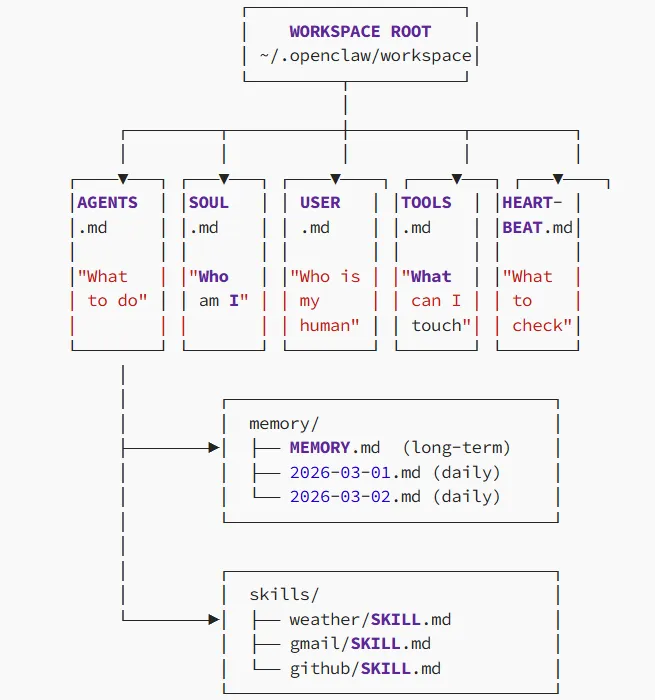
ls ~/.openclaw/workspace/
├── AGENTS.md # Operating instructions. The "job description."
├── SOUL.md # Personality. Voice. Values. The "character sheet."
├── USER.md # Info about YOU. Your preferences.
├── TOOLS.md # Which tools the agent can use.
├── HEARTBEAT.md # What to check proactively.
├── MEMORY.md # Long-term memory. Durable facts.
├── memory/ # Daily diary entries
│ ├── 2026-03-25.md
│ └── 2026-03-26.md
└── skills/ # Installed skills
├── weather/
│ └── SKILL.md
└── gmail/
└── SKILL.md
- 专业且平易近人
- 简洁明了,更倾向于使用要点而非段落
- 主动提供相关信息
- 用户隐私至上;绝不泄露数据
- 任何涉及财务影响的行动前务必确认
- 所有事实性陈述均需注明来源- 若任务失败,请报告错误;切勿捏造成功
- 上午 7:30 进行晨间简报,最多 5 个要点
- 总结邮件时,首先突出显示行动事项
- 在回复“下一步是什么”之前,务必先查看 HEARTBEAT.md 文件
1. 安全第一。切勿在未确认的情况下执行破坏性命令。
- 代码审查时,先检查安全问题,再检查代码风格。
- 邮件草稿的正式程度应与收件人的要求保持一致。
- 研究时,至少参考 3 个信息来源后再进行总结。
- 未经明确批准,绝不发送电子邮件。
- 绝不修改项目目录之外的文件。
- 绝不与其他用户分享对话内容。
- 姓名:Sarah
- 时区:UTC+8
- 职位:高级全栈开发人员
- 沟通风格:直接、简洁、不废话
- 偏好格式:带代码块的 Markdown
- 晨间简报时间:当地时间早上 7:30
- 讨厌饼图。真的。千万别建议用饼图。
- Tempest 项目:React Native 移动应用(高优先级)
- 后端迁移:从 Express 迁移到 Fastify
## 每日日志 - 2026年3月26日
- 已于 UTC 时间 14:23 将热修复程序部署到测试服务器
- 用户提及即将于 4月 15 日至 22 日休假,无需晨会
- 发现身份验证模块存在代码检查错误,已提交 GitHub 问题 #347
## 核心事实
- 时区:UTC+8
- 主要项目:Project Tempest(React Native 应用)
- 偏好沟通方式:直接、简洁、不使用表情符号
- 对蘑菇过敏(提及此信息是为了获得餐厅推荐)
- 假期:2026 年 4月 15 日至 22 日
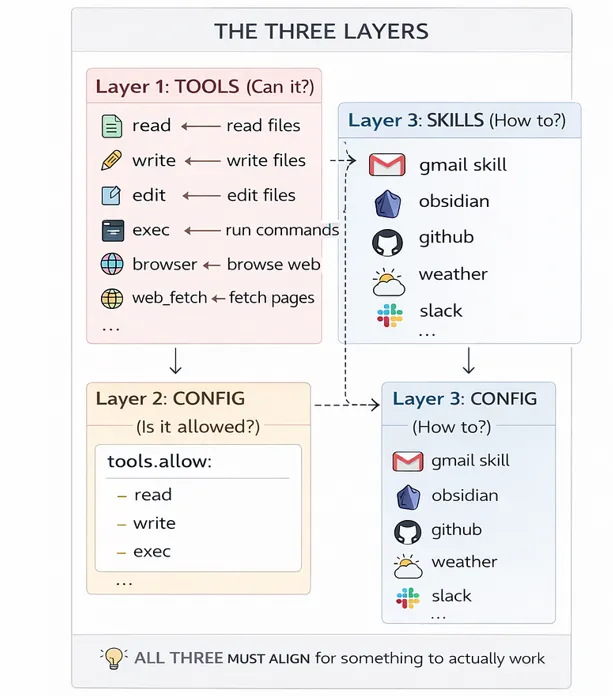
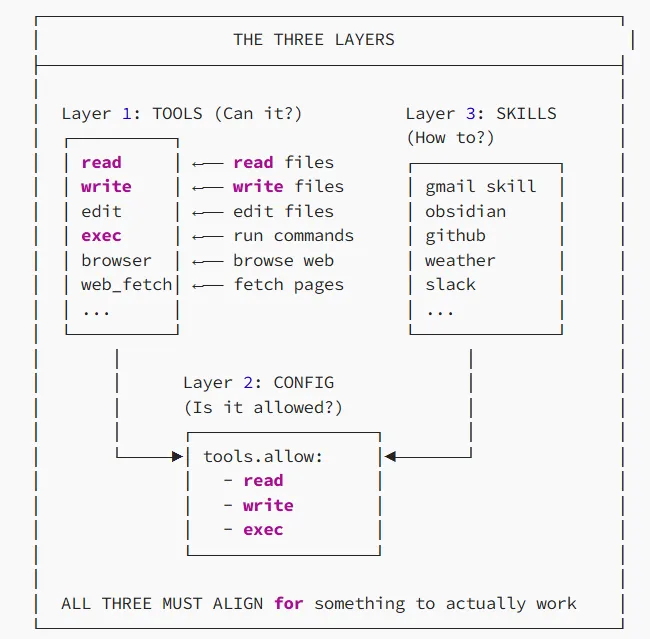
└── weather/
└── SKILL.md
name: weather
description: Get current weather information for any location
version: 1.0.0---
2. Parse the response
3. Present the information in a clean, readable format
4. Include temperature, conditions, and any weather warnings
配置:您是否已允许 OpenClaw 运行命令?(如果没有允许exec,它甚至无法启动程序。) 安装:机器上是否gog已安装桥接工具?(如果没有安装,OpenClaw 知道该怎么做,但无法连接到 Google。) 授权:您是否已登录 Google 帐户并授予访问权限?(未经授权,Google 将不会允许访问。)
clawhub install weather
clawhub install gmail
clawhub install github
clawhub list
openclaw skills list --eligible
clawhub update --all
clawhub uninstall weather
- Check if any unread emails require urgent attention
- Monitor the staging server health endpoint
- Check if the Tempest project CI/CD pipeline has any failures
- Compile a morning briefing with:
- Top 3 unread emails
- Today's calendar events
- Any overnight CI/CD failures
- Weather for the day
- If staging server returns non-200 status, alert immediately
- If any email from the CEO arrives, prioritize notification
- If GitHub PR has been open for >48 hours without review, nudge me
"agents": {
"defaults": {
"heartbeat": {
"every": "30m"
}
}
}
}
# Nothing fancy here. Just a folder.
mkdir -p ~/.openclaw/workspace/skills/daily-standup
cat << 'EOF' > ~/.openclaw/workspace/skills/daily-standup/SKILL.md---
name: daily-standup
description: Generate a daily standup summary from git commits
version: 1.0.0
requirements:
- git---
When the user asks for a standup update, daily summary,
or during morning briefing.
(or use the default from USER.md if available)
project directory
- feat: New features
- fix: Bug fixes
- refactor: Code improvements
- docs: Documentation updates
- chore: Maintenance tasks
## Standup - [Date] ### Yesterday
- [grouped summaries]
### Today
- [planned work based on open issues/PRs]
### Blockers
- [any failing CI, unreviewed PRs, or dependency issues]
- Keep total length under 200 words
- Highlight any PRs awaiting review
- If no commits since yesterday, say so honestly
EOF
openclaw gateway restart
openclaw skills list --eligible
# You should see "daily-standup" in the output
{
"providers" : {
"anthropic" : {
"apiKey" : "sk-ant-your-key-here"
} , "openai" : {
"apiKey" : "sk-your-key-here"
} ,
"ollama" : {
"apiBase" : "http://localhost:11434/v1"
}
} ,
"agents" : {
"defaults" : {
"model" : "anthropic/claude-opus-4-5"
}
}
}
curl -fsSL https://ollama.com/install.sh | sh
ollama pull llama3
# Use the ollama provider entry as shown above
"gateway": {
" address ": "127.0.0.1"
}
}
"gateway" : {
"auth" : {
"mode" : "token"
}
}
}
"tools" : {
"exec" : {
"ask" : "on"
}
}
}
查看创建者并查看 GitHub 仓库 逐行读取 SKILL.md 文件 检查它需要哪些权限 用于openclaw skills list --eligible验证范围

# 1. 获取一台全新的 Ubuntu 24.04 服务器
# 2. 安装 Node.js 22
curl -fsSL https://deb.nodesource.com/setup_22.x | sudo -E bash -
sudo apt install -y nodejs
sudo fallocate -l 4G /swapfile
sudo chmod 600 /swapfile
sudo mkswap /swapfile
sudo swapon /swapfile
npm install -g openclaw@latest
openclaw onboard --install-daemon 进行安装
docker pull openclaw/openclaw:latest
docker run -d \
--name my-lobster \
-p 18789:18789 \
-v ~/.openclaw:/root/.openclaw \
openclaw/openclaw:latest
sudo tee /etc/systemd/system/openclaw-gateway.service << 'EOF' [Unit]
Description=OpenClaw Gateway
After=network.target
Type=simple
User=ubuntu
WorkingDirectory=/home/ubuntu/.openclaw
ExecStart=/home/ubuntu/.npm-global/bin/openclaw gateway start --foreground
Restart=always
RestartSec=10
WantedBy=multi-user.target
EOF
sudo systemctl start openclaw-gateway
npm install -g openclaw @latest # 全局安装
openclaw onboard --install-daemon # 首次设置向导
openclaw gateway start # 启动网关
openclaw gateway stop # 停止网关
openclaw gateway restart # 重启(配置更改后)
openclaw gateway status # 检查是否正在运行
OpenClaw 控制面板 # 在浏览器中打开 Web 用户界面
# 默认 URL:http://127.0.0.1: 18789/
clawhub install <技能名称> # 从 ClawHub 安装
clawhub list # 列出已安装的技能
clawhub update --all # 更新所有技能
clawhub uninstall <技能名称> # 移除技能
openclaw skills list # 显示所有技能
openclaw skills list --eligible # 显示可运行的技能
openclaw skills info <技能名称> # 技能详情
openclaw doctor # 运行诊断
openclaw doctor --repair # 修复常见问题
openclaw logs --follow # 查看实时日志
openclaw config # 编辑配置文件
openclaw update --channel stable # 更新 OpenClaw
先从一个频道和一个技能开始。别第一天就把 Telegram、Discord、Slack、Gmail 和你的智能家居都连接起来。你会因为要排查哪个频道发送了什么信息而崩溃的。 始终限制权限exec。请在配置中进行设置exec.ask: "on"。代理会在运行 shell 命令前询问。这让我避免了一个恶意程序pip install试图升级我的整个 Python 环境。 安装第三方技能前务必阅读其说明。思科曾发现一些恶意技能会窃取数据。请仔细阅读 SKILL.md 文件。如果其中有任何您不理解的功能,请不要安装。 openclaw doctor每次配置更改后都要运行它。它可以检测出错误的路径、缺失的依赖项和配置错误。像使用牙线一样定期运行它:即使你认为不需要它,也要运行它。 SOUL.md 文件应简洁明了。诸如“提供帮助”之类的模糊指令会导致模糊的行为。而诸如“最多 5 个要点,删除任何文件前请确认”之类的具体指令则会导致明确的行为。 使用 Git 跟踪你的工作区。整个~/.openclaw/workspace/目录都只是文件。把它放到一个 Git 仓库里。现在,你就可以记录 AI 的个性、记忆和行为的版本历史记录了。回滚错误的更改,并追踪具体的提交。 端口 18789 上的 Web 用户界面是您的最佳助手。它显示会话数、内存使用情况、已安装技能和代理状态。在深入研究配置文件之前,请务必先使用它。 如果出现故障,请先检查以下三项:网关是否正在运行?(openclaw gateway status)您的 API 密钥是否有效?您的通道令牌是否正确? 为消息渠道设置私信配对。这样可以确保未知发件人收到配对码,未经您的批准无法与您的客服人员互动。 定期整理你的记忆。日常笔记容易变得杂乱无章。删除旧的记录。将重要的信息上传到 MEMORY.md。这就像整理办公桌一样。


往期推荐