 夜雨聆风
夜雨聆风【OpenClaw】通过 Nanobot 源码学习架构---(7)Memory
0x00 概要 0x01 OpenClaw 1.1 核心设计理念 1.2 双层存储架构(核心) 1.3 记忆写入规则(何时写、写哪里) 1.4 检索机制(混合搜索) 1.5 关键流程与特性 1.6 Claw0 1.7 ZeroClaw 0x02 会话消息 2.1 消息记录结构 2.2 存储位置 2.3 会话状态更新 2.4 重要特性 2.5 Claw0 0x03 MemoryStore 3.1 两层记忆结构 3.2 与其他组件的协作 3.3 记忆管理方式 3.4 记忆整合/会话压缩 3.5 代码 0x04 SKILL.md 4.1 文件内容 4.2 文件结构 4.3 核心作用 4.4 使用流程 4.5 memory 技能用法拆解 4.6 关键补充 0x05 相关工具 5.1 文件系统工具 5.2 _SAVE_MEMORY_TOOL 0xFF 参考
0x00 概要
OpenClaw 应该有40万行代码,阅读理解起来难度过大,因此,本系列通过Nanobot来学习 OpenClaw 的特色。
Nanobot是由香港大学数据科学实验室(HKUDS)开源的超轻量级个人 AI 助手框架,定位为"Ultra-Lightweight OpenClaw"。非常适合学习Agent架构。
Memory 是构建复杂 Agent 的关键基础。如果仅依赖 LLM 自带的有限上下文窗口作为短期记忆,Agent 将在跨会话中处于 stateless 的状态,难以维持连贯性。同时,缺乏长期记忆机制也限制了 Agent 自主管理和执行持续性任务的能力。引入额外的 Memory 可以让 Agent 做到存储、检索,并利用历史交互与经验,从而实现更智能和持续的行为。
Nanobot 的记忆系统提供了两层存储方案:频繁访问的重要信息保存在 MEMORY.md 中并始终加载到上下文,而详细的历史事件保存在 HISTORY.md 中可通过搜索访问。然而,实际上的记忆系统还应该包括会话消息,因此记忆系统总体包括如下:
Session messages:当前会话临时存储
HISTORY.md:历史日志文件,记录会话历史事件,用于搜索查询
MEMORY.md:长期记忆文件,存储偏好、项目上下文、关系等重要信息
0x01 OpenClaw
OpenClaw 的记忆机制以 文件即真相(File-First) 为核心,采用 双层 Markdown 落盘存储 + 混合向量检索 + 自动刷新 的工程化设计,彻底解决 Agent 跨会话失忆问题,同时保证透明、可控、可治理。
1.1 核心设计理念
文件是唯一真相源:所有记忆以纯 Markdown 文件存储在本地工作区,模型只 “记住” 写入磁盘的内容,无黑盒向量库。 透明可控:可直接用编辑器查看、编辑、Git 版本管理记忆文件。 持久优先:重要信息必须落盘,不依赖内存,跨会话、重启后不丢失。 分层治理:短期临时信息与长期重要知识分离,避免记忆污染。
模型不会因为你用得更久而变聪明。但围绕它的文件会变得更丰富、更精准、更贴合你的具体需求。
1.2 双层存储架构(核心)
默认工作区路径:~/.openclaw/workspace/
1.2.1. 短期记忆(每日日志)
文件: memory/YYYY-MM-DD.md(按天归档,仅追加)内容:日常对话、临时上下文、即时想法、待办、会话摘要 加载:会话启动时自动加载 今天 + 昨天 的日志,提供近期上下文 生命周期:按天滚动,保留历史,不主动清理
1.2.2. 长期记忆(精选持久)
文件: MEMORY.md(可选,仅主会话加载,群组上下文不加载)内容:用户偏好、关键决策、项目元数据、持久事实、长期目标 特性:结构化整理,人工 / 模型可主动提炼写入 隔离:仅在私密会话可见,保护敏感信息
1.3 记忆写入规则(何时写、写哪里)
写入 MEMORY.md:决策、偏好、持久事实、长期知识 写入 memory/YYYY-MM-DD.md:日常笔记、运行上下文、临时信息 显式触发:用户说 “记住这个” 时,强制写入文件,不留在内存 自动刷新(Pre-compaction Flush):会话接近上下文压缩阈值时,触发静默轮次,提醒模型将重要内容写入持久记忆(默认 NO_REPLY,用户无感知)sessionFlush: /new 会构建新session,此时保存旧 session到memory/ -slug.md
1.4 检索机制(混合搜索)
索引层:基于 SQLite 构建向量索引,默认启用 嵌入支持:OpenAI、Gemini、Voyage、本地模型等多种嵌入提供商 混合检索:向量相似度 + BM25 关键词匹配,支持 MMR 重排序(提升多样性) 检索范围:覆盖 MEMORY.md与所有memory/*.md文件CLI 工具: openclaw memory search执行语义检索
1.5 关键流程与特性
会话启动:加载今日 / 昨日日志 + 主会话加载 MEMORY.md,构建初始上下文 运行时:对话与操作实时写入当日日志;重要信息由模型 / 用户主动提炼到 MEMORY.md 压缩保护:上下文快满时,自动触发记忆刷新,确保重要信息不被压缩丢失 跨会话:重启 / 新会话自动加载历史记忆,实现真正的长期记忆 工作区隔离:每个 Agent 独立工作区,记忆不互通(可显式配置共享)
1.6 Claw0
Claw0 关于 memory 的特色如下:
1.6.1 混合搜索管道 -- 向量 + 关键词 + MMR
完整的搜索管道串联五个阶段:
关键词搜索 (TF-IDF): 与上面相同的算法, 按余弦相似度返回 top-10 向量搜索 (哈希投影): 通过基于哈希的随机投影模拟嵌入向量, 返回 top-10 合并: 按文本前缀取并集, 加权组合 ( vector_weight=0.7, text_weight=0.3)时间衰减: score *= exp(-decay_rate * age_days), 越近的记忆得分越高MMR 重排序: MMR = lambda * relevance - (1-lambda) * max_similarity_to_selected, 用 token 集合的 Jaccard 相似度保证多样性
基于哈希的向量嵌入展示了双通道搜索的模式, 不需要外部嵌入 API.
1.6.2 _auto_recall() -- 自动记忆注入
每次 LLM 调用之前, 自动搜索相关记忆并注入到系统提示词中. 用户不需要显式请求.
def _auto_recall(user_message: str) -> str:results = memory_store.search_memory(user_message, top_k=3)if not results:return ""return "\n".join(f"- [{r['path']}] {r['snippet']}" for r in results)# 在 agent 循环中, 每轮:memory_context = _auto_recall(user_input)system_prompt = build_system_prompt(mode="full", bootstrap=bootstrap_data,skills_block=skills_block, memory_context=memory_context,)
1.7 ZeroClaw
下图是来自其官方文档的“Storage backends and data flow”。
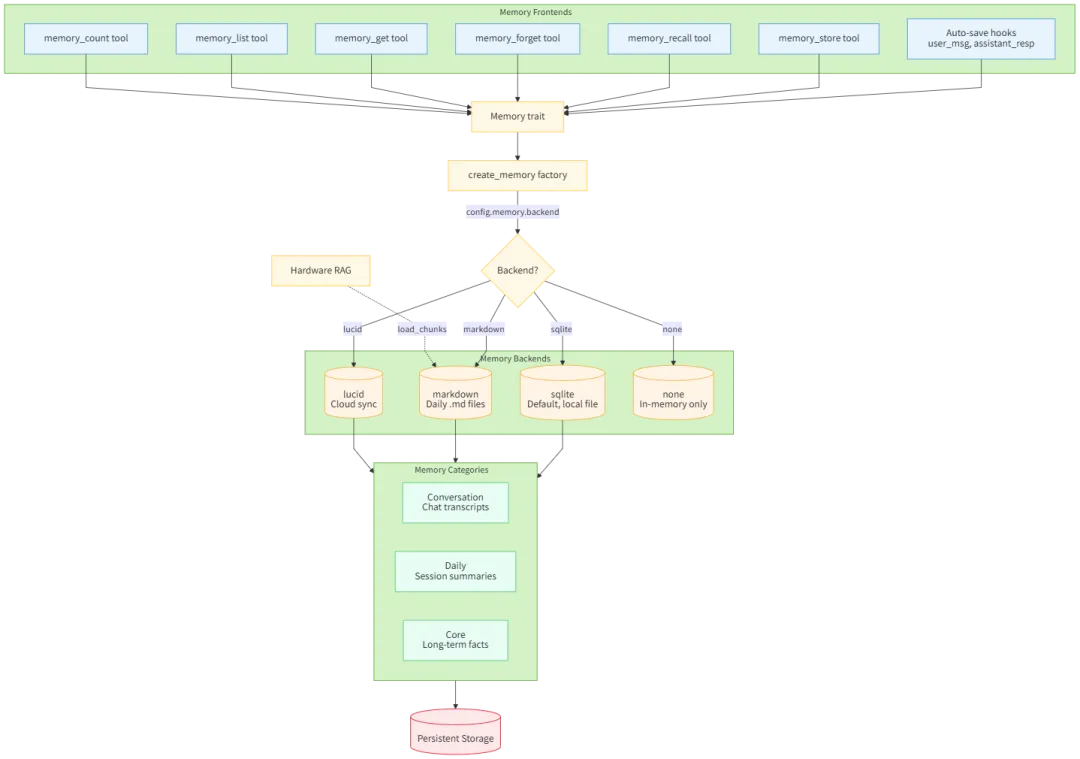
1.7.1 记忆系统架构
| Memory Frontends | ||
| Memory Backends | ||
| Memory Categories | ||
1.7.2 数据流向
Frontend (AutoSave/Tools) → Memory trait → create_memory factory│▼Backend? (config.memory.backend)│┌─────────────────────────┼─────────────────────────┐│ │ │▼ ▼ ▼sqlite markdown lucid│ │ │└─────────────────────────┼─────────────────────────┘│▼Memory Categories(Conversation / Daily / Core)│▼Persistent Storage
1.7.3 RAG 集成
Hardware RAG -.-> load_chunks -> Markdown (每日 .md 文件)0x02 会话消息
会话消息的定位是“会话级运行事实”。它不等同于长期记忆,也不应该直接替代长期记忆文件。
2.1 消息记录结构
每个消息字典包含以下字段:
role:消息角色(user,assistant,tool) content:消息内容 timestamp:时间戳 tool_calls:工具调用信息(如果有) tool_call_id:工具调用ID(如果是工具结果) name:工具名称
2.2 存储位置
会话消息记录主要存储在以下两个地方:
内存缓存(Session对象) 数据结构:Session 类中的 messages 字段类型:list[dict[str,Any]] 内容:包含角色、内容、时间戳等信息的消息列表 磁盘文件(JSONL格式文件) 文件格式:JSONL(每行一个JSON对象) 文件位置:/.nanobot/workspace/sessions/(session_key).jsonl 文件命名:将会话键中的冒号替换为下划线 3存储管理组件 它记录会话头信息、消息、工具调用与结果等内容,主要用于会话连续性、恢复、压缩、导出和调试。
存储流程如下:
创建/获取会话:通过get_orcreate()方法从缓存或磁盘加载 添加消息:添加到内存中的messages列表 保存会话:调用save()方法同步到磁盘
2.3 会话状态更新
主流程表示
Session.messages → Filter & Format → [MemoryStore.consolidate()] → LLM Request → [_SAVE_MEMORY_TOOL] → Parse Result → Update Memory Files → Update Session State详细流程
会话消息积累 └─ Session.messages[](包含多个消息对象)
触发条件满足 └─ unconsolidated >= memory_window
提取待归档消息 └─ old_messages = session.messages[last_consolidated:-keep_count]
格式化消息 └─ lines[](时间戳+角色+内容格式)
读取当前记忆 └─ current_memory = MEMORY.md 内容
构建 LLM 提示 └─ 包含当前记忆和待处理对话
LLM 处理请求 └─ 使用 _SAVE_MEMORY_TOOL 工具定义
LLM 返回工具调用 └─ 包含 history_entry 和 memory_update 参数
更新记忆文件 └─ HISTORY.md(追加 history_entry) └─ MEMORY.md(写入 memory_update)
更新会话状态 └─ last_consolidated 指针更新,指向已归档的消息位置
└─ 对于完全归档(archive_all),设置为 0;否则设置为 len(session.messages) - keep_count
2.4 重要特性
追加模式:消息记录只增不减,用于LLM缓存效率 合并机制:长会话会触发合并过程,将旧消息归档到MEMORY.md/HISTORY.md 缓存优化:使用内存缓存避免频繁磁盘读取 持久化:所有消息最终都会保存到JSONL文件中
这种设计确保了消息记录的可靠性和访问效率,同时支持大规模会话的管理。
2.5 Claw0
我们再用Claw0来进行比对。
在 Claw0 中,会话就是 JSONL 文件. 追加写入, 重放恢复, 太大就摘要压缩.
架构如下:
User Input|vSessionStore.load_session() --> rebuild messages[] from JSONL|vContextGuard.guard_api_call()|+-- Attempt 0: normal call| || overflow? --no--> success| |yes+-- Attempt 1: truncate oversized tool results| || overflow? --no--> success| |yes+-- Attempt 2: compact history via LLM summary| || overflow? --yes--> raise|SessionStore.save_turn() --> append to JSONL|vPrint responseFile layout:workspace/.sessions/agents/{agent_id}/sessions/{session_id}.jsonlworkspace/.sessions/agents/{agent_id}/sessions.json (index)
其要点如下:
SessionStore: JSONL 持久化. 写入时追加, 读取时重放. _rebuild_history(): 将扁平的 JSONL 转换回 API 兼容的 messages[]. ContextGuard: 3 阶段溢出重试 (正常 -> 截断 -> 压缩 -> 失败). compact_history(): LLM 生成摘要替换旧消息. REPL 命令: /new,/switch,/context,/compact用于会话管理.
其历史压缩机制如下:
将最早 50% 的消息序列化为纯文本, 让 LLM 生成摘要。 用摘要 + 近期消息替换
def compact_history(self, messages, api_client, model):keep_count = max(4, int(len(messages) * 0.2))compress_count = max(2, int(len(messages) * 0.5))compress_count = min(compress_count, len(messages) - keep_count)old_text = _serialize_messages_for_summary(messages[:compress_count])summary_resp = api_client.messages.create(model=model, max_tokens=2048,system="You are a conversation summarizer. Be concise and factual.",messages=[{"role": "user", "content": summary_prompt}],)# 用摘要 + "Understood" 对替换旧消息compacted = [{"role": "user", "content": "[Previous conversation summary]\n" + summary},{"role": "assistant", "content": [{"type": "text","text": "Understood, I have the context."}]},]compacted.extend(messages[compress_count:])return compacted
0x03 MemoryStore
MemoryStore 是 Nanobot 框架中实现智能体双层记忆体系的核心组件,核心职责是管理智能体的「长期记忆(MEMORY.md)」和「历史日志(HISTORY.md)」,通过 LLM 自动整合对话记录,将临时会话信息提炼为结构化的长期记忆,避免消息无限累积,同时保留可检索的历史日志,复刻了 OpenCLAW 的核心记忆管理能力,是 Agent 具备「长期记忆能力」的核心实现。
3.1 两层记忆结构
记忆是智能体跨会话持久化知识的方式。在nanobot中,记忆存在Markdown 文件中。Markdown 记忆的妙处在于人类可读、人类可编辑。你可以用文本编辑器打开 MEMORY.md,进行调整,立即看到变化。没有数据库迁移,没有管理后台,就一个文件。
MemoryStore 模块通过「长期记忆 + 历史日志」双层结构实现 Agent 的记忆管理,核心是 consolidate 方法通过 LLM 自动提炼会话信息,避免消息无限累积;
长期记忆(MEMORY.md):存储提炼后的核心事实、结论,轻量化且可直接用于后续对话上下文; 历史日志(HISTORY.md):存储对话记录和交互历史,支持 grep 检索;
3.1.1 HISTORY.md
历史日志:存储在memory/HISTORY.md文件中,所有原始交互——用户输入、模型输出、工具调用结果——全部追加写入 History。不可修改,不可删除。
追加式事件日志,不可变 支持文本搜索,便于查找过往事件。 可以通过grep命令搜索 不会直接加载到LLM上下文,按需查询
3.1.2 MEMORY.md
长期事实记忆:存储在memory/MEMORY.md文件中,即Memory 是从 History 里提炼出来的结构化知识。和 History 的”原始全量”不同,Memory 是摘要过的、索引好的、可以快速检索的。
用户偏好:"I prefer dark mode" 项目上下文:"The API uses OAuth2" 关系信息:"Alice is the project lead"
这些信息会在每次会话开始时加载到上下文中。
3.2 与其他组件的协作
与 AgentLoop 的协作。
AgentLoop 负责触发和协调记忆整合
AgentLoop 在处理消息时调用 MemoryStore.get_memory_context() 获取长期记忆。 当会话消息数量达到阈值时,AgentLoop 触发记忆整合过程。
与 ContextBuilder 的协作
ContextBuilder 负责将记忆注入系统提示
ContextBuilder 使用 MemoryStore.get_memory_context() 将长期记忆整合到系统提示中。
与 SessionManager 的协作
MemoryStore.consolidate() 接收来自 SessionManager 的 Session 对象。 整合完成后更新 Session.last_consolidated 指针,避免重复处理。
3.3 记忆管理方式
有两种记忆管理方式
自动管理
通过MemoryStore.consolidate()自动进行 使用_SAVE_MEMORY_TOOL专用工具 LLM在此过程中不使用edit_file或者 write_file 手动管理
用户可以主动请求AI更新 MEMORY.md AI可以使用在常规工具集中的edit_file或者 write_file工具
3.3.1 记忆存储的时机
记忆存储的时机有两种。
会话压缩(系统驱动/自动写记忆)
会话压缩会将历史对话压缩到HISTORY.md和MEMORY.md ,其核心目的为:
上下文管理:防止会话过长导致上下文溢出 知识沉淀:将临时信息转化为持久记忆
入口:
MemoryStore.consolidate()函数
具体函数:
MemoryStore.write_long_term():写入长期记忆到MEMORY.md MemoryStore.append_history():追加事件摘要到HISTORY.md
触发条件:
系统自动调用,通过_SAVE_MEMORY_TOOL工具
手动记忆管理
手动记忆管理指的是:用户使用 write_file 和 edit_file 工具直接编辑记忆文件。
入口文件:
nanobot/skills/memory/SKILL.md
## When to Update MEMORY.mdWrite important facts immediately using `edit_file` or `write_file`:- User preferences ("I prefer dark mode")- Project context ("The API uses OAuth2")- Relationships ("Alice is the project lead")
工具:
write_file工具:直接写入完整内容到memory/MEMORY.md edit_file工具:编辑现有内容,替换指定文本
具体函数:
WriteFileTool.execute():在 nanobot/agent/tools/filesystem.py 中实现 EditFileTool.execute():在 nanobot/agent/tools/filesystem.py 中实现
操作的两个示例如下:
主动要求记录
用户输入:"记住,我的名字是张三" → AI 分析请求意图 → 识别需要更新长期记忆 → 选择适当的文件操作工具([EditFileTool.execute() → edit_file] 或 [WriteFileTool.execute() → write_file] → 构造工具调用参数 → 执行文件操作(更新 MEMORY.md) → 返回执行结果给 LLM → 更新 MEMORY.md 文件手动合并(/new命令)
# /new命令 pythonif cmd == "/new":#档案全部消息if notawait self._consolidate_memory(temp,archive_all=True):#处理错误session.clear)#清空会话
3.3.2 记忆读取的时机
构建上下文(系统提示构建时)
此处是长期记忆读取。
[ContextBuilder] 初始化 → 加载 MEMORY.md → 注入系统提示 → LLM 会话中持续访问记忆
位置:memory.py中的MemoryStore.get_memory_context() 具体函数:MemoryStore.read_long_term()在nanobot/agent/memory.py中 调用时机:构建系统提示时(context.py中的build_system_prompt()) 目的:将长期记忆加入到系统提示中,使LLM在每次对话中都能看到关键信息
检索历史
此处是历史日志读取,即用户主动查询,Agent通过exec工具手动搜索历史事件 。
入口:exec工具执行grep命令 命令格式:grep -i“keyword"memory/HISTORY.md 具体实现:ExecTool.execute() 在nanobot/agent/tools/shell.py 中 文件路径:memory/HISTORY.md 安全限制:通过命令过滤和路径限制确保安全
搜索执行流程如下:
用户输入:"查找上次会议记录" → AI 识别搜索意图 → 构造 grep 命令 → exec 工具调用:{"command": "grep -i '会议' memory/HISTORY.md"} → [ExecTool.execute()] → 执行 grep 命令 → 返回搜索结果给 LLM → LLM 整理结果并回应用户
会话历史读取
入口: Session.get_history() 具体实现:在会话管理器中维护的消息列表
3.4 记忆整合/会话压缩
记忆整合会定期清理,在会话过长时自动合并内存限制:限制历史消息数量,这个记忆系统的设计旨在平衡信息保留与性能,通过自动合并减少上下文长度,同时保持重要的长期记忆。
会话增长 → 达到阈值 → 触发合并 → LLM 处理 → [save_memory / _SAVE_MEMORY_TOOL] 工具调用 → 更新 MEMORY.md 和 HISTORY.md
3.4.1 机制
MemoryStore.consolidate() 执行主要合并逻辑。
总体流程
整合过程:从会话中提取旧消息 → 构建记忆合并提示 → LLM处理 → 保存到记忆文件。
具体来说,当会话token使用量接近上下文窗口限制时,即AgentLoop._process_message() 中的条件判断。
Gateway会:
调用AgentLoop._consolidate_memory() 提取会话数据:从Session.messages中提取需要整合的消息(session.messages 中从 last_consolidated 到倒数第50条之间的消息) 构建提示:创建包含当前记忆(当前MEMORY.md内容)和待处理对话的提示 LLM处理:模型根据提示词判断并写入重要信息,使用 _SAVE_MEMORY_TOOL 工具调用LLM进行记忆整理 工具调用:LLM必须调用save_memory工具,提供: history_entry:摘要事件,追加至 HISTORY.md memory_update:更新后的长期记忆,覆盖MEMORY.md 更新记忆: 将重要事件摘要追加到HISTORY.md 将长期事实更新到 MEMORY.md 更新 Session.last_consolidated 指针 使用 NO_REPLY标记避免用户看到输出
具体流程
具体流程如下:
记忆系统初始化
ContextBuilder 初始化 → 加载 MemoryStore → 注册记忆相关工具
记忆合并流程
在 MemoryStore.consolidate() 方法中使用。
合并触发条件
会话消息数量超过 memory_window 阈值,达到内存窗口大小限制时自动触发 执行 /new 命令时
条件判断
# [AgentLoop._process_message()]) → 检查 unconsolidated 消息数量 → 判断是否超过 [memory_window]阈值 → 触发记忆合并任务unconsolidated = len(session.messages) - session.last_consolidatedif (unconsolidated >= self.memory_window and session.key not in self._consolidating):
数据准备阶段
用户消息→_process_message()→检查是否需要整合 →[AgentLoop._consolidate_memory()] → [MemoryStore.consolidate()] → 提取需要归档的消息(old_messages)→ 读取当前长期记忆(current_memory,作为合并过程的上下文)→ 构建 LLM 提示(prompt)
提取消息数据信息如下:
从 session.messages 中获取需要归档的消息 过滤掉内容为空的消息 格式化为时间戳 + 角色 + 内容的格式
LLM 处理阶段
待整合消息 +当前记忆 → 调用 LLM with [_SAVE_MEMORY_TOOL] → 系统提示:"You are a memory consolidation agent..." → 用户提示:包含当前记忆和待处理对话 → 工具定义:[_SAVE_MEMORY_TOOL]
使用系统提示:"You are a memory consolidation agent. Call the save_memory tool with your consolidation of the conversation." 传递 _SAVE_MEMORY_TOOL 作为可用工具定义 模型:指定的 LLM 模型
current_memory = self.read_long_term()# 构建用户消息prompt = f"""Process this conversation and call the save_memory tool with your consolidation.## Current Long-term Memory{current_memory or"(empty)"}## Conversation to Process{chr(10).join(lines)}"""try:response = await provider.chat(messages=[ # 系统消息如下{"role": "system", "content": "You are a memory consolidation agent. Call the save_memory tool with your consolidation of the conversation."},{"role": "user", "content": prompt}, # 用户消息],tools=_SAVE_MEMORY_TOOL,model=model,)
工具调用阶段
LLM 必须调用 save_memory 工具 → 参数:{history_entry, memory_update} → [MemoryStore.consolidate()] 解析工具调用结果 → 更新 HISTORY.md 和 MEMORY.md
3.4.2 示例图
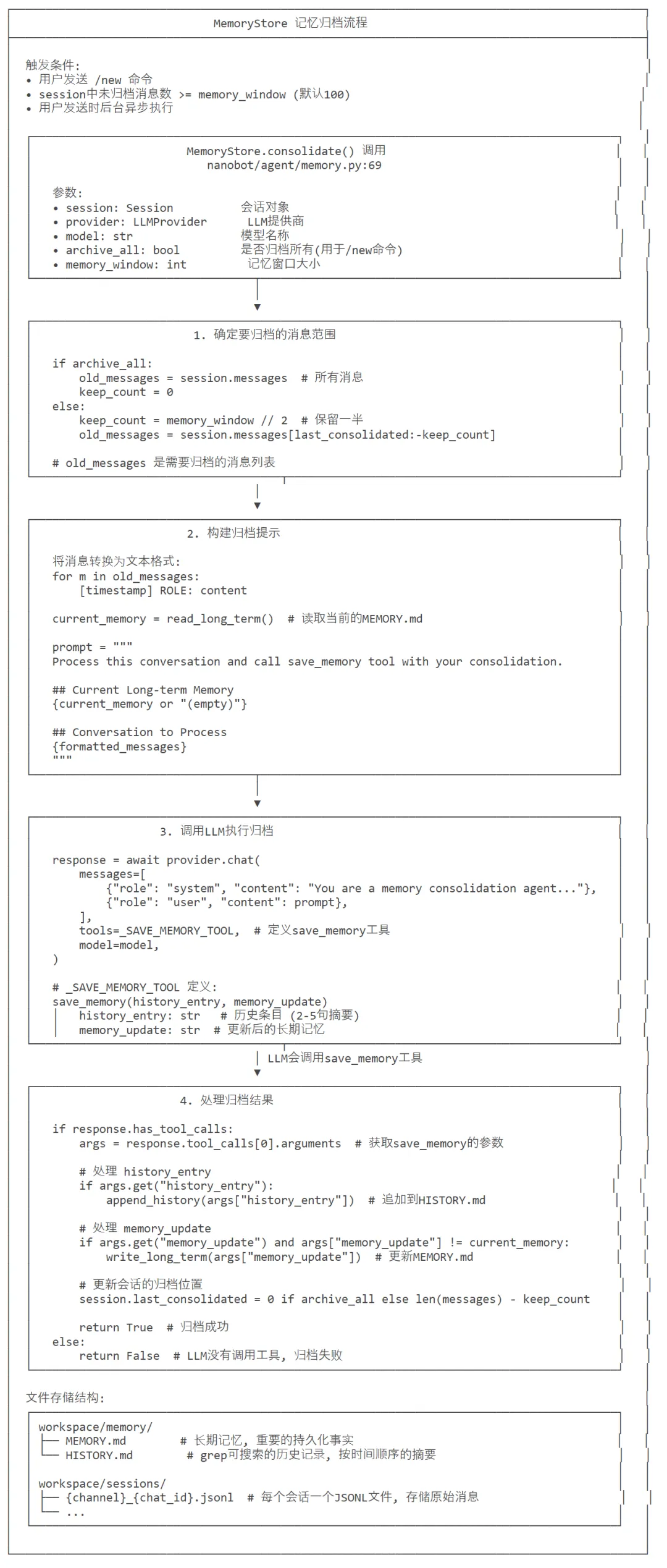
下图给出了记忆归档流程,用文字解释如下:
用户持续对话 → Session.messages增长
检查阅值 → len(session.messages)-session.last_consolidated>=memory_window
异步整合 → 启动_consolidateand_unlock()协程
获取待整合数据 → 提取session.messages[session.last_consolidated:-keep_count]
构建LLM提示 → 包含当前记忆和待整合对话
LLM处理 → 调用带有save_memory工具的聊天
工具执行 → LLM返回history_entry和 memory_update
写入文件 → 更新HISTORY.md 和MEMORY.md
更新状态 → 设置session.last_consolidated
3.5 代码
# ===================== 核心类定义 =====================class MemoryStore:"""Two-layer memory: MEMORY.md (long-term facts) + HISTORY.md (grep-searchable log)."""def __init__(self, workspace: Path):# 初始化记忆目录(确保目录存在,不存在则创建)self.memory_dir = ensure_dir(workspace / "memory")# 定义长期记忆文件路径(MEMORY.md)self.memory_file = self.memory_dir / "MEMORY.md"# 定义历史日志文件路径(HISTORY.md)self.history_file = self.memory_dir / "HISTORY.md"def read_long_term(self) -> str:"""读取长期记忆文件内容"""# 检查文件是否存在if self.memory_file.exists():# 读取文件内容(UTF-8编码保证中文等字符正常)return self.memory_file.read_text(encoding="utf-8")# 文件不存在时返回空字符串return ""def write_long_term(self, content: str) -> None:"""写入内容到长期记忆文件(覆盖写入)"""self.memory_file.write_text(content, encoding="utf-8")def append_history(self, entry: str) -> None:"""追加内容到历史日志文件(不会覆盖原有内容)"""# 以追加模式打开文件(a),UTF-8编码with open(self.history_file, "a", encoding="utf-8") as f:# 去除entry末尾的空白符,添加两个换行(分隔不同条目)后写入f.write(entry.rstrip() + "\n\n")def get_memory_context(self) -> str:"""生成格式化的长期记忆上下文(供Agent对话使用)"""# 读取当前长期记忆内容long_term = self.read_long_term()# 有内容时返回格式化字符串,无内容时返回空字符串return f"## Long-term Memory\n{long_term}" if long_term else ""async def consolidate(self,session: Session,provider: LLMProvider,model: str,*,archive_all: bool = False,memory_window: int = 50,) -> bool:"""Consolidate old messages into MEMORY.md + HISTORY.md via LLM tool call.Returns True on success (including no-op), False on failure."""# 分支1:全量归档模式(archive_all=True)if archive_all:# 取所有会话消息作为待整合的旧消息old_messages = session.messages# 全量归档后不保留旧消息(keep_count=0)keep_count = 0# 记录日志:全量归档的消息数量logger.info("Memory consolidation (archive_all): {} messages", len(session.messages))# 分支2:增量归档模式(默认)else:# 计算保留的消息数量(记忆窗口的一半,避免频繁整合)keep_count = memory_window // 2# 若会话消息总数 ≤ 保留数量,无需整合,直接返回成功if len(session.messages) <= keep_count:return True# 若自上次整合后无新消息,无需整合,直接返回成功if len(session.messages) - session.last_consolidated <= 0:return True# 提取待整合的旧消息:从上次整合位置到倒数keep_count条old_messages = session.messages[session.last_consolidated:-keep_count]# 若待整合消息为空,直接返回成功if not old_messages:return True# 记录日志:待整合消息数量、保留消息数量logger.info("Memory consolidation: {} to consolidate, {} keep", len(old_messages), keep_count)# 构建待整合的对话文本(带时间戳、角色、工具使用信息)lines = []for m in old_messages:# 跳过无内容的消息if not m.get("content"):continue# 拼接工具使用信息(若有)tools = f" [tools: {', '.join(m['tools_used'])}]" if m.get("tools_used") else ""# 格式化每行内容:[时间戳] 角色(大写) [工具信息]: 消息内容lines.append(f"[{m.get('timestamp', '?')[:16]}] {m['role'].upper()}{tools}: {m['content']}")# 读取当前长期记忆内容current_memory = self.read_long_term()# 构建LLM提示词:告知LLM需要整合对话并调用save_memory工具prompt = f"""Process this conversation and call the save_memory tool with your consolidation.## Current Long-term Memory{current_memory or"(empty)"}## Conversation to Process{chr(10).join(lines)}"""try:# 调用LLM接口,触发记忆整合response = await provider.chat(messages=[# 系统提示:定义LLM的角色为记忆整合代理{"role": "system", "content": "You are a memory consolidation agent. Call the save_memory tool with your consolidation of the conversation."},# 用户提示:传入待整合的对话和当前记忆{"role": "user", "content": prompt},],tools=_SAVE_MEMORY_TOOL, # 传入save_memory工具描述model=model, # 指定使用的LLM模型)# 检查LLM是否调用了save_memory工具if not response.has_tool_calls:# 未调用工具时记录警告日志,返回失败logger.warning("Memory consolidation: LLM did not call save_memory, skipping")return False# 提取工具调用的参数(取第一个工具调用的参数)args = response.tool_calls[0].arguments# 兼容处理:部分LLM返回的参数是JSON字符串,需解析为字典if isinstance(args, str):args = json.loads(args)# 校验参数类型:必须是字典,否则返回失败if not isinstance(args, dict):logger.warning("Memory consolidation: unexpected arguments type {}", type(args).__name__)return False# 处理历史条目:追加到HISTORY.mdif entry := args.get("history_entry"):# 确保entry是字符串类型(非字符串则转为JSON字符串)if not isinstance(entry, str):entry = json.dumps(entry, ensure_ascii=False)# 追加到历史日志文件self.append_history(entry)# 处理记忆更新:写入MEMORY.md(仅当内容变化时)if update := args.get("memory_update"):# 确保update是字符串类型(非字符串则转为JSON字符串)if not isinstance(update, str):update = json.dumps(update, ensure_ascii=False)# 仅当内容与当前记忆不同时才写入(避免无意义的写入)if update != current_memory:self.write_long_term(update)# 更新会话的最后整合位置:# - 全量归档:重置为0# - 增量归档:设为当前消息总数 - 保留数量session.last_consolidated = 0 if archive_all else len(session.messages) - keep_count# 记录日志:记忆整合完成logger.info("Memory consolidation done: {} messages, last_consolidated={}", len(session.messages), session.last_consolidated)# 返回成功return Trueexcept Exception:# 捕获所有异常,记录错误日志logger.exception("Memory consolidation failed")# 返回失败return False
0x04 SKILL.md
SKILL.md 是 Nanobot 中技能的标准化定义文件,存放在对应技能的目录下(workspace/skills/{skill-name}/SKILL.md 或内置技能目录),是 Agent 识别、理解、使用技能的唯一依据,核心作用是为 LLM 提供技能的使用说明、规则、操作方法,无需训练,靠 LLM 阅读理解即可直接使用。
memory/SKILL.md 这个文件是给agent(LLM)看的技能指南,告诉 agent 如何使用记忆系统,指导用户如何主动更新记忆文件的。
4.1 文件内容
---name: memorydescription: Two-layer memory system with grep-based recall.always: true---# Memory## Structure- `memory/MEMORY.md` — Long-term facts (preferences, project context, relationships). Always loaded into your context.- `memory/HISTORY.md` — Append-only event log. NOT loaded into context. Search it with grep.## Search Past Events```bashgrep -i "keyword" memory/HISTORY.md```Use the `exec` tool to run grep. Combine patterns: `grep -iE "meeting|deadline" memory/HISTORY.md`## When to Update MEMORY.mdWrite important facts immediately using `edit_file` or `write_file`:- User preferences ("I prefer dark mode")- Project context ("The API uses OAuth2")- Relationships ("Alice is the project lead")## Auto-consolidationOld conversations are automatically summarized and appended to HISTORY.md when the session grows large. Long-term facts are extracted to MEMORY.md. You don't need to manage this.
4.2 文件结构
SKILL.md 是 Nanobot 技能的 “标准化配置 + 使用手册”,开发者按规范编写即可实现技能的即插即用,Agent 靠阅读理解即可使用,是 Nanobot 实现轻量化、插件化技能体系的核心载体。
SKILL.md 采用Markdown 格式,分为顶部YAML 前置元数据(用---包裹)和下方正文技能说明,是固定规范,Agent 会自动解析这两部分内容。
前置元数据
是技能的 “配置信息”,定义技能的基础属性(Agent 自动解析,用于技能管理),Nanobot 的 SkillsLoader 会自动提取、校验,核心必填 / 常用字段(示例中为memory技能的元数据):
name | memory | ||
description | |||
always | true则直接嵌入 Agent 系统提示,无需手动加载;false则按需调用 | true | |
requires | bins(CLI 工具)、env(环境变量),缺失则技能标记为不可用 | {bins: [grep]} |
正文使用说明
用 Markdown 格式写清技能的核心功能、结构、操作命令、使用规则,是 LLM 实际使用技能的 “说明书”,需简洁、清晰、可执行,核心包含技能结构、操作方法、使用场景 / 规则三部分(示例为memory技能的说明)。
4.3 核心作用
这是Agent 技能的「身份标识 + 使用手册」。
对 SkillsLoader:是技能加载、校验、分类的依据,自动解析元数据,判断技能是否可用、是否为常驻技能,生成技能摘要; 对 Agent(LLM):是技能的唯一使用手册,LLM 通过阅读正文,掌握技能的操作方法、命令、规则,无需训练,直接在推理时使用; 对开发者:是技能的标准化开发规范,只需按「元数据 + 使用说明」编写,即可实现技能的 “即插即用”,无需修改 Agent 核心代码。
4.4 使用流程
SKILL.md 的使用完全由 Nanobot 框架自动化处理,被Agent 侧自动加载 + 按需调用,LLM 仅需负责 “阅读理解并执行”,核心流程:
加载: SkillsLoader启动时扫描技能目录,自动识别 SKILL.md,解析元数据,将技能加入注册表;分类:元数据中 always: true的技能(如示例memory),会被自动加载到 Agent 系统提示中,成为常驻技能,Agent 随时可用;always: false的技能仅生成摘要,不直接加载;调用:Agent 需使用非常驻技能时,会先通过 read_file工具读取对应技能的 SKILL.md,阅读使用说明后,按文档中的方法执行;执行:Agent 严格按照 SKILL.md 正文的说明操作(如示例中用 exec工具执行grep命令检索记忆),无需额外逻辑。
4.5 memory 技能用法拆解
元数据: always: true→ 该技能直接嵌入 Agent 系统提示,Agent 无需手动读取,随时可使用记忆功能;结构说明:清晰区分 MEMORY.md(长期记忆,加载到上下文)和HISTORY.md(事件日志,不加载),让 Agent 明确记忆系统的组成;操作方法:明确检索 HISTORY.md需用exec工具执行grep命令,并给出基础用法和组合模式,Agent 可直接复制命令执行;使用规则:讲清 MEMORY.md的更新场景(用户偏好、项目上下文等)和工具(edit_file/write_file),以及自动整合规则(无需 Agent 管理),让 Agent 知道 “何时做、怎么做、不用做什么”。比如:当对话中出现重要信息时,AI 可以使用 edit_file 或 write_file 工具将其保存到 MEMORY.md 文件中。
4.6 关键补充
我们接下来看看与 Nanobot 框架的联动细节。
优先级:工作空间( workspace/skills)的 SKILL.md 优先级高于内置技能目录,同名技能会覆盖内置技能;可用性:若元数据中 requires指定的依赖(如 CLI 工具、环境变量)缺失,SkillsLoader会将技能标记为available: false,并在技能摘要中注明缺失依赖,Agent 会提示安装后再使用;轻量化:非常驻技能的 SKILL.md 不会直接加载到上下文,仅生成 XML 摘要,Agent 需用时再通过 read_file工具读取,减少上下文冗余,提升推理效率。
0x05 相关工具
与记忆相关的工具如下:
文件系统工具
LLM 会主动调用 WriteFileTool 和 EditFileTool 用户可以显式调用 write_file 或 edit_file 工具来更新 MEMORY.md 文件 ReadFileTool、WriteFileTool、EditFileTool:用于直接访问记忆文件,用户可以通过标准文件操作技能间接管理记忆。这些工具对应了相关函数,比如edit_file 和 write_file。
Write important facts immediately using `edit_file` or `write_file`:- User preferences ("I prefer dark mode")- Project context ("The API uses OAuth2")- Relationships ("Alice is the project lead")
exec 工具:用于运行 grep 搜索历史记录
_SAVE_MEMORY_TOOL:后台自动执行的 记忆归档/整合 机制 _SAVE_MEMORY_TOOL 是内部使用的工具,专门用于记忆合并 当会话达到 memory_window 阈值时,系统自动调用 MemoryStore.consolidate() 此方法内部调用 LLM,传递 _SAVE_MEMORY_TOOL 工具定义
我们举例如下。
5.1 文件系统工具
class WriteFileTool(Tool):"""Tool to write content to a file."""def __init__(self, workspace: Path | None = None, allowed_dir: Path | None = None):self._workspace = workspaceself._allowed_dir = allowed_dir@propertydef name(self) -> str:return "write_file"@propertydef description(self) -> str:return "Write content to a file at the given path. Creates parent directories if needed."@propertydef parameters(self) -> dict[str, Any]:return {"type": "object","properties": {"path": {"type": "string","description": "The file path to write to"},"content": {"type": "string","description": "The content to write"}},"required": ["path", "content"]}async def execute(self, path: str, content: str, **kwargs: Any) -> str:try:file_path = _resolve_path(path, self._workspace, self._allowed_dir)file_path.parent.mkdir(parents=True, exist_ok=True)file_path.write_text(content, encoding="utf-8")return f"Successfully wrote {len(content)} bytes to {file_path}"except PermissionError as e:return f"Error: {e}"except Exception as e:return f"Error writing file: {str(e)}"class EditFileTool(Tool):"""Tool to edit a file by replacing text."""def __init__(self, workspace: Path | None = None, allowed_dir: Path | None = None):self._workspace = workspaceself._allowed_dir = allowed_dir@propertydef name(self) -> str:return "edit_file"@propertydef description(self) -> str:return "Edit a file by replacing old_text with new_text. The old_text must exist exactly in the file."@propertydef parameters(self) -> dict[str, Any]:return {"type": "object","properties": {"path": {"type": "string","description": "The file path to edit"},"old_text": {"type": "string","description": "The exact text to find and replace"},"new_text": {"type": "string","description": "The text to replace with"}},"required": ["path", "old_text", "new_text"]}async def execute(self, path: str, old_text: str, new_text: str, **kwargs: Any) -> str:try:file_path = _resolve_path(path, self._workspace, self._allowed_dir)if not file_path.exists():return f"Error: File not found: {path}"content = file_path.read_text(encoding="utf-8")if old_text not in content:return self._not_found_message(old_text, content, path)# Count occurrencescount = content.count(old_text)if count > 1:return f"Warning: old_text appears {count} times. Please provide more context to make it unique."new_content = content.replace(old_text, new_text, 1)file_path.write_text(new_content, encoding="utf-8")return f"Successfully edited {file_path}"except PermissionError as e:return f"Error: {e}"except Exception as e:return f"Error editing file: {str(e)}"@staticmethoddef _not_found_message(old_text: str, content: str, path: str) -> str:"""Build a helpful error when old_text is not found."""lines = content.splitlines(keepends=True)old_lines = old_text.splitlines(keepends=True)window = len(old_lines)best_ratio, best_start = 0.0, 0for i in range(max(1, len(lines) - window + 1)):ratio = difflib.SequenceMatcher(None, old_lines, lines[i : i + window]).ratio()if ratio > best_ratio:best_ratio, best_start = ratio, iif best_ratio > 0.5:diff = "\n".join(difflib.unified_diff(old_lines, lines[best_start : best_start + window],fromfile="old_text (provided)", tofile=f"{path} (actual, line {best_start + 1})",lineterm="",))return f"Error: old_text not found in {path}.\nBest match ({best_ratio:.0%} similar) at line {best_start + 1}:\n{diff}"return f"Error: old_text not found in {path}. No similar text found. Verify the file content."
5.2 _SAVE_MEMORY_TOOL
LLM 执行 _SAVE_MEMORY_TOOL 时,必须返回 history_entry 和 memory_update,分别由程序来更新 HISTORY.md 和 MEMORY.md。
# ===================== 核心常量定义 =====================# 定义save_memory工具的元数据(供LLM调用的工具描述)_SAVE_MEMORY_TOOL = [{"type": "function", # 工具类型(固定为function)"function": {"name": "save_memory", # 工具名称(唯一标识)# 工具描述:告知LLM该工具的作用是将记忆整合结果保存到持久化存储"description": "Save the memory consolidation result to persistent storage.",# 工具参数定义(JSON Schema格式)"parameters": {"type": "object", # 参数整体为对象类型"properties": {# 第一个参数:历史条目(会话摘要)"history_entry": {"type": "string", # 参数类型为字符串"description": "A paragraph (2-5 sentences) summarizing key events/decisions/topics. ""Start with [YYYY-MM-DD HH:MM]. Include detail useful for grep search.",},# 第二个参数:记忆更新(完整的长期记忆内容)"memory_update": {"type": "string", # 参数类型为字符串"description": "Full updated long-term memory as markdown. Include all existing ""facts plus new ones. Return unchanged if nothing new.",},},"required": ["history_entry", "memory_update"], # 必填参数列表},},}]
0xEE 带货
带个货,是我的图书编辑 黄爱萍 老师的最新书籍。
0xFF 参考
AI Infra:多 Agent 场景需要什么样的 Context Infra 层
OpenClaw的Memory是怎么实现的
OpenClaw 进阶指南:从 SOUL.md 到 MEMORY.md,逐层拆解智能体的"操作系统"
万字】带你实现一个Agent(上),从Tools、MCP到Skills
3500 行代码打造轻量级AI Agent:Nanobot 架构深度解析
OpenClaw真完整解说:架构与智能体内核
https://github.com/shareAI-lab/learn-claude-code
OpenClaw架构-Agent Runtime 运行时深度拆解

