夜雨聆风
夜雨聆风最近想深入研究一下openclaw的设计思路。首先要做的当然是下载代码编译运行获得第一手体感,代码的下载使用如下命令:
git clone https://github.com/openclaw/openclaw.git
cd openclaw
下载后发现openclaw代码使用nodejs开发,这让我有点意外,以为它会使用Python,毕竟是基于大模型的agent应用,使用Python是常态。但入乡随俗,既然使用nodejs开发,那么下载nodejs环境必不可少,openclaw的编译使用22.0以上的js版本比较好,要不然容易出现各种编译错误的坑。由于整个系统使用corepack来安装依赖,因此我们还需要使用如下命令启用corepack:
corepack enable
然后就可以使用如下命令安装依赖:
pnpm install
依赖安装完毕后就可以使用下面命令编译其UI部分的代码:
pnpm ui:build
由于我使用的是windows系统,执行上面命令时会出现如下错误:
pnpm ui:build

> openclaw@2026.4.6 ui:build C:\Users\OseasyVM\Documents\openclaw
> node scripts/ui.js build

'C:\Program' 不是内部或外部命令,也不是可运行的程序
或批处理文件。
 ELIFECYCLE  Command failed with exit code 1.
出现上面错误的原因在于,在执行命令时,首先需要获得pnpm所在的安装路径,但是在windows系统上,它通常安装在”C:\Program Files\nodejs”这个系统目录下,由于路径中存在空格,这导致控制台在执行pnpm这个命令时,实际上执行的是:
C:\Program Files\nodejs\pnpm ui:build
可以看到Program Files中间的空格导致控制台把命令从C\Promgram这里截断。通过搜索发现这个问题早就有人提交了Pr,但Openclaw项目积累了5000多个pr,上面bug对应的修复pr并没有合并到main分支。没办法我们只能自己动手处理。首先当我们在控制台运行”pmpn ui:build”这个命令时,对应的执行代码在/scripts/ui.js这个文件中,其中有两个函数分别为:function run(cmd, args)和function runSync(cmd, args, envOverride),他们在”pnpm ui:build”执行时会被调用,run对应异步执行,runSync对应同步执行,两者逻辑本质上没有区别。
可以看到这两个函数都传入一个cmd参数,这个参数就是pmpn这个程序所在的路径,也就是”C:\Program Files\nodejs\pmpn”,也就是代码会创建一个新的进程去调用pmpn来执行ui:build这个命令,于是在新进程中就会执行命令C:\Program Files\nodejs\pmpn ui:build.注意到Program后面跟着一个空格,这导致命令解析时,把Files\nodejs\pmpn看做是一个命令行参数,这就是导致出错的原因。解决办法就是把C:\Program Files\nodejs\pmpn这一整个字符串用双引号包括起来,这样才能避免空格导致的问题,也就是命令行变成”C:\Program Files\nodejs\pnpm” ui:build 这样。因此我们做如下修改:
functionrun(cmd, args) {
const options = createSpawnOptions(cmd, args);
let child;

// Windows + 需要 shell + 命令路径包含空格 → 使用字符串命令方式
if (process.platform === 'win32' && options.shell === true && cmd.includes(' ')) {
// 将命令路径用双引号包裹,然后拼接所有参数(参数中若有空格,也需处理,但一般参数由用户传入,暂保持原样)
const quotedCmd = `"${cmd}"`;
const fullCommand = [quotedCmd, ...args].join(' ');
// 使用字符串命令,并强制 shell: true(createSpawnOptions 可能因为 cmd 变化而重新计算 shell,这里直接覆盖)
try {
      child = spawn(fullCommand, [], {
        ...options,
shell: true,
// 注意:必须保留 cwd、stdio、env 等
      });
    } catch (err) {
console.error(`Failed to launch ${cmd}:`, err);
      process.exit(1);
return;
    }
  } else {
// 原有逻辑
try {
      child = spawn(cmd, args, options);
    } catch (err) {
console.error(`Failed to launch ${cmd}:`, err);
      process.exit(1);
return;
    }
  }

  child.on("error", (err) => {
console.error(`Failed to launch ${cmd}:`, err);
    process.exit(1);
  });
  child.on("exit", (code) => {
if (code !== 0) {
      process.exit(code ?? 1);
    }
  });
}

functionrunSync(cmd, args, envOverride) {
let options = createSpawnOptions(cmd, args, envOverride);
let result;

if (process.platform === 'win32' && options.shell === true && cmd.includes(' ')) {
const quotedCmd = `"${cmd}"`;
const fullCommand = [quotedCmd, ...args].join(' ');
try {
      result = spawnSync(fullCommand, [], {
        ...options,
shell: true,
      });
    } catch (err) {
console.error(`Failed to launch ${cmd}:`, err);
      process.exit(1);
return;
    }
  } else {
try {
      result = spawnSync(cmd, args, options);
    } catch (err) {
console.error(`Failed to launch ${cmd}:`, err);
      process.exit(1);
return;
    }
  }

if (result.signal) {
    process.exit(1);
  }
if ((result.status ?? 1) !== 0) {
    process.exit(result.status ?? 1);
  }
}
完成上面修改后,再执行pnpm ui:build,命令运行就可以成功。这一步成功后我们再执行其他模块的编译,运行命令:
pnpm build
运行完毕后就会在本地生成\dist文件夹,所有编译好的可执行文件就在该文件夹中。为了验证编译是否成功,我们可以测试openclaw的help命令执行情况:
node dist/entry.js --help
上面命令运行后输出如下:
node dist/entry.js --help

� OpenClaw 2026.4.6 (3b865d8) — I've read more man pages than any human should—so you don't have to.

Usage: openclaw [options] [command]

Options:
  --container <name>   Run the CLI inside a running Podman/Docker container named <name> (default: env OPENCLAW_CONTAINER)
  --dev                Dev profile: isolate state under ~/.openclaw-dev, default gateway port 19001, and shift derived ports
                       (browser/canvas)
  -h, --help           Display help for command
  --log-level <level>  Global log level override for file + console (silent|fatal|error|warn|info|debug|trace)
  --no-color           Disable ANSI colors
  --profile <name>     Use a named profile (isolates OPENCLAW_STATE_DIR/OPENCLAW_CONFIG_PATH under ~/.openclaw-<name>)
  -V, --version        output the version number

Commands:
  Hint: commands suffixed with * have subcommands. Run <command> --help for details.
  acp *                Agent Control Protocol tools
  agent                Run one agent turn via the Gateway
  agents *             Manage isolated agents (workspaces, auth, routing)
  approvals *          Manage exec approvals (gateway or node host)
  backup *             Create and verify local backup archives for OpenClaw state
  capability *         Run provider-backed inference commands (fallback alias: infer)
  channels *           Manage connected chat channels (Telegram, Discord, etc.)
  clawbot *            Legacy clawbot command aliases
  completion           Generate shell completion script
  config *             Non-interactive config helpers (get/set/unset/file/validate). Default: starts guided setup.
  configure            Interactive configuration for credentials, channels, gateway, and agent defaults
  cron *               Manage cron jobs via the Gateway scheduler
  daemon *             Gateway service (legacy alias)
  dashboard            Open the Control UI with your current token
  devices *            Device pairing + token management
  directory *          Lookup contact and group IDs (self, peers, groups) for supported chat channels
  dns *                DNS helpers for wide-area discovery (Tailscale + CoreDNS)
  docs                 Search the live OpenClaw docs
  doctor               Health checks + quick fixes for the gateway and channels
  gateway *            Run, inspect, and query the WebSocket Gateway
  health               Fetch health from the running gateway
  help                 Display help for command
  hooks *              Manage internal agent hooks
  infer *              Run provider-backed inference commands
  logs                 Tail gateway file logs via RPC
  mcp *                Manage OpenClaw MCP config and channel bridge
  memory               Search, inspect, and reindex memory files
  message *            Send, read, and manage messages
  models *             Discover, scan, and configure models
  node *               Run and manage the headless node host service
  nodes *              Manage gateway-owned node pairing and node commands
  onboard              Interactive onboarding for gateway, workspace, and skills
  pairing *            Secure DM pairing (approve inbound requests)
  plugins *            Manage OpenClaw plugins and extensions
  qa *                 Run QA scenarios and launch the private QA debugger UI
  qr                   Generate mobile pairing QR/setup code
  reset                Reset local config/state (keeps the CLI installed)
  sandbox *            Manage sandbox containers for agent isolation
  secrets *            Secrets runtime reload controls
  security *           Security tools and local config audits
  sessions *           List stored conversation sessions
  setup                Initialize local config and agent workspace
  skills *             List and inspect available skills
  status               Show channel health and recent session recipients
  system *             System events, heartbeat, and presence
  tasks *              Inspect durable background task state
  tui                  Open a terminal UI connected to the Gateway
  uninstall            Uninstall the gateway service + local data (CLI remains)
  update *             Update OpenClaw and inspect update channel status
  webhooks *           Webhook helpers and integrations

Examples:
  openclaw models --help
    Show detailed help for the models command.
  openclaw channels login --verbose
    Link personal WhatsApp Web and show QR + connection logs.
  openclaw message send --target +15555550123 --message "Hi" --json
    Send via your web session and print JSON result.
  openclaw gateway --port 18789
    Run the WebSocket Gateway locally.
  openclaw --dev gateway
    Run a dev Gateway (isolated state/config) on ws://127.0.0.1:19001.
  openclaw gateway --force
    Kill anything bound to the default gateway port, then start it.
  openclaw gateway ...
    Gateway control via WebSocket.
  openclaw agent --to +15555550123 --message "Run summary" --deliver
    Talk directly to the agent using the Gateway; optionally send the WhatsApp reply.
  openclaw message send --channel telegram --target @mychat --message "Hi"
    Send via your Telegram bot.

Docs: docs.openclaw.ai/cli
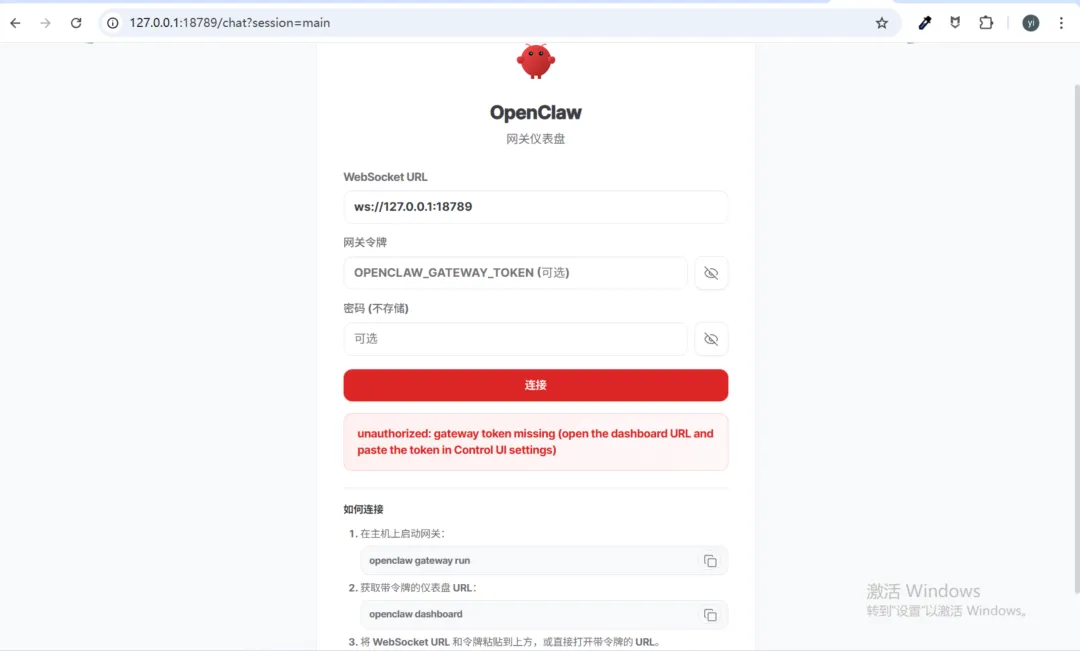
然后我们可以开启openclaw的网关配置页面:
pnpm openclaw gateway --port 18789
上面命令执行需要几分钟左右,然后就可以在浏览器查看openclaw的网关配置页面: