 夜雨聆风
夜雨聆风摘要:当大语言模型能够轻松读懂混淆代码、当AI智能体可以自动爬取并还原业务逻辑,传统前端安全防线正在被重新定义。本文深入剖析AI驱动的逆向工程实战技术,探讨AI时代前端面临的新型安全威胁,并提供可落地的安全防护方案。
引言:当AI成为逆向工程师
2025年,安全研究员做了一个令人不安的实验:他们让一个接入浏览器的AI智能体“自己学会钓鱼”。在没有人类攻击者直接操控的情况下,这个AI在24小时内完成了从侦察目标、生成钓鱼页面到发送个性化邮件的全流程攻击。
这不是科幻小说,而是真实发生在网络安全实验室的场景。
与此同时,另一项来自学术界的 benchmark 研究——JsDeObsBench——揭示了更残酷的事实:GPT-4o在JavaScript去混淆任务中达到93.42%的执行正确率,其代码简化能力是传统工具的1.72倍。这意味着,曾经被视为“最后一道防线”的代码混淆技术,正在被AI以惊人的效率攻破。
Cloudflare的数据显示,仅在2025年前五个月,他们就拦截了4160亿次AI驱动的爬取攻击,平均每天27亿次。这些攻击不再是传统的手工脚本,而是具备自适应能力、可以模拟人类行为的智能体。
⚠️ 现实警示:AI逆向不再是高门槛的技术活,一个普通用户借助AI工具就能完成过去需要专业安全团队才能实现的前端代码分析。
今天,我们就来深入探讨这个既令人兴奋又令人担忧的议题:AI时代,前端代码安全该何去何从?
第一部分:AI智能体的前端代码逆向能力
1️⃣ AI如何理解与逆向前端代码:从AST到语义推理
传统逆向工程师需要手动分析代码执行流程、理解加密算法、追踪数据流。而AI大模型带来了全新的分析范式。
核心原理:三层理解架构
/** * AI驱动的JavaScript代码分析架构 * 该架构模拟了现代LLM进行代码逆向时的三层处理流程 */// 第一层:词法/语法分析 - 将混淆代码转换为结构化表示class JavaScriptParser {constructor() {// 使用Acorn或Babel解析器将JS代码转换为AST(抽象语法树)this.parser = null; }/** * 解析混淆代码为AST * @param {string} obfuscatedCode - 经过混淆的JavaScript代码 * @returns {Object} - 返回代码的抽象语法树结构 */parse(obfuscatedCode) {// AST包含:程序语句、函数声明、变量声明、表达式等节点return this.parser.parse(obfuscatedCode); }}// 第二层:模式识别 - 识别常见的混淆模式class ObfuscationPatternRecognizer {/** * 识别字符串数组+索引映射模式 * 例如:_0x1a2b[3] -> "token" * 这种模式常见于OB混淆(Obfuscator.io生成的代码) */recognizeStringArrayPattern(ast) {const patterns = {// 检测字符串数组定义stringArrayDeclarations: [],// 检测数组索引引用arrayIndexReferences: [],// 检测字符串拼接模式stringConcatOperations: [] };// 遍历AST节点,识别混淆特征this.traverseAST(ast, (node) => {// 模式1:检测 _0xXXXX = ["...", "...", ...]if (this.isStringArrayDeclaration(node)) { patterns.stringArrayDeclarations.push(node); }// 模式2:检测 _0xXXXX[index] 形式if (this.isArrayIndexAccess(node)) { patterns.arrayIndexReferences.push(node); } });return patterns; }/** * 识别控制流平坦化模式 * 将正常顺序的代码转换为switch-case状态机 * 这是最常见的JavaScript混淆技术之一 */recognizeControlFlowFlattenening(ast) {// 控制流平坦化会将代码转换为如下结构:// while(true) { switch(state) { case 0: ...; state = 1; break; case 1: ... } }// AI可以识别这种模式并还原为原始的控制流 }}// 第三层:语义推理 - 基于上下文理解代码意图class SemanticReasoner {/** * 使用语义推理还原变量命名 * 例如:根据变量使用上下文,将 a, b, c 还原为 userName, password, token */inferVariableNames(codeContext) {// 输入:变量的使用上下文// 输出:推测的语义化变量名const { variableName, // 当前变量名(如 a, b, _0x1234) assignedFrom, // 赋值来源 passedTo, // 传递给哪些函数 usedInConditions // 在哪些条件判断中使用 } = codeContext;// 简单的启发式推理逻辑// 实际应用中,AI会使用大规模训练得到的模式库if (passedTo.includes('fetch') || passedTo.includes('XMLHttpRequest')) {return 'requestData'; // 传递给网络请求函数 → 请求数据 }if (usedInConditions.includes('length') && variableName.type === 'string') {return 'stringToValidate'; // 检查长度 → 待验证字符串 }return variableName; // 无法推断,保持原名 }}实际案例:OB混淆代码的AI还原
// ===== 混淆后的代码(由Obfuscator.io生成)=====var _0x1a2b = ['ZXhhbXBsZQ==', 'dXNlcm5hbWU=', 'cGFzc3dvcmQ='];function _0x3b4c(_0x5d6e) {var _0x7f8a = _0x1a2b[0];var _0x9c0b = _0x1a2b[1] + _0x1a2b[2];return window[_0x7f8a](atob(_0x9c0b));}// ===== AI分析后还原的代码 =====function authenticateUser(credentials) {// 使用Base64解码还原字符串// 'ZXhhbXBsZQ==' -> 'example'// 'dXNlcm5hbWU=' -> 'username'// 'cGFzc3dvcmQ=' -> 'password'const windowKey = 'example';const combinedString = atob('username') + atob('password');// 还原结果:调用 window.example('usernamepassword')return window[windowKey](combinedString);}💡 技术要点:AI之所以能还原这类代码,是因为它训练时见过海量的混淆-源码配对数据,形成了强大的模式识别能力。
2️⃣ 基于LLM的自动化逆向工程:JSHook与Reverse Machine实战
2025年,一批专为AI时代设计的逆向工具横空出世。JSHook 和 Reverse Machine 是其中的代表作。
JSHook:AI原生的浏览器逆向工具
JSHook是一个基于MCP(Model Context Protocol)的JavaScript逆向工程工具,专为AI助手优化。通过它,Claude、ChatGPT等AI可以自动化完成复杂的网页分析、调试和逆向任务。
/** * JSHook的核心功能演示 * 展示如何使用AI Hook生成器监控API请求 */// 场景:监控所有API请求,记录URL、参数和响应// 使用自然语言描述需求,AI自动生成Hook代码// 定义Hook描述const hookConfig = {description: "监控所有API请求,记录URL和参数",target: {type: "api", // 目标是API调用name: "fetch"// 拦截fetch函数 },behavior: {captureArgs: true, // 捕获调用参数captureReturn: true, // 捕获返回值logToConsole: true// 输出到控制台 },condition: {urlPattern: ".*api.*"// 只匹配包含api的URL }};/** * 生成的Hook代码示例 * 这段代码会被注入到目标页面中 */// 保存原始的fetch函数引用const originalFetch = window.fetch;// 重写fetch函数,实现监控window.fetch = async function(...args) {// 解析请求参数const [input, init = {}] = args;const url = typeof input === 'string' ? input : input.url;const method = init.method || 'GET';// 记录请求信息console.log('[JSHook] API请求拦截:', {url: url,method: method,headers: init.headers,body: init.body,timestamp: new Date().toISOString() });// 执行原始请求const response = await originalFetch.apply(window, args);// 克隆响应以便后续分析const clonedResponse = response.clone();// 尝试解析响应体 clonedResponse.json().then(data => {console.log('[JSHook] API响应拦截:', {url: url,status: response.status,data: data }); }).catch(() => {// 响应不是JSON格式 });return response;};/** * 更高级的用法:Hook加密函数,捕获密钥生成逻辑 */// 监控crypto.subtle.encrypt,这是许多前端加密逻辑的核心const originalEncrypt = window.crypto.subtle.encrypt;window.crypto.subtle.encrypt = async function(algorithm, key, data) {console.log('[JSHook] 加密操作拦截:');console.log(' 算法:', algorithm);console.log(' 密钥信息:', await window.crypto.subtle.exportKey('raw', key));console.log(' 原始数据:', new TextDecoder().decode(data));const result = await originalEncrypt.apply(window.crypto.subtle, arguments);console.log(' 加密结果(hex):', bufferToHex(result));return result;};// 辅助函数:将ArrayBuffer转换为十六进制字符串function bufferToHex(buffer) {return [...new Uint8Array(buffer)] .map(b => b.toString(16).padStart(2, '0')) .join('');}Reverse Machine:AI驱动的变量去混淆
Reverse Machine代表了新一代的AI逆向工具,它使用GPT-4/Gemini/Claude等大模型进行语义级别的变量重命名。
# 安装和使用Reverse Machinenpm install -g reverse-machine# 估算处理成本(推荐先执行)reverse-machine openai --cost ./script.min.js# 使用OpenAI模式进行去混淆reverse-machine openai ./script.min.js# 使用Claude模式reverse-machine anthropic ./bundle.js# 批量处理整个项目目录reverse-machine gemini ./my-project/// ===== 输入:混淆后的代码 =====// (minified and obfuscated)function a(e,t){var n=[];var r=e.length;var i=0;for(;i<r;i+=t){if(i+t<r){n.push(e.substring(i,i+t))}else{n.push(e.substring(i,r))}}return n}// ===== AI处理后的输出 =====// (deobfuscated and human-readable)function splitStringIntoChunks(inputString, chunkSize) {// 将字符串按指定大小分割成块var chunks = [];var stringLength = inputString.length;var currentIndex = 0;for (; currentIndex < stringLength; currentIndex += chunkSize) {if (currentIndex + chunkSize < stringLength) {// 还有足够的字符组成一个完整的块 chunks.push(inputString.substring(currentIndex, currentIndex + chunkSize)); } else {// 剩余字符不足一块,直接使用剩余部分 chunks.push(inputString.substring(currentIndex, stringLength)); } }return chunks;}3️⃣ AI驱动的API接口发现与调用链还原
AI不仅能还原代码逻辑,还能通过分析网络请求和执行流程,智能还原整个API调用链。
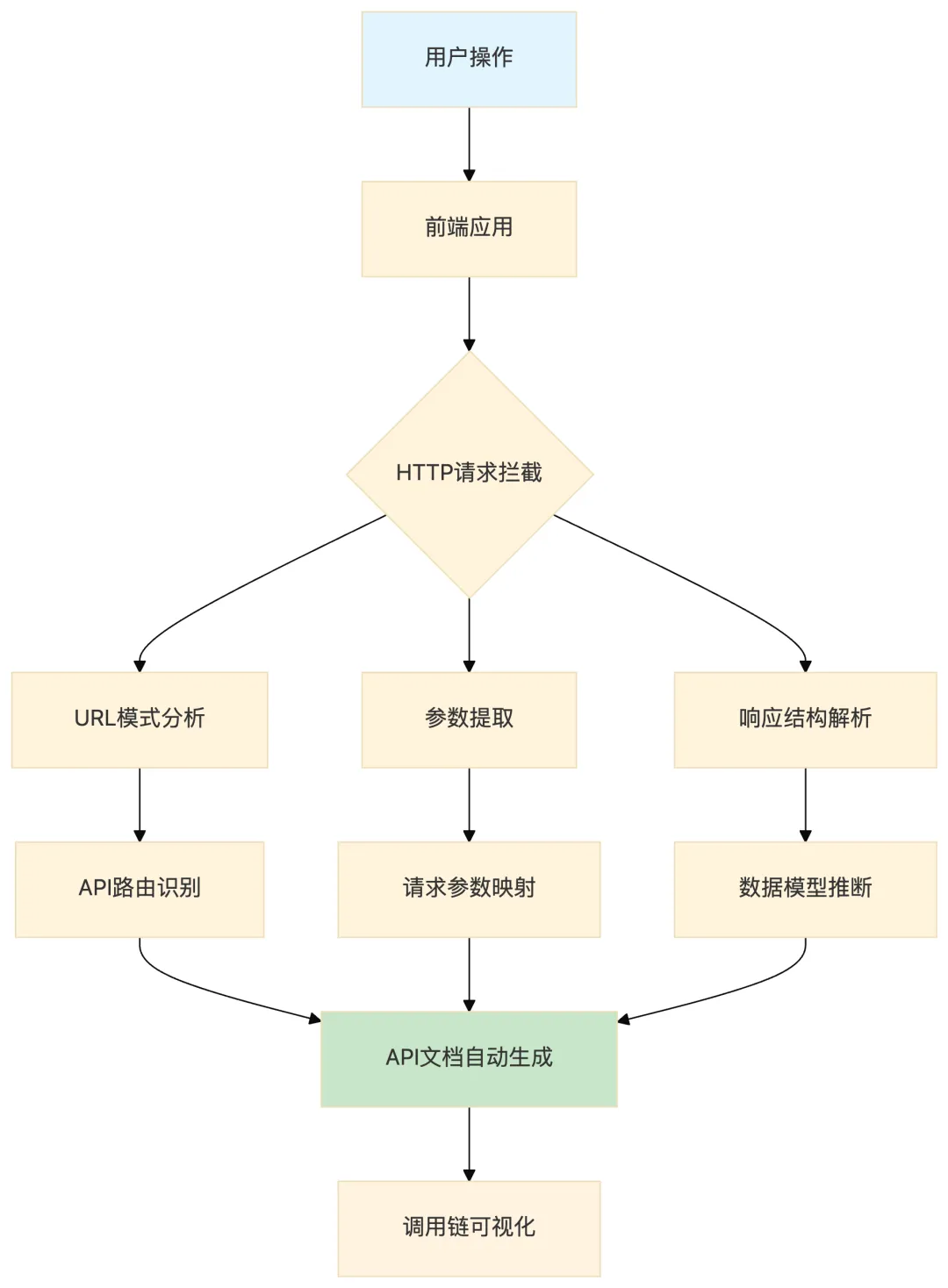
/** * API调用链追踪器 * 自动分析并还原前后端交互逻辑 */class APICallChainAnalyzer {constructor() {// 存储已发现的API端点this.discoveredEndpoints = new Map();// 存储调用关系图this.callGraph = new Map(); }/** * 拦截并分析所有网络请求 * 构建API调用链的完整视图 */startTracking() {// Hook fetch APIconst self = this;// 拦截fetch请求window.fetch = async function(...args) {const [url, config] = self._parseArgs(args);const method = (config && config.method) || 'GET';const endpoint = self._extractEndpoint(url);// 记录API调用 self._recordAPICall(endpoint, method, {params: self._parseParams(url, config),headers: config && config.headers,body: config && config.body });// 执行实际请求const response = await originalFetch.apply(window, args);// 分析响应结构const clonedResponse = response.clone();try {const data = await clonedResponse.json(); self._analyzeResponse(endpoint, data); } catch (e) {// 非JSON响应 }return response; };// Hook XMLHttpRequest以确保完整覆盖const OriginalXHR = window.XMLHttpRequest;const self = this;window.XMLHttpRequest = function() {const xhr = new OriginalXHR();const originalOpen = xhr.open.bind(xhr);const originalSend = xhr.send.bind(xhr);let currentEndpoint = '';let currentMethod = ''; xhr.open = function(method, url, ...rest) { currentEndpoint = url; currentMethod = method;return originalOpen(method, url, ...rest); }; xhr.send = function(data) { self._recordAPICall(currentEndpoint, currentMethod, {params: self._parseParams(currentEndpoint, {body: data}),body: data });return originalSend(data); };return xhr; }; }/** * 提取API端点信息 */_extractEndpoint(url) {try {const parsed = new URL(url);// 移除query参数获取基础路径return parsed.pathname; } catch {return url; } }/** * 分析并归类API端点 */_classifyEndpoint(endpoint) {const patterns = {// 用户相关接口user: /\/user[s]?\/|\/profile|\/account/i,// 认证相关接口auth: /\/auth|\/login|\/logout|\/token|refresh/i,// 数据查询接口query: /\/query|\/search|\/list|\/fetch|\/get/i,// 数据提交接口mutation: /\/create|\/update|\/delete|\/submit|\/post/i,// 文件上传接口upload: /\/upload|\/file|\/media|\/image|\/avatar/i };for (const [type, pattern] of Object.entries(patterns)) {if (pattern.test(endpoint)) {return type; } }return 'unknown'; }/** * 生成API文档 */generateDocumentation() {const docs = {title: 'Auto-Generated API Documentation',endpoints: [] };for (const [endpoint, info] of this.discoveredEndpoints) { docs.endpoints.push({path: endpoint,method: info.method,category: this._classifyEndpoint(endpoint),description: this._inferPurpose(endpoint),requestParams: this._documentParams(info.params),responseModel: this._documentResponse(info.response) }); }return docs; }}4️⃣ 前端加密逻辑的AI破解:从AES密钥到签名算法
许多前端应用依赖JavaScript实现加密逻辑,如参数签名、设备指纹生成等。AI可以快速分析这些加密算法。
/** * AI辅助加密分析工具 * 通过动态监控和模式识别,揭示隐藏的加密逻辑 */class EncryptionAnalyzer {constructor() {this.encryptionPatterns = new Map();this.keyExtractionPoints = []; }/** * 监控CryptoAPI调用,提取加密密钥和使用模式 */hookCryptoAPI() {const self = this;// 监控 SubtleCrypto.digest - 用于生成哈希if (window.crypto && window.crypto.subtle) {const originalDigest = window.crypto.subtle.digest.bind(window.crypto.subtle);window.crypto.subtle.digest = async function(algorithm, data) {console.log('[EncryptionAnalyzer] 检测到哈希运算:');console.log(' 算法:', algorithm);console.log(' 输入数据:', new TextDecoder().decode(data));const result = await originalDigest(algorithm, data);console.log(' 哈希结果:', self._bufferToHex(result));return result; };// 监控加密/解密操作const originalEncrypt = window.crypto.subtle.encrypt.bind(window.crypto.subtle);window.crypto.subtle.encrypt = async function(algorithm, key, data) {console.log('[EncryptionAnalyzer] 检测到加密操作:');console.log(' 算法:', algorithm);// 尝试导出密钥信息try {const exportedKey = await window.crypto.subtle.exportKey('raw', key);console.log(' 密钥(hex):', self._bufferToHex(exportedKey)); } catch (e) {console.log(' 密钥: [无法导出]'); }console.log(' 原始数据:', new TextDecoder().decode(data));const result = await originalEncrypt(algorithm, key, data);console.log(' 加密结果:', self._bufferToHex(result));return result; };// 监控密钥生成const originalGenerateKey = window.crypto.subtle.generateKey.bind(window.crypto.subtle);window.crypto.subtle.generateKey = async function(algorithm, extractable, keyUsages) {console.log('[EncryptionAnalyzer] 检测到密钥生成:');console.log(' 算法:', algorithm);console.log(' 用途:', keyUsages);const key = await originalGenerateKey(algorithm, extractable, keyUsages);// 尝试导出公钥(如果允许)if (key.publicKey) {try {const exportedPublic = await window.crypto.subtle.exportKey('spki', key.publicKey);console.log(' 公钥:', self._bufferToHex(exportedPublic)); } catch (e) {} }return key; }; } }/** * 识别常见的加密参数构造模式 * 例如:timestamp + nonce + signature 的组合方式 */analyzeSignatureConstruction() {// Hook Date.now和Math.random来追踪时间戳和随机数const originalDateNow = Date.now;const originalRandom = Math.random;window.Date.now = function() {const timestamp = originalDateNow();console.log('[EncryptionAnalyzer] 检测到时间戳使用:', timestamp);return timestamp; };Math.random = function() {const value = originalRandom();console.log('[EncryptionAnalyzer] 检测到随机数生成:', value);return value; };// 追踪字符串拼接,因为签名通常通过拼接构造const stringConcats = [];// 通过监控变量赋值来追踪签名构造this.setupVariableWatchdog((variable, value, stack) => {if (this._looksLikeSignature(value)) {console.log('[EncryptionAnalyzer] 可能的签名值:', {variable: variable,value: value,stack: stack }); } }); }/** * 检测值是否可能是签名 */_looksLikeSignature(value) {if (typeof value !== 'string') return false;// 签名通常是长字符串(hex或base64)if (value.length < 20 || value.length > 128) return false;// 检查是否是十六进制或Base64编码return /^[a-f0-9]{32,}$/i.test(value) || /^[A-Za-z0-9+/]{20,}={0,2}$/.test(value); }_bufferToHex(buffer) {return [...new Uint8Array(buffer)] .map(b => b.toString(16).padStart(2, '0')) .join(''); }}// 使用示例const analyzer = new EncryptionAnalyzer();analyzer.hookCryptoAPI();analyzer.analyzeSignatureConstruction();第二部分:AI时代前端面临的新威胁
5️⃣ AI自动化攻击 vs 传统手工攻击:全方位对比
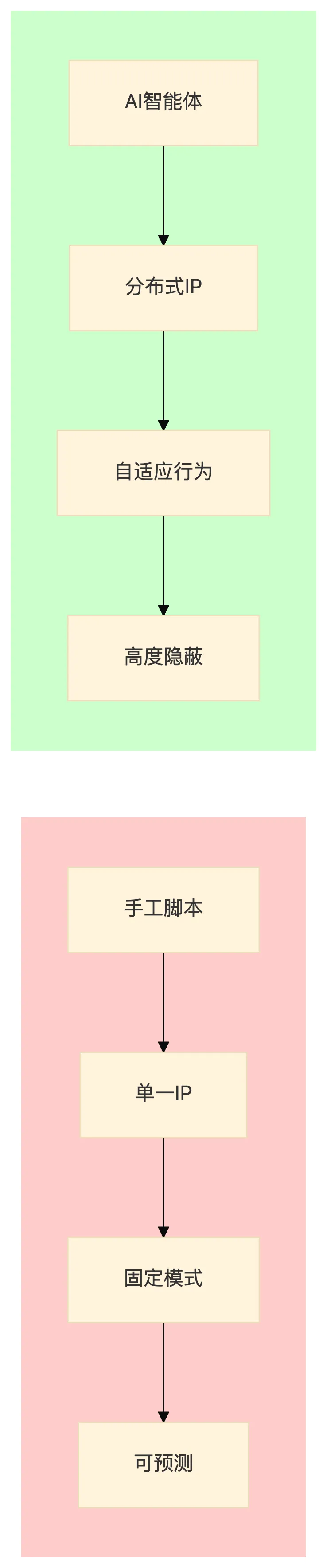
| 攻击速度 | ||
| 并发规模 | ||
| 适应性 | ||
| 伪装能力 | ||
| 成本门槛 | ||
| 检测难度 | ||
| 攻击范围 |
💡 关键洞察:AI攻击的本质变化不是"更快",而是"更像人"。传统安全规则基于"机器vs人"的二元判断,AI攻击模糊了这个边界。
6️⃣ AI智能体的自动化漏洞挖掘:从发现到利用
AI不仅能逆向代码,还能自动化挖掘和利用漏洞。
/** * AI驱动的漏洞扫描器示例 * 展示AI如何自动化执行XSS、CSRF等漏洞检测 */class AIAutoVulnerabilityScanner {constructor() {this.findings = [];this.testCases = new Map(); }/** * 自动化XSS漏洞检测 * AI会智能生成绕过payload并验证 */async scanForXSS(targetUrl) {const xssPayloads = [// 基础payload'<script>alert(1)</script>','"><img src=x onerror=alert(1)>',// AI增强:WAF绕过'<svg/onload=alert(1)>','<scr\x00ipt>alert(1)</scr\x00ipt>',// 大小写混合绕过'<ScRiPt>alert(1)</sCrIpT>',// Unicode编码绕过'javascript:alert(1)',// 事件处理器'onerror=alert(1) autofocus onfocus=alert(1)' ];for (const payload of xssPayloads) {// 测试URL参数await this._testParameter(targetUrl, 'q', payload);await this._testParameter(targetUrl, 'search', payload);await this._testParameter(targetUrl, 'id', payload);// 测试表单输入await this._testFormInput(targetUrl, payload);// 测试JSON bodyawait this._testJSONBody(targetUrl, payload); }return this.findings; }/** * 自动化CSRF漏洞检测 */async scanForCSRF(targetUrl) {// 收集所有表单const forms = document.querySelectorAll('form');for (const form of forms) {const formInfo = {action: form.action,method: form.method,inputs: [],csrfToken: null };// 检查是否有CSRF Tokenconst csrfInput = form.querySelector('input[name*="csrf"], input[name*="token"], input[name*="_token"]');if (!csrfInput) { formInfo.inputs = Array.from(form.querySelectorAll('input')).map(i => ({name: i.name,type: i.type }));this.findings.push({type: 'CSRF',severity: 'HIGH',description: `表单缺少CSRF保护`,form: formInfo }); }// 验证Token是否真正生效if (csrfInput) {await this._verifyTokenEffectiveness(form.action, csrfInput.value); } } }/** * 自动化原型链污染检测 */async scanForPrototypePollution() {// 检查危险的属性赋值const dangerousPatterns = ['__proto__','constructor.prototype',Object.keys({}) + '.constructor.prototype' ];// 测试常见的污染点const pollutePoints = [// URL参数'?__proto__[test]=value','?constructor[prototype][test]=value',// JSON输入JSON.stringify({__proto__: {test: 'value'}}),JSON.stringify({constructor: {prototype: {test: 'value'}}}) ];for (const point of pollutePoints) {const testUrl = targetUrl + point;try {const response = await fetch(testUrl);// 检查响应是否反映了我们注入的属性const data = await response.json();if (data.test === 'value' || {}.test === 'value') {this.findings.push({type: 'Prototype Pollution',severity: 'CRITICAL',payload: point }); } } catch (e) {} } }/** * 发送测试请求 */async _testParameter(url, paramName, payload) {const testUrl = new URL(url); testUrl.searchParams.set(paramName, payload);try {const response = await fetch(testUrl.toString());const text = await response.text();// 检查payload是否被反射且未转义if (text.includes(payload) && !text.includes('<')) {this.findings.push({type: 'XSS',severity: 'HIGH',location: `GET parameter: ${paramName}`,payload: payload,url: testUrl.toString() }); } } catch (e) {} }/** * 验证CSRF Token是否真正有效 */async _verifyTokenEffectiveness(formAction, token) {// 尝试使用空token提交try {const response = await fetch(formAction, {method: 'POST',body: new URLSearchParams({}),credentials: 'include' });// 如果不需要有效token就能提交,则存在CSRFif (response.ok) {this.findings.push({type: 'CSRF',severity: 'HIGH',description: 'CSRF Token验证不严格或缺失' }); } } catch (e) {} }}7️⃣ Deepfake+前端社工:AI生成钓鱼页面的新范式
2025年,安全研究员观察到一种令人警惕的新趋势:攻击者开始使用AI工具(如Vercel的v0.dev、Lovable)快速生成钓鱼网站。
/** * AI生成钓鱼网站的典型流程 * 展示攻击者如何利用AI工具快速搭建钓鱼基础设施 */// ===== 攻击者使用的提示词(来自Okta安全报告)=====const phishingPrompt = `build a copy of the website login.okta.com`;// ===== 钓鱼页面自动生成器概念代码 =====class PhishingPageGenerator {/** * 使用AI生成登录页面 * @param {string} targetBrand - 目标品牌(如 'Microsoft', 'Google', 'PayPal') */static generatePhishingPage(targetBrand) {// 这个过程现在只需要一句话,AI就能完成const prompt = `Create a professional ${targetBrand} login page with: - Exact same visual style as the official ${targetBrand} login - Form fields for email/username and password - "Remember me" checkbox - Standard ${targetBrand} branding and logo - Form submits credentials to attacker-controlled endpoint`;// AI会在几秒内生成完整的钓鱼页面代码return this._renderPage(prompt); }}/** * 传统防护 vs AI生成钓鱼的对比 */const traditionalPhishingIndicators = ['URL拼写错误(如 paypa1.com)','低质量的Logo图片','明显的语法错误','托管在不知名域名','使用HTTP而非HTTPS'];const aiGeneratedPhishingIndicators = ['✓ 完美的URL拼写','✓ 高质量的品牌资源','✓ 专业的文案内容','✓ 托管在可信平台(Vercel、Netlify)','✓ 完整的SSL证书','✗ 几乎无法通过视觉或传统规则识别'];/** * 新一代防御策略:行为层监控 */// 浏览器扩展 - 监控凭据提交行为const credentialMonitor = {/** * 监听表单提交,向用户发出安全警告 */init() {// 合法登录页面的域名白名单this.legitimateDomains = ['login.microsoftonline.com','account.microsoft.com','accounts.google.com','signin.aws.amazon.com','login.salesforce.com' ];// 监听所有表单提交document.addEventListener('submit', (e) => {const form = e.target;const action = form.action || window.location.href;// 检查表单提交目标const targetDomain = new URL(action).hostname;if (!this.isLegitimateDomain(targetDomain)) {// 凭据将被发送到非官方域名!this.showSecurityWarning(form, targetDomain); } }); },/** * 检查域名是否是官方域名 */isLegitimateDomain(domain) {return this.legitimateDomains.some(d => domain === d || domain.endsWith('.' + d) ); },/** * 显示安全警告 */showSecurityWarning(form, targetDomain) {// 创建警告元素const warning = document.createElement('div'); warning.className = 'phishing-warning'; warning.innerHTML = ` <div style=" position: fixed; top: 0; left: 0; right: 0; bottom: 0; background: rgba(0,0,0,0.8); display: flex; align-items: center; justify-content: center; z-index: 999999; "> <div style=" background: white; padding: 30px; border-radius: 10px; max-width: 400px; text-align: center; "> <h2 style="color: #d32f2f; margin-top: 0;">⚠️ 安全警告</h2> <p>此页面试图将您的凭据发送到:</p> <code style="background: #f5f5f5; padding: 5px 10px; border-radius: 3px;">${targetDomain} </code> <p>这不是官方登录页面,您的密码可能会被盗!</p> <div style="margin-top: 20px;"> <button onclick="this.closest('.phishing-warning').remove()" style="padding: 10px 20px; cursor: pointer;"> 我理解风险,继续提交 </button> <button onclick="window.location.href='about:blank'" style="padding: 10px 20px; cursor: pointer; margin-left: 10px;"> 离开此页面 </button> </div> </div> </div> `; form.parentElement.appendChild(warning); form.preventDefault(); }};// 初始化监控credentialMonitor.init();第三部分:前端安全防护实战
8️⃣ 代码混淆进阶:对抗AI逆向的混淆策略
面对AI逆向的威胁,传统的代码混淆已经不够。我们需要更高级的对抗策略。
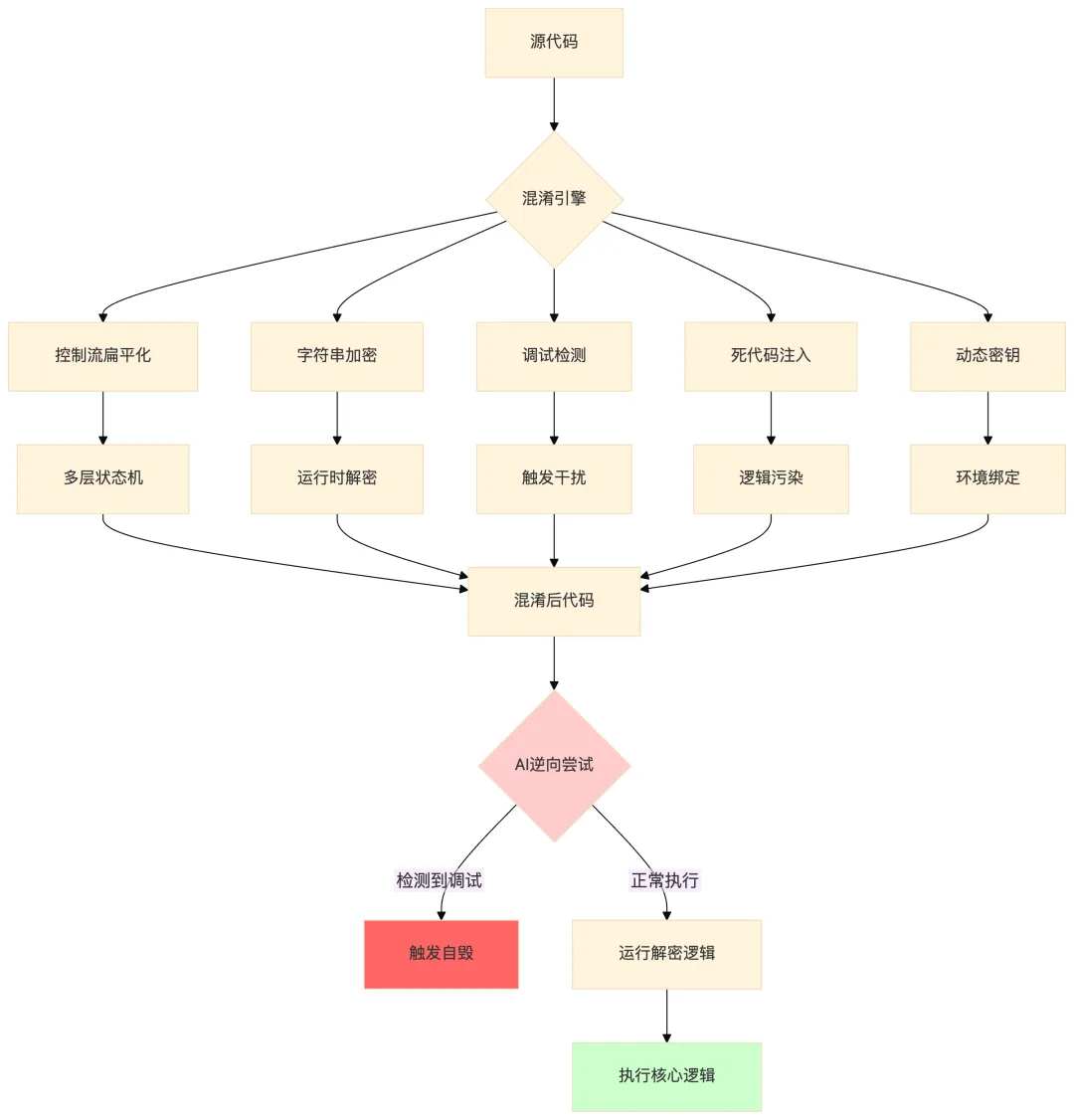
/** * 高级JavaScript混淆器 * 实现多层防护机制对抗AI逆向 */class AdvancedObfuscator {constructor(options = {}) {this.options = {// 控制流平坦化层级数controlFlowDepth: options.controlFlowDepth || 3,// 字符串加密密钥轮换stringEncryptionRounds: options.stringEncryptionRounds || 2,// 是否启用调试检测debugDetection: options.debugDetection !== false,// 死代码注入比例deadCodeRatio: options.deadCodeRatio || 0.3,// 动态密钥环境dynamicKeying: options.dynamicKeying !== false, ...options };// 字符串数组 - 用于存储加密的字符串this.stringArray = [];// 加密密钥this.encryptionKey = this._generateKey(); }/** * 生成随机密钥 */_generateKey() {const chars = 'ABCDEFGHIJKLMNOPQRSTUVWXYZabcdefghijklmnopqrstuvwxyz0123456789';let key = '';for (let i = 0; i < 32; i++) { key += chars.charAt(Math.floor(Math.random() * chars.length)); }return key; }/** * 加密字符串 */_encryptString(str) {// 使用XOR加密 + Base64编码let encrypted = '';for (let i = 0; i < str.length; i++) {const charCode = str.charCodeAt(i) ^ this.encryptionKey.charCodeAt(i % this.encryptionKey.length); encrypted += String.fromCharCode(charCode); }return btoa(encrypted); }/** * 控制流扁平化 * 将正常顺序的代码转换为switch-case状态机 */_flattenControlFlow(astNode) {// 这是简化的示例,实际实现需要AST级别的操作// 正常代码:// function foo() { a(); b(); c(); }// 扁平化后:// function foo() {// let state = Math.random() * 100 | 0; // 随机入口// const table = [a, b, c];// while(true) {// state = table[state]();// if (state >= table.length) break;// }// }return ` function ${astNode.name}() { // 随机化执行顺序 const _state = Math.floor(Math.random() * ${astNode.body.length}); const _table = [${astNode.body.map(fn => fn.name).join(', ')}]; // 状态机执行 let _current = _state; while(true) { if (_current >= _table.length) break; _current = _table[_current](); } } `; }/** * 生成调试检测代码 */_generateDebugDetection() {return ` (function() { // 检测DevTools是否打开 const _checkDevTools = () => { const threshold = 160; const widthThreshold = window.outerWidth - window.innerWidth > threshold; const heightThreshold = window.outerHeight - window.innerHeight > threshold; // 检查console是否被打开 const start = +new Date(); debugger; const end = +new Date(); if (widthThreshold || heightThreshold || (end - start > 100)) { // 检测到调试行为 // 执行干扰操作 console.clear(); document.body.innerHTML = ''; throw new Error('Security check failed'); } }; // 定时检测 setInterval(_checkDevTools, ${1000 + Math.random() * 2000}); // 尝试重写toString const _originalToString = Function.prototype.toString; Function.prototype.toString = function() { if (this.name && this.name.includes('_0x')) { return 'function() { [native code] }'; } return _originalToString.call(this); }; })(); `; }/** * 生成死代码 * 插入无意义的代码分支干扰AI分析 */_generateDeadCode() {const deadCodeSamples = [`if (${Math.random()} > 0.5) { console.log('${this._encryptString('dead')}') }`,`for(let i=0; i<${Math.floor(Math.random()*10)}; i++) { void 0; }`,`switch(${Math.floor(Math.random()*5)}) { ${[0,1,2,3].map(i => `case ${i}: break;`).join('')} }`,`try { throw new Error() } catch(e) { ${this._encryptString('trap')} }` ];return deadCodeSamples.slice(0, Math.ceil(this.options.deadCodeRatio * 4)); }/** * 完整混淆流程 */obfuscate(sourceCode) {let result = sourceCode;// 1. 字符串加密 result = this._encryptStrings(result);// 2. 变量名混淆 result = this._obfuscateVariables(result);// 3. 控制流平坦化(需要AST支持,这里是简化演示)// 实际使用需要借助Babel或UglifyJS// 4. 添加调试检测if (this.options.debugDetection) { result = this._generateDebugDetection() + result; }// 5. 注入死代码const deadCode = this._generateDeadCode().join('; '); result = result.replace(/\{/g, `{ ${deadCode}; `);// 6. 压缩和格式化 result = this._minify(result);return result; }_minify(code) {// 简化的压缩:移除多余空格和换行return code .replace(/\s+/g, ' ') .replace(/\s*([{};])\s*/g, '$1') .trim(); }}// 使用示例const obfuscator = new AdvancedObfuscator({controlFlowDepth: 3,debugDetection: true,deadCodeRatio: 0.4});const originalCode = `function authenticate(username, password) { const token = btoa(username + ':' + password); fetch('/api/auth', { method: 'POST', headers: { 'Authorization': 'Bearer ' + token } });}`;const obfuscatedCode = obfuscator.obfuscate(originalCode);console.log(obfuscatedCode);⚠️ 重要提示:混淆只是提高攻击成本,不能提供绝对安全。核心敏感逻辑应放在后端实现。
9️⃣ WebAssembly:用WASM保护核心业务逻辑
WebAssembly提供了一种将核心逻辑编译为二进制格式的方法,大大增加了逆向分析的难度。
// ===== 敏感算法示例(Rust代码,将编译为WASM)=====// 使用Rust编写加密算法use wasm_bindgen::prelude::*;// 标记为导出的函数,可以从JavaScript调用#[wasm_bindgen]pub fn encrypt_data(plaintext: &str, key: &str) -> Vec<u8> {// 简化的XOR加密示例// 实际应用中应使用成熟的加密库(如aes-gcm, chacha20poly1305)let key_bytes = key.as_bytes();let plaintext_bytes = plaintext.as_bytes();let mut ciphertext = Vec::with_capacity(plaintext_bytes.len());for (i, &byte) in plaintext_bytes.iter().enumerate() {let key_byte = key_bytes[i % key_bytes.len()]; ciphertext.push(byte ^ key_byte); } ciphertext}// 解密函数#[wasm_bindgen]pub fn decrypt_data(ciphertext: Vec<u8>, key: &str) -> Result<String, JsValue> {let key_bytes = key.as_bytes();let mut plaintext = String::new();for (i, &byte) in ciphertext.iter().enumerate() {let key_byte = key_bytes[i % key_bytes.len()]; plaintext.push((byte ^ key_byte) as char); }Ok(plaintext)}// 签名生成(防止篡改)#[wasm_bindgen]pub fn generate_signature(data: &str, secret: &str) -> String {use std::collections::hash_map::DefaultHasher;use std::hash::{Hash, Hasher};let mut hasher = DefaultHasher::new(); (data, secret).hash(&mut hasher);format!("{:x}", hasher.finish())}// ===== JavaScript中使用WASM模块 =====/** * WASM辅助加载器 * 处理WASM模块的异步加载和初始化 */class WASMLoader {constructor() {this.module = null;this.ready = false; }/** * 异步加载WASM模块 * @param {string} wasmUrl - WASM文件的URL */async load(wasmUrl) {try {// 方法1:使用fetch加载const response = await fetch(wasmUrl);const bytes = await response.arrayBuffer();// 编译并实例化WASM模块const { instance } = await WebAssembly.instantiate(bytes, {// 导入JavaScript函数到WASMenv: {// 例如:WASM可以调用JavaScript的console.log'console_log': (ptr, len) => {const msg = this.getStringFromMemory(ptr, len);console.log('[WASM]', msg); } } });this.module = instance.exports;this.ready = true;console.log('[WASM] 模块加载成功');return this; } catch (error) {console.error('[WASM] 加载失败:', error);throw error; } }/** * 调用WASM中的加密函数 */encrypt(plaintext, key) {if (!this.ready) {throw new Error('WASM模块未就绪'); }// 将字符串编码为UTF-8并写入WASM内存const plaintextBytes = new TextEncoder().encode(plaintext);const keyBytes = new TextEncoder().encode(key);// 在WASM内存中分配空间const plaintextPtr = this.allocate(plaintextBytes.length);const keyPtr = this.allocate(keyBytes.length);// 写入数据this.writeToMemory(plaintextPtr, plaintextBytes);this.writeToMemory(keyPtr, keyBytes);// 调用WASM函数// 注意:具体签名取决于Rust编译后的导出const resultPtr = this.module.encrypt_data( plaintextPtr, plaintextBytes.length, keyPtr, keyBytes.length );// 读取结果// 实际实现需要根据WASM返回的结构解析// 清理内存this.deallocate(plaintextPtr);this.deallocate(keyPtr);return resultPtr; }/** * 验证签名 */verifySignature(data, signature, secret) {if (!this.ready) {throw new Error('WASM模块未就绪'); }const expected = this.module.generate_signature(data, secret);return expected === signature; }// 内存管理辅助方法allocate(size) { /* ... */ }writeToMemory(ptr, bytes) { /* ... */ }getStringFromMemory(ptr, len) { /* ... */ }deallocate(ptr) { /* ... */ }}// 使用示例async function initCryptoModule() {const loader = new WASMLoader();await loader.load('/wasm/crypto.wasm');// 加密敏感数据const encrypted = loader.encrypt('my secret data', 'encryption-key');console.log('加密结果:', encrypted);// 验证签名const data = 'important-message';const signature = loader.module.generate_signature(data, 'secret');const isValid = loader.verifySignature(data, signature, 'secret');console.log('签名验证:', isValid);}// 启动initCryptoModule();💡 WASM优势:
二进制格式,人类难以直接阅读 无法使用标准JavaScript调试器分析 可以隐藏算法实现细节 执行性能接近原生代码
🔟 运行时防护:检测与对抗AI自动化脚本
除了静态保护,我们还需要运行时检测来识别AI自动化攻击。
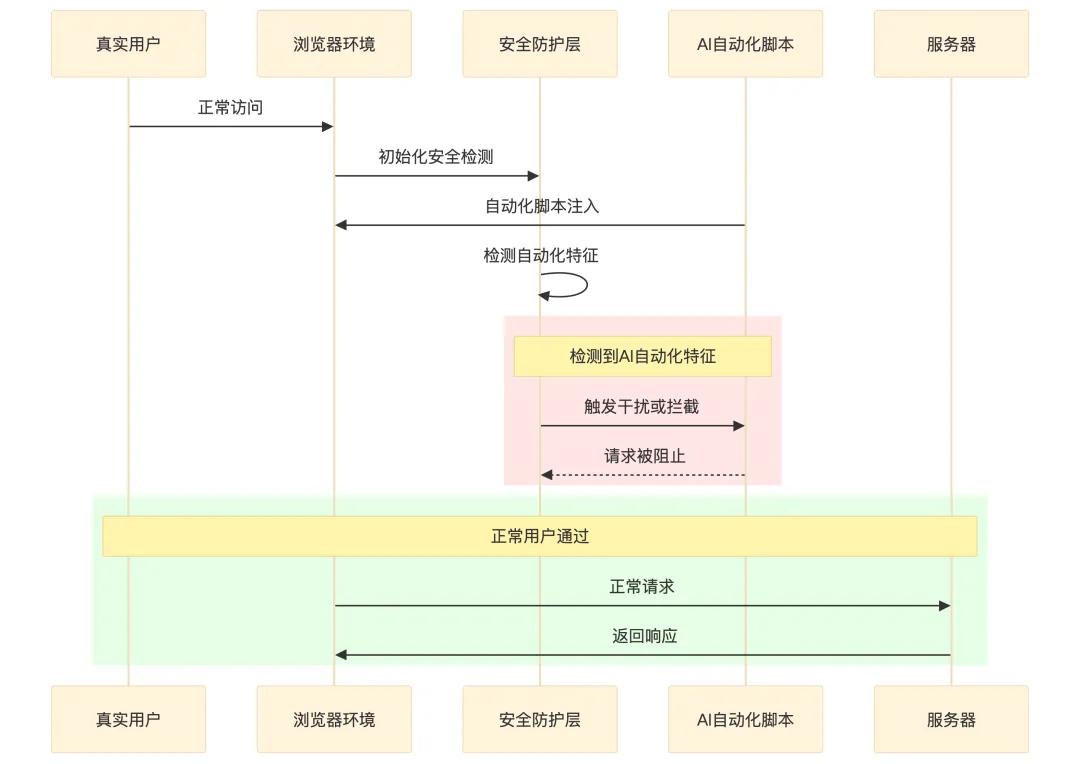
/** * AI自动化脚本检测器 * 通过多层特征检测识别自动化攻击 */class BotDetectionEngine {constructor() {this.features = [];this.threshold = 0.7; // 置信度阈值 }/** * 初始化检测引擎 */init() {// 收集浏览器指纹特征this.collectFingerprints();// 监听用户行为事件this.setupBehaviorMonitoring();// 执行隐藏的JavaScript挑战this.runHiddenChallenges(); }/** * 收集浏览器指纹 */collectFingerprints() {const fp = {// Canvas指纹canvas: this._getCanvasFingerprint(),// WebGL指纹webgl: this._getWebGLFingerprint(),// 音频指纹audio: this._getAudioFingerprint(),// 时区timezone: Intl.DateTimeFormat().resolvedOptions().timeZone,// 语言language: navigator.language,// 平台platform: navigator.platform,// 硬件并发hardwareConcurrency: navigator.hardwareConcurrency,// 设备内存deviceMemory: navigator.deviceMemory || 'unknown',// 屏幕分辨率screenResolution: `${screen.width}x${screen.height}`,// 触摸支持touchSupport: 'ontouchstart' in window,// WebDriver检测webdriver: navigator.webdriver || false };this.fingerprint = fp;// 如果检测到自动化特征if (fp.webdriver || fp.touchSupport === false) {this.features.push({type: 'browser_fingerprint',score: 0.9,reason: '检测到自动化浏览器特征' }); } }/** * 获取Canvas指纹 */_getCanvasFingerprint() {try {const canvas = document.createElement('canvas');const ctx = canvas.getContext('2d');// 绘制测试图形 ctx.textBaseline = 'top'; ctx.font = "14px 'Arial'"; ctx.fillStyle = '#f60'; ctx.fillRect(125, 1, 62, 20); ctx.fillStyle = '#069'; ctx.fillText('Bot Detection Test', 2, 15); ctx.fillStyle = 'rgba(102, 204, 0, 0.7)'; ctx.fillText('Bot Detection Test', 4, 17);return canvas.toDataURL(); } catch (e) {return null; } }/** * 获取WebGL指纹 */_getWebGLFingerprint() {try {const canvas = document.createElement('canvas');const gl = canvas.getContext('webgl') || canvas.getContext('experimental-webgl');if (!gl) return null;const debugInfo = gl.getExtension('WEBGL_debug_renderer_info');if (debugInfo) {return {vendor: gl.getParameter(debugInfo.UNMASKED_VENDOR_WEBGL),renderer: gl.getParameter(debugInfo.UNMASKED_RENDERER_WEBGL) }; } } catch (e) {return null; } }/** * 获取音频指纹 */_getAudioFingerprint() {try {const AudioContext = window.AudioContext || window.webkitAudioContext;if (!AudioContext) return null;const context = new AudioContext();const oscillator = context.createOscillator();const analyser = context.createAnalyser();const gain = context.createGain();const scriptProcessor = context.createScriptProcessor(4096, 1, 1); oscillator.type = 'triangle'; oscillator.frequency.value = 10000; oscillator.connect(analyser); analyser.connect(scriptProcessor); scriptProcessor.connect(gain); gain.connect(context.destination); oscillator.start(0);// 收集音频处理数据... context.close();return 'audio-fingerprint-generated'; } catch (e) {return null; } }/** * 设置行为监控 */setupBehaviorMonitoring() {const events = {mousemove: [],keydown: [],click: [],scroll: [] };const eventTimes = {mousemove: new Map(),keydown: new Map(),click: new Map() };// 鼠标移动模式let lastMoveTime = 0;document.addEventListener('mousemove', (e) => {const now = Date.now();const interval = now - lastMoveTime;if (lastMoveTime > 0) { eventTimes.mousemove.set(e.timeStamp, {x: e.clientX,y: e.clientY,interval: interval }); } lastMoveTime = now;// 收集足够数据后分析if (eventTimes.mousemove.size > 50) {this._analyzeMousePattern(eventTimes.mousemove); } });// 键盘输入模式let lastKeyTime = 0;document.addEventListener('keydown', (e) => {const now = Date.now();const interval = now - lastKeyTime;if (lastKeyTime > 0) { eventTimes.keydown.set(e.timeStamp, {key: e.key,interval: interval }); } lastKeyTime = now; });// 点击模式document.addEventListener('click', (e) => {const now = Date.now();// 记录点击位置、目标元素等 events.click.push({timestamp: now,x: e.clientX,y: e.clientY,target: e.target.tagName }); });// 滚动行为let lastScrollTime = 0;document.addEventListener('scroll', () => {const now = Date.now();const interval = now - lastScrollTime;if (lastScrollTime > 0) { events.scroll.push(interval); } lastScrollTime = now; }); }/** * 分析鼠标移动模式 */_analyzeMousePattern(mouseEvents) {const events = Array.from(mouseEvents.values());// 计算运动轨迹的统计特征let totalDistance = 0;let directionChanges = 0;let prevAngle = null;for (let i = 1; i < events.length; i++) {const prev = events[i - 1];const curr = events[i];const dx = curr.x - prev.x;const dy = curr.y - prev.y;const distance = Math.sqrt(dx * dx + dy * dy);const angle = Math.atan2(dy, dx); totalDistance += distance;// 统计方向变化if (prevAngle !== null) {const angleDiff = Math.abs(angle - prevAngle);if (angleDiff > Math.PI / 4) { // 超过45度视为方向变化 directionChanges++; } } prevAngle = angle; }// 分析速度特征const avgSpeed = totalDistance / events.length;const humanLikeSpeed = avgSpeed > 0.5 && avgSpeed < 50;// 真实用户的移动会有自然的加速度和方向变化// 机器人的移动往往过于均匀const naturalPattern = directionChanges > events.length * 0.3;if (!humanLikeSpeed || !naturalPattern) {this.features.push({type: 'mouse_behavior',score: 0.85,reason: '鼠标移动模式不符合人类特征' }); } }/** * 运行隐藏的JavaScript挑战 */runHiddenChallenges() {// 挑战1:检查Performance API的精度const start = performance.now();// 执行一些计算for (let i = 0; i < 1000; i++) {Math.sqrt(i); }const duration = performance.now() - start;// 人类执行时间通常会有自然的抖动// 机器人可能过于均匀或过于快if (duration < 0.05 || duration > 100) {this.features.push({type: 'timing_analysis',score: 0.75,reason: '执行时间异常' }); }// 挑战2:检查是否支持某些DOM特性const domFeatures = ['ontouchstart' in window,typeof document.hidden !== 'undefined',typeof document.onvisibilitychange !== 'undefined' ];// 真实浏览器通常支持完整的DOM特性const missingFeatures = domFeatures.filter(f => !f).length;if (missingFeatures > 1) {this.features.push({type: 'dom_features',score: 0.8,reason: 'DOM特性缺失' }); } }/** * 计算最终风险分数 */calculateRiskScore() {if (this.features.length === 0) {return 0; // 无可疑特征 }// 使用加权平均计算风险分数const totalWeight = this.features.reduce((sum, f) => sum + f.score, 0);const avgScore = totalWeight / this.features.length;return Math.min(avgScore, 1); }/** * 判断是否为机器人 */isBot() {return this.calculateRiskScore() > this.threshold; }/** * 获取详细报告 */getReport() {return {riskScore: this.calculateRiskScore(),isBot: this.isBot(),features: this.features,fingerprint: this.fingerprint }; }}// 使用示例const detector = new BotDetectionEngine();detector.init();// 延迟执行最终判断,等待收集足够的行为数据setTimeout(() => {const report = detector.getReport();if (report.isBot) {console.warn('[BotDetection] 检测到自动化脚本!');console.table(report.features);// 执行防御措施showSecurityChallenge(); } else {console.log('[BotDetection] 用户身份验证通过'); }}, 3000); // 等待3秒收集行为数据1️⃣1️⃣ 零信任前端架构:AI时代的最小权限设计
在AI时代,即使代码被逆向,前端也不应该存储或处理任何敏感数据。这就是零信任架构的核心思想。
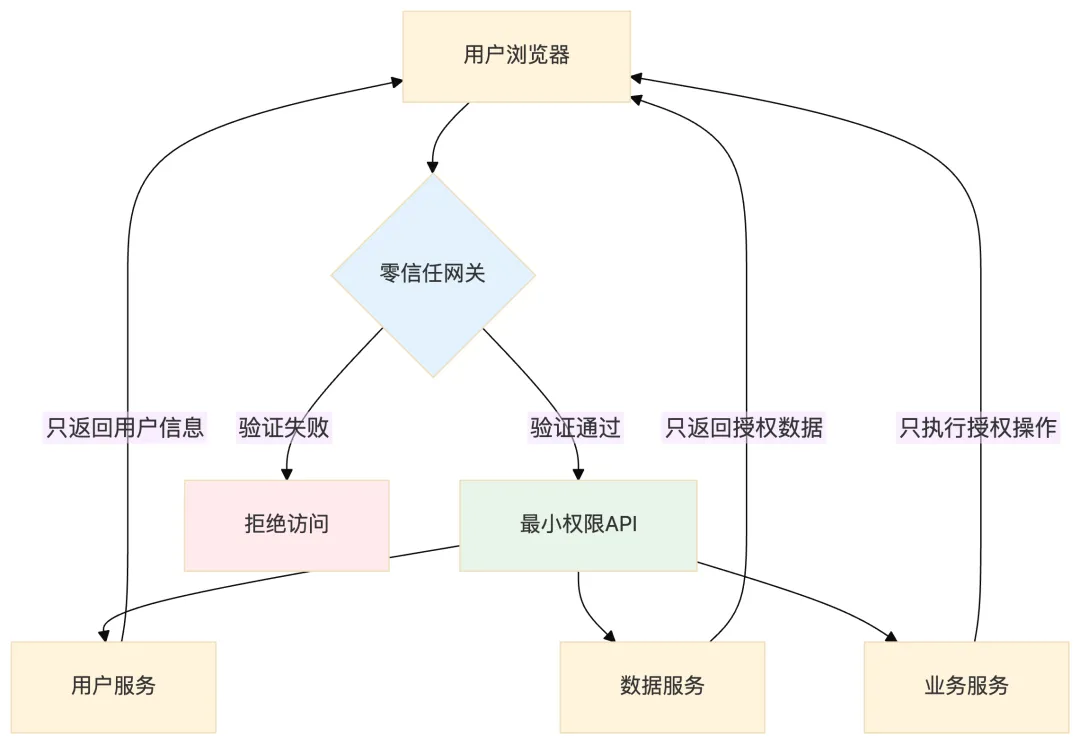
/** * 零信任前端架构实现 * 核心原则:永不信任前端,所有请求必须经过验证 */// ===== 1. 令牌刷新与验证系统 =====class ZeroTrustTokenManager {constructor() {this.accessToken = null;this.refreshToken = null;this.tokenExpiry = null;this.refreshThreshold = 5 * 60 * 1000; // 提前5分钟刷新 }/** * 初始化令牌管理 */async init() {// 从安全的存储中恢复令牌this.accessToken = sessionStorage.getItem('zt_access_token');this.refreshToken = sessionStorage.getItem('zt_refresh_token');this.tokenExpiry = parseInt(sessionStorage.getItem('zt_token_expiry') || '0');// 检查是否需要刷新if (this.shouldRefreshToken()) {await this.refreshTokens(); }// 设置自动刷新this.scheduleTokenRefresh(); }/** * 检查是否需要刷新令牌 */shouldRefreshToken() {if (!this.accessToken) return true;const timeUntilExpiry = this.tokenExpiry - Date.now();return timeUntilExpiry < this.refreshThreshold; }/** * 刷新访问令牌 */async refreshTokens() {try {const response = await fetch('/api/auth/refresh', {method: 'POST',credentials: 'include', // 使用HTTP-only Cookieheaders: {'X-Requested-With': 'XMLHttpRequest' } });if (!response.ok) {throw new Error('Token refresh failed'); }const data = await response.json();this.setTokens(data.access_token, data.expires_in); } catch (error) {// 刷新失败,清除会话this.clearTokens();window.location.href = '/login'; } }/** * 设置新的令牌 */setTokens(accessToken, expiresIn) {this.accessToken = accessToken;this.tokenExpiry = Date.now() + (expiresIn * 1000);// 注意:实际生产中不应该在前端存储明文token// 这里只是为了演示,实际应使用HTTP-only CookiesessionStorage.setItem('zt_access_token', accessToken);sessionStorage.setItem('zt_token_expiry', this.tokenExpiry.toString()); }/** * 清除所有令牌 */clearTokens() {this.accessToken = null;this.refreshToken = null;this.tokenExpiry = null;sessionStorage.removeItem('zt_access_token');sessionStorage.removeItem('zt_refresh_token');sessionStorage.removeItem('zt_token_expiry'); }/** * 获取带有令牌的请求头 */getAuthHeaders() {return {'Authorization': `Bearer ${this.accessToken}`,'X-Request-ID': this.generateRequestId() // 请求追踪 }; }/** * 生成唯一请求ID(防重放) */generateRequestId() {return `${Date.now()}-${Math.random().toString(36).substr(2, 9)}`; }/** * 调度令牌刷新 */scheduleTokenRefresh() {// 每分钟检查一次setInterval(async () => {if (this.shouldRefreshToken()) {await this.refreshTokens(); } }, 60000); }}// ===== 2. 敏感操作二次验证 =====class SensitiveOperationGate {constructor(tokenManager) {this.tokenManager = tokenManager;this.verifiedOperations = new Map(); }/** * 需要二次验证的操作类型 */static OPERATION_TYPES = {TRANSFER: 'transfer',DELETE_ACCOUNT: 'delete_account',CHANGE_PASSWORD: 'change_password',VIEW_SENSITIVE_DATA: 'view_sensitive_data',API_KEY_GENERATION: 'api_key_generation' };/** * 请求敏感操作验证 * @param {string} operationType - 操作类型 * @param {object} context - 操作上下文 */async requestVerification(operationType, context) {// 生成验证会话const verificationId = this.generateVerificationId();const verificationChallenge = await this.createChallenge(operationType, context);// 显示验证UIreturn new Promise((resolve, reject) => {this.showVerificationModal(verificationId, operationType, context, {onSuccess: (verification) => {// 验证成功后,记录验证状态this.verifiedOperations.set(operationType, {verifiedAt: Date.now(),expiresAt: Date.now() + 5 * 60 * 1000, // 5分钟内有效context: context });resolve(verification); },onFailure: (error) => {reject(new Error('Verification failed: ' + error)); } }); }); }/** * 检查操作是否已验证 */isOperationVerified(operationType) {const verification = this.verifiedOperations.get(operationType);if (!verification) return false;// 检查是否过期if (Date.now() > verification.expiresAt) {this.verifiedOperations.delete(operationType);return false; }return true; }/** * 创建验证挑战 */async createChallenge(operationType, context) {// 调用后端生成挑战(如TOTP验证码、WebAuthn挑战等)const response = await fetch('/api/verify/challenge', {method: 'POST',headers: this.tokenManager.getAuthHeaders(),body: JSON.stringify({operation: operationType,context: this.hashContext(context),timestamp: Date.now() }) });return response.json(); }/** * 显示验证模态框 */showVerificationModal(verificationId, operationType, context, callbacks) {const modal = document.createElement('div'); modal.id = 'verification-modal'; modal.innerHTML = ` <div class="modal-overlay"></div> <div class="modal-content"> <h2>⚠️ 敏感操作验证</h2> <p>您正在执行以下敏感操作:</p> <div class="operation-details"> <strong>操作类型:</strong> ${operationType}<br> <strong>操作详情:</strong> ${JSON.stringify(context)} </div> <div class="verification-methods"> <button data-method="biometric">🔐 生物识别</button> <button data-method="totp">📱 TOTP验证码</button> <button data-method="sms">📞 短信验证码</button> </div> <div class="verification-input" style="display:none;"> <input type="text" placeholder="请输入验证码" maxlength="6"> <button class="verify-btn">验证</button> </div> <button class="cancel-btn">取消</button> </div> `;document.body.appendChild(modal);// 绑定事件... }generateVerificationId() {return `verify_${Date.now()}_${Math.random().toString(36).substr(2, 9)}`; }hashContext(context) {// 对上下文进行哈希,确保不可篡改return btoa(JSON.stringify(context)); }}// ===== 3. 数据最小化原则 =====/** * 数据隔离器 * 确保前端只处理必要的、最小化的数据 */class DataIsolationLayer {/** * 只暴露必要的字段 */static sanitizeUserData(user) {// 定义哪些字段可以暴露给前端const allowedFields = ['id', 'displayName', 'avatar', 'role'];const sanitized = {};for (const field of allowedFields) {if (user[field] !== undefined) { sanitized[field] = user[field]; } }return sanitized; }/** * 敏感字段永远不返回给前端 */static NEVER_EXPOSE = ['password','passwordHash','secretKey','apiSecret','privateKey','ssn','creditCard','bankAccount' ];/** * 在数据返回前端前,清洗所有敏感字段 */static async sanitizeAPIResponse(apiName, response) {// 检查响应中是否包含敏感字段for (const sensitiveField of this.NEVER_EXPOSE) {if (response.hasOwnProperty(sensitiveField)) {console.warn(`[Security] 尝试暴露敏感字段 ${sensitiveField},已拦截`);delete response[sensitiveField];// 上报安全事件await this.reportSecurityEvent('SENSITIVE_FIELD_EXPOSURE', {api: apiName,field: sensitiveField }); } }return response; }/** * 上报安全事件 */static async reportSecurityEvent(eventType, details) {try {await fetch('/api/security/events', {method: 'POST',method: 'include',body: JSON.stringify({type: eventType,details: details,timestamp: Date.now(),userAgent: navigator.userAgent }) }); } catch (e) {// 静默失败,不影响正常流程 } }}第四部分:未来展望
1️⃣2️⃣ AI攻防对抗:前端安全的新范式
AI正在重塑网络安全的攻防格局。对于前端安全而言,这意味着:
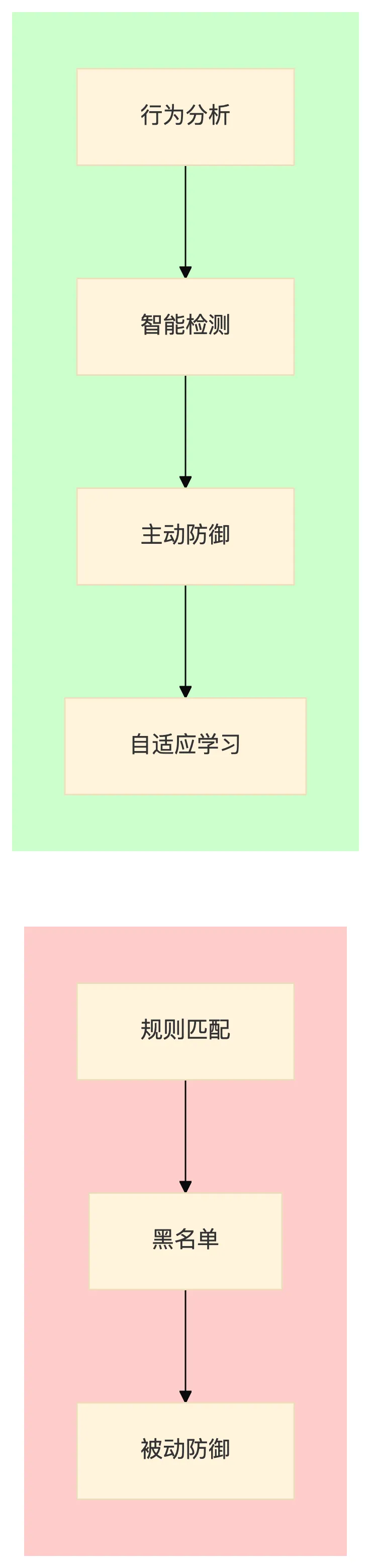
| 代码保护 | ||
| 攻击检测 | ||
| 身份验证 | ||
| 漏洞发现 | ||
| 威胁情报 | ||
| 响应速度 |
总结:与AI共生的前端安全之道
在这场AI驱动的安全变革中,我们既要拥抱AI带来的效率提升,也要清醒认识它带来的新风险。
作为前端开发者,我们可以做的是:
重新评估信任边界
永远假设前端代码会被逆向 敏感逻辑必须放在后端 使用HTTPS和证书 pinning 采用纵深防御策略
代码混淆 + WASM + 运行时检测 不要依赖单一防护手段 实现零信任架构
最小权限原则 持续验证 敏感操作二次确认 拥抱AI防御工具
使用AI驱动的WAF和Bot检测 自动化安全测试 实时威胁情报
💡 最终结论:AI不会取代安全,但会改变安全的玩法。在AI时代,前端安全的核心理念从"让攻击者看不懂代码"转变为"即使攻击者看懂代码也拿不到有价值的东西"。这才是真正的安全思维。