 夜雨聆风
夜雨聆风在科研数据处理中,将 Excel 的长列数据喂给 GraphPad 总是最枯燥的一步。
上一次我们分享了转置宏,但很多小伙伴反馈:“输入单元格地址(如 C1:C20)还是太麻烦了,能不能直接用鼠标选?”
安排! 经过优化的 2.0 进阶版 来了。🌟
2.0 版本的三大进化
自动识别:运行宏之前,鼠标拖选哪块,它就处理哪块,不再需要手打范围 。可视化交互:对话框会实时告诉你当前选了多少行,防止选错 。鼠标定点:输出位置不再靠猜,弹窗后直接用鼠标点一下目标单元格即可完成 。
🛠️ 核心代码:双剑合璧版
这次我为你准备了两个互补的功能,建议全部存入你的 PERSONAL.XLSB 个人宏工作簿中:
TransposeGroups:将一列数据按组转为横向行(适配 GraphPad 的 Grouped 格式)
TransposeGroupsToColumns:将一列数据按组转为纵向列(适配 GraphPad 的 Column 格式)
' =============================================================' TransposeGroups' Converts vertical data into horizontal rows (one row per group)' -> Use for GraphPad Grouped table format'' HOW TO USE:' 1. Select your data column in Excel FIRST (e.g. C1:C20)' 2. Press Alt+F8, select TransposeGroups, click Run' 3. Enter group sizes when prompted (e.g. 4,8,8)' 4. Click a cell to set the output start position' =============================================================Sub TransposeGroups() Dim inputRange As Range Dim outputCell As Range Dim groupSizesInput As String Dim groupSizes() As String Dim totalRows As Long Dim currentRow As Long Dim outRow As Long Dim outCol As Long Dim i As Long, j As Long Dim groupSize As Long Dim groupCount As Long Dim proceed As Integer ' Step 1: read current selection as input range On Error Resume Next Set inputRange = Selection On Error GoTo 0 If inputRange Is Nothing Or Selection.Columns.Count > 1 Then MsgBox "Please select a single column of data first, then run this macro.", vbExclamation Exit Sub End If' Step 2: group sizes groupSizesInput = InputBox( _ "Selected range: " & inputRange.Address & " (" & inputRange.Rows.Count & " rows)" & Chr(10) & Chr(10) & _ "Enter the number of values in each group, separated by commas." & Chr(10) & _ "Example: 4,8,8 means Group1=4, Group2=8, Group3=8" & Chr(10) & Chr(10) & _ "Each group will become one row in the output.", _ "TransposeGroups - Step 1/2", "4,8,8") If groupSizesInput = "" Then Exit Sub groupSizes = Split(groupSizesInput, ",") groupCount = UBound(groupSizes) + 1 totalRows = 0 For i = 0 To groupCount - 1 groupSizes(i) = Trim(groupSizes(i)) If Not IsNumeric(groupSizes(i)) Then MsgBox "Non-numeric value found: '" & groupSizes(i) & "'. Please re-run.", vbExclamation Exit Sub End If totalRows = totalRows + CLng(groupSizes(i)) Next i If totalRows <> inputRange.Rows.Count Then proceed = MsgBox( _ "Warning: group sizes sum to " & totalRows & _ ", but selected range has " & inputRange.Rows.Count & " rows." & Chr(10) & Chr(10) & _ "Continue anyway? (extra data will be ignored)", _ vbExclamation + vbYesNo, "Size mismatch") If proceed = vbNo Then Exit Sub End If ' Step 3: click to select output cell On Error Resume Next Set outputCell = Application.InputBox( _"Step 2/2 - Click the top-left cell where you want the output.", _"TransposeGroups - Select Output Cell", _ Type:=8) On Error GoTo 0 If outputCell Is Nothing Then Exit Sub Set outputCell = outputCell.Cells(1, 1)' Write output - each group fills one row currentRow = 1 outRow = 0 For i = 0 To groupCount - 1 groupSize = CLng(groupSizes(i)) outCol = 0 For j = 1 To groupSize If currentRow > inputRange.Rows.Count Then Exit For outputCell.Offset(outRow, outCol).Value = inputRange.Cells(currentRow, 1).Value outCol = outCol + 1 currentRow = currentRow + 1 Next j outRow = outRow + 1 Next i MsgBox "Done! " & groupCount & " groups written as rows starting at " & outputCell.Address & "." & Chr(10) & _ "You can now copy and paste directly into GraphPad.", _ vbInformation, "TransposeGroups - Complete"End Sub' =============================================================' TransposeGroupsToColumns' Converts vertical data into vertical columns (one column per group)' -> Use for GraphPad Column table format'' HOW TO USE:' 1. Select your data column in Excel FIRST (e.g. C1:C20)' 2. Press Alt+F8, select TransposeGroupsToColumns, click Run' 3. Enter group sizes when prompted (e.g. 4,8,8)' 4. Click a cell to set the output start position' =============================================================Sub TransposeGroupsToColumns() Dim inputRange As Range Dim outputCell As Range Dim groupSizesInput As String Dim groupSizes() As String Dim totalRows As Long Dim currentRow As Long Dim outRow As Long Dim outCol As Long Dim i As Long, j As Long Dim groupSize As Long Dim groupCount As Long Dim proceed As Integer' Step 1: read current selection as input range On Error Resume Next Set inputRange = Selection On Error GoTo 0 If inputRange Is Nothing Or Selection.Columns.Count > 1 Then MsgBox "Please select a single column of data first, then run this macro.", vbExclamation Exit Sub End If ' Step 2: group sizes groupSizesInput = InputBox( _"Selected range: " & inputRange.Address & " (" & inputRange.Rows.Count & " rows)" & Chr(10) & Chr(10) & _"Enter the number of values in each group, separated by commas." & Chr(10) & _"Example: 4,8,8 means Group1=4, Group2=8, Group3=8" & Chr(10) & Chr(10) & _"Each group will become one column in the output.", _"TransposeGroupsToColumns - Step 1/2", "4,8,8") If groupSizesInput = "" Then Exit Sub groupSizes = Split(groupSizesInput, ",") groupCount = UBound(groupSizes) + 1 totalRows = 0 For i = 0 To groupCount - 1 groupSizes(i) = Trim(groupSizes(i)) If Not IsNumeric(groupSizes(i)) Then MsgBox "Non-numeric value found: '" & groupSizes(i) & "'. Please re-run.", vbExclamation Exit Sub End If totalRows = totalRows + CLng(groupSizes(i)) Next i If totalRows <> inputRange.Rows.Count Then proceed = MsgBox( _"Warning: group sizes sum to " & totalRows & _", but selected range has " & inputRange.Rows.Count & " rows." & Chr(10) & Chr(10) & _"Continue anyway? (extra data will be ignored)", _ vbExclamation + vbYesNo, "Size mismatch") If proceed = vbNo Then Exit Sub End If' Step 3: click to select output cell On Error Resume Next Set outputCell = Application.InputBox( _ "Step 2/2 - Click the top-left cell where you want the output.", _ "TransposeGroupsToColumns - Select Output Cell", _ Type:=8) On Error GoTo 0 If outputCell Is Nothing Then Exit Sub Set outputCell = outputCell.Cells(1, 1) ' Write output - each group fills one column downward currentRow = 1 outCol = 0 For i = 0 To groupCount - 1 groupSize = CLng(groupSizes(i)) outRow = 0 For j = 1 To groupSize If currentRow > inputRange.Rows.Count Then Exit For outputCell.Offset(outRow, outCol).Value = inputRange.Cells(currentRow, 1).Value outRow = outRow + 1 currentRow = currentRow + 1 Next j outCol = outCol + 1 Next i MsgBox "Done! " & groupCount & " groups written as columns starting at " & outputCell.Address & "." & Chr(10) & _"You can now copy and paste directly into GraphPad.", _ vbInformation, "TransposeGroupsToColumns - Complete"End Sub📖 使用流程
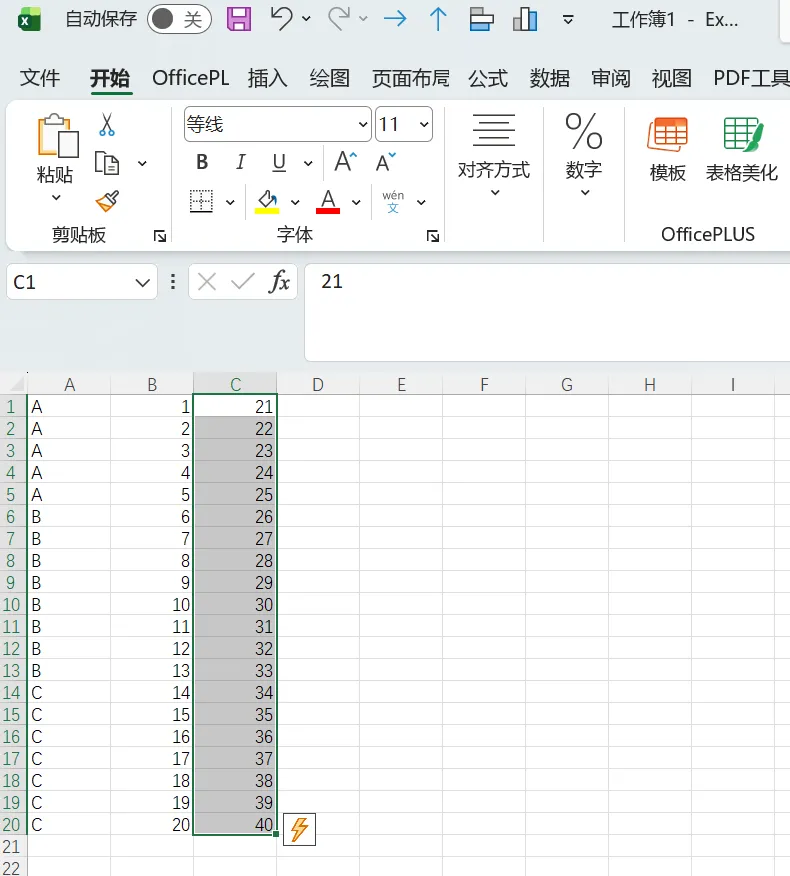
第一步:鼠标点选
在 Excel 中直接用鼠标拖选你要处理的数据列(例如 )
第二步:运行宏并输入分组
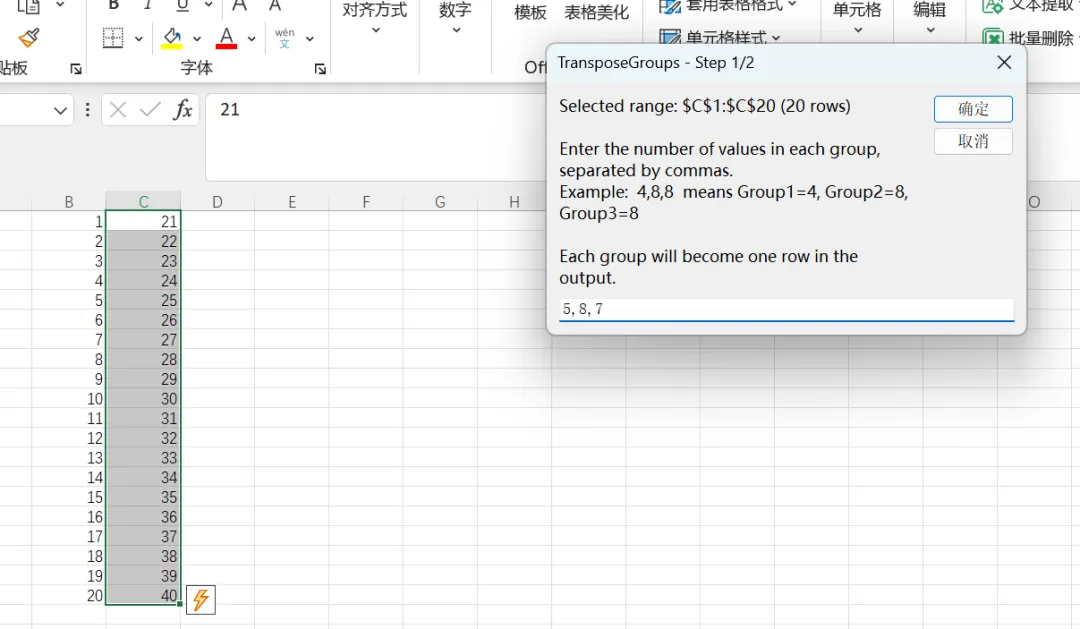
按下 Alt + F8 运行对应宏。此时会弹出一个贴心的对话框,自动显示你选中的行数。你只需要输入分组数量(如:5,8,7)
第三步:指定输出位置
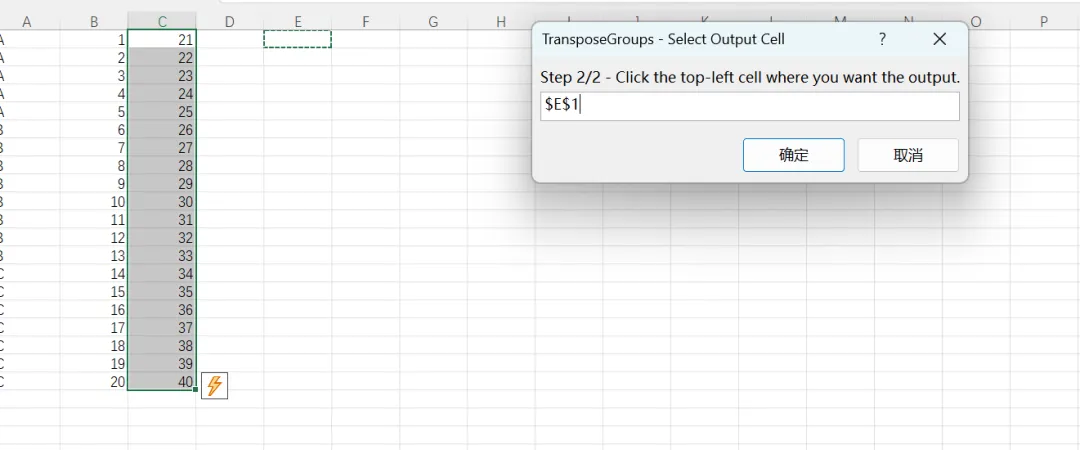
这时会弹出第二个对话框。不需要打字! 直接用鼠标点击一下你想存放数据的起始单元格(比如 ),点击确定,瞬间完成
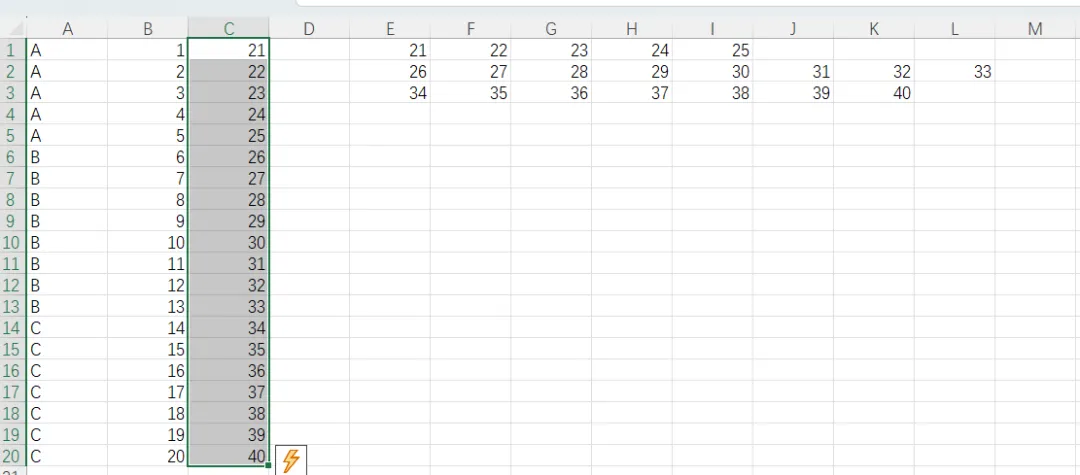
纵向转置同理~
为什么这个版本更适合你?
容错性更高:如果你的分组总和与选中的行数不匹配,它会弹出警告确认,避免数据错位 。
适配性更广:无论你是需要横向行还是纵向列,这两个宏能覆盖 90% 的 GraphPad 导入需求 。
零地址输入:全程无需记忆任何单元格坐标,符合直觉操作。