 夜雨聆风
夜雨聆风被豆包AI水印烦透了,我干脆自己写了个工具
平时用豆包AI搞图挺香的,写段提示词等几秒就出图,效率确实高。
但有个问题一直挺烦人的——每张图右下角都会带个豆包角标。自己看看还行,想做公众号配图、PPT素材或者设计稿的时候,这个水印就很尴尬了,直接让图废了一半。
之前也试过一些去水印工具,要么满屏广告,要么要充会员,要么处理完画面糊成一片,修复痕迹比水印本身还显眼。折腾了几次之后,干脆自己动手写了一个。反正也是写代码的,这事儿对我来说其实不算复杂。
效果先看
左边是豆包原图,右下角有角标水印;右边是处理后,水印没了,背景也填得挺自然,基本看不出修过。
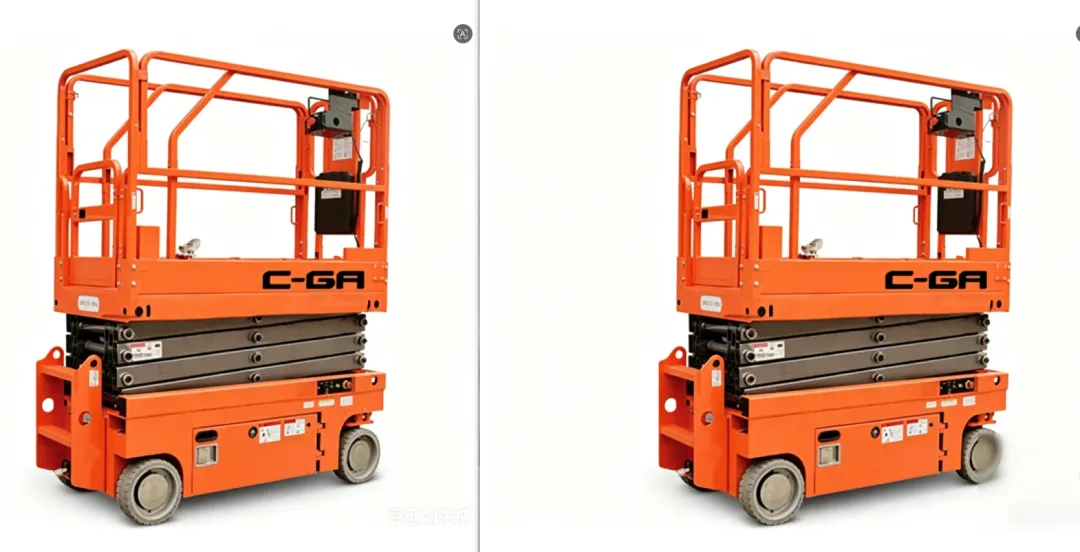
整个过程就四步:打开程序、选文件夹、点一个按钮、等进度条走完。几十张图大概也就几十秒的事儿,比手动一张张修快太多了。
能干什么
程序名字叫 WatermarkRemoverUltimate,纯 Java 写的,带图形界面,不用敲命令行。
其实就两个功能,但覆盖了大部分场景:
一键批量去 AI 右下角水印
这个是我最常用的。豆包的水印基本都在右下角,程序会自动定位到那个区域(大概是图片宽高的右下角 20%),然后智能填充修复,整个文件夹的图片可以一次性处理完。
手动框选去水印
如果水印位置不固定,或者你想处理其他类型的水印,可以选单张图片,在预览界面拖拽框选水印位置,然后批量处理。
普通用户怎么用
需要的环境: 电脑上装了 Java 就行,Win/Mac/Linux 都能跑。没装的话去 java.com 下载一个,安装过程基本就是一路下一步。
第一步:把代码跑起来
你可以直接复制文章后面的完整代码,保存成 WatermarkRemoverUltimate.java,然后在同目录下运行:
javac WatermarkRemoverUltimate.java
java WatermarkRemoverUltimate
运行之后就会弹出这样一个界面:
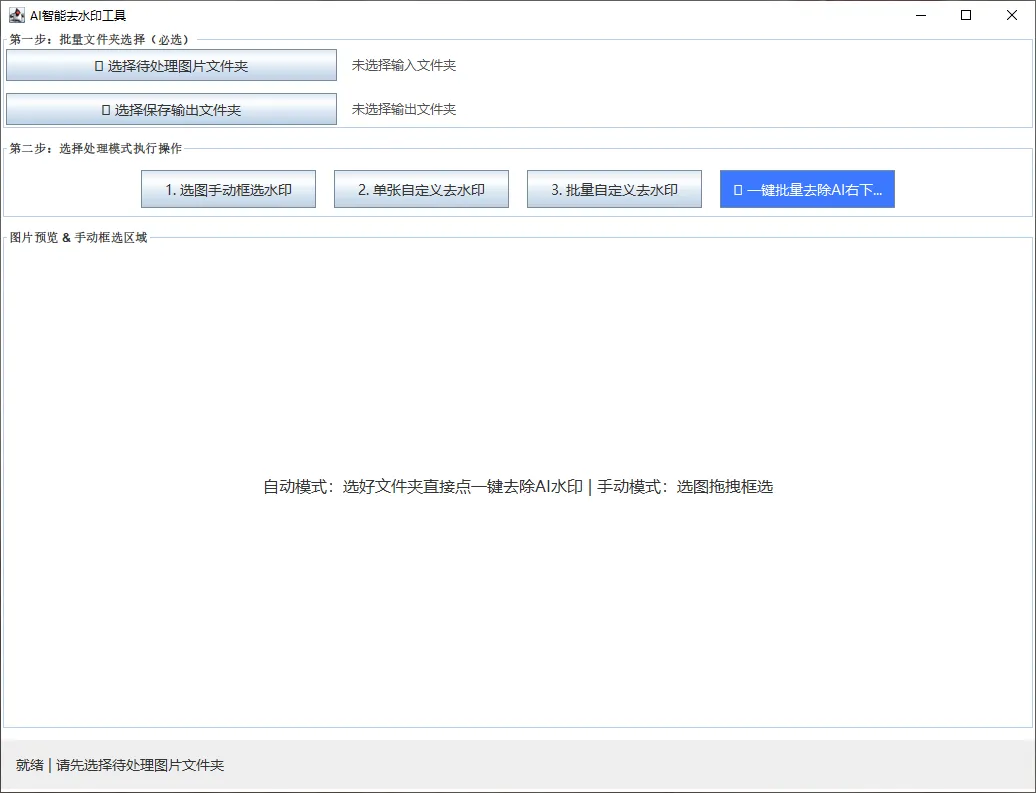
界面很简单,就三个区域:上面选文件夹,中间选处理模式,下面是预览和操作状态。
第二步:选输入和输出文件夹
点「📁 选择待处理图片文件夹」,选中你存放豆包图片的文件夹。输出文件夹可以另选一个空的,也可以不选——程序会自动在输入目录下建一个 auto_output 文件夹放处理结果。
第三步:点一键处理
直接点那个蓝色的「🔥 一键批量去除AI右下角水印」按钮,等进度条跑完,打开输出文件夹就能看到处理好的图片了。
说实话,这个流程我设计的时候就想尽量简单,最好是家里长辈也能用的那种程度。
技术人可能关心的实现细节
去水印本质上是 图像修复(Inpainting),就是拿水印周围的像素信息去推测、填充被遮挡的区域。
这个工具用的是一套纯像素级的多方向采样融合算法,没有调任何深度学习模型,纯 Java 标准库搞定。好处是不用下几十上百兆的模型文件,坏处是效果肯定不如 AI 模型那么精致,但处理豆包这种角标水印已经够用了。
修复算法的核心逻辑
public static BufferedImage highLevelAiInpaint(BufferedImage src, int x, int y, int w, int h) {
BufferedImageimg = copyImage(src);
intwidth = img.getWidth();
intheight = img.getHeight();
intstartX = Math.max(5, x);
intstartY = Math.max(5, y);
intendX = Math.min(width - 5, x + w);
intendY = Math.min(height - 5, y + h);
intsampleNear = 8;// 近邻采样距离
intsampleFar = 20;// 远邻采样距离
for(int dy = startY; dy < endY; dy++) {
for(int dx = startX; dx < endX; dx++) {
//上下左右各两圈像素采样
intn1 = getSafeRgb(img, dx, dy - sampleNear, width, height);
intn2 = getSafeRgb(img, dx, dy + sampleNear, width, height);
intn3 = getSafeRgb(img, dx - sampleNear, dy, width, height);
intn4 = getSafeRgb(img, dx + sampleNear, dy, width, height);
intf1 = getSafeRgb(img, dx, dy - sampleFar, width, height);
intf2 = getSafeRgb(img, dx, dy + sampleFar, width, height);
intf3 = getSafeRgb(img, dx - sampleFar, dy, width, height);
intf4 = getSafeRgb(img, dx + sampleFar, dy, width, height);
//近邻权重 60%,远邻权重 40%
intr = (int) (nearAvg(n1,n2,n3,n4,'r') * 0.6 + farAvg(f1,f2,f3,f4,'r') * 0.4);
intg = (int) (nearAvg(n1,n2,n3,n4,'g') * 0.6 + farAvg(f1,f2,f3,f4,'g') * 0.4);
intb = (int) (nearAvg(n1,n2,n3,n4,'b') * 0.6 + farAvg(f1,f2,f3,f4,'b') * 0.4);
//边缘渐变融合,避免修复区域出现硬边界
doublerate = getEdgeGradientRate(dx - startX, dy - startY, w, h);
r= (int) (r * rate + getR(img.getRGB(dx, dy)) * (1 - rate));
g= (int) (g * rate + getG(img.getRGB(dx, dy)) * (1 - rate));
b= (int) (b * rate + getB(img.getRGB(dx, dy)) * (1 - rate));
img.setRGB(dx,dy, (0xff << 24) | (r << 16) | (g << 8) | b);
}
}
returnimg;
}
算法思路其实挺简单的,三句话就能说清:
对水印区域内每个像素,向上下左右各采两圈颜色——近邻采 8px,远邻采 20px
近邻颜色占 60% 权重,远邻占 40%,加权平均算出填充色。近的地方颜色更准,远的地方能补充一些背景的整体趋势
边缘区域用 getEdgeGradientRate 做渐变过渡,不然修复区域和原图衔接的地方会有一道硬边,看着很假
这个算法对背景简单的图效果挺好——纯色、渐变、模糊虚化背景基本都能无痕修复。但背景复杂的情况(比如水印下面恰好是人脸、细密纹理或者规律图案),效果会打点折扣。日常使用够用了,毕竟豆包生成的图大部分背景也不会太复杂。
右下角水印的自动定位
// 自动计算右下角水印区域(图片宽高的 20%)
int ww = (int) (w * AI_WATERMARK_SCALE);// AI_WATERMARK_SCALE = 0.2
int wh = (int) (h * AI_WATERMARK_SCALE);
int wx = w - ww;// 从右边开始
int wy = h - wh;// 从下边开始
豆包的水印位置基本固定在右下角,所以程序直接按比例(宽高各 20%)自动定位,不需要你手动标坐标。这也是批量模式能无脑处理的关键——你只管选文件夹,剩下的事程序自己搞定。
完整代码
代码已经放在 Gitee 上了,可以直接访问:
👉[https://gitee.com/busyboluo/common-tools/blob/master/WatermarkRemoverUltimate.java](https://gitee.com/busyboluo/common-tools/blob/master/WatermarkRemoverUltimate.java)
不想点链接的话,下面就是完整代码,直接复制保存即可。没有第三方依赖,Java 8 及以上都能编译运行:
package com.ruoyi.common.utils;
import java.awt.BorderLayout;
import java.awt.Color;
import java.awt.Dimension;
import java.awt.FlowLayout;
import java.awt.Font;
import java.awt.Graphics;
import java.awt.Graphics2D;
import java.awt.GridLayout;
import java.awt.RenderingHints;
import java.awt.event.MouseAdapter;
import java.awt.event.MouseEvent;
import java.awt.image.BufferedImage;
import java.io.File;
import java.io.IOException;
import java.util.List;
import javax.imageio.ImageIO;
import javax.swing.*;
public class WatermarkRemoverUltimate {
privatestatic String batchInputDir = "";
privatestatic String batchOutputDir = "";
privatestatic int selectX, selectY, selectW, selectH;
privatestatic boolean isSelected = false;
privatestatic JFrame mainFrame;
privatestatic JProgressBar progressBar;
privatestatic JLabel statusLabel;
privatestatic JLabel inputPathLabel;
privatestatic JLabel outputPathLabel;
privatestatic BufferedImage currentImage;
privatestatic File currentImgFile;
privatestatic JPanel mainContentPane;
privatestatic final double AI_WATERMARK_SCALE = 0.2;
publicstatic void main(String[] args) {
SwingUtilities.invokeLater(WatermarkRemoverUltimate::initUI);
}
privatestatic void initUI() {
mainFrame= new JFrame("AI智能去水印工具");
mainFrame.setDefaultCloseOperation(JFrame.EXIT_ON_CLOSE);
mainFrame.setSize(1050,800);
mainFrame.setLocationRelativeTo(null);
mainContentPane= new JPanel();
mainContentPane.setLayout(newBoxLayout(mainContentPane, BoxLayout.Y_AXIS));
mainContentPane.setBackground(Color.WHITE);
mainFrame.setContentPane(mainContentPane);
//文件夹选择面板
JPaneldirPanel = new JPanel(new GridLayout(2, 3, 15, 12));
dirPanel.setBorder(BorderFactory.createTitledBorder("第一步:批量文件夹选择(必选)"));
dirPanel.setBackground(Color.WHITE);
dirPanel.setPreferredSize(newDimension(1000, 100));
dirPanel.setMaximumSize(newDimension(1200, 100));
JButtonbtnSelectInput = new JButton("📁 选择待处理图片文件夹");
JButtonbtnSelectOutput = new JButton("📂 选择保存输出文件夹");
inputPathLabel= new JLabel("未选择输入文件夹", SwingConstants.LEFT);
outputPathLabel= new JLabel("未选择输出文件夹", SwingConstants.LEFT);
styleDirButton(btnSelectInput);
styleDirButton(btnSelectOutput);
inputPathLabel.setFont(newFont("微软雅黑", Font.PLAIN, 13));
outputPathLabel.setFont(newFont("微软雅黑", Font.PLAIN, 13));
dirPanel.add(btnSelectInput);dirPanel.add(inputPathLabel); dirPanel.add(new JLabel(""));
dirPanel.add(btnSelectOutput);dirPanel.add(outputPathLabel); dirPanel.add(new JLabel(""));
mainContentPane.add(dirPanel);
mainContentPane.add(Box.createVerticalStrut(10));
//功能按钮
JPanelbtnPanel = new JPanel(new FlowLayout(FlowLayout.CENTER, 18, 12));
btnPanel.setBackground(Color.WHITE);
btnPanel.setBorder(BorderFactory.createTitledBorder("第二步:选择处理模式执行操作"));
btnPanel.setPreferredSize(newDimension(1000, 80));
btnPanel.setMaximumSize(newDimension(1200, 80));
JButtonbtnOpenImg = new JButton("1. 选图手动框选水印");
JButtonbtnSingleProcess = new JButton("2. 单张自定义去水印");
JButtonbtnBatchProcess = new JButton("3. 批量自定义去水印");
JButtonbtnAutoAiWatermark = new JButton("🔥 一键批量去除AI右下角水印");
styleButton(btnOpenImg);styleButton(btnSingleProcess); styleButton(btnBatchProcess); styleButton(btnAutoAiWatermark);
btnAutoAiWatermark.setBackground(newColor(60, 120, 255));
btnAutoAiWatermark.setForeground(Color.WHITE);
btnPanel.add(btnOpenImg);btnPanel.add(btnSingleProcess);
btnPanel.add(btnBatchProcess);btnPanel.add(btnAutoAiWatermark);
mainContentPane.add(btnPanel);
mainContentPane.add(Box.createVerticalStrut(10));
//图片预览区
JPanelimgPanel = new JPanel(new BorderLayout());
imgPanel.setBorder(BorderFactory.createTitledBorder("图片预览& 手动框选区域"));
imgPanel.setBackground(Color.WHITE);
imgPanel.setPreferredSize(newDimension(1000, 520));
JLabelimgTipLabel = new JLabel("自动模式:选好文件夹直接点一键去除AI水印 | 手动模式:选图拖拽框选", SwingConstants.CENTER);
imgTipLabel.setFont(newFont("微软雅黑", Font.PLAIN, 16));
imgPanel.add(imgTipLabel,BorderLayout.CENTER);
mainContentPane.add(imgPanel);
mainContentPane.add(Box.createVerticalStrut(10));
//状态栏
JPanelbottomPanel = new JPanel(new BorderLayout(15, 5));
bottomPanel.setBorder(BorderFactory.createEmptyBorder(12,15, 12, 15));
bottomPanel.setPreferredSize(newDimension(1000, 50));
statusLabel= new JLabel("就绪 | 请先选择待处理图片文件夹");
statusLabel.setFont(newFont("微软雅黑", Font.PLAIN, 14));
progressBar= new JProgressBar(0, 100);
progressBar.setPreferredSize(newDimension(320, 26));
progressBar.setStringPainted(true);
progressBar.setVisible(false);
bottomPanel.add(statusLabel,BorderLayout.WEST);
bottomPanel.add(progressBar,BorderLayout.EAST);
mainContentPane.add(bottomPanel);
btnSelectInput.addActionListener(e-> selectInputDir());
btnSelectOutput.addActionListener(e-> selectOutputDir());
btnOpenImg.addActionListener(e-> openAndSelectImage());
btnSingleProcess.addActionListener(e-> startSingleProcess());
btnBatchProcess.addActionListener(e-> startBatchProcess());
btnAutoAiWatermark.addActionListener(e-> startAutoAiWatermarkRemove());
mainFrame.setVisible(true);
}
privatestatic void styleDirButton(JButton btn) {
btn.setFont(newFont("微软雅黑", Font.PLAIN, 14));
btn.setPreferredSize(newDimension(200, 38));
btn.setFocusPainted(false);
}
privatestatic void styleButton(JButton btn) {
btn.setFont(newFont("微软雅黑", Font.PLAIN, 14));
btn.setPreferredSize(newDimension(175, 38));
btn.setFocusPainted(false);
}
privatestatic void selectInputDir() {
JFileChooserchooser = new JFileChooser();
chooser.setDialogTitle("选择【待处理图片文件夹】");
chooser.setFileSelectionMode(JFileChooser.DIRECTORIES_ONLY);
if(chooser.showOpenDialog(mainFrame) == JFileChooser.APPROVE_OPTION) {
batchInputDir= chooser.getSelectedFile().getAbsolutePath() + "/";
inputPathLabel.setText("✅已选输入:" + batchInputDir);
statusLabel.setText("✅输入文件夹配置完成");
}
}
privatestatic void selectOutputDir() {
JFileChooserchooser = new JFileChooser();
chooser.setDialogTitle("选择【处理后保存文件夹】");
chooser.setFileSelectionMode(JFileChooser.DIRECTORIES_ONLY);
if(chooser.showOpenDialog(mainFrame) == JFileChooser.APPROVE_OPTION) {
batchOutputDir= chooser.getSelectedFile().getAbsolutePath() + "/";
outputPathLabel.setText("✅已选输出:" + batchOutputDir);
statusLabel.setText("✅输出文件夹配置完成");
}
}
privatestatic String getSafeOutputPath() {
if(batchOutputDir.isEmpty()) {
batchOutputDir= batchInputDir.isEmpty()
?new File("").getAbsolutePath() + "/ai_watermark_output/"
:batchInputDir + "auto_output/";
}
FileoutDir = new File(batchOutputDir);
if(!outDir.exists()) outDir.mkdirs();
returnbatchOutputDir;
}
privatestatic void openAndSelectImage() {
JFileChooserchooser = new JFileChooser();
chooser.setDialogTitle("选择单张图片");
chooser.setFileFilter(newjavax.swing.filechooser.FileNameExtensionFilter("图片文件", "jpg", "jpeg", "png"));
if(chooser.showOpenDialog(mainFrame) != JFileChooser.APPROVE_OPTION) return;
currentImgFile= chooser.getSelectedFile();
try{ currentImage = ImageIO.read(currentImgFile); } catch (IOException e) {
JOptionPane.showMessageDialog(mainFrame,"图片读取失败!", "错误", JOptionPane.ERROR_MESSAGE); return;
}
JPanelpreviewPanel = new JPanel() {
finalBufferedImage img = currentImage;
intsx, sy, ex, ey;
{addMouseListener(new MouseAdapter() {
@Overridepublic void mousePressed(MouseEvent e) { sx = e.getX(); sy = e.getY(); }
@Overridepublic void mouseReleased(MouseEvent e) {
ex= e.getX(); ey = e.getY();
selectX= Math.min(sx, ex); selectY = Math.min(sy, ey);
selectW= Math.abs(ex - sx); selectH = Math.abs(ey - sy);
isSelected= true;
statusLabel.setText("✅水印框选完成");
JOptionPane.showMessageDialog(mainFrame,"水印区域框选成功!", "完成", JOptionPane.INFORMATION_MESSAGE);
repaint();
}
});}
@Overrideprotected void paintComponent(Graphics g) {
super.paintComponent(g);
if(img != null) {
doublescale = Math.min((double)getWidth()/img.getWidth(), (double)getHeight()/img.getHeight());
intdw = (int)(img.getWidth()*scale), dh = (int)(img.getHeight()*scale);
intox = (getWidth()-dw)/2, oy = (getHeight()-dh)/2;
g.drawImage(img,ox, oy, dw, dh, null);
if(isSelected) {
g.setColor(newColor(255,0,0,130));
g.fillRect(selectX+ox,selectY+oy, selectW, selectH);
g.setColor(Color.RED);
g.drawRect(selectX+ox,selectY+oy, selectW, selectH);
}
}
}
};
previewPanel.setBackground(Color.WHITE);
previewPanel.setPreferredSize(newDimension(1000, 520));
mainContentPane.remove(2);
mainContentPane.add(previewPanel,2);
mainFrame.revalidate();mainFrame.repaint();
}
privatestatic void startSingleProcess() {
if(!isSelected || currentImage == null) {
JOptionPane.showMessageDialog(mainFrame,"请先选图并手动框选水印!", "提示", JOptionPane.WARNING_MESSAGE); return;
}
newSwingWorker() {
@Overrideprotected Void doInBackground() throws Exception {
progressBar.setVisible(true);
statusLabel.setText("处理单张图片中...");
publish(30);
BufferedImageres = highLevelAiInpaint(currentImage, selectX, selectY, selectW, selectH);
publish(80);
Stringout = currentImgFile.getParent() + "/no_watermark_" + currentImgFile.getName();
saveImage(res,out);
publish(100);
statusLabel.setText("✅处理完成:" + out);
returnnull;
}
@Overrideprotected void process(List
@Overrideprotected void done() {
progressBar.setVisible(false);
JOptionPane.showMessageDialog(mainFrame,"✅ 单张去水印完成!", "成功", JOptionPane.INFORMATION_MESSAGE);
}
}.execute();
}
privatestatic void startBatchProcess() {
if(!isSelected) { JOptionPane.showMessageDialog(mainFrame, "请先手动框选水印区域!", "提示", JOptionPane.WARNING_MESSAGE); return; }
if(batchInputDir.isEmpty()) { JOptionPane.showMessageDialog(mainFrame, "请先选择待处理图片文件夹!", "错误", JOptionPane.ERROR_MESSAGE); return; }
FileinputDir = new File(batchInputDir);
File[]files = inputDir.listFiles((d,n) -> n.toLowerCase().matches(".*\\.(jpg|jpeg|png)"));
if(files == null || files.length == 0) { JOptionPane.showMessageDialog(mainFrame, "文件夹内无有效图片!", "提示", JOptionPane.WARNING_MESSAGE); return; }
StringsafeOut = getSafeOutputPath();
newSwingWorker() {
inttotal = files.length, finish = 0;
@Overrideprotected Void doInBackground() throws Exception {
progressBar.setVisible(true);
for(File f : files) {
statusLabel.setText("处理:"+ f.getName() + " (" + finish + "/" + total + ")");
BufferedImageimg = ImageIO.read(f);
if(img == null) { finish++; continue; }
saveImage(highLevelAiInpaint(img,selectX, selectY, selectW, selectH), safeOut + f.getName());
publish((int)((double)(++finish)/total*100));
Thread.sleep(30);
}
statusLabel.setText("✅批量处理完成,共" + finish + "张");
returnnull;
}
@Overrideprotected void process(List
@Overrideprotected void done() {
progressBar.setVisible(false);
JOptionPane.showMessageDialog(mainFrame,"✅ 批量处理完成!总计" + total + "张", "完成", JOptionPane.INFORMATION_MESSAGE);
}
}.execute();
}
privatestatic void startAutoAiWatermarkRemove() {
if(batchInputDir.isEmpty()) { JOptionPane.showMessageDialog(mainFrame, "请先选择【待处理图片文件夹】!", "错误", JOptionPane.ERROR_MESSAGE); return; }
FileinputDir = new File(batchInputDir);
File[]files = inputDir.listFiles((d,n) -> n.toLowerCase().matches(".*\\.(jpg|jpeg|png)"));
if(files == null || files.length == 0) { JOptionPane.showMessageDialog(mainFrame, "文件夹内无有效图片!", "提示", JOptionPane.WARNING_MESSAGE); return; }
StringsafeOut = getSafeOutputPath();
newSwingWorker() {
inttotal = files.length, finish = 0;
@Overrideprotected Void doInBackground() throws Exception {
progressBar.setVisible(true);
for(File f : files) {
statusLabel.setText("AI水印处理:"+ f.getName() + " (" + finish + "/" + total + ")");
BufferedImageimg = ImageIO.read(f);
if(img == null) { finish++; continue; }
intw = img.getWidth(), h = img.getHeight();
intww = (int)(w * AI_WATERMARK_SCALE), wh = (int)(h * AI_WATERMARK_SCALE);
saveImage(highLevelAiInpaint(img,w-ww, h-wh, ww, wh), safeOut + f.getName());
publish((int)((double)(++finish)/total*100));
Thread.sleep(20);
}
statusLabel.setText("✅AI水印全部去除完成,共" + finish + "张");
returnnull;
}
@Overrideprotected void process(List
@Overrideprotected void done() {
progressBar.setVisible(false);
JOptionPane.showMessageDialog(mainFrame,"✅ 一键去除完成!\n总数:" + total + "张\n保存目录:" + safeOut, "全自动完成", JOptionPane.INFORMATION_MESSAGE);
}
}.execute();
}
publicstatic BufferedImage highLevelAiInpaint(BufferedImage src, int x, int y, int w, int h) {
BufferedImageimg = copyImage(src);
intwidth = img.getWidth(), height = img.getHeight();
intstartX = Math.max(5, x), startY = Math.max(5, y);
intendX = Math.min(width-5, x+w), endY = Math.min(height-5, y+h);
intsampleNear = 8, sampleFar = 20;
for(int dy = startY; dy < endY; dy++) {
for(int dx = startX; dx < endX; dx++) {
intn1=getSafeRgb(img,dx,dy-sampleNear,width,height), n2=getSafeRgb(img,dx,dy+sampleNear,width,height);
intn3=getSafeRgb(img,dx-sampleNear,dy,width,height), n4=getSafeRgb(img,dx+sampleNear,dy,width,height);
intf1=getSafeRgb(img,dx,dy-sampleFar,width,height),f2=getSafeRgb(img,dx,dy+sampleFar,width,height);
intf3=getSafeRgb(img,dx-sampleFar,dy,width,height),f4=getSafeRgb(img,dx+sampleFar,dy,width,height);
intnr=(getR(n1)+getR(n2)+getR(n3)+getR(n4))/4, ng=(getG(n1)+getG(n2)+getG(n3)+getG(n4))/4, nb=(getB(n1)+getB(n2)+getB(n3)+getB(n4))/4;
intfr=(getR(f1)+getR(f2)+getR(f3)+getR(f4))/4, fg=(getG(f1)+getG(f2)+getG(f3)+getG(f4))/4, fb=(getB(f1)+getB(f2)+getB(f3)+getB(f4))/4;
intr=(int)(nr*0.6+fr*0.4), g=(int)(ng*0.6+fg*0.4), b=(int)(nb*0.6+fb*0.4);
doublerate = getEdgeGradientRate(dx-startX, dy-startY, w, h);
r=(int)(r*rate+getR(img.getRGB(dx,dy))*(1-rate));
g=(int)(g*rate+getG(img.getRGB(dx,dy))*(1-rate));
b=(int)(b*rate+getB(img.getRGB(dx,dy))*(1-rate));
img.setRGB(dx,dy, (0xff<<24)|(r<<16)|(g<<8)|b);
}
}
returnimg;
}
privatestatic int getSafeRgb(BufferedImage img, int x, int y, int mw, int mh) {
returnimg.getRGB(Math.max(0,Math.min(mw-1,x)), Math.max(0,Math.min(mh-1,y)));
}
privatestatic double getEdgeGradientRate(int x, int y, int w, int h) {
intedge = 6;
if(x > edge && y > edge && x < w-edge && y < h-edge) return 1.0;
returnMath.min(1.0, Math.min(Math.min(x,y), Math.min(w-x,h-y)) / (double)edge);
}
publicstatic BufferedImage copyImage(BufferedImage src) {
BufferedImagecopy = new BufferedImage(src.getWidth(), src.getHeight(), BufferedImage.TYPE_INT_ARGB);
Graphics2Dg2d = copy.createGraphics();
g2d.setRenderingHint(RenderingHints.KEY_ANTIALIASING,RenderingHints.VALUE_ANTIALIAS_ON);
g2d.drawImage(src,0, 0, null); g2d.dispose();
returncopy;
}
publicstatic void saveImage(BufferedImage img, String path) throws IOException {
ImageIO.write(img,path.toLowerCase().endsWith("png") ? "png" : "jpg", new File(path));
}
publicstatic int getR(int c) { return (c>>16)&0xff; }
publicstatic int getG(int c) { return (c>>8)&0xff; }
publicstatic int getB(int c) { return c&0xff; }
}
先泼点冷水:这事儿有局限
这个工具处理大多数豆包AI生成的图是没问题的,但有些情况确实搞不定,提前说清楚免得你用的时候失望:
•背景复杂的图效果会打折:如果水印下面正好是人脸、细密纹理或者复杂建筑,纯像素采样修复会有明显失真。这种时候建议换其他工具,或者干脆不用这张图
•隐形溯源水印去不掉:有些平台会在图片频域里嵌入肉眼看不见的水印,这个工具处理不了,它只能去掉肉眼可见的角标
•商用请注意合规:去水印后的图片能不能商用取决于原平台的使用协议,这个工具只是技术分享,别拿它干违法的事
另外代码写得其实挺糙的,没有异常兜底,没有日志系统,Swing 代码也是一股脑堆在一起。如果有谁想拿去改进,欢迎 fork 或者给我提 issue。
如果你也在做 Java 图像处理,或者有更好的 inpainting 思路,欢迎在评论区留言。我写这玩意儿的时候其实偷了不少懒,能优化的地方肯定很多。
顺手转发一下呗,没准你朋友圈里也有人在被这个水印烦着。