 夜雨聆风
夜雨聆风“近期将连续发布《从OpenClaw源码分析小龙虾是如何工作的?》,本系列一共十篇文章。 主题为:概览与调试环境搭建->Gateway中央控制器->Session管理分析->提示词上下文分析->ReAct原理与源码分析->定时任务与心跳机制->记忆系统分析->Skill 体系分析->Channel 系统分析->自我进化机制。
第8篇:Skill 体系分析
一、Skill 是什么?
Skill 是 OpenClaw 的能力扩展单元,让 Agent 能够调用外部 CLI 工具或服务。每个 Skill 封装一个独立能力(比如 peekaboo 用于 UI 自动化,github 用于 GitHub 操作),通过 SKILL.md 文件定义接口和行为。
二、整体架构
Skill 体系分为基础层 + 扩展层:
基础层是pi-coding-agent提供的通用agent skill功能。 扩展层是openclaw根据自己业务需求做的额外功能。
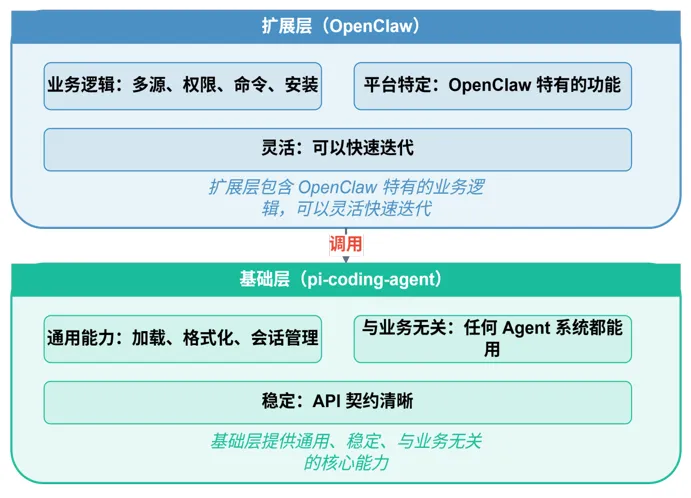
基础层职责:
├── 加载 SKILL.md 文件
├── 解析 frontmatter
├── 格式化 prompt
├── 管理 Session 生命周期
└── 定义核心类型 (Skill, Session)
扩展层职责:
├── 多源加载(bundled/managed/workspace)
├── 依赖检查(bins/env/config)
├── 命令解析(/skill 语法)
├── 安装逻辑(brew/node/go)
└── 白名单控制
OpenClaw 业务 → OpenClaw 扩展层 → pi-coding-agent 基础层 frontmatter:Markdown 文件顶部的一段 YAML/JSON 元数据,用 ---分隔符包裹。
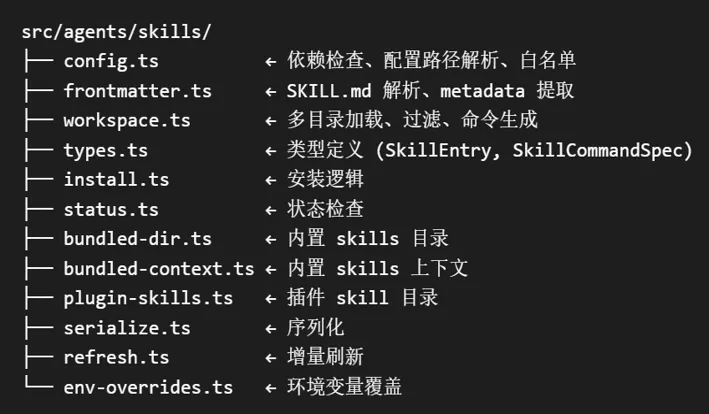
三、核心流程
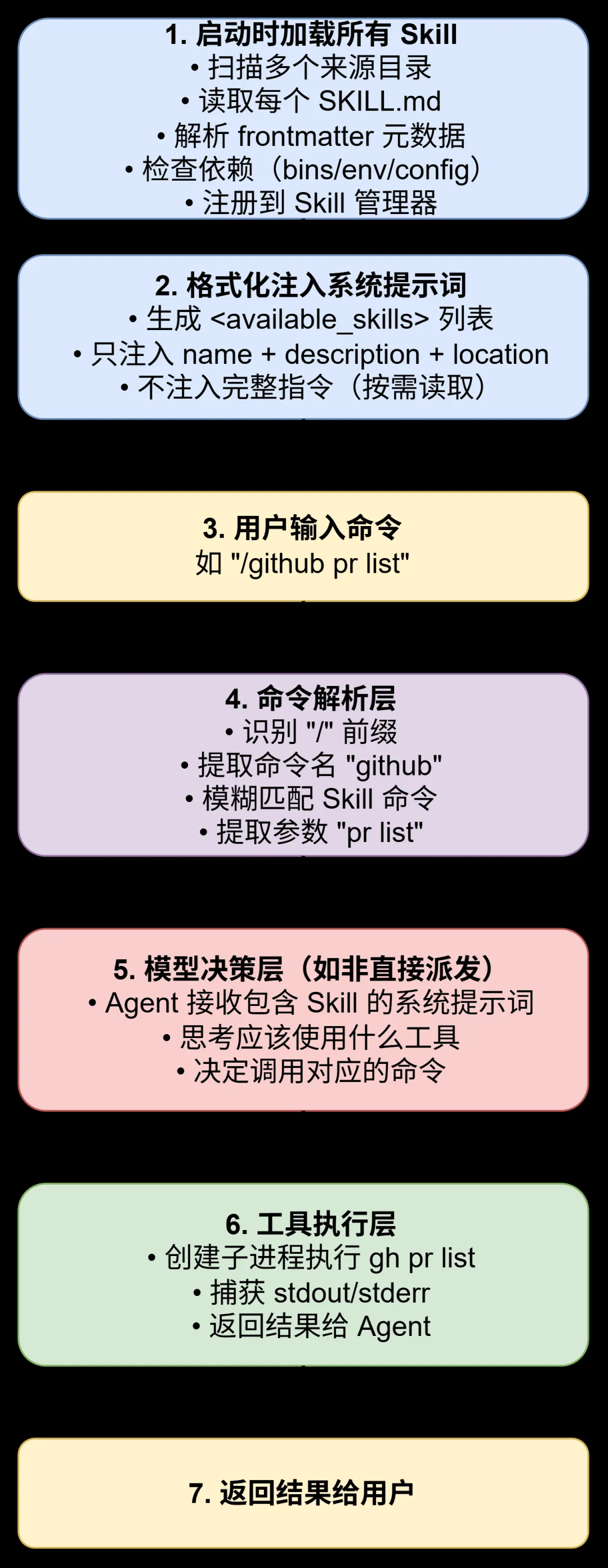
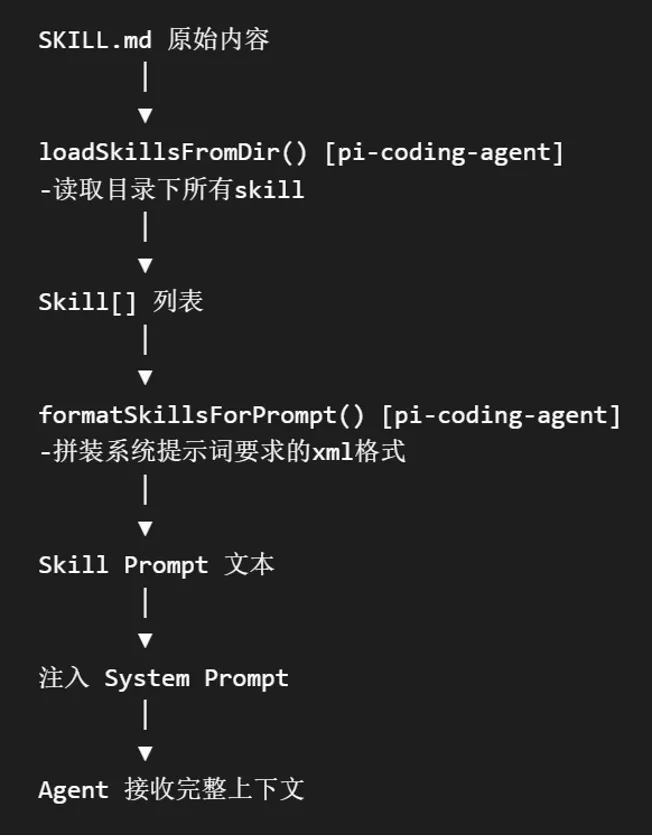
一个 Skill 从加载到执行的完整流程:
四、多源加载机制
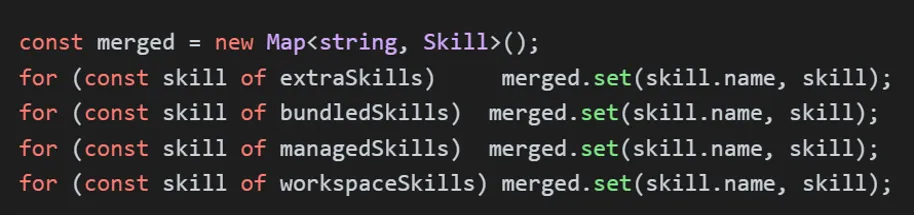
Openclaw的skill来源有四部分:
内置skill(openclaw-bundled):位于 /skills 额外skill(openclaw-extra):由extraDirs 配置 用户管理skill(openclaw-managed):位于~/.openclaw/skills/ 工作区skill(openclaw-workspace):workspace/skills/
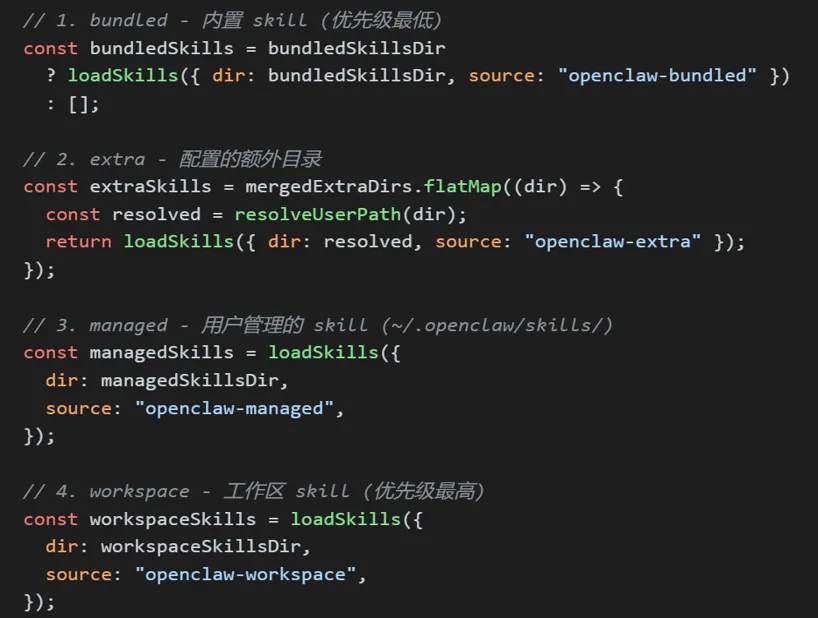
优先级: extra < bundled < managed < workspace
四个来源读取后会进行合并,根据名称覆盖,高优先级会覆盖低优先级。
五、SKILL.md 文件格式
SKILL.md 是一个 Markdown 文件,顶部包含 YAML/JSON 格式的 frontmatter 元数据。
5.1 示例
---
name: github
description: GitHub 操作,如 PR、Issue 管理
homepage: https://cli.github.com/
emoji: 🐙
os: [darwin, linux]  # 支持的 OS:darwin/linux/windows
requires:
  bins: [gh]                    # 必需的命令行工具
  env: [GITHUB_TOKEN]           # 必需的环境变量
  config: ["github.token"]      # 必需的配置项
install:
  brew: gh                      # brew 安装方式
  node: "@github/cli"           # npm 安装方式
  go: "github.com/cli/cli"      # go 安装方式
metadata:
  openclaw:
    command-dispatch: tool      # 派发模式:tool | agent | auto
    command-tool: gh            # 派发到的工具名
    command-arg-mode: append    # 参数传递模式
---

# GitHub Skill

使用 `gh` 命令行工具进行 GitHub 操作。

## 常用命令

| 命令 | 说明 |
|------|------|
| `/github pr list` | 列出 Pull Requests |
| `/github pr checkout <id>` | 检出 PR |
| `/github issue create` | 创建 Issue |
| `/github issue list` | 列出 Issues |

## 环境要求

- 需要安装 `gh` CLI 工具
- 需要设置 `GITHUB_TOKEN` 环境变量
5.2 Frontmatter 字段说明
name:Skill 名称 description:简短描述 homepage:项目主页链接 metadata.openclaw:OpenClaw 扩展配置 emoji:emoji表情 os: :操作系统 requires.bins:必需在 PATH 中存在xxx命令 requires.env:必需设置环境变量xxx requires.config:必需在openclaw.json中配置 install:安装方式 command-dispatch: 工具派发模式 command-tool:派发到哪个工具 command-arg-mode:参数传递方式
六、系统提示词中的 Skill 注入
6.1 注入格式
Skill 以 <available_skills> 标签的形式注入到系统提示词中:
<available_skills>
<skill>
<name>github</name>
<description>GitHub 操作,如 PR、Issue 管理</description>
<location>/home/user/.openclaw/skills/github/SKILL.md</location>
</skill>
<skill>
<name>peekaboo</name>
<description>UI 自动化测试工具</description>
<location>/home/user/.openclaw/skills/peekaboo/SKILL.md</location>
</skill>
<skill>
<name>docker</name>
<description>Docker 容器管理</description>
<location>/home/user/.openclaw/skills/docker/SKILL.md</location>
</skill>
</available_skills>
6.2 使用指令
系统提示词中包含使用 Skill 的指令:
## Skills
在回复之前:查看 <available_skills> 中的条目。

如果**恰好有一个**技能明显适用:
   用 read 工具读取其 <location> 中的 SKILL.md,然后遵照执行。

如果**多个**可能适用:
   选择最具体的那一个,然后读取/遵照执行。

如果**没有**明显适用的:
   不读取任何 SKILL.md。
6.3 注入流程
Skill Prompt 注入流程:
loadSkillEntries()加载所有skill formatSkillsForPrompt()将skill格式化为文本 将格式化后的文本注入到系统提示词中 Agent 接收完整的系统提示词,根据skill说明决定要调用的工具
七、自定义一个 Skill
让我们通过一个完整的示例,展示如何创建一个自定义 Skill。
7.1 场景:股票查询 Skill
假设我们需要一个查询股票价格的 Skill。
步骤 1:创建 Skill 目录
mkdir -p ~/.openclaw/workspace/skills/stock_query
步骤 2:创建 SKILL.md 文件
---
name: stock
description: 查询股票价格和行情信息
emoji: 📈
requires:
  bins: [curl]
metadata:
  openclaw:
    command-dispatch: tool
    command-tool: curl
    command-arg-mode: append
---

# 股票查询 Skill

使用新浪财经 API 查询股票行情。

## 常用命令

| 命令 | 说明 |
|------|------|
| `/stock <code>` | 查询股票,如 `/stock 000001` |
| `/stock a <code>` | 查询 A 股 |
| `/stock us <code>` | 查询美股 |

## API 参考

- A股:`https://hq.sinajs.cn/list=s{code}`
- 港股:`https://hq.sinajs.cn/list=hk{code}`
- 美股:`https://hq.sinajs.cn/list=us{code}`

## 示例

/stock 000001
输出:平安银行,现价 12.34,涨跌 +0.15 (+1.23%)
步骤 3:验证 Skill
# 列出所有 Skill
openclaw skill list

# 输出示例:
# 📈 stock (tool) - 查询股票价格和行情信息
# 🐙 github (tool) - GitHub 操作
# 🎮 peekaboo (tool) - UI 自动化
步骤 4:使用 Skill
用户:/stock 000001
Agent:正在查询平安银行...
       平安银行 000001,现价 12.34 元,涨幅 +1.23%
八、总结
Skill 本质:通过 SKILL.md 声明式定义的 AI 能力扩展单元 整体架构:OpenClaw 扩展层 + pi-coding-agent 基础层 多源加载:内置 < 额外 < 用户管理 < 工作区,高优先级覆盖低优先级 SKILL.md:Markdown + frontmatter 元数据,人类可读、AI 可解析 两种派发模式:tool(直接执行)和 agent(AI 决策) 按需注入:只注入元数据到系统提示词,完整指令按需读取 依赖检查:自动检查 bins/env/config,不满足时禁用 Skill