 夜雨聆风
夜雨聆风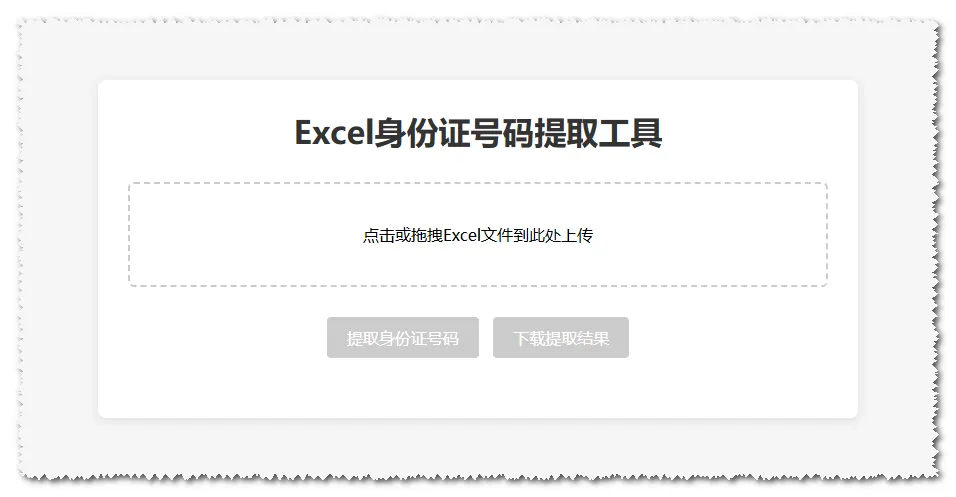
<!DOCTYPE html><htmllang="zh-CN"><head><metacharset="UTF-8"><metaname="viewport"content="width=device-width, initial-scale=1.0"><title>Excel身份证号码提取工具</title><style>* {margin: 0;padding: 0;box-sizing: border-box;font-family: "Microsoft Yahei", sans-serif;}body {max-width: 800px;margin: 50px auto;padding: 20px;background-color: #f5f5f5;}.container {background: white;padding: 30px;border-radius: 8px;box-shadow: 0 2px 10px rgba(0,0,0,0.1);}h1 {text-align: center;color: #333;margin-bottom: 30px;}.upload-area {border: 2px dashed #ccc;padding: 40px;text-align: center;border-radius: 6px;margin-bottom: 20px;cursor: pointer;transition: all 0.3s;}.upload-area:hover {border-color: #409eff;}#file-input {display: none;}.btn {display: inline-block;padding: 10px 20px;background: #409eff;color: white;border: none;border-radius: 4px;cursor: pointer;font-size: 16px;margin: 10px 5px;}.btn:disabled {background: #ccc;cursor: not-allowed;}.result-area {margin-top: 20px;padding: 20px;background: #f8f9fa;border-radius: 4px;display: none;}.status {text-align: center;margin: 20px 0;color: #666;}table {width: 100%;border-collapse: collapse;margin: 10px 0;}th, td {border: 1px solid #ddd;padding: 8px 12px;text-align: center;}th {background-color: #e9ecef;}</style></head><body><divclass="container"><h1>Excel身份证号码提取工具</h1><!-- 文件上传区域 --><divclass="upload-area"id="upload-area"><p>点击或拖拽Excel文件到此处上传</p><inputtype="file"id="file-input"accept=".xlsx,.xls"></div><!-- 操作按钮 --><divstyle="text-align: center;"><buttonclass="btn"id="extract-btn"disabled>提取身份证号码</button><buttonclass="btn"id="download-btn"disabled>下载提取结果</button></div><!-- 状态提示 --><divclass="status"id="status"></div><!-- 结果展示区域 --><divclass="result-area"id="result-area"><h3>提取结果预览</h3><tableid="result-table"><thead><tr><th>序号</th><th>身份证号码</th></tr></thead><tbody></tbody></table></div></div><!-- 引入SheetJS库 --><scriptsrc="https://cdn.jsdelivr.net/npm/xlsx@0.18.5/dist/xlsx.full.min.js"></script><script>// 获取DOM元素const uploadArea = document.getElementById('upload-area');const fileInput = document.getElementById('file-input');const extractBtn = document.getElementById('extract-btn');const downloadBtn = document.getElementById('download-btn');const status = document.getElementById('status');const resultArea = document.getElementById('result-area');const resultTable = document.getElementById('result-table').querySelector('tbody');// 全局变量存储文件和提取结果let workbook = null;let idCardList = [];// 点击上传区域触发文件选择uploadArea.addEventListener('click', () => {fileInput.click();});// 拖拽上传uploadArea.addEventListener('dragover', (e) => {e.preventDefault();uploadArea.style.borderColor = '#409eff';});uploadArea.addEventListener('dragleave', () => {uploadArea.style.borderColor = '#ccc';});uploadArea.addEventListener('drop', (e) => {e.preventDefault();uploadArea.style.borderColor = '#ccc';if (e.dataTransfer.files.length > 0) {fileInput.files = e.dataTransfer.files;handleFileSelect(e.dataTransfer.files[0]);}});// 文件选择事件fileInput.addEventListener('change', (e) => {if (e.target.files.length > 0) {handleFileSelect(e.target.files[0]);}});// 处理文件选择function handleFileSelect(file) {// 验证文件类型const fileTypes = ['application/vnd.openxmlformats-officedocument.spreadsheetml.sheet','application/vnd.ms-excel'];const fileName = file.name.toLowerCase();if (!fileTypes.includes(file.type) && !fileName.endsWith('.xlsx') && !fileName.endsWith('.xls')) {status.textContent = '❌ 请上传有效的Excel文件(.xlsx 或 .xls)';status.style.color = 'red';return;}status.textContent = '✅ 文件已上传:' + file.name;status.style.color = 'green';// 读取Excel文件const reader = new FileReader();reader.onload = function(e) {try {const data = new Uint8Array(e.target.result);workbook = XLSX.read(data, { type: 'array' });extractBtn.disabled = false;} catch (error) {status.textContent = '❌ 文件读取失败:' + error.message;status.style.color = 'red';}};reader.readAsArrayBuffer(file);}// 提取身份证号码extractBtn.addEventListener('click', () => {if (!workbook) return;status.textContent = '🔍 正在提取身份证号码...';status.style.color = '#666';// 清空之前的结果idCardList = [];resultTable.innerHTML = '';// 遍历所有工作表const sheetNames = workbook.SheetNames;for (const sheetName of sheetNames) {const worksheet = workbook.Sheets[sheetName];// 将工作表转换为JSONconst jsonData = XLSX.utils.sheet_to_json(worksheet, { header: 1 });// 遍历所有单元格内容for (let row = 0; row < jsonData.length; row++) {const rowData = jsonData[row];for (let col = 0; col < rowData.length; col++) {const cellValue = rowData[col];if (cellValue && typeof cellValue === 'string') {// 正则匹配18位身份证号码(考虑可能的空格)const idCardRegex = /\b\d{17}[\dXx]\b/g;const matches = cellValue.match(idCardRegex);if (matches) {matches.forEach(idCard => {// 去重if (!idCardList.includes(idCard.toUpperCase())) {idCardList.push(idCard.toUpperCase());}});}}}}}// 显示结果if (idCardList.length > 0) {status.textContent = `✅ 提取完成!共找到 ${idCardList.length} 个身份证号码`;status.style.color = 'green';// 填充结果表格idCardList.forEach((idCard, index) => {const tr = document.createElement('tr');tr.innerHTML = `<td>${index + 1}</td><td>${idCard}</td>`;resultTable.appendChild(tr);});resultArea.style.display = 'block';downloadBtn.disabled = false;} else {status.textContent = '❌ 未找到任何身份证号码';status.style.color = 'orange';resultArea.style.display = 'none';downloadBtn.disabled = true;}});// 下载提取结果downloadBtn.addEventListener('click', () => {if (idCardList.length === 0) return;// 创建新的工作簿const newWorkbook = XLSX.utils.book_new();// 创建工作表数据const sheetData = [['序号', '身份证号码']];idCardList.forEach((idCard, index) => {sheetData.push([index + 1, idCard]);});// 创建工作表const worksheet = XLSX.utils.aoa_to_sheet(sheetData);XLSX.utils.book_append_sheet(newWorkbook, worksheet, '身份证号码提取结果');// 下载文件XLSX.writeFile(newWorkbook, '身份证号码提取结果.xlsx');status.textContent = '📥 下载成功!文件已保存到本地';});</script></body></html>
使用方法:
将代码保存为 .html文件;用浏览器打开该文件; 上传 Excel 文件(支持.xlsx/.xls;) 点击 "提取身份证号码" 按钮; 查看提取结果,点击 "下载提取结果" 保存为新的 Excel 文件。