乐于分享
好东西不私藏

PyQt 实现炫酷仪表盘源码分享

PyQt 实现炫酷仪表盘源码分享

PyQt  实现炫酷仪表盘源码分享

  • 一、源码分享
    • 1、源码分享
    • 2、效果展示
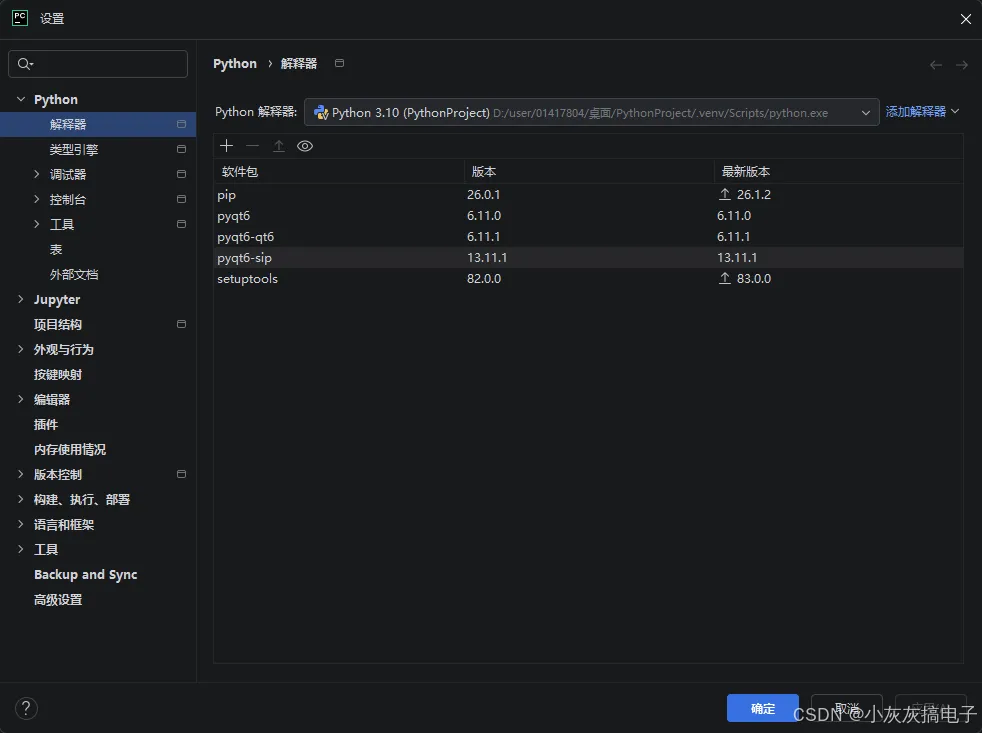
    • 3、库安装
  • 二、实现原理
    • 1、QPainter 概述
      • 1.1 主要特性
      • 1.2 基本使用模式
    • 2、QPainter 构造函数与设备管理
      • 2.1 构造函数
      • 2.2 设备管理方法
    • 3、绘图状态管理
      • 3.1 画笔(QPen)设置
      • 3.2 画刷(QBrush)设置
      • 3.3 字体(QFont)设置
      • 3.4 绘图状态保存与恢复
    • 4、基本图形绘制方法
      • 4.1 点与线
      • 4.2 矩形绘制
      • 4.3 椭圆与圆形
      • 4.4 多边形绘制
    • 5、文本绘制方法
      • 5.1 基本文本绘制
      • 5.2 文本测量与布局
      • 5.3 文本路径绘制
    • 6、图像绘制方法
      • 6.1 基本图像绘制
      • 6.2 图像变换与效果
    • 7、路径绘制(QPainterPath)
      • 7.1 创建与绘制路径
      • 7.2 路径操作
    • 8、坐标变换与视图
      • 8.1 基本变换
      • 8.2 矩阵变换
      • 8.3 视图与窗口
    • 9、高级绘制特性
      • 9.1 渲染提示
      • 9.2 合成模式
      • 9.3 裁剪区域
      • 9.4 不透明度与渐变
      • 9.5 性能优化技巧
      • 9.6 调试与问题排查

一、源码分享

1、源码分享

import sysimport mathfrom PyQt6.QtWidgets import (QApplication, QMainWindow, QWidget,                             QSlider, QVBoxLayout)from PyQt6.QtGui import (QPainter, QRadialGradient, QColor, QFont, QFontMetrics, QFontDatabase, QPen)from PyQt6.QtCore import Qt, QPointF, QRectFclass SpeedMeterWidget(QWidget):    def __init__(self, parent=None):        super().__init__(parent)        # 仪表盘参数 和QML完全一致        self.maxValue = 260        self.minValue = 0        self.currentValue = 130        self.redValue = 200        self.bg_color = QColor("#00020414")        # 数字字体,自行替换Digitall.ttf        font_id = QFontDatabase.addApplicationFont("image/Digitall.ttf")        font_family = QFontDatabase.applicationFontFamilies(font_id)[0]        self.digit_font = QFont(font_family)        #self.digit_font = QFont("Arial"40)    def set_current_value(self, val):        self.currentValue = val        self.update()  # 触发重绘    def paintEvent(self, event):        painter = QPainter(self)        painter.setRenderHint(QPainter.RenderHint.Antialiasing)        w = self.width()        h = self.height()        center_x = w / 2        center_y = h / 2        radius = min(w, h) / 2 * 0.9        # 1. 背景填充        painter.fillRect(00, w, h, self.bg_color)        # 2. 内层红色径向渐变圆环 修复版        radial_grad = QRadialGradient(center_x, center_y, radius * 0.6)        col_center = QColor("#E43223")        col_edge = QColor("#00E43223")        radial_grad.setColorAt(0, col_center)        radial_grad.setColorAt(1, col_edge)        painter.setBrush(radial_grad)        painter.setPen(Qt.PenStyle.NoPen)        painter.drawEllipse(QPointF(center_x, center_y), radius * 0.6, radius * 0.6)        # 3. 中间黑色内圆        painter.setBrush(Qt.GlobalColor.black)        painter.drawEllipse(QPointF(center_x, center_y), radius * 0.5, radius * 0.5)        # ====================== 绘制刻度线 ======================        painter.save()        start_angle = 45        r = radius        total_steps = 130        rotate_step = (360 - start_angle * 2) / total_steps        painter.translate(center_x, center_y)        painter.rotate(start_angle)        for i in range(total_steps + 1):            val = i * 2            if val >= self.redValue:                big_color = QColor("#FF0000")                small_color = QColor("#FF0000")            else:                big_color = QColor("#B6C6D6")                small_color = QColor("#525B62")            if i % 10 == 0:                painter.setPen(big_color)                pen = painter.pen()                pen.setWidth(9)                pen.setCapStyle(Qt.PenCapStyle.RoundCap)                painter.setPen(pen)                painter.drawLine(QPointF(0, r), QPointF(0, r / 1.1))            elif i % 5 == 0:                painter.setPen(small_color)                pen = painter.pen()                pen.setWidth(8)                pen.setCapStyle(Qt.PenCapStyle.RoundCap)                painter.setPen(pen)                painter.drawLine(QPointF(0, r), QPointF(0, r / 1.08))            else:                painter.setPen(small_color)                pen = painter.pen()                pen.setWidth(6)                pen.setCapStyle(Qt.PenCapStyle.RoundCap)                painter.setPen(pen)                painter.drawLine(QPointF(0, r), QPointF(0, r / 1.05))            painter.rotate(rotate_step)        painter.restore()        # ====================== 绘制数字 ======================        painter.save()        num_r = radius * 0.75        num_gap_angle = (360 - start_angle * 2) / 13        val_step = (self.maxValue - self.minValue) / 13        current_draw_val = self.minValue        start_deg = start_angle        num_font = self.digit_font        num_font.setPointSizeF(w * 0.04)        painter.setFont(num_font)        fm = QFontMetrics(num_font)        for i in range(14):            if current_draw_val >= self.redValue:                painter.setPen(QColor("#FF0000"))            else:                painter.setPen(Qt.GlobalColor.white)            # QML原始角度公式不变            angle_deg = -90 + start_deg + num_gap_angle * i            rad = math.radians(angle_deg)            x = -num_r * math.cos(rad)            y = -num_r * math.sin(rad)            painter.save()            painter.translate(center_x + x, center_y + y)           # painter.rotate(angle_deg)            text = f"{int(current_draw_val)}"            text_w = fm.horizontalAdvance(text)            text_h = w * 0.06            offset_y = text_h / 4            painter.drawText(QPointF(-text_w / 2, offset_y), text)            painter.restore()            current_draw_val += val_step        painter.restore()        # ====================== 绘制指针======================        painter.save()        deg_rotate = (270.0 / (self.maxValue - self.minValue)) * (self.currentValue - self.minValue) + 135        painter.translate(center_x, center_y)        painter.rotate(deg_rotate)        pen = QPen()        pen.setColor(Qt.GlobalColor.white)        pen.setWidth(8)        pen.setCapStyle(Qt.PenCapStyle.RoundCap)        painter.setPen(pen)        painter.drawLine(QPointF(radius * 0.50), QPointF(radius * 0.90))        painter.restore()        # ====================== 中心文字 ======================        painter.save()        painter.setPen(Qt.GlobalColor.white)        # 字体尺寸统一        num_font_size = w * 0.12        big_font = self.digit_font        big_font.setPointSizeF(num_font_size)        painter.setFont(big_font)        # 拆分百位、十位、个位        val = self.currentValue        hundred = val // 100        ten = (val // 10) % 10        unit = val % 10        # 计算单个数字宽度,用于水平居中排布        fm = QFontMetrics(big_font)        single_w = fm.horizontalAdvance("0")        gap = single_w * 0.001 # 数字间微小间距        # 总宽度 = 百位宽 + 间距 + 十位宽 + 间距 + 个位宽        total_text_width = single_w * 3 + gap * 2        # 起始X坐标,保证整体居中        start_x = center_x - total_text_width / 2        # -------- 绘制百位 --------        if hundred == 0:            painter.setPen(QColor("#666666"))        else:            painter.setPen(Qt.GlobalColor.white)        painter.drawText(QPointF(start_x, center_y), f"{hundred}")        # -------- 绘制十位 --------        if ten == 0 and hundred == 0:            painter.setPen(QColor("#666666"))        else:            painter.setPen(Qt.GlobalColor.white)        ten_x = start_x + single_w + gap        painter.drawText(QPointF(ten_x, center_y), f"{ten}")        # -------- 绘制个位 --------        if unit == 0 and hundred == 0 and ten == 0:            painter.setPen(QColor("#666666"))        else:            painter.setPen(Qt.GlobalColor.white)        unit_x = ten_x + single_w + gap        painter.drawText(QPointF(unit_x, center_y), f"{unit}")        # KM/h 单独绘制,在数字正下方,不重叠        unit_font = self.digit_font        unit_font.setPointSizeF(w * 0.05)        painter.setFont(unit_font)        rect_unit = QRectF(0, center_y + 50, w, h)        painter.drawText(rect_unit, Qt.AlignmentFlag.AlignHCenter, "KM/h")        painter.restore()class MainWindow(QMainWindow):    def __init__(self):        super().__init__()        self.setWindowTitle("Speedometer PyQt6")        self.resize(800800)        central_widget = QWidget()        central_widget.setStyleSheet("background-color: #020414;")        self.setCentralWidget(central_widget)        layout = QVBoxLayout(central_widget)        layout.setContentsMargins(00020)        self.meter = SpeedMeterWidget()        layout.addWidget(self.meter)        self.slider = QSlider(Qt.Orientation.Horizontal)        self.slider.setRange(0260)        self.slider.setValue(130)        layout.addWidget(self.slider)        self.slider.valueChanged.connect(self.meter.set_current_value)if __name__ == "__main__":    app = QApplication(sys.argv)    win = MainWindow()    win.show()    sys.exit(app.exec())

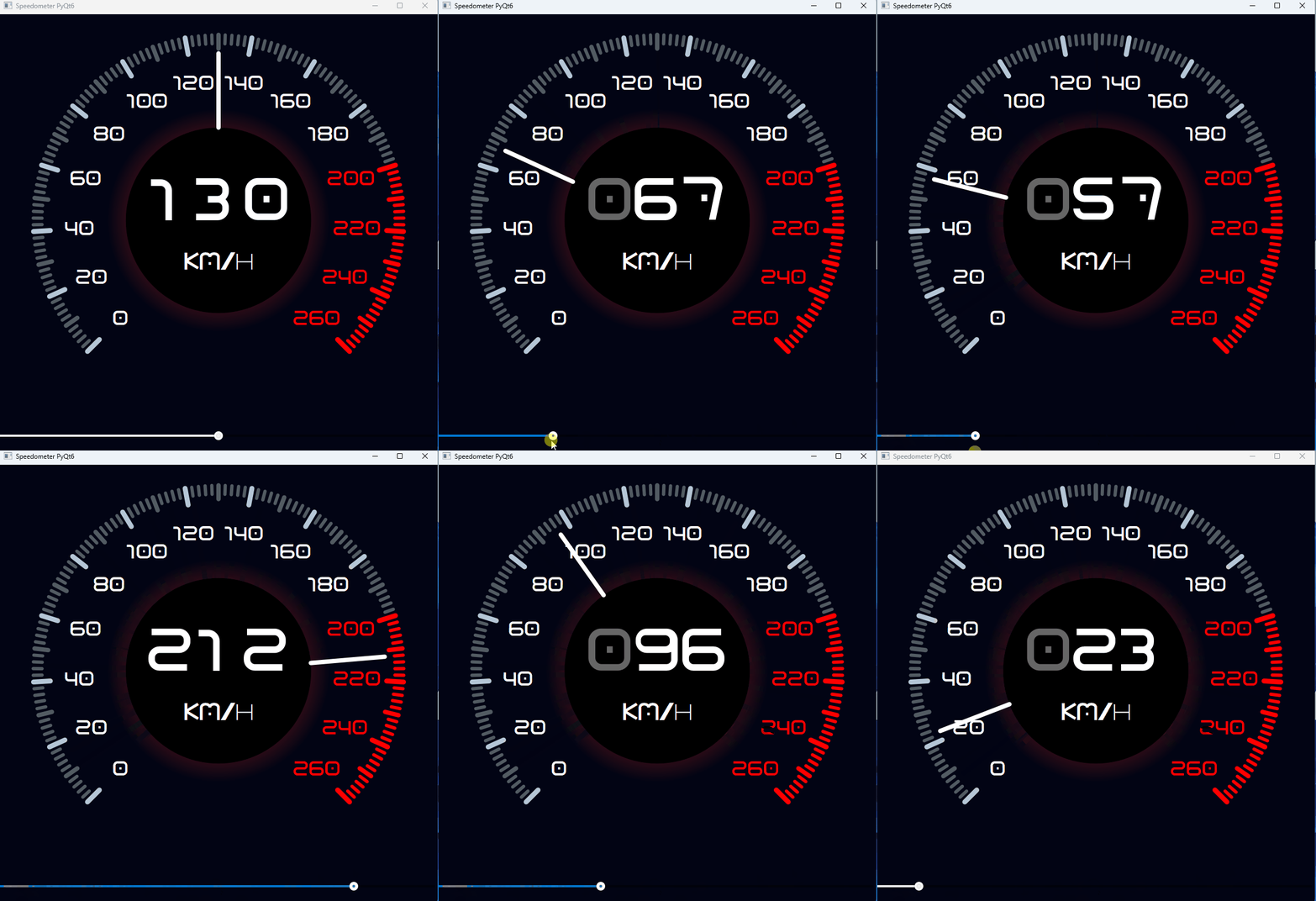
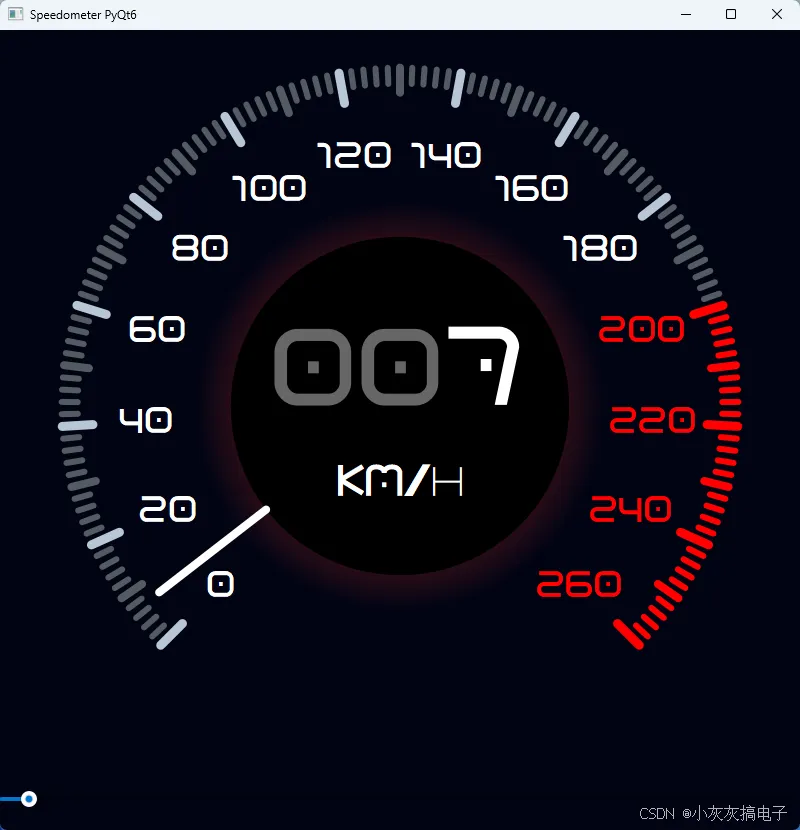
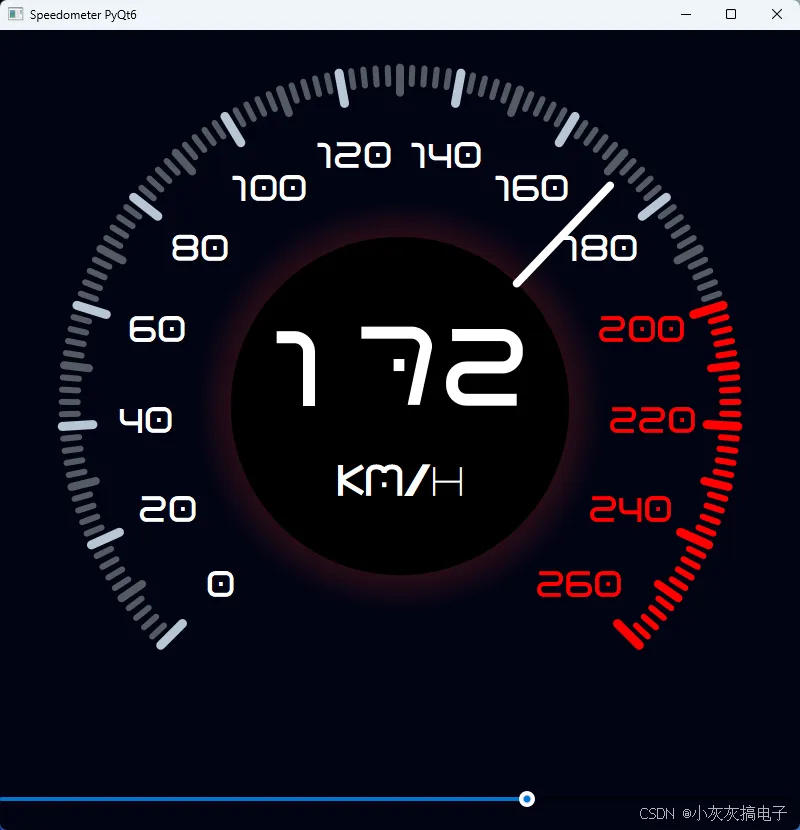
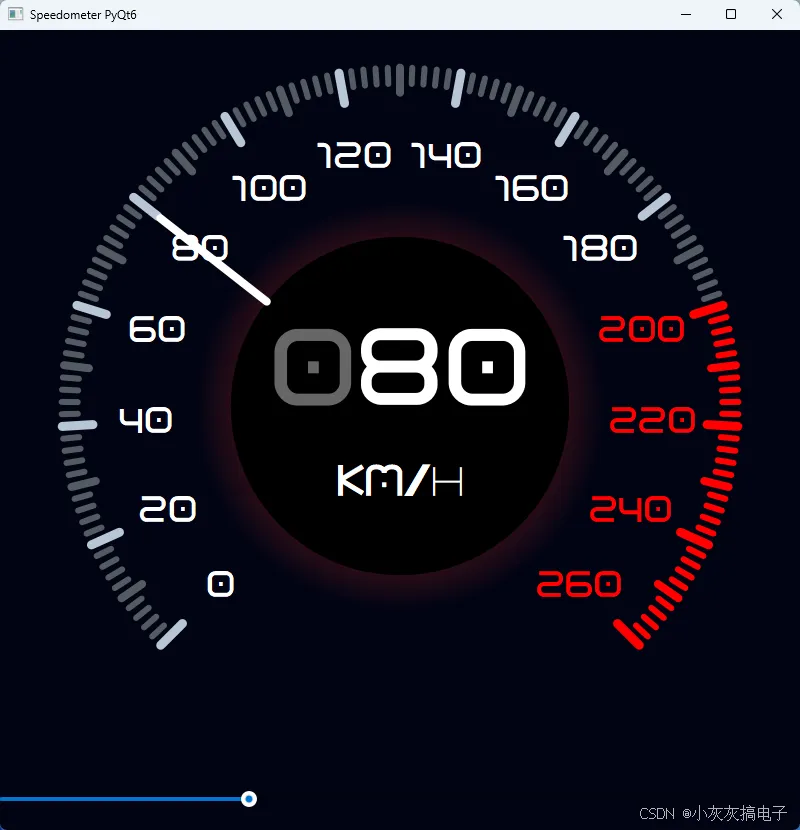
2、效果展示

3、库安装

二、实现原理

主要通过QPainter来绘制。

1、QPainter 概述

QPainter 是 PyQt6 中用于执行所有绘图操作的核心类。它提供了丰富的 API 来绘制各种图形、文本、图像和路径,是自定义控件、图表、游戏和可视化应用的基础。

1.1 主要特性

  • 设备无关
    :可在 QWidget、QPixmap、QImage、QPrinter 等多种设备上绘制
  • 坐标系系统
    :支持世界坐标、窗口坐标和视口坐标的转换
  • 绘图状态
    :保存和恢复绘图状态(画笔、画刷、字体等)
  • 抗锯齿
    :支持高质量的抗锯齿渲染
  • 变换操作
    :支持平移、旋转、缩放、剪切等几何变换

1.2 基本使用模式

from PyQt6.QtGui import QPainter, QPen, QBrush, QColorfrom PyQt6.QtWidgets import QWidgetclass MyWidget(QWidget):    def paintEvent(self, event):        painter = QPainter(self)  # 创建 QPainter 对象        painter.setRenderHint(QPainter.RenderHint.Antialiasing)  # 开启抗锯齿        # 绘制操作...        painter.drawRect(101010050)        # QPainter 会在离开作用域时自动结束绘制

2、QPainter 构造函数与设备管理

2.1 构造函数

# 方法1:先创建后绑定设备painter = QPainter()painter.begin(widget)  # 开始绘制# ... 绘制操作painter.end()          # 结束绘制# 方法2:创建时直接绑定设备(推荐)painter = QPainter(widget)# 方法3:在 QPixmap 上绘制pixmap = QPixmap(400, 300)painter = QPainter(pixmap)

2.2 设备管理方法

方法
描述
返回值
begin(QPaintDevice)
开始在指定设备上绘制
bool
end()
结束绘制
None
isActive()
检查是否正在绘制
bool
device()
获取当前绘制设备
QPaintDevice
setDevice(QPaintDevice)
设置绘制设备
None

3、绘图状态管理

3.1 画笔(QPen)设置

from PyQt6.QtGui import QPenfrom PyQt6.QtCore import Qt# 创建画笔pen = QPen(QColor("#FF5733"), 2)  # 颜色和宽度pen.setStyle(Qt.PenStyle.DashLine)  # 虚线样式pen.setCapStyle(Qt.PenCapStyle.RoundCap)  # 线帽样式pen.setJoinStyle(Qt.PenJoinStyle.RoundJoin)  # 连接样式painter.setPen(pen)  # 应用画笔painter.setPen(Qt.GlobalColor.red)  # 快捷设置(红色,宽度1)painter.setPen(Qt.PenStyle.NoPen)   # 无边框

3.2 画刷(QBrush)设置

from PyQt6.QtGui import QBrush, QLinearGradient, QRadialGradient# 纯色画刷brush = QBrush(QColor("#3498db"))painter.setBrush(brush)# 渐变画刷gradient = QLinearGradient(00100100)gradient.setColorAt(0, QColor("#1abc9c"))gradient.setColorAt(1, QColor("#2ecc71"))painter.setBrush(QBrush(gradient))# 纹理画刷texture_brush = QBrush(QPixmap("texture.png"))painter.setBrush(texture_brush)# 样式画刷painter.setBrush(Qt.BrushStyle.Dense4Pattern)  # 密集图案

3.3 字体(QFont)设置

from PyQt6.QtGui import QFontfont = QFont("Arial"12)font.setBold(True)font.setItalic(True)font.setUnderline(True)font.setPixelSize(16)  # 像素大小font.setPointSize(10)   # 点大小painter.setFont(font)

3.4 绘图状态保存与恢复

# 保存当前状态painter.save()# 修改状态painter.setPen(QColor("blue"))painter.setBrush(QColor("yellow"))painter.setFont(QFont("Times"14))# 绘制...painter.drawRect(5050100100)# 恢复之前的状态painter.restore()# 继续使用原始状态绘制painter.drawRect(20050100100)

4、基本图形绘制方法

4.1 点与线

# 绘制单个点painter.drawPoint(1010)painter.drawPoint(QPoint(2020))# 绘制多个点points = [QPoint(10, 10), QPoint(20, 20), QPoint(30, 30)]painter.drawPoints(points)# 绘制直线painter.drawLine(1010100100)painter.drawLine(QPoint(1010), QPoint(100100))# 绘制多条线lines = [    QLine(10, 10, 50, 50),    QLine(60, 10, 100, 50),    QLine(110, 10, 150, 50)]painter.drawLines(lines)# 绘制折线polyline = QPolygonF([QPointF(1010), QPointF(5050), QPointF(10010)])painter.drawPolyline(polyline)

4.2 矩形绘制

from PyQt6.QtCore import QRect, QRectF# 绘制矩形(多种方式)painter.drawRect(101010050)  # x, y, width, heightpainter.drawRect(QRect(101010050))painter.drawRect(QRectF(10.510.5100.050.0))# 绘制圆角矩形painter.drawRoundedRect(1010100501010)  # xRadius, yRadiuspainter.drawRoundedRect(QRectF(101010050), 1515)# 填充矩形(使用画刷)painter.fillRect(101010050, QColor("#e74c3c"))painter.fillRect(QRect(101010050), QBrush(QColor("#3498db")))# 清除矩形区域painter.eraseRect(101010050)

4.3 椭圆与圆形

# 绘制椭圆painter.drawEllipse(101010050)  # 外接矩形painter.drawEllipse(QRect(101010050))# 绘制圆形(宽高相等的椭圆)painter.drawEllipse(QPoint(5050), 3030)  # 中心点,x半径,y半径painter.drawEllipse(QPointF(50.550.5), 25.025.0)# 绘制弧线painter.drawArc(101010010030 * 16120 * 16)  # 角度以1/16度为单位# 绘制弦painter.drawChord(101010010030 * 16120 * 16)# 绘制饼图painter.drawPie(101010010030 * 16120 * 16)

4.4 多边形绘制

from PyQt6.QtCore import QPolygon, QPolygonF# 创建多边形polygon = QPolygon()polygon << QPoint(1010) << QPoint(5010) << QPoint(5050) << QPoint(1050)# 绘制多边形painter.drawPolygon(polygon)# 使用 QPolygonF(浮点精度)polygon_f = QPolygonF()polygon_f << QPointF(10.510.5) << QPointF(50.510.5) << QPointF(50.550.5)# 填充多边形painter.drawPolygon(polygon, Qt.FillRule.OddEvenFill)# 绘制凸多边形(性能更好)convex_polygon = QPolygon([QPoint(1010), QPoint(5010), QPoint(3050)])painter.drawConvexPolygon(convex_polygon)

5、文本绘制方法

5.1 基本文本绘制

# 在指定位置绘制文本painter.drawText(1030"Hello PyQt6")# 在指定矩形内绘制文本rect = QRect(101020050)painter.drawText(rect, Qt.AlignmentFlag.AlignCenter, "居中文本")# 带对齐方式的文本painter.drawText(rect, Qt.AlignmentFlag.AlignLeft | Qt.AlignmentFlag.AlignTop, "左上对齐")# 使用 QPointpainter.drawText(QPoint(1030), "在点位置绘制")# 绘制富文本(HTML)painter.drawText(1050"<b>粗体</b> <i>斜体</i> <font color='red'>红色</font>")

5.2 文本测量与布局

# 获取文本宽度text_width = painter.fontMetrics().horizontalAdvance("Hello World")# 获取文本高度text_height = painter.fontMetrics().height()# 获取文本边界矩形bounding_rect = painter.fontMetrics().boundingRect("Hello World")# 文本布局from PyQt6.QtGui import QTextLayouttext = "这是一个多行文本示例,会自动换行"layout = QTextLayout(text, painter.font())layout.beginLayout()while True:    line = layout.createLine()    if not line.isValid():        break    line.setLineWidth(200)  # 行宽    # 绘制每一行...layout.endLayout()

5.3 文本路径绘制

from PyQt6.QtGui import QPainterPath# 创建文本路径path = QPainterPath()path.addText(1050, painter.font(), "路径文本")# 绘制文本路径painter.drawPath(path)# 填充文本路径painter.fillPath(path, QColor("#9b59b6"))# 描边文本路径painter.strokePath(path, QPen(QColor("#34495e"), 2))

6、图像绘制方法

6.1 基本图像绘制

from PyQt6.QtGui import QPixmap, QImage# 加载图像pixmap = QPixmap("image.png")image = QImage("photo.jpg")# 绘制图像(多种方式)painter.drawPixmap(1010, pixmap)  # 在指定位置绘制painter.drawPixmap(QRect(1010100100), pixmap)  # 缩放绘制painter.drawPixmap(QRect(1010100100), pixmap, pixmap.rect())  # 源矩形和目标矩形# 绘制 QImagepainter.drawImage(1010, image)painter.drawImage(QRect(1010200150), image)# 绘制图像的一部分source_rect = QRect(005050)  # 源图像区域target_rect = QRect(1010100100)  # 目标区域painter.drawPixmap(target_rect, pixmap, source_rect)

6.2 图像变换与效果

# 保存状态painter.save()# 平移后绘制painter.translate(5050)painter.drawPixmap(00, pixmap)# 恢复状态painter.restore()# 旋转后绘制painter.save()painter.translate(100100)  # 设置旋转中心painter.rotate(45)  # 旋转45painter.drawPixmap(-50, -50, pixmap)  # 以中心点绘制painter.restore()# 缩放绘制painter.save()painter.scale(0.50.5)  # 缩小一半painter.drawPixmap(1010, pixmap)painter.restore()

7、路径绘制(QPainterPath)

7.1 创建与绘制路径

from PyQt6.QtGui import QPainterPath# 创建路径path = QPainterPath()# 移动起点path.moveTo(1010)# 添加直线path.lineTo(10010)path.lineTo(100100)path.lineTo(10100)path.closeSubpath()  # 闭合路径# 添加曲线path.cubicTo(505010015015050)  # 三次贝塞尔曲线path.quadTo(10010015050)  # 二次贝塞尔曲线# 添加圆弧path.arcTo(505010010030120)  # 角度为度# 添加椭圆path.addEllipse(2002005030)# 添加矩形path.addRect(101010050)# 添加圆角矩形path.addRoundedRect(1010100501010)# 绘制路径painter.drawPath(path)# 填充路径painter.fillPath(path, QColor("#f1c40f"))# 描边路径painter.strokePath(path, QPen(QColor("#2c3e50"), 3))

7.2 路径操作

# 路径合并path1 = QPainterPath()path1.addRect(10105050)path2 = QPainterPath()path2.addEllipse(30305050)# 并集union_path = path1.united(path2)# 交集intersected_path = path1.intersected(path2)# 差集subtracted_path = path1.subtracted(path2)# 绘制结果painter.drawPath(union_path)

8、坐标变换与视图

8.1 基本变换

# 平移painter.translate(10050)  # 向右100,向下50# 旋转(以原点为中心)painter.rotate(45)  # 顺时针45# 缩放painter.scale(2.00.5)  # X轴放大2倍,Y轴缩小一半# 剪切painter.shear(0.20.1)  # X剪切0.2,Y剪切0.1# 重置变换painter.resetTransform()

8.2 矩阵变换

from PyQt6.QtGui import QTransform# 创建变换矩阵transform = QTransform()transform.translate(10050)transform.rotate(30)transform.scale(1.51.5)# 应用矩阵变换painter.setTransform(transform)# 获取当前变换矩阵current_transform = painter.transform()# 组合变换transform1 = QTransform().translate(5050)transform2 = QTransform().rotate(45)combined_transform = transform1 * transform2  # 先平移后旋转painter.setTransform(combined_transform)

8.3 视图与窗口

# 设置视口(物理坐标)painter.setViewport(00400300)# 设置窗口(逻辑坐标)painter.setWindow(-200, -150400300)# 设置世界矩阵painter.setWorldTransform(QTransform().rotate(30))# 启用世界变换painter.setWorldMatrixEnabled(True)# 坐标映射logical_point = painter.transform().map(QPoint(100100))  # 物理转逻辑physical_point = painter.transform().inverted().map(QPoint(100100))  # 逻辑转物理

9、高级绘制特性

9.1 渲染提示

# 开启抗锯齿(重要!)painter.setRenderHint(QPainter.RenderHint.Antialiasing)# 文本抗锯齿painter.setRenderHint(QPainter.RenderHint.TextAntialiasing)# 平滑像素图变换painter.setRenderHint(QPainter.RenderHint.SmoothPixmapTransform)# 高质量图像缩放painter.setRenderHint(QPainter.RenderHint.LosslessImageRendering)# 组合多个渲染提示painter.setRenderHints(    QPainter.RenderHint.Antialiasing |     QPainter.RenderHint.TextAntialiasing |    QPainter.RenderHint.SmoothPixmapTransform)# 检查是否启用某个渲染提示if painter.renderHints() & QPainter.RenderHint.Antialiasing:    print("抗锯齿已启用")

9.2 合成模式

from PyQt6.QtCore import Qt# 设置合成模式painter.setCompositionMode(QPainter.CompositionMode.SourceOver)  # 默认:源覆盖目标painter.setCompositionMode(QPainter.CompositionMode.Source)      # 只绘制源,忽略目标painter.setCompositionMode(QPainter.CompositionMode.DestinationOver)  # 目标覆盖源painter.setCompositionMode(QPainter.CompositionMode.Clear)       # 清除目标区域painter.setCompositionMode(QPainter.CompositionMode.Xor)         # 异或模式# 常用合成模式示例# 1. 叠加模式(类似Photoshop的叠加)painter.setCompositionMode(QPainter.CompositionMode.Multiply)    # 正片叠底painter.setCompositionMode(QPainter.CompositionMode.Screen)      # 滤色painter.setCompositionMode(QPainter.CompositionMode.Overlay)     # 叠加# 2. 混合模式painter.setCompositionMode(QPainter.CompositionMode.Darken)      # 变暗painter.setCompositionMode(QPainter.CompositionMode.Lighten)     # 变亮# 恢复默认合成模式painter.setCompositionMode(QPainter.CompositionMode.SourceOver)

9.3 裁剪区域

from PyQt6.QtCore import QRect, QRegion# 设置矩形裁剪区域painter.setClipRect(1010100100)# 设置路径裁剪区域path = QPainterPath()path.addEllipse(50508080)painter.setClipPath(path)# 设置区域裁剪(多个矩形组合)region = QRegion(QRect(10105050))region = region.united(QRegion(QRect(70705050)))painter.setClipRegion(region)# 组合裁剪区域(交集)painter.setClipRect(00200200)painter.setClipRect(5050100100, Qt.ClipOperation.IntersectClip)# 保存和恢复裁剪状态painter.save()painter.setClipRect(10108080)# 在此裁剪区域内绘制painter.restore()  # 恢复裁剪状态# 检查裁剪区域if painter.hasClipping():    clip_rect = painter.clipBoundingRect()    print(f"裁剪区域: {clip_rect}")# 禁用裁剪painter.setClipping(False)

9.4 不透明度与渐变

# 设置全局不透明度painter.setOpacity(0.5)  # 50%不透明度# 使用透明颜色transparent_brush = QBrush(QColor(25500128))  # 半透明红色painter.setBrush(transparent_brush)# 复杂渐变from PyQt6.QtGui import QConicalGradient, QRadialGradient, QLinearGradient# 锥形渐变conical_gradient = QConicalGradient(1001000)  # 中心点,起始角度conical_gradient.setColorAt(0, QColor("#ff0000"))conical_gradient.setColorAt(0.5, QColor("#00ff00"))conical_gradient.setColorAt(1, QColor("#0000ff"))painter.setBrush(QBrush(conical_gradient))# 径向渐变(中心向外)radial_gradient = QRadialGradient(15015050150150)  # 中心,半径,焦点radial_gradient.setColorAt(0, QColor("#ffffff"))radial_gradient.setColorAt(1, QColor("#000000"))painter.setBrush(QBrush(radial_gradient))# 线性渐变(带多个色标)linear_gradient = QLinearGradient(002000)  # 起点,终点linear_gradient.setColorAt(0, QColor("#ff0000"))linear_gradient.setColorAt(0.3, QColor("#ffff00"))linear_gradient.setColorAt(0.7, QColor("#00ff00"))linear_gradient.setColorAt(1, QColor("#0000ff"))linear_gradient.setSpread(QGradient.Spread.ReflectSpread)  # 反射扩展painter.setBrush(QBrush(linear_gradient))

9.5 性能优化技巧

# 1. 批量绘制(减少状态切换)painter.save()painter.setPen(QPen(Qt.GlobalColor.blue, 2))painter.setBrush(QBrush(Qt.GlobalColor.yellow))# 批量绘制多个图形painter.drawRect(10105050)painter.drawRect(70105050)painter.drawRect(130105050)painter.restore()# 2. 使用 QPainterPath 预定义路径path = QPainterPath()path.moveTo(1010)path.lineTo(10010)path.lineTo(100100)path.lineTo(10100)path.closeSubpath()# 一次性绘制复杂路径painter.drawPath(path)# 3. 避免频繁创建 QPainter 对象# 错误做法:在循环中反复创建 QPainter# 正确做法:在 paintEvent 外创建一次,重复使用# 4. 使用 QPicture 记录和重放绘制命令from PyQt6.QtGui import QPicturepicture = QPicture()recorder = QPainter(picture)recorder.drawRect(101010050)recorder.drawEllipse(50508080)recorder.end()# 重放绘制命令painter.drawPicture(00, picture)# 5. 禁用不需要的渲染提示painter.setRenderHint(QPainter.RenderHint.Antialiasing, False)  # 关闭抗锯齿提升性能painter.setRenderHint(QPainter.RenderHint.TextAntialiasing, False)# 6. 使用 QStaticText 绘制静态文本(性能更好)from PyQt6.QtGui import QStaticTextstatic_text = QStaticText("这是一个静态文本")painter.drawStaticText(1010, static_text)# 7. 合理使用 update() 和 repaint()# update():异步重绘,合并多个更新请求# repaint():立即重绘,用于需要即时反馈的场景

9.6 调试与问题排查

# 检查绘制设备if painter.device():    print(f"绘制设备: {painter.device()}")else:    print("警告:未绑定绘制设备")# 检查绘制状态if painter.isActive():    print("QPainter 正在绘制中")else:    print("QPainter 未激活,请先调用 begin() 或使用带设备的构造函数")# 检查变换矩阵transform = painter.transform()print(f"当前变换矩阵: {transform.m11()}{transform.m12()}{transform.m21()}{transform.m22()}")# 保存绘制日志import logginglogging.basicConfig(level=logging.DEBUG)def paintEvent(self, event):    painter = QPainter(self)    logging.debug(f"开始绘制,设备: {painter.device()}")    try:        # 绘制操作...        painter.drawRect(101010050)        logging.debug("绘制完成")    except Exception as e:        logging.error(f"绘制错误: {e}")    finally:        # QPainter 会自动结束        pass# 常见问题:# 1. 忘记调用 begin() 或使用错误的设备# 2. 在 paintEvent 外使用 QPainter# 3. 未正确处理坐标变换# 4. 内存泄漏:确保 QPainter 在作用域结束时自动销毁

基本 文件 流程 错误 SQL 调试
  1. 请求信息 : 2026-07-11 17:40:29 HTTP/1.1 GET : https://www.yeyulingfeng.com/a/848867.html
  2. 运行时间 : 0.088522s [ 吞吐率:11.30req/s ] 内存消耗:4,973.66kb 文件加载:145
  3. 缓存信息 : 0 reads,0 writes
  4. 会话信息 : SESSION_ID=037553c10510dbf28f30e45519fb1afc
  1. /yingpanguazai/ssd/ssd1/www/wwww.yeyulingfeng.com/public/index.php ( 0.79 KB )
  2. /yingpanguazai/ssd/ssd1/www/wwww.yeyulingfeng.com/vendor/autoload.php ( 0.17 KB )
  3. /yingpanguazai/ssd/ssd1/www/wwww.yeyulingfeng.com/vendor/composer/autoload_real.php ( 2.49 KB )
  4. /yingpanguazai/ssd/ssd1/www/wwww.yeyulingfeng.com/vendor/composer/platform_check.php ( 0.90 KB )
  5. /yingpanguazai/ssd/ssd1/www/wwww.yeyulingfeng.com/vendor/composer/ClassLoader.php ( 14.03 KB )
  6. /yingpanguazai/ssd/ssd1/www/wwww.yeyulingfeng.com/vendor/composer/autoload_static.php ( 6.05 KB )
  7. /yingpanguazai/ssd/ssd1/www/wwww.yeyulingfeng.com/vendor/topthink/think-helper/src/helper.php ( 8.34 KB )
  8. /yingpanguazai/ssd/ssd1/www/wwww.yeyulingfeng.com/vendor/topthink/think-validate/src/helper.php ( 2.19 KB )
  9. /yingpanguazai/ssd/ssd1/www/wwww.yeyulingfeng.com/vendor/ralouphie/getallheaders/src/getallheaders.php ( 1.60 KB )
  10. /yingpanguazai/ssd/ssd1/www/wwww.yeyulingfeng.com/vendor/topthink/think-orm/src/helper.php ( 1.47 KB )
  11. /yingpanguazai/ssd/ssd1/www/wwww.yeyulingfeng.com/vendor/topthink/think-orm/stubs/load_stubs.php ( 0.16 KB )
  12. /yingpanguazai/ssd/ssd1/www/wwww.yeyulingfeng.com/vendor/topthink/framework/src/think/Exception.php ( 1.69 KB )
  13. /yingpanguazai/ssd/ssd1/www/wwww.yeyulingfeng.com/vendor/topthink/think-container/src/Facade.php ( 2.71 KB )
  14. /yingpanguazai/ssd/ssd1/www/wwww.yeyulingfeng.com/vendor/symfony/deprecation-contracts/function.php ( 0.99 KB )
  15. /yingpanguazai/ssd/ssd1/www/wwww.yeyulingfeng.com/vendor/symfony/polyfill-mbstring/bootstrap.php ( 8.26 KB )
  16. /yingpanguazai/ssd/ssd1/www/wwww.yeyulingfeng.com/vendor/symfony/polyfill-mbstring/bootstrap80.php ( 9.78 KB )
  17. /yingpanguazai/ssd/ssd1/www/wwww.yeyulingfeng.com/vendor/symfony/var-dumper/Resources/functions/dump.php ( 1.49 KB )
  18. /yingpanguazai/ssd/ssd1/www/wwww.yeyulingfeng.com/vendor/topthink/think-dumper/src/helper.php ( 0.18 KB )
  19. /yingpanguazai/ssd/ssd1/www/wwww.yeyulingfeng.com/vendor/symfony/var-dumper/VarDumper.php ( 4.30 KB )
  20. /yingpanguazai/ssd/ssd1/www/wwww.yeyulingfeng.com/vendor/guzzlehttp/guzzle/src/functions_include.php ( 0.16 KB )
  21. /yingpanguazai/ssd/ssd1/www/wwww.yeyulingfeng.com/vendor/guzzlehttp/guzzle/src/functions.php ( 5.54 KB )
  22. /yingpanguazai/ssd/ssd1/www/wwww.yeyulingfeng.com/vendor/topthink/framework/src/think/App.php ( 15.30 KB )
  23. /yingpanguazai/ssd/ssd1/www/wwww.yeyulingfeng.com/vendor/topthink/think-container/src/Container.php ( 15.76 KB )
  24. /yingpanguazai/ssd/ssd1/www/wwww.yeyulingfeng.com/vendor/psr/container/src/ContainerInterface.php ( 1.02 KB )
  25. /yingpanguazai/ssd/ssd1/www/wwww.yeyulingfeng.com/app/provider.php ( 0.19 KB )
  26. /yingpanguazai/ssd/ssd1/www/wwww.yeyulingfeng.com/vendor/topthink/framework/src/think/Http.php ( 6.04 KB )
  27. /yingpanguazai/ssd/ssd1/www/wwww.yeyulingfeng.com/vendor/topthink/think-helper/src/helper/Str.php ( 7.29 KB )
  28. /yingpanguazai/ssd/ssd1/www/wwww.yeyulingfeng.com/vendor/topthink/framework/src/think/Env.php ( 4.68 KB )
  29. /yingpanguazai/ssd/ssd1/www/wwww.yeyulingfeng.com/app/common.php ( 0.03 KB )
  30. /yingpanguazai/ssd/ssd1/www/wwww.yeyulingfeng.com/vendor/topthink/framework/src/helper.php ( 18.78 KB )
  31. /yingpanguazai/ssd/ssd1/www/wwww.yeyulingfeng.com/vendor/topthink/framework/src/think/Config.php ( 5.54 KB )
  32. /yingpanguazai/ssd/ssd1/www/wwww.yeyulingfeng.com/config/alipay.php ( 3.59 KB )
  33. /yingpanguazai/ssd/ssd1/www/wwww.yeyulingfeng.com/vendor/topthink/framework/src/think/facade/Env.php ( 1.67 KB )
  34. /yingpanguazai/ssd/ssd1/www/wwww.yeyulingfeng.com/config/app.php ( 0.95 KB )
  35. /yingpanguazai/ssd/ssd1/www/wwww.yeyulingfeng.com/config/cache.php ( 0.78 KB )
  36. /yingpanguazai/ssd/ssd1/www/wwww.yeyulingfeng.com/config/console.php ( 0.23 KB )
  37. /yingpanguazai/ssd/ssd1/www/wwww.yeyulingfeng.com/config/cookie.php ( 0.56 KB )
  38. /yingpanguazai/ssd/ssd1/www/wwww.yeyulingfeng.com/config/database.php ( 2.48 KB )
  39. /yingpanguazai/ssd/ssd1/www/wwww.yeyulingfeng.com/config/filesystem.php ( 0.61 KB )
  40. /yingpanguazai/ssd/ssd1/www/wwww.yeyulingfeng.com/config/lang.php ( 0.91 KB )
  41. /yingpanguazai/ssd/ssd1/www/wwww.yeyulingfeng.com/config/log.php ( 1.35 KB )
  42. /yingpanguazai/ssd/ssd1/www/wwww.yeyulingfeng.com/config/middleware.php ( 0.19 KB )
  43. /yingpanguazai/ssd/ssd1/www/wwww.yeyulingfeng.com/config/route.php ( 1.89 KB )
  44. /yingpanguazai/ssd/ssd1/www/wwww.yeyulingfeng.com/config/session.php ( 0.57 KB )
  45. /yingpanguazai/ssd/ssd1/www/wwww.yeyulingfeng.com/config/trace.php ( 0.34 KB )
  46. /yingpanguazai/ssd/ssd1/www/wwww.yeyulingfeng.com/config/view.php ( 0.82 KB )
  47. /yingpanguazai/ssd/ssd1/www/wwww.yeyulingfeng.com/app/event.php ( 0.25 KB )
  48. /yingpanguazai/ssd/ssd1/www/wwww.yeyulingfeng.com/vendor/topthink/framework/src/think/Event.php ( 7.67 KB )
  49. /yingpanguazai/ssd/ssd1/www/wwww.yeyulingfeng.com/app/service.php ( 0.13 KB )
  50. /yingpanguazai/ssd/ssd1/www/wwww.yeyulingfeng.com/app/AppService.php ( 0.26 KB )
  51. /yingpanguazai/ssd/ssd1/www/wwww.yeyulingfeng.com/vendor/topthink/framework/src/think/Service.php ( 1.64 KB )
  52. /yingpanguazai/ssd/ssd1/www/wwww.yeyulingfeng.com/vendor/topthink/framework/src/think/Lang.php ( 7.35 KB )
  53. /yingpanguazai/ssd/ssd1/www/wwww.yeyulingfeng.com/vendor/topthink/framework/src/lang/zh-cn.php ( 13.70 KB )
  54. /yingpanguazai/ssd/ssd1/www/wwww.yeyulingfeng.com/vendor/topthink/framework/src/think/initializer/Error.php ( 3.31 KB )
  55. /yingpanguazai/ssd/ssd1/www/wwww.yeyulingfeng.com/vendor/topthink/framework/src/think/initializer/RegisterService.php ( 1.33 KB )
  56. /yingpanguazai/ssd/ssd1/www/wwww.yeyulingfeng.com/vendor/services.php ( 0.14 KB )
  57. /yingpanguazai/ssd/ssd1/www/wwww.yeyulingfeng.com/vendor/topthink/framework/src/think/service/PaginatorService.php ( 1.52 KB )
  58. /yingpanguazai/ssd/ssd1/www/wwww.yeyulingfeng.com/vendor/topthink/framework/src/think/service/ValidateService.php ( 0.99 KB )
  59. /yingpanguazai/ssd/ssd1/www/wwww.yeyulingfeng.com/vendor/topthink/framework/src/think/service/ModelService.php ( 2.04 KB )
  60. /yingpanguazai/ssd/ssd1/www/wwww.yeyulingfeng.com/vendor/topthink/think-trace/src/Service.php ( 0.77 KB )
  61. /yingpanguazai/ssd/ssd1/www/wwww.yeyulingfeng.com/vendor/topthink/framework/src/think/Middleware.php ( 6.72 KB )
  62. /yingpanguazai/ssd/ssd1/www/wwww.yeyulingfeng.com/vendor/topthink/framework/src/think/initializer/BootService.php ( 0.77 KB )
  63. /yingpanguazai/ssd/ssd1/www/wwww.yeyulingfeng.com/vendor/topthink/think-orm/src/Paginator.php ( 11.86 KB )
  64. /yingpanguazai/ssd/ssd1/www/wwww.yeyulingfeng.com/vendor/topthink/think-validate/src/Validate.php ( 63.20 KB )
  65. /yingpanguazai/ssd/ssd1/www/wwww.yeyulingfeng.com/vendor/topthink/think-orm/src/Model.php ( 23.55 KB )
  66. /yingpanguazai/ssd/ssd1/www/wwww.yeyulingfeng.com/vendor/topthink/think-orm/src/model/concern/Attribute.php ( 21.05 KB )
  67. /yingpanguazai/ssd/ssd1/www/wwww.yeyulingfeng.com/vendor/topthink/think-orm/src/model/concern/AutoWriteData.php ( 4.21 KB )
  68. /yingpanguazai/ssd/ssd1/www/wwww.yeyulingfeng.com/vendor/topthink/think-orm/src/model/concern/Conversion.php ( 6.44 KB )
  69. /yingpanguazai/ssd/ssd1/www/wwww.yeyulingfeng.com/vendor/topthink/think-orm/src/model/concern/DbConnect.php ( 5.16 KB )
  70. /yingpanguazai/ssd/ssd1/www/wwww.yeyulingfeng.com/vendor/topthink/think-orm/src/model/concern/ModelEvent.php ( 2.33 KB )
  71. /yingpanguazai/ssd/ssd1/www/wwww.yeyulingfeng.com/vendor/topthink/think-orm/src/model/concern/RelationShip.php ( 28.29 KB )
  72. /yingpanguazai/ssd/ssd1/www/wwww.yeyulingfeng.com/vendor/topthink/think-helper/src/contract/Arrayable.php ( 0.09 KB )
  73. /yingpanguazai/ssd/ssd1/www/wwww.yeyulingfeng.com/vendor/topthink/think-helper/src/contract/Jsonable.php ( 0.13 KB )
  74. /yingpanguazai/ssd/ssd1/www/wwww.yeyulingfeng.com/vendor/topthink/think-orm/src/model/contract/Modelable.php ( 0.09 KB )
  75. /yingpanguazai/ssd/ssd1/www/wwww.yeyulingfeng.com/vendor/topthink/framework/src/think/Db.php ( 2.88 KB )
  76. /yingpanguazai/ssd/ssd1/www/wwww.yeyulingfeng.com/vendor/topthink/think-orm/src/DbManager.php ( 8.52 KB )
  77. /yingpanguazai/ssd/ssd1/www/wwww.yeyulingfeng.com/vendor/topthink/framework/src/think/Log.php ( 6.28 KB )
  78. /yingpanguazai/ssd/ssd1/www/wwww.yeyulingfeng.com/vendor/topthink/framework/src/think/Manager.php ( 3.92 KB )
  79. /yingpanguazai/ssd/ssd1/www/wwww.yeyulingfeng.com/vendor/psr/log/src/LoggerTrait.php ( 2.69 KB )
  80. /yingpanguazai/ssd/ssd1/www/wwww.yeyulingfeng.com/vendor/psr/log/src/LoggerInterface.php ( 2.71 KB )
  81. /yingpanguazai/ssd/ssd1/www/wwww.yeyulingfeng.com/vendor/topthink/framework/src/think/Cache.php ( 4.92 KB )
  82. /yingpanguazai/ssd/ssd1/www/wwww.yeyulingfeng.com/vendor/psr/simple-cache/src/CacheInterface.php ( 4.71 KB )
  83. /yingpanguazai/ssd/ssd1/www/wwww.yeyulingfeng.com/vendor/topthink/think-helper/src/helper/Arr.php ( 16.63 KB )
  84. /yingpanguazai/ssd/ssd1/www/wwww.yeyulingfeng.com/vendor/topthink/framework/src/think/cache/driver/File.php ( 7.84 KB )
  85. /yingpanguazai/ssd/ssd1/www/wwww.yeyulingfeng.com/vendor/topthink/framework/src/think/cache/Driver.php ( 9.03 KB )
  86. /yingpanguazai/ssd/ssd1/www/wwww.yeyulingfeng.com/vendor/topthink/framework/src/think/contract/CacheHandlerInterface.php ( 1.99 KB )
  87. /yingpanguazai/ssd/ssd1/www/wwww.yeyulingfeng.com/app/Request.php ( 0.09 KB )
  88. /yingpanguazai/ssd/ssd1/www/wwww.yeyulingfeng.com/vendor/topthink/framework/src/think/Request.php ( 55.78 KB )
  89. /yingpanguazai/ssd/ssd1/www/wwww.yeyulingfeng.com/app/middleware.php ( 0.25 KB )
  90. /yingpanguazai/ssd/ssd1/www/wwww.yeyulingfeng.com/vendor/topthink/framework/src/think/Pipeline.php ( 2.61 KB )
  91. /yingpanguazai/ssd/ssd1/www/wwww.yeyulingfeng.com/vendor/topthink/think-trace/src/TraceDebug.php ( 3.40 KB )
  92. /yingpanguazai/ssd/ssd1/www/wwww.yeyulingfeng.com/vendor/topthink/framework/src/think/middleware/SessionInit.php ( 1.94 KB )
  93. /yingpanguazai/ssd/ssd1/www/wwww.yeyulingfeng.com/vendor/topthink/framework/src/think/Session.php ( 1.80 KB )
  94. /yingpanguazai/ssd/ssd1/www/wwww.yeyulingfeng.com/vendor/topthink/framework/src/think/session/driver/File.php ( 6.27 KB )
  95. /yingpanguazai/ssd/ssd1/www/wwww.yeyulingfeng.com/vendor/topthink/framework/src/think/contract/SessionHandlerInterface.php ( 0.87 KB )
  96. /yingpanguazai/ssd/ssd1/www/wwww.yeyulingfeng.com/vendor/topthink/framework/src/think/session/Store.php ( 7.12 KB )
  97. /yingpanguazai/ssd/ssd1/www/wwww.yeyulingfeng.com/vendor/topthink/framework/src/think/Route.php ( 23.73 KB )
  98. /yingpanguazai/ssd/ssd1/www/wwww.yeyulingfeng.com/vendor/topthink/framework/src/think/route/RuleName.php ( 5.75 KB )
  99. /yingpanguazai/ssd/ssd1/www/wwww.yeyulingfeng.com/vendor/topthink/framework/src/think/route/Domain.php ( 2.53 KB )
  100. /yingpanguazai/ssd/ssd1/www/wwww.yeyulingfeng.com/vendor/topthink/framework/src/think/route/RuleGroup.php ( 22.43 KB )
  101. /yingpanguazai/ssd/ssd1/www/wwww.yeyulingfeng.com/vendor/topthink/framework/src/think/route/Rule.php ( 26.95 KB )
  102. /yingpanguazai/ssd/ssd1/www/wwww.yeyulingfeng.com/vendor/topthink/framework/src/think/route/RuleItem.php ( 9.78 KB )
  103. /yingpanguazai/ssd/ssd1/www/wwww.yeyulingfeng.com/route/app.php ( 3.94 KB )
  104. /yingpanguazai/ssd/ssd1/www/wwww.yeyulingfeng.com/vendor/topthink/framework/src/think/facade/Route.php ( 4.70 KB )
  105. /yingpanguazai/ssd/ssd1/www/wwww.yeyulingfeng.com/vendor/topthink/framework/src/think/route/dispatch/Controller.php ( 4.74 KB )
  106. /yingpanguazai/ssd/ssd1/www/wwww.yeyulingfeng.com/vendor/topthink/framework/src/think/route/Dispatch.php ( 10.44 KB )
  107. /yingpanguazai/ssd/ssd1/www/wwww.yeyulingfeng.com/app/controller/Index.php ( 9.87 KB )
  108. /yingpanguazai/ssd/ssd1/www/wwww.yeyulingfeng.com/app/BaseController.php ( 2.05 KB )
  109. /yingpanguazai/ssd/ssd1/www/wwww.yeyulingfeng.com/vendor/topthink/think-orm/src/facade/Db.php ( 0.93 KB )
  110. /yingpanguazai/ssd/ssd1/www/wwww.yeyulingfeng.com/vendor/topthink/think-orm/src/db/connector/Mysql.php ( 5.44 KB )
  111. /yingpanguazai/ssd/ssd1/www/wwww.yeyulingfeng.com/vendor/topthink/think-orm/src/db/PDOConnection.php ( 52.47 KB )
  112. /yingpanguazai/ssd/ssd1/www/wwww.yeyulingfeng.com/vendor/topthink/think-orm/src/db/Connection.php ( 8.39 KB )
  113. /yingpanguazai/ssd/ssd1/www/wwww.yeyulingfeng.com/vendor/topthink/think-orm/src/db/ConnectionInterface.php ( 4.57 KB )
  114. /yingpanguazai/ssd/ssd1/www/wwww.yeyulingfeng.com/vendor/topthink/think-orm/src/db/builder/Mysql.php ( 16.58 KB )
  115. /yingpanguazai/ssd/ssd1/www/wwww.yeyulingfeng.com/vendor/topthink/think-orm/src/db/Builder.php ( 24.06 KB )
  116. /yingpanguazai/ssd/ssd1/www/wwww.yeyulingfeng.com/vendor/topthink/think-orm/src/db/BaseBuilder.php ( 27.50 KB )
  117. /yingpanguazai/ssd/ssd1/www/wwww.yeyulingfeng.com/vendor/topthink/think-orm/src/db/Query.php ( 15.71 KB )
  118. /yingpanguazai/ssd/ssd1/www/wwww.yeyulingfeng.com/vendor/topthink/think-orm/src/db/BaseQuery.php ( 45.13 KB )
  119. /yingpanguazai/ssd/ssd1/www/wwww.yeyulingfeng.com/vendor/topthink/think-orm/src/db/concern/TimeFieldQuery.php ( 7.43 KB )
  120. /yingpanguazai/ssd/ssd1/www/wwww.yeyulingfeng.com/vendor/topthink/think-orm/src/db/concern/AggregateQuery.php ( 3.26 KB )
  121. /yingpanguazai/ssd/ssd1/www/wwww.yeyulingfeng.com/vendor/topthink/think-orm/src/db/concern/ModelRelationQuery.php ( 20.07 KB )
  122. /yingpanguazai/ssd/ssd1/www/wwww.yeyulingfeng.com/vendor/topthink/think-orm/src/db/concern/ParamsBind.php ( 3.66 KB )
  123. /yingpanguazai/ssd/ssd1/www/wwww.yeyulingfeng.com/vendor/topthink/think-orm/src/db/concern/ResultOperation.php ( 7.01 KB )
  124. /yingpanguazai/ssd/ssd1/www/wwww.yeyulingfeng.com/vendor/topthink/think-orm/src/db/concern/WhereQuery.php ( 19.37 KB )
  125. /yingpanguazai/ssd/ssd1/www/wwww.yeyulingfeng.com/vendor/topthink/think-orm/src/db/concern/JoinAndViewQuery.php ( 7.11 KB )
  126. /yingpanguazai/ssd/ssd1/www/wwww.yeyulingfeng.com/vendor/topthink/think-orm/src/db/concern/TableFieldInfo.php ( 2.63 KB )
  127. /yingpanguazai/ssd/ssd1/www/wwww.yeyulingfeng.com/vendor/topthink/think-orm/src/db/concern/Transaction.php ( 2.77 KB )
  128. /yingpanguazai/ssd/ssd1/www/wwww.yeyulingfeng.com/vendor/topthink/framework/src/think/log/driver/File.php ( 5.96 KB )
  129. /yingpanguazai/ssd/ssd1/www/wwww.yeyulingfeng.com/vendor/topthink/framework/src/think/contract/LogHandlerInterface.php ( 0.86 KB )
  130. /yingpanguazai/ssd/ssd1/www/wwww.yeyulingfeng.com/vendor/topthink/framework/src/think/log/Channel.php ( 3.89 KB )
  131. /yingpanguazai/ssd/ssd1/www/wwww.yeyulingfeng.com/vendor/topthink/framework/src/think/event/LogRecord.php ( 1.02 KB )
  132. /yingpanguazai/ssd/ssd1/www/wwww.yeyulingfeng.com/vendor/topthink/think-helper/src/Collection.php ( 16.47 KB )
  133. /yingpanguazai/ssd/ssd1/www/wwww.yeyulingfeng.com/vendor/topthink/framework/src/think/facade/View.php ( 1.70 KB )
  134. /yingpanguazai/ssd/ssd1/www/wwww.yeyulingfeng.com/vendor/topthink/framework/src/think/View.php ( 4.39 KB )
  135. /yingpanguazai/ssd/ssd1/www/wwww.yeyulingfeng.com/app/controller/Es.php ( 3.30 KB )
  136. /yingpanguazai/ssd/ssd1/www/wwww.yeyulingfeng.com/vendor/topthink/framework/src/think/Response.php ( 8.81 KB )
  137. /yingpanguazai/ssd/ssd1/www/wwww.yeyulingfeng.com/vendor/topthink/framework/src/think/response/View.php ( 3.29 KB )
  138. /yingpanguazai/ssd/ssd1/www/wwww.yeyulingfeng.com/vendor/topthink/framework/src/think/Cookie.php ( 6.06 KB )
  139. /yingpanguazai/ssd/ssd1/www/wwww.yeyulingfeng.com/vendor/topthink/think-view/src/Think.php ( 8.38 KB )
  140. /yingpanguazai/ssd/ssd1/www/wwww.yeyulingfeng.com/vendor/topthink/framework/src/think/contract/TemplateHandlerInterface.php ( 1.60 KB )
  141. /yingpanguazai/ssd/ssd1/www/wwww.yeyulingfeng.com/vendor/topthink/think-template/src/Template.php ( 46.61 KB )
  142. /yingpanguazai/ssd/ssd1/www/wwww.yeyulingfeng.com/vendor/topthink/think-template/src/template/driver/File.php ( 2.41 KB )
  143. /yingpanguazai/ssd/ssd1/www/wwww.yeyulingfeng.com/vendor/topthink/think-template/src/template/contract/DriverInterface.php ( 0.86 KB )
  144. /yingpanguazai/ssd/ssd1/www/wwww.yeyulingfeng.com/runtime/temp/c935550e3e8a3a4c27dd94e439343fdf.php ( 31.50 KB )
  145. /yingpanguazai/ssd/ssd1/www/wwww.yeyulingfeng.com/vendor/topthink/think-trace/src/Html.php ( 4.42 KB )
  1. CONNECT:[ UseTime:0.000701s ] mysql:host=127.0.0.1;port=3306;dbname=wenku;charset=utf8mb4
  2. SHOW FULL COLUMNS FROM `fenlei` [ RunTime:0.000980s ]
  3. SELECT * FROM `fenlei` WHERE `fid` = 0 [ RunTime:0.000325s ]
  4. SELECT * FROM `fenlei` WHERE `fid` = 63 [ RunTime:0.000368s ]
  5. SHOW FULL COLUMNS FROM `set` [ RunTime:0.000572s ]
  6. SELECT * FROM `set` [ RunTime:0.000215s ]
  7. SHOW FULL COLUMNS FROM `article` [ RunTime:0.000659s ]
  8. SELECT * FROM `article` WHERE `id` = 848867 LIMIT 1 [ RunTime:0.001057s ]
  9. UPDATE `article` SET `lasttime` = 1783762829 WHERE `id` = 848867 [ RunTime:0.004143s ]
  10. SELECT * FROM `fenlei` WHERE `id` = 64 LIMIT 1 [ RunTime:0.000282s ]
  11. SELECT * FROM `article` WHERE `id` < 848867 ORDER BY `id` DESC LIMIT 1 [ RunTime:0.000468s ]
  12. SELECT * FROM `article` WHERE `id` > 848867 ORDER BY `id` ASC LIMIT 1 [ RunTime:0.000975s ]
  13. SELECT * FROM `article` WHERE `id` < 848867 ORDER BY `id` DESC LIMIT 10 [ RunTime:0.000813s ]
  14. SELECT * FROM `article` WHERE `id` < 848867 ORDER BY `id` DESC LIMIT 10,10 [ RunTime:0.001085s ]
  15. SELECT * FROM `article` WHERE `id` < 848867 ORDER BY `id` DESC LIMIT 20,10 [ RunTime:0.002097s ]
0.090078s