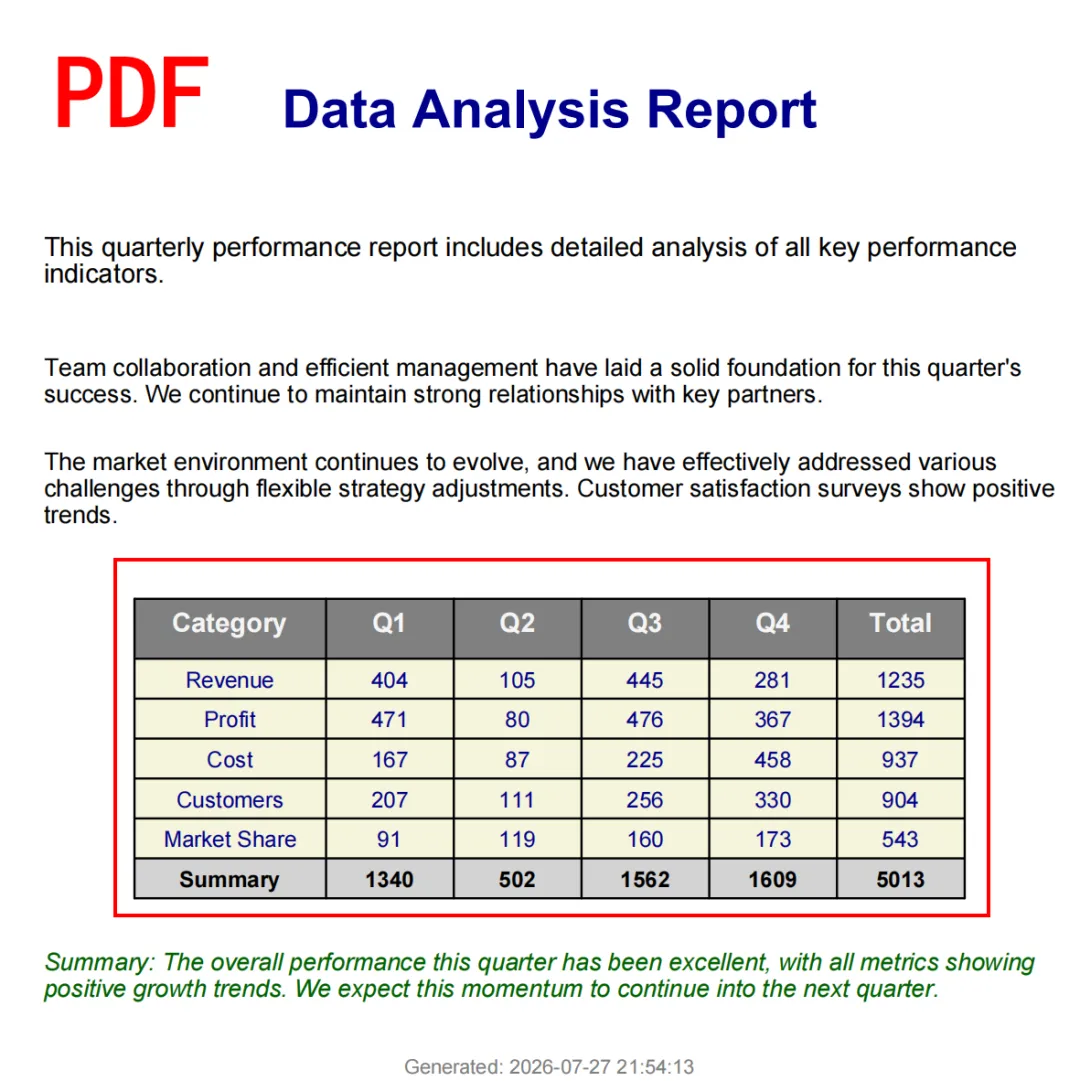
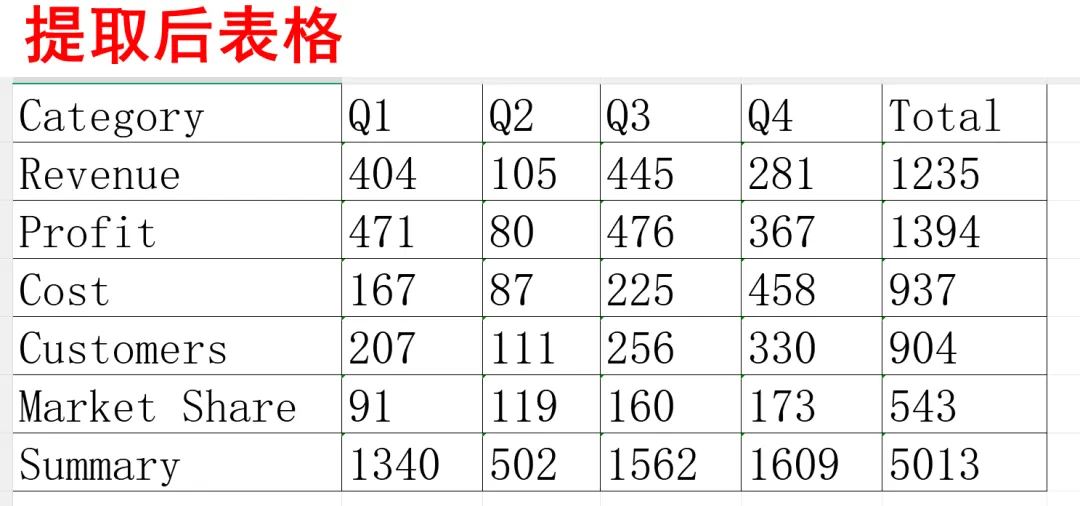
#pip install pymupdf #提前安装#import fitz # PyMuPDFdoc = fitz.open("你的文件.pdf")page = doc[0] # 获取第一页# 检测页面上的表格tables = page.find_tables()# 检查是否有表格被检测到if tables.tables: # 获取第一个表格的数据,返回一个列表的列表 first_table_data = tables[0].extract() for row in first_table_data: print(row)doc.close()
#pip install pdfplumber#提前安装#import pdfplumberwith pdfplumber.open("你的文件.pdf") as pdf: # 获取第一页 page = pdf.pages[0] # 提取表格数据,返回一个二维列表 table = page.extract_table() if table: # 打印第一行(通常是表头) print(table[0]) # 打印第一行数据 print(table[1]) else: print("当前页面未检测到表格")
这是pdfplumber方法:(运行代码,输入pdf路径)import pdfplumberimport openpyxlimport osfrom pathlib import Pathdef clean_cell_value(cell): """清理单元格值""" if cell is None: return '' return str(cell).strip()def extract_tables_from_pdf(pdf_path, output_dir=None): """ 从PDF中提取所有表格并保存为Excel文件 """ if not os.path.exists(pdf_path): print(f"❌ 文件不存在: {pdf_path}") return # 设置输出目录 if output_dir is None: output_dir = os.path.dirname(pdf_path) base_name = Path(pdf_path).stem print(f"📄 正在处理: {pdf_path}") try: with pdfplumber.open(pdf_path) as pdf: all_tables = [] table_count = 0 # 遍历每一页 for page_num, page in enumerate(pdf.pages, 1): tables = page.extract_tables() for table_idx, table in enumerate(tables, 1): if not table or len(table) == 0: continue # 清理表格:移除全空行 cleaned_table = [] for row in table: if any(clean_cell_value(cell) != '' for cell in row): cleaned_table.append([clean_cell_value(cell) for cell in row]) if not cleaned_table: continue # 移除全空列 if cleaned_table: col_count = len(cleaned_table[0]) col_has_data = [False] * col_count for row in cleaned_table: for i in range(min(col_count, len(row))): if row[i] != '': col_has_data[i] = True # 只保留有数据的列 if any(col_has_data): cleaned_table = [ [row[i] for i in range(min(col_count, len(row))) if col_has_data[i]] for row in cleaned_table ] all_tables.append({ 'page': page_num, 'table': table_idx, 'data': cleaned_table }) table_count += 1 if table_count == 0: print("⚠️ 未找到任何表格") return print(f"✅ 找到 {table_count} 个表格,正在保存...") # 保存到Excel excel_path = os.path.join(output_dir, f"{base_name}_表格提取.xlsx") wb = openpyxl.Workbook() # 删除默认sheet wb.remove(wb.active) for i, table_info in enumerate(all_tables, 1): data = table_info['data'] page = table_info['page'] # 创建sheet sheet_name = f"表格{i}" if len(sheet_name) > 31: sheet_name = f"表{i}" ws = wb.create_sheet(title=sheet_name) # 写入数据 for row_idx, row in enumerate(data, 1): for col_idx, value in enumerate(row, 1): ws.cell(row=row_idx, column=col_idx, value=value) # 自动调整列宽 for col in ws.columns: max_length = 0 col_letter = col[0].column_letter for cell in col: try: if cell.value: max_length = max(max_length, len(str(cell.value))) except: pass adjusted_width = min(max_length + 2, 30) # 限制最大宽度30 ws.column_dimensions[col_letter].width = adjusted_width # 保存 wb.save(excel_path) print(f"📊 已保存到: {excel_path}") # 预览第一个表格 if all_tables: print("\n📋 表格预览(第一个表格前5行):") print("=" * 50) preview_data = all_tables[0]['data'][:5] if preview_data: # 显示表头(第一行) if preview_data: print(" | ".join(str(cell) for cell in preview_data[0])) print("-" * 50) # 显示数据行 for row in preview_data[1:]: print(" | ".join(str(cell) for cell in row)) print("=" * 50) except Exception as e: print(f"❌ 提取失败: {e}")def main(): """交互式入口""" print("=" * 50) print("📊 PDF表格提取工具") print("=" * 50) print("💡 提示: 直接输入PDF路径,或把文件拖拽到窗口") while True: print("\n请输入PDF文件路径 (输入 q 退出):") pdf_path = input("📁 > ").strip() if pdf_path.lower() == 'q': print("👋 再见!") break if not pdf_path: print("❌ 路径不能为空") continue # 移除引号 pdf_path = pdf_path.strip('"').strip("'") if os.path.exists(pdf_path): extract_tables_from_pdf(pdf_path) else: print(f"❌ 文件不存在: {pdf_path}")if __name__ == "__main__": main()
import pymupdfimport openpyxlimport osimport sysfrom pathlib import Pathdef clean_cell_value(cell): """清理单元格值""" if cell is None: return '' return str(cell).strip()def extract_tables_from_pdf(pdf_path, output_dir=None): """ 从PDF中提取所有表格并保存为Excel文件(使用 PyMuPDF) """ if not os.path.exists(pdf_path): print(f"❌ 文件不存在: {pdf_path}") return False # 设置输出目录 if output_dir is None: output_dir = os.path.dirname(pdf_path) base_name = Path(pdf_path).stem print(f"📄 正在处理: {pdf_path}") try: doc = pymupdf.open(pdf_path) all_tables = [] table_count = 0 # 遍历每一页 for page_num in range(len(doc)): page = doc[page_num] # 查找表格(可以调整策略) tables = page.find_tables() if not tables or not tables.tables: continue # 提取每个表格 for table_idx, table in enumerate(tables, 1): # 提取表格数据(返回列表) table_data = table.extract() if not table_data or len(table_data) == 0: continue # 清理表格:移除全空行 cleaned_table = [] for row in table_data: if any(clean_cell_value(cell) != '' for cell in row): cleaned_table.append([clean_cell_value(cell) for cell in row]) if not cleaned_table: continue # 移除全空列 if cleaned_table: col_count = len(cleaned_table[0]) col_has_data = [False] * col_count for row in cleaned_table: for i in range(min(col_count, len(row))): if row[i] != '': col_has_data[i] = True # 只保留有数据的列 if any(col_has_data): cleaned_table = [ [row[i] for i in range(min(col_count, len(row))) if col_has_data[i]] for row in cleaned_table ] all_tables.append({ 'page': page_num + 1, 'table': table_idx, 'data': cleaned_table }) table_count += 1 doc.close() if table_count == 0: print("⚠️ 未找到任何表格") return False print(f"✅ 找到 {table_count} 个表格,正在保存...") # 保存到Excel excel_path = os.path.join(output_dir, f"{base_name}_表格提取.xlsx") wb = openpyxl.Workbook() # 删除默认sheet wb.remove(wb.active) for i, table_info in enumerate(all_tables, 1): data = table_info['data'] page = table_info['page'] # 创建sheet sheet_name = f"表格{i}_P{page}" if len(sheet_name) > 31: sheet_name = f"表{i}" ws = wb.create_sheet(title=sheet_name) # 写入数据 for row_idx, row in enumerate(data, 1): for col_idx, value in enumerate(row, 1): ws.cell(row=row_idx, column=col_idx, value=value) # 自动调整列宽 for col in ws.columns: max_length = 0 col_letter = col[0].column_letter for cell in col: try: if cell.value: max_length = max(max_length, len(str(cell.value))) except: pass adjusted_width = min(max_length + 2, 30) ws.column_dimensions[col_letter].width = adjusted_width # 保存 wb.save(excel_path) print(f"📊 已保存到: {excel_path}") # 预览第一个表格 if all_tables: print("\n📋 表格预览(第一个表格前5行):") print("=" * 50) preview_data = all_tables[0]['data'][:5] if preview_data: # 显示表头(第一行) print(" | ".join(str(cell) for cell in preview_data[0])) print("-" * 50) # 显示数据行 for row in preview_data[1:]: print(" | ".join(str(cell) for cell in row)) print("=" * 50) return True except Exception as e: print(f"❌ 提取失败: {e}") return Falsedef get_pdf_path_from_args(): """从命令行参数或拖拽获取文件路径""" # 如果运行时有参数(包括拖拽) if len(sys.argv) > 1: pdf_path = sys.argv[1].strip().strip('"').strip("'") if os.path.exists(pdf_path): return pdf_path return Nonedef main(): """交互式入口""" print("=" * 50) print("📊 PDF表格提取工具 (PyMuPDF版)") print("=" * 50) print("💡 使用方法:") print(" 1. 直接拖拽PDF文件到本窗口") print(" 2. 在命令行输入文件路径") print(" 3. 输入 'q' 或 'quit' 退出") print("=" * 50) # 检查命令行参数(支持拖拽) pdf_path = get_pdf_path_from_args() if pdf_path: print(f"\n📁 检测到文件: {pdf_path}") extract_tables_from_pdf(pdf_path) print("\n" + "=" * 50) print("按 Enter 键继续...") input() return while True: try: print("\n请输入PDF文件路径 (输入 q 退出):") user_input = input("📁 > ").strip() if not user_input: continue if user_input.lower() in ['q', 'quit', 'exit']: print("👋 再见!") break # 移除引号 pdf_path = user_input.strip('"').strip("'") if os.path.exists(pdf_path): extract_tables_from_pdf(pdf_path) else: print(f"❌ 文件不存在: {pdf_path}") print("💡 提示: 可以直接将PDF文件拖拽到命令行窗口") except KeyboardInterrupt: print("\n\n👋 程序已中断,再见!") break except EOFError: print("\n\n👋 再见!") break except Exception as e: print(f"❌ 发生错误: {e}") continueif __name__ == "__main__": main()
 夜雨聆风
夜雨聆风