 夜雨聆风
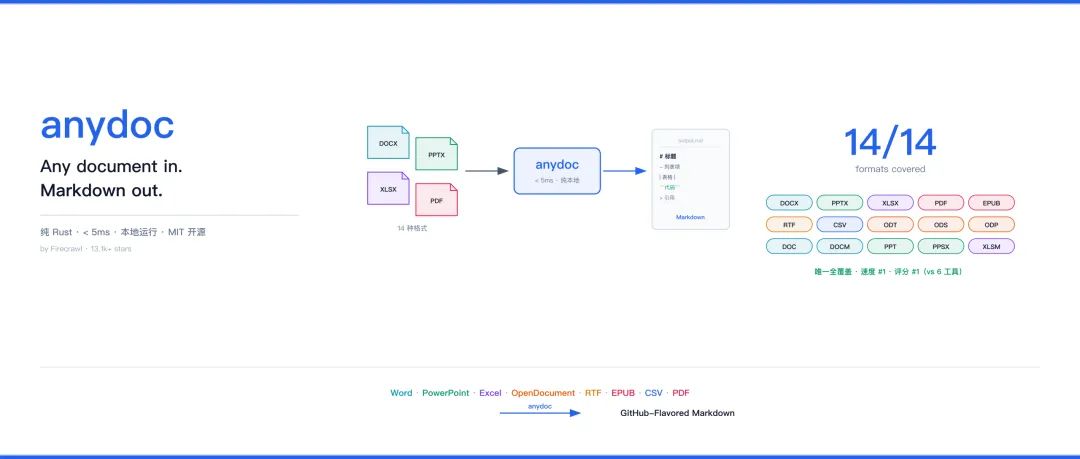
夜雨聆风由 Firecrawl 出品的开源 Rust 库。Any document in. Markdown out. 支持 Word / PowerPoint / Excel / OpenDocument / RTF / EPUB / CSV / PDF 共 14 种格式,一键转成 GitHub-Flavored Markdown,单文档转换中位数耗时 < 5ms,纯本地运行,文件不离开你的机器。
• 官网 Demo:https://firecrawl.github.io/anydoc/ • GitHub 仓库:https://github.com/firecrawl/anydoc • License:MIT | Stars:13.1k+ | Forks:655
一、这篇文章给谁看
如果你属于下面任何一类,这篇文章对你有用:
| AI Agent / LLM 应用开发者 | .docx / .pptx / .xlsx,但大模型只吃文本,你不知道怎么把文档喂进去 | |
| RAG / 知识库构建者 | ||
| 文档处理工作流工程师 | ||
| AI Coding Agent 用户 | ||
| 需要批量转文档的普通用户 | ||
| 关注数据隐私 / 合规的开发者 |
如果你不属于以上任何一类——比如你只需要 PDF 转 Markdown 且文档是扫描件,或你需要精确保留原版式——请直接看下面的「不该用 anydoc 的场景」。
二、什么时候会用到它
该用 anydoc 的场景
用「当你……」句式判断,命中任意一条就值得用:
• 当你让大模型读一份 .docx/.pptx/.xlsx,但模型只接受文本输入 —— 先用 anydoc 转成 Markdown 再喂模型• 当你要构建 RAG 知识库,语料是混合办公格式(一份 docx 报告 + 一份 xlsx 数据表 + 一份 pptx 汇报 + 几份 pdf)—— anydoc 全部转成统一 Markdown 入库 • 当你做文档总结 / 翻译 / 问答 / 信息提取,输入是 Office 文档 —— 转成 Markdown 后接任意 LLM 处理 • 当你的 AI Agent 需要自主读取项目中的文档(读 README.docx、解析需求规格、看 PPT 评审纪要)—— 装 anydoc Agent Skill,Agent 自己转自己读 • 当你需要批量把文档转成 Markdown 归档 / 发布 / 喂给静态站点生成器 —— CLI 循环调用即可 • 当你处理的文档不能上传云端(涉密、含 PII、合规要求)—— anydoc 纯本地,甚至浏览器内 WASM 版本文件都不离开本机 • 当你收到扩展名错误 / 缺失的文件(别人把 docx 改名成 .bin 发过来)—— anydoc 从文件内容检测格式,不依赖扩展名,照样能转 • 当你在 Node / Python / Rust 代码里需要文档转换能力 —— 三种语言都有官方绑定,API 统一
不该用 anydoc 的场景
明确边界,避免选错工具:
| 扫描版 / 纯图片 PDF | Unsupported 失败 | |
| 需要精确保留原版式 | ||
| 加密 / 密码保护的文档 | Encrypted | |
| 只需要图片提取 | ||
| 只需要纯文本(不要 Markdown 结构) | pandoc -t plainstrings |
三、用了之后得到什么
输入 → 输出一句话
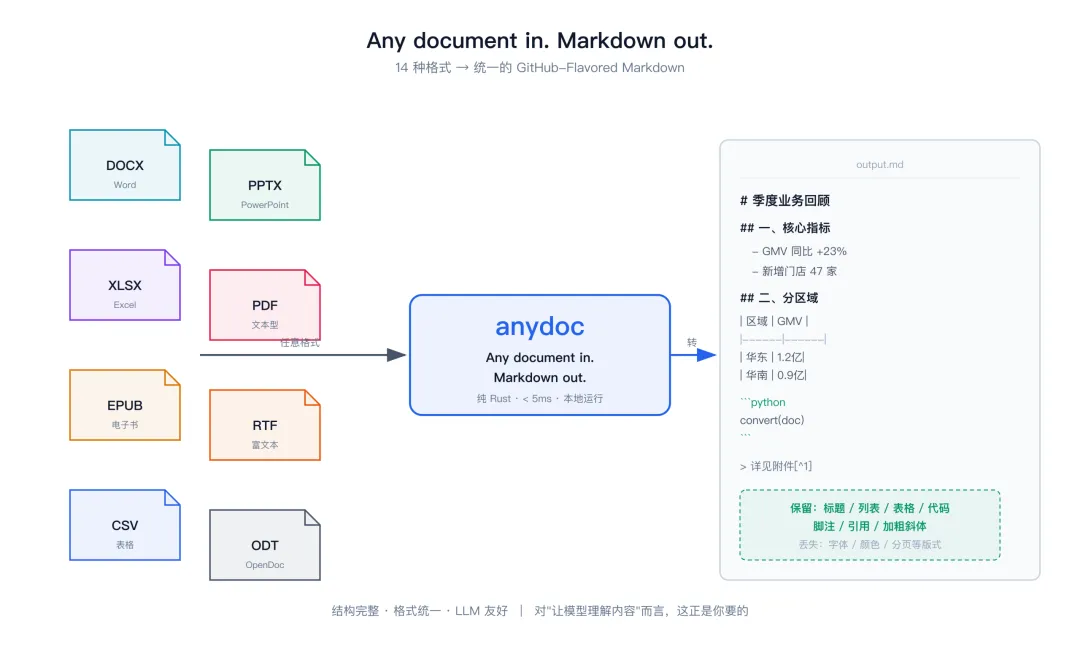
输入:任意 14 种支持格式之一的文件(路径 / 字节流 / stdin) 输出:一段 GitHub-Flavored Markdown 字符串
转换前后对比(直观感受)
假设有一份 季度报告.docx,原文档长这样(Word 里的视觉效果):
┌─────────────────────────────────────┐│ 2024 Q3 季度业务回顾 [标题1] ││ ││ 一、核心指标 ││ • GMV 同比增长 23% ││ • 新增门店 47 家 ││ ││ 二、分区域表现 ││ ┌────────┬────────┬────────┐ ││ │ 区域 │ GMV │ 增长率 │ ││ ├────────┼────────┼────────┤ ││ │ 华东 │ 1.2亿 │ +18% │ ││ │ 华南 │ 0.9亿 │ +31% │ ││ └────────┴────────┴────────┘ ││ ││ 详见附件¹ │└─────────────────────────────────────┘跑 npx @firecrawl/anydoc 季度报告.docx,得到:
# 2024 Q3 季度业务回顾一、核心指标- GMV 同比增长 23%- 新增门店 47 家二、分区域表现| 区域 | GMV | 增长率 ||------|------|--------|| 华东 | 1.2 亿 | +18% || 华南 | 0.9 亿 | +31% |详见附件[^1]得到的 Markdown 保留了什么
• ✅ 标题层级(带 anchor) • ✅ 加粗 / 斜体 / 删除线 • ✅ 行内代码与代码块 • ✅ 链接与文档内交叉引用 • ✅ 项目符号 / 编号 / 嵌套 / 任务列表(保留源文档自身编号) • ✅ 表格(支持合并单元格与表头行) • ✅ 引用块 • ✅ 脚注与尾注 • ✅ PPT 的演讲者备注(Speaker notes)
会丢失什么(务必知晓)
• ❌ 原版式:字体、字号、颜色、分栏、分页、页眉页脚 • ❌ 图片视觉:转为 alt 文本(原始字节保留在 document model 上,标注 media type,可二次提取) • ❌ 动画、嵌入视频、OLE 嵌入对象的具体内容 • ❌ 扫描版 PDF 的文字(需 OCR,anydoc 不做)
一句话总结产出:你得到的是结构完整、格式统一、LLM 友好的 Markdown 文本,丢掉的是视觉版式。对"让模型理解内容"这件事来说,这正是你要的。
四、怎么用(快速上手)
方式一:CLI(零安装,最常用)
要求 Node 20+,首次运行 npx 自动下载预编译二进制。
npx @firecrawl/anydoc report.docx # Markdown 输出到 stdoutnpx @firecrawl/anydoc slides.pptx -o slides.md # 写入文件npx @firecrawl/anydoc - --format csv < data.csv # 从 stdin 读取永久安装:npm install -g @firecrawl/anydoc,之后直接用 anydoc 命令。
CLI 行为约定:
• 格式自动识别:从文件内容判断,仅在 stdin CSV / 扩展名缺失或错误时需传 --format <name>• 退出码: 0成功 /1转换失败 /2用法错误• 错误输出:失败仅向 stderr 输出一行 anydoc: <message>,从不交互提示• 大文档:用 -o写文件按需读取,避免全量塞入上下文
方式二:Agent Skill(让 AI Agent 自主用)
npx skills add firecrawl/anydoc兼容 Claude Code、Codex、Cursor、OpenCode 等所有 Agent Skills 兼容客户端。装完之后,Agent 遇到文档会自动调用 anydoc 转换再读取。
方式三:Node.js
npm install @firecrawl/anydocimport { toMarkdown, toMarkdownBytes, toDocument } from '@firecrawl/anydoc';const md = await toMarkdown('report.docx'); // 从路径const md2 = await toMarkdownBytes(bytes); // 从字节(格式自动检测)const md3 = await toMarkdownBytes(bytes, 'csv'); // 显式指定格式(CSV 等无签名格式必须)const doc = await toDocument(bytes); // 停在文档模型层(保留嵌入资源)转换跑在 libuv 线程池,不阻塞事件循环。
方式四:Python
pip install firecrawl-anydocimport anydocmd = anydoc.to_markdown("report.docx") # 从路径md = anydoc.to_markdown_bytes(data) # 从字节(格式自动检测)md = anydoc.to_markdown_bytes(data, "csv") # 显式指定格式doc = anydoc.to_document(data) # 停在文档模型层转换期间释放 GIL,其他线程可继续运行。
方式五:Browser(WebAssembly,隐私场景首选)
npm install @firecrawl/anydoc-wasmimport init, { toMarkdownBytes, toDocument } from '@firecrawl/anydoc-wasm';await init();const md = toMarkdownBytes(bytes); // 文件不离开本机方式六:Rust
cargo add anydoclet md = anydoc::to_markdown("report.docx")?;let md = anydoc::to_markdown_bytes(&bytes, None)?; // 格式自动检测let md = anydoc::to_markdown_bytes(&bytes, anydoc::Format::Csv)?; // 显式指定let doc = anydoc::to_document(&bytes, None)?; // 文档模型层五、支持哪些格式(14/14)
| Word | .doc.docx.docm |
| PowerPoint | .ppt.pps.pot.pptx.pptm.ppsx.ppsm |
| Excel | .xls.xlsx.xlsm.xlsb |
| OpenDocument | .odt.ods.odp |
| Rich Text Format | .rtf |
| EPUB | .epub |
| CSV | .csv |
.pdf |
六、为什么选 anydoc
核心优势
| 格式覆盖最全 | |
| 输出统一 | .doc 和昨天的 .pptx 输出风格完全一致 |
| 内容级格式检测 | |
| 极快 | |
| 隐私 | |
| 多语言绑定 | |
| Agent 就绪 |
性能基准(精简版)
在 100 份覆盖 14 种格式的真实文档上对比 6 个同类工具:
| anydoc | 14/14 | 4.4 | 81 |
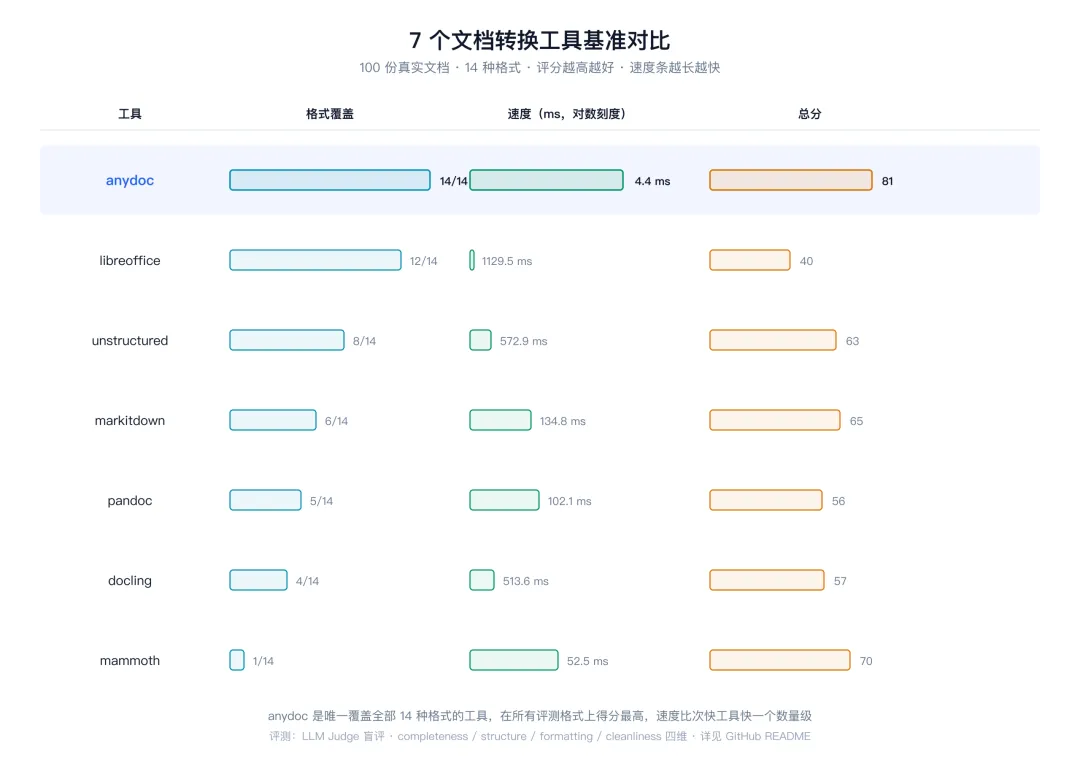
评分 0-100,越高越好;总分由 completeness / structure / formatting / cleanliness 四维平均。anydoc 是唯一覆盖全部 14 种格式的工具,且在所有评测格式上得分最高,速度比次快工具快一个数量级。完整基准见 GitHub README。
附录 A:与 Firecrawl Parse 的关系
anydoc 是 Firecrawl Parse 托管 API 的底层转换引擎。两者分工:
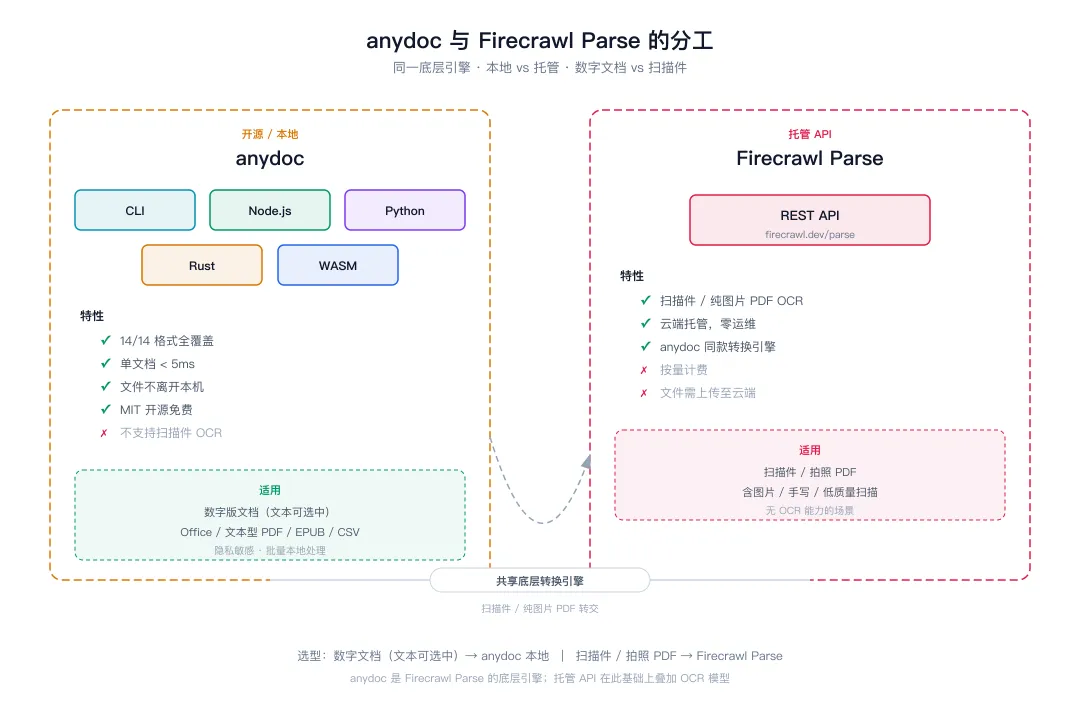
选型建议:文档是数字版(文本可选中的 PDF / Office 文档)→ 用 anydoc 本地转;遇到扫描件 / 拍照 PDF → 切换到 Firecrawl Parse。
附录 B:错误处理
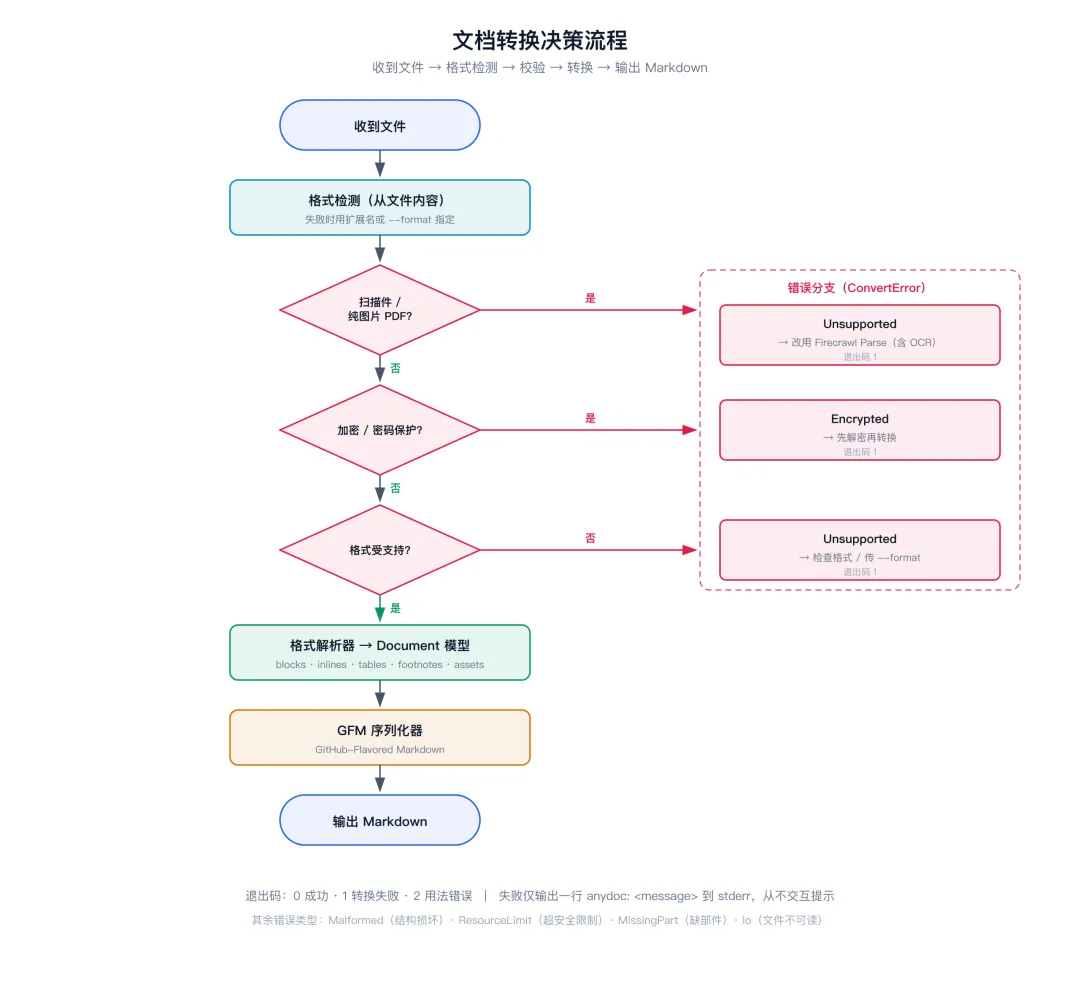
转换仅在无法产出有意义的 Markdown 时返回错误。ConvertError 明确命名错误类型:
Unsupported | ||
Malformed | ||
Encrypted | ||
ResourceLimit | ||
MissingPart | ||
Io | to_markdown) |
跨语言映射:Node / wasm 在 error.code 上暴露 variant 名;Python 每个 variant 对应一个 anydoc.ConvertError 子类,文件无法读取时抛 OSError。
附录 C:工作原理
document bytes │ ├─► 格式检测 → 基于内容标记,非扩展名 │ ├─► 格式解析器 → 每种格式一个(doc, docx, ppt, pptx, xls, │ xlsx, odt/ods/odp, rtf, epub, csv) │ │ │ └─► Document → 共享模型:blocks, inlines, tables, │ footnotes, assets │ │ │ └─► GFM 序列化器 → Markdown │ └─► PDF → pdf-inspector → 直接产出 Markdown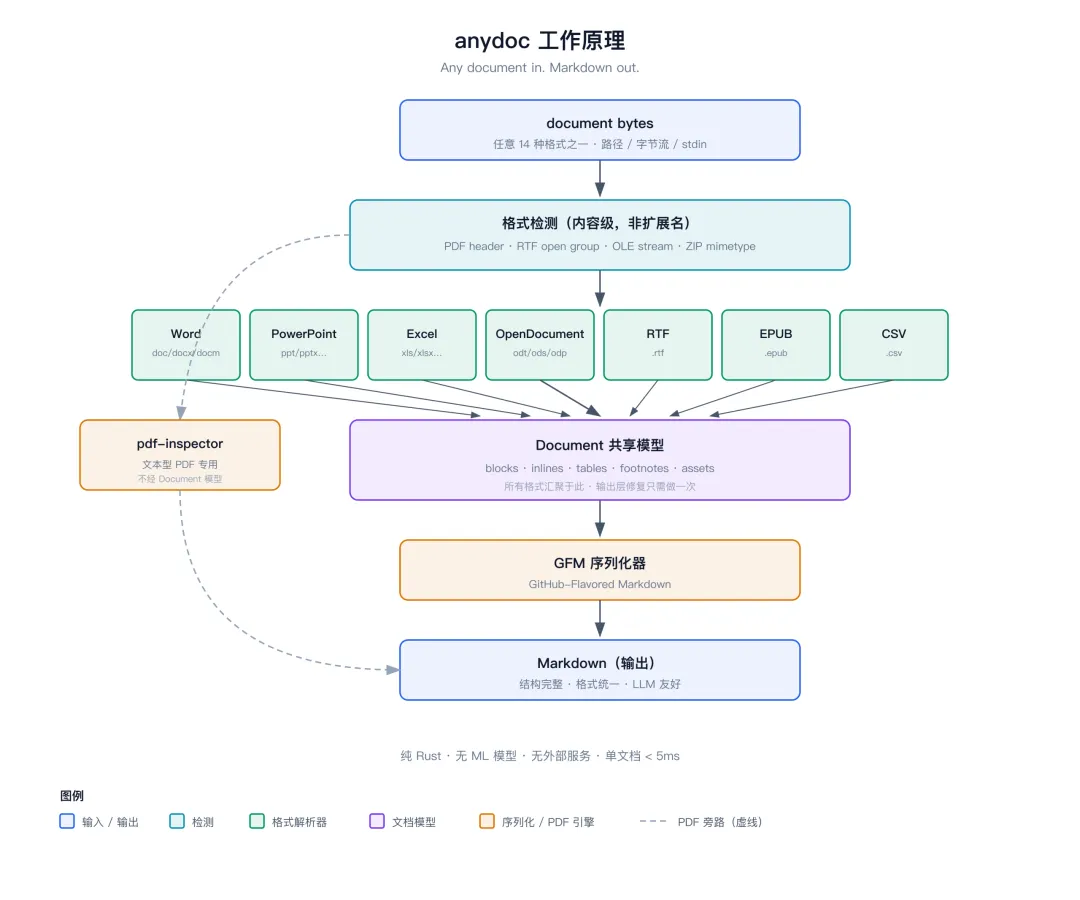
由于所有格式都汇聚到同一个文档模型与序列化器,输出层面的修复只需做一次:给 docx 修了表格转义问题,rtf、odt 等所有格式自动同步受益。
附录 D:Agent Skill 规则(给 Agent 看的)
anydoc 作为 Agent Skill 分发,Skill 文件(skills/convert-documents-to-markdown/SKILL.md)教会 Agent 用 CLI 转换文档,核心规则:
1. 支持的输入:14 种格式(见第五章) 2. 格式自动检测:仅在检测失败时(stdin CSV、扩展名缺失/错误)传 --format <name>3. 退出码: 0成功 /1转换失败 /2用法错误;失败仅输出一行anydoc: <message>到 stderr,CLI 从不交互提示4. 大文档策略:用 -o写文件,按需读取片段,避免全量塞入上下文5. OCR 限制:扫描版 / 纯图片 PDF 不支持,需走 Firecrawl Parse 托管 API 6. 代码库内优先用库:Node / Python / Rust 均暴露统一的 to_markdown/toMarkdownAPI
附录 E:开发与贡献
cargo test # Rust 测试cd node && npm install && npm run build && npm test # Node 绑定cd python && pip install maturin && maturin develop && python -m unittest discover -s tests # Pythonwasm-pack build wasm --release --target web --scope firecrawl && node --test wasm/test.mjs # WASM• tests/fixtures/下 fixture 语料做快照测试• tests/robustness.rs对每个 fixture 做变异测试• fuzz/下每个格式都有 cargo-fuzz 目标• 速度与质量基准在 bench/
发版机制:打 v<version> tag,通过 .github/workflows/release.yml 自动发布 crate、npm 包、PyPI wheel。版本号在三处同步更新:Cargo.toml、node/package.json、python/Cargo.toml。
参考链接
• 官网 Demo(浏览器内试转):https://firecrawl.github.io/anydoc/ • GitHub 仓库:https://github.com/firecrawl/anydoc • crates.io:https://crates.io/crates/anydoc • npm:https://www.npmjs.com/package/@firecrawl/anydoc • PyPI:https://pypi.org/project/firecrawl-anydoc/ • skills.sh:https://skills.sh/firecrawl/anydoc • Firecrawl Parse 托管 API(扫描件 OCR):https://firecrawl.dev/parse • pdf-inspector(PDF 底层引擎):https://github.com/firecrawl/pdf-inspector